
OneStream-anmeldelse: Fordele, ulemper, funktioner og priser
OneStream udmærker sig inden for økonomistyring ved at tilbyde en uovertruffen fleksibilitet og integrationsmuligheder, hvilket gør det til en ideel alt-i-en-løsning for dynamiske økonomiteams.

We review tools independently, and commissions help fund our testing. See our transparency policy, our methodology, or suggest a tool.
OneStream is a financial management software built for enterprise finance teams managing consolidation, planning, reporting, and analytics. I'd mainly consider it if you want a single unified platform rather than a collection of separate tools. If you're weighing it against Oracle EPM Cloud, the key difference is OneStream's unified architecture. Rather than managing separate modules for consolidation, planning, and reporting, everything lives in one system—which makes a real difference during complex close cycles and multi-entity consolidations.
OneStream Evaluation Summary
4.7/5
- Pricing upon request
- Free demo available
Why Trust Our Software Recommendations
6,700+
Reviews
20
Industry experts
16+
Evaluation factors
14
Years
Our team has been testing and reviewing software since 2012. As finance leaders ourselves, we know how difficult—and important—it is to choose the right software.
For this guide, we evaluated tools using hands-on testing and independent research, scoring tools using our selection criteria.
Our reviews reflect our human editorial judgment, not a sales pitch.
OneStream Overview
In my opinion, OneStream offers strong financial management capabilities, particularly for large enterprises needing in-depth financial analysis. Its standout features and core functionalities make it a solid choice, though onboarding can be challenging. Compared to competitors and other marketplace solutions, such as Anaplan, OneStream excels with comprehensive integration options, but it may feel too complex for smaller teams. If your team needs a powerful all-in-one tool for financial consolidation and reporting, OneStream is worth considering.
Pros
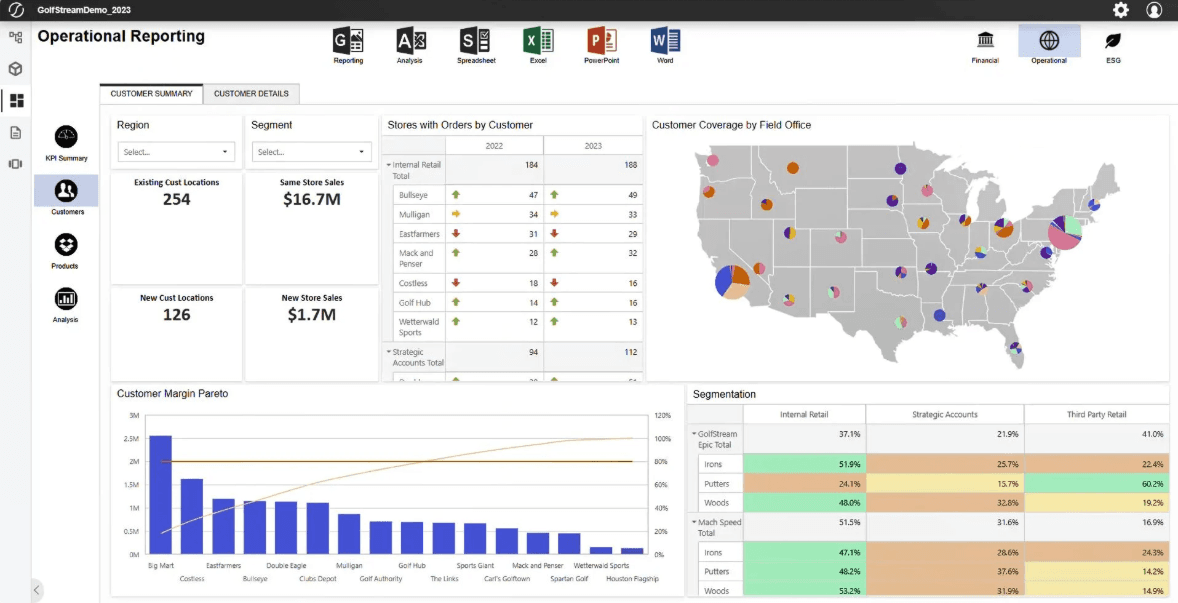
- OneStream's financial reporting tools offer detailed insights for your team's analysis.
- The platform's customizable dashboards are user friendly, helping you tailor data visualization and underlying metadata to fit your team's needs.
- Its unified approach simplifies financial processes, reducing errors in your work.
Cons
- The interface can feel complex, especially if your team is new to corporate performance management (CPM) software.
- Some user reviews say customer support response times can be slower than you'd expect for urgent issues.
- Onboarding can be time-consuming, requiring significant effort from your team to get started.
Is OneStream Right For Your Needs?
Who Would be a Good Fit for OneStream?
OneStream is a great product for large enterprises where complex financial data analysis is crucial. Your finance team will benefit from its powerful consolidation and reporting tools, which help eliminate data silos and improve accuracy. If your work involves handling large volumes of financial data and requires detailed insights, OneStream's customizable dashboards and unified platform make it a valuable asset. User reviews from Trustpilot and LinkedIn often highlight its flexibility and depth.
- Large EnterprisesOneStream excels in handling complex financial data, making it ideal for large-scale operations.
- Manufacturing IndustryIts detailed reporting tools help you manage intricate supply chain costs effectively.
- Health Care SectorOneStream's data analysis capabilities are valuable for tracking a wide range of financial metrics in health care.
- Finance TeamsYour team will appreciate the platform's ability to consolidate data, manage financial metadata, and reduce reporting errors.
- Accounting DepartmentsThe unified approach helps streamline your department's financial business processes, boosting accuracy.
- Data-Driven RolesIf your role involves deep financial analysis, OneStream's customizable dashboards can be a game-changer for your workflow.
Who Would be a Bad Fit for OneStream?
OneStream might not be suitable for small businesses or startups with limited financial data and simpler needs. Its complex interface and extensive features could overwhelm your small team and lead to unnecessary complications. For companies that don't require deep data analysis or advanced reporting, OneStream's capabilities could be excessive and costly. Smaller teams might also find the onboarding process too time-consuming and the support not responsive enough for their immediate needs.
- Small BusinessesYour small team may find OneStream's complexity and feature set overwhelming for basic financial tasks.
- StartupsIts detailed functionalities could be excessive when your focus is rapid growth and agility.
- FreelancersOneStream's extensive features aren't necessary for managing your straightforward, individual financial tasks.
- Non-Financial RolesYou may not benefit from OneStream's advanced tools if your role doesn't involve in-depth financial analysis.
- Simple Accounting NeedsFor basic accounting tasks, OneStream's comprehensive features are likely more than you need.
- Limited IT SupportIf your organization lacks strong IT support, OneStream's implementation and required add-ins could be challenging to handle.
How We Test & Score Tools
We’ve spent years building, refining, and improving our software testing and scoring system. The rubric is designed to capture the nuances of software selection and what makes a tool effective, focusing on critical aspects of the decision-making process.
Below, you can see exactly how our testing and scoring works across seven criteria. It allows us to provide an unbiased evaluation of the software based on core functionality, standout features, ease of use, onboarding, customer support, integrations, customer reviews, and value for money.
Core Functionality (25% of final scoring)
The starting point of our evaluation is always the core functionality of the tool. Does it have the basic features and functions that a user would expect to see? Are any of those core features locked to higher-tiered pricing plans? At its core, we expect a tool to stand up against the baseline capabilities of its competitors.
Standout Features (25% of final scoring)
Next, we evaluate uncommon standout features that go above and beyond the core functionality typically found in tools of its kind. A high score reflects specialized or unique features that make the product faster, more efficient, or offer additional value to the user.
We also evaluate how easy it is to integrate with other tools typically found in the tech stack to expand the functionality and utility of the software. Tools offering plentiful native integrations, 3rd party connections, and API access to build custom integrations score best.
Ease of Use (10% of final scoring)
We consider how quick and easy it is to execute the tasks defined in the core functionality using the tool. High scoring software is well designed, intuitive to use, offers mobile apps, provides templates, and makes relatively complex tasks seem simple.
Onboarding (10% of final scoring)
We know how important rapid team adoption is for a new platform, so we evaluate how easy it is to learn and use a tool with minimal training. We evaluate how quickly a team member can get set up and start using the tool with no experience. High scoring solutions indicate little or no support is required.
Customer Support (10% of final scoring)
We review how quick and easy it is to get unstuck and find help by phone, live chat, or knowledge base. Tools and companies that provide real-time support score best, while chatbots score worst.
Customer Reviews (10% of final scoring)
Beyond our own testing and evaluation, we consider the net promoter score from current and past customers. We review their likelihood, given the option, to choose the tool again for the core functionality. A high scoring software reflects a high net promoter score from current or past customers.
Value for Money (10% of final scoring)
Lastly, in consideration of all the other criteria, we review the average price of entry level plans against the core features and consider the value of the other evaluation criteria. Software that delivers more, for less, will score higher.
Core Features
Financial Consolidation: OneStream allows your team to consolidate financial data across multiple entities, ensuring consistency and accuracy. It simplifies your closing processes by automatically eliminating intercompany transactions.
Budgeting and Forecasting: You can create detailed budgets and forecasts to enable better financial planning. OneStream's dynamic modeling helps your team adjust to market changes quickly.
Reporting and Analytics: With OneStream's powerful reporting tools, your team can generate detailed financial reports. The analytics capabilities provide you with insights to drive informed decision-making.
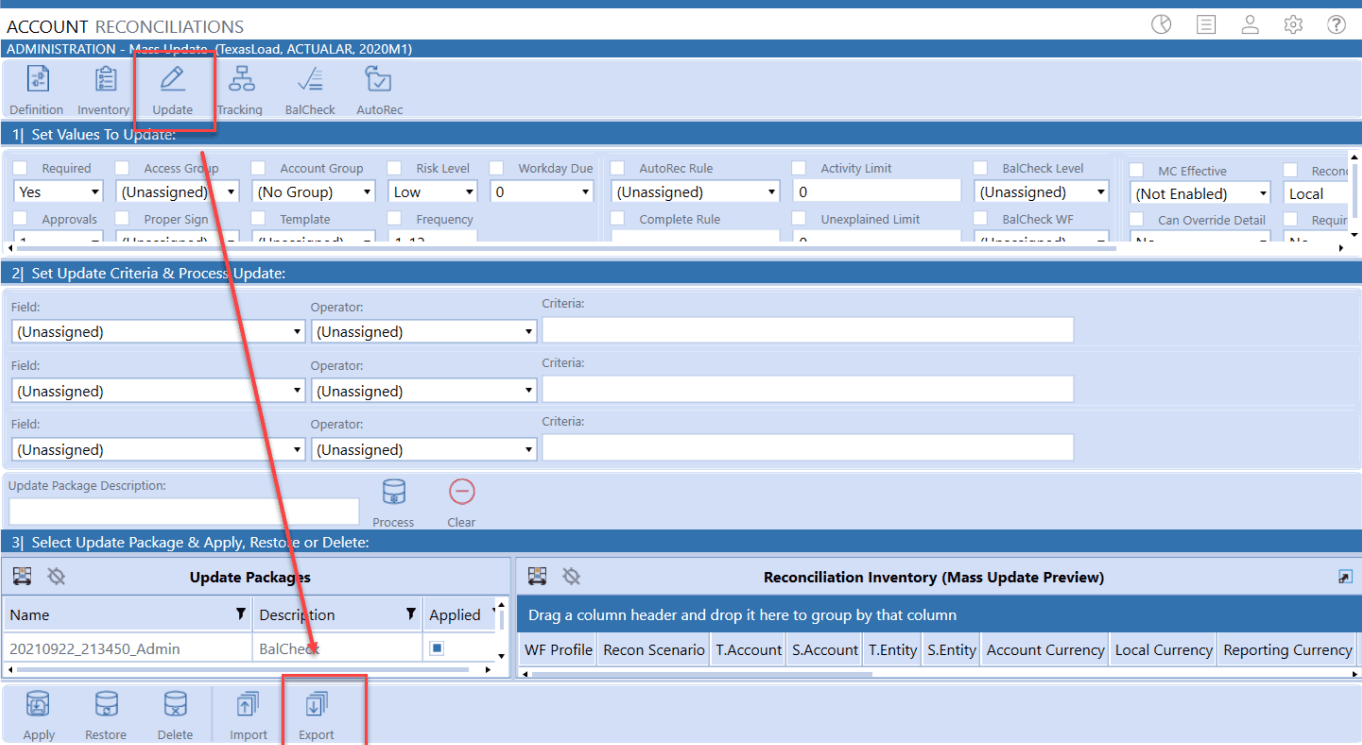
Account Reconciliation: This feature automates the reconciliation process, saving your team time and reducing errors. It ensures that your financial statements are precise.
Cash Flow Management: OneStream offers real-time cash flow monitoring and management, helping you maintain liquidity. It provides visibility into your cash position to support strategic decisions.
Workflow Automation: OneStream streamlines your financial processes through automation, reducing manual tasks. Your team can focus on strategic activities instead of repetitive work.
Ease of Use
OneStream's interface can feel complex if you're new to CPM software. The abundance of features might overwhelm smaller teams, making navigation tricky. Your team might need time to adjust to its detailed functionalities and the configuration of add-ins, which could slow down initial productivity. However, once familiar, you'll find its powerful tools and customizable dashboards invaluable for in-depth financial analysis.
Integrations
OneStream integrates with Microsoft SQL Server, Oracle Database, SAP ERP, Power BI, Tableau, Salesforce, Workday, NetSuite, ServiceNow, and JD Edwards.
OneStream also offers an API and connects with third-party integration tools.
OneStream Specs
- Analytics: Yes
- API: Yes
- Approval Workflows: No
- Audience Targeting: No
- Brand Management: No
- Calendar Management: No
- Campaign Management: No
- Collaboration Support: No
- Conversion Tracking: No
- Custom Reports: Yes
- Dashboard: Yes
- Data Export: Yes
- Data Import: Yes
- Data Visualization: Yes
- External Integrations: Yes
- Feedback Management: No
- Keyword Tracking: No
- Knowledge Base: Yes
- Landing Pages: No
- Link Tracking: No
- Marketing Automation: No
- Multi-Account: No
- Multi-User: Yes
- Notifications: Yes
- Review Monitoring: No
- Scheduling: No
- Sentiment Analysis: No
- Social Media Monitoring: No
- Social-Media Integration: No
- Third-Party Plugins/Add-Ons: No
- Workflow Management: Yes


