

Workday Adaptive Planning-anmeldelse: Fordele, ulemper, funktioner & priser
Workday Adaptive Planning skiller sig ud med prognoser i realtid og værktøjer til samarbejdsbaseret planlægning, hvilket gør det til et oplagt valg for økonomiteams, der søger effektivitet.

We review tools independently, and commissions help fund our testing. See our transparency policy, our methodology, or suggest a tool.
Workday Adaptive Planning er en softwareløsning til budgettering og planlægning, der hjælper virksomheder med at styre finansiel planlægning, prognoser og analyse. Den egner sig bedst til økonomiteams i brancher som teknologi og sundhedspleje, hvor dynamiske prognoser og datadrevet beslutningstagning er afgørende. Værdien ligger i at tilbyde rapportering i realtid, tilpasselige dashboards og samarbejdsværktøjer, der optimerer planlægningseffektiviteten.
Workday Adaptive Planning imødekommer almindelige udfordringer som besværlige manuelle processer og mangel på data i realtid og er til gavn for økonomi- og regnskabsteams. I denne artikel gennemgår jeg Workday Adaptive Plannings funktioner, fordele og ulemper, anvendelsesområder og priser, så du kan afgøre, om det opfylder dine FP&A-behov.
Workday Adaptive Planning Evaluation Summary
4.4/5
- Pricing upon request
- Free demo available
Why Trust Our Software Recommendations
6,700+
Reviews
20
Industry experts
16+
Evaluation factors
14
Years
Our team has been testing and reviewing software since 2012. As finance leaders ourselves, we know how difficult—and important—it is to choose the right software.
For this guide, we evaluated tools using hands-on testing and independent research, scoring tools using our selection criteria.
Our reviews reflect our human editorial judgment, not a sales pitch.
Workday Adaptive Planning Overview
In my opinion, Workday Adaptive Planning is a strong choice for businesses seeking scalable budgeting and planning tools. It offers impressive forecasting and collaborative features that surpass many competitors. However, its onboarding could be simpler, and some users find the interface takes time to master. It's best for medium to large organizations that value real-time data access and detailed financial analysis. If your team prioritizes integration capabilities and data-driven insights, this software could fit well into your financial planning strategy.
Pros
- It offers real-time forecasting, helping your team make quick decisions with connected data sets.
- The collaborative tools enhance teamwork across departments and tie operational data to financial models.
- Users appreciate the detailed financial analysis capabilities.
Cons
- Some users find the user interface takes time to learn.
- Onboarding can be more complex than expected.
- A few users feel the reporting features could be more intuitive.
Is Workday Adaptive Planning Right For Your Needs?
Who Would be a Good Fit for Workday Adaptive Planning?
Workday Adaptive Planning is ideal for finance teams in medium to large businesses, especially in sectors like technology and healthcare. Your team will benefit from its real-time forecasting, customizable dashboards, and collaborative tools, which are crucial for data-driven decision-making. If you're in a fast-paced industry needing accurate, up-to-date financial insights, this software's detailed analysis capabilities can enhance your financial planning and help you stay ahead.
- Technology CompaniesWorkday Adaptive Planning suits technology firms needing agile forecasting to keep up with rapid market changes.
- Healthcare OrganizationsHealthcare teams benefit from its ability to handle complex budgeting processes and ensure accurate financial and operational planning.
- Large EnterprisesIf you're part of a large enterprise, you'll appreciate the software's scalability and robust data analysis features and continuous enhancements.
- Finance DepartmentsFinance departments use it to enhance collaboration and streamline financial reporting and planning tasks.
- CFOsCFOs gain insights through its comprehensive reporting tools, aiding strategic financial decision-making, capacity, and workforce planning.
- Educational InstitutionsEducational institutions find value in its ability to forecast budgets efficiently across multiple departments for better financial management.
Who Would be a Bad Fit for Workday Adaptive Planning?
Small businesses or startups with limited budgets might not find Workday Adaptive Planning suitable due to its complexity and learning curve. If your team needs a quick, straightforward solution with minimal setup, this software might feel overwhelming. It's not ideal for those without dedicated financial staff, as its advanced features require financial expertise to fully leverage.
- Small StartupsYour startup may struggle with its complexity and find more straightforward tools more suitable.
- FreelancersFreelancers need simpler budgeting tools, making this software an overkill for solo operations.
- Non-Financial TeamsNon-financial teams might find its features too specialized and challenging to navigate.
- Retail BusinessesRetail businesses with basic budgeting needs might not need its advanced forecasting capabilities.
- NonprofitsNonprofits looking for cost-effective solutions might not justify the investment in its extensive features.
- Very Small EnterprisesVery small enterprises could find it too complex and costly for their limited needs.
How We Test & Score Tools
We’ve spent years building, refining, and improving our software testing and scoring system. The rubric is designed to capture the nuances of software selection and what makes a tool effective, focusing on critical aspects of the decision-making process.
Below, you can see exactly how our testing and scoring works across seven criteria. It allows us to provide an unbiased evaluation of the software based on core functionality, standout features, ease of use, onboarding, customer support, integrations, customer reviews, and value for money.
Core Functionality (25% of final scoring)
The starting point of our evaluation is always the core functionality of the tool. Does it have the basic features and functions that a user would expect to see? Are any of those core features locked to higher-tiered pricing plans? At its core, we expect a tool to stand up against the baseline capabilities of its competitors.
Standout Features (25% of final scoring)
Next, we evaluate uncommon standout features that go above and beyond the core functionality typically found in tools of its kind. A high score reflects specialized or unique features that make the product faster, more efficient, or offer additional value to the user.
We also evaluate how easy it is to integrate with other tools typically found in the tech stack to expand the functionality and utility of the software. Tools offering plentiful native integrations, 3rd party connections, and API access to build custom integrations score best.
Ease of Use (10% of final scoring)
We consider how quick and easy it is to execute the tasks defined in the core functionality using the tool. High scoring software is well designed, intuitive to use, offers mobile apps, provides templates, and makes relatively complex tasks seem simple.
Onboarding (10% of final scoring)
We know how important rapid team adoption is for a new platform, so we evaluate how easy it is to learn and use a tool with minimal training. We evaluate how quickly a team member can get set up and start using the tool with no experience. High scoring solutions indicate little or no support is required.
Customer Support (10% of final scoring)
We review how quick and easy it is to get unstuck and find help by phone, live chat, or knowledge base. Tools and companies that provide real-time support score best, while chatbots score worst.
Customer Reviews (10% of final scoring)
Beyond our own testing and evaluation, we consider the net promoter score from current and past customers. We review their likelihood, given the option, to choose the tool again for the core functionality. A high scoring software reflects a high net promoter score from current or past customers.
Value for Money (10% of final scoring)
Lastly, in consideration of all the other criteria, we review the average price of entry level plans against the core features and consider the value of the other evaluation criteria. Software that delivers more, for less, will score higher.
Core Features
Budgeting and Forecasting: This feature lets your team create detailed budgets and forecasts with real-time data. It helps you adjust quickly to market changes.
Financial Reporting: Generate comprehensive reports that give you a clear view of your financial performance. It's designed to simplify complex data into easy-to-read formats.
Data Visualization: Use visual dashboards to track your financial metrics and KPIs. This helps your team grasp insights at a glance.
Scenario Planning: You can test different financial scenarios to see potential impacts on your business. This feature aids in strategic decision-making.
Collaboration Tools: Workday Adaptive Planning offers tools that enhance team collaboration across departments. It ensures everyone is aligned and informed.
Automated Workflows: Streamline your processes with automated workflows that save time and reduce errors. This lets your team focus on strategic tasks.
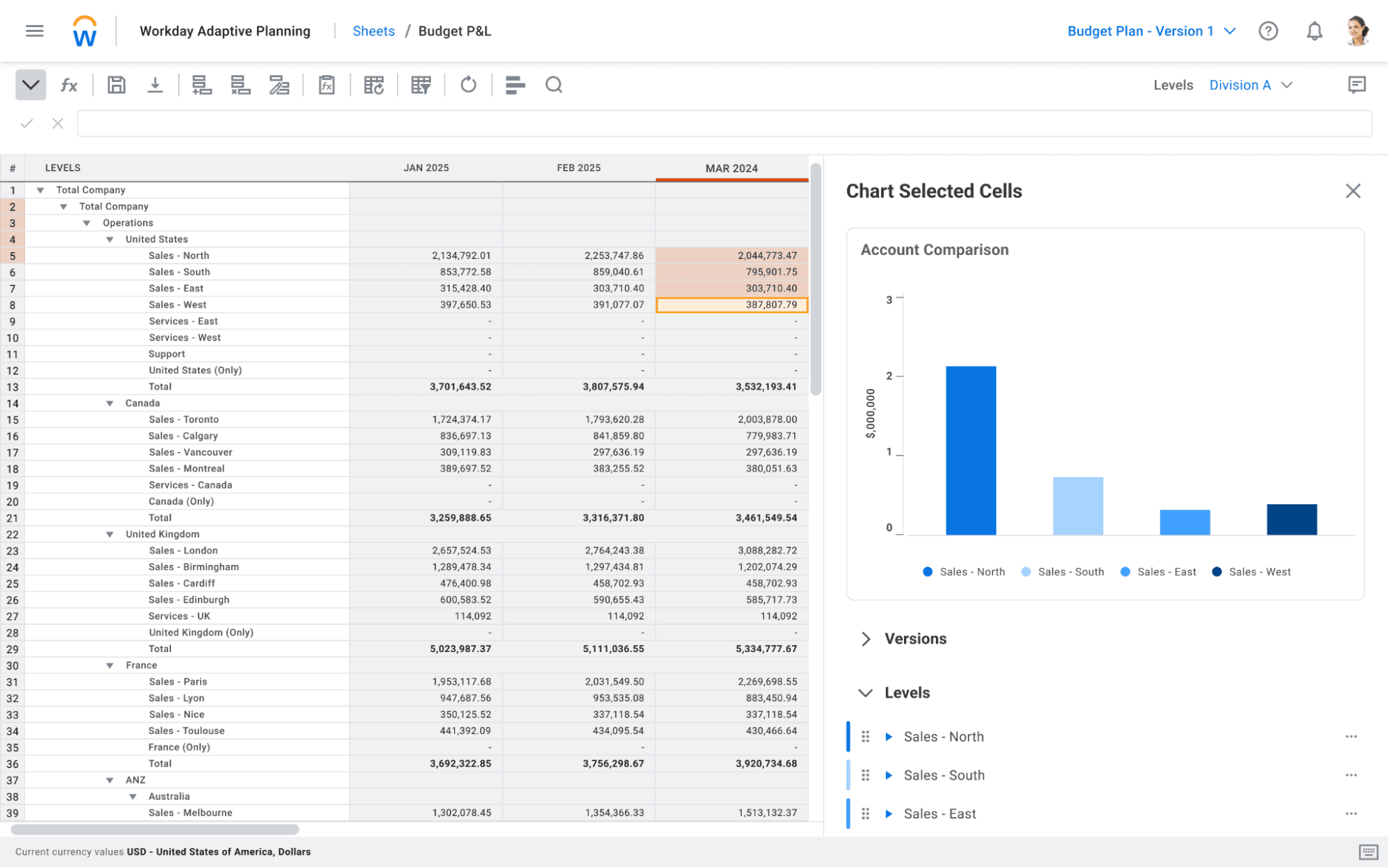
Ease of Use
Workday Adaptive Planning is relatively user-friendly, but some users find its interface takes time to master. While it offers powerful features like real-time data access and advanced analytics, your team might need some time to adapt. Once familiar, you'll find its functionalities greatly enhance your financial planning and analysis processes. Training and initial setup can be a bit complex, but the long-term benefits in efficiency and collaboration are worth the initial effort.
Integrations
Workday Adaptive Planning integrates with NetSuite, Salesforce, Workday HCM, Microsoft Dynamics, QuickBooks, Xero, Oracle, SAP, and Sage Intacct.
Workday Adaptive Planning also offers an API and connects with third-party integration tools.
Workday Adaptive Planning Specs
- 2-Factor Authentication: No
- Accounts Payable: No
- Accounts Receivable: No
- API: Yes
- Approval Workflows: Yes
- Balance Sheet: Yes
- Billing/Invoicing: No
- Budgeting: Yes
- Calendar Management: No
- Comparative Reporting: Yes
- CRM Integration: No
- Custom Reports: Yes
- Customer Management: No
- Dashboard: No
- Data Export: No
- Data Import: Yes
- Data Visualization: Yes
- Expense Tracking: Yes
- External Integrations: Yes
- Forecasting: Yes
- General Account Ledger: No
- Historical Data Analysis: Yes
- Inventory Tracking: No
- Multi-Currency: Yes
- Multi-User: Yes
- Notifications: Yes
- P&L: Yes
- Payroll: No
- Scenario Planning: Yes
- Scheduling: Yes
- Supplier Management: No
- Tax Management: No
- Time Management: No


