

Fishbowl Inventory -arvostelu: hyvät ja huonot puolet, ominaisuudet ja hinnoittelu
Fishbowl Inventory tarjoaa pienille ja keskisuurille yrityksille edullisia varastonhallintaratkaisuja helppokäyttöisen käyttöliittymänsä ja monipuolisten ominaisuuksiensa ansiosta.

We review tools independently, and commissions help fund our testing. See our transparency policy, our methodology, or suggest a tool.
Fishbowl Inventory is an inventory accounting software built for small to mid-sized businesses that need to manage warehouse operations, manufacturing, and inventory tracking beyond what QuickBooks handles on its own. If your team already runs on QuickBooks and needs deeper inventory control without rebuilding your entire accounting stack, I'd consider Fishbowl over something like NetSuite—it keeps your existing setup intact while adding the inventory depth that QuickBooks alone can't offer.
Fishbowl Inventory Evaluation Summary
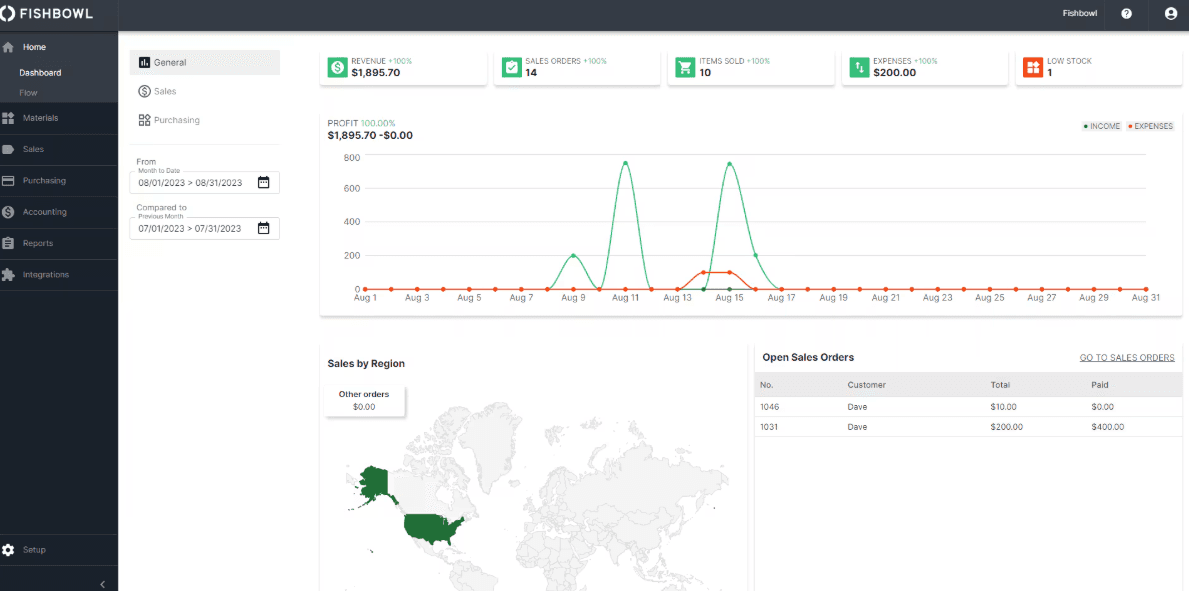
4/5
- From $229/month (billed annually)
- Free demo available
Miksi luottaa ohjelmistosuosituksiimme
6,700+
Reviews
20
Industry experts
16+
Evaluation factors
14
Years
Tiimimme on testannut ja arvioinut ohjelmistoja vuodesta 2012 lähtien. Talousjohtajina tiedämme itse, kuinka vaikeaa — ja tärkeää — oikean ohjelmiston valitseminen on.
Tätä opasta varten arvioimme työkaluja käytännön testauksen ja itsenäisen tutkimuksen avulla, pisteyttäen työkalut valintakriteeriemme perusteella.
Arvostelumme perustuvat inhimilliseen toimitukselliseen harkintaamme, eivät myyntipuheeseen.
Fishbowl Inventory Overview
In my opinion, Fishbowl Inventory is a solid choice for small to medium-sized businesses needing affordable inventory control. While its features and support are commendable, the learning curve can be a hurdle for some. It stands out with its flexibility and integration capabilities, making it ideal for manufacturing and distribution sectors. However, it may not match up to larger competitors in terms of advanced functionalities. Fishbowl Inventory value and ease of integration may be compelling reasons to consider it if you're trying to determine which software suits your needs.
Pros
- You get a user-friendly interface that's easy to navigate.
- Your team benefits from strong inventory tracking features.
- It offers excellent customer support when you need it.
Cons
- You may find the onboarding process a bit challenging.
- The software can be slow at times during peak usage.
- Your team may encounter a steep initial learning curve.
Is Fishbowl Inventory Right For Your Needs?
Who Would be a Good Fit for Fishbowl Inventory?
The Fishbowl Inventory management system is ideal for small to midsize manufacturing and distribution businesses. If your team needs efficient inventory tracking and management, Fishbowl Inventory’s accessible interface and strong support can be invaluable. Its functionalities make it a great fit for wholesalers and retailers who require detailed inventory insights. You'll find it especially useful if you want to improve order management without breaking the bank.
- Small ManufacturersFishbowl Inventory tracking helps your small manufacturing team manage stock levels efficiently.
- Wholesale DistributorsIt offers detailed management solutions for your work orders, perfect for your wholesale distribution needs.
- Retail BusinessesYour retail operation benefits from Fishbowl Inventory’s simple user interface for managing inventory.
- Finance DepartmentsFishbowl Inventory provides detailed reports so your finance team can make informed decisions.
- Operations ManagersYour operations team will appreciate the software's ability to streamline inventory processes.
- Growing BusinessesFishbowl Inventory is cost-effective for growing businesses needing scalable inventory solutions.
Who Would be a Bad Fit for Fishbowl Inventory?
Fishbowl Inventory may not suit large enterprises needing complex, advanced inventory management features or deeply integrated CRM and NetSuite environments. If your team requires highly customizable solutions or real-time inventory analytics, Fishbowl Inventory capabilities may fall short. Industries with rapid inventory turnover may find its processing speed limiting. Additionally, companies with limited resources for training may struggle with its learning curve, making it less ideal for teams needing a quick, out-of-the-box solution.
- Large EnterprisesFishbowl Inventory features may not meet your complex inventory needs.
- Tech StartupsRapid growth and the need for customization can outpace Fishbowl Inventory capabilities.
- Fast-Paced RetailersIts processing speed may not keep up with your rapid inventory turnover.
- Highly Regulated IndustriesYou may find that Fishbowl Inventory lacks the compliance features needed for stringent regulations.
- Custom Software DevelopersFishbowl Inventory limited customization options may not fit your unique software requirements.
- Limited Training ResourcesYour team may struggle with the software's learning curve if training resources are scarce.
How We Test & Score Tools
We’ve spent years building, refining, and improving our software testing and scoring system. The rubric is designed to capture the nuances of software selection and what makes a tool effective, focusing on critical aspects of the decision-making process.
Below, you can see exactly how our testing and scoring works across seven criteria. It allows us to provide an unbiased evaluation of the software based on core functionality, standout features, ease of use, onboarding, customer support, integrations, customer reviews, and value for money.
Core Functionality (25% of final scoring)
The starting point of our evaluation is always the core functionality of the tool. Does it have the basic features and functions that a user would expect to see? Are any of those core features locked to higher-tiered pricing plans? At its core, we expect a tool to stand up against the baseline capabilities of its competitors.
Standout Features (25% of final scoring)
Next, we evaluate uncommon standout features that go above and beyond the core functionality typically found in tools of its kind. A high score reflects specialized or unique features that make the product faster, more efficient, or offer additional value to the user.
We also evaluate how easy it is to integrate with other tools typically found in the tech stack to expand the functionality and utility of the software. Tools offering plentiful native integrations, 3rd party connections, and API access to build custom integrations score best.
Ease of Use (10% of final scoring)
We consider how quick and easy it is to execute the tasks defined in the core functionality using the tool. High scoring software is well designed, intuitive to use, offers mobile apps, provides templates, and makes relatively complex tasks seem simple.
Onboarding (10% of final scoring)
We know how important rapid team adoption is for a new platform, so we evaluate how easy it is to learn and use a tool with minimal training. We evaluate how quickly a team member can get set up and start using the tool with no experience. High scoring solutions indicate little or no support is required.
Customer Support (10% of final scoring)
We review how quick and easy it is to get unstuck and find help by phone, live chat, or knowledge base. Tools and companies that provide real-time support score best, while chatbots score worst.
Customer Reviews (10% of final scoring)
Beyond our own testing and evaluation, we consider the net promoter score from current and past customers. We review their likelihood, given the option, to choose the tool again for the core functionality. A high scoring software reflects a high net promoter score from current or past customers.
Value for Money (10% of final scoring)
Lastly, in consideration of all the other criteria, we review the average price of entry level plans against the core features and consider the value of the other evaluation criteria. Software that delivers more, for less, will score higher.
Core Features
Inventory Tracking: Fishbowl Inventory lets you track your stock levels in real time, ensuring you never run out or overstock. This feature helps your team maintain optimal inventory levels efficiently and helps simplify your ERP system.
Order Management: You can manage sales orders seamlessly from purchase to fulfillment, streamlining processes and reducing errors.
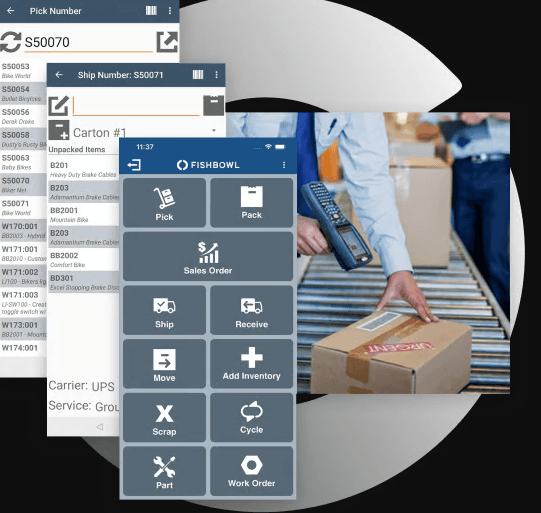
Barcode Scanning: Fishbowl Inventory barcode scanning speeds up your inventory tasks and minimizes mistakes. It's a valuable tool for quick and accurate stock updates.
Multi-Location Management: You can easily manage inventory across multiple locations. This feature ensures visibility, control over all your stock, and effective warehouse management, no matter where it is.
Reporting Tools: Fishbowl Inventory offers custom reports so your team can make informed decisions. These insights are crucial for planning and optimizing inventory.
Manufacturing Support: Your manufacturing team can track production stages and manage resources effectively. This feature integrates seamlessly with inventory management to keep everything aligned.
Ease of Use
The Fishbowl Inventory software interface is generally user-friendly, but some users may find the learning curve a bit steep at first. Once your team is familiar with it, the intuitive design streamlines inventory tasks. The software offers helpful guides and support, which can ease the transition. Compared to some competitors, you may need more time to get accustomed to its features, but the payoff is worth it for improved inventory management.
Integrations
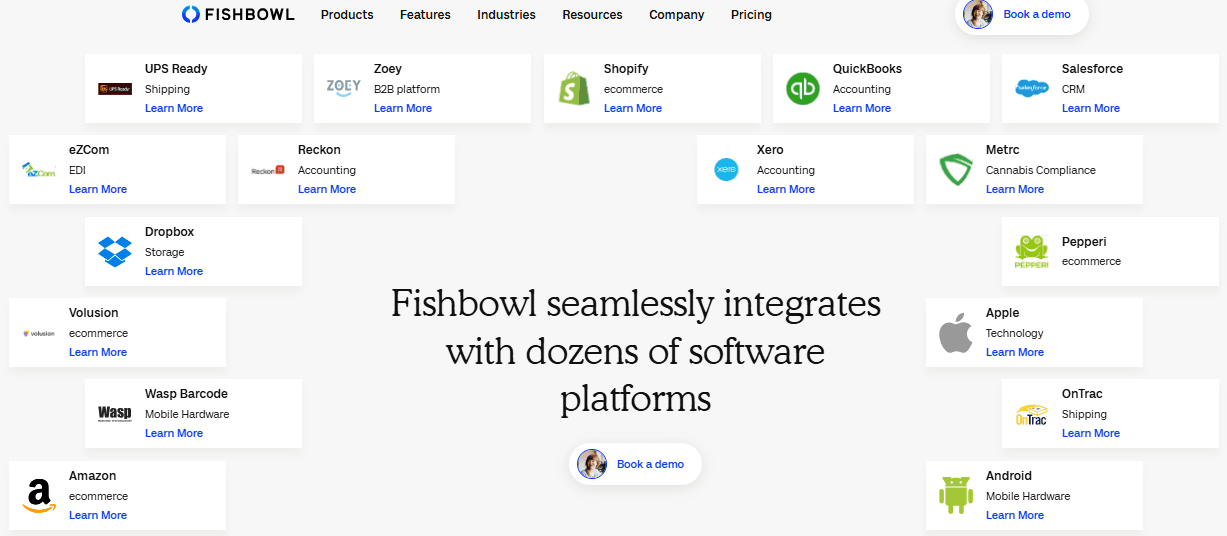
Fishbowl Inventory provides seamless integration with QuickBooks Online, QuickBooks Desktop, Xero, Shopify, Amazon, eBay, BigCommerce, Volusion, Zen Cart, Salesforce, and Zoho. It also has an API and connects with third-party integration tools to enhance its functionality.
Fishbowl Inventory Specs
- API: Yes
- Barcode Scanning: Yes
- Budgeting: No
- Calendar Management: No
- Customer Management: Yes
- Dashboard: Yes
- Data Export: Yes
- Data Import: Yes
- Data Visualization: Yes
- External Integrations: Yes
- Forecasting: Yes
- Inventory Tracking: Yes
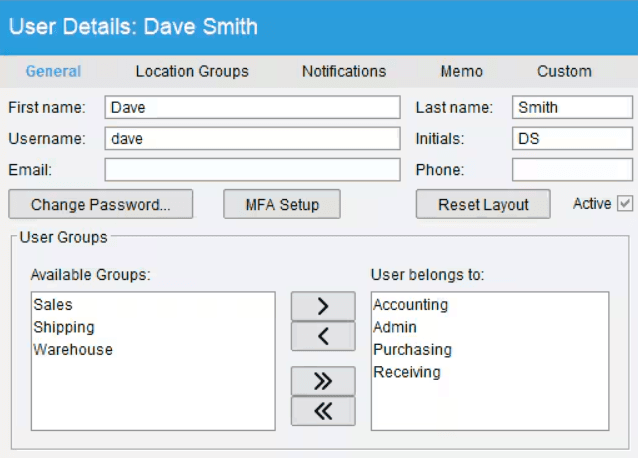
- Multi-User: Yes
- Notifications: Yes
- Order Management: Yes
- POS Integration: No
- Product Catalog: Yes
- Purchase Orders: Yes
- Reorder Automation: Yes
- SAP Integration: No
- Scheduling: No
- Shipping Management: Yes
- Status Notifications: Yes
- Stock Level Monitoring: Yes
- Supplier Management: Yes
- Third-Party Plugins/Add-Ons: Yes
- Warehouse Management: Yes


