

Avis sur monday.com : Avantages, Inconvénients, Fonctionnalités et Tarification
monday.com excelle dans l'automatisation financière grâce à ses intégrations conviviales et ses automatisations sans code, en faisant un choix idéal pour améliorer la productivité des équipes.

Nous évaluons les outils indépendamment ; les commissions aident à financer nos tests. Consultez notre politique de transparence et notre méthodologie.
monday.com provides a finance automation and business management software that helps teams manage workflows and automate repetitive tasks. It best serves finance departments in tech startups, marketing agencies, and e-commerce businesses by simplifying project management and financial planning. Using monday.com enhances productivity with customizable dashboards and integration capabilities, making it an all-in-one project management platform ideal for small businesses and small teams.
It addresses common issues such as task tracking and data consolidation for finance teams. In this article, I'll cover monday.com's key features, pros and cons, use cases, pricing, etc., so you can decide if it meets your department's needs and goals.
monday AI Workspace Evaluation Summary
.png&w=1920&q=75)
4.6/5
- From $9/user/month (billed annually)
- Free plan available
Pourquoi faire confiance à nos recommandations de logiciels
6,700+
Reviews
20
Industry experts
16+
Evaluation factors
14
Years
Nos avis reflètent notre jugement indépendant — et non un argumentaire de vente. Découvrez comment nous restons transparents.
Pour ce guide, nous avons évalué les outils grâce à des tests pratiques et une recherche indépendante, en notant les outils selon nos critères de sélection.
Nos avis reflètent notre jugement éditorial humain, et non un argumentaire de vente.
monday AI Workspace Overview
In my opinion, monday.com is a solid choice for finance automation, particularly for teams that value user-friendly interfaces and seamless integrations. Its standout features, including customizable dashboards and extensive automation options, make it appealing for tech-savvy teams. Many also appreciate the collaboration features built into the platform. While it offers excellent integration capabilities, some might find its pricing a bit high compared to other options. However, the ease of use and strong customer support can justify the cost for those seeking a reliable project management solution. It's best suited for dynamic teams in industries such as tech and marketing, where team collaboration and automation are key.
Pros
- You can create custom dashboards to fit your team's needs.
- Automations save your team time on recurring tasks.
- The user interface is intuitive, with a minimal learning curve.
Cons
- You might find the mobile app less responsive than the desktop version.
- Some users feel the reporting features lack depth.
- It can be overwhelming for teams new to project management software.
Is monday AI Workspace Right For Your Needs?
Who Would be a Good Fit for monday AI Workspace?
monday.com is great for tech startups, marketing agencies, and e-commerce businesses where collaboration and automation are key. Your team will appreciate its customizable dashboards, calendar view options, chart view, and automation features that simplify project management and financial planning. The included online docs feature helps consolidate content from other websites. If you're in a fast-paced environment, monday.com helps keep tasks organized and your team aligned with kanban boards. Its user-friendly interface makes onboarding easy, so you can get started quickly on your projects.
- Tech StartupsYour team can easily manage projects and automate tasks, boosting productivity and keeping the focus on innovation.
- Marketing AgenciesThe customizable dashboards help your team track campaigns and client projects efficiently.
- E-Commerce Businessesmonday.com simplifies inventory and order management, keeping your business operations smooth.
- Finance DepartmentsAutomations and task tracking help your team streamline financial planning and analysis.
- Project ManagersThe intuitive interface allows you to organize and monitor project timelines effectively.
- Creative Teamsmonday.com supports collaboration and creativity with its visual project management tools.
Who Would be a Bad Fit for monday AI Workspace?
monday.com might not suit large enterprises or industries that require deep financial reporting, such as banking or insurance. If your work demands complex data analysis and in-depth reporting, you might find monday.com's capabilities limited. Teams that rely heavily on mobile functionality could struggle, as the mobile app is less responsive than the desktop version. Additionally, if you're new to project management tools, the platform's range of features might feel overwhelming.
- Large EnterprisesYour team may find the reporting features lacking for extensive financial analysis.
- Banking Sectormonday.com's current capabilities may not meet the need for detailed financial reporting.
- Insurance IndustryComplex data analysis requirements can exceed what monday.com offers.
- Mobile-Dependent TeamsIf your team works primarily on mobile devices, you might find the app's responsiveness insufficient.
- New Project ManagersThe platform's extensive features can be overwhelming for beginners.
- Data-Intensive Fieldsmonday.com may not support the depth of data analysis required in these areas.
Comment nous testons et évaluons les outils
Nous avons passé des années à construire, affiner et améliorer notre système de test et d’évaluation des logiciels. Notre grille vise à saisir toute la subtilité de la sélection logicielle et les facteurs déterminant l’efficacité d’un outil, en mettant l’accent sur les aspects essentiels du processus de décision. Ci-dessous, vous pouvez voir exactement comment notre test et notre notation fonctionnent selon sept critères. Cela nous permet de fournir une évaluation impartiale des logiciels sur la base des fonctionnalités principales, des fonctionnalités distinctives, de la facilité d’utilisation, de la prise en main, du service client, des intégrations, des avis clients et du rapport qualité/prix.
Fonctionnalité principale (25 % de la note finale)
Le point de départ de notre évaluation est toujours la fonctionnalité principale de l’outil. Dispose-t-il des caractéristiques de base attendues ? Certaines de ces fonctions de base sont-elles réservées aux plans tarifaires supérieurs ? Fondamentalement, nous attendons d’un outil qu’il soit au moins l’égal de ses concurrents en capacités essentielles.
Fonctionnalités Distinctives (25 % de la note finale)
Ensuite, nous évaluons les fonctionnalités rares ou uniques, allant au-delà de la fonctionnalité principale habituellement trouvée dans ce type d’outil. Un score élevé traduit des fonctionnalités spécialisées ou innovantes qui rendent le produit plus rapide, plus efficace, ou apportent une valeur supplémentaire à l’utilisateur. Nous évaluons aussi la facilité d’intégration avec d’autres outils courants de l’écosystème technologique pour étendre les capacités du logiciel. Les outils offrant de nombreuses intégrations natives, des connexions tierces et un accès API pour des intégrations personnalisées obtiennent le meilleur score.
Facilité d’utilisation (10 % de la note finale)
Nous considérons la rapidité et la facilité d’exécution des tâches essentielles avec l’outil. Un logiciel bien conçu, intuitif, proposant des applications mobiles, des modèles et permettant de simplifier des tâches complexes obtient la meilleure note.
Prise en Main (10 % de la note finale)
Nous savons combien il est important d’adopter rapidement une nouvelle plateforme, c’est pourquoi nous évaluons la facilité d’apprentissage et d’utilisation du logiciel avec un minimum de formation. Nous évaluons la rapidité de mise en place d’un nouveau membre d’équipe sans expérience. Un outil ayant un bon score requiert peu voire aucun support pour la prise en main.
Service Client (10 % de la note finale)
Nous évaluons s’il est rapide et facile d’obtenir de l’aide ou de dépanner par téléphone, chat en direct ou base de connaissances. Les outils et entreprises offrant une assistance en temps réel obtiennent le meilleur score, tandis que les chatbots sont moins bien notés.
Avis Clients (10 % de la note finale)
Au-delà de nos propres tests et évaluations, nous prenons en compte le net promoter score fourni par les clients actuels et passés. Nous vérifions leur probabilité de recommander l’outil et d’en refaire le choix pour ses fonctionnalités principales. Un logiciel bien noté se traduit par un net promoter score élevé.
Rapport Qualité/Prix (10 % de la note finale)
Enfin, en tenant compte de tous les autres critères, nous comparons le prix moyen des plans d’entrée de gamme avec les fonctionnalités principales, et le rapport de valeur avec les autres critères d’évaluation. Les logiciels offrant plus pour moins obtiennent la meilleure note.
Core Features
Task Management: Create and assign tasks to your team, keeping everyone aligned on priorities. Easily track progress and due dates at a glance with the visual boards.
Automations: Set up automatic workflows to handle repetitive tasks, freeing up your team's time for more important work. Use triggers and actions to customize these automations.
Time Tracking: Monitor how much time your team spends on each task to improve budgeting and resource allocation.
Customizable Dashboards: Tailor dashboards using drag-and-drop widgets to show the information that matters most to your team.
Reporting: Generate reports to analyze your team's performance and project outcomes. Use insights to make data-driven decisions.
Collaboration Tools: Communicate with your team directly within tasks, reducing the need for constant emails. Keep all project-related discussions in one place, with file storage available for important documents.
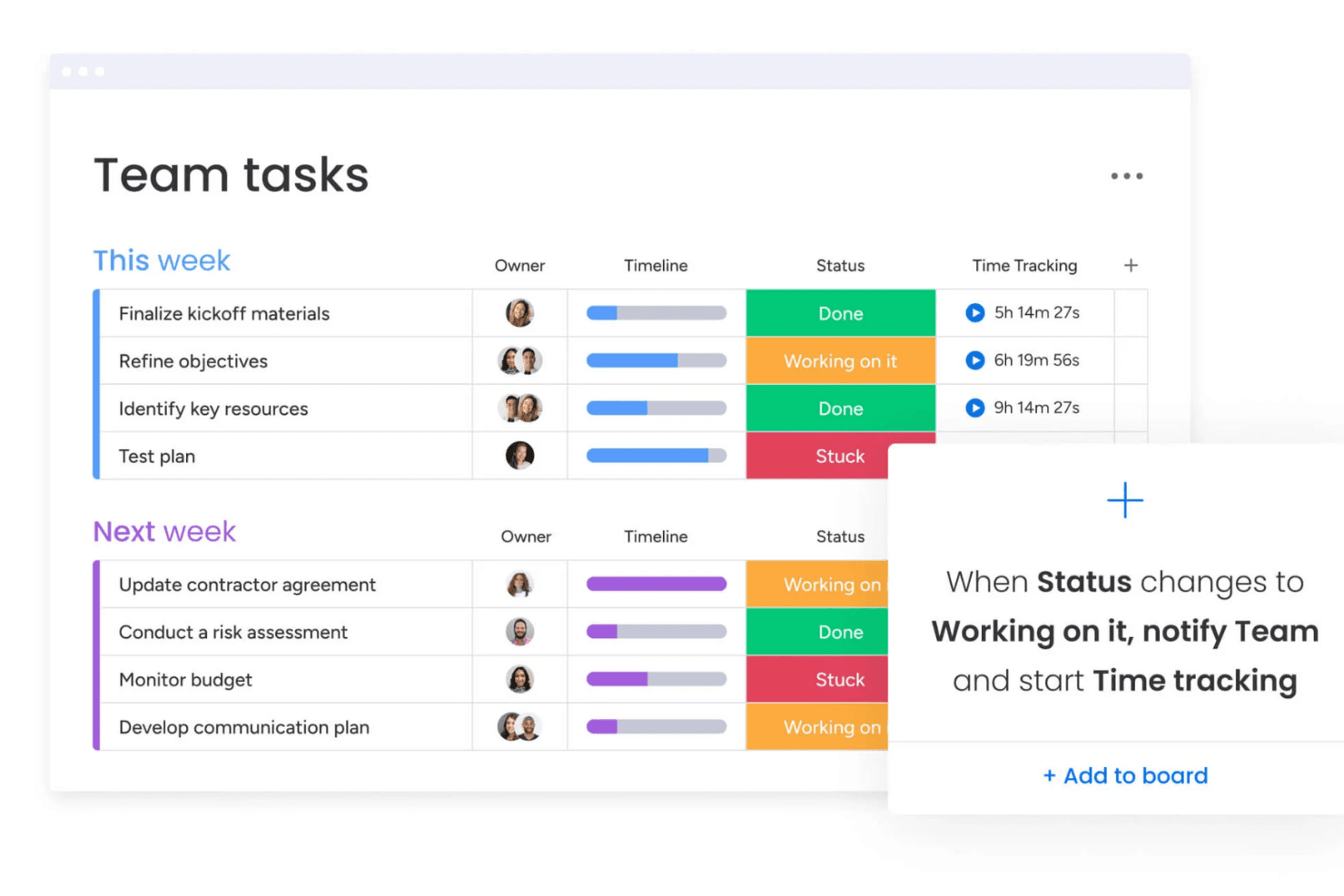
Standout Features
No-Code Automations: You don't need technical skills to set up automations. Simply use the intuitive automation tool to set up automated tasks, notifications, and other actions that fit your team's needs.
Visual Workflow Builder: You can create and visualize workflows with ease. This feature helps your team understand processes and ensures everyone follows the same steps.
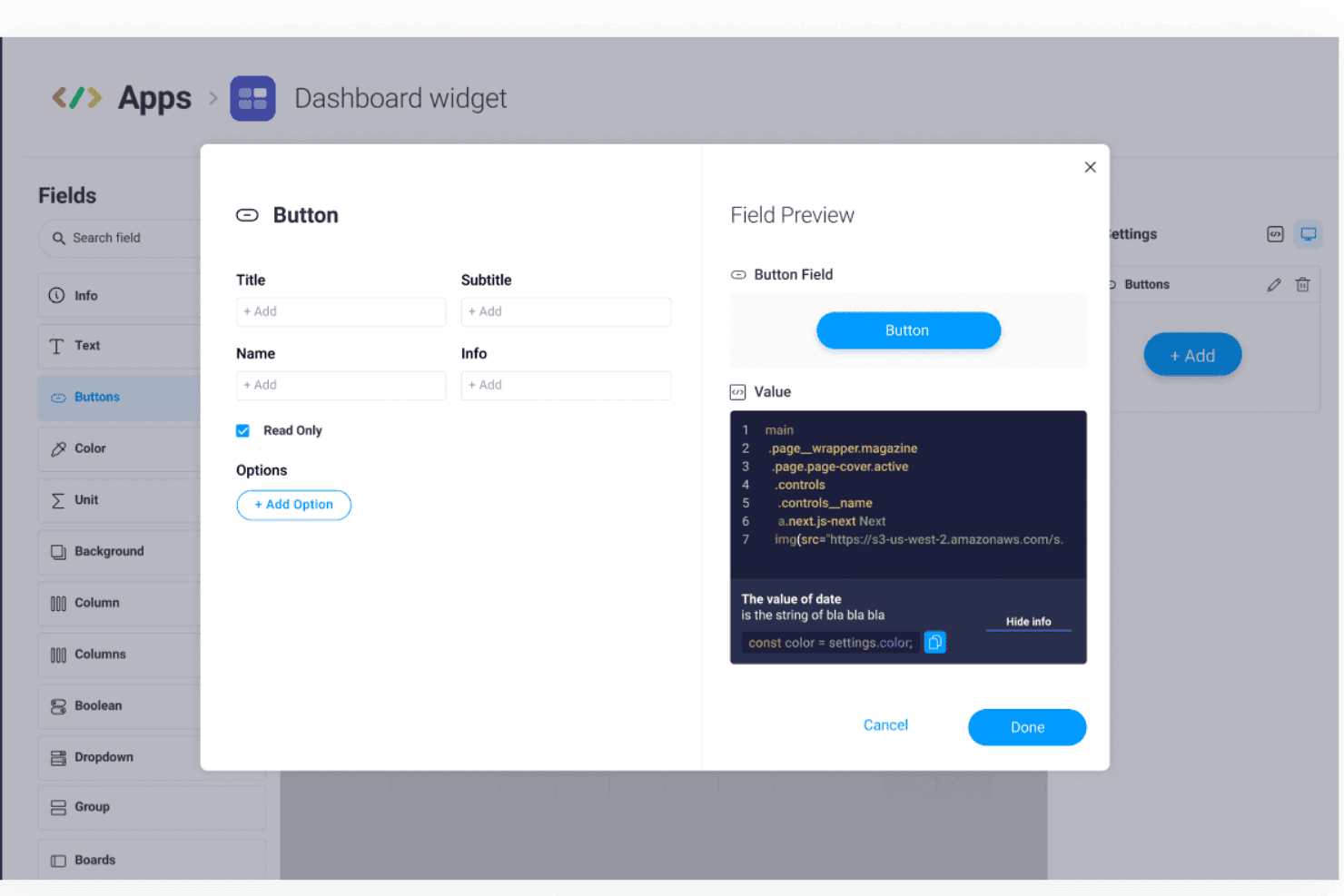
Ease of Use
monday.com's platform is user-friendly, making it easy for your team to get started quickly. The straightforward interface allows you to customize dashboards and set up automations without needing technical skills. Visual elements, including drag-and-drop boards, simplify task management, helping your team stay organized. Compared to other finance CRM software, monday.com stands out for its simplicity and ease of navigation, allowing your team to focus on work rather than figuring out the platform.

Onboarding
monday.com offers a straightforward onboarding process that helps your team start quickly. The platform provides tutorials and guides that walk you through setting up projects and automations. You'll find the support resources in the knowledge base helpful for resolving questions as they arise. Although some users feel the initial setup can be overwhelming, the available resources and intuitive interface generally lead to a smooth transition. This ensures your team can see value from monday.com sooner rather than later.

Customer Support
monday.com provides reliable customer support through multiple channels, including an online request form and live chat, ensuring your team gets the help it needs. The response time is generally quick, allowing you to resolve issues without significant delays. Users appreciate the comprehensive help center and community forums, which offer solutions to common problems. monday.com offers premium support as part of its top-tier plans, or teams can hire a monday.com expert for help with a specific project. The range of available support and responsive assistance make monday.com a dependable option.

Integrations
monday.com integrates with Slack, Google Drive, Dropbox, Zoom, Microsoft Teams, Shopify, Trello, Jira, HubSpot, and LinkedIn.
monday.com also offers an API and connects with third-party integration tools.

Value for Money
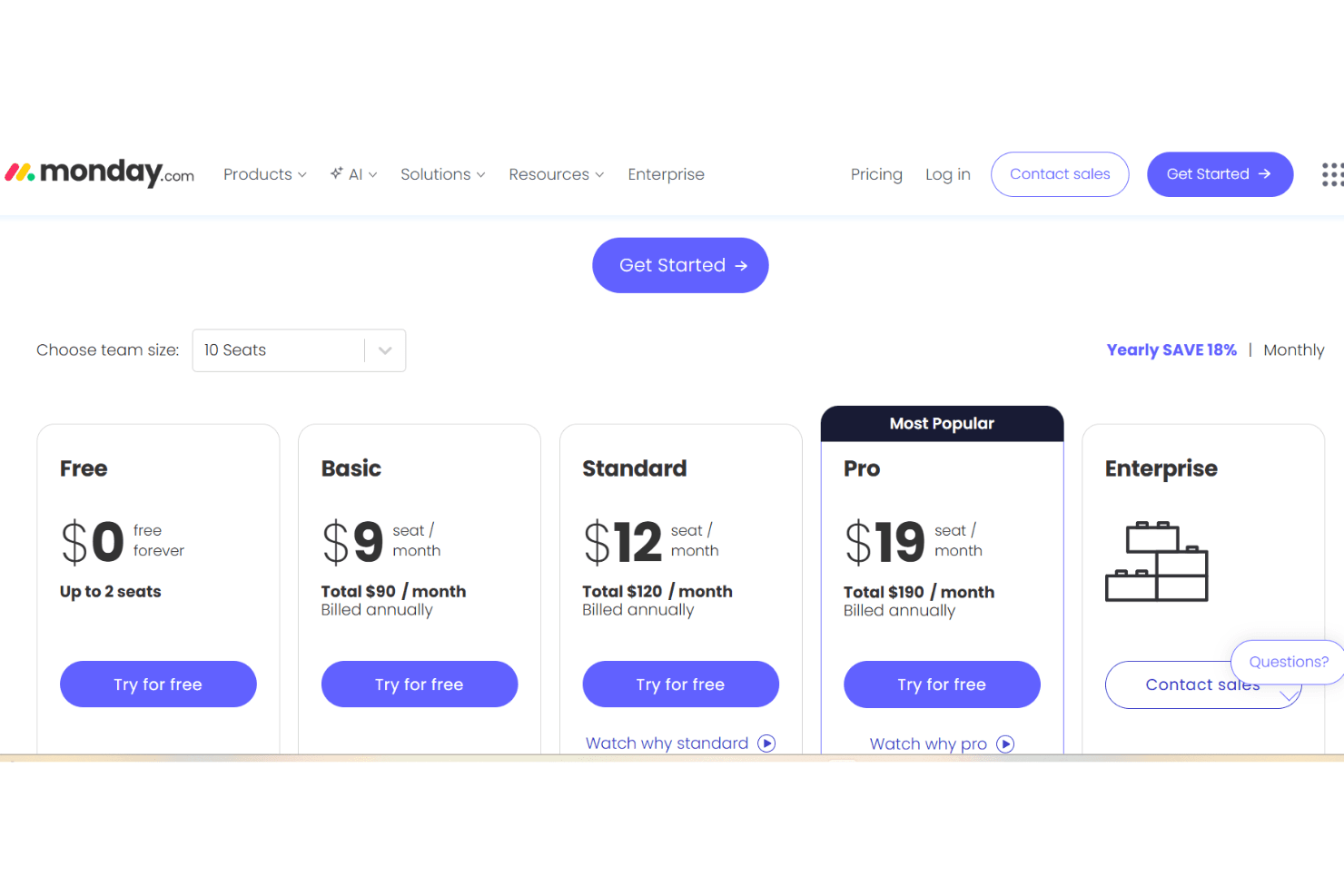
monday.com offers a range of paid plans for its monday CRM product. These plans are designed to accommodate various business needs, though some users find the cost high for smaller teams. The monday.com pricing model is per seat with a three-user minimum, which can impact value. Though there is not a free version of monday CRM, a 14-day free trial allows your team to evaluate the software before committing to a purchase.
- Basic Plan: $12 per seat/month (billed annually); one workspace for individuals and small teams.
- Standard Plan: $17 per seat/month (billed annually); three workspaces, custom automations, and AI-powered tools.
- Pro Plan: $28 per seat/month (billed annually); unlimited contacts, 15 workspaces, and advanced communication and AI-powered tools.
- Ultimate Plan: Reach out to monday.com for pricing; robust security features, unlimited workspaces and automations, and premium support.
monday AI Workspace Specs
- API: Yes
- Batch Permissions & Access: Yes
- Budgeting: No
- Calendar Management: Yes
- Collaboration Support: Yes
- Contact Management: No
- Contact Sharing: No
- Customer Management: No
- Dashboard: Yes
- Dashboards: Yes
- Data Export: Yes
- Data Import: Yes
- Data Visualization: Yes
- Dependency Tracking: Yes
- Document Sharing: Yes
- Expense Tracking: No
- External Integrations: Yes
- File Sharing: Yes
- Gantt Charts: Yes
- Kanban Boards: Yes
- Multi-User: Yes
- Notifications: Yes
- Project Management: Yes
- Resource Management: Yes
- Scheduling: Yes
- Task Scheduling/Tracking: Yes
- Third-Party Plugins/Add-Ons: Yes
- Time Management: Yes
- Travel Management: No
- Workflow Management: Yes
monday AI Workspace FAQs
monday AI Workspace Company Overview & History
monday.com is headquartered in Tel Aviv, Israel, and employs over 3,000 people. The company's work platform offers a suite of products, including monday work management, monday CRM, monday dev, and monday service. Known for its vibrant work culture, monday.com has gained attention for its user-friendly platform and extensive customization options. Notable clients include Compass, Coca-Cola, and Datacom. After completing its IPO in 2021, the company was valued at $7.5 billion.
monday.com Major Milestones
2012: Founded by Roy Mann and Eran Zinman.
2014: Launched its first product.
2019: Reached unicorn status with a valuation over $1 billion.
2021: Went public on NASDAQ, achieving a valuation of $7.5 billion.
2022: Expanded its product line to include CRM and development tools.