

Avis sur Nanonets : Avantages, Inconvénients, Fonctionnalités et Tarification
Nanonets excelle dans l'automatisation des processus financiers grâce à l'efficacité de l'IA, ce qui en fait un choix remarquable pour les équipes cherchant une automatisation financière intelligente.

Nous évaluons les outils indépendamment ; les commissions aident à financer nos tests. Consultez notre politique de transparence et notre méthodologie.
Nanonets is an accounts payable automation software built around AI-powered document capture and data extraction. It's a strong fit for finance teams processing high volumes of invoices across varied formats, where manual data entry is a real bottleneck. I'd lean toward it over a tool like Bill.com if your team deals with inconsistent or complex invoice layouts—Nanonets' OCR and extraction layer handles that variability more directly before documents move into approval workflows.
TrailHQ Evaluation Summary
4.9/5
- Pricing upon request
- Free trial available + free demo
Pourquoi faire confiance à nos recommandations de logiciels
6,700+
Reviews
20
Industry experts
16+
Evaluation factors
14
Years
Nos avis reflètent notre jugement indépendant — et non un argumentaire de vente. Découvrez comment nous restons transparents.
Pour ce guide, nous avons évalué les outils grâce à des tests pratiques et une recherche indépendante, en notant les outils selon nos critères de sélection.
Nos avis reflètent notre jugement éditorial humain, et non un argumentaire de vente.
TrailHQ Overview
In my opinion, Nanonets is a strong contender in the finance automation space. It excels in AI-driven document processing, making it ideal for teams handling large volumes of data. Although its interface is intuitive, onboarding could be smoother. Compared to alternative products, Nanonets offers excellent value, especially for businesses needing robust automation without breaking the bank. I think it's best suited for companies that are ready to leverage AI for efficiency and are comfortable with some self-guided learning.
Pros
- Nanonets uses AI, machine learning, and deep learning to reduce manual data entry for your team.
- Its user-friendly interface makes it easy for your team members to adapt quickly.
- It offers accuracy in document processing, saving your team time.
Cons
- Your team might find the onboarding process a bit lengthy, especially when configuring custom models.
- Customer support can sometimes be slow to respond to inquiries.
- You might need to invest time in learning some advanced features.
Is TrailHQ Right For Your Needs?
Who Would be a Good Fit for TrailHQ?
Nanonets is a great fit for finance teams in industries that deal with high volumes of invoices and receipts. Its AI-driven automation reduces manual data entry, making your team's work more efficient. If your team often struggles with accuracy in document processing, Nanonets's precision can save you time and reduce errors. It's ideal for departments looking to enhance productivity without a steep learning curve.
- Logistics CompaniesNanonets simplifies data entry from shipping documents and purchase orders, making your logistics operations smoother.
- Retail ChainsNanonets automates invoice data processing, helping your retail team handle large volumes efficiently.
- Finance DepartmentsNanonets reduces errors in financial document handling, improving the accuracy of your finance tasks.
- Accounts Payable TeamsIt speeds up invoice processing, so your accounts payable team can focus on other tasks.
- Data-Heavy IndustriesNanonets handles large datasets with ease, benefiting your data-centric operations.
- Small and Medium BusinessesNanonets offers powerful automation without overwhelming smaller teams, making it an ideal choice for growing businesses.
Who Would be a Bad Fit for TrailHQ?
Nanonets might not be suitable for businesses with minimal document processing needs or those relying heavily on customer support. If your team requires detailed guidance, occasional delays in support from Nanonets may be frustrating. It may also not be ideal for industries with complex customization and integration needs, as it might not offer the depth needed for specialized workflows.
- Very Small BusinessesIf your team handles limited documents, Nanonets's capabilities might be more than you need.
- Highly Specialized IndustriesNanonets may not offer the customization needed for niche industry requirements.
- Customer Support-Reliant TeamsIf your team needs frequent support, Nanonets's response times might be an issue.
- Complex Integration NeedsNanonets might not meet your needs if your operations depend on intricate software integrations.
- FreelancersNanonets's comprehensive features could be too excessive for solo workers.
- Non-Digital BusinessesIf your business relies heavily on paper processes, Nanonets's digital focus might not align with your operations.
Comment nous testons et évaluons les outils
Nous avons passé des années à construire, affiner et améliorer notre système de test et d’évaluation des logiciels. Notre grille vise à saisir toute la subtilité de la sélection logicielle et les facteurs déterminant l’efficacité d’un outil, en mettant l’accent sur les aspects essentiels du processus de décision. Ci-dessous, vous pouvez voir exactement comment notre test et notre notation fonctionnent selon sept critères. Cela nous permet de fournir une évaluation impartiale des logiciels sur la base des fonctionnalités principales, des fonctionnalités distinctives, de la facilité d’utilisation, de la prise en main, du service client, des intégrations, des avis clients et du rapport qualité/prix.
Fonctionnalité principale (25 % de la note finale)
Le point de départ de notre évaluation est toujours la fonctionnalité principale de l’outil. Dispose-t-il des caractéristiques de base attendues ? Certaines de ces fonctions de base sont-elles réservées aux plans tarifaires supérieurs ? Fondamentalement, nous attendons d’un outil qu’il soit au moins l’égal de ses concurrents en capacités essentielles.
Fonctionnalités Distinctives (25 % de la note finale)
Ensuite, nous évaluons les fonctionnalités rares ou uniques, allant au-delà de la fonctionnalité principale habituellement trouvée dans ce type d’outil. Un score élevé traduit des fonctionnalités spécialisées ou innovantes qui rendent le produit plus rapide, plus efficace, ou apportent une valeur supplémentaire à l’utilisateur. Nous évaluons aussi la facilité d’intégration avec d’autres outils courants de l’écosystème technologique pour étendre les capacités du logiciel. Les outils offrant de nombreuses intégrations natives, des connexions tierces et un accès API pour des intégrations personnalisées obtiennent le meilleur score.
Facilité d’utilisation (10 % de la note finale)
Nous considérons la rapidité et la facilité d’exécution des tâches essentielles avec l’outil. Un logiciel bien conçu, intuitif, proposant des applications mobiles, des modèles et permettant de simplifier des tâches complexes obtient la meilleure note.
Prise en Main (10 % de la note finale)
Nous savons combien il est important d’adopter rapidement une nouvelle plateforme, c’est pourquoi nous évaluons la facilité d’apprentissage et d’utilisation du logiciel avec un minimum de formation. Nous évaluons la rapidité de mise en place d’un nouveau membre d’équipe sans expérience. Un outil ayant un bon score requiert peu voire aucun support pour la prise en main.
Service Client (10 % de la note finale)
Nous évaluons s’il est rapide et facile d’obtenir de l’aide ou de dépanner par téléphone, chat en direct ou base de connaissances. Les outils et entreprises offrant une assistance en temps réel obtiennent le meilleur score, tandis que les chatbots sont moins bien notés.
Avis Clients (10 % de la note finale)
Au-delà de nos propres tests et évaluations, nous prenons en compte le net promoter score fourni par les clients actuels et passés. Nous vérifions leur probabilité de recommander l’outil et d’en refaire le choix pour ses fonctionnalités principales. Un logiciel bien noté se traduit par un net promoter score élevé.
Rapport Qualité/Prix (10 % de la note finale)
Enfin, en tenant compte de tous les autres critères, nous comparons le prix moyen des plans d’entrée de gamme avec les fonctionnalités principales, et le rapport de valeur avec les autres critères d’évaluation. Les logiciels offrant plus pour moins obtiennent la meilleure note.
Core Features
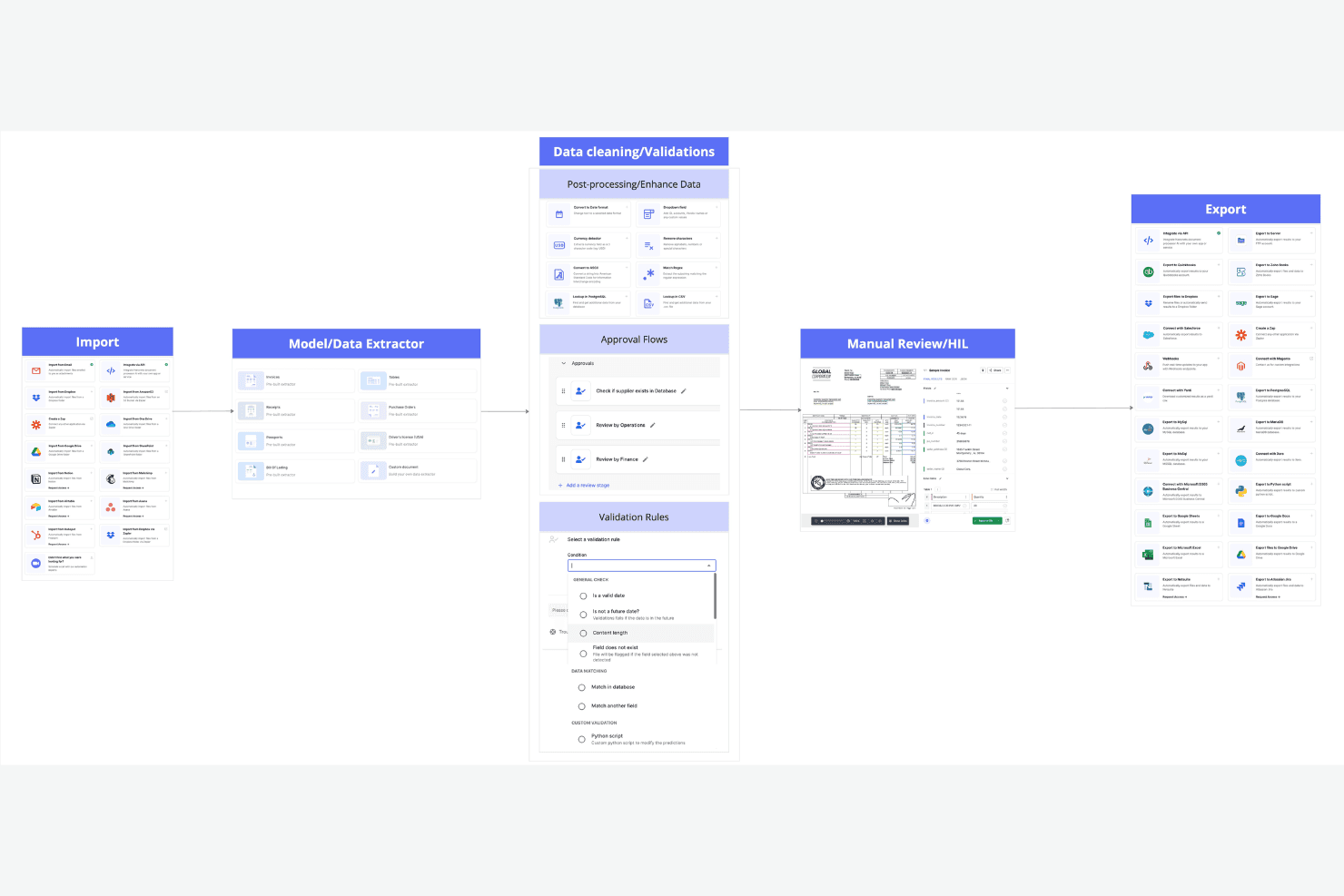
AI-Powered Data Extraction: Nanonets uses AI to automatically extract data from documents, saving your team hours of manual entry. Its accuracy also reduces errors, enhancing your data reliability.
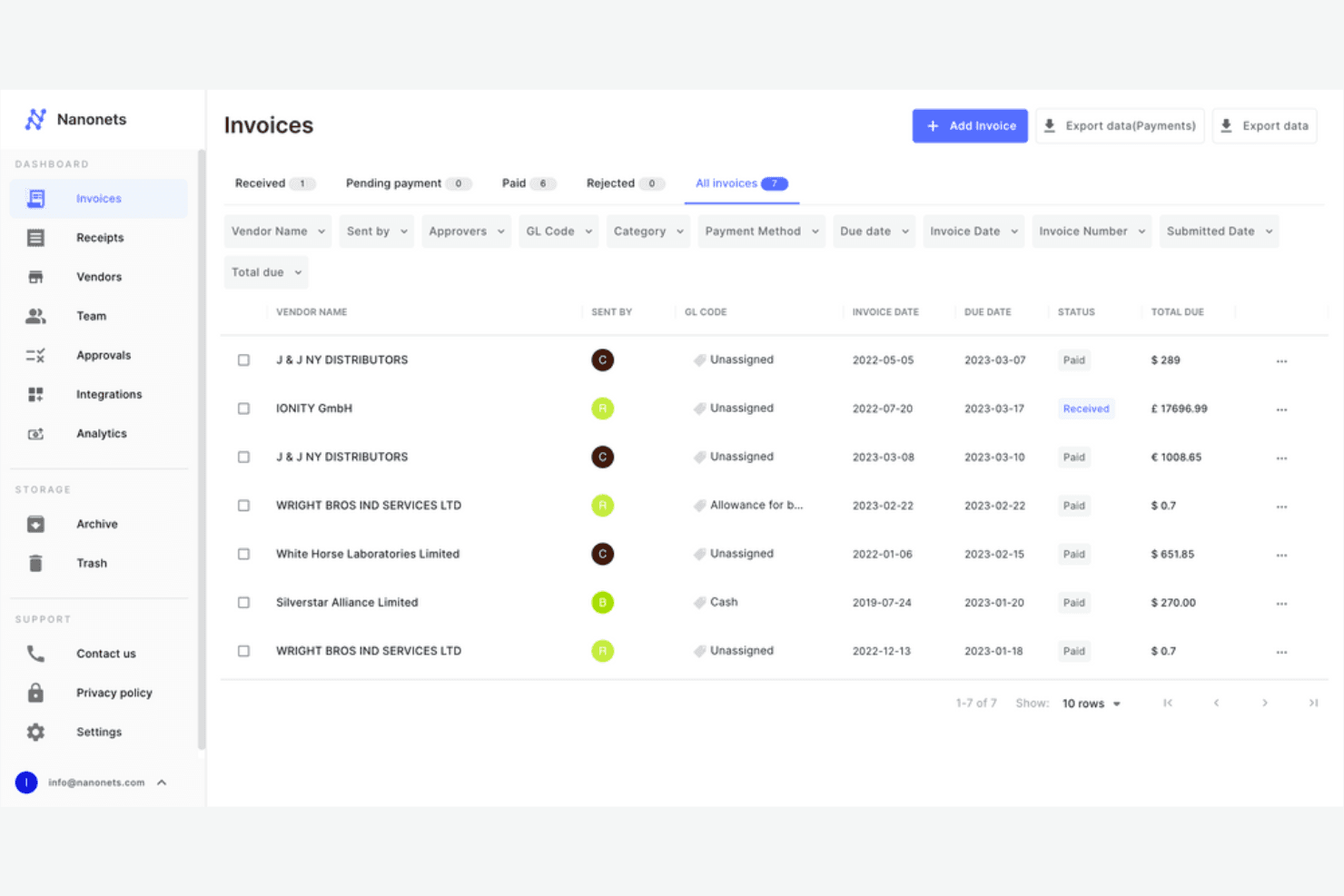
Automated Invoice Processing: This feature allows your team to automate the entire invoice processing workflow, from receipt to approval. It speeds up your accounts payable tasks significantly.
Customizable Workflows: You can tailor workflows to fit your team's specific needs to make your processes more efficient.
Document Classification: Nanonets automatically classifies documents, allowing your team to organize and retrieve files effortlessly. It simplifies your document management and search processes.
Real-Time Analytics: You can get instant insights into your financial data with Nanonets's analytics features to help your team make informed decisions quickly.
Secure Data Storage: Nanonets stores sensitive financial data securely, giving you peace of mind.
Ease of Use
Nanonets is user-friendly, so your team can get up and running quickly. Its intuitive interface allows you to navigate through features smoothly, and user reviews appreciate how straightforward it is to set up workflows and automate tasks. While some advanced features might require a little learning, the overall experience is smooth compared to other finance automation tools.
Integrations
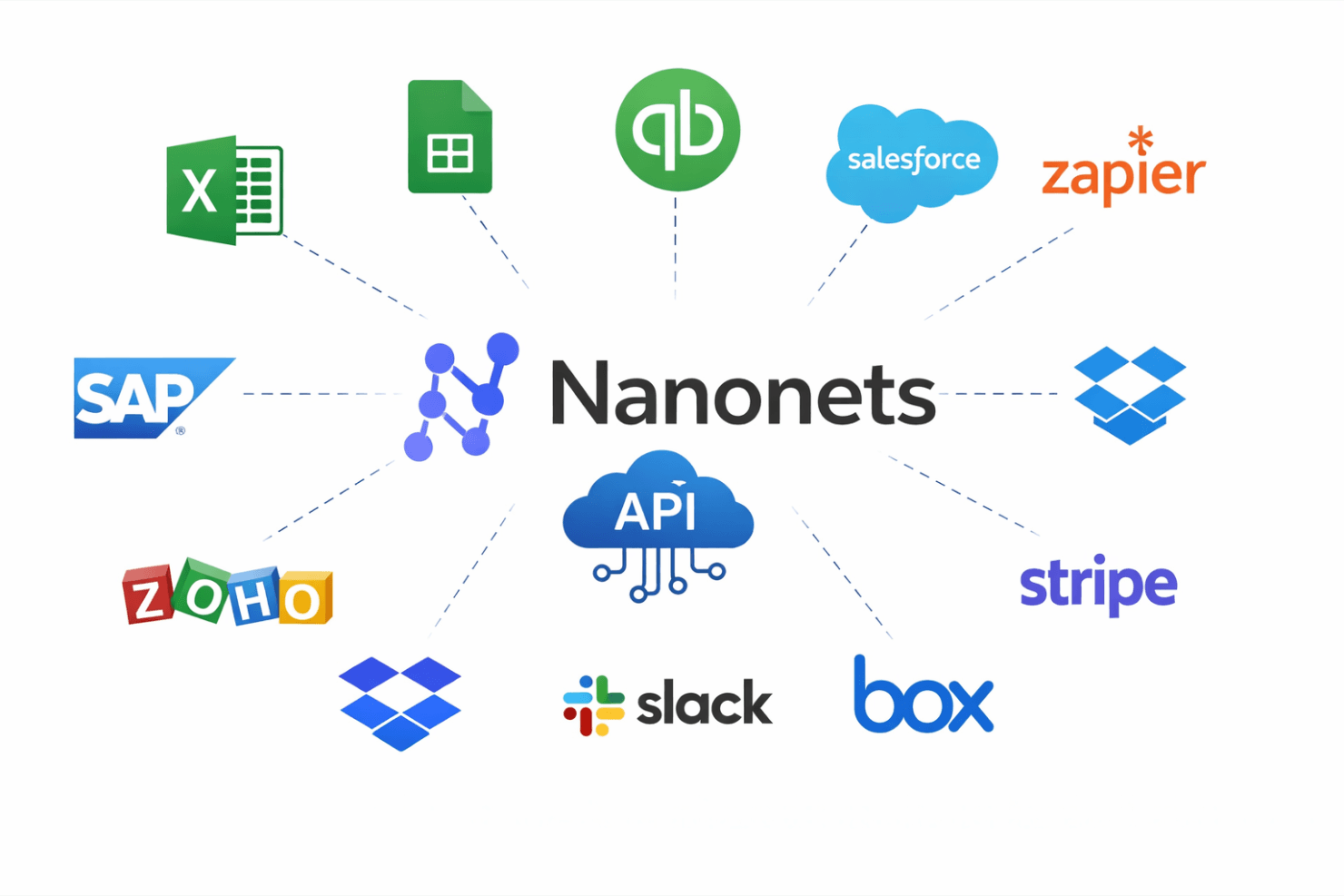
Nanonets integrates with Microsoft Excel, Google Sheets, QuickBooks, Salesforce, SAP, Zoho, Dropbox, Slack, Stripe, and Box.
Nanonets also provides an API for custom integrations and connects with third-party integration tools, such as Zapier, through optical character recognition (OCR).
TrailHQ Specs
- A/B Testing: No
- AI Integration: No
- Analytics: No
- API: Yes
- Calendar Management: No
- Comparative Reporting: No
- Custom Reports: No
- Dashboard: Yes
- Data Export: Yes
- Data Import: Yes
- Data Mining: No
- Data Visualization: Yes
- External Integrations: Yes
- Forecasting: No
- Historical Data Analysis: No
- Multi-User: Yes
- Notifications: No
- Process Reporting: No
- Real-time Alerts: No
- Scenario Planning: No
- Scheduling: No
- Sentiment Analysis: No
- SEO: No
- Time Series Modeling: No
- Workflow Management: No


