

10 meilleures alternatives à Procore pour le secteur de la construction en 2026

Sélection des meilleures alternatives à Procore


En tant que directeur financier, vous subissez une pression constante pour gérer les budgets, optimiser les ressources et garantir la livraison des projets dans les délais. Les logiciels de gestion de la construction peuvent changer la donne, mais tous les outils ne conviennent pas à tous les modèles d’entreprise. Si vous constatez que Procore ne répond pas à vos besoins, vous n’êtes pas seul.
D’après mon expérience, il est important de trouver un logiciel adapté à vos défis spécifiques. Qu’il s’agisse du coût, de l’évolutivité ou de fonctionnalités propres à votre secteur, certaines alternatives pourraient mieux convenir à votre équipe.
J’ai examiné et évalué de manière indépendante diverses alternatives à Procore afin de vous aider à prendre une décision éclairée. Dans cet article, je partagerai mes meilleurs choix en me concentrant sur la manière dont chaque solution peut répondre aux besoins particuliers de votre entreprise.
Qu’est-ce que Procore ?
Procore est un logiciel de gestion de la construction qui aide les équipes à gérer les projets du début à la fin. Il est largement utilisé par les chefs de projet, les ingénieurs et les entrepreneurs qui doivent maintenir les projets sur la bonne voie et dans les limites du budget. Les fonctionnalités de gestion documentaire, de collaboration en temps réel et de suivi financier contribuent à améliorer l’efficacité, la communication et le contrôle des coûts. Dans l’ensemble, Procore propose une plateforme qui simplifie les processus de construction et améliore la visibilité sur les projets.
Tableau comparatif des alternatives à Procore
Ce tableau comparatif récapitule les informations tarifaires de ma sélection des meilleures alternatives à Procore.
| Tool | Best For | Trial Info | Price | ||
|---|---|---|---|---|---|
| 1 | Idéal pour la gestion de portefeuilles de projets de grande envergure | Démonstration gratuite disponible | Tarification sur demande | Website | |
| 2 | Idéal pour la gestion de projets tout-en-un | Démo gratuite disponible | Tarification sur demande | Website | |
| 3 | Idéal pour la collaboration en temps réel sur les chantiers | Formule gratuite disponible | À partir de $39/utilisateur/mois (facturé annuellement) | Website | |
| 4 | Idéal pour les entrepreneurs commerciaux | Démo gratuite disponible | Tarification sur demande | Website | |
| 5 | Idéal pour les constructeurs sur mesure et les rénovateurs | Démo gratuite disponible | Tarification sur demande | Website | |
| 6 | Idéal pour les entreprises de services à domicile | Démo gratuite disponible | Prix sur demande | Website | |
| 7 | Idéal pour le suivi simple des projets | Essai gratuit de 30 jours + démonstration gratuite disponible | À partir de $15/utilisateur/mois (facturé annuellement) | Website | |
| 8 | Idéal pour les entrepreneurs généraux | Démo gratuite disponible | Tarification sur demande | Website | |
| 9 | Idéal pour la gestion de projets basée sur l'IA | Forfait gratuit disponible | À partir de $165/projet/mois | Website | |
| 10 | Idéal pour les entrepreneurs spécialisés | Démo gratuite disponible | Tarification sur demande | Website |
Pourquoi faire confiance à nos recommandations de logiciels
Nos avis reflètent notre jugement indépendant — et non un argumentaire de vente. Découvrez comment nous restons transparents.
Pour ce guide, nous avons évalué les outils grâce à des tests pratiques et une recherche indépendante, en notant les outils selon nos critères de sélection.
Nos avis reflètent notre jugement éditorial humain, et non un argumentaire de vente.
Avis sur les meilleures alternatives à Procore
Vous trouverez ci-dessous mes résumés détaillés des meilleures alternatives à Procore qui ont été retenues dans ma sélection. Mes avis présentent une analyse approfondie des principales fonctionnalités, des avantages & inconvénients, des intégrations et des cas d’utilisation idéaux de chaque outil afin de vous aider à trouver celui qui vous convient le mieux.

Idéal pour la gestion de portefeuilles de projets de grande envergure
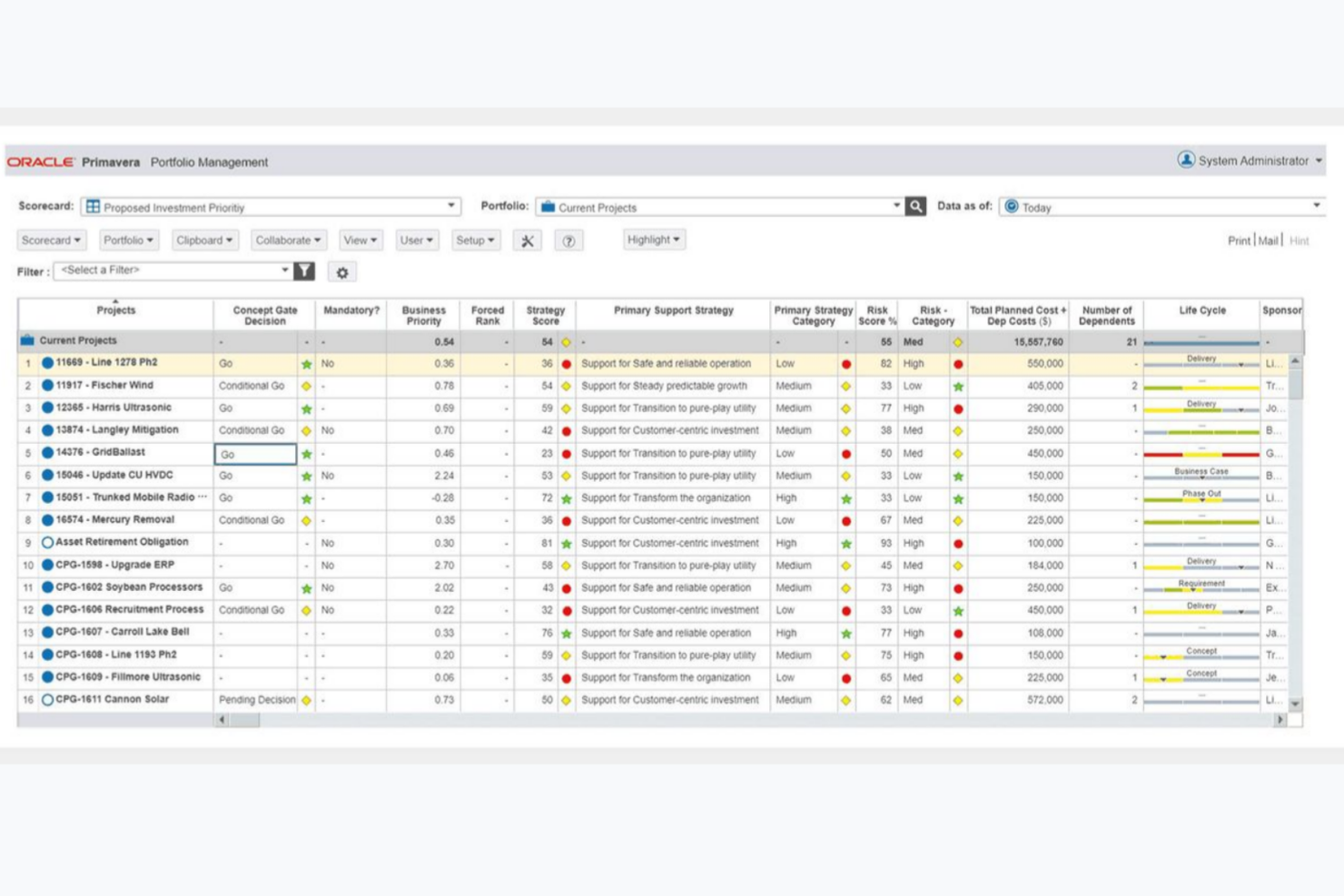
Oracle Primavera est un logiciel de gestion de portefeuille de projets conçu pour les projets de grande envergure et les entreprises. Il est largement utilisé par les chefs de projet, les planificateurs et les ordonnanceurs dans des secteurs comme la construction, l'ingénierie et l'énergie.
Pourquoi c'est une bonne alternative à Procore : Oracle Primavera offre une gestion avancée des portefeuilles, une optimisation des ressources et une analyse des risques, ce qui aide à gérer les projets complexes et à les aligner sur les objectifs de l'entreprise. Ces fonctionnalités favorisent la planification et l'exécution stratégiques, en offrant une vue complète des performances des projets. L'accent mis sur la gestion de plusieurs projets au sein d'un portefeuille le distingue de Procore, en fournissant de meilleurs outils d'affectation et de hiérarchisation des ressources.
Fonctionnalités et intégrations remarquables :
Les fonctionnalités comprennent la planification de scénarios pour évaluer différents résultats de projet, le suivi des projets pour garantir une livraison dans les délais et le nivellement des ressources afin d'optimiser leur utilisation. Le logiciel fournit également des outils de rapports détaillés, qui vous aident à analyser les données des projets et à prendre des décisions éclairées.
Les intégrations comprennent SAP Project System, SAP Plant Maintenance et SAP PS et PM.
Pros and Cons
Pros:
- Gestion avancée des ressources
- Analyse des risques
- Adapté aux projets de grande envergure
Cons:
- Aucune information publique sur les tarifs
- Flexibilité limitée pour les petits projets

Idéal pour la gestion de projets tout-en-un
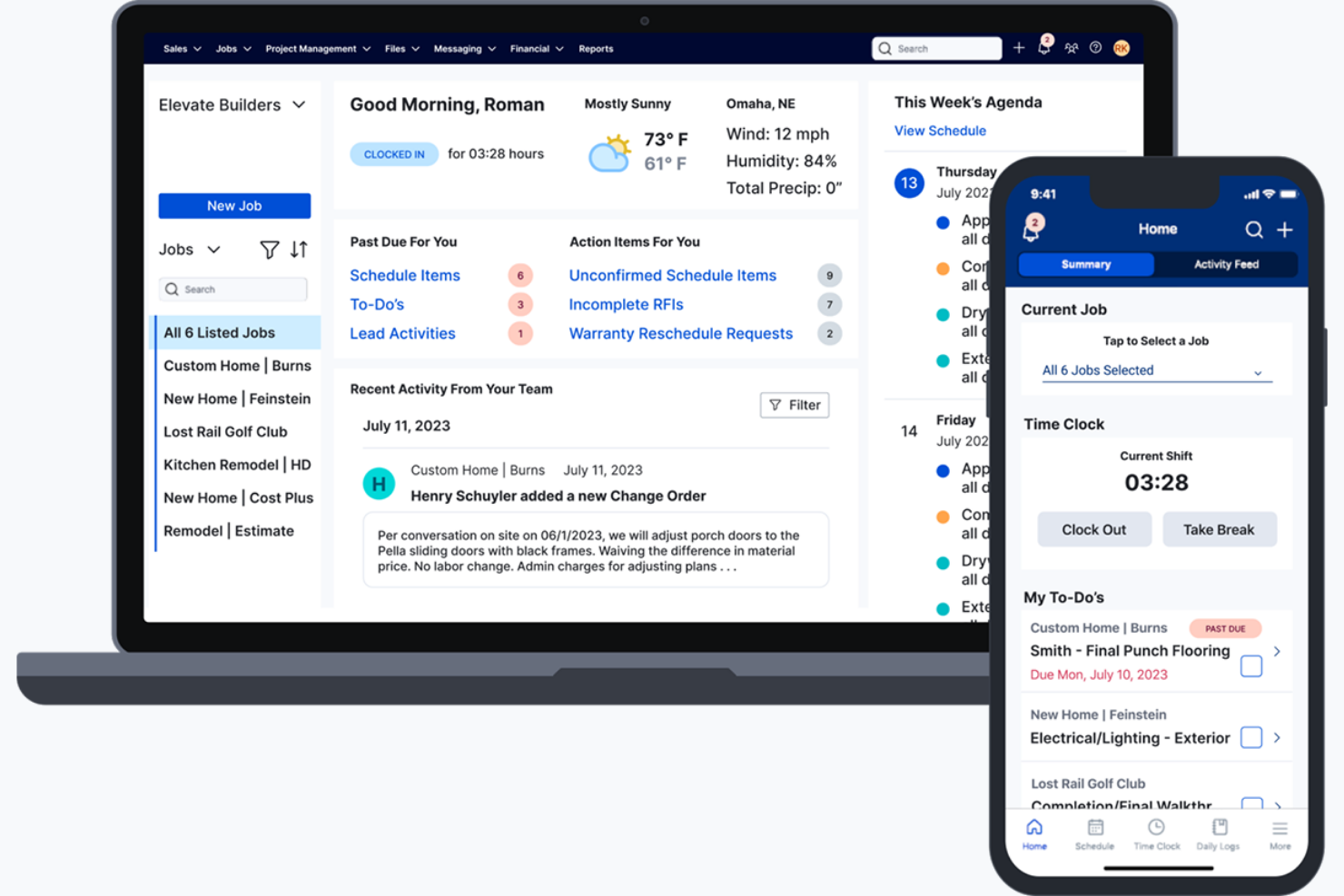
Buildertrend est un logiciel de gestion de projets de construction conçu pour permettre aux constructeurs résidentiels et commerciaux de gérer les projets, les plannings et les communications avec les clients. Il est utilisé par les entrepreneurs et les professionnels de la rénovation pour accroître l’efficacité des projets et la satisfaction des clients.
Pourquoi c’est une bonne alternative à Procore : Buildertrend propose des fonctionnalités telles que la planification, la budgétisation et des outils de communication avec les clients, ce qui en fait une solution idéale pour les constructeurs à la recherche d’une solution tout-en-un. Ces outils aident votre équipe à gérer les projets du début à la fin, en veillant à ce que tout reste sur la bonne voie. L’accent mis sur la fourniture d’une plateforme complète de gestion de projets la distingue de Procore, en offrant une approche intégrée de la gestion de la construction.
Fonctionnalités et intégrations remarquables :
Les fonctionnalités comprennent le suivi du temps pour surveiller les coûts de main-d’œuvre, le stockage de documents pour accéder facilement aux fichiers des projets et la gestion des ordres de modification pour traiter les ajustements. Vous pouvez également utiliser des outils de gestion des appels d’offres pour gérer le processus d’appel d’offres et obtenir davantage de projets.
Les intégrations comprennent QuickBooks, Xero, Gusto, Salesforce, HubSpot et Pipedrive.
Pros and Cons
Pros:
- Solution complète de gestion de projets
- Solides fonctionnalités de planification
- Outils de budgétisation efficaces
Cons:
- Courbe d’apprentissage pour les équipes qui débutent avec les logiciels de construction
- Limité pour les projets de construction de grande envergure

Idéal pour la collaboration en temps réel sur les chantiers
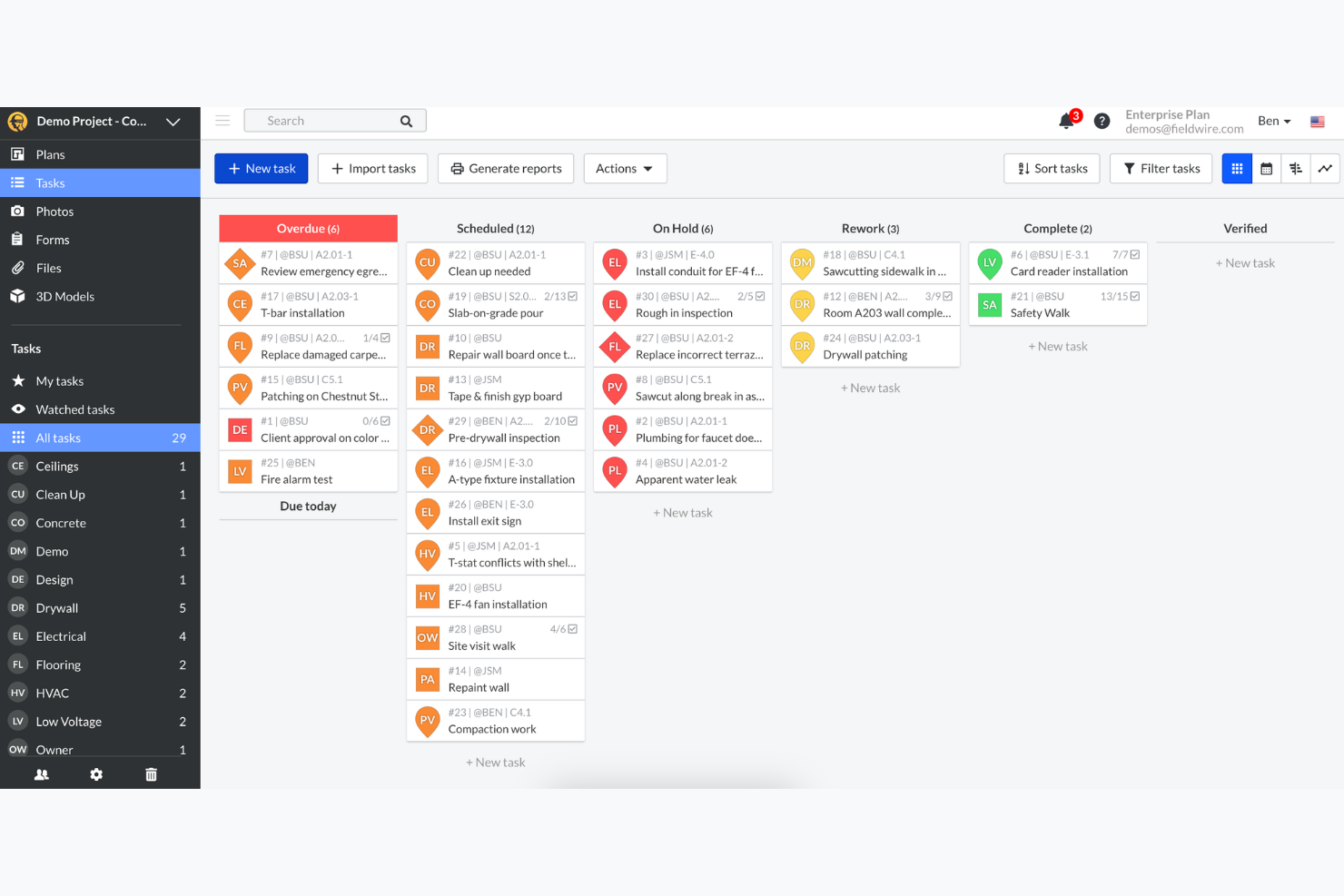
Fieldwire est un logiciel de gestion de chantier conçu pour permettre aux équipes de construction de coordonner les tâches et de gérer les projets sur site. Il est principalement utilisé par les responsables de construction, les ingénieurs et les travailleurs sur le terrain afin de simplifier la communication et de garantir l’efficacité des projets.
Pourquoi c’est une bonne alternative à Procore : Fieldwire propose des fonctionnalités telles que la gestion des tâches, la consultation des plans et le suivi des problèmes, améliorant ainsi la collaboration en temps réel sur les chantiers. Ces outils permettent à votre équipe de rester connectée et informée tout au long du cycle de vie du projet. L’accent mis sur les mises à jour en temps réel et la collaboration sur le terrain en fait un choix distinct pour les équipes ayant besoin d’une gestion efficace sur site.
Fonctionnalités et intégrations remarquables :
Les fonctionnalités comprennent la gestion des listes de réserves pour suivre les problèmes du projet, la planification des tâches pour que tout le monde reste informé, ainsi que la documentation photographique pour constituer des dossiers visuels du projet. Vous pouvez utiliser les outils de création de rapports pour obtenir des informations sur l’avancement du projet et les performances de l’équipe.
Les intégrations comprennent Dropbox, Box, OneDrive, Google Drive, QuickBooks, Datagrid et Microsoft Project.
Pros and Cons
Pros:
- Efficace pour la gestion sur le terrain
- Outils performants de coordination des tâches
- Prend en charge les mises à jour en temps réel
Cons:
- Fonctionnalités avancées limitées
- Axé sur les opérations sur le terrain

BuildOps
Idéal pour les entrepreneurs commerciaux
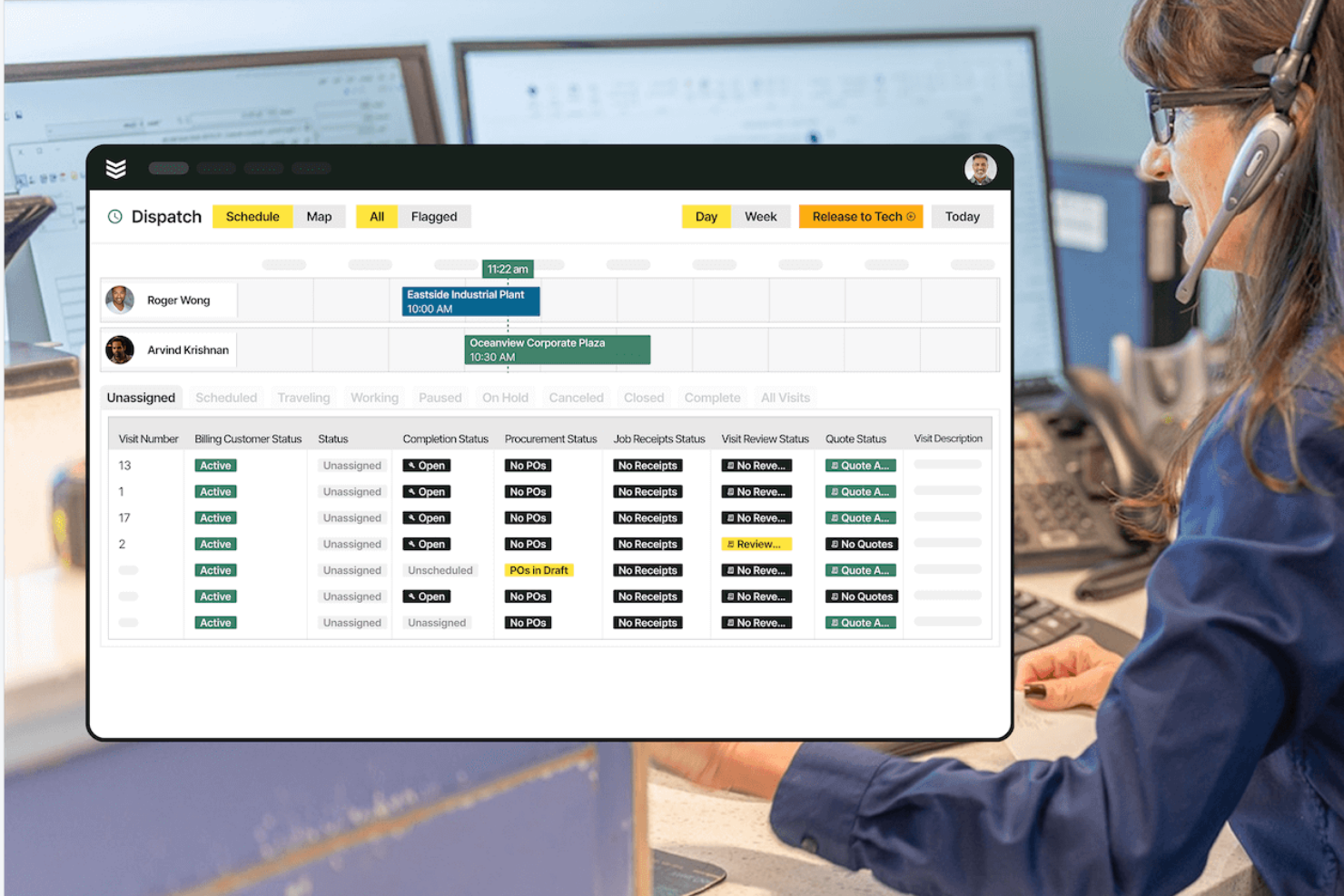
BuildOps est un logiciel de gestion des services sur site et des projets conçu pour les entrepreneurs commerciaux afin de superviser leurs opérations et de simplifier leurs flux de travail. Il est principalement utilisé par les entreprises des secteurs du HVAC, de la plomberie et de l'électricité pour gérer efficacement les tâches de service et les projets.
Pourquoi c'est une bonne alternative à Procore : BuildOps propose des fonctionnalités telles que la répartition des interventions, la gestion des ordres de travail et la maintenance préventive, offrant ainsi aux entrepreneurs commerciaux un ensemble pratique d'outils de gestion de projet conçus pour les opérations quotidiennes sur le terrain et au bureau. Ces fonctionnalités aident les équipes à coordonner les tâches, à respecter les calendriers des projets et à soutenir les flux de travail de construction dans le cadre d'activités axées sur les services. Grâce à ses outils de collaboration intégrés et à son approche de bout en bout de la gestion des appels de service et de la maintenance récurrente, il répond aux besoins spécifiques des entrepreneurs commerciaux.
Fonctionnalités et intégrations remarquables :
Les fonctionnalités comprennent la gestion des stocks pour suivre les pièces et les fournitures, la gestion des clients pour améliorer les interactions avec eux, ainsi que l'accès mobile pour permettre la collaboration des équipes en déplacement. Vous pouvez également utiliser des outils d'analyse pour obtenir des informations sur les performances de l'entreprise et optimiser les opérations.
Les intégrations comprennent QuickBooks, Sage Intacct, NetSuite et Viewpoint.
Pros and Cons
Pros:
- Conçu pour les entrepreneurs commerciaux
- Gestion performante des ordres de travail
- Fonctionnalités efficaces de répartition des interventions
Cons:
- Axé sur les secteurs fondés sur les services
- Limité pour les projets de grande envergure

Idéal pour les constructeurs sur mesure et les rénovateurs
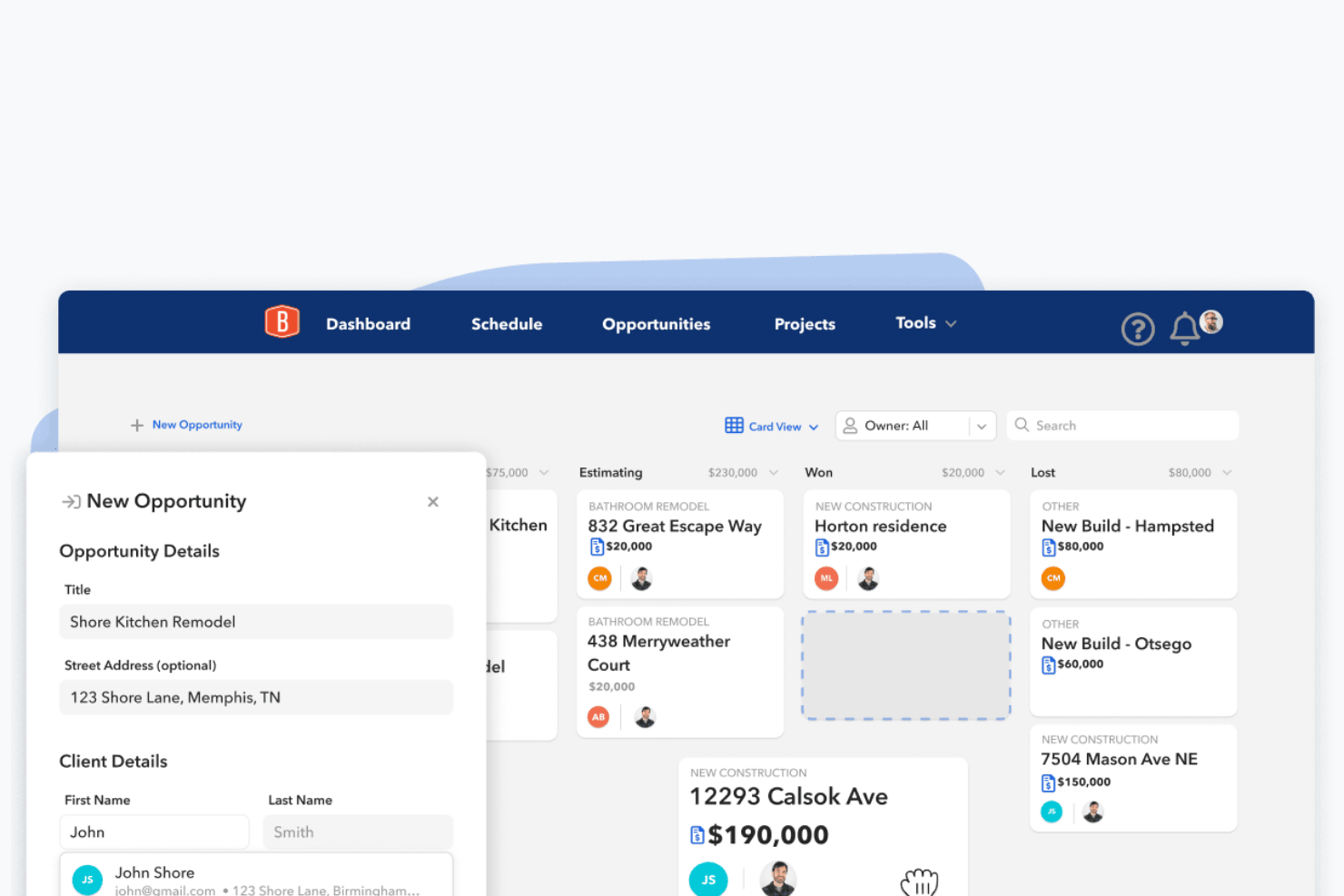
BuildBook est un logiciel de gestion de la construction conçu pour les constructeurs sur mesure et les rénovateurs afin de gérer les projets et les communications avec les clients. Il est utilisé par les petites et moyennes entreprises de construction pour accroître la transparence des projets et la satisfaction des clients.
Pourquoi c'est une bonne alternative à Procore : BuildBook aide les constructeurs à maintenir la clarté, la cohérence et la satisfaction des clients tout au long de chaque phase d'un projet. Ses outils de communication, ses calendriers de projet et ses journaux quotidiens permettent aux équipes et aux propriétaires de rester alignés, tandis que des modules dédiés répondent aux besoins organisationnels des constructeurs sur mesure. Ces fonctionnalités offrent une meilleure visibilité sur l'avancement des projets et peuvent améliorer la rentabilité globale en réduisant les malentendus, les retards et les reprises.
Fonctionnalités et intégrations remarquables :
Les fonctionnalités comprennent le partage de photos pour documenter visuellement l'avancement des projets, des outils de budgétisation pour suivre les dépenses et la gestion des tâches pour garantir l'achèvement en temps voulu des activités du projet. Vous pouvez également utiliser les fonctionnalités de collaboration d'équipe pour que tout le monde reste aligné et informé.
Les intégrations comprennent QuickBooks.
Pros and Cons
Pros:
- Prise en charge mobile
- Outils de communication solides avec les clients
- Documentation efficace des projets
Cons:
- Options de rapports limitées
- Peu d'options de collaboration pour les partenaires commerciaux

Idéal pour les entreprises de services à domicile
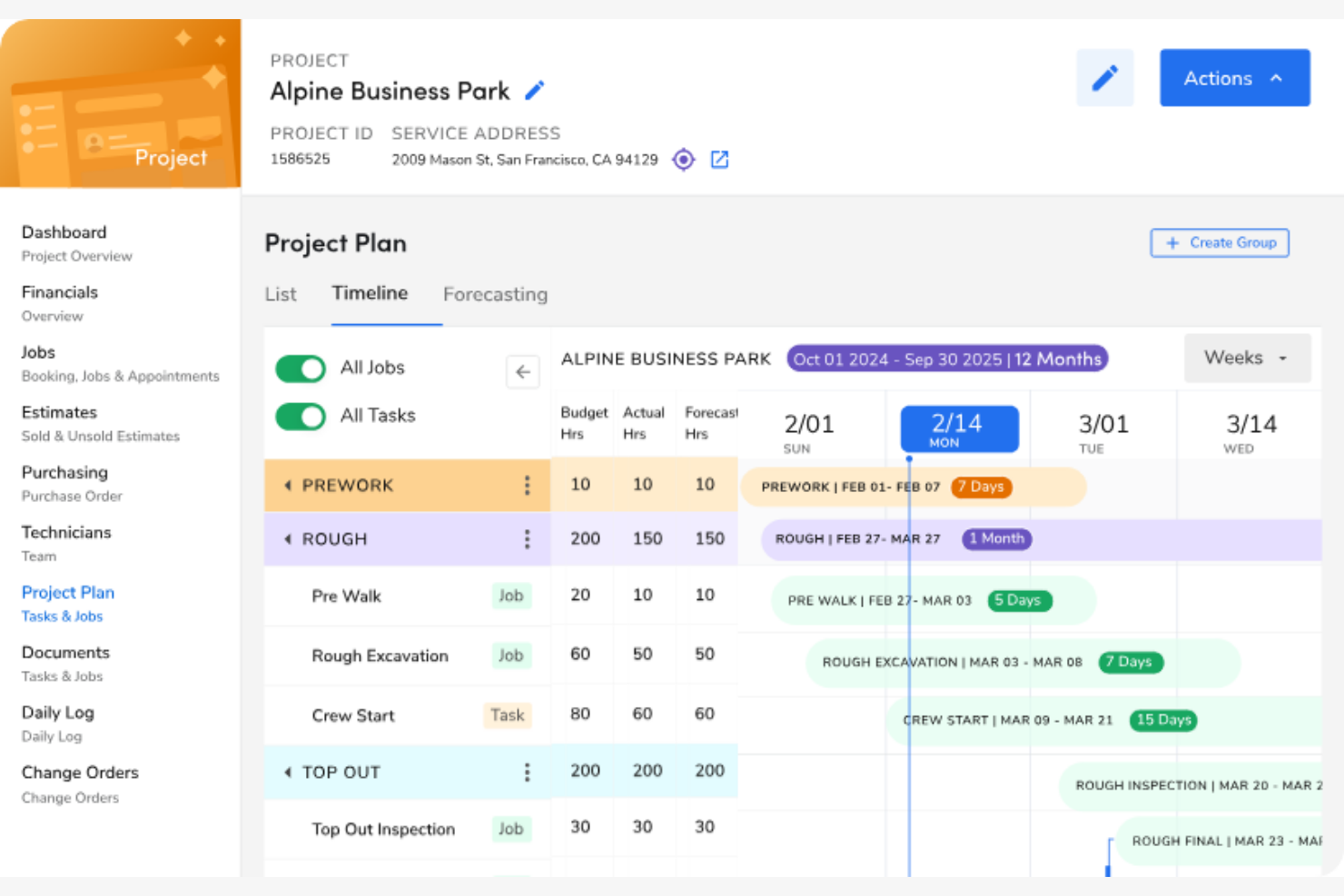
ServiceTitan est un logiciel de gestion des interventions conçu pour les entreprises de services à domicile, comme celles spécialisées dans le chauffage, la ventilation et la climatisation, la plomberie et l'électricité. Il aide les propriétaires d'entreprise à gérer efficacement la planification, la répartition des interventions et les communications avec les clients.
Pourquoi c'est une bonne alternative à Procore : ServiceTitan offre des fonctionnalités telles que l'accès mobile, la gestion de la relation client et la facturation, ce qui en fait une solution idéale pour gérer les opérations sur le terrain. Ces outils vous aident à simplifier la planification des interventions et à améliorer la satisfaction des clients. Son orientation vers les secteurs des services à domicile le différencie de Procore, en fournissant des solutions adaptées aux petites et moyennes entreprises de services.
Fonctionnalités et intégrations remarquables :
Les fonctionnalités comprennent des outils de répartition pour optimiser les opérations sur le terrain, l'automatisation du marketing pour renforcer l'engagement des clients et des outils de reporting pour obtenir des informations sur les performances de l'entreprise. Vous pouvez également gérer les stocks afin de disposer des bonnes pièces au moment voulu.
Les intégrations comprennent Google, Sage Intacct et GreenSky.
Pros and Cons
Pros:
- Idéal pour les entreprises de services à domicile
- Outils efficaces de gestion des clients
- Prend en charge les opérations mobiles sur le terrain
Cons:
- Axé sur des secteurs de services spécifiques
- Limité pour les projets de construction à grande échelle

Idéal pour le suivi simple des projets
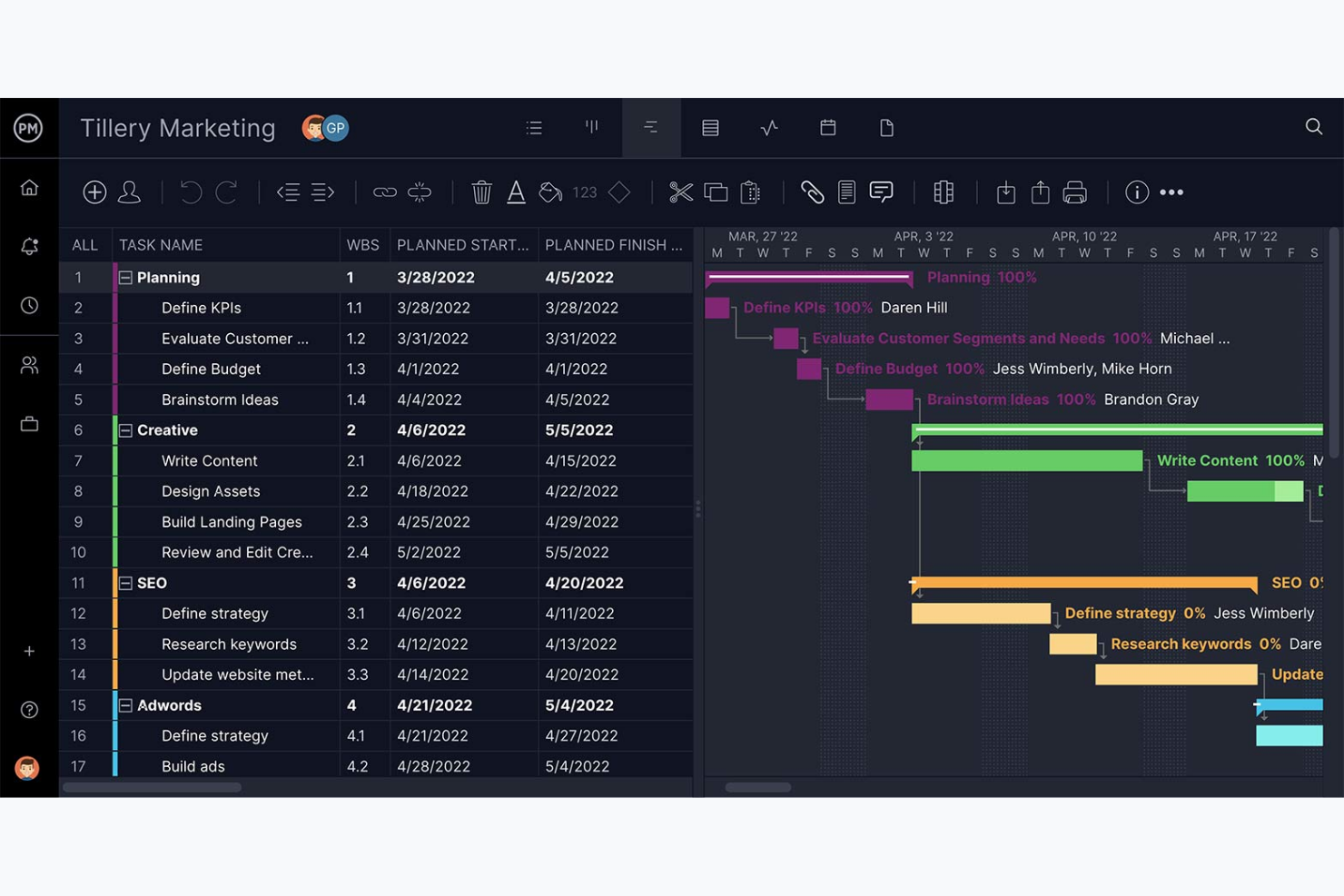
ProjectManager est un logiciel de gestion de projet hébergé dans le cloud, conçu pour les équipes qui souhaitent gérer efficacement les tâches, les projets et les ressources. Il est largement utilisé par les chefs de projet et les responsables d'équipe dans divers secteurs pour planifier, suivre et rendre compte de l'avancement des projets.
Pourquoi c'est une bonne alternative à Procore : ProjectManager propose des fonctionnalités telles que des tableaux de bord en temps réel, la gestion des tâches et l'allocation des ressources dans une interface conviviale, afin d'aider votre équipe à collaborer efficacement sur les chantiers. Ces outils assurent la transparence et permettent à chacun de rester informé et coordonné. L'accent mis sur les mises à jour en temps réel et la collaboration offre une approche interactive de la gestion des projets.
Fonctionnalités et intégrations remarquables :
Les fonctionnalités comprennent des diagrammes de Gantt pour la planification visuelle des projets, le suivi du temps pour surveiller les heures consacrées aux projets et la gestion de la charge de travail pour équilibrer les efforts de l'équipe. Vous pouvez également utiliser des outils de reporting pour obtenir des informations et prendre des décisions fondées sur les données.
Les intégrations comprennent Microsoft Project, Microsoft Excel, Google Drive, Dropbox, Slack, Trello, Jira, Salesforce et QuickBooks.
Pros and Cons
Pros:
- Mises à jour des projets en temps réel
- Gestion efficace des tâches
- Prend en charge l'allocation des ressources
Cons:
- Peut être déroutant au début
- Fonctionnalités mobiles limitées

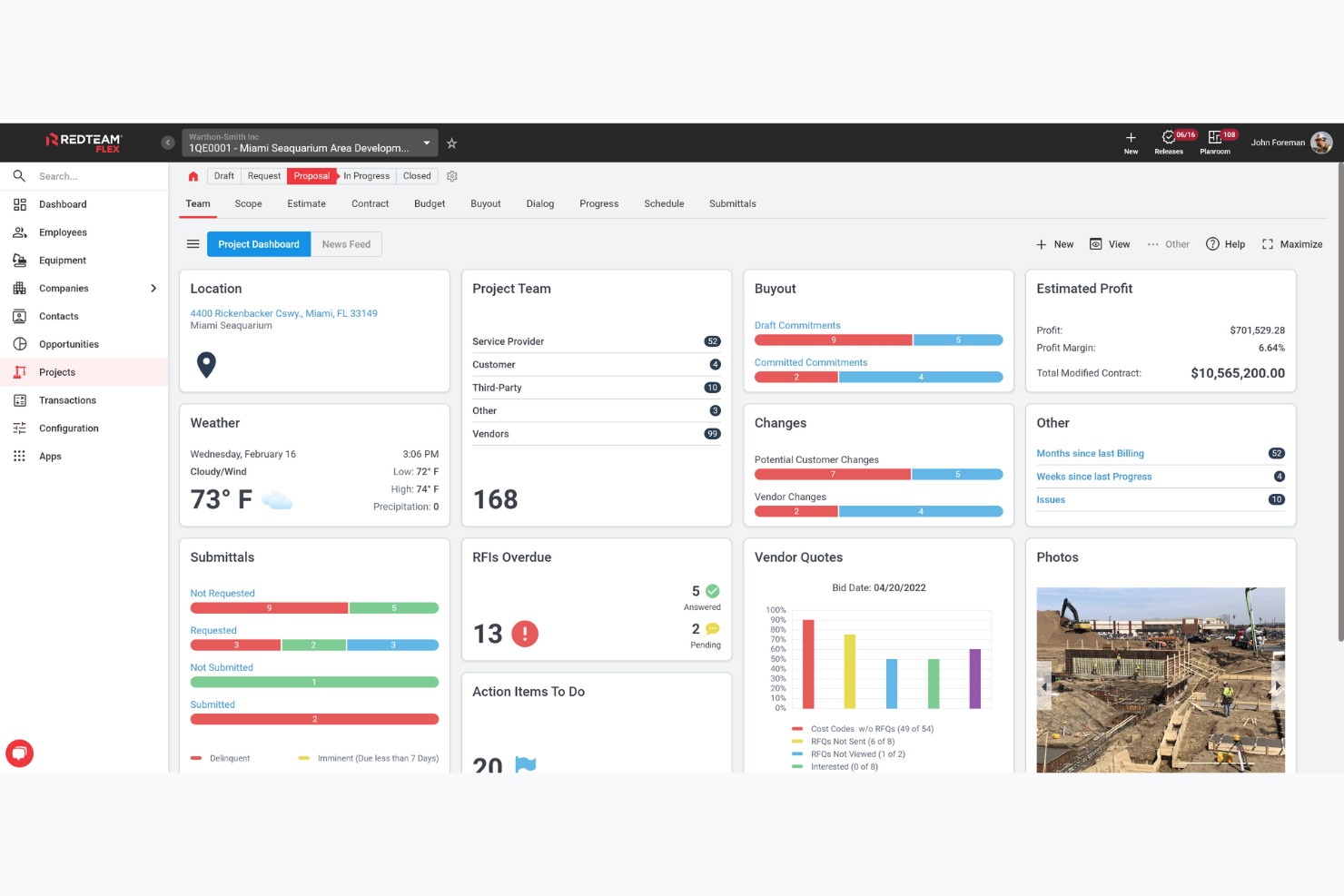
RedTeam est un logiciel de gestion de projets de construction conçu pour les entrepreneurs généraux afin de gérer les projets, de l'appel d'offres à la clôture. Il est utilisé par les équipes de construction pour gérer la gestion de projets, les finances et la collaboration.
Pourquoi c'est une bonne alternative à Procore : RedTeam propose des fonctionnalités telles que la gestion des appels d'offres, la gestion des contrats et la gestion sur le terrain, ce qui en fait une solution idéale pour les entrepreneurs généraux. Il fournit des outils pour gérer la communication avec les sous-traitants, le suivi des coûts et la documentation des projets. Ces fonctionnalités favorisent une exécution efficace des projets et garantissent que tous les membres de l'équipe sont sur la même longueur d'onde.
Fonctionnalités et intégrations remarquables :
Les fonctionnalités comprennent la gestion des documents pour faciliter l'accès aux fichiers de projet, le calcul des coûts des travaux pour suivre les dépenses et la gestion des ordres de modification pour gérer les ajustements apportés aux projets. Vous pouvez également utiliser des outils de planification pour organiser les échéances et garantir la livraison des projets dans les délais.
Les intégrations comprennent QuickBooks, Sage 100 Contractor, Sage 300 CRE, Acumatica et Docusign.
Pros and Cons
Pros:
- Conçu pour les entrepreneurs généraux
- Solides outils de suivi des coûts
- Gestion efficace des appels d'offres
Cons:
- Axé sur les travaux réalisés par des entrepreneurs généraux
- Flexibilité limitée pour les autres secteurs

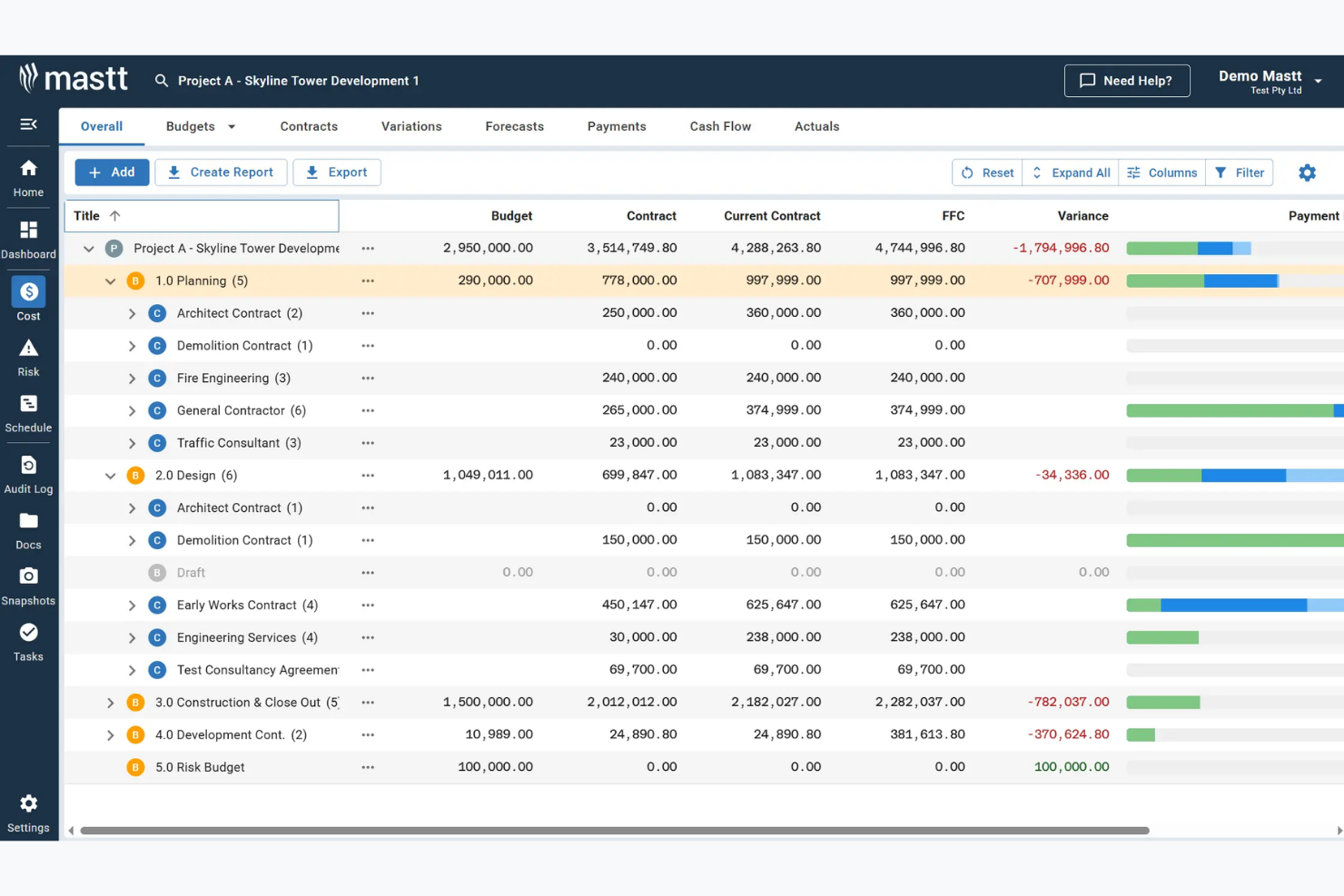
Mastt est un logiciel de gestion de projets de construction basé sur l'IA, conçu pour améliorer la réalisation des projets et l'efficacité opérationnelle. Il est principalement utilisé par les propriétaires de projets, les promoteurs immobiliers et les petites entreprises dans des secteurs tels que l'aviation et la santé.
Pourquoi c'est une bonne alternative à Procore : Mastt propose la saisie de données basée sur l'IA, des tableaux de bord en temps réel et des contrôles de projet automatisés, qui favorisent une gestion de projet et une prise de décision avancées. Ces fonctionnalités vous aident à gérer efficacement les coûts, les risques et les calendriers, en offrant une vue d'ensemble claire de tous les projets. La plateforme se concentre sur les outils d'IA pour l'analyse des documents et l'examen des contrats, offrant ainsi des capacités de gestion des données.
Fonctionnalités et intégrations remarquables :
Les fonctionnalités comprennent la budgétisation des projets, l'analyse des écarts et la prévision des flux de trésorerie. Le logiciel propose également la gestion des calendriers, la gestion des risques ainsi que des outils d'IA pour l'examen des documents et des paiements. Ces fonctionnalités fournissent à votre équipe des données en temps réel et des capacités simplifiées de gestion de projet.
Les intégrations ne sont pas répertoriées publiquement.
Pros and Cons
Pros:
- Informations sur les données basées sur l'IA
- Suivi des projets en temps réel
- Gestion simplifiée des risques
Cons:
- Informations publiques limitées sur les tarifs
- Aucune information sur les intégrations

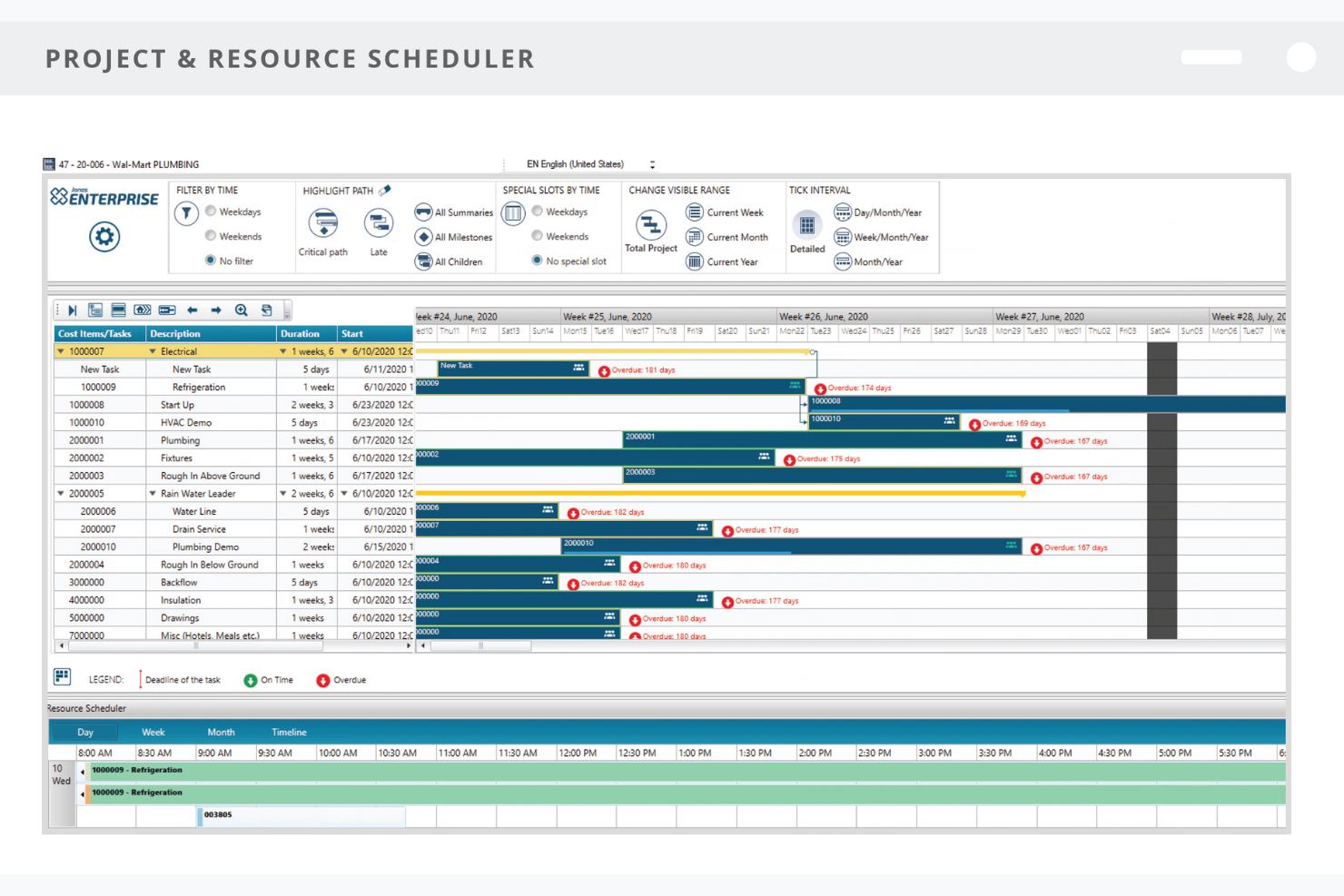
Jonas Construction Software est un logiciel de gestion de la construction conçu pour les entrepreneurs spécialisés. Il fournit des outils permettant de gérer efficacement la comptabilité, la gestion de projets et les opérations de service. Il est utilisé par les entreprises de construction pour gérer leurs flux de travail et améliorer leur supervision financière.
Pourquoi c'est une bonne alternative à Procore : Jonas Construction Software fournit des outils de calcul des coûts de chantier, de gestion des services et de contrôle des documents, conçus pour aider les entrepreneurs spécialisés à améliorer le suivi de leurs projets. Les équipes peuvent gérer les chantiers, suivre les dépenses et tenir à jour une documentation détaillée des projets, notamment les documents soumis, les relevés de quantités et les annotations. Les autorisations intégrées garantissent que les bons membres de l'équipe ont accès aux documents essentiels, contribuant ainsi à maintenir l'exactitude et la responsabilité dans l'ensemble des projets. Grâce à ses fonctionnalités adaptées aux besoins des entrepreneurs spécialisés, Jonas Construction Software favorise des opérations efficaces et de meilleurs résultats de projet.
Fonctionnalités et intégrations remarquables :
Les fonctionnalités comprennent la gestion des équipements pour suivre et entretenir les actifs, le traitement de la paie pour gérer les paiements des employés et le suivi des stocks pour gérer les niveaux de stock. Vous pouvez également utiliser des outils de création de rapports pour obtenir des informations sur les performances financières et l'avancement des projets.
Les intégrations comprennent Trimble, QuickBid, Fleet Complete et Procore.
Pros and Cons
Pros:
- Adapté aux entrepreneurs spécialisés
- Solides fonctionnalités de calcul des coûts de chantier
- Outils efficaces de gestion des services
Cons:
- Axé sur des marchés de niche
- Limité pour les projets de grande envergure
Autres alternatives à Procore
Voici quelques alternatives supplémentaires à Procore qui n’ont pas été retenues dans ma sélection, mais qui méritent tout de même votre attention :


Comment j’évalue les alternatives à Procore
Je divise mon évaluation en deux niveaux : le socle minimal que l’outil doit atteindre — gestion des coûts de chantier, situations de travaux, paiements des sous-traitants — et les éléments différenciateurs qui distinguent une plateforme d’une autre.
Fonctionnalités principales (Critères de base pour cette liste)
Lorsque je sélectionne les outils pour ma liste, j’attribue à chacun une note de 0 (fonctionnalité absente) à 5 (excellence dans ce domaine) pour chaque fonctionnalité clé listée ci-dessous. Ensuite, je calcule le score total de l’outil en pourcentage. Chaque outil doit obtenir un score total minimum de 65 % pour être pris en considération.
- Gestion des coûts de chantier : Je vérifie si une plateforme permet de ventiler les coûts par main-d’œuvre, matériaux, équipements et frais généraux par code de coût, et non pas seulement en montants globaux par projet.
- Gestion du budget et des avenants : Chaque outil doit vous permettre de suivre les avenants avec des workflows d’approbation et de visualiser leur impact en temps réel sur la valeur initiale du contrat.
- Comptes fournisseurs/clients et paiements des sous-traitants : Je recherche des workflows AP/AR spécifiques au secteur BTP, comme la gestion des retenues de garantie, la collecte des quittances de paiement et le traitement des demandes de paiement.
- Situations de travaux et reporting financier : La plateforme doit générer des plannings de situations et des rapports d’avancement sans imposer à votre équipe des calculs manuels sous tableur.
- Intégration comptable/ERP : J’évalue si l’outil se synchronise dans les deux sens avec les principaux systèmes comptables du BTP comme Sage 300 CRE, Viewpoint ou Acumatica.
- Gestion des engagements et des contrats : Les bons de commande et sous-traitances doivent être directement rattachés aux budgets de projet pour que les coûts engagés soient visibles dès avant l’arrivée des factures.
Une fois ma liste d’outils répondant à ces critères établie, j’examine ce qui distingue chaque plateforme.
Facteurs différenciants (ce qui sépare les fournisseurs)
Voici comment je compare et contraste les différents fournisseurs :
Fonctionnalités distinctives
La facturation d’avancement au format AIA est importante car elle conditionne la rapidité avec laquelle votre équipe peut générer les situations de paiement maître d’ouvrage sans reformater les données sous Excel. J’analyse également la prise en charge multi-structure — les entreprises avec plusieurs sociétés ou joint-ventures ont besoin de consolidations financières sans multiplier les bases de données. La prévision de trésorerie, liée aux échéanciers de paiement et cycles de règlements, est aussi un critère fort, notamment pour les DAF pilotant la liquidité sur de nombreux chantiers actifs.
Au-delà des fonctionnalités
La profondeur d’intégration est un critère majeur — je vérifie si la plateforme se synchronise en bidirectionnel avec votre ERP existant ou outils terrain comme Procore lui-même, car les exports à sens unique compliquent les rapprochements en fin de mois. L’accompagnement à la mise en place compte également. Migrer depuis un système hérité en cours de projet peut rallonger les clôtures, donc je privilégie les éditeurs disposant d’équipes d’onboarding spécialisées construction. Enfin, je tiens compte de l’adéquation à la taille de l’entreprise, car une plateforme conçue pour les grands groupes peut submerger l’équipe financière d’un sous-traitant spécialisé.
Pourquoi chercher une alternative à Procore ?
Bien que Procore soit un bon choix de logiciel de gestion de la construction, plusieurs raisons peuvent pousser certains utilisateurs à rechercher d’autres solutions. Vous cherchez peut-être une alternative à Procore parce que…
- Vous avez besoin d’une option plus économique
- Votre équipe a besoin de fonctionnalités hors ligne
- Vous souhaitez une meilleure intégration avec les outils existants
- Vos projets sont de plus petite envergure
- Vous avez besoin d’un logiciel dont la prise en main est plus simple
- Vous souhaitez bénéficier d’une assistance dans différentes langues
Si l’un de ces points vous correspond, vous êtes au bon endroit. Ma liste contient plusieurs solutions logicielles de gestion de la construction mieux adaptées aux équipes confrontées à ces difficultés avec Procore et à la recherche de solutions alternatives.
Principales fonctionnalités de Procore
Voici quelques-unes des principales fonctionnalités de Procore, afin de vous aider à mettre en regard et à comparer ce que proposent les solutions alternatives :
- Outils de préconstruction : Comprend la gestion des appels d’offres, le BIM, l’estimation et la préqualification pour aider votre équipe à se préparer efficacement.
- Exécution du projet : Offre une gestion de projet complète ainsi qu’une supervision de la qualité & de la sécurité afin de maintenir les projets sur la bonne voie.
- Gestion des ressources : Fournit des outils pour planifier, suivre et gérer les équipements afin d’optimiser l’utilisation des ressources.
- Gestion financière : Gère les finances des projets, les intégrations comptables, la facturation et les paiements afin de maintenir le contrôle du budget.
- Procore Helix : Une couche d’IA qui fournit des analyses et des informations adaptées au secteur de la construction, améliorant ainsi la prise de décision.
- Gestion des documents : Centralise les documents des projets pour faciliter leur accès et la collaboration au sein de votre équipe.
- Accès mobile : Permet aux membres de l’équipe d’accéder aux informations des projets sur site via des appareils mobiles, assurant une connectivité permanente.
- Outils de création de rapports : Fournit des rapports personnalisables pour vous aider à analyser les performances des projets et à prendre des décisions éclairées.
- Fonctionnalités de collaboration : Facilite la communication et le travail d’équipe entre les différents services et parties prenantes.
- Gestion de la sécurité : Garantit la conformité aux normes de sécurité et aide à suivre efficacement les incidents et les inspections.