

Programvare for samtalekostnadsføring sporer, analyserer og fordeler telefonbruk og kostnader i virksomheten din. Hvis du leter etter de beste verktøyene for samtalekostnadsføring, er du sannsynligvis opptatt av å få kontroll over kommunikasjonsutgiftene, forbedre rapporteringen eller avdekke bruksmønstre på tvers av team eller lokasjoner.
Denne veiledningen gjennomgår de beste løsningene for samtalekostnadsføring, med detaljert innsikt i funksjoner, integrasjoner og implementeringsmetoder – slik at du trygt kan velge løsningen som passer best for bedre oversikt over telekommunikasjonen og kostnadskontroll.
Hvorfor du kan stole på våre programvareanbefalinger
6,700+
Reviews
20
Industry experts
16+
Evaluation factors
14
Years
Teamet vårt har testet og anmeldt programvare siden 2012. Vi er selv økonomiledere, så vi vet hvor vanskelig og hvor viktig det er å velge riktig programvare.
I denne guiden har vi vurdert verktøyene gjennom praktisk testing og uavhengig research og gitt dem poeng ut fra våre utvelgelseskriterier.
Anmeldelsene våre bygger på vår egen redaksjonelle vurdering. De er ikke et salgsargument.
Sammenligningstabell for programvare for samtalekostnadsføring
Sammenlign prisdetaljer for mine anbefalte programmer for samtalekostnadsføring i tabellen nedenfor.
| Tool | Best For | Trial Info | Price | ||
|---|---|---|---|---|---|
| 1 | Best for advanced usage analytics and alerts | Free demo available | Pricing upon request | Website | |
| 2 | Best for real-time dashboard visualizations | 14-day free trial available | From $89/month (billed annually) | Website | |
| 3 | Best for historical call trend analysis | Free demo available | Pricing upon request | Website | |
| 4 | Best for hospitality sector deployments | Not available | Pricing upon request | Website | |
| 5 | Best for flexible deployment options | Not available | Pricing upon request | Website | |
| 6 | Best for enterprise-scale telecom oversight | Free demo available | Pricing upon request | Website | |
| 7 | Best for customizable reporting options | Free demo available | Pricing upon request | Website | |
| 8 | Best for integration with major UC platforms | Free demo available | From $300/month | Website | |
| 9 | Best for centralized multi-site management | Free demo available | Pricing upon request | Website | |
| 10 | Best for integration with property management | Free demo available | Pricing upon request | Website |


Anmeldelser av den beste programvaren for samtalekostnadsføring
Nedenfor finner du mine detaljerte sammendrag av den beste programvaren for samtalekostnadsføring som kom med på kortlisten. Anmeldelsene mine gir en detaljert gjennomgang av funksjonene, integrasjonene og de beste bruksområdene for hver programvare, slik at du kan finne den som passer best for deg.
 Best for advanced usage analytics and alerts
- Free demo available
- Pricing upon request
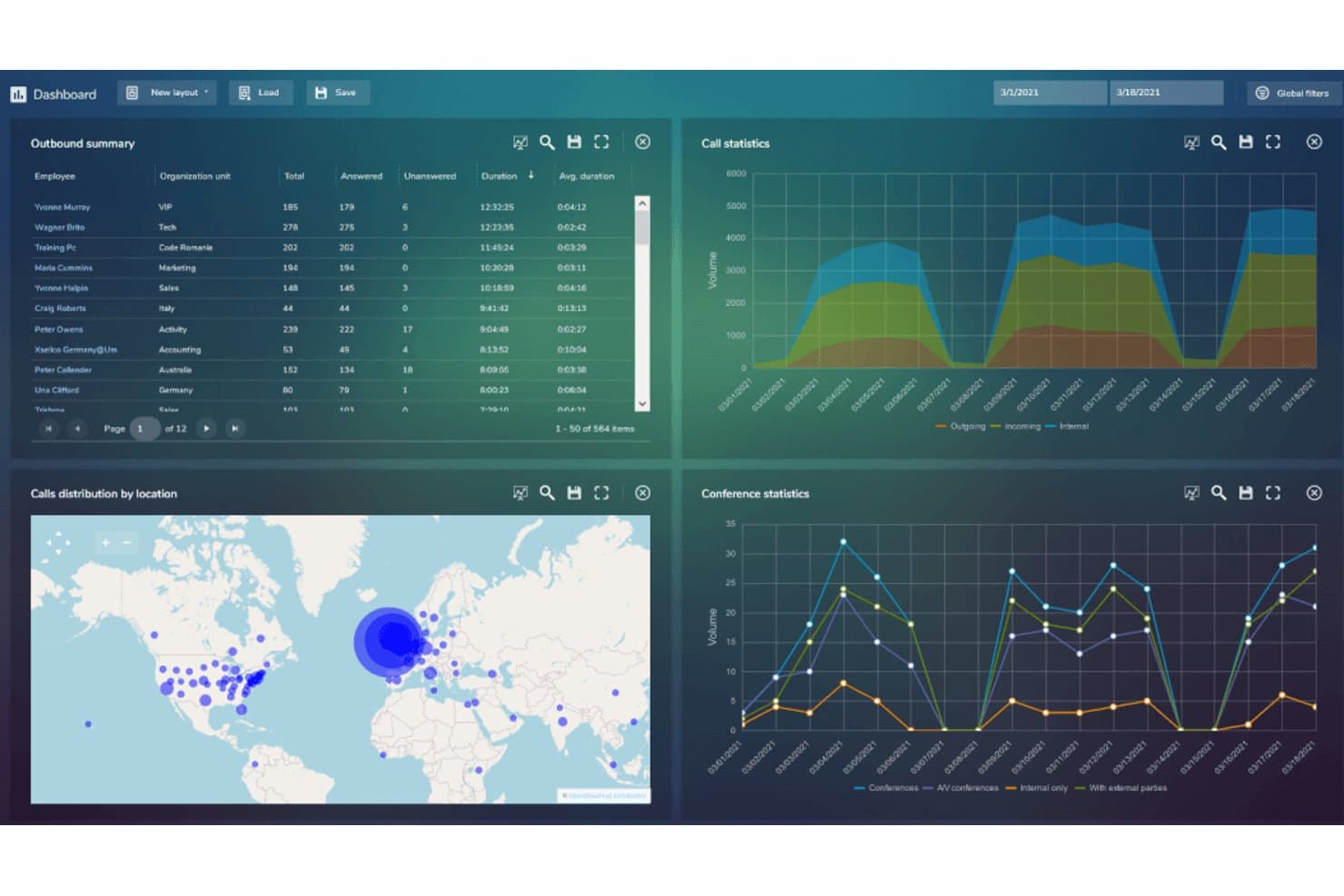
Avotus features a call accounting dashboard with outbound summaries, call statistics, geographic call distribution, and conference statistics. Avotus EUR is a call accounting platform that captures and reports on call detail records across legacy PBX, VoIP, and unified communications environments, with modules for cost allocation, rate management, trunk utilization, and compliance reporting.
Who Is Avotus Best For?
Avotus EUR is a strong fit for enterprise telecom and IT finance teams managing multi-site, multi-vendor environments that mix legacy PBX systems with modern VoIP and UC platforms.
Why I Picked Avotus
Avotus EUR earns its spot on my shortlist because the depth of its usage analytics goes well beyond standard CDR reporting. I particularly like the trunk utilization reporting, which calculates Grade of Service using Erlang-B and Erlang-C formulas, so I can identify capacity strain before it causes problems. The exception-based alerting covers 911 threat call notifications and suspicious call pattern detection, which I've found valuable when reviewing telecom security and compliance logs.
Avotus Key Features
- Multi-PBX and UC integration: Connects with over 140 legacy and IP PBX systems plus unified communications platforms.
- Departmental cost allocation: Assigns call costs to users or departments for internal chargeback and budget tracking.
- Rates and tariff module: Applies custom carrier rate tables to call records for accurate cost calculation across regions.
- Compliance and retention reporting: Supports legal audit needs and regulatory call data retention requirements.
Avotus Integrations
Avotus integrates with ReflectR and Cloudbeds.
Pros and Cons
Pros:
- Custom rate tables for multi-carrier billing
- Detailed departmental call and cost allocation
- Advanced trunk and capacity analytics dashboards
Cons:
- User interface feels outdated compared to peers
- Invoice audit features require additional modules
Learn more about Avotus: Best for real-time dashboard visualizations
- 14-day free trial available
- From $89/month (billed annually)
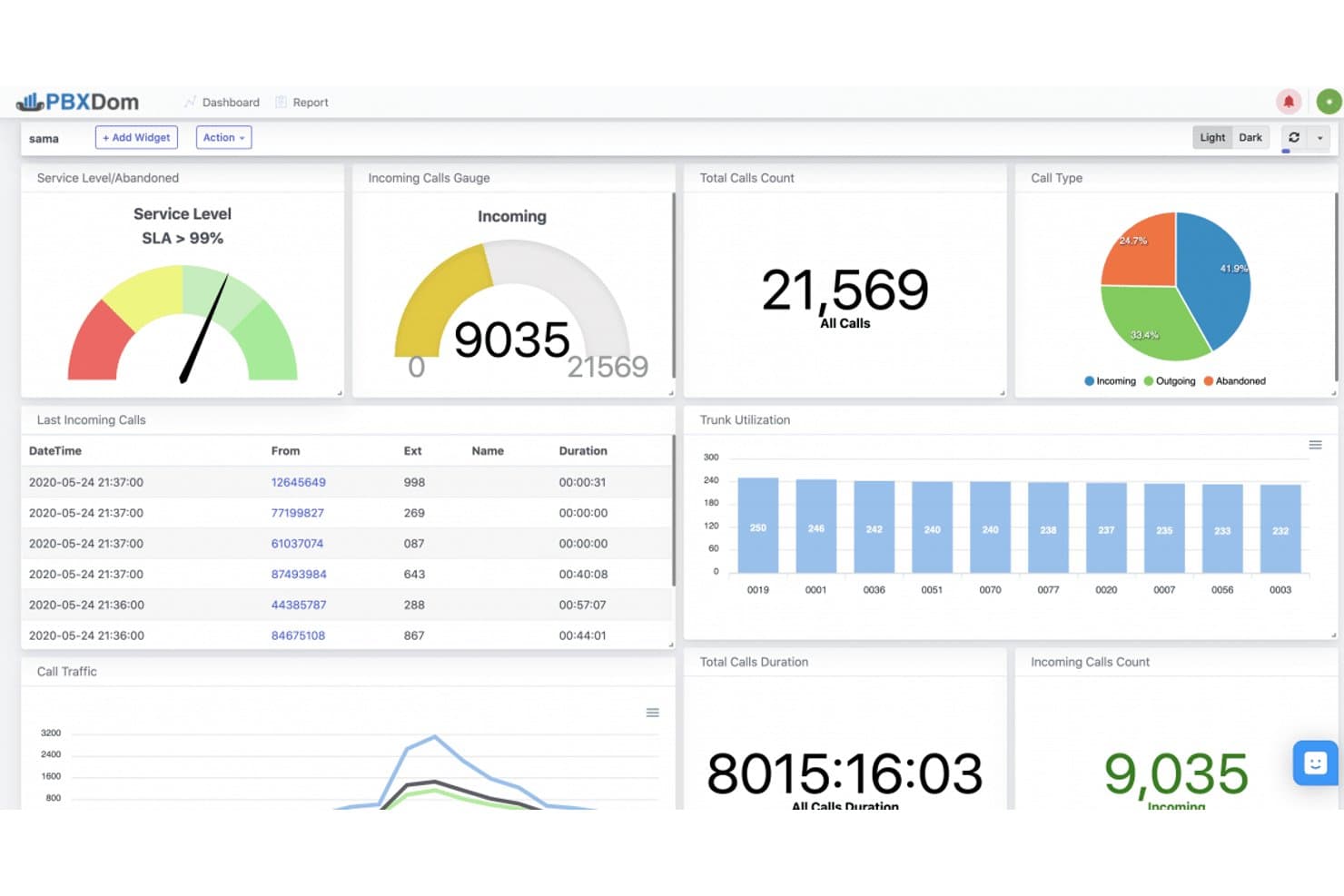
PBXDom offers a dashboard covering total calls, service levels, trunk utilization, call types, and traffic metrics for Cisco CallManager. PBXDom is a cloud-based call accounting and telecom expense platform that captures CDRs from major PBX systems, allocates call costs by user, department, and client, and delivers real-time reporting through customizable dashboards.
Who Is PBXDom Best For?
It's a strong fit for telecom expense managers and IT finance teams at multi-site organizations running Cisco, Avaya, Mitel, Panasonic, 3CX, or Asterisk-based phone systems.
Why I Picked PBXDom
PBXDom earns its spot on my shortlist because of how much real-time visibility it gives me into call activity across every extension and department. I can build custom dashboards from up to 70 widgets, combining live call volumes, cost-per-department breakdowns, and extension-level data in a single view. With dashboard sharing built in on Pro plans and up, I can push those views directly to department heads without giving them full system access.
PBXDom Key Features
- Advanced call reporting: Generate detailed call logs with filtering by user, department, extension, and time period.
- Account and client matter codes: Assign calls to specific employees, departments, or clients using unique codes for precise allocation.
- Custom carrier rate management: Configure and manage telecom provider rate tables to calculate call costs before invoices arrive.
- Multi-PBX integration: Connects with Cisco, Avaya, Mitel, Panasonic, 3CX, and Asterisk platforms for consolidated call data capture.
PBXDom Integrations
PBXDom offers native integrations with Cisco, Avaya, Mitel, Panasonic, 3CX, Asterisk, and Slack. It also connects with Zapier and provides an API and webhooks for custom integrations.
Pros and Cons
Pros:
- Extensive PBX support for on-premise systems
- Custom reporting for departments and users
- Real-time dashboards with live call data
Cons:
- Doesn’t support modern UCaaS platforms like Teams
- No automated telecom invoice reconciliation
Learn more about PBXDom: Best for historical call trend analysis
- Free demo available
- Pricing upon request
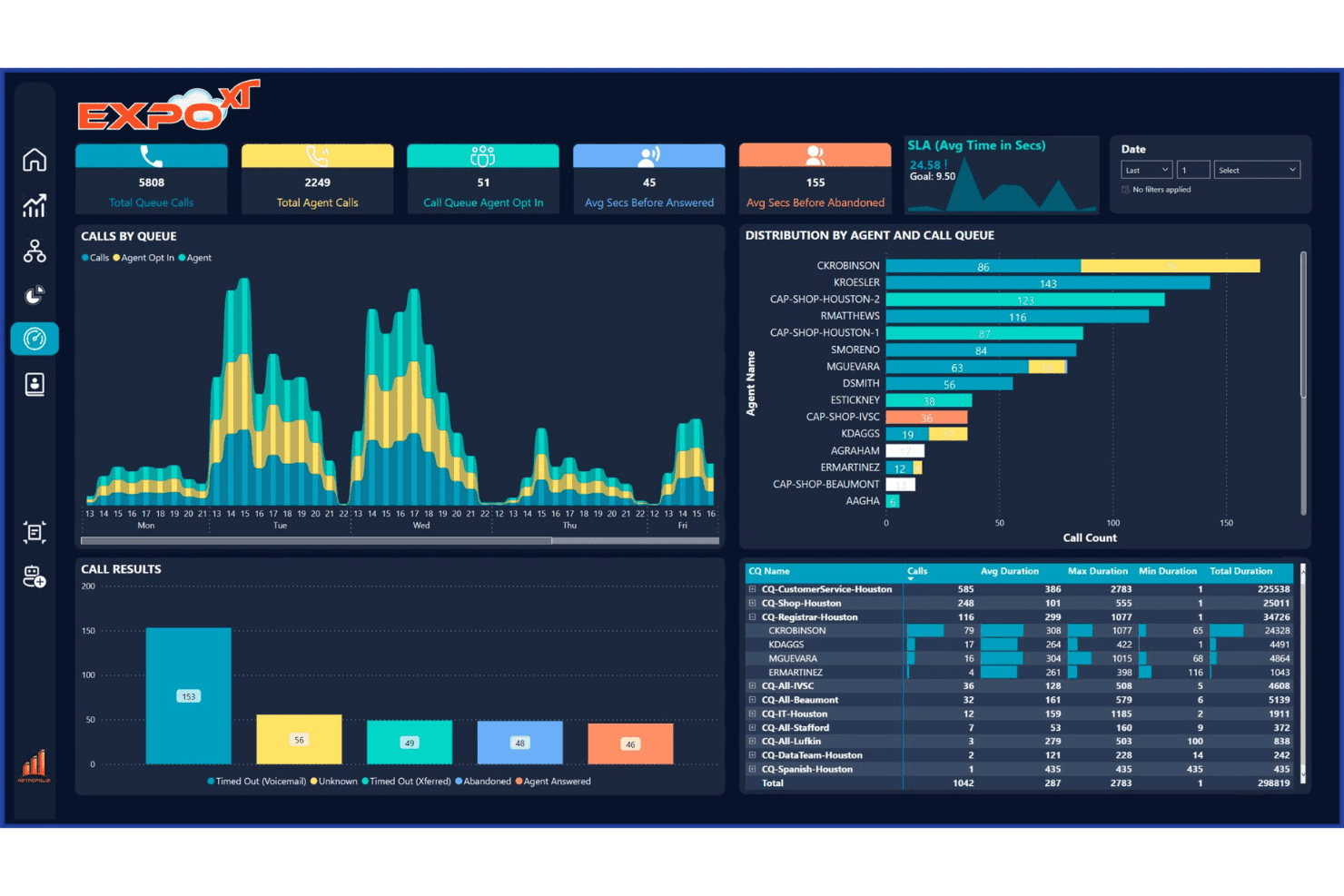
Metropolis ProftWatch lets users access historical call trends and performance insights. Metropolis ProfitWatch is a hospitality-focused call accounting system that captures CDRs, applies customizable rate tables, and bills guest calls back to your property management system.
Who Is Metropolis ProfitWatch Best For?
It's a strong fit for hotels, resorts, and casinos that need to track and bill guest calls through an existing property management system.
Why I Picked Metropolis ProfitWatch
I picked ProfitWatch as one of the best because its trunk analysis and multi-level usage reporting give you a genuine longitudinal view of call activity across your organization. I find the geographic hot spot map especially useful for identifying call volume concentrations by region over time. Scheduled HTML report delivery means I'm getting consistent data snapshots on a set cadence, without manual exports every time I need to review trends.
Metropolis ProfitWatch Key Features
- Customizable rate tables: Set up unique rate structures to match various carrier requirements and special hotel promotions.
- PMS integration: Smoothly connects with major property management systems to automate call billing to guest accounts.
- 911 and toll-fraud alerts: Instantly notifies staff about emergency calls or suspicious calling patterns.
- Multi-PBX compatibility: Works with a wide range of PBX systems, including Avaya, Mitel, Cisco, and NEC.
Metropolis ProfitWatch Integrations
Metropolis ProfitWatch offers native integrations with Power BI, Avaya, Cisco, NEC, Mitel, Samsung, ShoreTel, WebRezPro, Microsoft Teams, Zoom, Webex Calling, and NICE. Their collaboration analytics can be integrated with CRM systems like Salesforce, Zoho, and Microsoft Dynamics.
Pros and Cons
Pros:
- Telephony hardware compatibility across major brands
- PMS integration for automated guest billing
- Historical call volume trend reporting
Cons:
- Department-level cost allocation not supported
- Lacks telecom invoice reconciliation workflow
Learn more about Metropolis ProfitWatch:
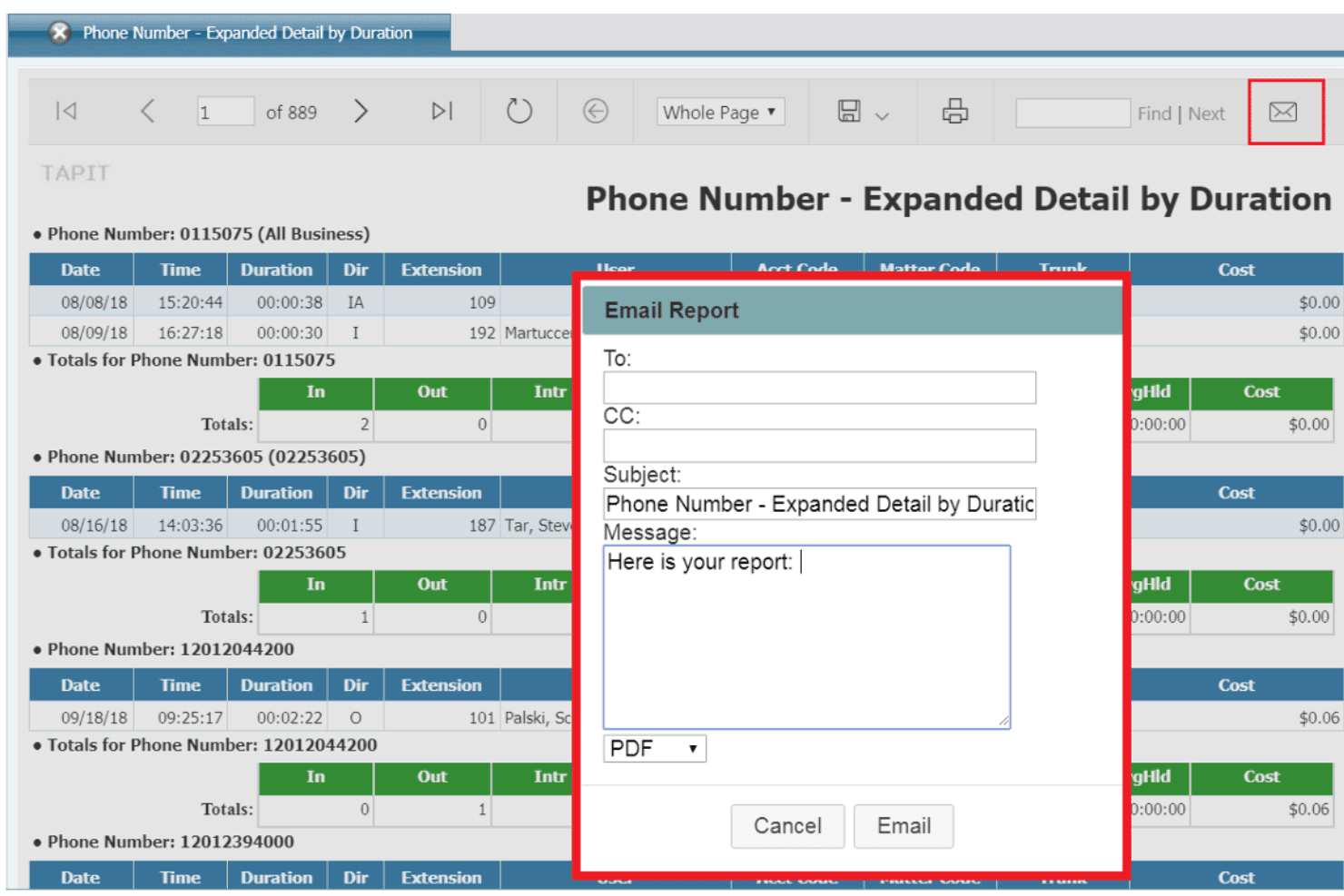
TAPIT 6 lets users access detailed call reports and email sharing. TAPIT 6 is an on-premise call accounting platform that captures call detail records across virtually any PBX or VoIP system, with cost allocation reporting, toll fraud detection, and multi-site call data management built in.
Who Is Cross Soft Best For?
TAPIT 6 is a strong fit for IT and finance teams in hospitality, healthcare, and government organizations running on-premise PBX systems across single or multiple sites.
Why I Picked Cross Soft
I picked TAPIT 6 as one of the best because its PBX-agnostic architecture fits the mixed telephony environments common in hotels and resorts. I like that its multi-site call data management lets a property group track call costs by extension and department across locations from a single installation. The toll fraud detection feature, which flags after-hours or international call patterns, is particularly valuable in hospitality where front desk lines see heavy, round-the-clock use.
Cross Soft Key Features
- Customizable reporting templates: Choose from over 125 report templates and tailor data views to your organizational structure.
- Permission-based user access: Set granular access controls with unlimited users for compliance and operational oversight.
- Emergency call alerts: Receive email or SMS notifications automatically when 911 or other emergency numbers are dialed.
- Multi-format data export: Export reports and call records in PDF, Excel, or Word formats for flexible data handling.
Cross Soft Integrations
Native integrations are not publicly listed.
Pros and Cons
Pros:
- Emergency call alerts for compliance monitoring
- Multi-site call data management is included
- Handles legacy and modern PBX call records
Cons:
- No cloud-native or UCaaS phone system support
- No built-in telecom invoice reconciliation
Learn more about Cross Soft: Best for flexible deployment options
- Not available
- Pricing upon request
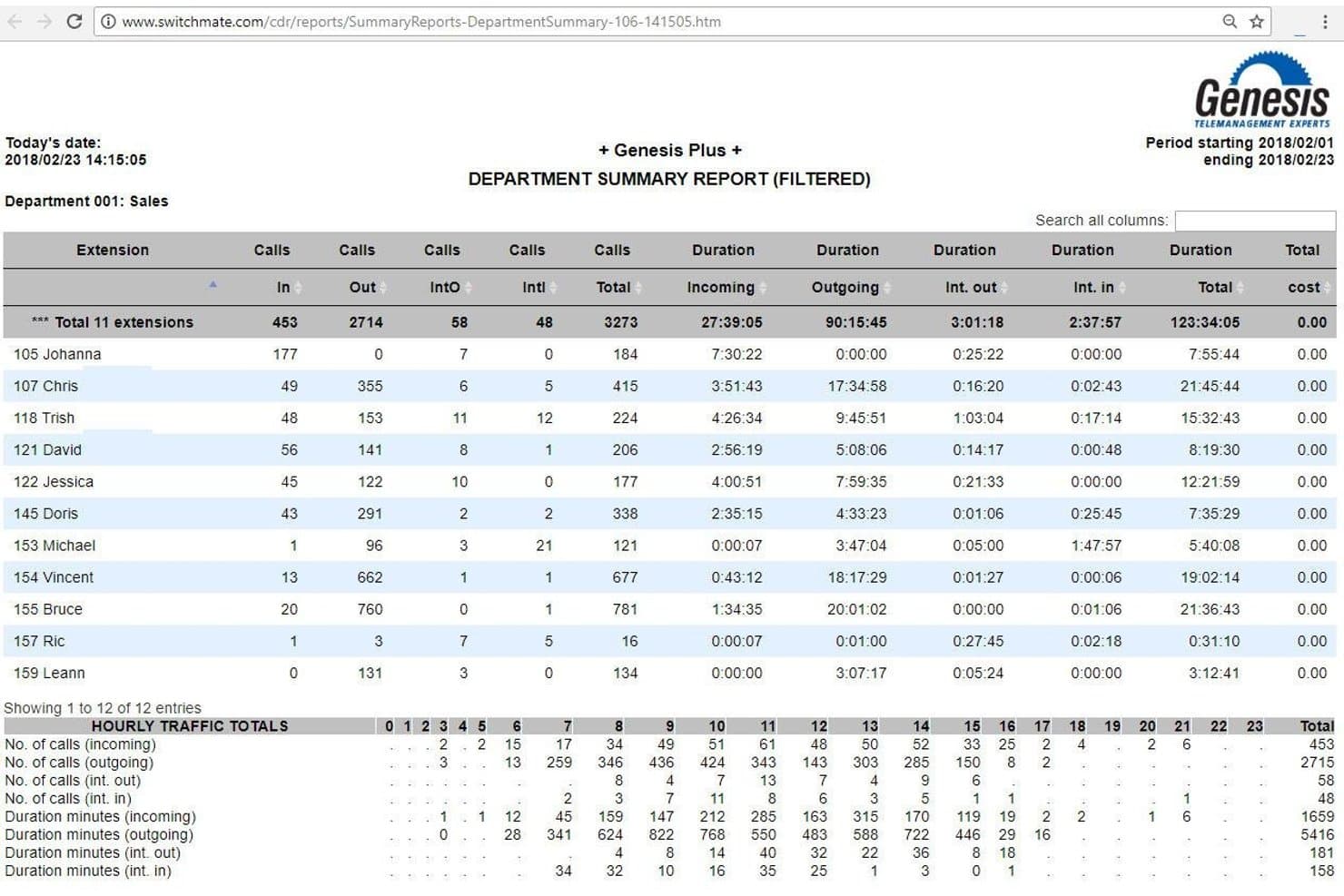
Genesis Call Accounting offers access to a detailed Department Summary Report with call volumes, durations, and hourly traffic totals per extension. Genesis Call Accounting is a call detail recording and telecom cost management platform that captures CDRs from PBX, VoIP, and cloud systems, with cost allocation, usage reporting, and chargeback billing across SME, enterprise, and hospitality environments.
Who Is Genesis Call Accounting Best For?
It's a strong fit for multi-location enterprises and hospitality operators managing telecom costs across mixed on-premises, cloud, and hybrid telephony environments.
Why I Picked Genesis Call Accounting
Genesis Call Accounting earns its spot on my shortlist because no other tool I've tested gives you this much control over how and where the software runs. You can deploy it as a cloud/SaaS solution, fully on-premises, or in a hybrid configuration, which matters when your organization runs a mixed telephony environment. I particularly like that it captures CDRs from multiple voice platforms simultaneously and maintains consistent reporting even during a PBX migration.
Genesis Call Accounting Key Features
- Analytics dashboard: Tracks and displays call activity, usage, and costs in real time.
- Automatic 911 and fraud detection: Flags emergency calls and unusual calling patterns for security purposes.
- Customizable report scheduling: Lets you deliver recurring reports by email, SMS, or print.
- Guest billing and PMS integration: Enables call charge management and connects to property management systems in hospitality settings.
Genesis Call Accounting Integrations
Genesis Call Accounting offers native integrations with RingCentral, Cloudbeds, Stayntouch, and Webex.
Pros and Cons
Pros:
- Offers guest billing for hospitality environments
- Supports cost allocation by department or tenant
- Captures data from multiple PBX systems simultaneously
Cons:
- Limited documentation for large enterprise deployments
- No built-in carrier invoice reconciliation
Learn more about Genesis Call Accounting: Best for enterprise-scale telecom oversight
- Free demo available
- Pricing upon request
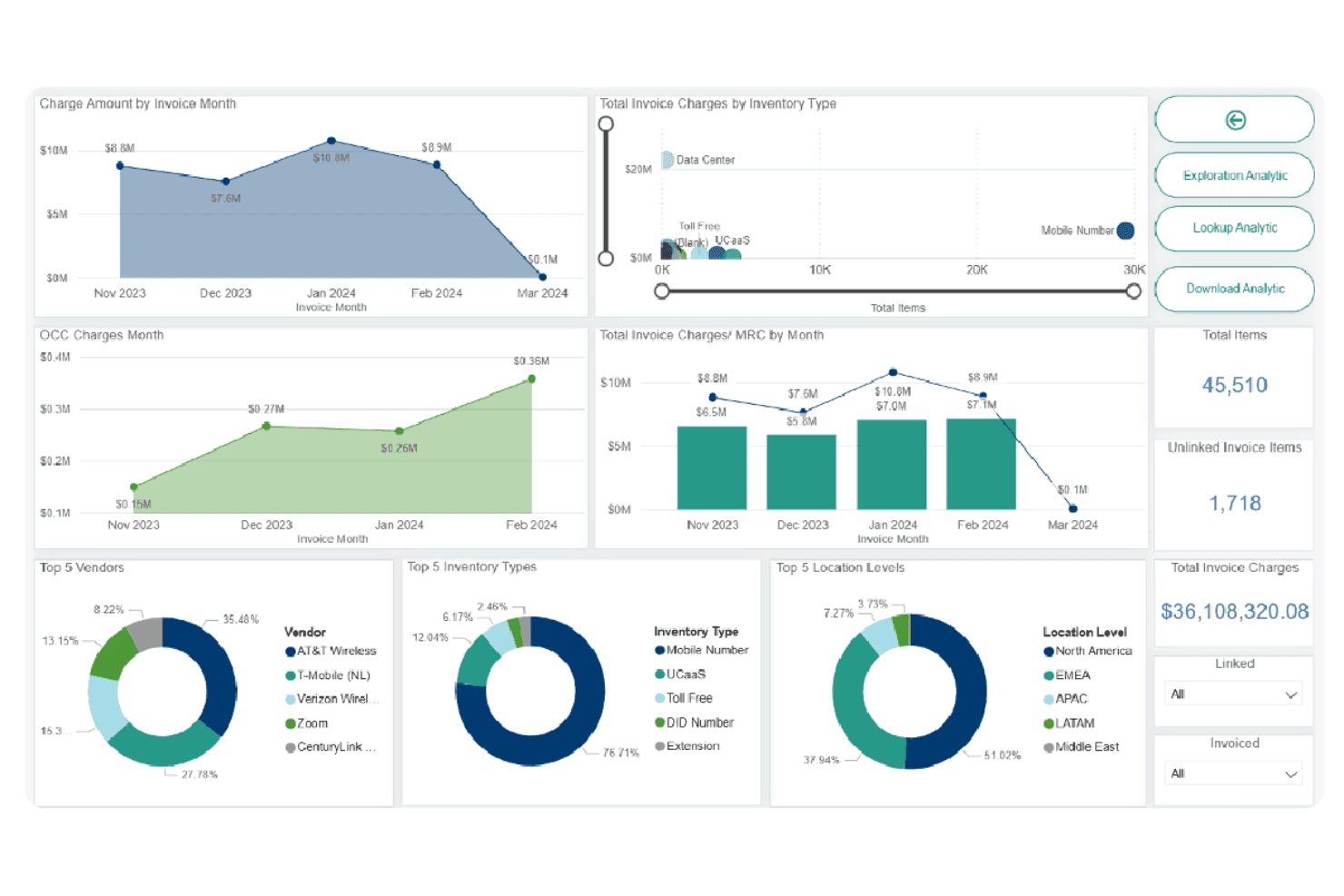
Calero enables telecom expense analytics for enterprise-wide cost visibility. Calero is a telecom expense management platform that combines call detail recording, cost allocation, invoice reconciliation, and usage reporting across hybrid PBX and UCaaS environments.
Who Is Calero Best For?
Calero is a strong fit for large enterprises managing complex, multi-site telecom environments across fixed, mobile, and cloud communication systems.
Why I Picked Calero
I picked Calero as one of the best because it handles call accounting at a scale most tools simply aren't built for. I particularly like how it captures CDRs across both legacy PBX systems and UCaaS platforms like Microsoft Teams and Webex in a single unified view. Its automated invoice reconciliation, paired with built-in dispute management, means my team can catch billing discrepancies across thousands of carrier invoices without relying on manual side-by-side review.
Calero Key Features
- Customizable reporting dashboards: Build and share tailored reports on telecom usage and cost allocation.
- HRIS integration: Syncs with your human resources system to automate onboarding and offboarding for telecom access.
- Multi-carrier rate management: Maintain and update rate tables for various carriers and international billing scenarios.
- Centralized inventory lifecycle management: Track telecom assets from procurement through decommissioning across your organization.
Calero Integrations
Calero offers native integrations with Asana, Atlassian, Box, Five9, NetSuite, Okta, RingCentral, Zendesk, ServiceNow, DocuSign, and more. An API is available for custom integrations.
Pros and Cons
Pros:
- Manages extensive telecom invoice reconciliation
- Handles chargebacks and cost allocation natively
- Real-time analytics across enterprise telecom systems
Cons:
- Core features require extensive initial setup
- Not designed for smaller organizations
Learn more about Calero: Best for customizable reporting options
- Free demo available
- Pricing upon request
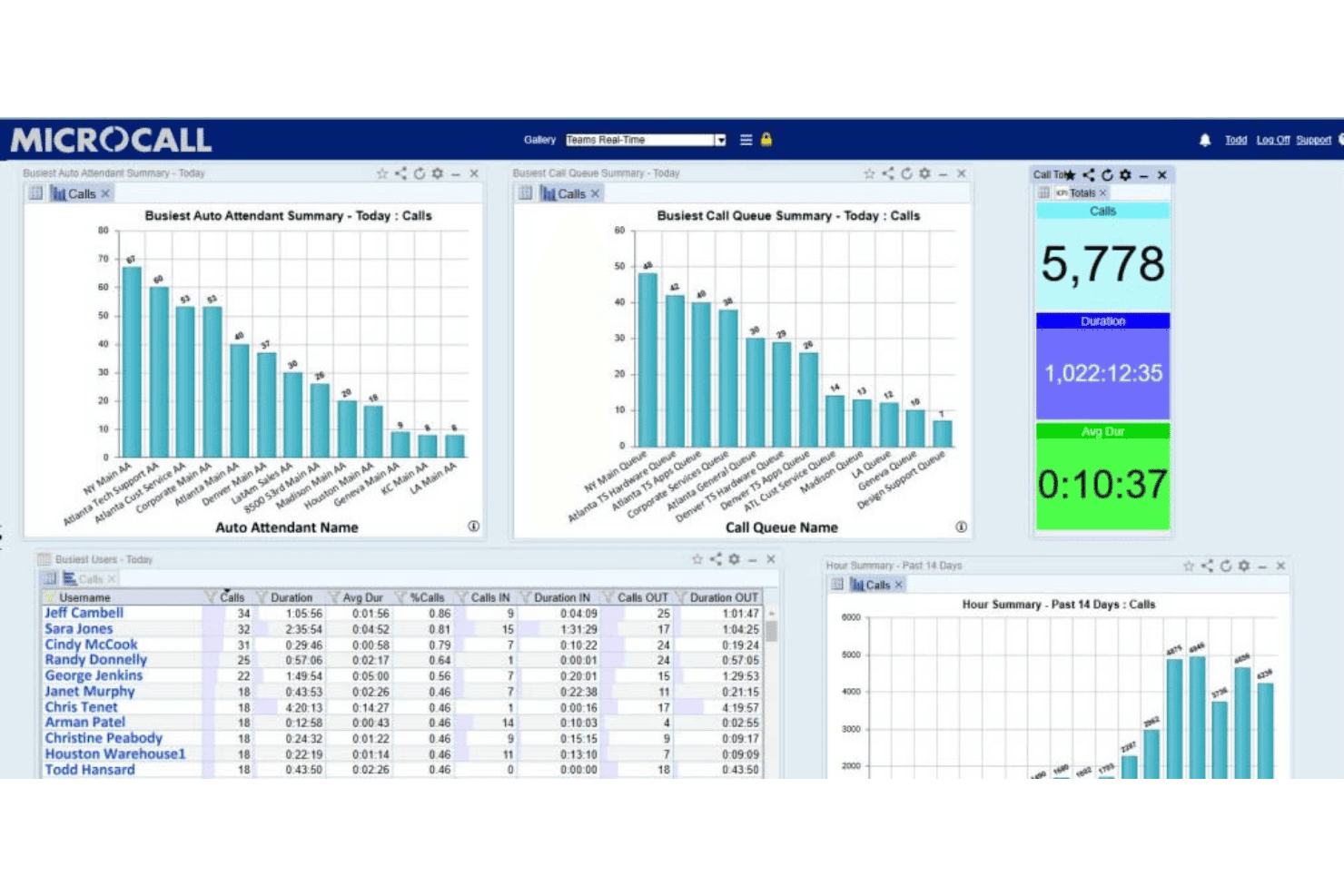
Microcall offers a dashboard with auto attendant summaries, call queue charts, busiest user stats, and total call metrics. Microcall is a call accounting platform that captures CDRs from PBX, VoIP, and UCaaS systems and allocates telecom costs across departments, business units, and locations.
Who Is Microcall Best For?
Microcall suits mid-to-large enterprises — particularly in healthcare, government, and higher education — that manage telecom costs across multiple systems and locations.
Why I Picked Microcall
I picked Microcall as one of the best because the Galleries Reporting Dashboard gives me something I don't see elsewhere: bookmarkable, real-time report URLs I can share directly with department heads. I can schedule unlimited custom reports to auto-distribute via email, so finance and operations teams each get the cost allocation data they actually need. The SimpleSearch feature also lets me pull records across every connected platform using any call criteria, without rebuilding queries from scratch.
Microcall Key Features
- Cradle to grave tracking: See every step of a call’s lifecycle for auditing and accountability.
- Multi-platform CDR capture: Collect call detail records like call duration from PBX, VoIP, and UCaaS platforms like Cisco, Avaya, and Microsoft Teams.
- Toll fraud alerts: Detect and alert on suspicious call patterns to help protect against telecom fraud.
- Real-time emergency notifications: Instantly alert teams to emergency 911 calls or system failures as they occur.
Microcall Integrations
Microcall offers 100+ native integrations including Microsoft Teams, Cisco CUCM, Avaya, Webex, Genesys, RingCentral, Zoom, 3CX, 8x8, Five9, and Dialpad. An API is available for custom integrations.
Pros and Cons
Pros:
- Real-time alerts for emergency calls and fraud
- Cradle to grave call tracking included
- Custom report generator supports advanced filtering
Cons:
- Limited international rate management options
- No carrier invoice reconciliation tools
Learn more about Microcall: Best for integration with major UC platforms
- Free demo available
- From $300/month
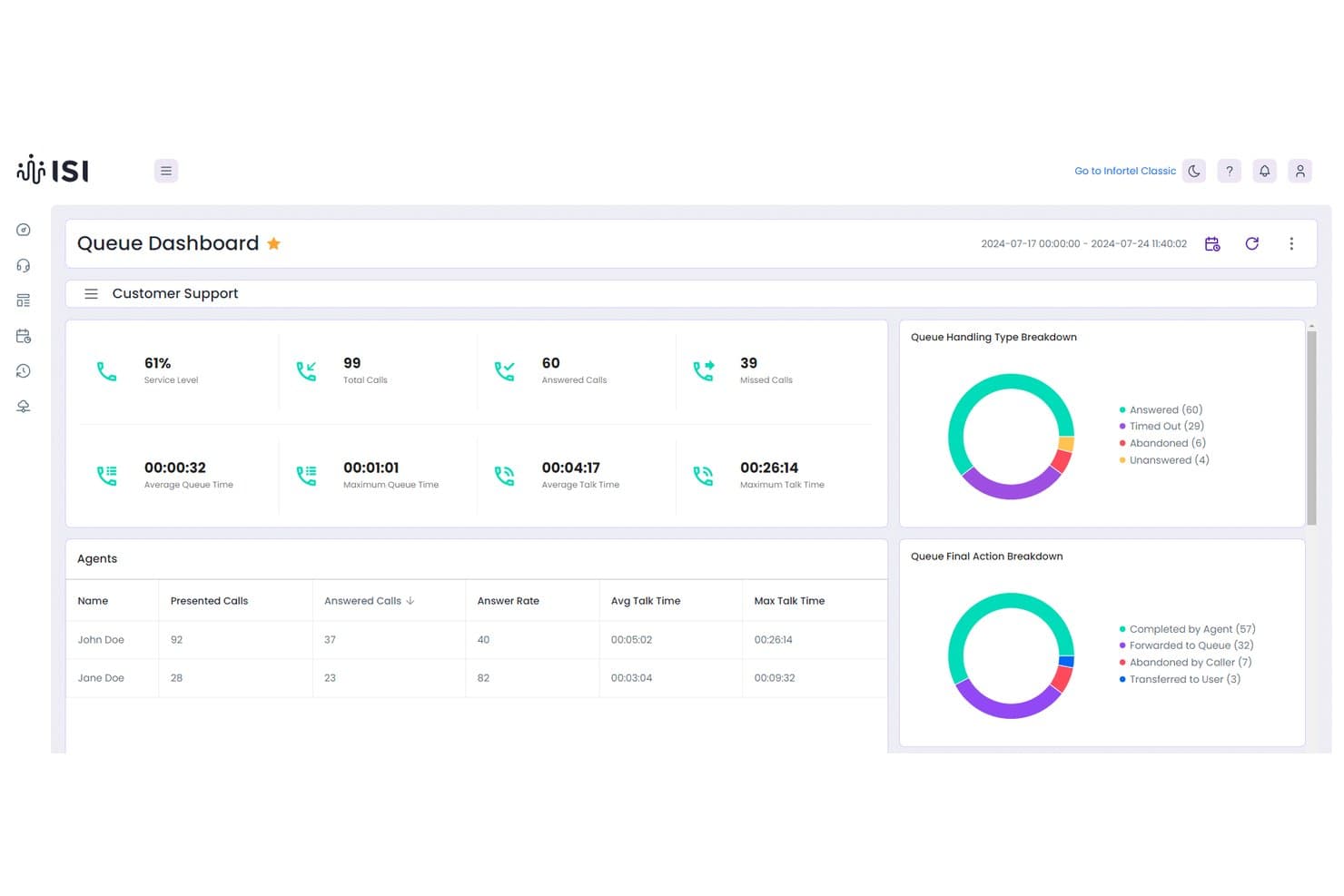
ISI Infortel Select enables access to a Queue Dashboard with call metrics, agent performance tables, and call handling and final action type analysis. ISI Infortel Select is a cloud-based call accounting and CDR reporting platform that captures, rates, and allocates call costs across Cisco UCM, Microsoft Teams, Webex Calling, and Avaya from a single interface.
Who Is ISI Infortel Select Best For?
It's a strong fit for telecommunications managers and IT finance teams at mid-to-large enterprises running mixed or multi-platform UC environments.
Why I Picked ISI Infortel Select
I picked ISI Infortel Select because no other call accounting tool I've tested handles multi-platform UC environments as natively. When my team runs a Cisco UCM to Microsoft Teams migration, Infortel Select pulls CDRs from both platforms simultaneously, so cost allocation and chargeback reports stay uninterrupted across the transition. It also retains call data for 13 months by default, compared to the 30-90 day purge cycles built into most native UC tools.
ISI Infortel Select Key Features
- Organizational summary and location roll-up: View consolidated call data across your entire company and by specific sites.
- Exception reporting: Flag patterns of potential abuse or misuse directly from CDR analytics.
- Customizable call rating engine: Apply actual carrier rate tables or your own rates to calls for precise cost allocation.
- Department cost allocation and chargeback: Assign charges to departments, tenants, or clients for internal billing and audits.
ISI Infortel Select Integrations
Native integrations are not publicly listed.
Pros and Cons
Pros:
- Detailed custom reporting and automated exports
- Highly granular cost allocation and chargebacks
- Real-time CDR capture for major UC platforms
Cons:
- Limited international rate management features
- No automated carrier invoice reconciliation
Learn more about ISI Infortel Select: Best for centralized multi-site management
- Free demo available
- Pricing upon request
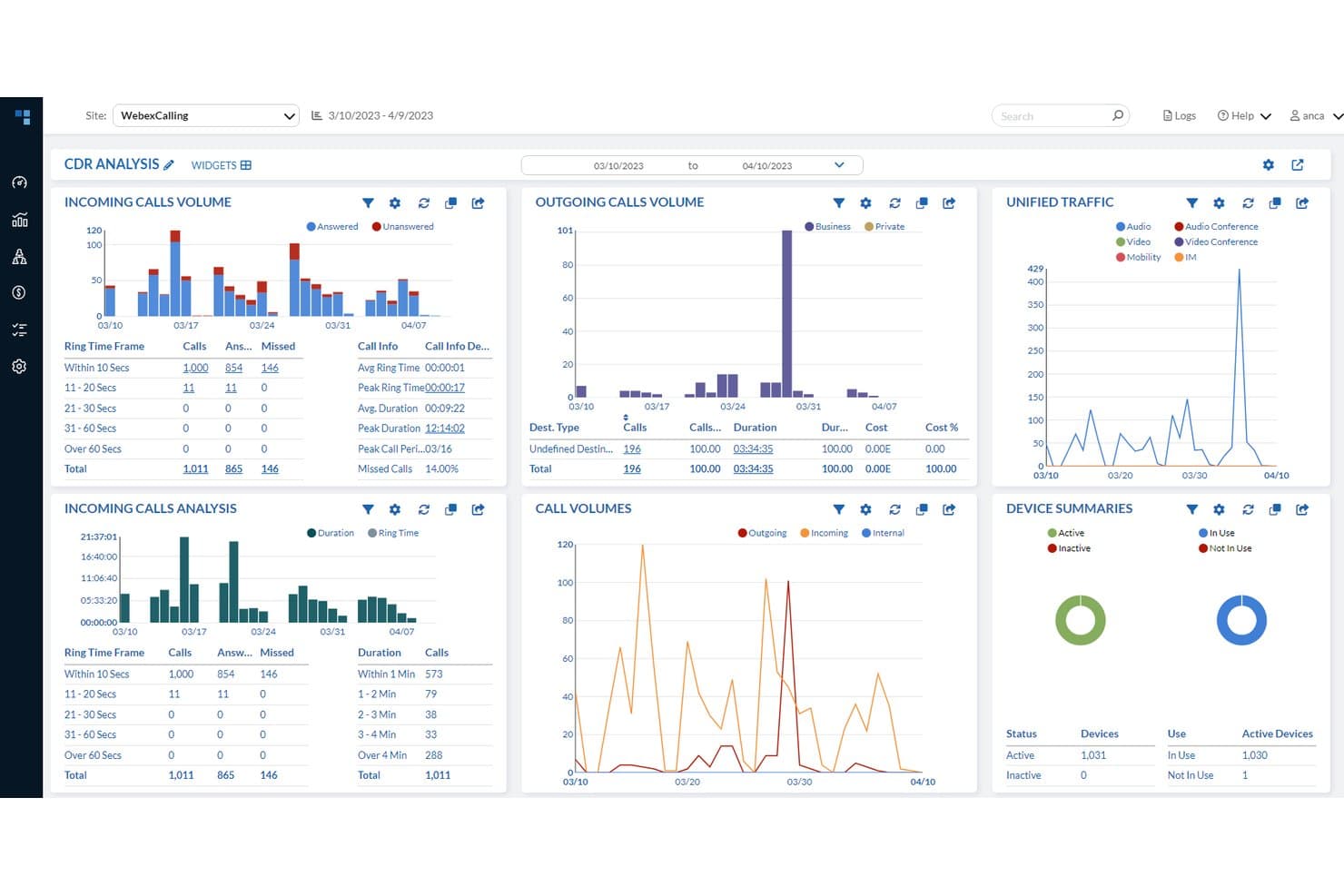
PhonEX ONE (MIND CTI) provides CDR analysis with call volumes, traffic insights, and device summaries. PhonEX ONE is a call accounting and UC analytics platform that captures CDRs across traditional PBX, VoIP, and unified communications systems, with cost allocation, chargeback reporting, fraud detection, and multi-site traffic analysis built in.
Who Is PhonEX ONE (MIND CTI) Best For?
PhonEX ONE is a strong fit for IT finance and telecom expense teams in large enterprises managing communications across multiple sites, systems, and currencies.
Why I Picked PhonEX ONE (MIND CTI)
PhonEX ONE earns its spot as one of the best on my shortlist because of how it handles multi-site call accounting without forcing you to commit to a single UC platform. I like that its dynamic hierarchy structure automatically syncs with your organization's layout, so cost allocation and chargeback reports stay accurate across sites without manual reorganization. The platform's support for multiple currencies and languages in a single instance means I'm not managing separate installs for different regions.
PhonEX ONE (MIND CTI) Key Features
- Personalized dashboards: Create custom widgets for real-time and historical telecom analysis.
- Quality of service monitoring: Track and quantify user audio call quality across platforms.
- Fraud detection and alerting: Receive real-time alerts about usage anomalies and potential toll fraud.
- Contact center analytics: Access detailed call statistics for contact centers, including agent and group performance.
PhonEX ONE (MIND CTI) Integrations
PhonEX ONE offers native integrations with Cisco, Microsoft, Avaya, and Redbox.
Pros and Cons
Pros:
- Real-time fraud detection and usage alerts
- Multi-currency and multi-language support in one instance
- Dynamic hierarchy auto-syncs with organizational changes
Cons:
- UI is available in English only
- No public API for custom integrations
Learn more about PhonEX ONE (MIND CTI): Best for integration with property management
- Free demo available
- Pricing upon request
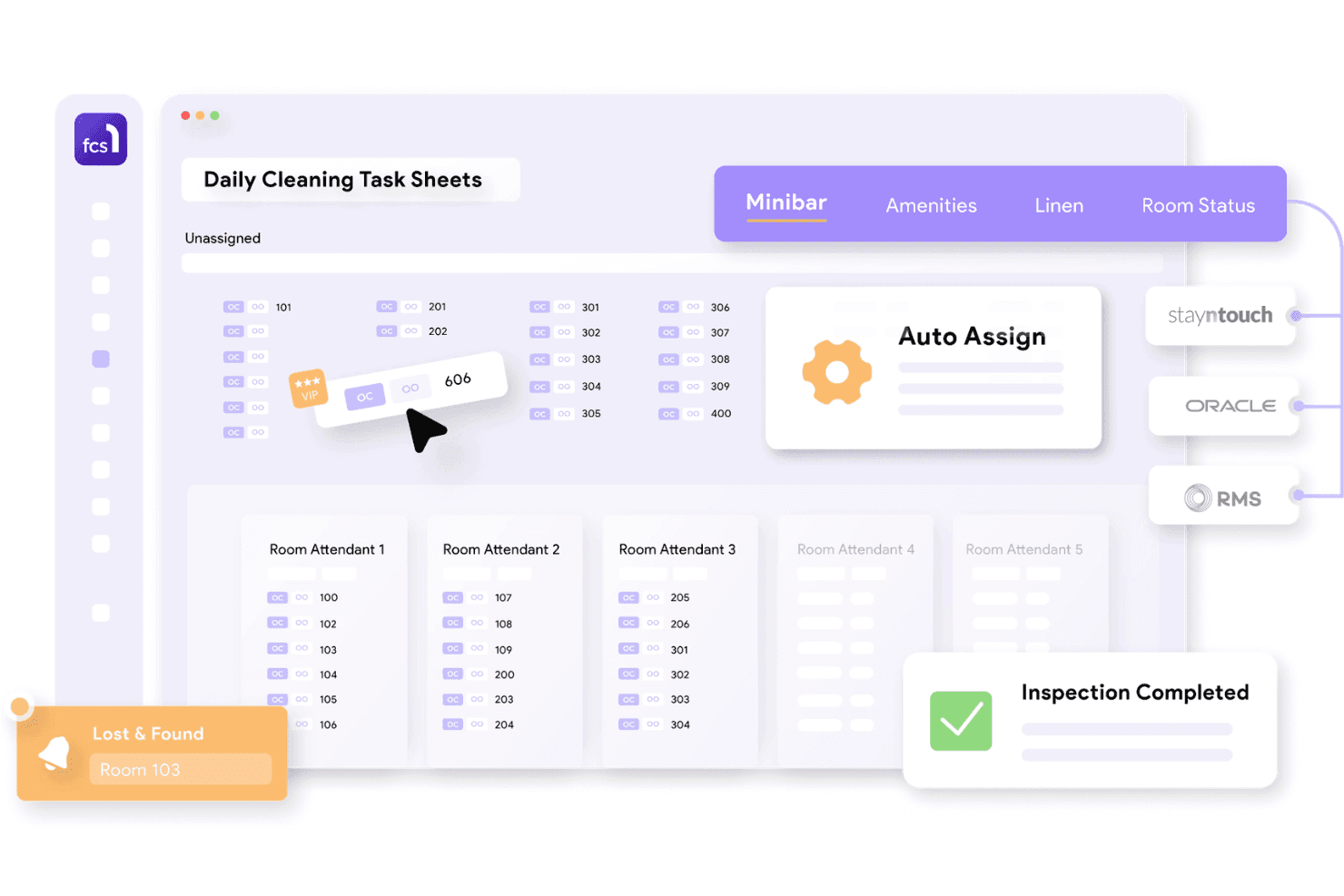
FCS1 integrates hotel operations with leading property management systems. FCS1 Call Accounting is a hospitality-focused call accounting module that captures call detail records, applies billing rates to guest calls, and posts charges to property management systems via PABX integration.
Who Is FCS1 Call Accounting Best For?
FCS1 Call Accounting is built for hotels and resorts that need to bill guest calls directly through their existing property management system.
Why I Picked FCS1 Call Accounting
FCS1 Call Accounting earns its spot on my shortlist because of how tightly it connects to hotel property management systems. I like that it automatically posts guest call charges directly to folios via real-time PMS integration with platforms like Oracle, MEWS, and Shiji. It also captures call data from PABX systems like Avaya and Cisco, eliminating manual entry between the phone system and the guest bill, and optimize operational efficiency.
FCS1 Call Accounting Key Features
- Call reporting tools: Generate detailed reports on call activity, volumes, and trends for auditing and compliance.
- Multi-property management: Monitor and administer call accounting functions across several properties from a single interface.
- Integration with major PABX vendors: Connect directly with Alcatel Lucent, Mitel, NEC, Siemens, and more for call data.
- Mobile-first dashboard: Access call records and system settings through a user-friendly, mobile-optimized portal.
FCS1 Call Accounting Integrations
FCS1 Call Accounting offers native integrations with Avaya, Cisco, Mitel, Oracle, Mews, Infor, Signify, RMS, Siemens, Trevo, and Vouch. An API is available for custom integrations.
Pros and Cons
Pros:
- Handles minibar and in-room service billing
- Automates posting call charges to guest folios
- Designed for multi-property hotel environments
Cons:
- Limited reporting beyond guest billing needs
- Not built for corporate telecom expense management
Learn more about FCS1 Call Accounting:
How I Evaluate Call Accounting Software
I split my evaluation into baseline requirements—CDR capture, chargebacks, and invoice reconciliation—and differentiators that matter for law firms, MSPs, or distributed enterprises.
Core Functionality (Table Stakes For This List)
When I'm selecting tools for my list, I rank each one on a scale from 0 (does not offer the functionality) to 5 (excels in this area) for each core functionality listed below. Then, I calculate the tool's total score into a percentage. Each tool needs to achieve a minimum total score of 65% to be considered for inclusion.
- Call Detail Recording: I check whether the tool captures CDRs in real time from multiple sources, since gaps in call logging make downstream cost reports unreliable.
- Cost Allocation & Chargeback: Granular allocation by user, department, project, and client matters here—especially for firms that bill telecom costs back to specific matters.
- Rate Plan Management: Each tool should support custom carrier rate tables and multi-currency tariffs, so per-call costs stay accurate across providers and regions.
- Telecom Expense Reporting: Report customization, scheduled delivery, and export compatibility with accounting systems like QuickBooks or SAP are what I evaluate here.
- Invoice Reconciliation: Matching CDRs against carrier invoices to catch overcharges is key, so I look for automated discrepancy flagging and audit trail support.
- Multi-PBX/VoIP Integration: I check compatibility with platforms like Cisco, Avaya, Microsoft Teams, and RingCentral, plus support for hybrid on-prem-to-cloud setups.
Once I have a list of tools that meet the criteria, I consider what sets each platform apart.
Differentiating Factors (What Sets Vendors Apart)
Here's how I compare and contrast different vendors:
Standout Features
Fraud and toll abuse detection is a major differentiator. I look for automated alerts that flag suspicious patterns like off-hours international calls or premium-rate dialing on unused extensions. Multi-tenant cost allocation also separates vendors—law firms and MSPs need chargeback by client matter or project code, not just by department. Unified communications reporting matters too, since many organizations now split activity across voice, video, and chat on platforms like Teams and Webex.
Beyond Features
PBX and UC platform compatibility is the first thing I check—your tool needs native CDR/SMDR support for your specific system, whether that's Cisco, Avaya, or Microsoft Teams. Deployment model matters too, especially for regulated industries like healthcare or finance where data residency controls dictate whether cloud, on-premise, or hybrid is viable. I also evaluate licensing transparency, since per-extension versus per-site pricing can shift total cost of ownership dramatically as you scale across locations.
Slik velger du programvare for samtalekostnadsføring
Det er lett å gå seg vill i lange funksjonslister og komplekse prisstrukturer. For å hjelpe deg med å holde fokus når du går gjennom den unike prosessen din for programvarevalg, får du her en sjekkliste over faktorer du bør ha i bakhodet:
| Faktor | Hva bør du vurdere? |
|---|---|
| FaktorSkalerbarhet | Hva bør du vurdere?Vil verktøyet støtte veksten i antall brukere, lokasjoner og systemer de neste 3–5 årene uten skjulte kostnader? |
| FaktorIntegrasjoner | Hva bør du vurdere?Kan det kobles direkte til PBX-, VoIP-, UC- eller regnskapssystemene dine, eller kreves det ekstra oppsett? |
| FaktorTilpasningsmuligheter | Hva bør du vurdere?Kan du tilpasse fordelings-, rapporterings- og tariffregler til organisasjonens avdelinger, prosjekter og faktureringsmodeller? |
| FaktorBrukervennlighet | Hva bør du vurdere?Hvem i teamet ditt skal bruke plattformen daglig? Vil IT-, telekom- eller økonomimedarbeidere trenge omfattende opplæring? |
| FaktorImplementering og oppstart | Hva bør du vurdere?Hvor komplisert er det innledende oppsettet – særlig import av CDR-er og konfigurering av pristabeller – for miljøet ditt? |
| FaktorSikkerhetstiltak | Hva bør du vurdere?Er samtaledata kryptert både i hvile og under overføring? Finnes det revisjonsspor og rollebasert tilgang for sensitiv telekominformasjon? |
| FaktorKostnad | Hva bør du vurdere?Er prisene basert på årlige lisenser, lisenser per lokasjon eller per anknytning? Vær oppmerksom på gebyrer for brukerstøtte eller integrasjoner. |
| FaktorEtterlevelseskrav | Hva bør du vurdere?Oppfyller leverandøren bransjens krav til datalagring og personvern, for eksempel GDPR, SOX eller HIPAA? |
Hva er programvare for samtalekostnadsføring?
Programvare for samtalekostnadsføring sporer, analyserer og fordeler telefonbruk og kostnader i hele organisasjonen. Den samler inn samtaledata fra PBX- eller VoIP-systemene dine og hjelper økonomi- og telekomteam med å fordele utgifter, generere interne viderefaktureringer og oppdage faktureringsfeil eller uvanlig samtaleaktivitet. Detaljert rapportering gir bedre kontroll over telekomutgiftene, støtter behovene for etterlevelse og forenkler revisjoner ved å gjøre samtalebruk og kostnader synlige på avdelings-, prosjekt- eller kundenivå.
Funksjoner
Når du velger programvare for samtalekostnadsføring, bør du se etter følgende nøkkelfunksjoner:
- Registrering av samtaledetaljer: Registrerer og lagrer data fra alle innkommende, utgående og interne samtaler, inkludert varighet, destinasjon og tidspunkt, for kostnadssporing og revisjoner.
- Kostnadsfordeling og intern belastning: Tildeler telekomkostnader til brukere, avdelinger eller prosjekter, slik at organisasjonen får nøyaktig budsjettering og intern fakturering.
- Administrasjon av prisplaner: Bruker tilpassede tariff- og operatørtabeller for hver samtale, slik at kostnadene per samtale beregnes korrekt, også på tvers av flere leverandører eller valutaer.
- Rapportering av telekomkostnader: Produserer detaljerte rapporter om samtalebruk, ruting, mønstre og kostnader, slik at økonomi- og IT-team kan analysere trender, støtte etterlevelse og informere strategiske beslutninger.
- Avstemming av fakturaer: Sammenligner samtaledata med operatørfakturaer for å avdekke avvik, svindel eller faktureringsfeil før betalinger gjennomføres.
- Integrasjon med flere systemer: Kobler seg til PBX-, VoIP- og enhetlige kommunikasjonsplattformer for å samle all samtaleaktivitet, også på tvers av hybride miljøer eller miljøer med flere leverandører.
- Analyseoversikter i sanntid: Visualiserer aktuell samtaletrafikk, forbruk og systembruk, slik at ledere kan håndtere avvik eller overforbruk etter hvert som det oppstår.
- Oppdagelse av svindel og misbruk: Overvåker uvanlige eller mistenkelige ringemønstre, for eksempel bruk av spesialnumre eller aktivitet utenom arbeidstid, og gir varsler for å begrense økonomisk risiko.
- Tilpassbar rapportering: Lar brukere opprette, filtrere og planlegge egendefinerte rapporter, og støtter ulike interne arbeidsflyter samt eksterne kunde- eller myndighetskrav.
- Kontroller for datasikkerhet: Tilbyr rollebasert tilgang, kryptert lagring av samtaledata og detaljerte revisjonsspor for å beskytte sensitiv telekominformasjon og støtte etterlevelse.
Fordeler
Implementering av programvare for samtaleregistrering gir flere fordeler for teamet og virksomheten din. Her er noen av fordelene du kan se frem til:
- Kostnadstransparens: Få tydelig innsikt i telekomforbruket per avdeling, prosjekt eller kunde med detaljerte funksjoner for fordeling og rapportering.
- Mer nøyaktig intern belastning: Tildel og viderefakturer samtalekostnader automatisk til interne team eller kunder, slik at manuelt arbeid og feil reduseres.
- Proaktiv oppdagelse av svindel: Motta sanntidsvarsler om mistenkelig eller uautorisert ringeaktivitet, slik at økonomisk risiko og mulig misbruk begrenses.
- Forenklede fakturarevisjoner: Sammenlign raskt operatørfakturaer med faktiske samtaleregistreringer for å markere overfakturering, uautorisert bruk eller feil før betaling.
- Forenklet etterlevelse: Oppretthold revisjonsspor og rollebasert tilgang for sensitive samtaledata, og støtt krav fra økonomi, juridiske avdelinger og myndigheter.
- Optimalisert ressursplanlegging: Bruk analyseoversikter i sanntid og brukstrender til å styre kapasitet, finne ineffektivitet og planlegge fremtidige telekominvesteringer.
- Overvåking av enhetlig kommunikasjon: Overvåk og rapporter om tale-, video- og chataktivitet på tvers av plattformer for å få en helhetlig oversikt over alle kommunikasjonskostnader.
Kostnader og priser
Ved valg av programvare for samtaleregistrering er det nødvendig å forstå de ulike prismodellene og planene som er tilgjengelige. Kostnadene varierer basert på funksjoner, teamstørrelse, tillegg og mer. Tabellen nedenfor oppsummerer vanlige planer, gjennomsnittsprisene deres og typiske funksjoner som er inkludert i programvareløsninger for samtaleregistrering:
Sammenligningstabell for programvare for samtaleregistrering
| Plantype | Gjennomsnittspris | Vanlige funksjoner |
|---|---|---|
| PlantypeGratisplan | Gjennomsnittspris$0 | Vanlige funksjonerGrunnleggende eksport av samtalelogger, begrenset lagring av CDR, integrasjon med ett system og brukerstøtte fra fellesskapet. |
| PlantypePersonlig plan | Gjennomsnittspris$10-$25/bruker/måned | Vanlige funksjonerSamtaleopptak, kostnadsfordeling per bruker, forhåndsbygde rapporter, begrensede integrasjoner og e-poststøtte. |
| PlantypeBedriftsplan | Gjennomsnittspris$30-$60/bruker/måned | Vanlige funksjonerFordeling på flere avdelinger, administrasjon av operatørpriser, analyseoversikter, fakturaavstemming og API-tilgang. |
| PlantypeStorbedriftsplan | Gjennomsnittspris$70-$150/bruker/måned | Vanlige funksjonerUbegrensede integrasjoner, avansert sikkerhet, sanntidsoppdagelse av svindel, tilpasset rapportering og dedikert brukerstøtte. |
Vanlige spørsmål om programvare for samtaleregistrering
Her er noen svar på vanlige spørsmål om programvare for samtaleregistrering:
Hvilke typer telefonsystemer er kompatible med programvare for samtaleregistrering?
Det meste av programvaren for samtaleregistrering støtter et bredt utvalg av PBX-, VoIP- og enhetlige kommunikasjonsplattformer – inkludert Cisco, Avaya, Mitel, Microsoft Teams og RingCentral – ved å hente inn og behandle detaljerte samtaleregistre direkte fra disse systemene.
Kan programvare for samtaleregistrering fordele kostnader til bestemte klienter eller prosjekter?
Ja, mange løsninger lar deg tilordne samtalekostnader etter avdeling, klientoppdrag, prosjektkode eller bruker. Dette hjelper team med å viderefakturere telekomkostnader nøyaktig for juridisk arbeid, konsulentarbeid eller tjenestebasert arbeid.
Hvordan bidrar programvare for samtaleregistrering til å forhindre telekomsvindel?
Programvare for samtaleregistrering kan sende automatiserte varsler når den oppdager uvanlige ringemønstre, for eksempel hyppige internasjonale samtaler eller bruk på inaktive internnumre. Dette gjør det mulig for teamet ditt å undersøke saken raskt og stanse mulig misbruk.
Er det vanskelig å implementere programvare for samtaleregistrering i et miljø med flere lokasjoner?
Nei, de fleste moderne plattformer støtter oppsett med flere lokasjoner og distribuerte miljøer. Sørg for at løsningen du velger, kan importere detaljerte samtaleregistre og måledata fra hvert system og tilby sentralisert rapportering for alle lokasjoner.
Hvilke sikkerhetskontroller er tilgjengelige for sensitive samtaledata?
Ledende løsninger tilbyr kryptering av data i hvile og under overføring, samt rollebasert tilgang og detaljerte revisjonslogger for å holde sensitive samtaleregistre sikre og klare for samsvarskontroll.