

O software fiscal internacional ajuda a sua equipa a gerir a conformidade fiscal transfronteiriça, automatizar declarações e acompanhar as obrigações fiscais globais num único local. Se está à procura do melhor software fiscal internacional, é provável que esteja a lidar com requisitos de comunicação complexos, regulamentação em constante mudança e a necessidade de apoiar o crescimento da empresa em vários países. Este guia destaca ferramentas analisadas por especialistas, concebidas para o ajudar a manter a conformidade, reduzir o trabalho manual e acompanhar a evolução das regras fiscais internacionais — para que se possa concentrar em comunicações precisas e na tomada de decisões estratégicas. Eis o que precisa de saber para escolher a solução certa para a sua empresa.
Why Trust Our Software Recommendations
6,700+
Reviews
20
Industry experts
16+
Evaluation factors
14
Years
Our team has been testing and reviewing software since 2012. As finance leaders ourselves, we know how difficult—and important—it is to choose the right software.
For this guide, we evaluated tools using hands-on testing and independent research, scoring tools using our selection criteria.
Our reviews reflect our human editorial judgment, not a sales pitch.
Tabela comparativa de software fiscal internacional
Esta tabela comparativa resume os detalhes de preços das minhas principais escolhas de software fiscal internacional:
Score legend (out of 5)
- Excellent4.5–5
- Good4–4.4
- Average3–3.9
- Below average2–2.9
- Poor1–1.9
Sorted by: Default
| Tool | Starting Price | Website | ||||||||||||
|---|---|---|---|---|---|---|---|---|---|---|---|---|---|---|
Best for indirect VAT and e-invoicing at scale | Not rated | Not rated | Not rated | Not rated | Not rated | 5 | 2 | Not rated | Not rated | Not rated | Not rated | Not rated | Pricing upon request Free demo available | Website |
Best for SAP-native tax compliance workflows | Not rated | Not rated | Not rated | Not rated | Not rated | Not rated | 3 | 2 | 4 | 4 | 4 | 2 | Pricing upon request Free demo available | Website |
Best for automated VAT calculations | Not rated | Not rated | Not rated | Not rated | Not rated | Not rated | 2 | 1 | 4 | 5 | 4 | 2 | Pricing upon request Free demo available | Website |
Best for digital sales tax automation | Not rated | Not rated | Not rated | Not rated | Not rated | Not rated | 1 | Not rated | 4 | 5 | 4 | 2 | $29/month 7-day free trial available | Website |
Best for Pillar Two compliance at scale | Not rated | Not rated | Not rated | Not rated | Not rated | Not rated | 4 | Not rated | 5 | 4 | 3 | 3 | Pricing upon request Free demo available | Website |
Best with global tax research tools | Not rated | Not rated | Not rated | Not rated | Not rated | Not rated | 4 | 1 | 5 | 1 | 2 | 2 | Pricing upon request Free demo available | Website |
Best with real-time regulatory updates | Not rated | Not rated | Not rated | Not rated | Not rated | Not rated | 1 | Not rated | 5 | 5 | 4 | 2 | Pricing upon request Free demo available | Website |
Best with ERP system compatibility | Not rated | Not rated | Not rated | Not rated | Not rated | Not rated | 3 | Not rated | 4 | 5 | 5 | 2 | Pricing upon request Free demo available | Website |
Best for SaaS revenue tax management | Not rated | Not rated | Not rated | Not rated | Not rated | Not rated | 2 | Not rated | 4 | 5 | 4 | 1 | $100/month Free demo available | Website |
Best for cross-border compliance support | Not rated | Not rated | Not rated | Not rated | Not rated | Not rated | 4 | 2 | 4 | Not rated | 2 | 3 | Pricing upon request Free demo available | Website |


Avaliações do melhor software fiscal internacional
Seguem-se os meus resumos detalhados do software fiscal internacional que entrou na minha seleção. As minhas avaliações oferecem uma análise detalhada das funcionalidades, dos melhores casos de utilização e das integrações de cada software, para o ajudar a encontrar a melhor opção para si.
 Best for indirect VAT and e-invoicing at scale
- Free demo available
- Pricing upon request
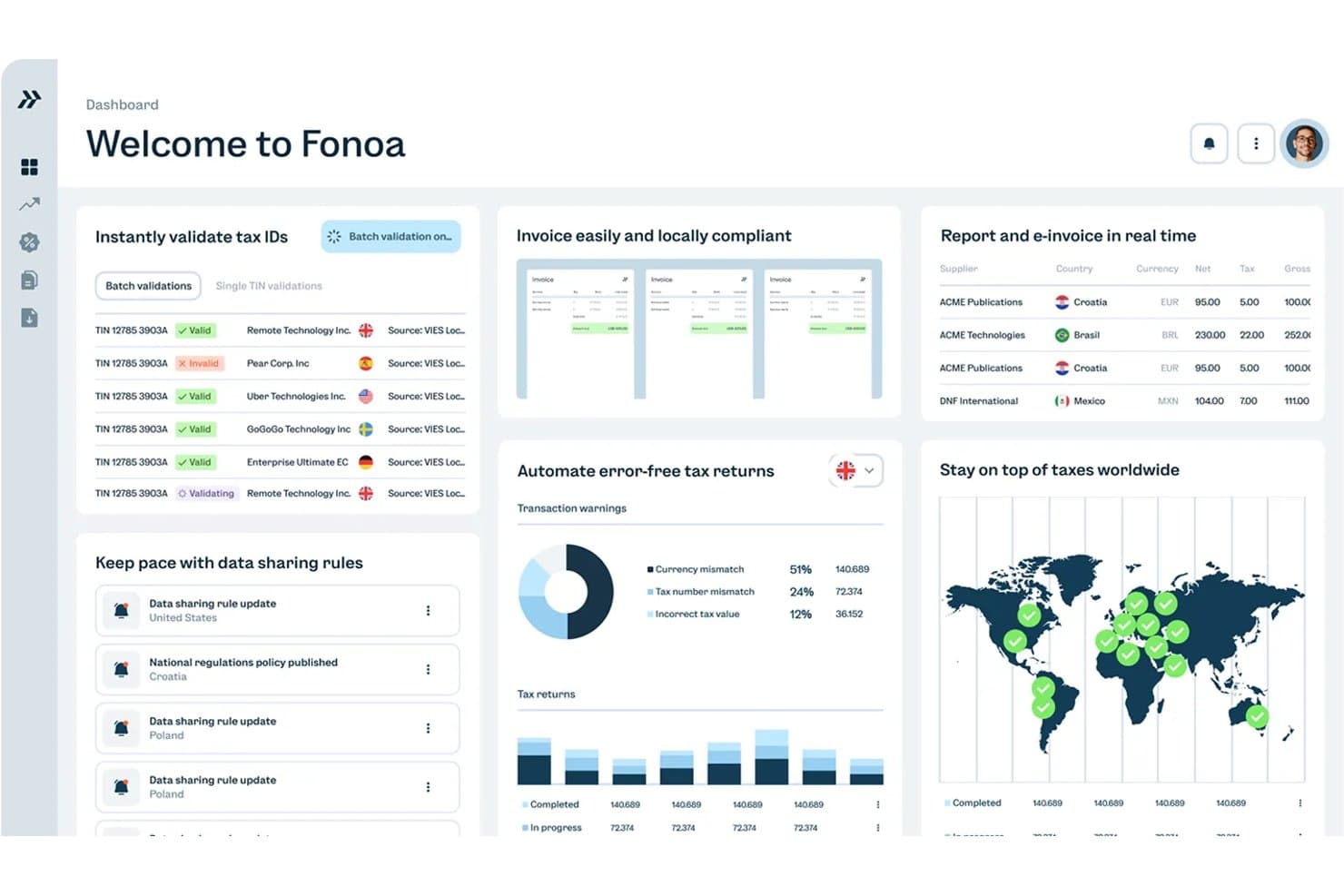
Fonoa centralizes tax validation, invoicing, and returns in one dashboard. Fonoa is an API-first indirect tax automation platform that handles VAT, GST, and sales tax across the full compliance lifecycle—covering tax ID validation, real-time calculation, e-invoicing, and return filing across 100+ jurisdictions.
Who Is Fonoa Best For?
Fonoa is a strong fit for finance and tax teams at high-volume digital businesses—SaaS companies, marketplaces, and platforms—that need to automate VAT, GST, and e-invoicing across dozens of jurisdictions without building compliance infrastructure from scratch.
Why I Picked Fonoa
I've included Fonoa in my top picks because it handles the full indirect tax lifecycle—validation, calculation, e-invoicing, and return filing—through a single data model, which is rare at this scale. I love that the Tax Engine processes each transaction in real time (under 200ms) and automatically updates rules across 100+ jurisdictions, so your team isn't manually maintaining rate tables. The E-Invoicing module connects directly to tax authorities via accredited API connections, covering both outgoing and incoming invoices across 50+ countries.
Fonoa Key Features
- Tax ID validation: Checks tax IDs in real time against live government registries across 120+ countries, with fuzzy matching to correct bad data and batch processing of up to 50,000 records.
- Audit trail automation: Compiles every tax determination, override, and approval by jurisdiction and period into versioned, tamper-proof evidence to support SOX and SOC 2 governance.
- Regulatory alerts: Delivers compliance alerts tailored to your company's profile, ranked by materiality and linked directly to the tax platform so rule changes can be deployed immediately.
- AP and AR tax coverage: Applies the same calculation logic to both sales and purchase transactions, giving your team consistent indirect tax treatment across accounts receivable and accounts payable.
Fonoa Integrations
Fonoa integrations include SAP, Oracle Fusion Cloud, and NetSuite, although connection depth isn’t publicly detailed. Its API supports custom connections to checkout, billing, invoicing, and AP/AR systems.
Pros and Cons
Pros:
- Strong support for high-volume transactions
- Audit trails support SOX and SOC 2
- Real-time VAT/GST coverage across jurisdictions
Cons:
- No tax provision or entity consolidation
- No transfer pricing or treaty logic
Learn more about Fonoa: Best for SAP-native tax compliance workflows
- Free demo available
- Pricing upon request
Visit WebsiteCustomer Rating:4.8/5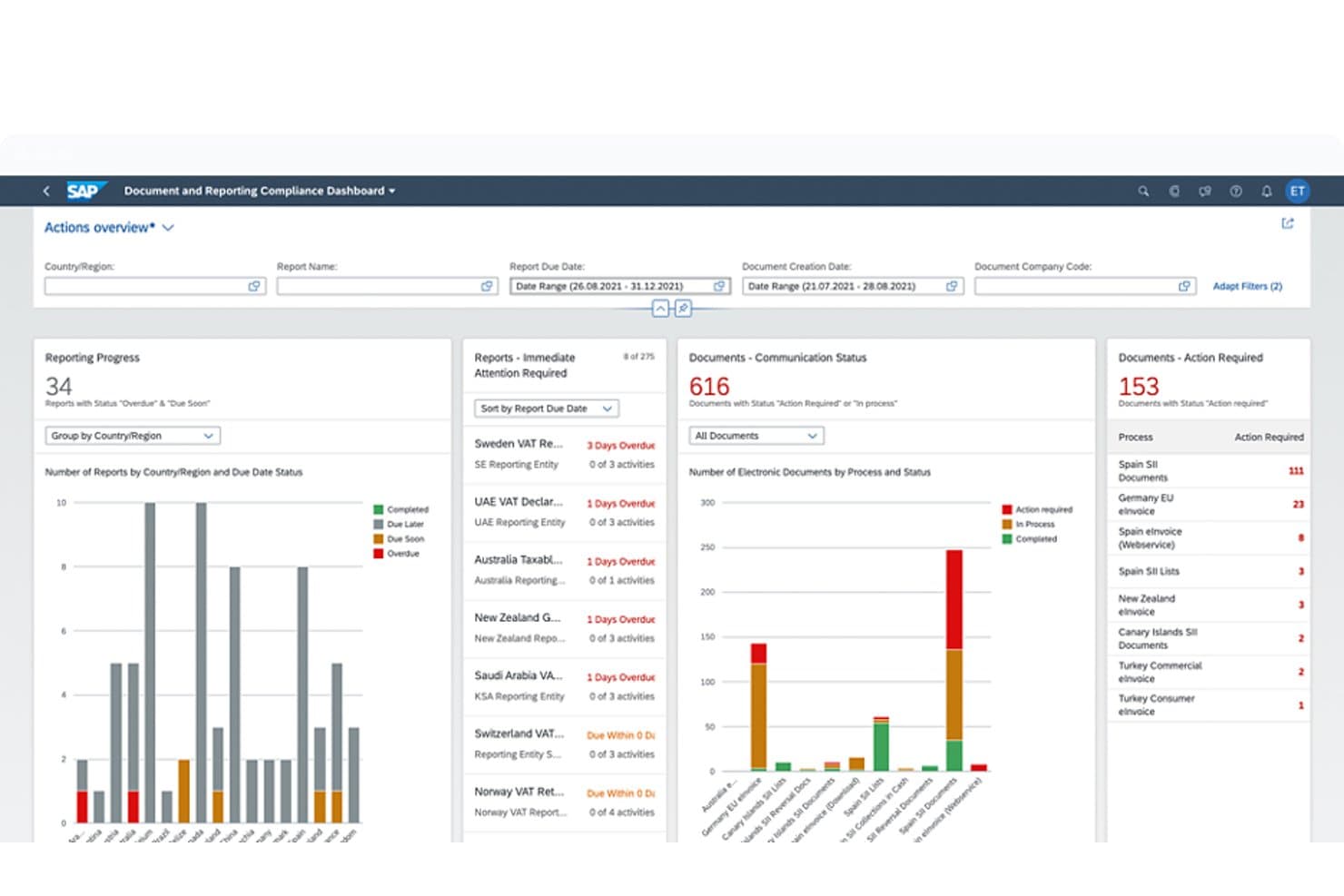
SAP Tax Compliance tracks document and reporting compliance across regions. SAP Tax Compliance is a modular tax and trade management suite built natively into SAP ERP, covering e-invoicing, VAT/GST reporting, indirect tax compliance, transfer pricing, and BEPS 2.0 across 60+ countries.
Who Is SAP Tax Compliance Best For?
SAP Tax Compliance is the right fit for enterprise tax teams already running SAP ERP who need multi-jurisdiction VAT, e-invoicing, and BEPS 2.0 compliance built directly into their existing stack.
Why I Picked SAP Tax Compliance
SAP Tax Compliance earns its spot on my shortlist because it's the only solution I'd recommend to enterprise teams already running SAP ERP who can't afford compliance gaps across dozens of jurisdictions. I like that SAP Document and Reporting Compliance handles e-invoicing, VAT returns, and SAF-T audit files across 60+ countries natively, with automated submissions via Peppol and local tax authority standards. The Joule AI assistant's Tax Posting and Statutory Report Analysis agents actively flag anomalies before filings go out, which I find genuinely useful during close cycles.
SAP Tax Compliance Key Features
- Regulatory change manager: Tracks upcoming legal changes, identifies which SAP products they affect, and delivers updates through SAP Notes at no additional cost.
- Scenario modeling: Lets tax teams run "what-if" simulations to evaluate the tax impact of business decisions before committing to them.
- BEPS 2.0 Tax Manager: Runs on SAP PaPM Cloud Universal Model to handle Pillar Two data validation, top-up tax calculation and allocation, and real-time recalculation.
- Compliance calendar: Provides a centralized dashboard with checklists for adjustments, approvals, and submissions so your team can track filing deadlines across jurisdictions.
SAP Tax Compliance Integrations
SAP Tax Compliance has native integrations with SAP S/4HANA, SAP ECC, SAP Concur, SAP Business Network, SAP Integration Suite, and SAP BTP. It also connects with Peppol and local tax-authority networks, plus partner integrations for Avalara, Sovos, and insightsoftware Longview Tax.
Pros and Cons
Pros:
- Strong audit trails and compliance visibility
- Automatic regulatory updates through SAP Notes
- Broad multi-country filing and e-invoicing coverage
Cons:
- Transfer pricing documentation tools are limited
- Treaty-rate automation remains undocumented
Learn more about SAP Tax Compliance: Best for automated VAT calculations
- Free demo available
- Pricing upon request
Visit WebsiteCustomer Rating:4/5
Avalara automates tax calculations and compliance across regions. Avalara offers automated VAT calculation and compliance tools for businesses selling across borders. The platform is especially useful for ecommerce companies, finance teams, and tax professionals who need to manage complex, multi-country VAT rules. Its real-time tax determination and filing features help reduce manual errors and keep international transactions compliant.
Why I Picked Avalara
When it comes to handling automated VAT calculations, Avalara offers a level of precision and coverage that’s hard to match. The platform automatically applies the correct VAT rates and rules for each transaction, even as regulations change across countries. I appreciate that Avalara also supports VAT registration and digital filing, which helps businesses stay compliant without manual intervention. These features make it a strong choice for companies managing high volumes of cross-border sales and complex VAT obligations.
Avalara Key Features
Some other features that make Avalara stand out include:
- Cross-border tax determination: Calculate taxes for international transactions based on real-time location and product data.
- Returns preparation and filing: Generate and submit VAT returns to tax authorities in multiple countries.
- Document management: Store and retrieve tax documents, certificates, and compliance records in a centralized portal.
- Tax exemption certificate management: Collect, validate, and manage exemption certificates for eligible customers.
Avalara Integrations
Integrations include Shopify, NetSuite, QuickBooks, Magento, Salesforce, Epicor, Sage, and Microsoft Dynamics.
Pros and Cons
Pros:
- Built-in HS code mapping
- Real-time rate calculation
- Massive integration library
Cons:
- Setup can be complicated
- Focuses only on indirect
Learn more about Avalara: Best for digital sales tax automation
- 7-day free trial available
- From $29/month
Visit WebsiteCustomer Rating:4.8/5
Quaderno automates sales tax, VAT, and GST compliance for sellers. Quaderno is built for digital businesses and SaaS companies that need to automate sales tax compliance across global markets. The platform tracks tax thresholds, applies the correct rates, and generates tax-compliant invoices for every sale. This makes it especially useful for online sellers managing VAT, GST, and US sales tax in multiple countries.
Why I Picked Quaderno
For digital-first businesses, Quaderno stands out for its ability to automate sales tax compliance across borders. The platform automatically detects when you cross tax thresholds in different countries and applies the correct VAT, GST, or US sales tax rates to each transaction. I appreciate how Quaderno generates tax-compliant invoices and keeps detailed records for every sale, which is especially important for SaaS and ecommerce companies selling internationally. This focus on digital sales tax automation makes it a strong choice for teams that need to stay compliant without manual intervention.
Quaderno Key Features
Some other Quaderno features that international sellers may find valuable include:
- Multi-currency support: Issue invoices and process payments in multiple currencies for global customers.
- Automated credit note generation: Create and send credit notes automatically when refunds or adjustments are needed.
- Customizable invoice templates: Design and brand invoices to meet local and business requirements.
- Real-time tax reports: Access up-to-date tax summaries and export data for filings at any time.
Quaderno Integrations
Integrations include Stripe, PayPal, Shopify, WooCommerce, Amazon, Zapier, Xero, and QuickBooks Online.
Pros and Cons
Pros:
- Sends compliant receipts
- Easy Stripe integration
- Beautiful user interface
Cons:
- No transfer pricing tools
- Lacks deep ERP syncing
Learn more about Quaderno: Best for Pillar Two compliance at scale
- Free demo available
- Pricing upon request
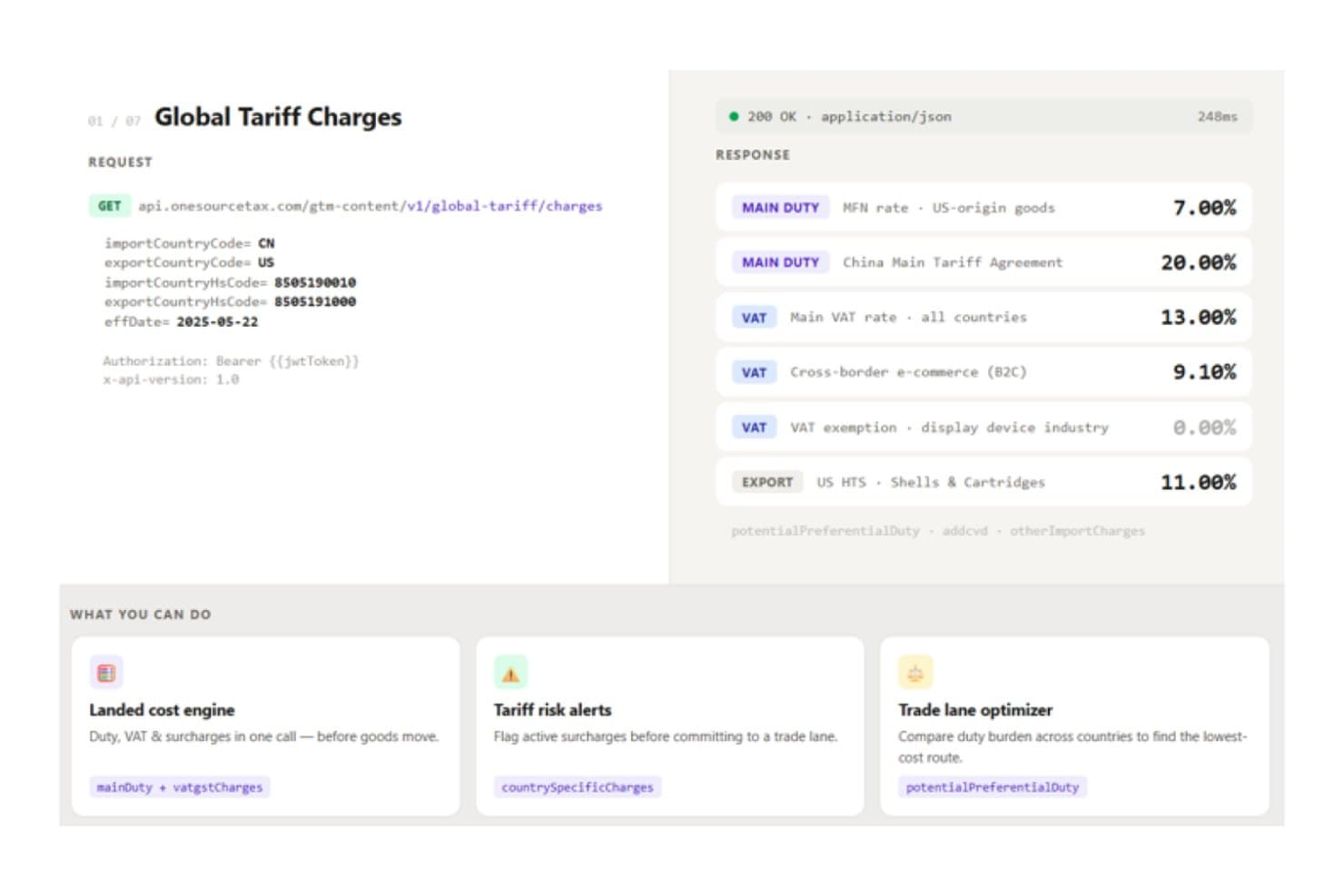
ONESOURCE delivers real-time global tariff rates via API for trade compliance. ONESOURCE is a modular enterprise tax suite from Thomson Reuters that covers direct tax compliance, tax provision, indirect tax calculation and reporting, e-invoicing, statutory reporting, and Pillar Two (GloBE) compliance across multinational entities.
Who Is ONESOURCE Best For?
ONESOURCE is a strong fit for multinational tax teams that need to manage Pillar Two compliance, indirect tax automation, and multi-entity provision under a single enterprise vendor.
Why I Picked ONESOURCE
I've included ONESOURCE in my top picks because its Pillar Two compliance depth is unlike anything else I've seen at enterprise scale. The Orbitax Global Minimum Tax integration automates GloBE calculations and safe-harbor analysis across 190+ countries, and it connects directly to Tax Provision so your existing data mappings carry over. I also like that the tool logged 1,700+ GloBE Information Return filings across 34 jurisdictions in under a year, which tells me this isn't theoretical coverage.
ONESOURCE Key Features
- Indirect tax determination: Calculates sales tax, VAT, GST, and excise in real time across 205+ countries and 60,000+ jurisdictions, processing up to 10M transactions per hour.
- Statutory reporting: Generates statutory financial statements in 45+ jurisdictions using local-language templates, with audit trails and one-click machine translation.
- VAT return automation: Prepares and reconciles VAT/GST returns, SAF-T/SII digital reports, and prefilled-return comparisons across 38+ countries through Indirect Compliance.
- E-invoicing compliance: Supports e-invoicing requirements in 80–85+ countries via the integrated Pagero network, with line-level matching of e-invoices to returns.
ONESOURCE Integrations
ONESOURCE has 12 SAP integrations, including SAP ERP, S/4HANA, and Ariba, plus certified connectors for Oracle ERP Cloud, Oracle Cloud Infrastructure, and Microsoft Dynamics 365 F&O. Determination offers 60+ prebuilt integrations, while REST APIs, OData, and SFTP support custom data connections.
Pros and Cons
Pros:
- Multi-entity provision supports global reporting
- Frequent tax-content updates across jurisdictions
- Pillar Two automation across 190+ countries
Cons:
- Non-U.S. income-tax filing remains unclear
- Transfer pricing documentation requires another vendor
Learn more about ONESOURCE: Best with global tax research tools
- Free demo available
- Pricing upon request

Bloomberg Tax helps enterprises manage global tax compliance and planning. With Bloomberg Tax, tax professionals and multinational finance teams get access to a deep library of global tax research tools. The platform is designed for those who need to navigate complex international tax regulations and stay current with evolving compliance standards. Its unique strength lies in delivering expert analysis, country-by-country guides, and up-to-date legislative tracking for cross-border operations.
Why I Picked Bloomberg Tax
What sets Bloomberg Tax apart for me is its unmatched suite of global tax research tools, which are essential for professionals handling international tax matters. The platform offers detailed country-by-country tax guides and expert commentary, helping users interpret complex regulations in multiple jurisdictions. I appreciate the real-time legislative tracking and analysis, which keeps your team informed about changes that could impact cross-border compliance. These research-focused features make Bloomberg Tax a strong choice for organizations that need authoritative, up-to-date tax intelligence on a global scale.
Bloomberg Tax Key Features
Some other features that stood out to me include:
- Tax treaty comparison tool: Compare provisions across multiple international tax treaties in a single view.
- Interactive tax charts: Visualize key tax rates and rules for different countries.
- Document management system: Organize, store, and retrieve research and compliance documents securely.
- Personalized news alerts: Receive updates on tax developments tailored to your selected jurisdictions and topics.
Bloomberg Tax Integrations
Integrations include Advantax, Vertex, Avalara, and various ERP systems through Advantage Fixed Assets.
Pros and Cons
Pros:
- Strong planning tools
- Highly trusted data source
- Tracks treaty networks
Cons:
- Overkill for small firms
- Focuses mostly on research
Learn more about Bloomberg Tax:

Sovos automates VAT compliance for businesses across regions. Sovos is designed for finance teams and tax professionals who need to keep pace with constantly changing global tax regulations. The platform specializes in delivering real-time regulatory updates and automating compliance across multiple jurisdictions. This makes it especially useful for multinational businesses facing frequent changes in tax rules and reporting requirements.
Why I Picked Sovos
What sets Sovos apart is its focus on real-time regulatory updates, which is essential for businesses operating in multiple countries. The platform monitors global tax law changes and automatically updates compliance processes, so your team can respond quickly to new requirements. I like that Sovos also provides automated reporting and e-invoicing features that help you stay ahead of shifting international tax obligations. This makes it a strong fit for organizations that need to minimize compliance risk in a fast-changing regulatory environment.
Sovos Key Features
Some other Sovos features that international tax teams may find useful include:
- Multi-jurisdiction tax determination: Calculate taxes for transactions across different countries and regions in real time.
- Automated VAT return preparation: Generate VAT returns for multiple jurisdictions within the platform.
- Audit trail and compliance documentation: Maintain detailed records of tax calculations and filings for audit support.
- Tax data analytics dashboard: Visualize and analyze tax data trends across your global operations.
Sovos Integrations
Integrations include SAP, NetSuite, Microsoft Dynamics, Magento, QuickBooks, Shopify, and Oracle.
Pros and Cons
Pros:
- High volume processing
- Good for enterprise scale
- Real-time regulatory sync
Cons:
- Slow customer service
- Lacks direct tax features
Learn more about Sovos:

Vertex automates tax calculation and compliance for large enterprises. Vertex is designed for organizations that need to manage complex tax requirements across multiple countries and business systems. The platform stands out for its deep compatibility with leading ERP systems, making it a strong fit for enterprises with integrated finance and operations. This helps tax teams automate calculations, maintain compliance, and adapt quickly to changing international tax regulations.
Why I Picked Vertex
For businesses that rely on ERP systems to manage global operations, Vertex offers a level of compatibility that’s hard to match in the international tax software space. I picked Vertex because it integrates directly with major ERP platforms, allowing tax calculations and compliance processes to run within your existing financial workflows. The platform supports real-time tax determination and automated updates for changing tax rules across multiple jurisdictions. This makes it especially valuable for organizations that need to keep tax processes tightly aligned with their broader finance and operations infrastructure.
Vertex Key Features
Some other features that make Vertex a strong choice for international tax management include:
- Global content database: Provides up-to-date tax rates and rules for over 19,000 jurisdictions worldwide.
- Tax data analytics dashboard: Offers visualizations and reporting tools for monitoring tax exposure and compliance.
- Automated exemption certificate management: Tracks, stores, and validates exemption certificates for sales and use tax.
- Batch processing capabilities: Handles large volumes of transactions for bulk tax calculations and filings.
Vertex Integrations
Integrations include SAP, Oracle, NetSuite, Microsoft Dynamics, Salesforce, and Workday.
Pros and Cons
Pros:
- Highly customizable rules
- Handles massive data loads
- Accurate VAT/GST rules
Cons:
- Expensive maintenance
- Requires IT support
Learn more about Vertex:

Anrok automates sales tax compliance for SaaS businesses. Anrok is purpose-built for SaaS companies that need to manage tax compliance on recurring software revenue across global markets. It’s especially relevant for finance and operations teams navigating complex digital tax rules, such as VAT, GST, and US sales tax. The platform automates tax calculations, registration, and filings for SaaS revenue, helping you keep pace with evolving international requirements.
Why I Picked Anrok
For SaaS companies dealing with recurring revenue, Anrok addresses the unique tax challenges that come with digital product sales across borders. I picked Anrok because it specializes in automating tax calculations and filings for subscription-based software, which is often subject to complex and shifting international tax rules. The platform tracks tax thresholds, manages registrations in multiple jurisdictions, and generates compliant invoices tailored to SaaS billing models. These features make Anrok a strong fit for finance teams that need to stay compliant as they scale their software business globally.
Anrok Key Features
Some other features that make Anrok useful for SaaS tax management include:
- Real-time tax liability dashboard: Gives you a live view of tax obligations across all jurisdictions.
- Automated exemption certificate management: Collects, validates, and stores customer exemption certificates.
- Audit-ready reporting tools: Prepares detailed reports to support audits and regulatory reviews.
- Multi-currency support: Handles tax calculations and invoicing in different currencies for global customers.
Anrok Integrations
Integrations include Stripe, Chargebee, Recurly, Zuora, NetSuite, and QuickBooks Online.
Pros and Cons
Pros:
- Clean and modern interface
- Easy global threshold alerts
- Syncs with billing systems
Cons:
- Narrow global use case
- No employee tax features
Learn more about Anrok: Best for cross-border compliance support
- Free demo available
- Pricing upon request

Forte International Tax supports global payroll and tax compliance needs. Forte International Tax offers tailored solutions for businesses navigating complex cross-border tax compliance. It’s especially relevant for multinational corporations, finance teams, and tax professionals managing multi-jurisdictional reporting and regulatory requirements. The platform stands out for its focus on proactive compliance management and support for evolving international tax laws.
Why I Picked Forte International Tax
What drew me to Forte International Tax is its specialized focus on cross-border compliance support, which is a major concern for organizations operating in multiple countries. The platform provides in-depth guidance on international tax regulations and helps users manage compliance with country-specific rules and deadlines. I appreciate that Forte International Tax offers ongoing monitoring of regulatory changes, so your team can stay ahead of evolving requirements. These features make it a strong choice for businesses that need to reduce risk and maintain compliance across different jurisdictions.
Forte International Tax Key Features
In addition to its compliance monitoring and regulatory guidance, I also found these features worth noting:
- Customizable reporting templates: Generate country-specific tax reports tailored to your organization’s needs.
- Secure document management: Store, organize, and retrieve sensitive tax documents within a protected environment.
- Multi-entity management: Oversee tax compliance for several subsidiaries or business units from a single dashboard.
- Direct access to tax advisors: Connect with international tax experts for case-specific questions and support.
Forte International Tax Integrations
Integrations include Oracle, SAP, Microsoft Dynamics 365, and Corptax.
Pros and Cons
Pros:
- Tracks foreign tax credits
- Good for mid-market firms
- Handles transfer pricing
Cons:
- Implementation takes time
- Interface can feel dated
Learn more about Forte International Tax:
Outro software fiscal internacional
Eis algumas opções adicionais de software fiscal internacional que não entraram na minha seleção, mas que vale a pena consultar:
- 11OrbitaxBest for multinational entity reporting
- 12PwC SightlineBest for enterprise-scale integrations
- 13CCH IntegratorBest for group tax provisioning and Pillar Two filing
- 14Longview TaxBest for provision-led CbCR and Pillar Two reporting
- 15CCH TagetikBest for group tax provision and close on one platform
- 16CSC CorptaxBest for consolidated global tax data
- 17TaxuallyBest for VAT and e-invoicing firm white-labeling
How I Evaluate International Tax Software
I split my evaluation into three parts, led by the most-weighted core: calculate cross-border tax and meet filing rules across countries. Then I consider standout features such as treaty scenario modeling. Finally, I weigh onboarding, tax expertise, support, and pricing value beyond the feature set.
Core Functionality (Table Stakes For This List)
When I'm selecting tools for my list, I score each one on a scale from 0 (does not offer the functionality) to 5 (excels in this area) for each core functionality listed below. I then convert the total into a percentage to help assess each tool's overall fit, with extra weight on any functionalities I’ve deemed essential.
- Multi-Jurisdiction Compliance (Essential): I look for country-specific calculation, reporting, and filing support that can handle obligations as a company adds markets.
- Cross-Border Tax (Essential): I assess how the engine handles international transactions, including treaty treatment and withholding across relevant jurisdictions.
- Regulatory Updates: I consider how regularly tax rules and rates are updated, and whether teams receive alerts about changes that affect filing or reporting.
- VAT/GST Handling: I look for calculation, validation, and reporting across jurisdictions, including support for filing-ready indirect tax data.
- Transfer Pricing Support: I evaluate documentation tools and coverage of common pricing methods for intercompany transactions across related entities.
- Currency and Entity Consolidation: I check whether teams can consolidate tax data across legal entities and currencies, then report by entity or jurisdiction.
Once I have a list of tools that meet the criteria, I consider what sets each platform apart.
Differentiating Factors (What Sets Vendors Apart)
Here's how I compare and contrast different vendors:
Standout Features
I look for scenario modeling that lets tax teams simulate restructurings or treaty elections before committing—useful when evaluating Pillar Two exposure across new entity structures. I also evaluate how well each platform generates audit-ready workpapers automatically, since defensible documentation saves significant time during tax authority inquiries. API-driven extensibility matters too; I check whether a tool can connect to internal data warehouses and BI layers so tax data fits into the broader reporting stack.
Beyond Features
I evaluate how well a platform scales as entity structures change. M&A activity or new market entries shouldn't force a re-implementation, and licensing should grow predictably with added jurisdictions. I also check vendor regulatory depth—whether updates come from in-house tax research teams or partnerships with firms like IBFD—because stale rates or missed rule changes create real compliance exposure. Total cost of ownership matters too: I weigh implementation, training, and ongoing fees against reduced reliance on external advisors and faster close cycles.
Como escolher software fiscal internacional
É fácil perder-se em listas extensas de funcionalidades e estruturas de preços complexas. Para o ajudar a manter-se focado enquanto trabalha no seu processo específico de seleção de software, eis uma lista de fatores a ter em conta:
| Fator | O que deve considerar |
|---|---|
| FatorEscalabilidade | O que deve considerarO software conseguirá lidar com os volumes de transações atuais e previstos, o crescimento das entidades e novos mercados sem atualizações significativas? |
| FatorIntegrações | O que deve considerarA ferramenta liga-se de forma nativa ao seu ERP, aos sistemas de faturação e de contabilidade, ou precisará de desenvolvimento personalizado ou de middleware? |
| FatorPersonalização | O que deve considerarPode adaptar as regras fiscais, os formatos de comunicação e os fluxos de trabalho ao seu modelo de negócio e às suas necessidades de conformidade, ou está limitado a predefinições? |
| FatorFacilidade de utilização | O que deve considerarA sua equipa financeira e os utilizadores não técnicos conseguirão navegar no sistema, atualizá-lo e resolver problemas sem apoio contínuo das TI? |
| FatorImplementação e integração inicial | O que deve considerarQuanto tempo demorará a começar a utilizar o sistema e que recursos (internos ou fornecidos pelo vendedor) são necessários para a migração de dados e a formação? |
| FatorCusto | O que deve considerarTodos os módulos necessários estão incluídos no preço indicado, ou existem taxas adicionais para países, utilizadores ou declarações adicionais? |
| FatorMedidas de segurança | O que deve considerarO fornecedor cumpre as normas da sua organização relativas à privacidade dos dados, à encriptação e ao controlo de acesso, especialmente no que diz respeito a dados fiscais sensíveis? |
| FatorRequisitos de conformidade | O que deve considerarO software suporta as jurisdições, os tipos de impostos e as normas de comunicação específicos que a sua empresa tem de cumprir atualmente e no futuro? |
O que é software fiscal internacional?
O software fiscal internacional é uma solução digital que ajuda as empresas a gerir, calcular e declarar impostos em vários países e jurisdições. Automatiza tarefas complexas, como os cálculos de IVA, GST e imposto sobre vendas, acompanha os requisitos de conformidade e gera relatórios prontos para auditoria. As equipas financeiras utilizam estas ferramentas para reduzir erros manuais, acompanhar a evolução da regulamentação e garantir declarações precisas para transações transfronteiriças.
Funcionalidades
Eis as principais funcionalidades que qualquer software fiscal internacional de qualidade deve ter:
- Cálculo automatizado de impostos: Calcula o IVA, o GST e o imposto sobre vendas para cada transação, com base nas regras mais recentes de cada jurisdição relevante, reduzindo o trabalho manual e os erros.
- Suporte para várias jurisdições: Gere a conformidade fiscal em vários países, estados ou províncias, permitindo-lhe gerir operações globais a partir de uma única plataforma.
- Acompanhamento de limiares: Monitoriza as vendas e os volumes de transações para o alertar quando se aproxima ou ultrapassa os limiares de registo fiscal em diferentes regiões.
- Automatização da declaração de impostos: Prepara e submete declarações fiscais por via eletrónica às autoridades competentes, ajudando-o a cumprir os prazos e a reduzir o risco de incumprimento.
- Relatórios prontos para auditoria: Gera relatórios detalhados e exportáveis que apoiam auditorias e revisões internas, com registos claros dos cálculos e das declarações.
- Gestão de certificados de isenção: Recolhe, valida e armazena certificados de isenção dos clientes, garantindo a aplicação das taxas de imposto corretas e a manutenção da conformidade.
- Painéis de controlo em tempo real: Proporciona visibilidade atualizada sobre as obrigações fiscais, as declarações e o estado de conformidade em todas as jurisdições.
- Suporte para várias moedas: Processa transações, faturação e relatórios em várias moedas, o que é essencial para empresas com clientes internacionais.
- Capacidades de integração: Liga-se diretamente aos seus sistemas ERP, de contabilidade e de faturação para sincronizar os dados das transações e otimizar os fluxos de trabalho.
- Atualizações regulamentares: Incorpora automaticamente alterações na legislação e nas taxas fiscais, para que os seus cálculos e declarações se mantenham corretos à medida que a regulamentação evolui.
Vantagens
A implementação de software fiscal internacional proporciona várias vantagens à sua equipa e à sua empresa. Eis algumas das que pode esperar:
- Redução do risco de incumprimento: Os cálculos automatizados e as alterações regulamentares atualizadas ajudam a evitar erros dispendiosos e penalizações em várias jurisdições.
- Poupança de tempo: A declaração de impostos, os relatórios e o acompanhamento de limiares automatizados libertam a sua equipa de tarefas manuais e repetitivas.
- Maior precisão: Os painéis de controlo em tempo real e os relatórios prontos para auditoria garantem que os seus dados fiscais são precisos e fáceis de verificar.
- Operações globais escaláveis: O suporte para várias jurisdições e moedas facilita a expansão para novos mercados sem reformular os seus processos fiscais.
- Gestão fiscal centralizada: A integração com os seus sistemas ERP, de contabilidade e de faturação permite-lhe gerir todas as obrigações fiscais a partir de uma única plataforma.
- Melhor preparação para auditorias: A manutenção detalhada de registos e a gestão de certificados de isenção simplificam a resposta a auditorias e revisões regulamentares.
- Maior visibilidade: Os dados atualizados sobre as obrigações fiscais e o estado de conformidade ajudam-no a tomar decisões informadas e a planear de forma proativa.
Custos e preços
A seleção de software fiscal internacional exige uma compreensão dos vários modelos de preços e planos disponíveis. Os custos variam consoante as funcionalidades, o tamanho da equipa, os complementos e outros fatores. A tabela abaixo resume os planos comuns, os respetivos preços médios e as funcionalidades normalmente incluídas nas soluções de software fiscal internacional:
Tabela de comparação de planos de software fiscal internacional
| Tipo de plano | Preço médio | Funcionalidades comuns |
|---|---|---|
| Tipo de planoPlano gratuito | Preço médio$0 | Funcionalidades comunsCálculo básico de impostos, suporte limitado para jurisdições, introdução manual de dados e relatórios básicos. |
| Tipo de planoPlano pessoal | Preço médio$30-$100/utilizador/mês | Funcionalidades comunsCálculo automatizado de impostos, acesso para um único utilizador, ferramentas básicas de conformidade e suporte padrão. |
| Tipo de planoPlano empresarial | Preço médio$150-$1500/mês | Funcionalidades comunsAcesso para vários utilizadores, suporte para várias jurisdições, declarações automatizadas, opções de integração e relatórios de auditoria. |
| Tipo de planoPlano empresarial avançado | Preço médio$2,000+/mês | Funcionalidades comunsGestão avançada da conformidade, integrações personalizadas, suporte dedicado à conta, análises avançadas e assistência na integração. |
Perguntas frequentes
Eis algumas respostas a perguntas comuns sobre software fiscal internacional:
Como é que o software fiscal internacional lida com alterações à regulamentação fiscal?
O software fiscal internacional atualiza automaticamente as taxas e regras fiscais à medida que a regulamentação muda. Isto ajuda a sua equipa a manter-se em conformidade sem investigação ou atualizações manuais, reduzindo o risco de erros e de incumprimento de prazos.
O software fiscal internacional pode integrar-se com os meus sistemas de contabilidade ou ERP existentes?
Sim, a maioria dos softwares fiscais internacionais oferece integrações com plataformas populares de contabilidade, ERP e faturação. Isto permite sincronizar dados de transações, automatizar fluxos de trabalho e evitar a introdução duplicada de dados.
O que devo ter em consideração ao avaliar software fiscal internacional para uma empresa em crescimento?
Procure escalabilidade, suporte para várias jurisdições e preços flexíveis. Certifique-se de que o software consegue lidar com um maior volume de transações, novos mercados e utilizadores adicionais à medida que a sua empresa cresce.
A integração inicial e a formação estão normalmente incluídas no software fiscal internacional?
A maioria dos fornecedores disponibiliza recursos de integração inicial, como guias de configuração, vídeos de formação e suporte em direto. Alguns oferecem visitas guiadas interativas ao produto ou seminários online para ajudar a sua equipa a começar de forma rápida e confiante.
Como é que o software fiscal internacional ajuda na preparação para auditorias?
O software fiscal internacional gera relatórios detalhados e exportáveis e mantém registos claros dos cálculos, das declarações fiscais e dos certificados de isenção. Esta documentação facilita a resposta a auditorias e revisões regulamentares.