

Software-ul de facturare în cloud automatizează gestionarea abonamentelor, facturarea și procesarea plăților pentru companiile care utilizează servicii digitale. Dacă sunteți în căutarea celui mai bun software de facturare în cloud, este posibil să vă confruntați cu modele complexe de stabilire a prețurilor, cicluri recurente de facturare sau cerințe fiscale globale — toate acestea în timp ce urmăriți să obțineți rapoarte financiare exacte și controale mai stricte.
În acest ghid, veți găsi informații precise despre principalele platforme disponibile în prezent, elementele care le diferențiază și modul în care puteți identifica instrumentul potrivit pentru prioritățile companiei dumneavoastră. Indiferent dacă obiectivul este extinderea abonamentelor sau integrarea facturării cu operațiunile financiare, veți putea lua o decizie sigură și bine fundamentată.
Why Trust Our Software Recommendations
6,700+
Reviews
20
Industry experts
16+
Evaluation factors
14
Years
Our team has been testing and reviewing software since 2012. As finance leaders ourselves, we know how difficult—and important—it is to choose the right software.
For this guide, we evaluated tools using hands-on testing and independent research, scoring tools using our selection criteria.
Our reviews reflect our human editorial judgment, not a sales pitch.
Tabel comparativ al soluțiilor software de facturare în cloud
Tabelul de mai jos compară detaliile privind prețurile pentru selecția mea de top de soluții software de facturare în cloud.
Sorted by: Default
| Tool | Starting Price | Website | |
|---|---|---|---|
Best for global SaaS payments | 4.5 out of 5 | Pricing upon request Free demo available | Website |
Best for AI-powered financial reporting | 4.3 out of 5 | £1,200/month Free demo available | Book Demo |
Best for subscriber retention tools | 4.3 out of 5 | Pricing upon request Free demo available | Website |
Best for enterprise-grade billing automation | 4.8 out of 5 | Pricing upon request Free demo available | Website |
Best for open-source billing customization | Not rated | Pricing upon request Free demo available | Website |
Best for merchant of record billing worldwide | 4.6 out of 5 | $0.50 per transaction Free plan + Free demo available | Website |
Best for rapid pricing experiments at scale | 4.4 out of 5 | Pricing upon request Free plan available | Website |
Best for deep SaaS financial integrations | 4.3 out of 5 | $599/month Free demo available | Website |
Best for complex quote-to-cash automation | 3.8 out of 5 | Pricing upon request Free demo available | Website |
Best for flexible hybrid pricing models | Not rated | $0.7% of billing volume per month Not available | Website |


Recenzii ale celor mai bune soluții software de facturare în cloud
Mai jos sunt prezentate rezumatele mele detaliate ale celor mai bune soluții software de facturare în cloud care au ajuns pe lista mea scurtă. Recenziile mele oferă o analiză detaliată a funcțiilor, prețurilor și integrărilor fiecărei platforme, pentru a vă ajuta să o găsiți pe cea mai potrivită pentru dumneavoastră.
 Best for global SaaS payments
- Free demo available
- Pricing upon request
Visit WebsiteCustomer Rating:4.5/5
FastSpring offers a merchant dashboard displaying net sales, orders, MRR, refunds, and account balance in one unified view. FastSpring is a merchant-of-record platform for SaaS and digital software companies that combines subscription billing, localized checkout, global payment processing, and automated tax collection and remittance across multiple jurisdictions.
Who Is FastSpring Best For?
FastSpring is a strong fit for small to mid-sized SaaS and software companies that sell digital products across multiple countries and need to offload tax compliance.
Why I Picked FastSpring
FastSpring earns its spot on my shortlist because its Merchant of Record model handles VAT, GST, and sales tax collection and remittance across jurisdictions automatically. I picked it for SaaS finance teams who need to sell globally without registering for tax in every market they operate in. Its localized checkout adapts currency, language, and payment method per buyer region, and the subscription billing engine covers automated renewals, payment retries, and dunning.
FastSpring Key Features
- Branded checkout customization: Build fully branded, localized checkout flows using the Store Builder Library and embedded widgets.
- Affiliate management: Track referrals and manage commission payments for global affiliate campaigns directly through the platform.
- Interactive quotes (IQ): Create, send, and track personalized sales quotes that convert directly into purchases.
- REST API and webhooks: Connect billing data and trigger workflows programmatically with REST API access and real-time webhooks.
FastSpring Integrations
FastSpring offers native integrations with tools like Asana, Calendly, ClickUp, Constant Contact, Drip, Eventbrite, GitHub, Intercom, Jotform, and Google Analytics 360. An API and webhooks are available for custom integrations.
Pros and Cons
Pros:
- Handles subscription renewals and dunning automatically
- Localized checkout adapts currency and payment method
- Automatic global tax remittance across jurisdictions
Cons:
- Limited prebuilt ERP and accounting connectors
- No native ASC 606 revenue recognition support
Learn more about FastSpring: Best for AI-powered financial reporting
- Free demo available
- From £1,200/month
Visit WebsiteCustomer Rating:4.3/5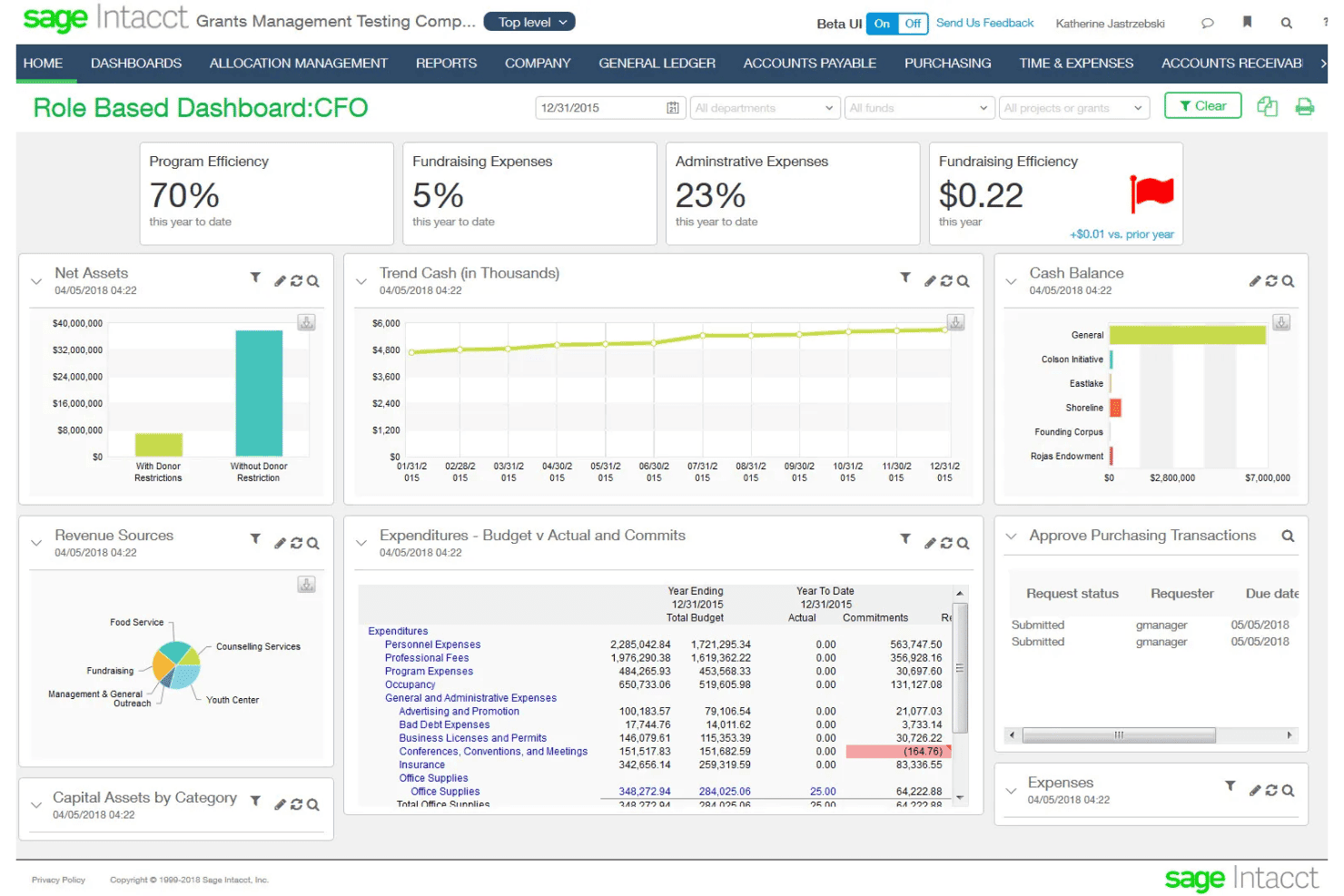
Sage Intacct offers a CFO role-based dashboard displaying key financial metrics including program efficiency, fundraising expenses, net assets, cash balance, and budget vs. actual expenditures. Sage Intacct is a cloud ERP and financial management platform built for subscription businesses, combining subscription billing, usage-based billing, multi-entity accounting, and native ASC 606/IFRS 15 revenue recognition.
Who Is Sage Intacct Best For?
It's a strong fit for mid-market SaaS and professional services finance teams managing complex billing, multi-entity structures, and revenue recognition requirements.
Why I Picked Sage Intacct
Sage Intacct earns its spot on my shortlist because of how well its AI agents work alongside billing and revenue data. The Financial Intelligence agent lets me query financial data in plain language, while the Financial Assurance agent flags unusual journal entries in real time. When a billing run closes, I can move straight into reporting without hunting for anomalies manually.
Sage Intacct Key Features
- Subscription billing automation: Automates contract-based recurring invoices, renewals, and usage charges.
- Multi-entity accounting: Supports consolidated financials and intercompany billing for organizations with multiple subsidiaries.
- ASC 606/IFRS 15 revenue recognition: Handles complex revenue schedules and contract modifications for compliance.
- Marketplace integrations: Connects directly with solutions like Salesforce, Avalara, ADP, Bill.com, and Workday HCM.
Sage Intacct Integrations
Sage Intacct offers 350+ marketplace integrations, including native integrations with Salesforce, Avalara, ADP, Rippling, Bill.com, and Workday HCM. An API is available for custom integrations.
Pros and Cons
Pros:
- AI agents surface anomalies in real time
- Consolidates multi-entity billing and financials natively
- Native ASC 606 revenue recognition built in
Cons:
- Custom report building requires configuration
- Implementation takes weeks
Learn more about Sage Intacct: Best for subscriber retention tools
- Free demo available
- Pricing upon request
Visit WebsiteCustomer Rating:4.3/5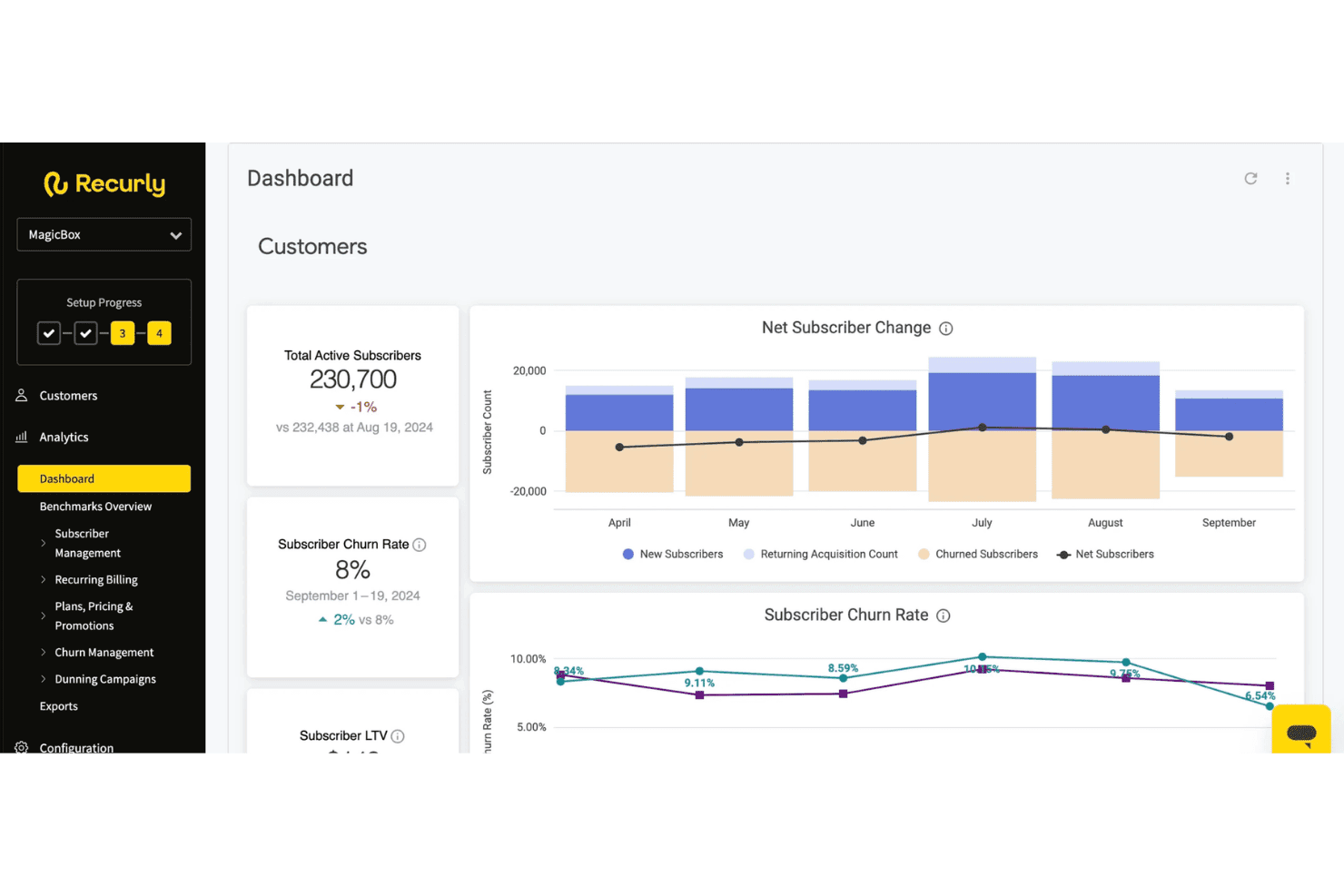
Recurly provides a dashboard displaying total active subscribers, churn rate, net subscriber changes, and subscriber LTV metrics. Recurly is a subscription management and billing platform that handles recurring billing automation, dunning, usage-based pricing, revenue recognition, payments orchestration, and subscriber lifecycle management across the full subscription cycle.
Who Is Recurly Best For?
Recurly is a strong fit for mid-market and enterprise subscription businesses in SaaS, media, and consumer services managing recurring revenue at scale.
Why I Picked Recurly
I've included Recurly in my top picks because its retention toolset goes well beyond standard dunning. The Engage module uses AI-powered propensity-to-churn modeling to trigger personalized cancel-save flows and win-back offers before a subscriber actually churns. I also like that these prompts connect directly to billing in real time, so a retention action taken in-app, like accepting a pause offer, is reflected in the billing system instantly without any manual intervention.
Recurly Key Features
- Revenue recognition automation: Handles ASC 606 and IFRS 15 compliance with automated contract modifications and audit-ready reporting.
- Multi-currency and tax support: Processes payments in 140+ currencies and integrates with Avalara or Vertex for jurisdiction-specific tax calculation.
- Payment gateway network: Connects to 20+ global payment gateways and supports card, ACH, and digital wallet methods.
- Self-service portal: Lets end customers manage subscriptions, update payment methods, and download invoices without contacting support.
Recurly Integrations
Recurly offers native integrations with Stripe, PayPal, Adyen, GoCardless, Avalara, Vertex, Zendesk, Snowflake, and ChartMogul. An API is available for custom integrations.
Pros and Cons
Pros:
- Supports hybrid and usage-based pricing models
- Automated ASC 606 rev rec reporting
- AI-powered cancel-save flows reduce churn
Cons:
- ERP sync depth lags some competitors
- Custom reporting options are limited
Learn more about Recurly: Best for enterprise-grade billing automation
- Free demo available
- Pricing upon request
Visit WebsiteCustomer Rating:4.8/5
BillingPlatform offers an AI-powered dashboard that surfaces unbilled usage and under-invoiced accounts with revenue exposure, AR aging, and overdue invoice queuing. BillingPlatform is an enterprise cloud billing and revenue management platform that handles subscription billing, usage-based rating, AR automation, payment processing, and ASC 606/IFRS 15 revenue recognition across complex, multi-model pricing structures.
Who Is BillingPlatform Best For?
It's a strong fit for large enterprises in telecom, SaaS, financial services, and media that manage high-volume, multi-model billing across multiple entities and currencies.
Why I Picked BillingPlatform
BillingPlatform earns its spot as one of the best on my shortlist because of how it handles billing complexity that most platforms simply can't configure. I particularly like its metadata-driven architecture, which lets billing teams define custom objects, pricing rules, and workflow logic without writing code. The built-in mediation layer also impresses me, ingesting and rating high-volume usage data across diverse sources when billing spans multiple consumption dimensions.
BillingPlatform Key Features
- Self-service customer portal: Lets customers view invoices, manage payment methods, and download tax documents online.
- Native dunning automation: Schedules retries, manages collections, and updates cards automatically for failed or overdue payments.
- ASC 606/IFRS 15 revenue recognition: Creates audit-ready revenue schedules, contract modifications, and detailed disclosure reports.
- Multi-currency and tax engine integration: Handles transactions in global currencies and calculates sales tax, VAT, and GST automatically via external providers.
BillingPlatform Integrations
BillingPlatform offers native integrations with Salesforce, Oracle NetSuite, and Microsoft Dynamics. An API is available for custom integrations, and tax engine connectivity is supported via providers like Avalara.
Pros and Cons
Pros:
- Multi-entity billing across separate legal entities
- Automated contract modification handling
- Configurable mediation engine
Cons:
- Requires professional services for initial setup
- Sandbox testing environment has limitations
Learn more about BillingPlatform:
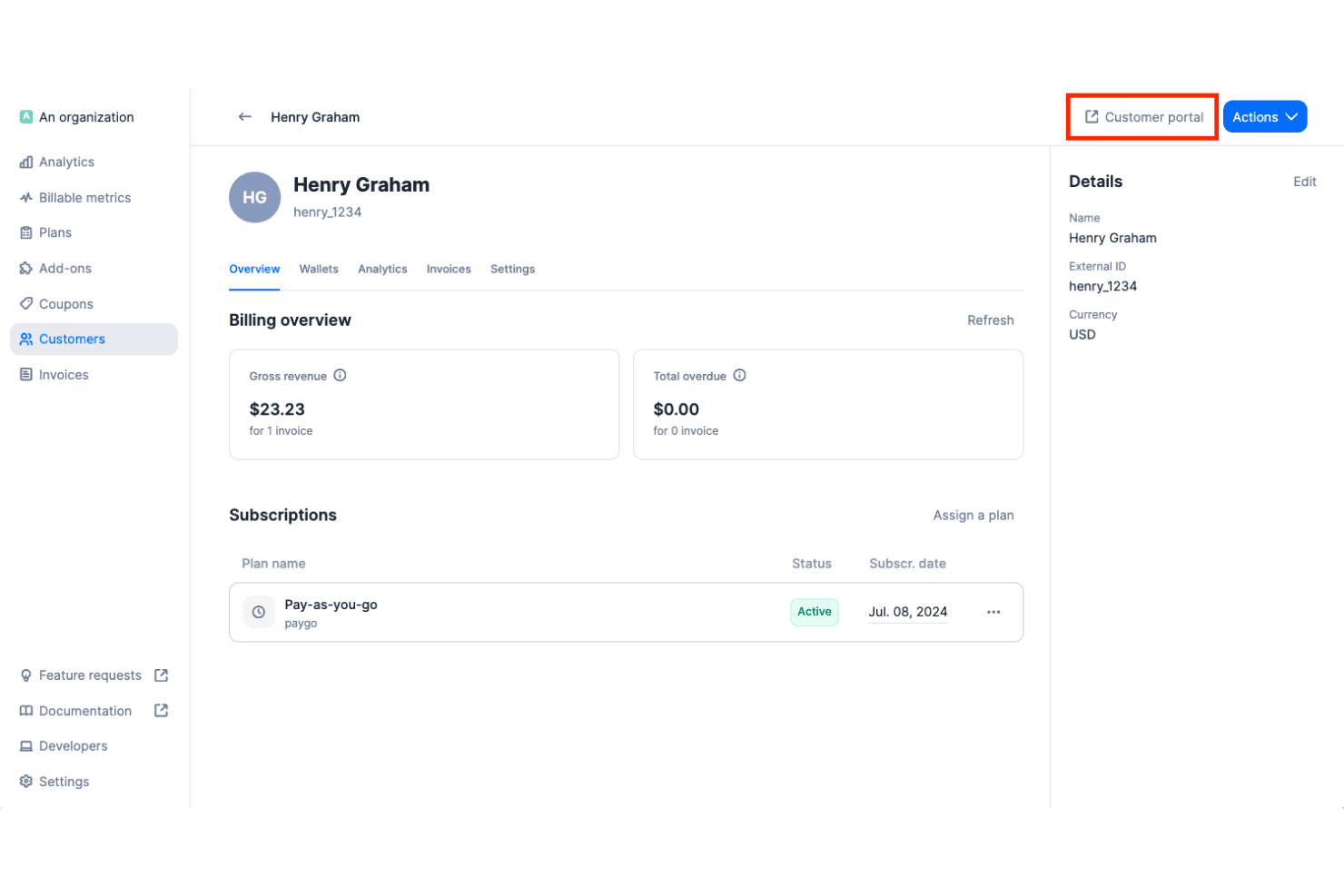
Lago offers a customer billing overview page showing gross revenue, overdue amounts, active subscriptions, and a customer portal access button. Lago is an open-source cloud billing platform that handles usage-based, subscription, and hybrid pricing models, with real-time event metering, automated invoicing, dunning workflows, and integrations across payment, tax, and accounting systems.
Who Is Lago Best For?
Lago is a strong fit for engineering-led SaaS and AI companies that need full control over their billing infrastructure, especially those with data sovereignty requirements or complex usage-based pricing.
Why I Picked Lago
Lago earns its spot on my shortlist because no other cloud billing platform gives you this level of access to the underlying billing logic. I can define custom billable metrics, build hybrid plans that mix subscriptions with consumption-based charges, and deploy the entire stack inside my own VPC. That matters when you're running AI workloads or handling GDPR-sensitive data and can't afford vendor lock-in on the billing layer.
Lago Key Features
- Multiple payment gateway integrations: Connects natively with Stripe, Adyen, GoCardless, and MoneyHash for global payments.
- Automated tax calculation: Integrates with Avalara and Anrok to handle sales tax, VAT, and GST across jurisdictions.
- Native NetSuite and Xero integration: Syncs invoices, payments, and customer data directly to leading accounting platforms.
- Customer-facing billing portal: Lets end customers view invoices, manage payment methods, and access billing history.
Lago Integrations
Lago offers native integrations with Stripe, Adyen, GoCardless, MoneyHash, Avalara, Anrok, NetSuite, Xero, HubSpot, Salesforce, and Zapier. An API is available for custom integrations.
Pros and Cons
Pros:
- Fully configurable billable metrics
- Real-time metering for high-volume event ingestion
- Fully self-hostable for data sovereignty needs
Cons:
- Missing native QuickBooks connectors
- No native ASC 606 revenue recognition
Learn more about Lago: Best for merchant of record billing worldwide
- Free plan + Free demo available
- From 5% + $0.50 per transaction
Visit WebsiteCustomer Rating:4.6/5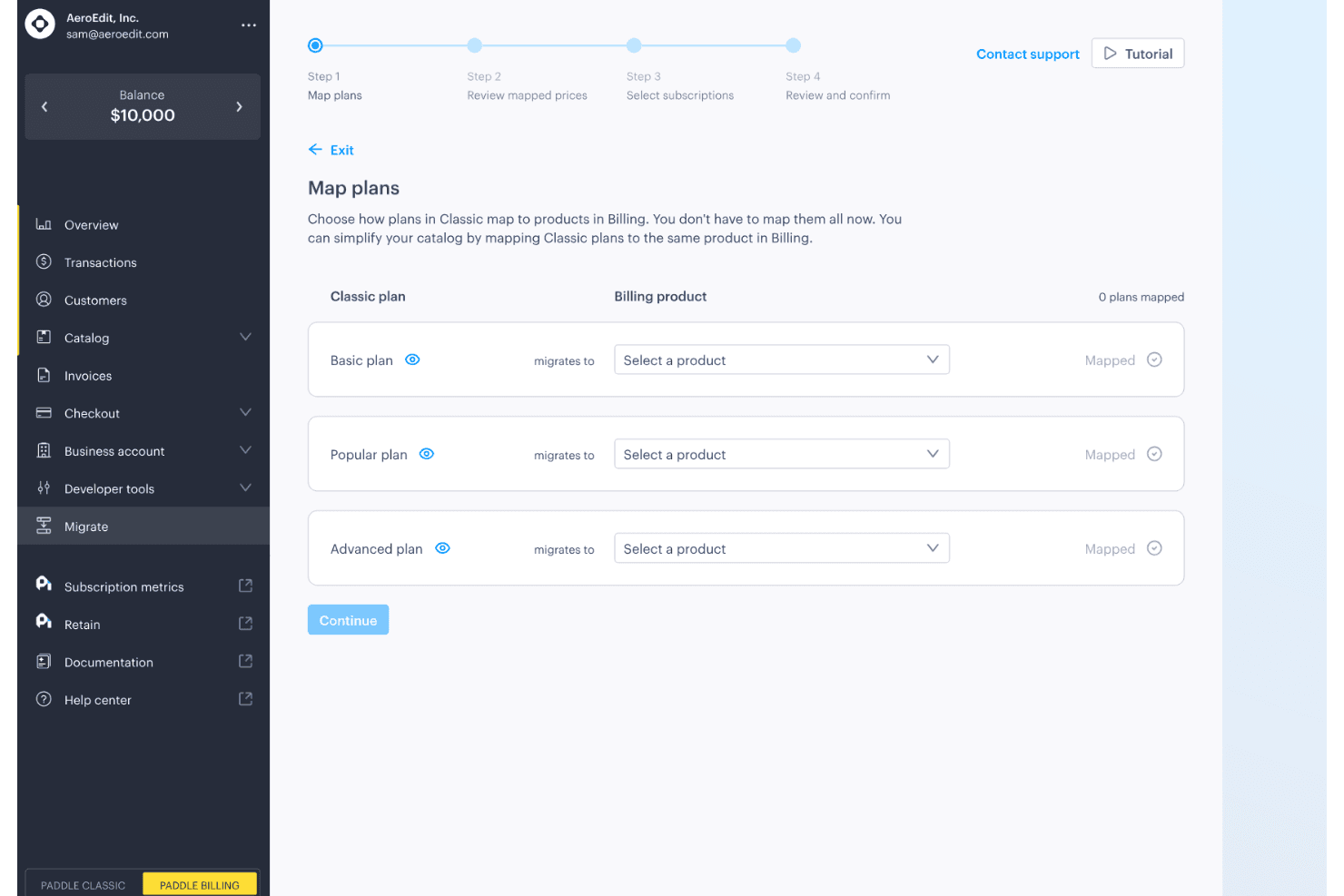
Paddle offers a guided migration flow that maps Classic plans to Billing products across Basic, Popular, and Advanced tiers. Paddle is a cloud billing platform for SaaS and digital product companies that combines subscription management, checkout, recurring billing, invoicing, and global tax compliance under a single merchant of record model.
Who Is Paddle Best For?
Paddle is a strong fit for growth-stage SaaS companies selling digital products across multiple countries who need tax compliance and billing handled without building in-house infrastructure.
Why I Picked Paddle
I picked Paddle as one of the best because no other cloud billing platform handles tax liability quite the same way. As the merchant of record, Paddle calculates, collects, files, and remits VAT and GST across 100+ jurisdictions automatically, so my team isn't managing a separate tax compliance stack on top of billing. I also use Paddle's Retain module to run dunning workflows, including smart payment retries and cancellation recovery flows, without any manual intervention.
Paddle Key Features
- Self-service customer portal: Customers can update payment methods and manage subscriptions without assistance.
- Multi-currency checkout: Paddle supports localized checkout in over 20 currencies.
- Automated invoicing: International and SaaS invoicing is built in, with taxes automatically applied.
- ProfitWell Metrics integration: Native analytics and SaaS metrics reporting connects directly to your financial data.
Paddle Integrations
Paddle offers native integrations with ProfitWell Metrics, HubSpot, Intercom, and Databox. An API is available for custom integrations.
Pros and Cons
Pros:
- Dunning workflows recover failed payments automatically
- Built-in merchant of record removes tax liability
- Handles global tax filing automatically across jurisdictions
Cons:
- Revenue recognition features lack ASC 606 depth
- No prebuilt ERP or accounting system connectors
Learn more about Paddle: Best for rapid pricing experiments at scale
- Free plan available
- Pricing upon request
Visit WebsiteCustomer Rating:4.4/5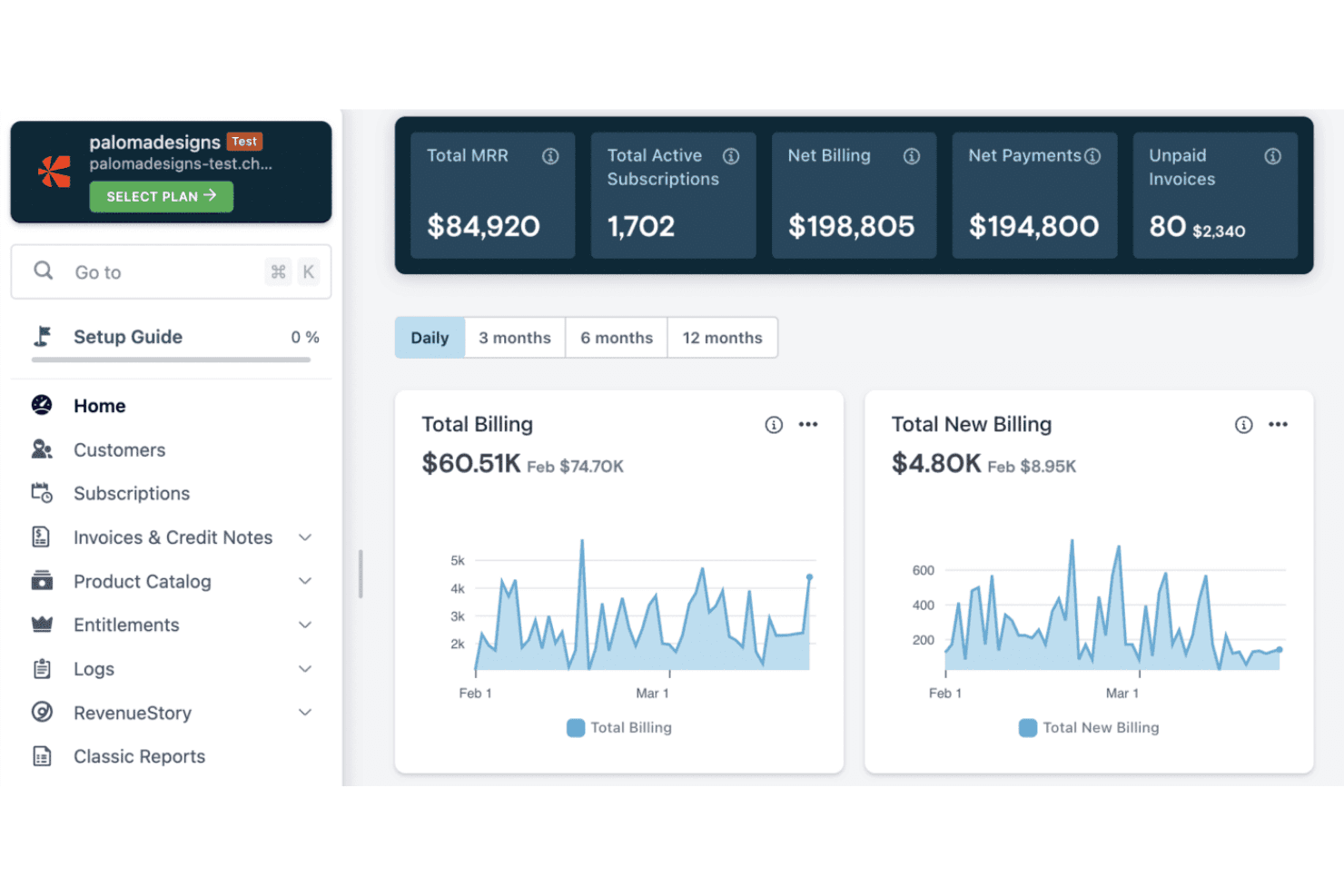
Chargebee features a billing dashboard with MRR, active subscriptions, net billing, payments, and unpaid invoices alongside daily billing trend charts. Chargebee is a cloud billing and revenue management platform that handles subscription billing, usage-based metering, CPQ, revenue recognition, and payment collection across 40+ gateways and 100+ currencies.
Who Is Chargebee Best For?
Chargebee is a strong fit for SaaS finance and revenue operations teams at growth-stage and mid-market companies managing subscription and usage-based billing.
Why I Picked Chargebee
Chargebee earns its spot on my shortlist because of how it handles pricing model iteration without pulling in engineering every time. The Price Book lets me manage tiered, usage-based, flat-fee, and hybrid pricing in one centralized catalog, so I can launch a new pricing tier and test it against existing segments without a code change. I also like the Growth module's AI-powered offer builder, which lets me run upgrade, upsell, and trial conversion experiments across subscriber cohorts.
Chargebee Key Features
- Dunning automation: Smart retry schedules and payment recovery workflows reduce failed transactions with minimal manual effort.
- Self-service customer portal: End customers can view invoices, update payment methods, and manage subscriptions independently.
- Multi-currency and tax engine: Supports 100+ currencies and automates VAT, GST, and sales tax calculation for global compliance.
- Native ERP and accounting integrations: Direct connectors to NetSuite, QuickBooks, and Xero sync billing and revenue data seamlessly.
Chargebee Integrations
Chargebee offers over 40 native payment gateway integrations, and has native integrations with Salesforce, HubSpot, NetSuite, QuickBooks Online, Xero, Apple App Store, and Google Play Store. An API is available for custom integrations.
Pros and Cons
Pros:
- Dunning handles failed payments with smart retries
- Customer self-service portal included natively
- ASC 606 revenue recognition fully automated
Cons:
- Advanced metering setup takes significant time
- Custom reporting requires workarounds
 Best for deep SaaS financial integrations
- Free demo available
- From $599/month (billed annually)
Visit WebsiteCustomer Rating:4.3/5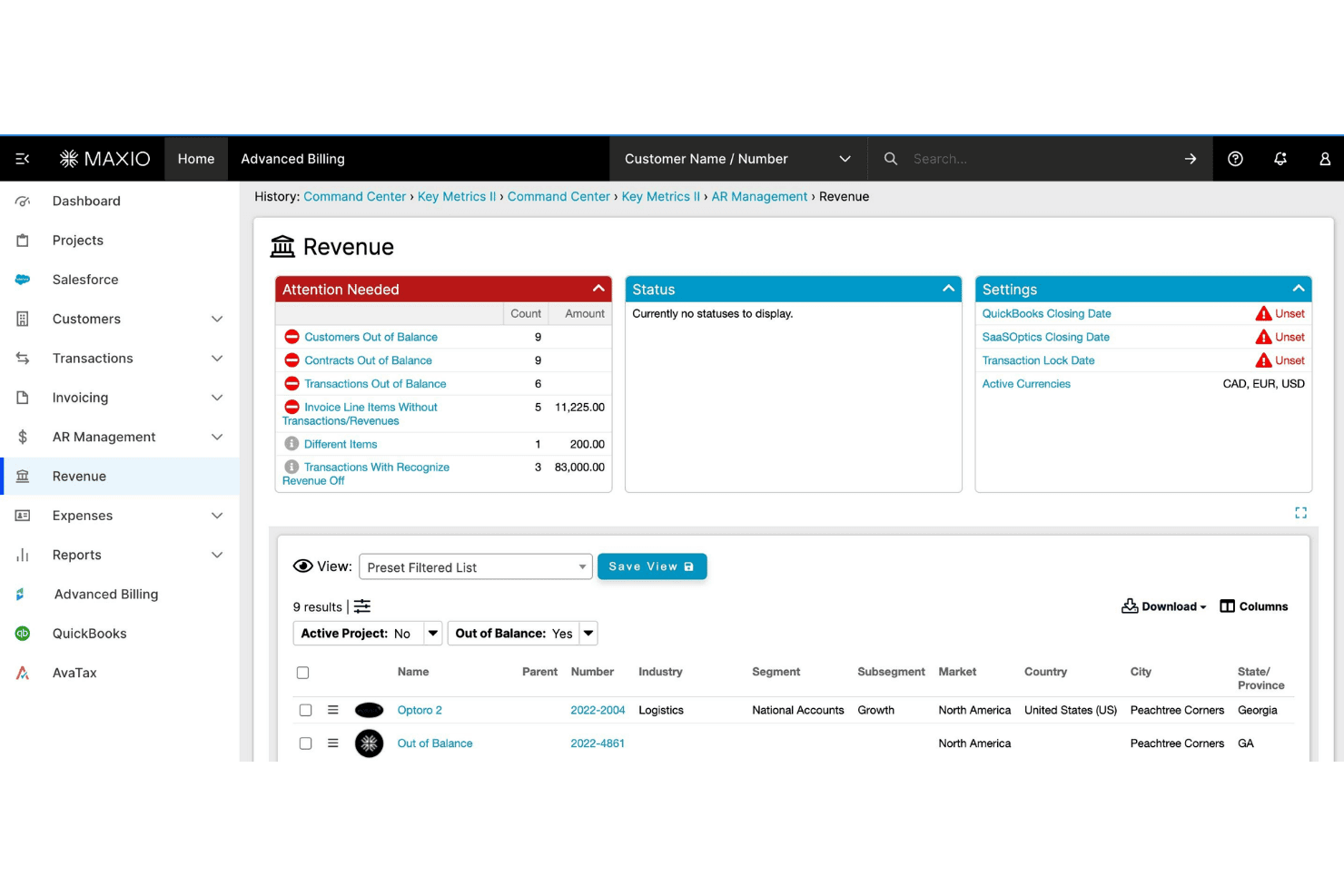
Maxio offers a Revenue management dashboard with attention-needed alerts, balance tracking, and customer filtering capabilities. Maxio is a subscription billing and financial operations platform built for B2B SaaS companies, covering usage-based billing, revenue recognition, A/R management, and SaaS metrics reporting.
Who Is Maxio Best For?
Maxio is a strong fit for finance and RevOps teams at B2B SaaS companies managing complex subscription contracts, usage-based pricing, or multi-entity billing structures.
Why I Picked Maxio
Maxio earns its spot on my shortlist because of how deeply it connects billing data to the financial systems SaaS teams already rely on. Native integrations with NetSuite, Sage Intacct, and QuickBooks include GL mapping and bidirectional sync, so close cycles don't require manual reconciliation. I also like the revenue recognition engine, which handles SSP allocation and contract modifications automatically under ASC 606 and IFRS 15.
Maxio Key Features
- Self-service customer portal: Lets customers view invoices, update payment methods, and manage subscriptions directly online.
- Configurable dunning automation: Enables you to set customized retry logic and automated recovery workflows for overdue accounts.
- Hybrid pricing model support: Allows combining flat-rate, per-seat, and usage-based charges on a single invoice.
- Multi-entity billing management: Supports separate catalogs, gateways, and reporting for subsidiaries or business units.
Maxio Integrations
Maxio offers 85+ native integrations, including NetSuite, QuickBooks Online, Xero, Sage Intacct, Salesforce, HubSpot, Pipedrive, Stripe, Avalara, and TaxJar. Zapier and an API are available for custom integrations.
Pros and Cons
Pros:
- Built-in investor-grade SaaS metrics reporting
- Strong ASC 606 revenue recognition automation
- Handles complex usage-based pricing natively
Cons:
- Steeper onboarding for smaller finance teams
- Implementation requires significant setup time
Learn more about Maxio: Best for complex quote-to-cash automation
- Free demo available
- Pricing upon request
Visit WebsiteCustomer Rating:3.8/5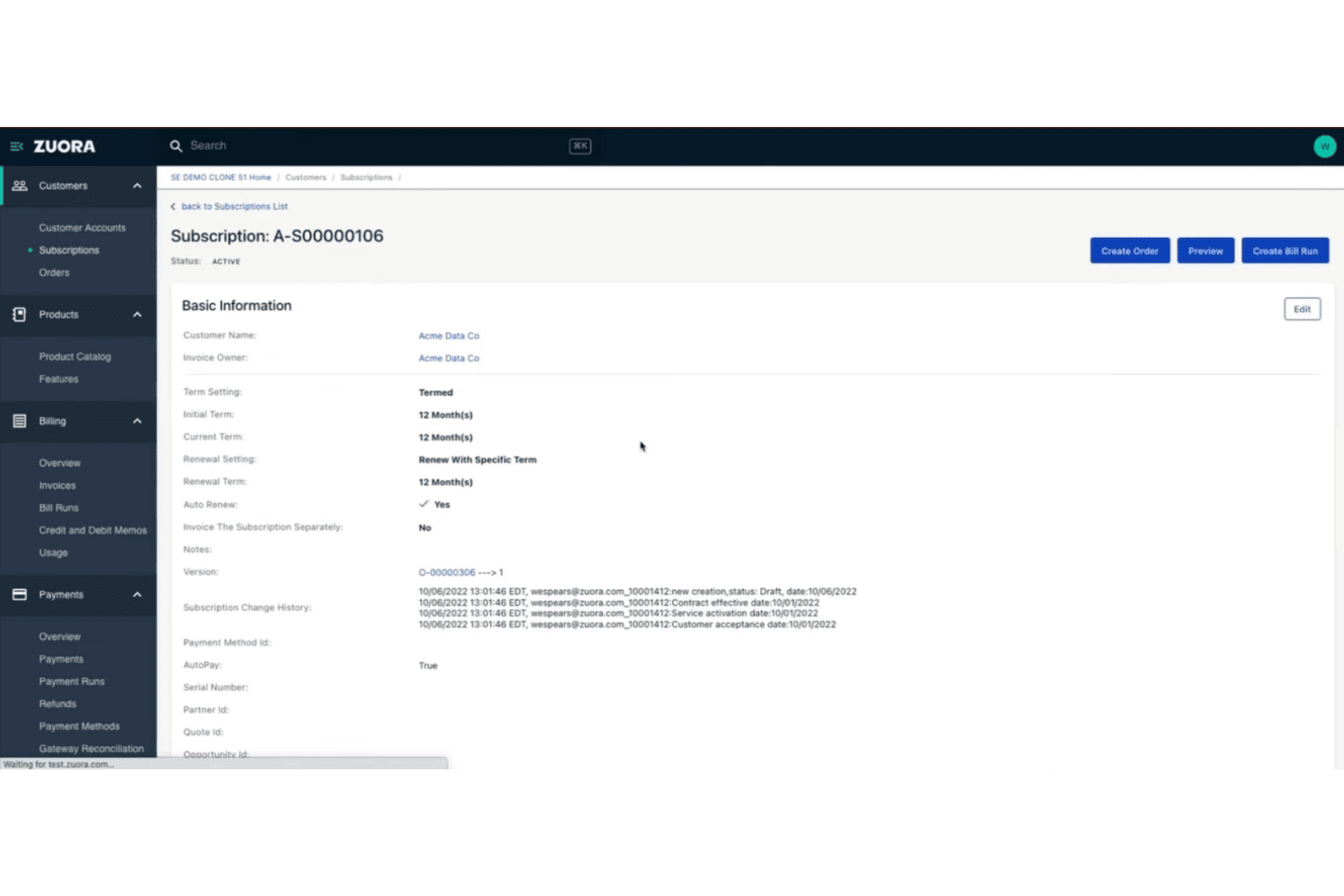
Zuora offers a detailed subscription management page with billing terms, renewal settings, and change history for a customer account. Zuora is an enterprise cloud billing platform built around subscription and usage-based monetization, covering quote-to-cash workflows, revenue recognition, payment processing, and AR automation.
Who Is Zuora Best For?
Zuora is a strong fit for enterprise finance and revenue operations teams at subscription businesses managing complex, high-volume billing across multiple products, pricing models, or markets.
Why I Picked Zuora
Zuora earns its spot as one of the best on my shortlist because of how tightly it connects the CPQ, billing, and revenue recognition layers into a single quote-to-cash workflow. I like that Zuora CPQ syncs directly with Zuora Billing, so pricing changes in a quote flow through to invoicing without manual reconciliation. The automated revenue recognition in Zuora Revenue handles contract modifications under ASC 606 and IFRS 15 without requiring custom workarounds.
Zuora Key Features
- Multi-currency and tax management: Supports global operations with multi-currency invoicing and automated tax calculation through integrated tax engines.
- Payment gateway integrations: Connects with 40+ payment gateways covering credit card, ACH, and regional payment methods.
- Self-service customer portal: Lets customers view invoices, manage payment methods, and handle subscription changes online.
- Customizable product catalog: Enables teams to manage complex product offerings, pricing experiments, add-ons, and bundling in one place.
Zuora Integrations
Zuora offers native integrations with Salesforce, NetSuite, and over 40 payment gateways including Stripe, Adyen, Braintree, and PayPal. An API is available for custom integrations.
Pros and Cons
Pros:
- Supports high-volume usage event ingestion
- Built-in ASC 606 and IFRS 15 compliance
- Handles complex subscription pricing models natively
Cons:
- Requires developer resources
- Long implementation timeline for enterprises
Learn more about Zuora: Best for flexible hybrid pricing models
- Not available
- From $0.7% of billing volume per month
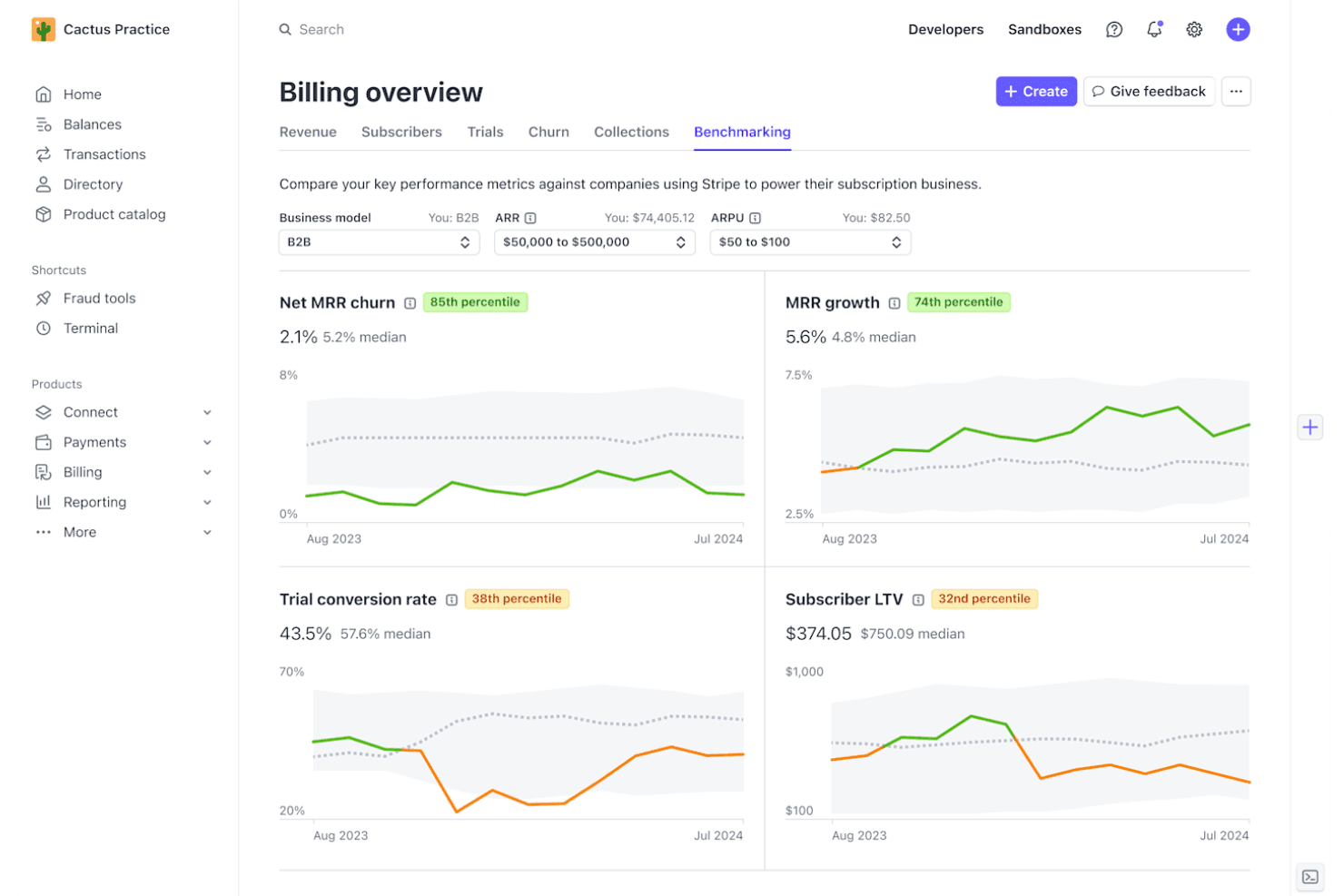
Stripe Billing offers a Benchmarking dashboard that compares key subscription metrics like Net MRR churn, MRR growth, trial conversion rate, and Subscriber LTV against industry peers. Stripe Billing is a cloud billing platform that handles subscription management, usage-based billing, invoicing, and payment collection across 15+ pricing models and 135+ currencies.
Who Is Stripe Billing Best For?
Stripe Billing is a strong fit for SaaS and technology companies that need to run multiple pricing models — subscriptions, metered usage, or both — within a single billing system.
Why I Picked Stripe Billing
I picked Stripe Billing as one of the best because it's the only platform I've used where you can genuinely mix subscription and consumption pricing within a single customer contract. That means setting a base recurring fee, layering metered usage charges on top, and configuring proration rules for mid-cycle plan changes, all within one system. The Meters API handles real-time event ingestion at up to 100,000 events per second, so metered charges stay accurate even at high transaction volumes.
Stripe Billing Key Features
- Self-service customer portal: Lets customers view invoices, update payment info, and manage subscriptions without contacting support.
- Automated tax calculation: Applies correct VAT, GST, or sales tax to invoices across 50+ countries.
- Integrated revenue recognition: Automatically generates ASC 606/IFRS 15-compliant revenue schedules and reports.
- Native NetSuite connector: Syncs invoices, payments, and reconciliation data directly with NetSuite accounts.
Stripe Billing Integrations
Stripe Billing offers native integrations with Salesforce, NetSuite, SAP Digital Payments Add-on, Snowflake, and Amazon Redshift. An API is available for custom integrations.
Pros and Cons
Pros:
- Real-time usage metering at massive scale
- Smart retry logic recovers failed payments
- Supports 15+ pricing models in one system
Cons:
- No native QuickBooks or Sage Intacct sync
- Revenue recognition lacks depth
Learn more about Stripe Billing:
Alte soluții software de facturare în cloud
Iată câteva opțiuni suplimentare de software de facturare în cloud care nu au ajuns pe lista mea scurtă, dar merită totuși analizate:
- 11MetronomeBest for real-time usage-based billing
- 12OrbBest for dynamic revenue design flexibility
- 13OrdwayBest for multi-model billing and SaaS metrics
- 14ZenskarBest for AI-driven contract-to-cash automation
- 15Zoho BillingBest for built-in global tax and localization
- 16YouniumBest for centralized quote-to-revenue management
- 17Aria SystemsBest for high-volume real-time charging engines
- 18Agentforce Revenue ManagementBest for unified CRM billing experience
- 19ZoneBillingBest for billing automation inside NetSuite
- 20Oracle NetSuite SuiteBillingBest for native ERP subscription lifecycle control
How I Evaluate Cloud Billing Software
I split my evaluation into baseline requirements—recurring billing, usage rating, and rev rec compliance—and the differentiators that separate one platform from another for SaaS finance teams.
Core Functionality (Table Stakes for This List)
When I'm selecting tools for my list, I rank each one on a scale from 0 (does not offer the functionality) to 5 (excels in this area) for each core functionality listed below. Then, I calculate the tool's total score into a percentage. Each tool needs to achieve a minimum total score of 65% to be considered for inclusion.
- Recurring Billing Automation: I look for platforms that handle invoice generation, renewal logic, and dunning retries without manual touchpoints—like auto-prorating mid-cycle upgrades.
- Usage-Based Billing: Metered and consumption models need accurate rating engines. I evaluate how each tool ingests high-volume events like API calls or compute hours.
- Payment Gateway Integration: I check gateway breadth across cards, ACH, wallets, and direct debit. Tools like Stripe Billing and Chargebee differ in how many regional processors they support.
- Tax & Multi-Currency Support: Global billing means handling VAT, GST, and sales tax across dozens of jurisdictions. I look at whether tax is native or relies on integrations like Avalara.
- Accounting & ERP Integration: I evaluate sync depth with systems like NetSuite, QuickBooks, and Sage Intacct—especially bidirectional GL mapping that keeps billing and ledger data aligned.
- Revenue Recognition Compliance: ASC 606 and IFRS 15 schedules should automate contract modifications, SSP allocations, and deferred revenue waterfall reporting for month-end close.
Once I have a list of tools that meet the criteria, I consider what sets each platform apart.
Differentiating Factors (What Sets Vendors Apart)
Here's how I compare and contrast different vendors:
Standout Features
Dunning automation is a key differentiator. I look at how each platform handles retry logic, smart card updaters, and recovery workflows for failed payments. Usage-based metering matters for teams billing on API calls or compute hours—real-time event ingestion at scale separates strong tools from limited ones. Self-service customer portals are worth evaluating too, letting subscribers update payment methods, switch plans, and pull tax documents without filing a support ticket.
Beyond Features
Pricing model flexibility is a big one—I evaluate whether a platform can combine flat subscriptions, per-seat, and usage components on a single invoice without engineering rework. Integration ecosystem depth matters just as much, especially native connectors to ERPs like NetSuite and QuickBooks alongside REST APIs for data warehouse syncing. I also check pricing transparency, looking at how clearly vendors disclose platform fees, transaction costs, and implementation charges so you can forecast total cost of ownership.
Cum să alegeți software-ul de facturare în cloud
Este ușor să vă pierdeți în liste lungi de funcții și structuri complexe de prețuri. Pentru a rămâne concentrați în timp ce parcurgeți procesul unic de selectare a software-ului pentru compania dumneavoastră, iată o listă de factori de care trebuie să țineți cont:
| Factor | Aspecte de luat în considerare |
|---|---|
| FactorScalabilitate | Aspecte de luat în considerareVa putea platforma gestiona creșterile bruște ale utilizării și dezvoltarea companiei? Verificați limitele privind volumul tranzacțiilor și flexibilitatea modelului de facturare. |
| FactorIntegrări | Aspecte de luat în considerareSe poate conecta fără probleme la ERP-ul, CRM-ul și procesatorii dumneavoastră de plăți? Evaluați profunzimea integrărilor, nu doar existența acestora. |
| FactorPosibilități de personalizare | Aspecte de luat în considerarePuteți adapta fluxurile de lucru pentru facturare, logica fiscală și șabloanele de factură fără ajutorul unui dezvoltator? Verificați cât de mult puteți personaliza direct în platformă. |
| FactorUșurință în utilizare | Aspecte de luat în considerareCât de repede pot echipele financiare și operaționale să configureze și să gestioneze facturarea? Căutați procese simple de aprobare, configurare a planurilor și raportare. |
| FactorImplementare și integrare inițială | Aspecte de luat în considerareCât timp și efort sunt necesare pentru lansare? Întrebați despre asistența pentru migrarea datelor, instruire și accesul la un plan clar de integrare inițială. |
| FactorCost | Aspecte de luat în considerareSunt transparente taxele pentru platformă, tranzacții și depășirea limitelor? Verificați existența costurilor recurente și a cheltuielilor ascunse care v-ar putea surprinde. |
| FactorMăsuri de securitate | Aspecte de luat în considerareFurnizorul îndeplinește cerințele dumneavoastră privind PCI DSS, SOC 2, GDPR sau localizarea datelor? Întrebați cum este gestionată și auditată securitatea. |
| FactorCapacități internaționale | Aspecte de luat în considerareVa accepta monede, jurisdicții fiscale și cerințe de autoservire pentru clienți dacă afacerea dumneavoastră se extinde pe piețe noi? |
Ce este software-ul de facturare în cloud?
Software-ul de facturare în cloud este o platformă digitală care automatizează facturarea, gestionarea abonamentelor și procesarea plăților pentru modelele de afaceri recurente sau bazate pe utilizare. Acesta simplifică gestionarea facturării în mai multe monede, conformitatea fiscală globală și integrările cu sistemele de contabilitate. Echipele financiare folosesc aceste instrumente pentru a eficientiza operațiunile privind veniturile, a reduce munca manuală și a susține raportarea financiară pregătită pentru audit în cazul ofertelor complexe bazate pe abonamente și consum.
Funcțiile software-ului de facturare în cloud
Atunci când alegeți un software de facturare în cloud, urmăriți următoarele funcții esențiale:
- Automatizarea facturării recurente: Generează facturi pentru abonamente, gestionează reînnoirile și procesează plățile conform unui program stabilit, fără intervenție manuală.
- Tarifarea bazată pe utilizare: Monitorizează activitatea sau consumul clienților, calculează costurile și acceptă modele de facturare măsurată, pe niveluri sau hibride.
- Integrarea cu gateway-uri de plată: Se conectează la mai mulți procesatori pentru a accepta plăți prin card de credit, ACH, transferuri bancare și metode de plată regionale.
- Calcularea globală a taxelor: Gestionează conformitatea privind impozitul pe vânzări, TVA-ul și GST-ul în diferite țări, folosind motoare integrate sau integrări cu terți.
- Asistență pentru mai multe monede: Emite facturi și acceptă plăți în monede diferite, aplicând automat cursurile de schimb.
- Fluxuri de lucru pentru notificări și colectare: Automatizează mementourile, reîncercările și etapele de recuperare pentru plățile eșuate sau restante, contribuind la reducerea pierderilor de venituri.
- Portal pentru clienți cu autoservire: Le oferă clienților posibilitatea de a vizualiza facturile, de a actualiza metodele de plată și de a-și gestiona abonamentele online.
- Conformitatea recunoașterii veniturilor: Oferă suport pentru cerințele ASC 606 și IFRS 15, cu programe automatizate pentru recunoașterea corectă a veniturilor și crearea unor rapoarte pregătite pentru audit.
- Integrarea cu platformele ERP și de contabilitate: Sincronizează datele de facturare cu platformele populare de contabilitate și ERP, pentru a asigura evidențe financiare corecte și procese de închidere simplificate.
- Facturare personalizabilă: Le permite echipelor financiare să adapteze șabloanele de facturi, elementele de identitate vizuală și pozițiile facturate pentru a corespunde cerințelor specifice ale companiei și așteptărilor clienților.
Beneficiile software-ului de facturare în cloud
Implementarea unui software de facturare în cloud oferă mai multe beneficii echipei și companiei dumneavoastră. Iată câteva dintre acestea:
- Cicluri de facturare mai rapide: Facturarea și reînnoirile automatizate ajută echipa să trimită rapid facturile, cu mai puțini pași manuali.
- Recunoașterea exactă a veniturilor: Conformitatea integrată cu ASC 606/IFRS 15 asigură faptul că situațiile financiare reflectă programele de recunoaștere a veniturilor în timp real.
- Acces global îmbunătățit: Facturarea în mai multe monede și automatizarea taxelor facilitează deservirea clienților din țări noi, fără costuri administrative suplimentare.
- Reducerea eșecurilor de plată: Fluxurile de lucru pentru notificări și reîncercările inteligente ajută la recuperarea veniturilor din tentativele de plată eșuate sau întârziate.
- Vizibilitate și control sporite: Tablourile de bord în timp real, pistele de audit și rapoartele detaliate oferă informațiile financiare necesare pentru luarea unor decizii informate privind compania.
- Experiență îmbunătățită pentru clienți: Portalurile cu autoservire le permit clienților să își gestioneze abonamentele, să vizualizeze facturile și să descarce înregistrările plăților ori de câte ori au nevoie.
Costurile și prețurile software-ului de facturare în cloud
Alegerea unui software de facturare în cloud necesită înțelegerea diferitelor modele și planuri de preț disponibile. Costurile variază în funcție de funcții, dimensiunea echipei, suplimente și multe altele. Tabelul de mai jos rezumă planurile obișnuite, prețurile lor medii și funcțiile incluse de regulă în soluțiile software de facturare în cloud:
Tabel comparativ al planurilor pentru software-ul de facturare în cloud
| Tipul planului | Preț mediu | Funcții comune |
|---|---|---|
| Tipul planuluiPlan gratuit | Preț mediu$0 | Funcții comuneFacturare de bază, integrare limitată cu plățile, sarcini manuale de facturare și asistență de bază pentru clienți. |
| Tipul planuluiPlan personal | Preț mediu$25–$75/lună | Funcții comuneFacturare recurentă, tarifare simplă bazată pe utilizare, asistență pentru mai multe monede și integrări de bază. |
| Tipul planuluiPlan pentru companii | Preț mediu$200–$600/lună | Funcții comuneNotificări avansate, automatizarea taxelor, recunoașterea veniturilor, portaluri cu autoservire, integrări contabile și raportare. |
| Tipul planuluiPlan pentru întreprinderi | Preț mediu$1,000+/lună | Funcții comuneFluxuri de lucru personalizate, măsurarea utilizării la volume mari, asistență premium, instrumente de conformitate, acces API și integrări ERP complexe. |
Întrebări frecvente despre software-ul de facturare în cloud
Iată câteva răspunsuri la întrebările frecvente despre software-ul de facturare în cloud:
Cum gestionează software-ul de facturare în cloud facturarea bazată pe utilizare?
Majoritatea platformelor monitorizează apelurile API, orele de calcul sau alte valori de utilizare folosind date în timp real, apoi calculează automat tarifele. Astfel, o companie SaaS sau un furnizor de software ca serviciu poate oferi modele de tarifare detaliate fără a se baza pe procese manuale sau foi de calcul complexe. Prin eliminarea introducerii manuale a datelor, soluțiile moderne de facturare în cloud contribuie la optimizarea proceselor generale de facturare și asigură procesarea corectă a facturilor.
Se poate integra software-ul de facturare în cloud cu sistemele mele de contabilitate și ERP?
Da, software-ul de facturare de top oferă posibilități de integrare prin conectori incluși pentru sisteme ERP precum NetSuite și Sage Intacct, precum și pentru software de contabilitate precum QuickBooks și Xero. Nivelul de sincronizare diferă, așa că verificați dacă datele circulă într-un singur sens sau bidirecțional și dacă este disponibilă maparea personalizată. Migrarea de la infrastructura locală veche și rigidă la software-ul de facturare bazat pe cloud asigură sincronizarea automată a sistemelor financiare.
La ce ar trebui să fiu atent în ceea ce privește costurile ascunse?
Pe lângă planurile tarifare de bază, acordați atenție taxelor de tranzacționare, tarifelor bazate pe venituri, asistenței premium și modulelor suplimentare. De asemenea, este posibil să întâlniți costuri suplimentare pentru configurare sau pentru funcții specifice, precum plățile recurente și notificările automatizate. Solicitați întotdeauna din timp o defalcare detaliată a costurilor și clarificați ce este inclus înainte de achiziție, mai ales dacă operați pe baza unui model de venituri bazat pe abonamente.
Este software-ul de facturare în cloud sigur pentru gestionarea plăților?
Da, majoritatea produselor bazate pe cloud respectă standardul PCI DSS și oferă criptare, împreună cu controale de acces bazate pe roluri. Securizarea mai multor opțiuni de plată — de la carduri de credit la ACH — este esențială pentru protejarea datelor clienților. Este recomandat să verificați certificările și să înțelegeți modul în care datele de plată sunt tokenizate sau protejate în orice soluție pe care o luați în considerare, pentru a vă proteja rezultatul financiar și a consolida încrederea.
Cât de repede putem începe să utilizăm aceste platforme?
Implementarea poate dura de la câteva zile pentru configurări simple până la câteva săptămâni pentru migrări complexe, mai ales dacă importați date de facturare vechi sau aveți nevoie de integrări personalizate. Asistența detaliată pentru configurare inițială și migrare poate face o diferență semnificativă.