

Why Trust Our Software Recommendations
6,700+
Reviews
20
Industry experts
16+
Evaluation factors
14
Years
Our team has been testing and reviewing software since 2012. As finance leaders ourselves, we know how difficult—and important—it is to choose the right software.
For this guide, we evaluated tools using hands-on testing and independent research, scoring tools using our selection criteria.
Our reviews reflect our human editorial judgment, not a sales pitch.
Software-ul de gestionare a cheltuielilor IT îți oferă vizibilitate în timp real asupra fiecărui dolar cheltuit pentru SaaS, cloud și active IT — atât pentru contractele aprobate, cât și pentru IT-ul clandestin. Dacă ești un lider financiar responsabil de maximizarea bugetului pentru tehnologie, aceste platforme te ajută să identifici risipa ascunsă, să controlezi reînnoirile software și să gestionezi corect achizițiile, fără foi de calcul dezordonate sau lacune în fluxurile de lucru.
Alegerea instrumentului potrivit îți oferă claritatea necesară pentru a alinia cheltuielile cu prioritățile companiei, pentru a elimina pierderile inutile și pentru a colabora eficient cu echipele IT și de achiziții. Iată cum te pot ajuta cele mai bune platforme de gestionare a cheltuielilor IT să preiei controlul asupra costurilor tehnologice.
Tabel comparativ al software-urilor de gestionare a cheltuielilor IT
Acest tabel comparativ rezumă detaliile de preț pentru selecția mea de software-uri de top pentru gestionarea cheltuielilor IT:
Score legend (out of 5)
- Excellent4.5–5
- Good4–4.4
- Average3–3.9
- Below average2–2.9
- Poor1–1.9
Sorted by: Default
| Tool | Starting Price | Website | |||||||
|---|---|---|---|---|---|---|---|---|---|
Best for AI-driven spend tied to HR data | 4.2 out of 5 | 4 | 3 | 3 | 5 | 5 | 5 | Pricing upon request Free demo available | Website |
Best for SaaS shadow IT discovery at scale | 4.2 out of 5 | 4 | 3 | 5 | 5 | 4 | 4 | Pricing upon request Free demo available | Website |
Best for SaaS spend with finance team controls | 3.8 out of 5 | 4 | 3 | 5 | 4 | 3 | 4 | $75/month Free demo available | Website |
Best for enterprise procurement and contract oversight | 3.8 out of 5 | 5 | 3 | 1 | 4 | 5 | 5 | Pricing upon request Free plan + 30-day free trial + free demo available | Website |
Best for IT license governance in large enterprises | 3.8 out of 5 | 4 | 2 | 4 | 4 | 4 | 5 | Pricing upon request Free demo available | Website |
Best for SaaS spend backed by human negotiators | 4.3 out of 5 | 4 | 3 | 5 | 4 | 5 | 5 | Pricing upon request Free demo available | Website |
Best for AI-driven SaaS and cloud spend control | 4.7 out of 5 | 5 | 3 | 5 | 5 | 5 | 5 | Pricing upon request Free trial + free demo available | Website |
Best for procurement backed by benchmark data | 4.5 out of 5 | 5 | 3 | 5 | 4 | 5 | 5 | €12.5K/year Free demo available | Website |
Best for enterprise-wide IT asset and spend visibility | 4.5 out of 5 | 5 | 4 | 5 | 5 | 5 | 3 | Pricing upon request Free demo available | Website |
Best for SaaS spend backed by AI and benchmarks | 4.2 out of 5 | 5 | 4 | 5 | 4 | 5 | 2 | Pricing upon request Free demo available | Website |


Recenzii ale celor mai bune software-uri de gestionare a cheltuielilor IT
Mai jos sunt prezentate rezumatele mele detaliate ale celor mai bune software-uri de gestionare a cheltuielilor IT care au ajuns pe lista mea scurtă. Recenziile mele oferă o analiză detaliată a funcțiilor, capabilităților și celor mai potrivite cazuri de utilizare pentru fiecare platformă, pentru a te ajuta să o găsești pe cea mai potrivită pentru tine.
 Best for AI-driven spend tied to HR data
- Free demo available
- Pricing upon request
Visit WebsiteCustomer Rating:4.8/5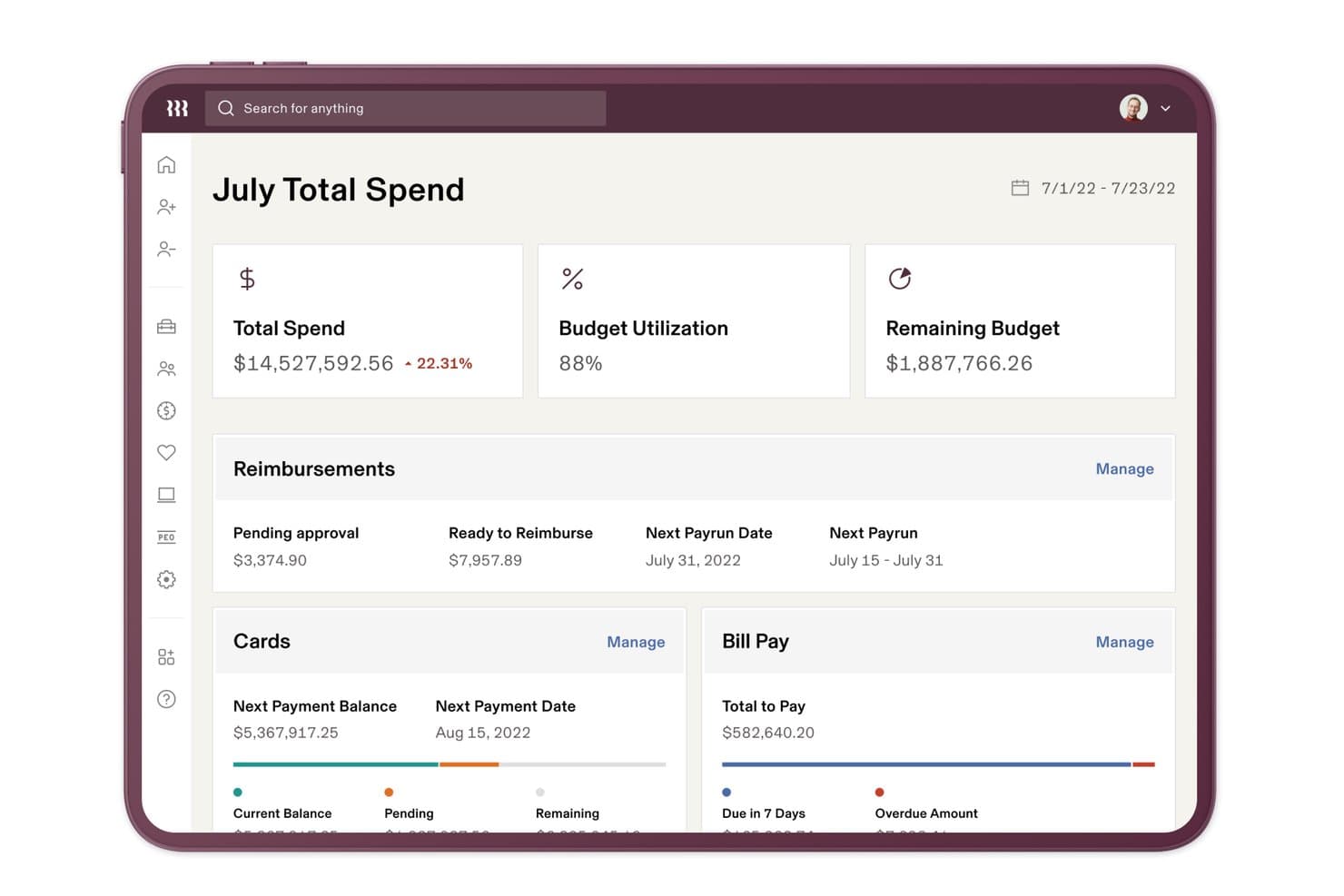
Rippling Spend centralizes budget, cards, and reimbursements in one dashboard. Rippling Spend is a modular spend management platform that unifies corporate cards, expense reimbursements, bill pay, procurement, and AI tool cost tracking across a single, HR-connected data model.
Who Is Rippling Spend Best For?
Rippling Spend is a strong fit for mid-market finance teams that already use—or plan to use—Rippling for HR and payroll, and want spend controls tied directly to employee data.
Why I Picked Rippling Spend
I picked Rippling Spend as one of the best because it's the only tool I've seen that ties spend controls directly to your HR data model. When a new engineer joins, Rippling automatically assigns the right card limits and software access based on their role and department. I also love the AI Spend Console, which maps AI tool costs (Cursor, OpenAI, Anthropic) to team-level outputs like pull requests, so you can actually justify AI budgets with business evidence.
Rippling Spend Key Features
- Renewal Manager AI: Sends automated alerts 30, 60, and 90 days before vendor contract renewals, with full vendor history and pricing context attached.
- Attribute-driven card controls: Enforces spend limits and vendor category restrictions at the point of transaction based on employee role, department, and seniority.
- Contract Reviewer AI: Scans uploaded vendor contracts for auto-renewal clauses, pricing inconsistencies, and legal red flags before you sign.
- Multi-currency expense reimbursement: Supports expense submissions and receipt translation across 185+ countries, with automatic currency conversion built in.
Rippling Spend Integrations
Rippling Spend offers 600+ native integrations, including NetSuite, QuickBooks Online, Xero, Sage Intacct, Workday, BambooHR, ADP, Okta, Azure AD, Jira, GitHub, Cursor, OpenAI, and Anthropic. It also provides API access for custom integrations.
Pros and Cons
Pros:
- AI-driven contract and renewal management
- Real-time unified dashboard for all spend
- Automated policies linked to employee attributes
Cons:
- Full SaaS discovery requires buying extra module
- Cloud spend visibility features not included
Learn more about Rippling Spend: Best for SaaS shadow IT discovery at scale
- Free demo available
- Pricing upon request
Visit WebsiteCustomer Rating:4.9/5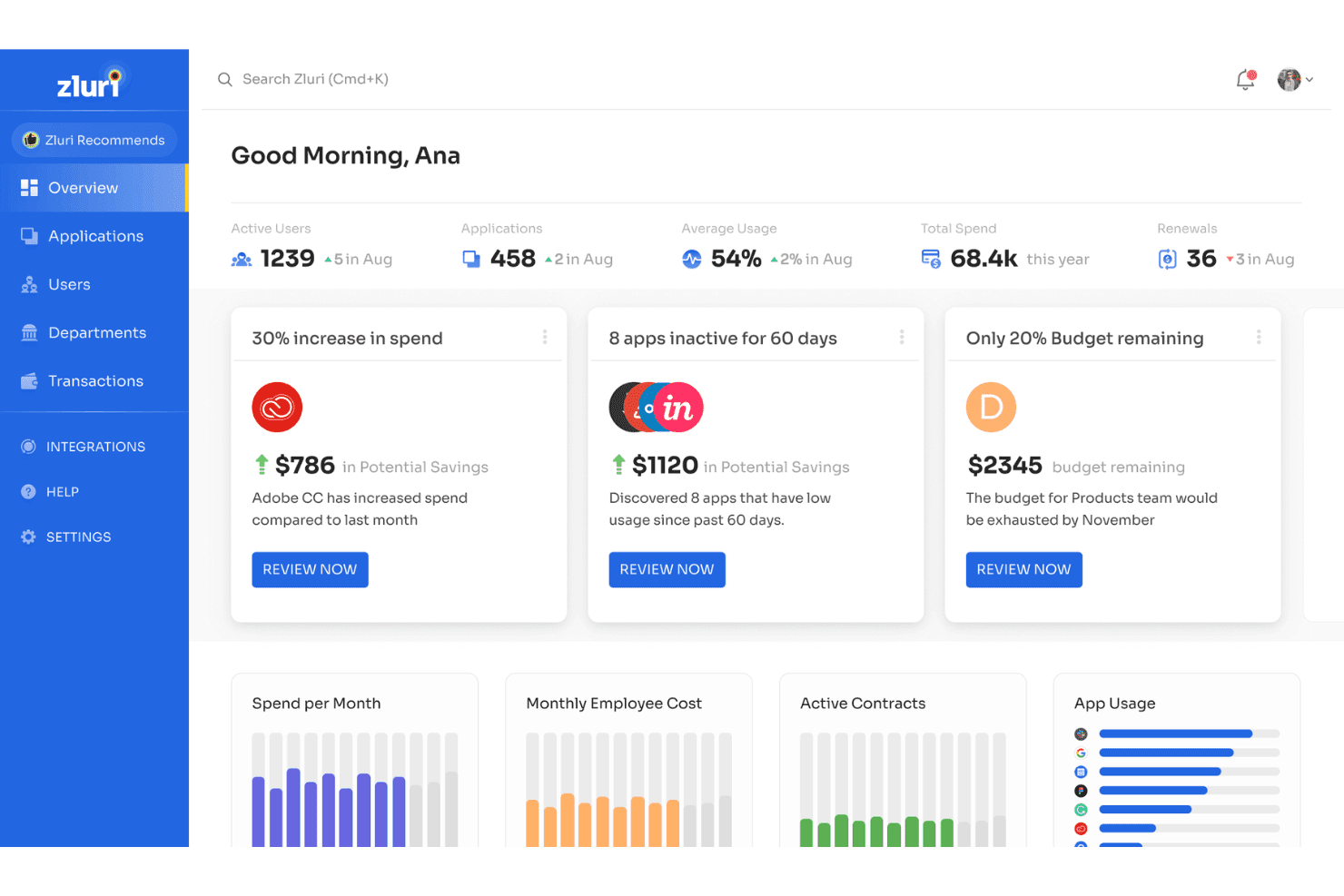
Zluri's dashboard surfaces spend insights and savings opportunities at a glance. Zluri is a SaaS management platform that uses a patented discovery engine to surface managed, unmanaged, and shadow IT applications across your SaaS and AI app ecosystem, with contract tracking, license optimization, and usage monitoring built in.
Who Is Zluri Best For?
Zluri is a strong fit for IT and finance teams at mid-to-large enterprises that need to get a handle on sprawling SaaS portfolios, especially where shadow IT is making spend visibility difficult.
Why I Picked Zluri
I picked Zluri as one of the best because its patented discovery engine does something most IT spend tools don't: it classifies every app across your environment as managed, unmanaged, or shadow IT, pulling from a catalog of 239K+ apps. That means when an employee signs up for an AI tool like DeepSeek or Claude without IT's knowledge, Zluri flags it instantly. I also like the automated license reclaim feature, which triggers downgrades or removals based on actual usage thresholds rather than manual audits.
Zluri Key Features
- Gen AI app governance: Monitor activity across AI apps like ChatGPT and Claude, then enforce security policies that restrict access to authorized users only.
- Contract and renewal management: Track all SaaS contracts, renewal dates, and vendor details in one place, with automated renewal alerts and license utilization data for negotiations.
- 300+ direct API integrations: Connect Zluri to your existing SaaS stack via native API integrations, an iPaaS engine, and SDKs across cloud and hybrid environments.
- Compliance support: Map your SaaS environment against frameworks including SOC 2, ISO 27001, HIPAA, SOX ITGC, and PCI DSS to support audit readiness.
Zluri Integrations
Zluri offers 300+ direct API integrations, including Google Workspace, Microsoft 365, Slack, Okta, Azure AD, Workday, BambooHR, Jira, Zoom, and Zendesk, plus a native iPaaS engine and SDKs for connecting cloud and hybrid apps. An open API is available for custom integrations.
Pros and Cons
Pros:
- Tracks renewals and contract terms in one view
- Offers automated license downgrades based on usage
- Flags shadow IT and unmanaged SaaS instantly
Cons:
- Advanced analytics limited without professional services
- Custom app detection setup takes extra time
Learn more about Zluri: Best for SaaS spend with finance team controls
- Free demo available
- From $75/month
Visit WebsiteCustomer Rating:4.6/5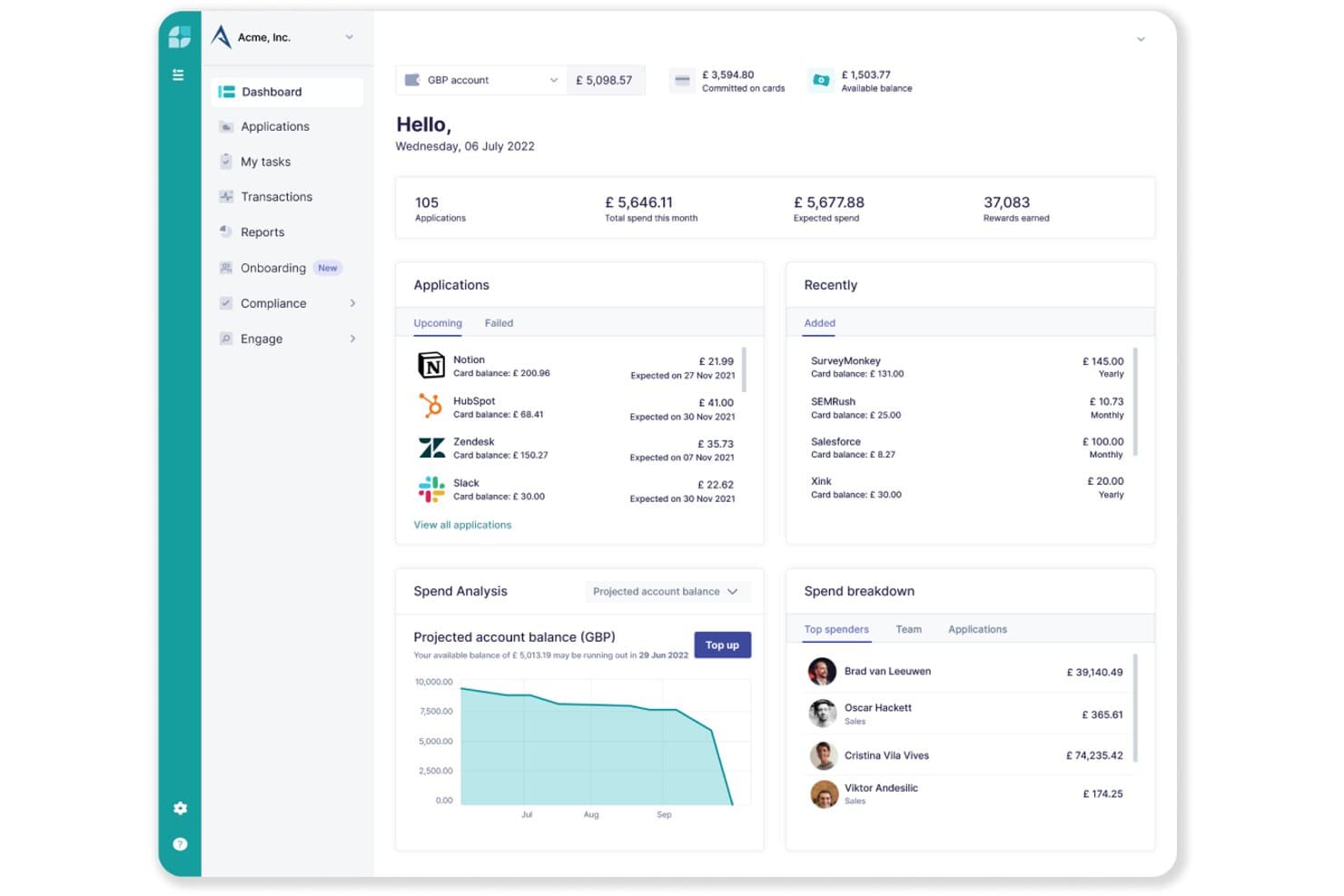
Cledara centralizes SaaS spend, balances, and top spenders in one dashboard. Cledara is a SaaS spend management platform that gives finance teams virtual cards per software tool, approval workflows, automated invoice capture, accounting reconciliation, and real-time spend reporting across a company's entire software stack.
Who Is Cledara Best For?
Cledara is a strong fit for finance teams at mid-sized companies that need structured controls over a growing, decentralized SaaS stack.
Why I Picked Cledara
I've included Cledara in my top picks because it gives finance teams something most spend management tools don't: a dedicated virtual card per software tool, so every SaaS charge is isolated, trackable, and cancellable at the source. I really like that approval workflows tie directly into the renewal cycle, meaning my team can review usage data before automatically greenlighting another year of a tool. The automated invoice capture and reconciliation against accounting systems like Xero and NetSuite cuts out the manual matching that makes SaaS bookkeeping so tedious.
Cledara Key Features
- Spend limits per tool: Set a maximum spend amount on each software's virtual card to block overages before they happen.
- Price change alerts: Cledara flags unexpected charges and price increases on individual subscriptions so your team can act before the next billing cycle.
- Employee reimbursements: Employees submit out-of-pocket software expenses with receipt capture directly in Cledara for finance-managed approval and repayment.
- Budgeting and forecasting: Access real-time and historical SaaS spend data to build forecasts and track software budgets across departments.
Cledara Integrations
Cledara offers native integrations with Xero, QuickBooks, NetSuite, Tripletex, Gmail, Microsoft 365, Slack, Okta, Google SSO, and connects to HR systems like BambooHR, HiBob, and Personio. An open API is available for custom integrations on every plan.
Pros and Cons
Pros:
- Supports automated invoice capture and reconciliation
- Virtual cards issued for each SaaS subscription
- Approval workflows connect directly to renewals
Cons:
- May require hands-on onboarding for full setup
- No public pricing for budget planning
Learn more about Cledara: Best for enterprise procurement and contract oversight
- Free plan + 30-day free trial + free demo available
- Pricing upon request
Visit WebsiteCustomer Rating:4.2/5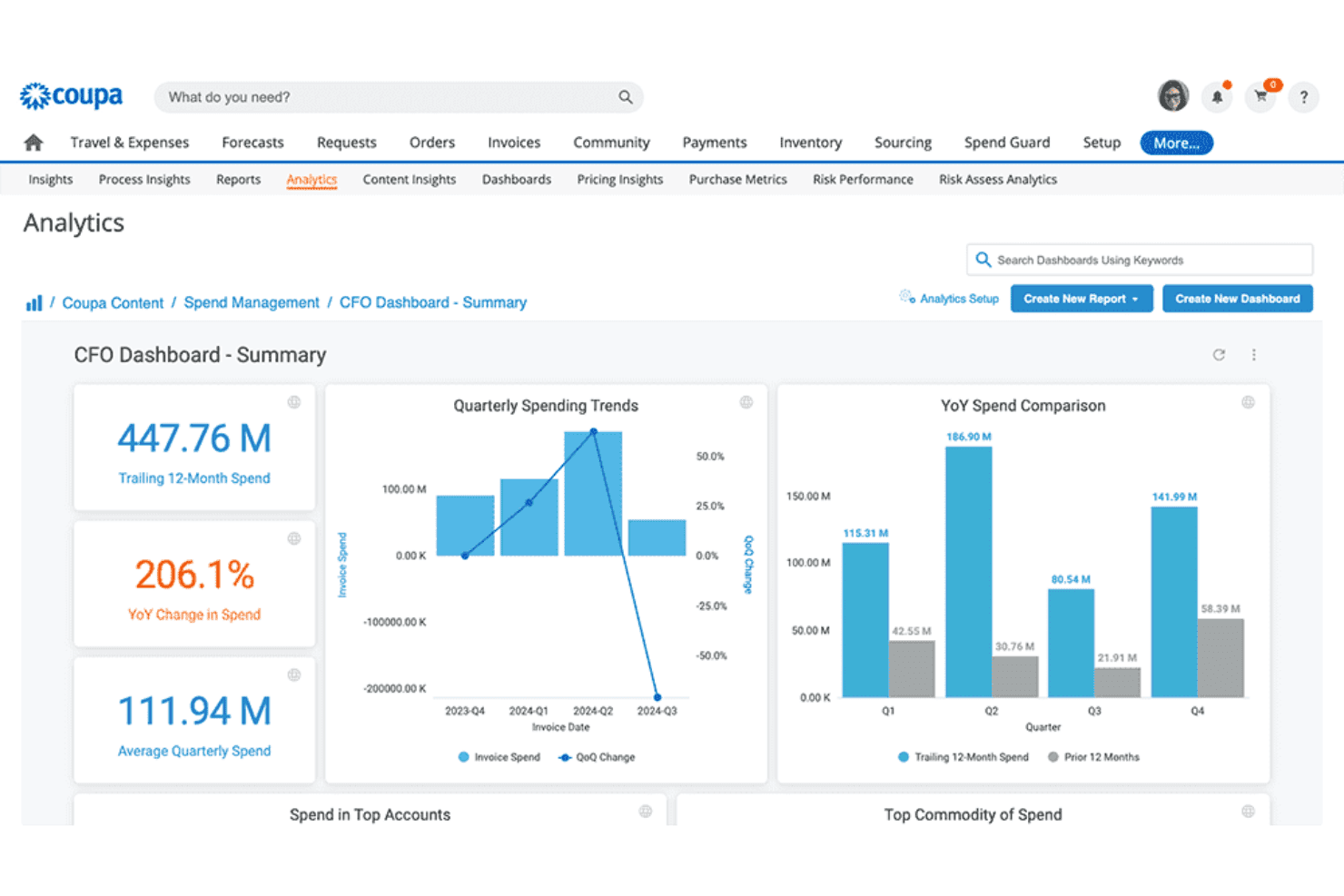
Coupa offers a CFO Dashboard with analytics including quarterly spending trends, YoY spend comparison, and key financial KPIs. Coupa is an AI-powered total spend management platform covering source-to-contract, procure-to-order, invoice-to-pay, and direct spend management across procurement, finance, and supply chain.
Who Is Coupa Best For?
Coupa is built for large enterprises—particularly those in the Fortune 500—that need centralized oversight across procurement, contracts, and supplier relationships at global scale.
Why I Picked Coupa
Coupa earns its spot as one of the best on my shortlist because of how tightly it connects contract management to live purchasing workflows. I love that Coupa's central contract repository enforces pre-negotiated rates and discounts at the point of purchase, so buying stays on-contract without relying on employees to self-police. On top of that, its AI-driven guided buying uses SpendGuard to detect off-contract and high-risk spend in real time, flagging issues before they become audit problems across thousands of transactions.
Coupa Key Features
- AP automation: Coupa matches purchase orders to invoices automatically, reducing manual processing across high-volume payables.
- Expense management: Employees submit expense reports directly in the platform, with automated policy checks applied before reimbursement.
- Supplier risk management: Coupa centralizes supplier information, compliance documentation, and risk scoring in a single supplier record.
- Spend analysis: Built-in analytics give you visibility into spending patterns across categories, suppliers, and business units.
Coupa Integrations
Coupa connects to up to 160 ERPs through its App Marketplace and pre-built connectors, including NetSuite, Oracle E-Business Suite, Oracle Fusion, SAP, and SAP S/4HANA. An open API is available for custom integrations across finance, procurement, and payment systems.
Pros and Cons
Pros:
- Centralizes supplier risk and compliance data
- AI flags risky or off-contract purchases
- Enforces negotiated contract terms during procurement
Cons:
- Approval workflows can feel rigid for teams
- Complex reporting setup for multi-entity organizations
Learn more about Coupa: Best for IT license governance in large enterprises
- Free demo available
- Pricing upon request
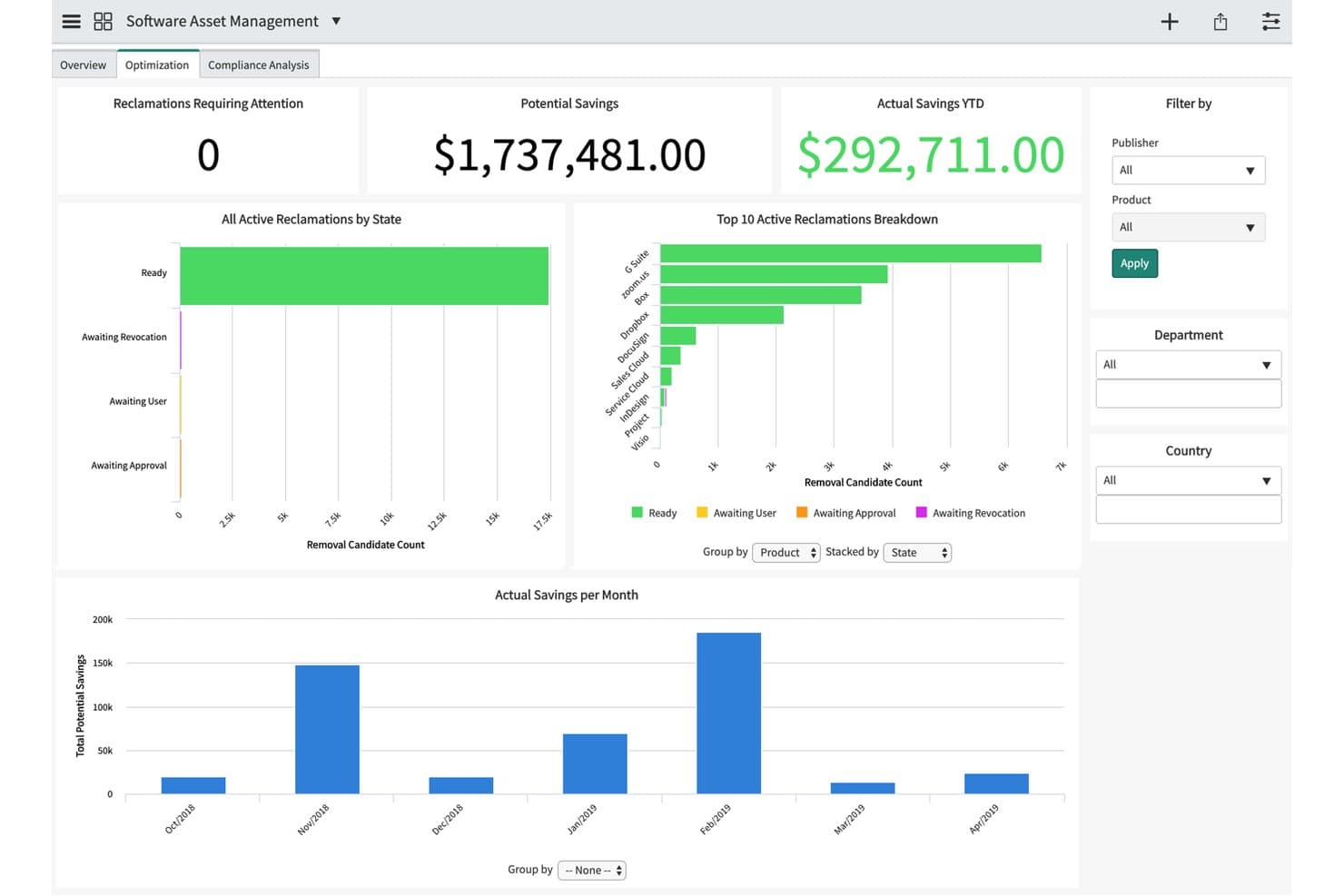
ServiceNow SAM tracks software reclamations and actual savings by month. ServiceNow SAM is an IT asset management platform that tracks software licenses, monitors compliance, manages SaaS subscriptions, and audits software usage across the enterprise.
Who Is ServiceNow Software Asset Management (SAM) Best For?
ServiceNow SAM is built for large enterprises with complex IT environments that need centralized license governance, compliance tracking, and SaaS spend visibility across thousands of software assets.
Why I Picked ServiceNow Software Asset Management (SAM)
ServiceNow SAM earns its spot on my list because it treats license governance as a first-class discipline, not an afterthought. I like how the overlapping software detection flags redundant SaaS spend across tools with similar functionality, which matters when you're managing hundreds of subscriptions. The SaaS detection feature tracks URLs accessed from endpoint devices to surface shadow IT before it becomes a compliance liability.
ServiceNow Software Asset Management (SAM) Key Features
- Software normalization: Machine learning standardizes discovered software titles and versions so your license data stays accurate and consistent.
- License reconciliation: Compares installed software against your entitlements to surface shortfalls or overage before an audit catches them.
- Publisher packs: Pre-built configurations for major software vendors give you a faster path to compliance tracking without starting from scratch.
- License and cloud cost simulator: Calculates the cost impact of migrating on-premises software licenses to the cloud before you commit to changes.
ServiceNow Software Asset Management (SAM) Integrations
ServiceNow SAM offers native integrations with Microsoft 365, Adobe Creative Cloud, Salesforce, Zoom, Cisco Webex, Zendesk, Asana, Adobe Workfront, Aha!, and Microsoft SCCM. It also offers REST APIs so you can build custom integration profiles for any SaaS app with a public API.
Pros and Cons
Pros:
- Flags redundant SaaS spend across departments
- Tracks and reports on software compliance risk
- Designed for complex enterprise IT environments
Cons:
- Reporting customization can be limited for finance teams
- Implementation often requires significant IT resources
Learn more about ServiceNow Software Asset Management (SAM): Best for SaaS spend backed by human negotiators
- Free demo available
- Pricing upon request
Visit WebsiteCustomer Rating:4.6/5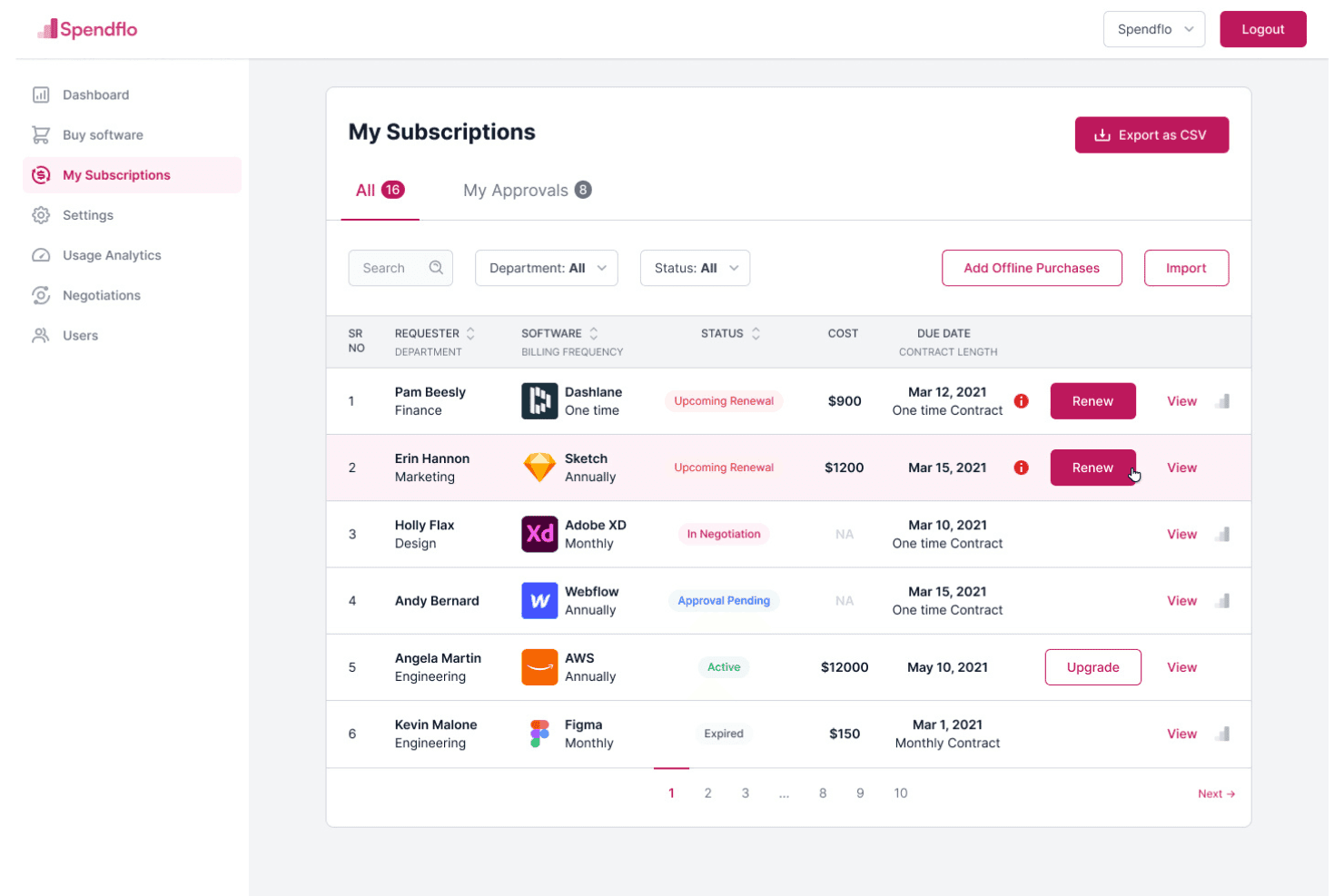
Spendflo centralizes all software subscriptions with renewal tracking. Spendflo is an AI-driven SaaS procurement and spend management platform that covers the full procurement lifecycle—from intake and supplier onboarding to accounts payable, contract management, and spend reporting—with built-in managed procurement support from human negotiators.
Who Is Spendflo Best For?
Spendflo is a strong fit for mid-market companies managing a large SaaS stack who want procurement support from real negotiators, not just automation.
Why I Picked Spendflo
I picked Spendflo as one of the best because it pairs AI procurement automation with a managed procurement team that actually negotiates on your behalf. What I find compelling is the pricing benchmarks feature, which pulls real contract data to show what comparable companies pay, giving your negotiators concrete leverage. On top of that, Spendflo flags auto-renew clauses 60 days out, so you're never caught scrambling at renewal time.
Spendflo Key Features
- Third-party risk management: Automatically validates vendor credentials, runs security assessments, and flags compliance gaps before contracts move forward.
- Accounts payable automation: Matches invoices to purchase orders line by line and flags two-way match failures for immediate review.
- Self-service vendor portal: Guides suppliers through documentation collection—tax forms, certifications, and banking details—without manual follow-up from your team.
- Usage analytics: Tracks SaaS license usage across your stack so you can identify underutilized subscriptions before renewal.
Spendflo Integrations
Spendflo offers 40+ native integrations across ERP, CLM, ITSM, IAM, HRIS, and productivity systems, including NetSuite, Coupa, Sage, DocuSign, Ironclad, ServiceNow, Jira, Okta, Workday, and Slack. It also connects to usage-tracking sources like Salesforce, GitHub, Zoom, and HubSpot for license optimization, and an API is available for custom integrations.
Pros and Cons
Pros:
- Tracks SaaS usage to reduce shelfware
- Dashboard flags renewal risks before contract lapses
- Negotiation support from real procurement experts
Cons:
- May over-focus on SaaS versus other spend
- No transparent or published pricing tiers
Learn more about Spendflo: Best for AI-driven SaaS and cloud spend control
- Free trial + free demo available
- Pricing upon request
Visit WebsiteCustomer Rating:4.6/5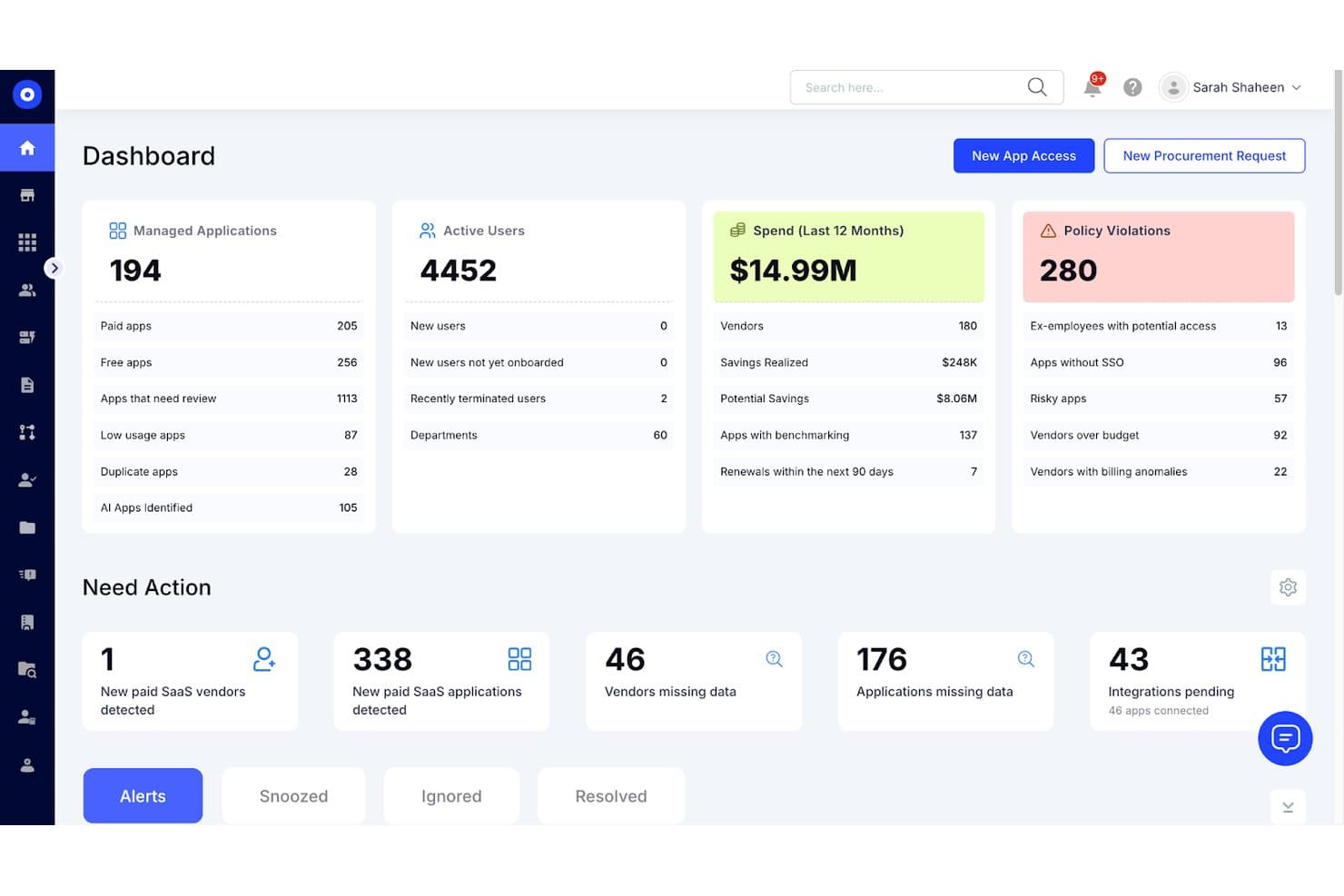
CloudEagle.ai centralizes IT spend, app usage, and policy violations in one dashboard. CloudEagle.ai is an AI-powered SaaS and cloud spend management platform that gives finance teams real-time visibility into software spending, license usage, AI tool costs, and renewals across the entire SaaS portfolio.
Who Is CloudEagle.ai Best For?
CloudEagle.ai is a strong fit for finance and FP&A teams at mid-to-large enterprises that need granular, real-time visibility into SaaS and AI tool spend across departments.
Why I Picked CloudEagle.ai
I picked CloudEagle.ai as one of the best because its AI spend tracking goes deeper than most tools in this category. It breaks down token usage and cost by AI model, user, and department across services like ChatGPT, Copilot, Cursor, and Claude, so you can set budgets and caps before spend gets out of hand. I also like its duplicate charge and price creep detection, which catches billing discrepancies across cycles before the next invoice arrives.
CloudEagle.ai Key Features
- Chargeback allocation: Splits the cost of shared SaaS tools across departments based on actual usage or custom rules, so every team is accountable for what they spend.
- SaaS portfolio rationalization: Flags redundant apps, unused licenses, and overlapping tools across the portfolio, including access left open for former employees.
- Renewal tracking: Surfaces upcoming renewal dates alongside live usage and spend data, so you're never caught off guard by an auto-renewing contract.
- FP&A system integration: Feeds real-time license, usage, and spend data directly into your existing forecasting and planning tools without replacing them.
CloudEagle.ai Integrations
CloudEagle.ai offers 500+ integrations across SaaS, AI, and identity ecosystems, including ChatGPT, Claude, Cursor, Copilot, Zoom, UiPath, AWS, Microsoft Azure, and more. Custom integrations are supported through API.
Pros and Cons
Pros:
- Allocates shared costs to departments accurately
- Detects duplicate SaaS charges automatically
- Breaks down AI tool spend by model
Cons:
- Free trial limited to scheduled demo only
- No upfront pricing transparency
Learn more about CloudEagle.ai: Best for procurement backed by benchmark data
- Free demo available
- From €12.5K/year (billed annually)
Visit WebsiteCustomer Rating:4.6/5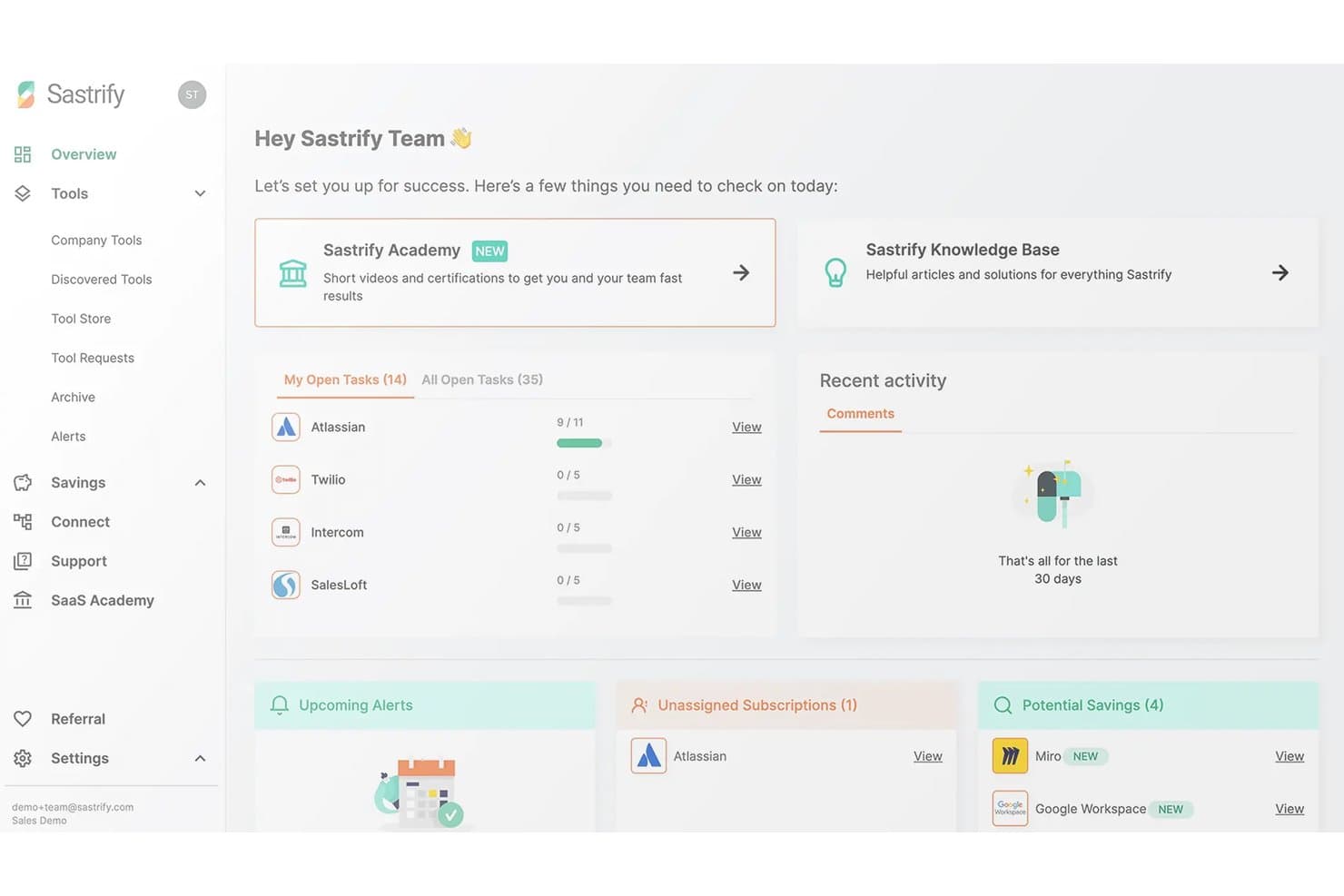
Sastrify centralizes SaaS spend, tasks, and savings in one dashboard. Sastrify is an IT spend management platform that gives finance teams visibility into SaaS contracts, license usage, and vendor costs, with AI-powered benchmarking, renewal tracking, and procurement workflow automation.
Who Is Sastrify Best For?
Sastrify is a strong fit for finance and procurement teams that need vendor pricing benchmarks to negotiate SaaS contracts with confidence.
Why I Picked Sastrify
Sastrify earns its spot on my shortlist because of how it backs procurement decisions with real pricing intelligence. Its AI benchmarks your contracts against data from 15,000+ vendors, so when you're heading into a renewal negotiation, you're not guessing what a fair price looks like. I also like the AI-powered rightsizing feature, which maps every license to actual usage, giving you concrete data to justify downgrades or cuts before a contract auto-renews.
Sastrify Key Features
- Automated spend alerts: Sastrify monitors your SaaS spend in real time and flags anomalies when costs spike or usage drops unexpectedly.
- Predictive forecasting: A built-in forecasting dashboard projects renewal timelines and spend trends months ahead so your team can plan accurately.
- Board-ready reporting: Sastrify generates auditable ROI reports that translate optimization results into financial impact you can present to leadership.
- Shadow IT detection: The platform scans your software ecosystem for unauthorized tools, giving finance teams visibility into unsanctioned spend across departments.
Sastrify Integrations
Sastrify offers 40+ native integrations across categories like SSO, accounting/ERP, procurement, HRIS, ticketing, and cloud, including Okta, Microsoft Entra ID, Google Workspace, NetSuite, QuickBooks, Xero, Workday, BambooHR, and Slack. An open API is available for custom integrations.
Pros and Cons
Pros:
- Procurement backed by live pricing benchmarks
- Contract renewal timelines forecasted with AI
- Real-time SaaS spend anomaly detection
Cons:
- Limited controls for direct contract execution
- Benchmarking most useful for larger portfolios
Learn more about Sastrify: Best for enterprise-wide IT asset and spend visibility
- Free demo available
- Pricing upon request
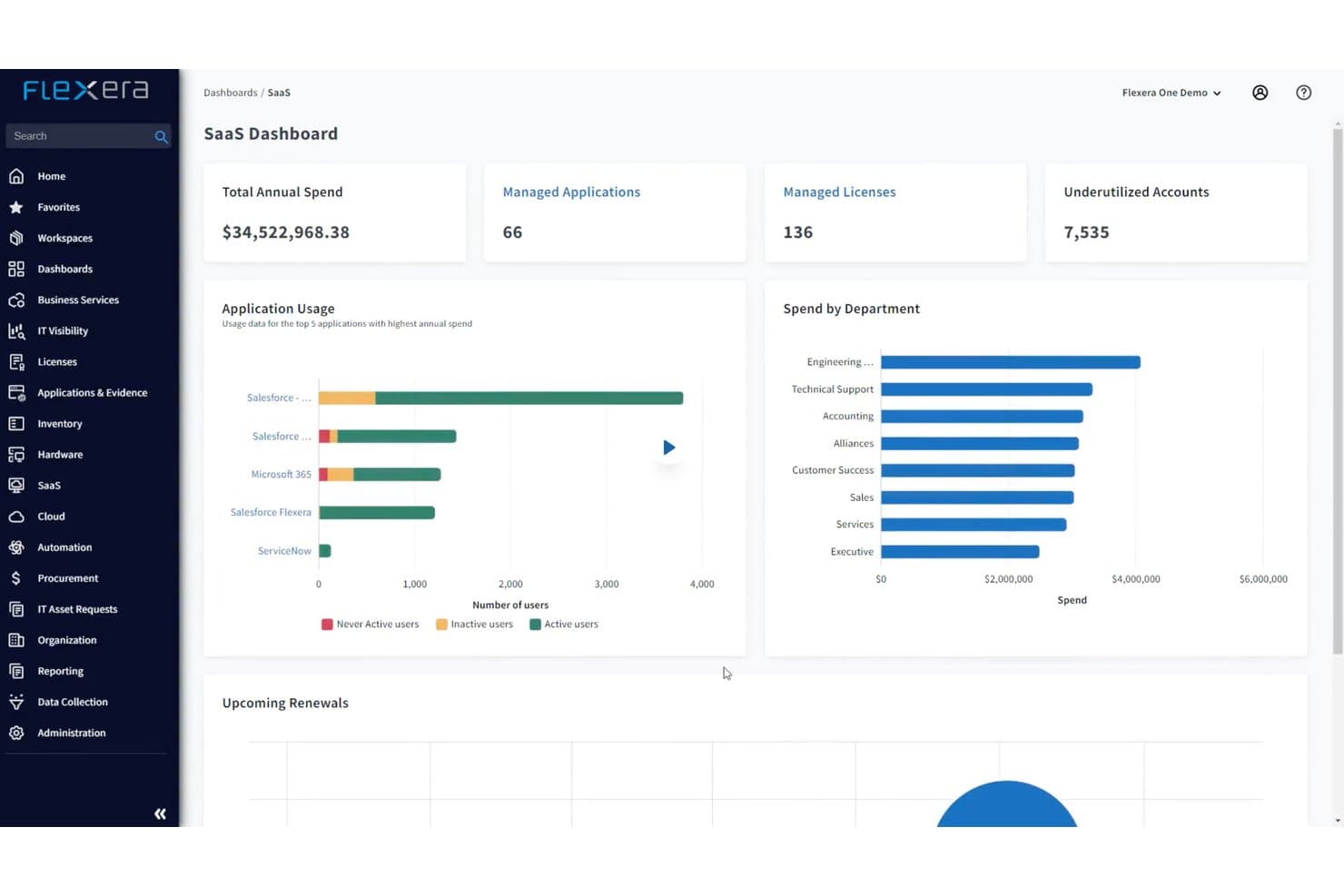
Flexera tracks SaaS spend, usage, and renewals across departments. Flexera is an IT asset and SaaS spend management platform that gives enterprises unified visibility into their full SaaS portfolio—covering SaaS discovery across sanctioned and shadow IT, usage-based license optimization, renewal management, and automated offboarding workflows.
Who Is Flexera Best For?
Flexera is a strong fit for large enterprises that need a single platform to manage both traditional IT assets and SaaS licenses across complex, multi-department environments.
Why I Picked Flexera
Flexera earns its spot on my shortlist because it covers the full IT asset picture, not just SaaS in isolation. I like how its multi-source SaaS discovery pulls from API connectors, SSO data, financial records, and browser extensions simultaneously, catching shadow IT apps that single-source tools miss entirely. Its usage-based license optimization lets you track active, inactive, and never-active users by name, so you can reclaim seats before the next renewal cycle rather than negotiating blind.
Flexera Key Features
- Renewal management dashboard: Centralizes all SaaS renewal dates in one view and sends automated alerts before contracts auto-renew or cancellation windows close.
- Automated offboarding workflows: Triggers license reclamation automatically when employees leave, so unused seats are recovered without manual follow-up.
- Vendor-specific spend dashboards: Delivers deep-dive usage and spend views for major SaaS vendors like Salesforce, Microsoft 365, and Adobe.
- Hybrid IT asset visibility: Combines SaaS management with on-premises software and hardware asset data, giving your team a single view across the full technology estate.
Flexera Integrations
Flexera provides integrations for 25,000+ SaaS apps and offers native connectors including Salesforce, ServiceNow, Okta, Adobe Creative Cloud, Box, Dropbox, DocuSign, Atlassian (Jira, Confluence, Trello), Google Workspace, and Slack. It also includes a Universal Connector and API for custom integrations.
Pros and Cons
Pros:
- Automates offboarding and license reclamation
- Catches shadow IT via multi-source discovery
- Unifies SaaS and on-premises asset tracking
Cons:
- Reporting customization can be limited
- Complex interface requires configuration effort
Learn more about Flexera:
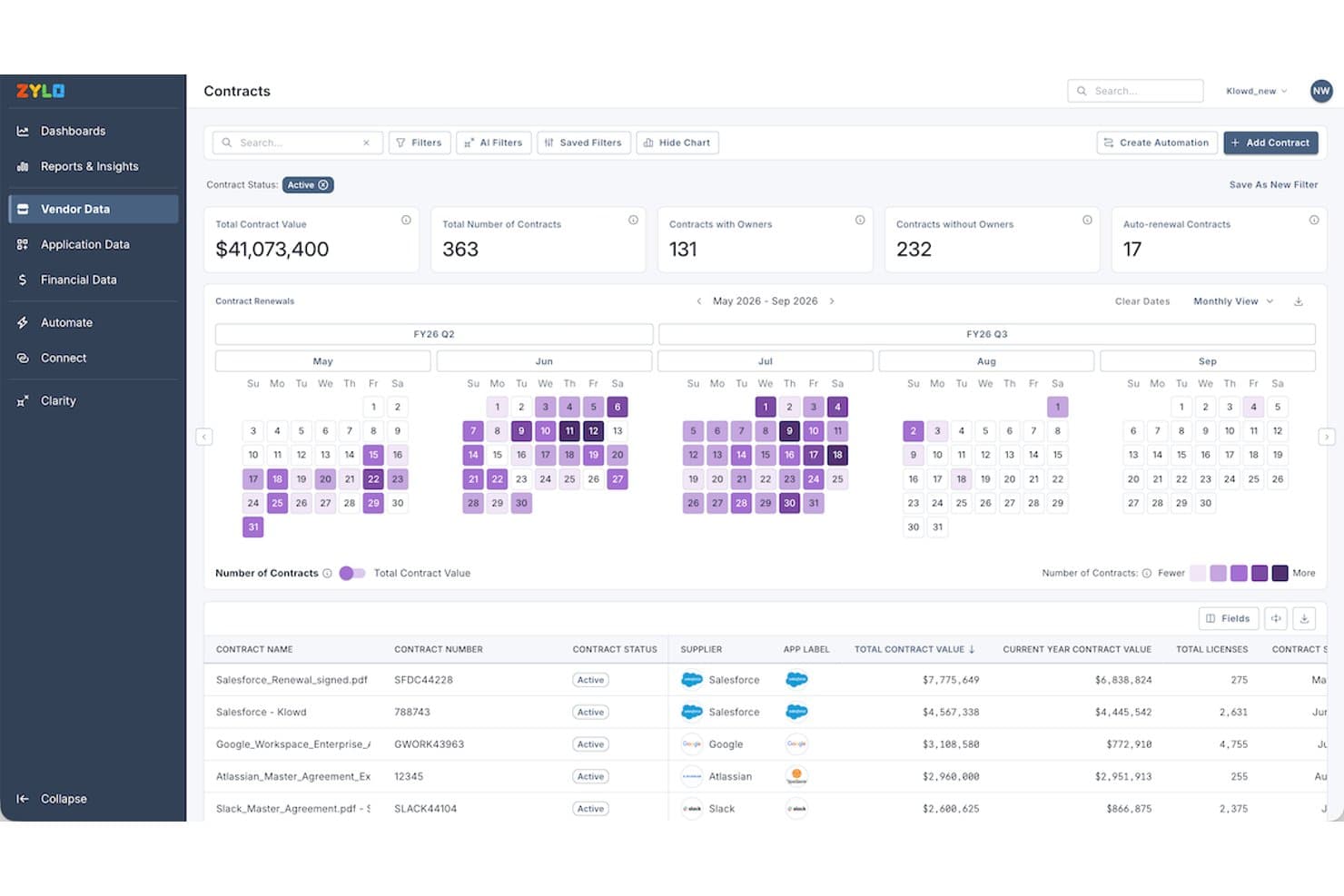
Zylo centralizes contract tracking, values, and renewal dates in one view. Zylo is a SaaS and AI spend management platform that gives enterprises a centralized system of record for software spend, usage, and contract data—combining AI-powered insights with benchmarking data to support renewal prioritization, license optimization, and shadow IT discovery.
Who Is Zylo Best For?
Zylo is a strong fit for large enterprises where finance and IT teams need to collaborate on SaaS portfolio visibility, contract governance, and license rightsizing.
Why I Picked Zylo
I picked Zylo as one of the best because its benchmarking dataset, backed by over $75B in SaaS and cloud spend data, gives your procurement and finance teams real market context when negotiating renewals. I love how Zylo Clarity AI surfaces actionable savings opportunities directly within the platform, rather than leaving you to interpret raw spend data on your own. It also flags AI app usage running outside of IT visibility, which is increasingly where unplanned spend hides.
Zylo Key Features
- Contract ingestion: AI automatically extracts and structures key data from uploaded contracts, giving you a centralized record of entitlements, terms, and renewal dates.
- License reclamation automation: Zylo identifies unused or underutilized licenses and automates the reclamation workflow so your team can right-size subscriptions before renewal.
- True-up forecasting: The platform monitors AI and software consumption in real time to flag projected overages before they hit your budget.
- Application redundancy detection: Zylo maps your full software portfolio to surface overlapping tools across business units, supporting consolidation decisions.
Zylo Integrations
Zylo offers native integrations with Salesforce, Microsoft 365, Microsoft Entra, Okta, OneLogin, Google SSO, NetSuite, Sage Intacct, Workday, ServiceNow, and more. It also provides a REST API for custom integrations, a no-code Usage Connect option, and a Model Context Protocol (MCP) server for connecting SaaS spend data to AI tools.
Pros and Cons
Pros:
- Automated license reclamation saves manual effort
- Benchmark data supports smarter negotiations
- AI flags hidden SaaS and AI spend
Cons:
- Contract management can feel complex
- Best suited for large organizations
Learn more about Zylo:
Alte software-uri de gestionare a cheltuielilor IT
Iată câteva opțiuni suplimentare de software pentru gestionarea cheltuielilor IT care nu au ajuns pe lista mea scurtă, dar care merită totuși analizate:
- 11ToriiBest for license reclamation and renewals
- 12TropicBest for SaaS negotiation and renewal savings
- 13SpendHoundBest for mid-market SaaS renewal negotiation
- 14JosysBest for IT-led SaaS spend and access control
- 15RampBest for finance-led IT spend control
- 16SetylBest for IT asset and SaaS spend in one view
- 17BetterCloudBest for SaaS license reclamation workflows
- 18ZipBest for procurement-led IT spend control
How I Evaluate IT Spend Management Software
I split my evaluation into baseline functionality every tool must cover—think real-time spend visibility and license tracking—and the differentiators, like renewal intelligence and shadow IT discovery depth, that separate good from great.
Core Functionality (Table Stakes For This List)
When I'm selecting tools for my list, I rank each one on a scale from 0 (does not offer the functionality) to 5 (excels in this area) for each core functionality listed below. I then calculate the tool's total score into a percentage, using 75% as a benchmark to help assess its overall fit for the list.
- IT Spend Visibility: I evaluate whether a tool consolidates SaaS, cloud, hardware, and vendor spend into a single dashboard with drill-down reporting and anomaly flags.
- SaaS & License Management: Shadow IT discovery depth matters here—I look for automated app detection, usage tracking, and reclamation workflows across hundreds of integrations.
- Vendor & Contract Management: I check for centralized contract storage, renewal alerts, and benchmarking or negotiation insights that help finance teams act before deadlines hit.
- Budgeting & Forecasting: Tools should support cost allocation by department or cost center, with variance reporting and forward-looking forecasts beyond static budget fields.
- Purchase Request & Approvals: I look for configurable multi-step approval routing with policy logic, so new software requests follow your organization's procurement rules automatically.
- Integrations & Data Sources: Broad connectivity with SSO providers, ERP/accounting systems, HRIS, and expense tools determines how much manual data wrangling your team can skip.
Once I have a list of tools that meet the criteria, I consider what sets each platform apart.
Differentiating Factors (What Sets Vendors Apart)
Here's how I compare and contrast different vendors:
Standout Features
Shadow IT discovery is where I see the biggest gaps between tools. I check whether detection goes beyond SSO logs to include expense report parsing, browser signals, and finance system scans—because unsanctioned apps hiding in credit card statements won't show up in Okta alone. Renewal intelligence is equally telling: I look for benchmark pricing data and automated calendars that surface leverage points well before contract expiration, giving your team time to negotiate rather than scramble. I also evaluate unit economics reporting—cost-per-user and cost-per-transaction metrics that translate raw IT spend into KPIs your FP&A team can actually act on.
Beyond Features
I evaluate how quickly a platform ingests SaaS and vendor data—some tools complete discovery in days, while others need months of custom integration work, which matters when you're reporting to the board next quarter. Pricing model fit is just as important: a tool that scales by employee count can punish a lean org with heavy SaaS sprawl, so I check whether costs track spend under management, app count, or headcount. I also look at ERP sync depth—bi-directional connections with systems like NetSuite or SAP that produce GL-coded, audit-ready records beat one-way CSV exports every time.
Cum să alegi un software de gestionare a cheltuielilor IT
Alegerea platformei de gestionare a cheltuielilor IT care merită un loc în stiva ta tehnologică financiară depinde de potrivirea controalelor, acoperirii și integrărilor software-ului cu prioritățile tale privind vizibilitatea și conformitatea:
| Dacă prioritatea ta este... | Caută... |
|---|---|
| Dacă prioritatea ta este...Obținerea vizibilității în timp real asupra SaaS și cloud | Caută...Tablouri de bord actualizate în timp real, cu jurnale ale modificărilor la nivel de tranzacție |
| Dacă prioritatea ta este...Prevenirea cheltuielilor excesive aferente contractelor | Caută...Calendare automatizate pentru reînnoiri, plus date comparative pentru negocieri |
| Dacă prioritatea ta este...Reducerea utilizării IT clandestine și a instrumentelor duplicate | Caută...Detectare care analizează evidențele financiare și fluxurile de cheltuieli |
| Dacă prioritatea ta este...Aplicarea controalelor financiare | Caută...Direcționarea aprobărilor conectată la ERP și la codificarea registrului general |
| Dacă prioritatea ta este...Obținerea rapidă a valorii | Caută...Instrumente care descoperă automat aplicațiile fără încărcări sau configurări manuale |
Cum îți evaluezi lista scurtă
- Testează viteza de preluare a datelor: Solicită furnizorilor să efectueze o probă în timp real — încarcă facturile SaaS pentru 12 luni și măsoară timpul până la afișarea tabloului de bord cu rezumatul cheltuielilor.
- Confirmă compatibilitatea cu fluxul de achiziții: Solicită o demonstrație care să prezinte o achiziție de software direcționată prin procesul tău real de aprobare și codificare în registrul general.
- Validează detectarea IT-ului clandestin: Trimite 3 rapoarte reale de cheltuieli anonimizate și verifică dacă platforma identifică cheltuielile pentru software care nu respectă politicile.
- Verifică profunzimea integrării ERP: Obține documentația privind sincronizarea bidirecțională cu ERP-ul tău (NetSuite, SAP sau Oracle), inclusiv câmpurile acceptate.
- Compromisul principal — profunzime versus amploare: Decide dacă descoperirea aprofundată a SaaS sau acoperirea completă a domeniilor IT și achiziții este mai urgentă, deoarece puține instrumente excelează în ambele.
Ce este software-ul de gestionare a cheltuielilor IT?
Software-ul de gestionare a cheltuielilor IT este o categorie de instrumente care ajută echipele financiare și IT să monitorizeze, să controleze și să analizeze cheltuielile legate de tehnologie pentru SaaS, cloud și hardware. Aceste platforme urmăresc automat contractele, licențele și plățile, astfel încât să obții transparență asupra cheltuielilor, să identifici oportunități de economisire și să aplici politicile de achiziții. Software-ul de gestionare a cheltuielilor IT este important deoarece ajută la alinierea investițiilor tehnologice cu strategia companiei și reduce risipa cauzată de IT-ul clandestin sau de abonamentele duplicate.
Funcții
Atunci când alegi un software de gestionare a cheltuielilor IT, fii atent la următoarele funcții esențiale:
- Tablou de bord pentru vizibilitatea cheltuielilor: Prezintă toate cheltuielile pentru SaaS, cloud, hardware și furnizori într-un singur loc, oferind filtre și opțiuni de analiză detaliată, astfel încât să puteți urmări fiecare leu și să detectați rapid anomaliile.
- Gestionarea SaaS și a licențelor: Automatizează descoperirea aplicațiilor utilizate, monitorizează utilizarea licențelor și identifică abonamentele subutilizate sau redundante, astfel încât să le puteți recupera sau realoca înainte de reînnoire.
- Registrul furnizorilor și al contractelor: Stochează contractele furnizorilor, termenii și datele de reînnoire și oferă alerte proactive, ajutându-vă să gestionați termenele, să evitați reînnoirile automate și să vă păstrați avantajul în negocieri.
- Flux de lucru pentru reînnoiri și achiziții: Direcționează cererile de achiziție și reînnoirile spre aprobare conform regulilor organizației, asigurându-se că fiecare cheltuială respectă politica și primește codificarea financiară corectă.
- Instrumente de bugetare și prognoză: Alocă cheltuielile pe departamente sau proiecte, urmărește valorile efective în raport cu bugetul și oferă analize ale abaterilor și prognoze orientate spre viitor pentru a sprijini o planificare financiară mai bună.
- Integrarea cheltuielilor și a tranzacțiilor: Se conectează la platformele ERP, de gestionare a cheltuielilor și SSO pentru a importa automat datele, reducând introducerea manuală și asigurând înregistrări actualizate și exacte ale cheltuielilor.
- Detectarea IT-ului fantomă: Identifică achizițiile sau utilizarea de software neautorizat prin scanarea înregistrărilor de cheltuieli și a activității din browser, evidențiind riscurile ascunse și cheltuielile din afara sferei de control a departamentului IT.
- Informații despre valori de referință și prețuri: Oferă valori de referință ale prețurilor de pe piață și analize ale costului per utilizator pentru contractele dumneavoastră, ajutându-vă să validați ofertele furnizorilor și să susțineți negocierile pentru reducerea costurilor.
- Raportare pregătită pentru audit: Generează rapoarte standardizate și exportabile, cu piste de audit detaliate, asociind fiecare tranzacție cu contractele și aprobările pentru conformitate și verificare.
Beneficii
Implementarea unui software de gestionare a cheltuielilor IT oferă mai multe beneficii echipei și companiei dumneavoastră. Iată câteva dintre avantajele pe care le puteți anticipa:
- Vizibilitate în timp real asupra cheltuielilor: Vedeți toate cheltuielile pentru SaaS, cloud, hardware și furnizori într-un singur tablou de bord, astfel încât să puteți urmări fiecare leu și să detectați rapid anomaliile.
- Control asupra reînnoirilor și contractelor: Centralizați contractele și configurați alerte proactive pentru reînnoire, ajutându-vă să evitați reînnoirile automate și să vă păstrați avantajul în negocieri.
- Detectarea IT-ului fantomă și a cheltuielilor duplicate: Identificați software-ul neautorizat și abonamentele duplicate prin analizarea datelor din SSO, a înregistrărilor de cheltuieli și a sistemelor financiare.
- Controale financiare mai stricte: Direcționați cererile de software și reînnoirile prin fluxuri de aprobare configurabile, asigurându-vă că cheltuielile respectă politicile dumneavoastră și codificarea corectă în GL.
- Bugetare și prognoză exacte: Alocați costurile pe departamente sau proiecte cu ajutorul instrumentelor de analiză a abaterilor și de prognoză, astfel încât să puteți planifica cu mai multă încredere.
- Gestionarea optimizată a licențelor și activelor: Automatizați descoperirea și monitorizarea utilizării aplicațiilor, permițându-vă să recuperați sau să realocați licențele subutilizate înainte de reînnoiri.
- Raportare conformă, pregătită pentru audit: Generați rapoarte standardizate și exportabile, cu piste de audit detaliate, asigurându-vă că fiecare tranzacție este conformă și ușor de verificat.
Costuri și prețuri
Selectarea unui software de gestionare a cheltuielilor IT necesită înțelegerea diferitelor modele de preț și planuri disponibile. Costurile variază în funcție de funcții, dimensiunea echipei, suplimente și alți factori. Tabelul de mai jos sintetizează planurile comune, prețurile medii ale acestora și funcțiile incluse de obicei în soluțiile software de gestionare a cheltuielilor IT:
Tabel comparativ al planurilor pentru software de gestionare a cheltuielilor IT
| Tipul planului | Preț mediu | Funcții comune |
|---|---|---|
| Tipul planuluiPlan gratuit | Preț mediu$0 | Funcții comuneTablou de bord de bază pentru cheltuieli, urmărire limitată a SaaS și asistență din partea comunității. |
| Tipul planuluiPlan personal | Preț mediu$10–$25/utilizator/lună | Funcții comuneAcces pentru un singur utilizator, raportarea cheltuielilor, descoperirea simplă a aplicațiilor și instrumente standard de raportare. |
| Tipul planuluiPlan pentru companii | Preț mediu$25–$50/utilizator/lună | Funcții comuneAsistență pentru mai mulți utilizatori, gestionarea furnizorilor și a contractelor, instrumente de bugetare, fluxuri de aprobare și integrări. |
| Tipul planuluiPlan pentru întreprinderi | Preț mediu$50–$100/utilizator/lună | Funcții comuneDescoperire avansată a SaaS, integrări personalizate, sincronizare ERP, acces bazat pe roluri și raportare pregătită pentru audit. |
Întrebări frecvente despre software-ul pentru gestionarea cheltuielilor IT
Iată răspunsurile la câteva întrebări frecvente despre software-ul pentru gestionarea cheltuielilor IT:
Cum ajută instrumentele pentru gestionarea cheltuielilor IT la reducerea utilizării neautorizate a soluțiilor IT?
Instrumentele pentru gestionarea cheltuielilor IT contribuie la reducerea utilizării neautorizate a soluțiilor IT prin detectarea automată a software-ului și serviciilor neautorizate din organizație. Acestea analizează evidențele cheltuielilor, jurnalele SSO și tranzacțiile cu cardul de credit pentru a identifica aplicațiile achiziționate în afara fluxurilor de lucru ale departamentului IT sau ale achizițiilor. Astfel, puteți identifica riscurile, controla costurile ascunse și readuce cheltuielile neautorizate sub controlul politicilor interne.
Se poate integra software-ul pentru gestionarea cheltuielilor IT cu sistemele ERP și financiare?
Da, majoritatea platformelor pentru gestionarea cheltuielilor IT oferă integrări cu sisteme ERP și financiare populare, precum NetSuite, SAP și Oracle. Aceste integrări vă permit să sincronizați datele despre cheltuieli, să automatizați codificarea în registrul general și să eliminați diferențele dintre evidențele departamentelor de achiziții, financiar și IT. Verificați întotdeauna nivelul de integrare — unele instrumente oferă sincronizare bidirecțională reală, în timp ce altele se pot baza pe exporturi de date într-un singur sens.
Care este diferența dintre gestionarea SaaS și platformele mai ample pentru gestionarea cheltuielilor IT?
Instrumentele pentru gestionarea SaaS se concentrează în principal pe descoperirea, monitorizarea și optimizarea aplicațiilor și licențelor SaaS. Platformele mai ample pentru gestionarea cheltuielilor IT merg mai departe, gestionând într-un singur loc toate cheltuielile IT — inclusiv hardware, servicii cloud, furnizori, contracte și fluxuri de lucru pentru achiziții. Dacă aveți nevoie de o acoperire completă a tuturor cheltuielilor cu tehnologia, căutați soluții care includ atât controale pentru SaaS, cât și pentru soluțiile non-SaaS.
Cât de repede puteți obține rezultate după implementarea software-ului pentru gestionarea cheltuielilor IT?
Vă puteți aștepta la o îmbunătățire vizibilă a transparenței cheltuielilor în câteva zile sau săptămâni, dacă platforma oferă o colectare eficientă a datelor și descoperire automată. Unele instrumente vă permit să încărcați imediat facturi anterioare sau să conectați integrări, oferindu-vă acces rapid la tablouri de bord. Dacă un instrument necesită multă configurare manuală sau o integrare personalizată, rezultatele pot apărea mai târziu — uneori după câteva săptămâni sau luni.
Care este cea mai bună modalitate de a măsura rentabilitatea investiției în instrumentele pentru gestionarea cheltuielilor IT?
Cea mai bună modalitate de a măsura rentabilitatea investiției este să urmăriți reducerile cheltuielilor rezultate în urma eliminării aplicațiilor duplicate, a licențelor neutilizate suficient sau a termenelor de reînnoire omise. Comparați cheltuielile cu tehnologia înainte și după implementare, luând în calcul economiile obținute printr-o poziție mai bună în negocieri, reducerea utilizării neautorizate a soluțiilor IT și îmbunătățirea controalelor de achiziții. Funcțiile de raportare care evidențiază evitarea costurilor sau economiile realizate prin contracte facilitează considerabil măsurarea rentabilității investiției.