

Software-ul de gestionare a cheltuielilor juridice centralizează, urmărește și analizează cheltuielile departamentului juridic, astfel încât să puteți controla costurile și să luați decizii bazate pe date. Pentru directorii financiari care se confruntă cu presiuni pentru optimizarea cheltuielilor juridice, aceste instrumente oferă vizibilitatea necesară, impun reguli de facturare specifice fiecărei firme și gestionează fluxuri complexe de aprobare. În acest ghid, veți găsi informații practice care vă vor ajuta să comparați soluțiile de top și să alegeți cea mai potrivită opțiune pentru nevoile juridice, financiare și de conformitate ale organizației dumneavoastră.
Why Trust Our Software Recommendations
6,700+
Reviews
20
Industry experts
16+
Evaluation factors
14
Years
Our team has been testing and reviewing software since 2012. As finance leaders ourselves, we know how difficult—and important—it is to choose the right software.
For this guide, we evaluated tools using hands-on testing and independent research, scoring tools using our selection criteria.
Our reviews reflect our human editorial judgment, not a sales pitch.
Tabel comparativ al software-urilor de gestionare a cheltuielilor juridice
Acest tabel comparativ rezumă detaliile privind prețurile pentru cele mai bune software-uri de gestionare a cheltuielilor juridice selectate de mine.
Sorted by: Default
| Tool | Starting Price | Website | |
|---|---|---|---|
Best for unified legal matter tracking | 4.5 out of 5 | Pricing upon request Free demo available | Website |
Best for custom billing guideline enforcement | 3.6 out of 5 | Pricing upon request Free demo available | Website |
Best for no-code workflow automation | 4.5 out of 5 | Pricing upon request Free demo available | Website |
Best for integrated matter and spend analytics | 3.5 out of 5 | Pricing upon request Free demo available | Website |
Best for secure European data residency | Not rated | Pricing upon request Free demo available | Website |
Best for global enterprise spend visibility | 4.6 out of 5 | Pricing upon request Free demo available | Website |
Best for AI-driven invoice review automation | 4.6 out of 5 | Pricing upon request Free demo available | Website |
Best for intuitive accrual management | 4.5 out of 5 | Pricing upon request Free demo available | Website |
Best for extensive workflow customization | 4.7 out of 5 | Pricing upon request Not available | Website |
Best for advanced rate benchmarking | 3.8 out of 5 | Pricing upon request Free demo available | Website |


Recenzii ale software-urilor de gestionare a cheltuielilor juridice
Mai jos sunt prezentate rezumatele mele detaliate ale celor mai bune software-uri de gestionare a cheltuielilor juridice care au ajuns pe lista mea scurtă. Recenziile mele oferă o analiză detaliată a funcțiilor, integrărilor și celor mai potrivite cazuri de utilizare pentru fiecare platformă, pentru a vă ajuta să găsiți cea mai bună opțiune pentru dumneavoastră.
 Best for unified legal matter tracking
- Free demo available
- Pricing upon request
Visit WebsiteCustomer Rating:4.5/5
LawVu organizes matter details, tasks, files, and team conversations in one place for efficient legal work tracking. LawVu is a legal workspace platform that unifies matter management, contract lifecycle management, and spend management — including e-billing, invoice review, outside counsel collaboration, and AI-powered billing guideline enforcement — in a single system for in-house legal teams.
Who Is LawVu Best For?
LawVu is a strong fit for mid-market legal operations teams that manage outside counsel spend alongside contracts and matters from a single platform.
Why I Picked LawVu
I picked LawVu as one of the best because matter tracking and spend management share the same data layer here. When I review an invoice, the matter context, budget status, and billing guidelines are all visible in one place. LawVu's AI-powered Billing Guideline Review flags non-compliant charges in real time, cutting back-and-forth with outside counsel. My team can also pull spend data tied directly to active matters, which makes accrual reporting at month-end much less manual.
LawVu Key Features
- E-billing module: Supports electronic invoice submission and review through a centralized platform.
- Configurable approval workflows: Enables multi-tiered invoice approval chains based on matter, amount, or entity.
- Rate card enforcement: Maintains and applies negotiated outside counsel rates at the invoice review stage.
- Spend analytics dashboards: Delivers interactive dashboards for monitoring legal expenditures and identifying trends.
LawVu Integrations
Native integrations are not clearly documented. LawVu provides an API for custom integrations.
Pros and Cons
Pros:
- Phase-level budget tracking with real-time variance
- Consolidates matter intake forms
- Spend and matter data tracked in one place
Cons:
- Restricts custom matter template creation
- Reporting customization options are limited
Learn more about LawVu: Best for custom billing guideline enforcement
- Free demo available
- Pricing upon request
Visit WebsiteCustomer Rating:3.6/5
TyMetrix 360° features a detailed invoice summary with vendor information, invoice totals, adjustments, and review status for legal spend management. TyMetrix 360° is a SaaS-based enterprise legal management platform that combines e-billing, matter management, invoice approval workflows, billing guideline enforcement, and spend analytics for corporate legal departments.
Who Is TyMetrix 360° Best For?
TyMetrix 360° suits mid-to-large enterprises and insurance organizations managing high volumes of outside counsel invoices across multiple law firms.
Why I Picked TyMetrix 360°
I picked TyMetrix 360° as one of the best because its billing guideline enforcement goes well beyond basic flagging. The Timekeeper Rate Management module enforces negotiated rate cards at the line-item level, so a firm can't bill above agreed rates without an automatic rejection. The Invoice Appeals module then creates a structured workflow for outside counsel to dispute those rejections, keeping the process documented and auditable. AI-powered auditing also catches overcharges and misallocations automatically, with clients reporting 5-10% ROI from enforcement alone.
TyMetrix 360° Key Features
- Power BI analytics integration: Pull reports and dashboards directly from Microsoft Power BI to analyze legal spend data.
- LegalVIEW benchmarking: Compare matter costs and performance against the industry's largest legal spend dataset.
- Accrual review module: Automate the tracking and capture of monthly legal accruals for financial reporting.
- Panel management tools: Centralize management of preferred law firms, including vendor profiles and diversity tracking.
TyMetrix 360° Integrations
TyMetrix 360° offers native integrations with SAP, Oracle, NetSuite, and Microsoft Power BI, and provides an API for custom integrations.
Pros and Cons
Pros:
- LegalVIEW benchmarks against thousands of law firms
- Custom billing rule builder with appeal workflow
- AI flags duplicate charges before human review
Cons:
- Limits automated task assignment options
- Limited custom internal user roles
Learn more about TyMetrix 360°: Best for no-code workflow automation
- Free demo available
- Pricing upon request
Visit WebsiteCustomer Rating:4.5/5
OnitX ELM organizes invoices, matters, and action items within a single legal operations workspace. OnitX ELM is an enterprise legal management platform that combines matter management, eBilling, AI-powered invoice review, billing guideline enforcement, and spend analytics for corporate legal departments.
Who Is OnitX ELM Best For?
OnitX ELM is a strong fit for enterprise legal departments that manage high volumes of outside counsel spend across multiple business units or geographies.
Why I Picked OnitX ELM
OnitX ELM earns its spot on my shortlist because of the depth of workflow customization built into its no-code Apptitude platform. I can configure multi-tier invoice approval routing by matter type, spend threshold, or business unit without writing a single line of code. The platform ships with 200+ pre-built workflow applications covering billing guideline enforcement and legal service requests, which my team adapts directly rather than building from scratch.
OnitX ELM Key Features
- LEDES invoice validation: Supports multiple LEDES e-billing formats for standardized invoice processing and compliance.
- Timekeeper rate enforcement: Applies approved timekeeper rates to submitted invoices and flags discrepancies automatically.
- Real-time spend analytics: Offers configurable dashboards and reports for matter-level financial tracking and insights.
- Vendor portal (BillingPoint): Allows outside counsel to submit, track, and manage invoices with clear status updates and feedback.
OnitX ELM Integrations
OnitX ELM offers native integrations with SAP, Oracle, NetSuite, Workday, and Microsoft 365 for syncing legal spend, invoice, and accrual data, and provides an API for custom integrations.
Pros and Cons
Pros:
- Provides external firm billing portals
- Ships with 200+ pre-built workflow applications
- Syncs multi-currency conversions
Cons:
- Not well suited for small in-house teams
- Requires dedicated internal administrative oversight
Learn more about OnitX ELM: Best for integrated matter and spend analytics
- Free demo available
- Pricing upon request
Visit WebsiteCustomer Rating:3.5/5
Wolters Kluwer Passport manages legal invoices with timekeeper summaries and totals. Wolters Kluwer Passport is an enterprise legal management platform that combines matter management, e-billing, billing guideline enforcement, and spend analytics into a single system for corporate legal departments.
Who Is Wolters Kluwer Passport Best For?
Passport suits large enterprise legal departments managing high volumes of outside counsel invoices and complex, multi-matter spend across global operations.
Why I Picked Wolters Kluwer Passport
Passport earns its spot on my shortlist because of how tightly it connects matter management and spend analytics into one system. I particularly like LegalVIEW Analytics, which benchmarks your spend against more than $230 billion in real invoices across 225 practice areas, giving legal ops and finance teams real context around whether they're overpaying. Paired with LegalVIEW BillAnalyzer's AI-powered line-item review, I can flag non-compliant charges before they ever reach approval.
Wolters Kluwer Passport Key Features
- Configurable invoice approval workflows: Route legal invoices through multi-tier approval chains with conditional logic based on matter or invoice value.
- Panel and vendor management: Track outside counsel relationships, enforce rate cards, and manage diversity and performance data in one system.
- Accrual and financial reporting: Generate accruals, export spend data, and synchronize with ERP or finance platforms for accurate month-end close.
- Microsoft Office integration: Access matter files, invoices, and workflows directly within Outlook, Word, and Excel via the Office Companion.
Wolters Kluwer Passport Integrations
Passport offers native integrations with SAP, Oracle, NetSuite, and Workday, and has native integrations across the Microsoft ecosystem, including Microsoft 365 and Azure. An API is available for custom integrations.
Pros and Cons
Pros:
- Real-time matter budget and accrual tracking
- AI-powered line-item review reduces manual auditing
- LegalVIEW benchmarking spans 200+ practice areas
Cons:
- Dated interface compared to newer competitors
- Limited granular custom user roles
Learn more about Wolters Kluwer Passport: Best for secure European data residency
- Free demo available
- Pricing upon request

Ascent ELM by DiliTrust maps total legal spend, matter counts, and spending by practice group and matter name through its Spend SmartView. Ascent ELM by DiliTrust is an enterprise legal management platform that combines eBilling, matter budget tracking, billing guideline enforcement, invoice approval workflows, and legal spend reporting with ERP integrations.
Who Is Ascent ELM by DiliTrust Best For?
Ascent ELM is a strong fit for multinational legal and finance teams that need legally compliant, sovereignty-conscious data hosting alongside enterprise-grade legal spend controls.
Why I Picked Ascent ELM by DiliTrust
I've included Ascent ELM by DiliTrust in my top picks because its sovereign hosting infrastructure directly addresses data residency requirements in regulated European markets. I rely on Smart Invoice Review to flag non-compliant billing lines against custom guidelines, and the Spend Transparency dashboards show real-time spend by matter, department, or firm. ISO 27001 and SOC 2 Type II certifications back up the residency claims with verifiable security standards.
Ascent ELM by DiliTrust Key Features
- Matter management dashboard: View teams, vendors, budgets, tasks, and appointments in one central location.
- Report Builder drag-and-drop analytics: Create custom legal spend and accrual reports without coding.
- Workflow automation: Automate matter intake, vendor onboarding, accrual processes, and budgeting tasks.
- Microsoft Office SmartLink integration: Manage tasks from within Outlook, Word, Excel, and PowerPoint.
Ascent ELM by DiliTrust Integrations
Ascent ELM by DiliTrust offers native integrations with NetSuite, SAP, Workday, JD Edwards, Microsoft Dynamics, PeopleSoft, and Sage 500 for ERP connectivity. An API is available for custom integrations.
Pros and Cons
Pros:
- Automates legal matter intake workflows
- Configurable billing guideline rules with auto-reject capability
- European data sovereignty meets strict GDPR residency requirements
Cons:
- Smaller global support footprint than US-headquartered ELM vendors
- Limited custom external vendor portals
Learn more about Ascent ELM by DiliTrust: Best for global enterprise spend visibility
- Free demo available
- Pricing upon request
Visit WebsiteCustomer Rating:4.6/5
Thomson Reuters Legal Tracker presents Rate Management Insights with bar charts comparing rate increases by timekeeper classification across five firms and industry benchmarks. Thomson Reuters Legal Tracker is an enterprise legal spend management platform combining e-billing, matter management, AI-powered invoice auditing, and benchmarking analytics backed by a library of $310B in corporate legal spend data.
Who Is Thomson Reuters Legal Tracker Best For?
Legal Tracker is a strong fit for large multinational corporations managing outside counsel spend across multiple jurisdictions, currencies, and legal entities.
Why I Picked Thomson Reuters Legal Tracker
Legal Tracker earns its spot on my shortlist because of how it handles spend visibility at a genuinely global scale. The platform supports multiple currencies and languages natively, so I can track invoices and matter budgets across dozens of jurisdictions without manual reconciliation. What I find especially useful is the benchmarking engine, which pulls from $310B in corporate legal spend data to compare matter costs and timekeeper rates directly against industry norms.
Thomson Reuters Legal Tracker Key Features
- LEDES invoice validation: Supports multiple LEDES formats and automatically checks invoices for compliance with standard rules.
- Configurable approval routing: Allows multi-level, rules-based invoice approval workflows tailored to organization or spend thresholds.
- Automated accrual reporting: Captures and reports accrual data for month-end close with integrations to finance systems.
- Centralized rate card repository: Maintains timekeeper-level rate details, enforces approved rates, and applies them during invoice review.
Thomson Reuters Legal Tracker Integrations
Legal Tracker offers native integrations with SAP, Oracle, NetSuite, and Workday for ERP and AP connectivity. An API is available for custom integrations.
Pros and Cons
Pros:
- Supports multi-currency, multi-entity billing globally
- AI flags non-compliant invoice line items automatically
- Validates corporate legal spend automatically
Cons:
- Lacks built-in contract management
- Long enterprise implementation timelines
Learn more about Thomson Reuters Legal Tracker: Best for AI-driven invoice review automation
- Free demo available
- Pricing upon request
Visit WebsiteCustomer Rating:4.6/5
Brightflag lets users review, flag, and approve legal invoices with AI insights. Brightflag is an AI-powered enterprise legal management platform that combines e-billing, matter management, vendor management, and spend analytics into a single system for corporate legal departments.
Who Is Brightflag Best For?
Brightflag is a strong fit for mid-to-large corporate legal departments that manage significant outside counsel spend and need finance-grade controls over legal billing.
Why I Picked Brightflag
I picked Brightflag as one of the best because its AI reviews every single invoice line, catching billing guideline violations and resourcing anomalies automatically. I also like how the AI feeds into vendor profiles and spend forecasts, so the value goes beyond catching bad charges. The controlled approval workflows and complete audit trails give me a clear record of every invoice decision, from submission to payment.
Brightflag Key Features
- LEDES format support: Accepts law firm invoice submissions in LEDES 1998B, 1998BI, and XML standards.
- Matter budget tracking: Lets you set, monitor, and report on matter, phase, and task-level budgets with real-time variance alerts.
- Timekeeper rate management: Centralizes negotiated rate cards and enforces timekeeper-level rates during invoice review.
- ERP and AP system integrations: Connects directly with SAP, Oracle, NetSuite, Workday, and other finance systems for payment sync.
Brightflag Integrations
Brightflag offers native integrations with SAP S/4HANA, Oracle Fusion, NetSuite, Workday, Sage Intacct, QuickBooks, Coupa, Concur, Ariba, Bill, and Ramp. An API is available for custom integrations.
Pros and Cons
Pros:
- Accrual data syncs with finance close cycles
- Outside counsel benchmarking across firms and matters
- AI flags billing violations before human review
Cons:
- Lacks automated firm scorecard generation
- Limits custom reporting field additions
Learn more about Brightflag: Best for intuitive accrual management
- Free demo available
- Pricing upon request
Visit WebsiteCustomer Rating:4.5/5
Onit SimpleLegal’s Spend Dashboard covers top vendor rankings, practice area breakdowns, billed fees, expenses, and discount tracking for legal spend oversight. Onit SimpleLegal is an enterprise legal management platform for in-house legal teams that combines eBilling, matter management, outside counsel vendor tracking, and accrual reporting with ERP and AP system integrations.
Who Is Onit SimpleLegal Best For?
It's a strong fit for mid-market corporate legal departments that manage high volumes of outside counsel invoices and need tighter finance-side controls without a full enterprise ELM implementation.
Why I Picked Onit SimpleLegal
I picked Onit SimpleLegal as one of the best because of how it handles accruals at month-end close. It automatically tracks four distinct accrual types: unbilled estimates, pending invoices, invoices with missing information, and rejected invoices. That level of categorization gives finance clean, structured data instead of a rough lump-sum estimate from legal. I also like the rules-based invoice review, which flags non-compliant line items before they ever reach the approval queue.
Onit SimpleLegal Key Features
- LEDES format support: Accepts and validates multiple industry-standard LEDES invoice formats for accurate intake of law firm invoices.
- Configurable approval workflows: Provides multi-tier, rules-based invoice routing tailored to different matter types or spend thresholds.
- Centralized vendor management: Maintains detailed outside counsel profiles, including rate cards and timekeeper data, for enforcement during invoice review.
- ERP and AP integrations: Connects directly to systems like SAP, NetSuite, or Oracle for bi-directional financial data sync and payment processing.
Onit SimpleLegal Integrations
Onit SimpleLegal offers native integrations with SAP, Oracle, NetSuite, and Workday for ERP and accounts payable workflows, and provides an API for custom integrations.
Pros and Cons
Pros:
- Categorizes month-end accruals automatically
- Structured invoice audit trail supports regulated industry compliance
- Automated accrual categorization reduces month-end manual work
Cons:
- Limited bulk historical data imports
- Limited advanced custom role permissions
Learn more about Onit SimpleLegal: Best for extensive workflow customization
- Not available
- Pricing upon request
Visit WebsiteCustomer Rating:4.7/5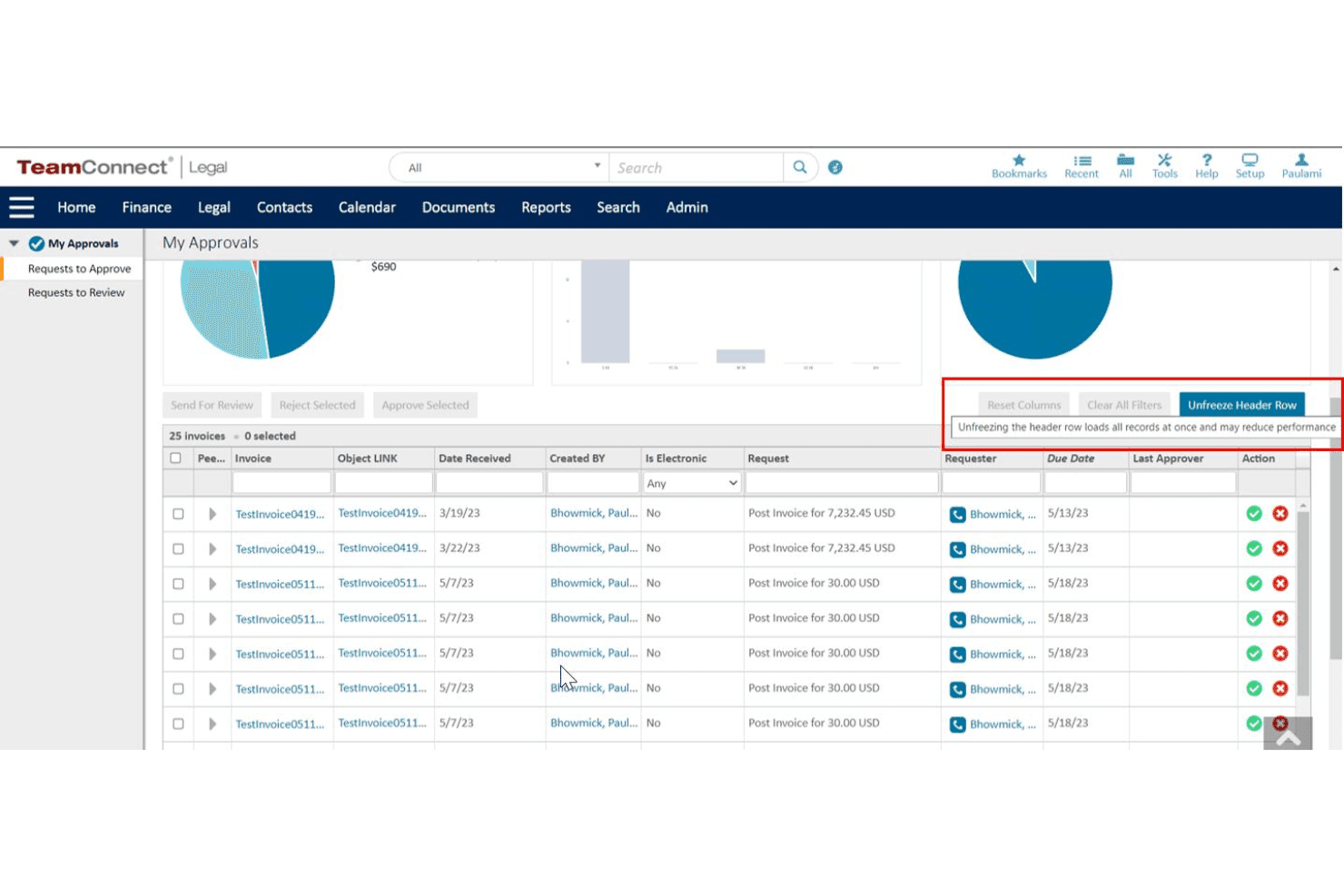
TeamConnect lets users review and approve invoices from a centralized queue. Mitratech TeamConnect is an enterprise legal management platform that combines matter management, e-billing, billing guideline enforcement, invoice approval workflows, and spend analytics for corporate legal departments.
Who Is Mitratech TeamConnect Best For?
TeamConnect is a natural fit for enterprise legal departments managing high invoice volumes, complex matter portfolios, and multiple outside counsel relationships simultaneously.
Why I Picked Mitratech TeamConnect
I've included Mitratech TeamConnect in my top picks because the TAP drag-and-drop workflow builder lets legal ops teams design their own invoice approval logic, conditional routing, and escalation rules without writing a single line of code. I like that billing guidelines are configurable at the rule level, so non-compliant line items get flagged or auto-rejected against your specific outside counsel agreements. The ARIES™ AI matter and spend agent layers on top, surfacing anomalies and answering spend questions in natural language.
Mitratech TeamConnect Key Features
- LEDES format compatibility: Accepts LEDES 1998B, 1998BI, and XML e-billing formats from outside counsel.
- Matter budget tracking: Lets users set and monitor budgets at the matter, phase, and task level.
- Rate card enforcement: Centralizes timekeeper rate approvals and ensures negotiated rates are applied.
- Accrual and financial reporting: Generates legal spend reports and accrual data for ERP and finance systems.
Mitratech TeamConnect Integrations
TeamConnect offers native integrations with SAP, Oracle, NetSuite, Salesforce, and Microsoft 365, and provides an API for custom integrations.
Pros and Cons
Pros:
- Deep matter-level budget and accrual reporting
- Provides role-based access
- Highly configurable invoice approval routing rules
Cons:
- Outside counsel onboarding requires significant change management
- Long enterprise implementation timeline before go-live
Learn more about Mitratech TeamConnect: Best for advanced rate benchmarking
- Free demo available
- Pricing upon request
Visit WebsiteCustomer Rating:3.8/5
LexisNexis CounselLink+ tracks Partner, Associate, and Paralegal hourly rates across multiple percentiles alongside custom company data. LexisNexis CounselLink+ is an enterprise legal management platform that combines e-billing, AI-powered invoice review, matter budget tracking, billing guideline enforcement, and outside counsel rate benchmarking for corporate legal departments.
Who Is LexisNexis CounselLink+ Best For?
CounselLink+ is well suited to mid-to-large corporate legal departments that manage high volumes of outside counsel invoices and need structured spend controls across multiple business units.
Why I Picked LexisNexis CounselLink+
CounselLink+ earns its spot on my shortlist because of the depth behind its rate benchmarking capability. The benchmarking database is built on $75B+ in actual invoice data, so when I'm negotiating timekeeper rates with outside counsel, I'm comparing against real market rates rather than estimates. I also like that those negotiated rate cards are enforced directly at invoice review, so any billing above agreed rates gets flagged automatically.
LexisNexis CounselLink+ Key Features
- AI-powered invoice audit: Uses machine learning to automatically scan invoices for billing guideline violations and flag issues before human review.
- Multi-currency support: Handles invoices in several currencies with built-in tax calculations and currency conversion.
- Matter lifecycle management: Tracks legal matters from intake through resolution with integrated documents and communication history.
- Configurable approval workflows: Allows you to set up custom, multi-stage invoice and payment approval paths based on company processes.
LexisNexis CounselLink+ Integrations
LexisNexis CounselLink+ offers native integrations with SAP, Oracle, NetSuite, and Workday for ERP and accounts payable workflows. An API is available for custom integrations.
Pros and Cons
Pros:
- Calculates international currency taxes natively
- Tracks outside counsel diversity
- Benchmarking database built on real invoice data
Cons:
- Lacks integrated document redlining tools
- Lacks automated document generation tools
Learn more about LexisNexis CounselLink+:
Alte software-uri de gestionare a cheltuielilor juridice
Iată câteva opțiuni suplimentare de software pentru gestionarea cheltuielilor juridice care nu au ajuns pe lista mea scurtă, dar care merită totuși analizate:
- 11PERSUITBest for RFP-driven outside counsel engagement
- 12Mitratech Legal Spend ManagementBest for AI-powered firm performance benchmarking
- 13LitifyBest for Salesforce-based matter collaboration
- 14XakiaBest for fast implementation with small teams
- 15LawcadiaBest for rules-driven spend approval automation
- 16DazychainBest for configurable compliance workflows
How I Evaluate Legal Spend Management Software
I evaluate legal spend tools across two layers: baseline capabilities like LEDES intake and billing guideline enforcement, and the differentiators that set leading platforms apart.
Core Functionality (Table Stakes For This List)
When I'm selecting tools for my list, I rank each one on a scale from 0 (does not offer the functionality) to 5 (excels in this area) for each core functionality listed below. I then calculate the tool's total score as a percentage, using 65% as a benchmark to help assess its overall fit for the list.
- E-Billing and LEDES Support: I check whether the platform ingests LEDES 98B, 1998BI, and XML formats, and whether it validates submissions or requires manual cleanup from your AP team.
- Billing Guideline Enforcement: Automated rule engines that flag block billing, excessive charges, or unapproved task codes keep invoice reviews from becoming a manual bottleneck.
- Matter Budget Tracking: I look for phase- and task-level budget monitoring with variance alerts, so legal ops can catch overruns mid-matter rather than at final invoice.
- Invoice Approval Workflows: Configurable multi-tier routing matters here, especially when approval chains differ by spend threshold, entity, or matter type across your organization.
- Accrual and Financial Reporting: I evaluate how well each platform generates accrual data and syncs with ERP systems like SAP or Oracle to support month-end close cycles.
- Vendor and Rate Management: Rate card enforcement at the timekeeper level is what I look for, including the ability to lock in negotiated rates and flag unapproved increases.
Once I have a list of tools that meet the criteria, I consider what sets each platform apart.
Differentiating Factors (What Sets Vendors Apart)
Here's how I compare and contrast different vendors:
Standout Features
AI-powered invoice review is a key differentiator. Platforms with strong ML models catch block billing, duplicate charges, and guideline violations before your team opens the invoice, which saves hours during review cycles. Outside counsel benchmarking also matters—comparing your firm's effective rates and cycle times against industry baselines gives you real leverage during rate negotiations. I look for rate card management that enforces approved timekeeper rates automatically, so unapproved increases don't slip through unnoticed.
Beyond Features
ERP connectivity is one of the first things I evaluate. If invoices can't flow into SAP, Oracle, or Workday without manual intervention, your AP team absorbs the friction during every close cycle. Pricing models vary widely too. Some vendors charge per user while others price based on spend under management, so I check whether outside counsel firms face submission fees that could hurt adoption. Data residency and compliance certifications like SOC 2 Type II also carry weight, especially for global organizations handling privileged legal data across jurisdictions.
Cum să alegeți un software de gestionare a cheltuielilor juridice
Care furnizor abordează punctele specifice de presiune cu care se confruntă echipele dumneavoastră juridice și financiare în gestionarea cheltuielilor pentru consilierii juridici externi, a verificării facturilor și a bugetelor la nivel de speță?
| Dacă prioritatea dumneavoastră este... | Căutați... |
|---|---|
| Dacă prioritatea dumneavoastră este...Vizibilitate în timp real asupra cheltuielilor juridice | Căutați...Tablouri de bord cu detaliere până la nivel de speță/fază |
| Dacă prioritatea dumneavoastră este...Mai puține contestații ale facturilor | Căutați...Aplicarea automată a regulilor de facturare |
| Dacă prioritatea dumneavoastră este...Integrare rapidă cu ERP | Căutați...Conectori SAP, Oracle sau Workday preconfigurați |
| Dacă prioritatea dumneavoastră este...Controlul creșterii tarifelor | Căutați...Aplicarea grilei de tarife la nivelul persoanei care înregistrează timpul |
| Dacă prioritatea dumneavoastră este...Integrare rapidă a firmelor de avocatură | Căutați...Portal pentru furnizori și manageri de implementare |
Cum să evaluați lista scurtă
- Solicitați un exemplu de raport privind erorile LEDES: Cereți un jurnal recent al erorilor generat de sistem pentru a confirma validarea avansată a facturilor în medii reale.
- Desfășurați o demonstrație live a configurării fluxului de lucru: Configurați un lanț de aprobare cu mai multe etape în timpul demonstrației și solicitați un prototip funcțional în mai puțin de 48 de ore.
- Solicitați un fișier de export pentru ERP: Obțineți un exemplu de fișier cu exporturi de cheltuieli în formatul necesar ERP-ului dumneavoastră pentru a valida conectivitatea imediată.
- Verificați traseul de audit al încălcării regulilor de facturare: Obțineți o factură anonimizată, cu note privind încălcarea regulilor semnalată de sistem și istoricul acțiunilor, pentru a verifica nivelul de detaliu al aplicării regulilor.
- Alertă privind compromisurile — motor de reguli versus flux de lucru deschis: Decideți dacă respingerea automată (mai puțină verificare manuală, opoziție mai mare din partea firmelor) sau direcționarea deschisă (mai multă flexibilitate, mai multe erori) corespunde toleranței dumneavoastră la risc.
Ce este software-ul de gestionare a cheltuielilor juridice?
Software-ul de gestionare a cheltuielilor juridice centralizează primirea facturilor juridice, verifică facturile consilierilor juridici externi din perspectiva conformității și urmărește onorariile firmelor de avocatură în raport cu bugetele spețelor. Aceste platforme ajută echipele financiare și juridice să automatizeze fluxurile de aprobare, să impună reguli de facturare personalizate și să genereze analize ale cheltuielilor pentru previzionare și înregistrarea cheltuielilor angajate. Cu suport integrat pentru formate standard în industrie, precum LEDES, echipa dumneavoastră poate gestiona costurile juridice aferente mai multor firme într-un mod mai previzibil și mai precis, în sincronizare cu procesele financiare generale.
Funcțiile software-ului de gestionare a cheltuielilor juridice
Atunci când selectați un software de gestionare a cheltuielilor juridice, urmăriți următoarele funcții esențiale:
- Facturare electronică și suport LEDES: Acceptă și validează facturi în format LEDES și în alte formate standard ale industriei, reducând introducerea manuală a datelor și asigurând consecvența acestora.
- Aplicarea ghidurilor de facturare: Aplică reguli personalizate pentru a semnala sau respinge costurile neconforme, facturarea blocată sau cheltuielile neautorizate, contribuind la menținerea unui control strict al costurilor.
- Urmărirea bugetului dosarului: Monitorizează în timp real cheltuielile în raport cu bugetele la nivel de dosar, fază și sarcină, alertându-vă cu privire la eventualele depășiri înainte ca acestea să se agraveze.
- Fluxuri de aprobare a facturilor pe mai multe niveluri: Direcționează facturile prin lanțuri configurabile de verificare și aprobare, susținând ierarhii organizaționale complexe și cerințe de conformitate.
- Raportarea angajamentelor și a cheltuielilor: Automatizează raportarea financiară pentru angajamente, previziuni și tendințe istorice, facilitând sprijinirea închiderii lunare de către echipele financiare.
- Gestionarea furnizorilor și a tarifelor: Menține un depozit cu funcție de căutare pentru avocații externi și grilele lor de tarife negociate, aplicând tarifele convenite în etapa de verificare a facturilor.
- Auditarea facturilor bazată pe inteligență artificială: Folosește învățarea automată pentru a detecta înregistrările duplicat, încălcările tiparelor și posibilele erori de facturare înainte de verificarea umană.
- Integrări cu ERP și AP: Se conectează direct la sisteme de contabilitate pentru întreprinderi, precum SAP, Oracle sau Workday, îmbunătățind procesarea plăților și urmărirea cheltuielilor.
- Controale ale accesului bazate pe roluri: Acordă utilizatorilor niveluri diferite de permisiuni în funcție de rol sau departament, sprijinind securitatea informațiilor și posibilitatea efectuării auditurilor.
- Portal de colaborare pentru firme de avocatură: Oferă avocaților externi un portal ușor de utilizat pentru trimiterea facturilor, partajarea documentelor și vizualizarea stadiului dosarelor, sporind transparența și reducând blocajele de comunicare.
Beneficiile software-ului de gestionare a cheltuielilor juridice
Implementarea unui software de gestionare a cheltuielilor juridice oferă mai multe beneficii echipei și companiei dumneavoastră. Iată câteva dintre acestea:
- Reducerea efortului manual: Verificarea automată a facturilor și aplicarea ghidurilor reduc numărul de ore alocate auditării facturilor și corectării erorilor.
- Control mai bun al bugetului: Urmărirea și alertele în timp real privind bugetele dosarelor, fazelor și sarcinilor ajută echipa să evite depășirile costisitoare.
- Conformitate îmbunătățită: Fluxurile de aprobare configurabile, aplicarea grilelor de tarife și pistele de audit ale încălcărilor facilitează respectarea politicilor financiare și juridice.
- Închidere financiară mai rapidă: Integrările directe cu ERP și raportarea automată a angajamentelor asigură transferul permanent al datelor privind cheltuielile juridice către sistemele financiare, accelerând închiderea de la sfârșitul lunii.
- Gestionarea îmbunătățită a furnizorilor: Profilurile centralizate ale furnizorilor, cu tarife aplicabile, vă permit să negociați, să monitorizați și să evaluați comparativ mai eficient performanța firmelor de avocatură.
- Analize pregătite pentru previziuni: Accesul la analize detaliate ale cheltuielilor și la instrumente de evaluare comparativă vă ajută să planificați angajamentele, să prognozați cheltuielile și să identificați oportunități de reducere a costurilor.
- Colaborare mai bună: Portalurile de colaborare oferă firmelor de avocatură și echipei dumneavoastră transparență cu privire la stadiul facturilor, progresul dosarelor și așteptările privind conformitatea.
Costurile și prețurile software-ului de gestionare a cheltuielilor juridice
Alegerea unui software de gestionare a cheltuielilor juridice necesită înțelegerea diverselor modele și planuri de tarifare disponibile. Costurile variază în funcție de caracteristici, dimensiunea echipei, modulele suplimentare și alți factori. Tabelul de mai jos prezintă pe scurt planurile uzuale, prețurile medii ale acestora și caracteristicile incluse de obicei în soluțiile software de gestionare a cheltuielilor juridice:
Tabel comparativ al planurilor pentru software-ul de gestionare a cheltuielilor juridice
| Tipul planului | Preț mediu | Caracteristici comune |
|---|---|---|
| Tipul planuluiPlan gratuit | Preț mediu$0 | Caracteristici comuneÎncărcări limitate de facturi, urmărirea de bază a cheltuielilor și acces pentru un singur utilizator. |
| Tipul planuluiPlan personal | Preț mediu$20-$50/utilizator/lună | Caracteristici comuneSuport LEDES, verificare manuală a facturilor, urmărirea simplă a bugetului și asistență prin e-mail. |
| Tipul planuluiPlan pentru companii | Preț mediu$60-$150/utilizator/lună | Caracteristici comuneFluxuri de aprobare configurabile, aplicarea ghidurilor de facturare, bugetare la nivel de fază/sarcină și export ERP. |
| Tipul planuluiPlan pentru întreprinderi | Preț mediu$200-$500/utilizator/lună | Caracteristici comuneAuditarea facturilor bazată pe inteligență artificială, analize avansate, gestionarea tarifelor personalului pontator, integrări și SSO. |
Întrebări frecvente despre software-ul de gestionare a cheltuielilor juridice
Iată câteva răspunsuri la întrebările frecvente despre software-ul de gestionare a cheltuielilor juridice:
Ce formate LEDES sunt acceptate de obicei?
Majoritatea platformelor de tehnologie juridică acceptă formatele LEDES 1998B, 1998BI și 2000, permițând preluarea automată a facturilor de la firmele de avocatură. Utilizarea formatelor standard ajută consilierii juridici interni să urmărească cu exactitate cheltuielile juridice și să identifice principalele tendințe de cheltuieli.
Puteți automatiza respectarea instrucțiunilor de facturare cu ajutorul acestor instrumente?
Da, prin fluxuri de lucru automatizate, aceste soluții aplică instrucțiunile dvs. în timpul preluării pentru a semnala taxele neconforme, a bloca facturarea și a detecta tarifele orare neaprobate. Acest lucru reduce timpul de verificare manuală, impunând în același timp practici de facturare mai bune. Unele echipe asociază această soluție și cu un serviciu gestionat de verificare a facturilor pentru un control suplimentar.
Cum se integrează aceste instrumente cu sistemele ERP și de contabilitate?
Furnizorii oferă de obicei integrări directe sau exporturi de fișiere pentru SAP, Oracle, Workday și alte sisteme ERP, permițând transferul fără probleme al datelor facturilor aprobate pentru efectuarea plății.
Cum funcționează bugetele pentru spețe în cadrul software-ului de gestionare a cheltuielilor juridice?
Puteți stabili bugete pentru spețe, faze și sarcini și primi alerte în timp real când cheltuielile se apropie de praguri sau le depășesc, contribuind la evitarea depășirilor de buget.
Firmele de avocatură plătesc taxe pentru trimiterea facturilor prin aceste platforme?
Unele platforme percep firmelor de avocatură taxe de trimitere, în timp ce altele nu, așa că verificați structura de prețuri a furnizorului dacă cooperarea firmei este importantă pentru dvs.