

Dayforce Review: Pros, Cons, Features, and Pricing



Dayforce is a workforce planning and payroll service software provider that centralizes HR, payroll, and talent management processes. It best serves mid-to-large companies across industries including retail, healthcare, and finance, supporting HR teams and payroll departments. Dayforce offers a unified all-in-one platform that simplifies workforce management and enhances decision-making. It's built to manage complex HR operations and employee data across organizations.
Dayforce HCM software addresses issues such as payroll accuracy and real-time data access for HR and finance teams. In this article, I'll cover Dayforce's features, pros and cons, use cases, pricing, and more to help you decide if it aligns with your business needs and goals.
Dayforce Evaluation Summary

- Pricing upon request
- Free demo available
Why Trust Our Software Recommendations
Our team has been testing and reviewing software since 2012. As finance leaders ourselves, we know how difficult—and important—it is to choose the right software.
For this guide, we evaluated tools using hands-on testing and independent research, scoring tools using our selection criteria.
Our reviews reflect our human editorial judgment, not a sales pitch.
Dayforce Overview
In my opinion, Dayforce offers a solid workforce planning and analysis software platform with strong integration of HR functionalities. It excels in payroll and talent management, making it a great choice for mid-to-large businesses that need comprehensive HR solutions. The interface is user-friendly, but onboarding can be a bit challenging. Compared to competitors, it provides good value for money with its all-in-one approach. However, smaller teams might find it more than they need. If you're determining the right tool for a larger organization with complex HR needs, Dayforce should be on your shortlist, especially if you require a robust HRIS with flexible modules for different business functions.
pros
-
It offers real-time data access for your HR and finance teams.
-
Payroll management is accurate and efficient for your organization.
-
The user experience is intuitive and easy for your team to navigate, especially with features such as its customizable dashboard.
cons
-
Customer support response times may not meet your expectations.
-
Some user reviews indicate limitations in the reporting features.
Is Dayforce Right For Your Needs?
Who Would be a Good Fit for Dayforce?
Dayforce is a good fit for mid-to-large companies that need centralized HR and payroll management. If your business operates in industries such as healthcare, retail, or finance, Dayforce's real-time data access and efficient payroll capabilities can streamline your operations. HR teams benefit from its intuitive interface, making daily tasks easier. It supports complex organizational needs, ensuring accuracy in payroll and compliance. If you have a diverse workforce with varied scheduling needs, Dayforce's tools can help manage these effectively through automated workflows and effective HR management processes. It also includes features that let employees clock in and track availability or request PTO with ease.
-
Healthcare Industry
Dayforce's scheduling and compliance features help your team manage shifts and adhere to industry regulations efficiently.
-
Retail Sector
Dayforce provides real-time data and payroll accuracy, which is crucial for managing a dynamic retail workforce.
-
Finance Departments
The HR software ensures accurate payroll processing and offers data-driven insights for your financial planning through its advanced payroll system.
-
Mid-Sized Companies
Dayforce's scalable features suit your growing business needs without complicating HR processes.
-
Human Resources Teams
Its user-friendly interface and robust HR tools simplify your team's daily management tasks. It also includes structured performance reviews and advanced time tracking
-
Large Enterprises
Dayforce's comprehensive capabilities support complex organizational structures and diverse workforce requirements.
Who Would be a Bad Fit for Dayforce?
Dayforce may not be suitable for small businesses with straightforward HR needs. If your team requires minimal payroll and scheduling management, the complexity of Dayforce could outweigh its benefits. Startups and small companies might find its onboarding process cumbersome and its features more than necessary. If you're looking for a simple solution, Dayforce's extensive capabilities might not align with your requirements.
-
Small Startups
Dayforce's robust features may overwhelm your simple HR and payroll needs.
-
Non-Profit Organizations
The software's complexity might not fit your budget or operational simplicity.
-
Freelance Teams
Your independent work style and minimal HR requirements may not align with Dayforce's structured approach.
-
Temporary Staffing Agencies
Dayforce may not offer the flexibility you need for frequent personnel changes and short-term contracts.
-
Creative Agencies
Your focus on creative projects might not require the comprehensive HR tools that Dayforce provides.
-
Boutique Firms
The software's extensive features may not be necessary for your limited team size and straightforward operations.
How We Test & Score Tools
We’ve spent years building, refining, and improving our software testing and scoring system. The rubric is designed to capture the nuances of software selection and what makes a tool effective, focusing on critical aspects of the decision-making process.
Below, you can see exactly how our testing and scoring works across seven criteria. It allows us to provide an unbiased evaluation of the software based on core functionality, standout features, ease of use, onboarding, customer support, integrations, customer reviews, and value for money.
Core Functionality (25% of final scoring)
The starting point of our evaluation is always the core functionality of the tool. Does it have the basic features and functions that a user would expect to see? Are any of those core features locked to higher-tiered pricing plans? At its core, we expect a tool to stand up against the baseline capabilities of its competitors.
Standout Features (25% of final scoring)
Next, we evaluate uncommon standout features that go above and beyond the core functionality typically found in tools of its kind. A high score reflects specialized or unique features that make the product faster, more efficient, or offer additional value to the user.
We also evaluate how easy it is to integrate with other tools typically found in the tech stack to expand the functionality and utility of the software. Tools offering plentiful native integrations, 3rd party connections, and API access to build custom integrations score best.
Ease of Use (10% of final scoring)
We consider how quick and easy it is to execute the tasks defined in the core functionality using the tool. High scoring software is well designed, intuitive to use, offers mobile apps, provides templates, and makes relatively complex tasks seem simple.
Onboarding (10% of final scoring)
We know how important rapid team adoption is for a new platform, so we evaluate how easy it is to learn and use a tool with minimal training. We evaluate how quickly a team member can get set up and start using the tool with no experience. High scoring solutions indicate little or no support is required.
Customer Support (10% of final scoring)
We review how quick and easy it is to get unstuck and find help by phone, live chat, or knowledge base. Tools and companies that provide real-time support score best, while chatbots score worst.
Customer Reviews (10% of final scoring)
Beyond our own testing and evaluation, we consider the net promoter score from current and past customers. We review their likelihood, given the option, to choose the tool again for the core functionality. A high scoring software reflects a high net promoter score from current or past customers.
Value for Money (10% of final scoring)
Lastly, in consideration of all the other criteria, we review the average price of entry level plans against the core features and consider the value of the other evaluation criteria. Software that delivers more, for less, will score higher.
Core Features
Payroll Management: Dayforce automates payroll processing, ensuring accuracy and compliance with regulations. It lets your team manage complex payroll structures effortlessly.
Time and Attendance: The attendance tracking feature tracks employee hours in real time, helping you manage schedules and reduce errors in timekeeping. Automated notifications help alert managers to scheduling changes and conflicts.
Talent Management: Dayforce supports recruitment, onboarding, and performance management, which makes it easier for your HR team to nurture talent. The hiring process also becomes more efficient with integrated applicant tracking tools.
Benefits Administration: You can manage employee benefits seamlessly and provide your team with clear options and simplified enrollment processes.
Workforce Analytics: Dayforce offers data-driven insights that help you make informed decisions about your workforce planning and strategy.
Compliance Management: It helps your organization stay compliant with labor laws and regulations, reducing risks and ensuring peace of mind.

Standout Features
Real-Time Data Access: Dayforce's real-time updates give your team immediate insights into workforce metrics, enhancing decision-making and operational efficiency.
Advanced Scheduling: The software allows for intricate scheduling solutions, which is perfect for businesses with diverse shift patterns and complex workforce needs.
Ease of Use
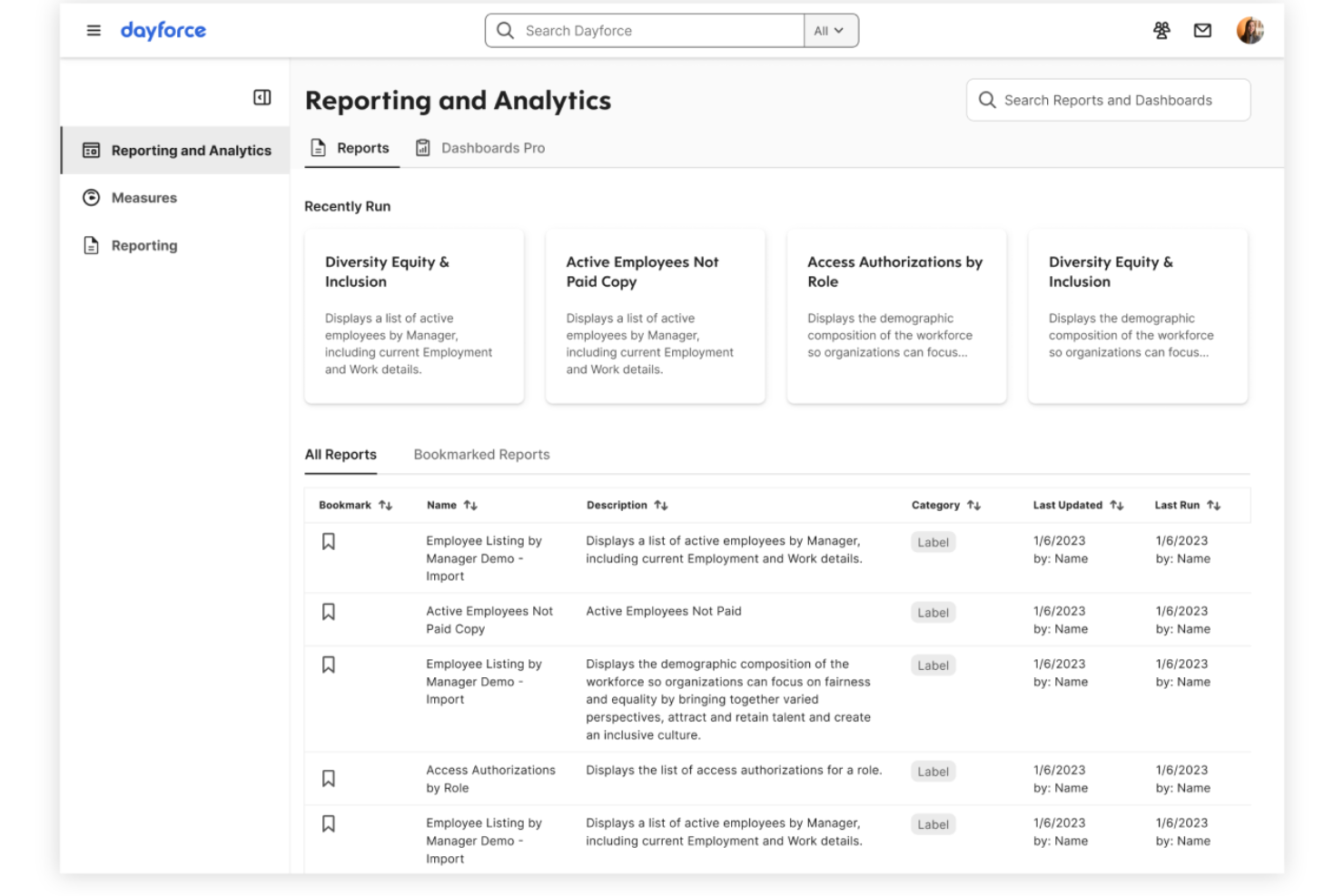
Dayforce is generally user-friendly, with an intuitive interface that makes it easy for your team to navigate HR tasks. While some users find the onboarding process complex, once you're set up, the software's real-time data access and payroll management are straightforward and simple to use. Compared to other solutions, Dayforce provides a balanced experience that supports efficient workforce management while minimizing common frustrations. If your team values an intuitive design, Dayforce can meet your expectations.

Onboarding
Dayforce's onboarding can be challenging, with a steep learning curve that might slow your team's initial setup. Despite this, the platform offers comprehensive support resources and training materials to help you navigate the process. The detailed guides and responsive customer service aim to enhance your team's understanding and usage of the software. If you're patient and willing to invest time, the onboarding experience eventually leads to a solid grasp of Dayforce's capabilities.

Customer Support
Dayforce offers reliable customer support, though response times can sometimes be slower than you'd prefer. The support team is knowledgeable and provides helpful guidance, ensuring your team can resolve issues effectively. You have access to various support channels, including phone and email, which aid in addressing your concerns. While improvements in response efficiency could enhance the experience, Dayforce's support resources are generally beneficial for your team's needs.

Integrations
Dayforce integrates directly with Workday, SAP SuccessFactors, Microsoft Dynamics 365, and Oracle HCM.
Dayforce also offers an API and connects with third-party integration tools to extend its capabilities.

Value for Money
No public pricing is available. Reach out to the company for pricing details.

Dayforce Specs
- 2-Factor Authentication
- 360 Degree Feedback
- API
- Application Tracking
- Attendance Tracking
- Batch Permissions & Access
- Compliance Tracking
- Dashboard
- Data Export
- Data Import
- Data Visualization
- Employee Database
- Employee Engagement
- Employee Incentive Management
- Employee Onboarding
- Employee Training
- Expense Tracking
- External Integrations
- Feedback Management
- Multi-User
- Notifications
- Payroll
- Performance Appraisal
- Scheduling
- Time Management
- Timesheets
- Travel Management
- Vacation & Absence Calendar
Dayforce FAQs
How does Dayforce ensure data security and compliance?
Can Dayforce handle complex payroll structures?
Does Dayforce support remote workforce management?
How user-friendly is Dayforce for non-technical teams?
What kind of customer support does Dayforce offer?
Is Dayforce scalable for growing businesses?
How does Dayforce facilitate employee self-service?
What training resources are available for new Dayforce users?
Dayforce Company Overview & History
Dayforce, Inc., formerly Ceridian HCM Holding Inc., is based in Minneapolis, Minnesota, and specializes in cloud-based Human Capital Management software. The company, publicly traded on the NYSE under the ticker symbol DAY, employs around 9,600 people. Known for its comprehensive HR solutions, Dayforce has notable clients across various industries. In August 2025, it was announced that Thoma Bravo would acquire Dayforce for $12.3 billion.
Dayforce Major Milestones
- 1992: Founded as Ceridian HCM Holding Inc.
- 2012: Ceridian acquired Dayforce, shifting its focus to HR solutions.
- 2024: Rebranded to Dayforce, Inc.
- 2024: Reported revenue of $1.76 billion.
- 2025: Announced acquisition by Thoma Bravo for $12.3 billion.