

monday.com Review: Pros, Cons, Features, and Pricing
monday.com excels in finance automation with its user-friendly integrations and no-code automations, making it an ideal choice for enhancing team productivity.

We review tools independently, and commissions help fund our testing. See our transparency policy, our methodology, or suggest a tool.
monday.com provides a finance automation and business management software that helps teams manage workflows and automate repetitive tasks. It best serves finance departments in tech startups, marketing agencies, and e-commerce businesses by simplifying project management and financial planning. Using monday.com enhances productivity with customizable dashboards and integration capabilities, making it an all-in-one project management platform ideal for small businesses and small teams.
It addresses common issues such as task tracking and data consolidation for finance teams. In this article, I'll cover monday.com's key features, pros and cons, use cases, pricing, etc., so you can decide if it meets your department's needs and goals.
monday AI Workspace Evaluation Summary
.png&w=1920&q=75)
4.6/5
- From $9/user/month (billed annually)
- Free plan available
Why Trust Our Software Recommendations
6,700+
Reviews
20
Industry experts
16+
Evaluation factors
14
Years
Our team has been testing and reviewing software since 2012. As finance leaders ourselves, we know how difficult—and important—it is to choose the right software.
For this guide, we evaluated tools using hands-on testing and independent research, scoring tools using our selection criteria.
Our reviews reflect our human editorial judgment, not a sales pitch.
monday AI Workspace Overview
In my opinion, monday.com is a solid choice for finance automation, particularly for teams that value user-friendly interfaces and seamless integrations. Its standout features, including customizable dashboards and extensive automation options, make it appealing for tech-savvy teams. Many also appreciate the collaboration features built into the platform. While it offers excellent integration capabilities, some might find its pricing a bit high compared to other options. However, the ease of use and strong customer support can justify the cost for those seeking a reliable project management solution. It's best suited for dynamic teams in industries such as tech and marketing, where team collaboration and automation are key.
Pros
- You can create custom dashboards to fit your team's needs.
- Automations save your team time on recurring tasks.
- The user interface is intuitive, with a minimal learning curve.
Cons
- You might find the mobile app less responsive than the desktop version.
- Some users feel the reporting features lack depth.
- It can be overwhelming for teams new to project management software.
Is monday AI Workspace Right For Your Needs?
Who Would be a Good Fit for monday AI Workspace?
monday.com is great for tech startups, marketing agencies, and e-commerce businesses where collaboration and automation are key. Your team will appreciate its customizable dashboards, calendar view options, chart view, and automation features that simplify project management and financial planning. The included online docs feature helps consolidate content from other websites. If you're in a fast-paced environment, monday.com helps keep tasks organized and your team aligned with kanban boards. Its user-friendly interface makes onboarding easy, so you can get started quickly on your projects.
- Tech StartupsYour team can easily manage projects and automate tasks, boosting productivity and keeping the focus on innovation.
- Marketing AgenciesThe customizable dashboards help your team track campaigns and client projects efficiently.
- E-Commerce Businessesmonday.com simplifies inventory and order management, keeping your business operations smooth.
- Finance DepartmentsAutomations and task tracking help your team streamline financial planning and analysis.
- Project ManagersThe intuitive interface allows you to organize and monitor project timelines effectively.
- Creative Teamsmonday.com supports collaboration and creativity with its visual project management tools.
Who Would be a Bad Fit for monday AI Workspace?
monday.com might not suit large enterprises or industries that require deep financial reporting, such as banking or insurance. If your work demands complex data analysis and in-depth reporting, you might find monday.com's capabilities limited. Teams that rely heavily on mobile functionality could struggle, as the mobile app is less responsive than the desktop version. Additionally, if you're new to project management tools, the platform's range of features might feel overwhelming.
- Large EnterprisesYour team may find the reporting features lacking for extensive financial analysis.
- Banking Sectormonday.com's current capabilities may not meet the need for detailed financial reporting.
- Insurance IndustryComplex data analysis requirements can exceed what monday.com offers.
- Mobile-Dependent TeamsIf your team works primarily on mobile devices, you might find the app's responsiveness insufficient.
- New Project ManagersThe platform's extensive features can be overwhelming for beginners.
- Data-Intensive Fieldsmonday.com may not support the depth of data analysis required in these areas.
How We Test & Score Tools
We’ve spent years building, refining, and improving our software testing and scoring system. The rubric is designed to capture the nuances of software selection and what makes a tool effective, focusing on critical aspects of the decision-making process.
Below, you can see exactly how our testing and scoring works across seven criteria. It allows us to provide an unbiased evaluation of the software based on core functionality, standout features, ease of use, onboarding, customer support, integrations, customer reviews, and value for money.
Core Functionality (25% of final scoring)
The starting point of our evaluation is always the core functionality of the tool. Does it have the basic features and functions that a user would expect to see? Are any of those core features locked to higher-tiered pricing plans? At its core, we expect a tool to stand up against the baseline capabilities of its competitors.
Standout Features (25% of final scoring)
Next, we evaluate uncommon standout features that go above and beyond the core functionality typically found in tools of its kind. A high score reflects specialized or unique features that make the product faster, more efficient, or offer additional value to the user.
We also evaluate how easy it is to integrate with other tools typically found in the tech stack to expand the functionality and utility of the software. Tools offering plentiful native integrations, 3rd party connections, and API access to build custom integrations score best.
Ease of Use (10% of final scoring)
We consider how quick and easy it is to execute the tasks defined in the core functionality using the tool. High scoring software is well designed, intuitive to use, offers mobile apps, provides templates, and makes relatively complex tasks seem simple.
Onboarding (10% of final scoring)
We know how important rapid team adoption is for a new platform, so we evaluate how easy it is to learn and use a tool with minimal training. We evaluate how quickly a team member can get set up and start using the tool with no experience. High scoring solutions indicate little or no support is required.
Customer Support (10% of final scoring)
We review how quick and easy it is to get unstuck and find help by phone, live chat, or knowledge base. Tools and companies that provide real-time support score best, while chatbots score worst.
Customer Reviews (10% of final scoring)
Beyond our own testing and evaluation, we consider the net promoter score from current and past customers. We review their likelihood, given the option, to choose the tool again for the core functionality. A high scoring software reflects a high net promoter score from current or past customers.
Value for Money (10% of final scoring)
Lastly, in consideration of all the other criteria, we review the average price of entry level plans against the core features and consider the value of the other evaluation criteria. Software that delivers more, for less, will score higher.
Core Features
Task Management: Create and assign tasks to your team, keeping everyone aligned on priorities. Easily track progress and due dates at a glance with the visual boards.
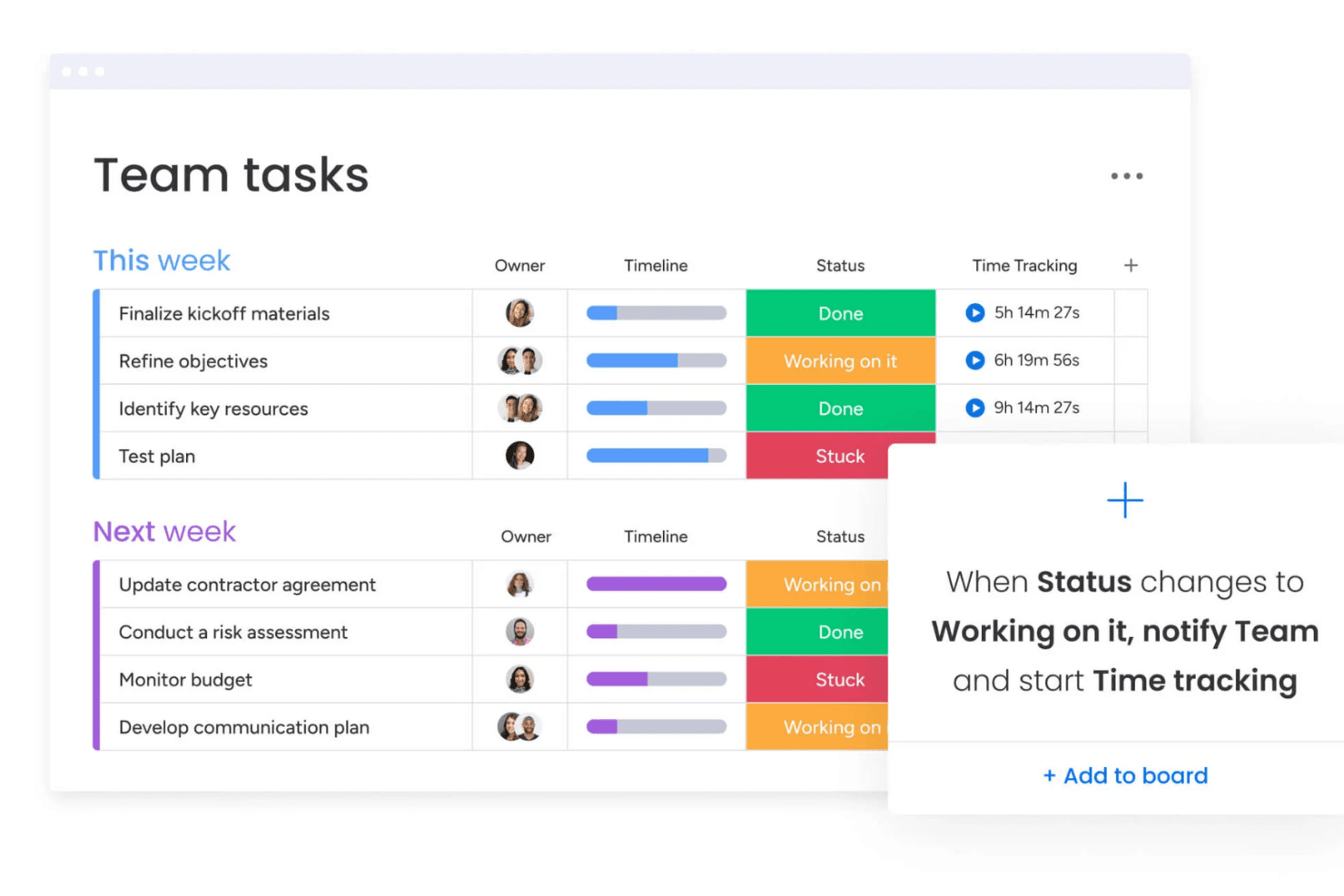
Automations: Set up automatic workflows to handle repetitive tasks, freeing up your team's time for more important work. Use triggers and actions to customize these automations.
Time Tracking: Monitor how much time your team spends on each task to improve budgeting and resource allocation.
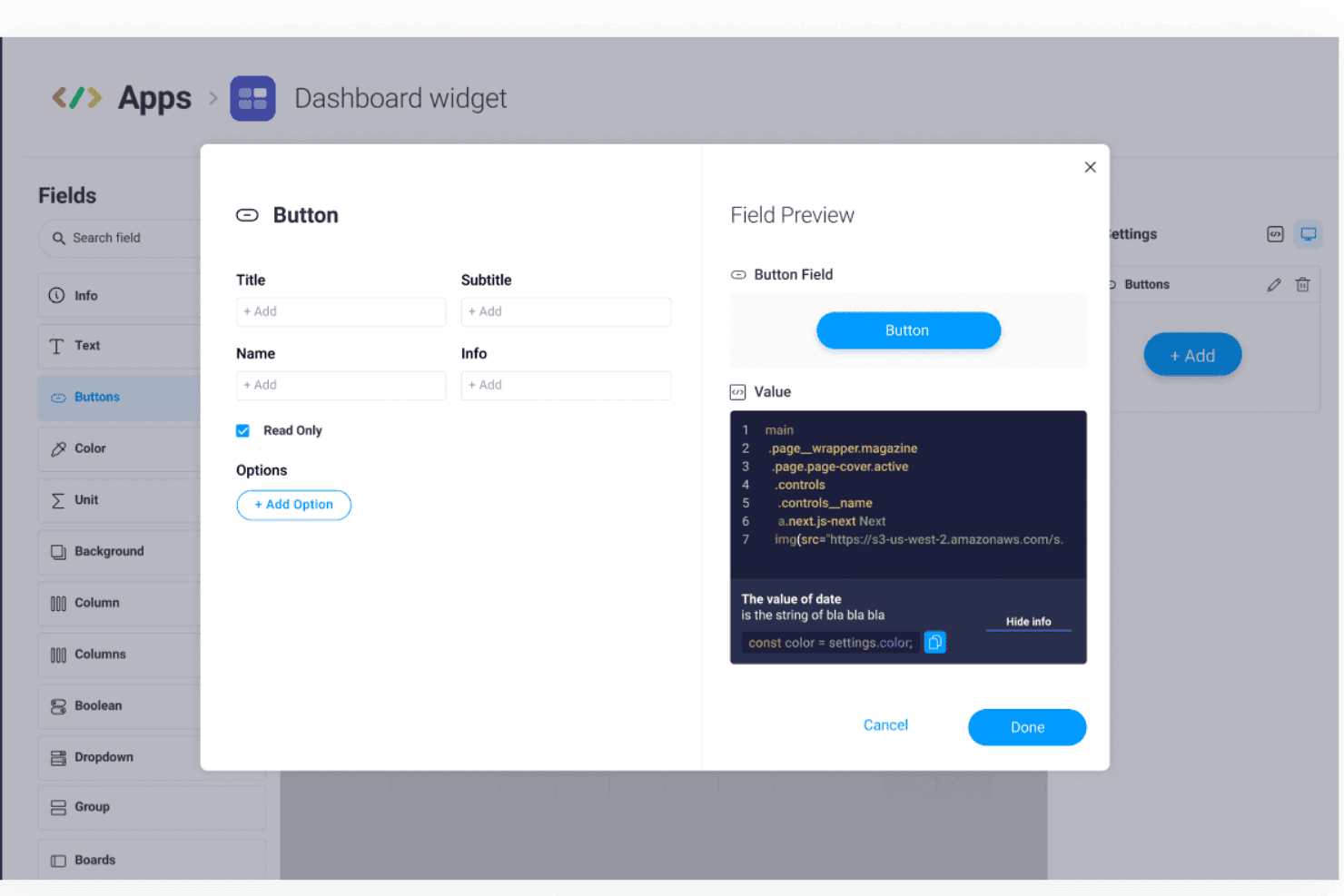
Customizable Dashboards: Tailor dashboards using drag-and-drop widgets to show the information that matters most to your team.
Reporting: Generate reports to analyze your team's performance and project outcomes. Use insights to make data-driven decisions.
Collaboration Tools: Communicate with your team directly within tasks, reducing the need for constant emails. Keep all project-related discussions in one place, with file storage available for important documents.
Standout Features
No-Code Automations: You don't need technical skills to set up automations. Simply use the intuitive automation tool to set up automated tasks, notifications, and other actions that fit your team's needs.
Visual Workflow Builder: You can create and visualize workflows with ease. This feature helps your team understand processes and ensures everyone follows the same steps.
Ease of Use
monday.com's platform is user-friendly, making it easy for your team to get started quickly. The straightforward interface allows you to customize dashboards and set up automations without needing technical skills. Visual elements, including drag-and-drop boards, simplify task management, helping your team stay organized. Compared to other finance CRM software, monday.com stands out for its simplicity and ease of navigation, allowing your team to focus on work rather than figuring out the platform.

Onboarding
monday.com offers a straightforward onboarding process that helps your team start quickly. The platform provides tutorials and guides that walk you through setting up projects and automations. You'll find the support resources in the knowledge base helpful for resolving questions as they arise. Although some users feel the initial setup can be overwhelming, the available resources and intuitive interface generally lead to a smooth transition. This ensures your team can see value from monday.com sooner rather than later.

Customer Support
monday.com provides reliable customer support through multiple channels, including an online request form and live chat, ensuring your team gets the help it needs. The response time is generally quick, allowing you to resolve issues without significant delays. Users appreciate the comprehensive help center and community forums, which offer solutions to common problems. monday.com offers premium support as part of its top-tier plans, or teams can hire a monday.com expert for help with a specific project. The range of available support and responsive assistance make monday.com a dependable option.

Integrations
monday.com integrates with Slack, Google Drive, Dropbox, Zoom, Microsoft Teams, Shopify, Trello, Jira, HubSpot, and LinkedIn.
monday.com also offers an API and connects with third-party integration tools.

Value for Money
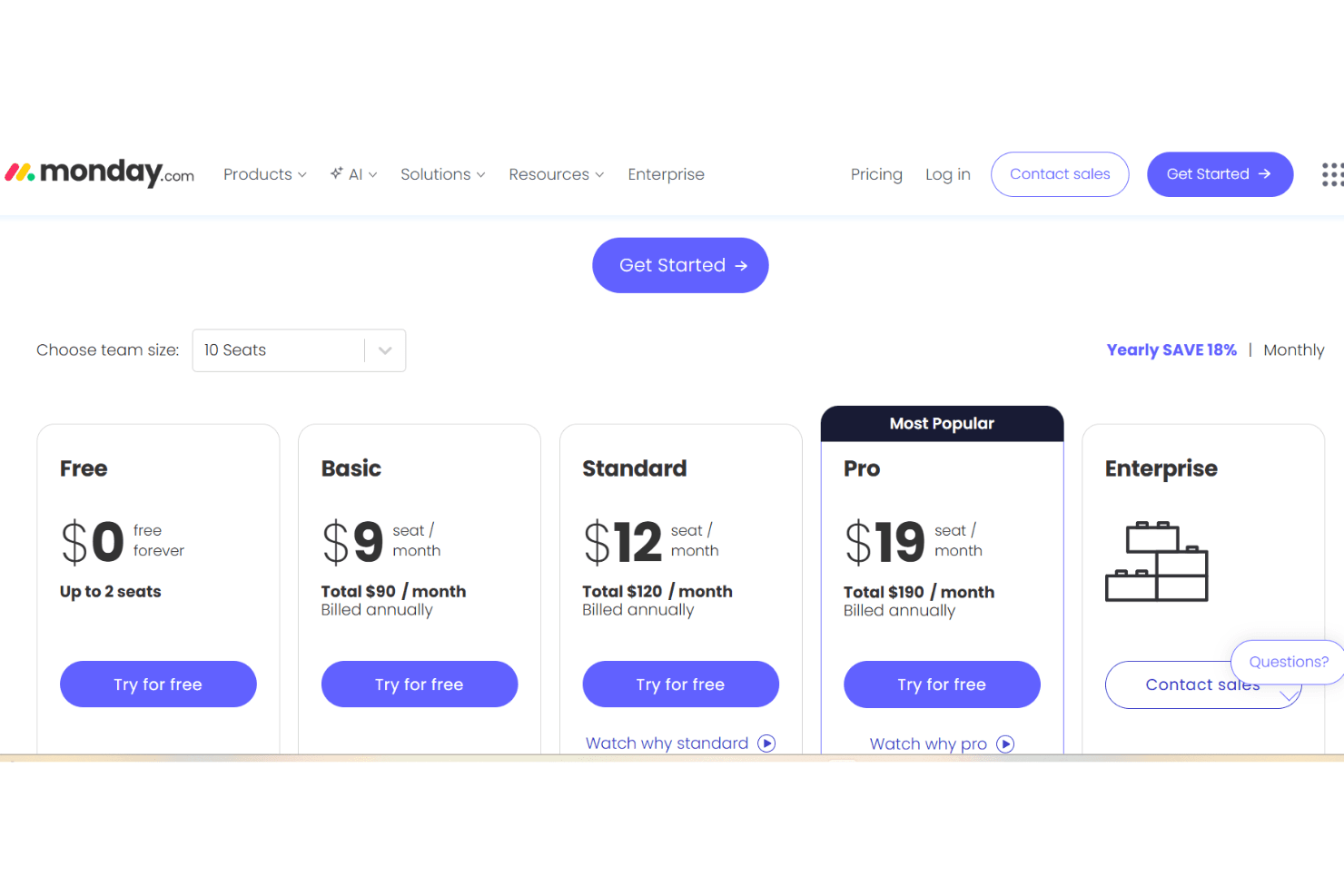
monday.com offers a range of paid plans for its monday CRM product. These plans are designed to accommodate various business needs, though some users find the cost high for smaller teams. The monday.com pricing model is per seat with a three-user minimum, which can impact value. Though there is not a free version of monday CRM, a 14-day free trial allows your team to evaluate the software before committing to a purchase.
- Basic Plan: $12 per seat/month (billed annually); one workspace for individuals and small teams.
- Standard Plan: $17 per seat/month (billed annually); three workspaces, custom automations, and AI-powered tools.
- Pro Plan: $28 per seat/month (billed annually); unlimited contacts, 15 workspaces, and advanced communication and AI-powered tools.
- Ultimate Plan: Reach out to monday.com for pricing; robust security features, unlimited workspaces and automations, and premium support.
monday AI Workspace Specs
- API: Yes
- Batch Permissions & Access: Yes
- Budgeting: No
- Calendar Management: Yes
- Collaboration Support: Yes
- Contact Management: No
- Contact Sharing: No
- Customer Management: No
- Dashboard: Yes
- Dashboards: Yes
- Data Export: Yes
- Data Import: Yes
- Data Visualization: Yes
- Dependency Tracking: Yes
- Document Sharing: Yes
- Expense Tracking: No
- External Integrations: Yes
- File Sharing: Yes
- Gantt Charts: Yes
- Kanban Boards: Yes
- Multi-User: Yes
- Notifications: Yes
- Project Management: Yes
- Resource Management: Yes
- Scheduling: Yes
- Task Scheduling/Tracking: Yes
- Third-Party Plugins/Add-Ons: Yes
- Time Management: Yes
- Travel Management: No
- Workflow Management: Yes
monday AI Workspace FAQs
monday AI Workspace Company Overview & History
monday.com is headquartered in Tel Aviv, Israel, and employs over 3,000 people. The company's work platform offers a suite of products, including monday work management, monday CRM, monday dev, and monday service. Known for its vibrant work culture, monday.com has gained attention for its user-friendly platform and extensive customization options. Notable clients include Compass, Coca-Cola, and Datacom. After completing its IPO in 2021, the company was valued at $7.5 billion.
monday.com Major Milestones
2012: Founded by Roy Mann and Eran Zinman.
2014: Launched its first product.
2019: Reached unicorn status with a valuation over $1 billion.
2021: Went public on NASDAQ, achieving a valuation of $7.5 billion.
2022: Expanded its product line to include CRM and development tools.