

Gusto-anmeldelse: Fordele, ulemper, funktioner og priser
Gusto gør HR og lønadministration enklere med sin brugervenlige grænseflade og omfattende funktioner, hvilket gør løsningen til et oplagt valg for ejere af små virksomheder, der søger effektivitet.

We review tools independently, and commissions help fund our testing. See our transparency policy, our methodology, or suggest a tool.
Gusto is a HR and payroll provider that helps you manage employee pay, benefits, and compliance. It integrates easily with leading accounting tools like QuickBooks, Xero, and FreshBooks, ensuring efficient data flow across systems.
Gusto is ideal for small to medium-sized businesses—especially those in tech companies or creative agencies who need an efficient way to manage employee details and payroll without the hassle. Overall, the software helps finance professionals maintain payroll accuracy, minimize manual input, and speed up the month-end close.
In this Gusto review, you’ll get a quick breakdown of the software’s core features, pros and cons, ideal use cases, pricing, and more. If payroll tasks slow down your month-end process, this one’s worth a closer look.
Why Trust Our Software Recommendations
6,700+
Reviews
20
Industry experts
16+
Evaluation factors
14
Years
Our team has been testing and reviewing software since 2012. As finance leaders ourselves, we know how difficult—and important—it is to choose the right software.
For this guide, we evaluated tools using hands-on testing and independent research, scoring tools using our selection criteria.
Our reviews reflect our human editorial judgment, not a sales pitch.
Gusto Evaluation Summary
4.6/5
- From $49/month + $6/month/user
- Free demo available
Gusto Overview
Gusto excels as an HR and payroll software with its intuitive interface and advanced feature set. Compared to other tools, it offers excellent value with seamless integration options and competitive pricing.
The software offers a strong core feature set, including automated payroll processing, contractor payments, and benefits administration. These capabilities make it an ideal fit for service-based firms or companies with hybrid workforces. However, businesses that require in-depth customization or niche compliance tools may find its offerings less advanced than those of more specialized enterprise platforms.
Overall, Gusto stands out as a reliable, efficient HR solution that prioritizes simplicity and user experience—making it a smart choice for growing businesses focused on operational efficiency.
Pros
- Well-organized dashboard makes it easy for finance teams to onboard quickly.
- The platform streamlines payroll processing with automatic calculations, direct deposits, and end-to-end tax filing.
- Simplifies benefits management by offering integrated access to health insurance, 401(k) plans, and commuter benefit.
Cons
- While support is generally helpful, users may experience delays in response during peak periods.
- Reporting lacks the customization and depth of data analytics required for larger corporations and enterprises.
- Limited flexibility for tailoring workflows, fields, or integrations.
How We Test & Score Tools
We’ve spent years building, refining, and improving our software testing and scoring system. The rubric is designed to capture the nuances of software selection and what makes a tool effective, focusing on critical aspects of the decision-making process.
Below, you can see exactly how our testing and scoring works across seven criteria. It allows us to provide an unbiased evaluation of the software based on core functionality, standout features, ease of use, onboarding, customer support, integrations, customer reviews, and value for money.
Core Functionality (25% of final scoring)
The starting point of our evaluation is always the core functionality of the tool. Does it have the basic features and functions that a user would expect to see? Are any of those core features locked to higher-tiered pricing plans? At its core, we expect a tool to stand up against the baseline capabilities of its competitors.
Standout Features (25% of final scoring)
Next, we evaluate uncommon standout features that go above and beyond the core functionality typically found in tools of its kind. A high score reflects specialized or unique features that make the product faster, more efficient, or offer additional value to the user.
We also evaluate how easy it is to integrate with other tools typically found in the tech stack to expand the functionality and utility of the software. Tools offering plentiful native integrations, 3rd party connections, and API access to build custom integrations score best.
Ease of Use (10% of final scoring)
We consider how quick and easy it is to execute the tasks defined in the core functionality using the tool. High scoring software is well designed, intuitive to use, offers mobile apps, provides templates, and makes relatively complex tasks seem simple.
Onboarding (10% of final scoring)
We know how important rapid team adoption is for a new platform, so we evaluate how easy it is to learn and use a tool with minimal training. We evaluate how quickly a team member can get set up and start using the tool with no experience. High scoring solutions indicate little or no support is required.
Customer Support (10% of final scoring)
We review how quick and easy it is to get unstuck and find help by phone, live chat, or knowledge base. Tools and companies that provide real-time support score best, while chatbots score worst.
Customer Reviews (10% of final scoring)
Beyond our own testing and evaluation, we consider the net promoter score from current and past customers. We review their likelihood, given the option, to choose the tool again for the core functionality. A high scoring software reflects a high net promoter score from current or past customers.
Value for Money (10% of final scoring)
Lastly, in consideration of all the other criteria, we review the average price of entry level plans against the core features and consider the value of the other evaluation criteria. Software that delivers more, for less, will score higher.
Core Features
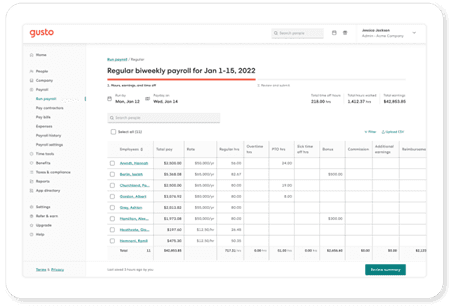
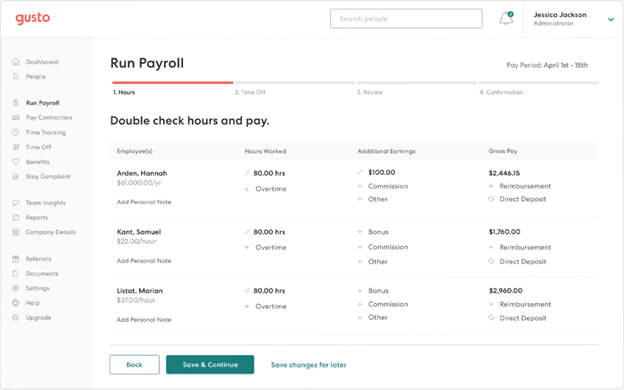
Automated Payroll Processing: Gusto handles all your payroll calculations automatically, saving you time and reducing errors. You can run payroll with just a few clicks, ensuring employees are paid accurately and on time.
Tax Filing: Gusto automatically calculates and files your payroll taxes, keeping you compliant with government regulations. This helps take the hassle out of tax season and bookkeeping by managing quarterly and annual filings.
Employee Benefits Management: Easily manage health insurance, retirement plans, and more through Gusto's benefits platform. Your team can enroll in benefits with minimal effort, enhancing employee satisfaction.
Time Tracking: Gusto offers built-in time tracking so your employees can clock in and out seamlessly. This feature also ensures accurate payroll by integrating directly with your timesheets.
Direct Deposit: With Gusto, you can pay your employees through direct deposit quickly and securely. In such, you eliminate the need for paper checks and pay stubs, and simplify payday for everyone.
HR Tools: Gusto provides essential HR tools for onboarding, employee self-service, and document management. This way, you can streamline your HR processes by keeping everything in one place.
Standout Features
Employee Self-Serve Portal: Gusto's portal allows employees to manage their own benefits and personal information, including bank accounts. This empowers your team and reduces the administrative load on your HR staff.
Compliance Assistance: Gusto offers compliance support to help you navigate labor laws and regulations. As a result, your business stays up-to-date with the latest requirements, reducing legal risks.
Ease of Use
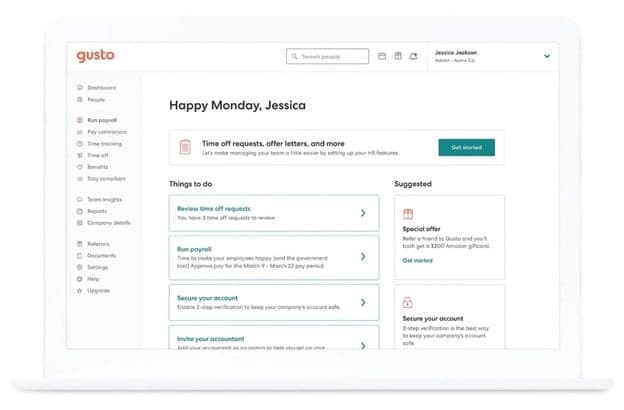
Gusto offers a user-friendly experience, designed to make payroll and human resources tasks simple for your team. Its intuitive layout makes navigation effortless, helping users quickly find what they need without confusion. Plus, with easy-to-use tools for payroll, benefits administration, and onboarding, Gusto minimizes the learning curve, making it accessible even for first-time users. Additional features like automated tax filing and employee self-onboarding also contribute to its ease of use, helping teams save time and avoid common administrative headaches.
Onboarding
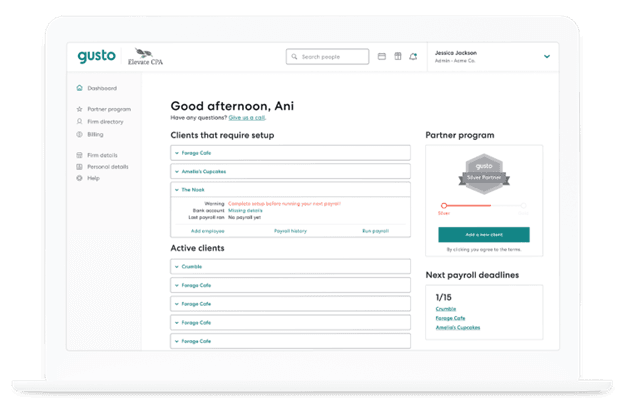
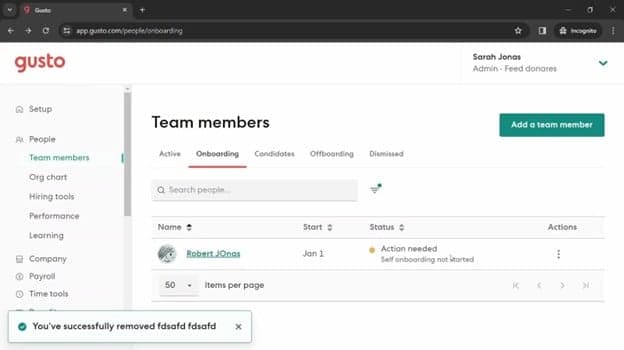
Gusto offers a smooth onboarding process with clear instructions and helpful resources to get you started. You and your team can quickly set up accounts and begin using the platform with minimal hassle. The availability of tutorials and support articles also ensures you have the guidance needed to navigate the system efficiently. All in all, Gusto's onboarding tools and flow are designed to be straightforward and user-centric, helping you integrate the software into your operations seamlessly.
Customer Support
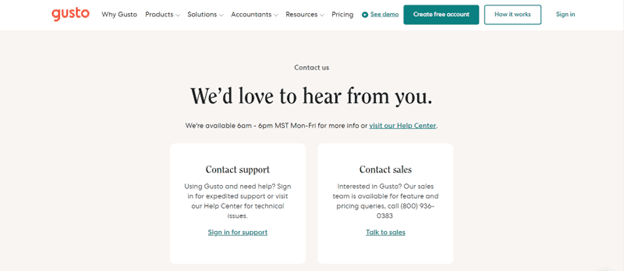
Gusto provides reliable customer support with multiple channels, including phone and email, to assist you and your team. While some users report occasional delays, the support team is generally helpful and knowledgeable. Gusto also offers an advanced help center with articles and guides, ensuring you have access to necessary information when you need it. The availability of these resources aids in resolving issues efficiently, though improvements in response times would enhance the overall experience.
Value for Money
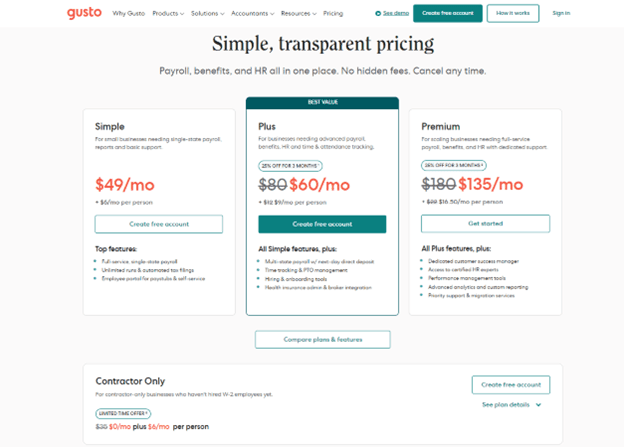
Gusto plans come at a competitive value, making it a solid investment for small to medium-sized businesses. The software provides a transparent pricing model and a good range of features included in each tier. Each of the available plans cater to different needs, ensuring you only pay for what your team requires.
- Simple Plan: Basic payroll processing and employee self-service.
- Plus Plan: Adds benefits administration and time tracking.
- Premium Plan: Includes HR resource center and priority support.
Gusto Specs
- API: Yes
- Application Tracking: Yes
- Approval Workflows: Yes
- Attendance Tracking: No
- Budgeting: Yes
- Calendar Management: Yes
- Compliance Tracking: Yes
- Dashboard: Yes
- Data Export: Yes
- Data Import: No
- Data Visualization: Yes
- Employee Database: Yes
- Employee Incentive Management: No
- Employee Onboarding: Yes
- Expense Tracking: Yes
- External Integrations: Yes
- Feedback Management: No
- Forecasting: No
- Multi-Currency: No
- Multi-User: No
- Notifications: Yes
- Payroll: Yes
- Scheduling: Yes
- Tax Management: Yes
- Time Management: Yes
- Timesheets: Yes
- Travel Management: No
- Vacation & Absence Calendar: Yes
Gusto FAQs
Gusto Company Overview & History
Gusto, originally founded as ZenPayroll in November 2011, is headquartered in San Francisco and specializes in payroll, benefits, and HR management software for U.S. businesses.
The company launched its services in 2012 and rebranded to Gusto in 2015, expanding its offerings to include health benefits and workers' compensation. As of recent reports, Gusto serves over 400,000 businesses nationwide and processes tens of billions of dollars in payroll annually.
They currently employ over 2,400 people and are recognized for their innovative and user-friendly services.
Gusto Major Milestones
- 2011: Founded as ZenPayroll in November.
- 2012: Launched payroll services.
- 2015: Rebranded to Gusto, adding health benefits and workers' compensation.
- 2020: Developed new products, including tools for the Paycheck Protection Program.
Hvad er det næste?
Klar til at udbygge dine kompetencer som økonomifagperson? Tilmeld dig vores gratis nyhedsbrev.