

Payroll software automates employee pay, tax calculations, filings, and payment processing while keeping payroll records connected to your accounting workflows. The best payroll software for your business depends on factors like company size, workforce location, compliance needs, and the systems you already use.
Small businesses may prioritize automated tax filing and straightforward payroll runs, while larger finance teams may need multi-state or global payroll, general ledger integrations, and multi-entity support. I compared the leading payroll platforms across these needs to help you narrow down the right fit.
Why Trust Our Software Recommendations
6,700+
Reviews
20
Industry experts
16+
Evaluation factors
14
Years
Our team has been testing and reviewing software since 2012. As finance leaders ourselves, we know how difficult—and important—it is to choose the right software.
For this guide, we evaluated tools using hands-on testing and independent research, scoring tools using our selection criteria.
Our reviews reflect our human editorial judgment, not a sales pitch.
Comparison Table: Payroll Software
This comparison table summarizes pricing details for my top payroll software selections.
| Tool | Best For | Trial Info | Price | ||
|---|---|---|---|---|---|
| 1 | Best for multi-country payroll and ERP sync | Free demo available | From $29/user/month | Website | |
| 2 | Best for multi-EIN with NetSuite or Sage Intacct | Free demo available | Pricing upon request | Website | |
| 3 | Best for multi-entity payroll at enterprise scale | Free demo available | Pricing upon request | Website | |
| 4 | Best for enterprise multi-entity payroll at scale | Free demo available | Pricing upon request | Website | |
| 5 | Best for enterprise payroll and finance on one platform | Free demo available | Pricing upon request | Website | |
| 6 | Best for multi-entity payroll and GL sync | Free demo available | From $8/user/month | Website | |
| 7 | Best for SMB payroll with tax penalty coverage | Free demo available | From $49/month + $6/month/user | Website | |
| 8 | Best for QuickBooks-native payroll and tax filing | 30-day free trial | From $50/month | Website | |
| 9 | Best for multi-state payroll with ERP sync | Free demo available | Pricing upon request | Website | |
| 10 | Best for mid-market multi-state tax compliance | Free demo available | Pricing upon request | Website |


Payroll Software Reviews
Below are my detailed summaries of the best payroll software that made it onto my shortlist. My reviews offer a detailed look at the features, best use cases, and integrations of each platform to help you find the best one for you.
 Best for multi-country payroll and ERP sync
- Free demo available
- From $29/user/month
Visit WebsiteCustomer Rating:4.9/5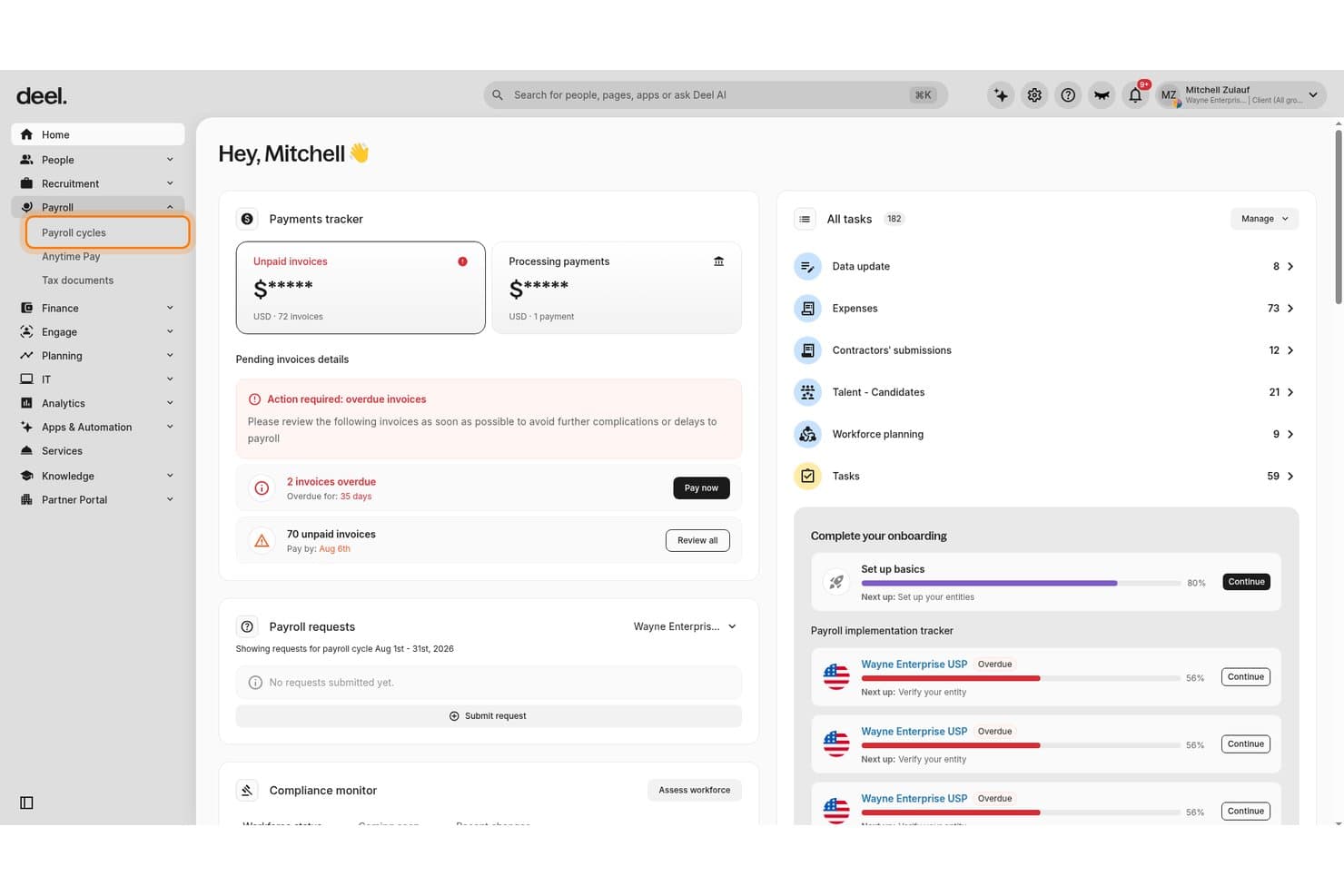
Deel Payroll centralizes payroll cycles, invoice tracking, and tasks for CFOs. Deel is a global payroll platform that handles multi-country payroll processing, contractor management, employer of record services, and ERP integrations across 150+ countries.
Who Is Deel Payroll Best For?
Deel Payroll is a strong fit for finance teams at mid-size to enterprise companies managing payroll across multiple countries or legal entities.
Why I Picked Deel Payroll
I picked Deel Payroll because it's built for payroll across borders and offers strong ERP sync capabilities. Deel's GL Sync pushes payroll journal entries directly into NetSuite, Sage, SAP, or Microsoft Dynamics. You can customize mapping by department, cost center, and location, which reduces manual work for multi-entity cost allocation. Additionally, its AI-powered anomaly detection flags missing data and jurisdiction-specific risks before you submit a payroll run.
Deel Payroll Key Features
- Multi-currency direct deposit: Pay workers in 120+ currencies across 150+ countries, funding payroll in one currency while distributing payments in local currencies.
- Off-cycle payroll runs: Process bonus payments, corrections, or last-minute pay runs at no additional cost, outside of the standard pay schedule.
- Worker classification tools: AI-powered misclassification risk assessment evaluates contractor vs. employee status using localized, jurisdiction-specific models.
- Unified worker management: Manage direct employees, EOR workers, and independent contractors within a single platform and shared data model.
Deel Payroll Integrations
Deel Payroll offers 68+ native integrations, including NetSuite (certified SuiteApp), QuickBooks, Xero, Sage, SAP, Microsoft Dynamics Finance, BambooHR, Workday, HiBob, and Expensify, with an open API available for custom integrations.
Pros and Cons
Pros:
- Unlimited off-cycle runs at no charge
- AI flags missing data before submission
- Handles payroll across 150+ countries
Cons:
- Not suitable for simple domestic payroll needs
- No employee-initiated earned wage access
Learn more about Deel Payroll: Best for multi-EIN with NetSuite or Sage Intacct
- Free demo available
- Pricing upon request
Visit WebsiteCustomer Rating:4.4/5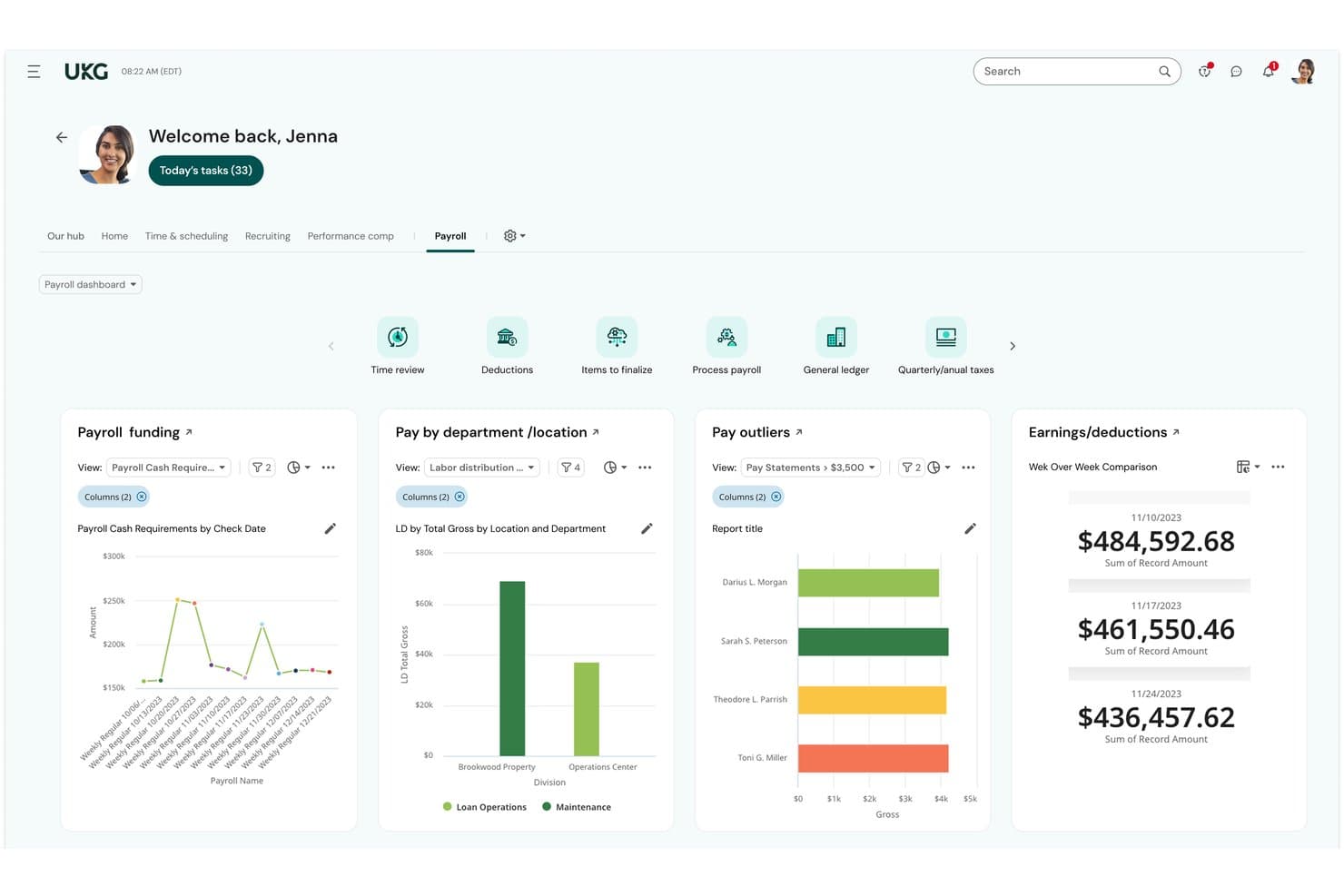
UKG Ready centralizes payroll funding, outliers, and earnings for CFOs. UKG Ready is an all-in-one HCM and payroll platform that handles payroll processing, tax filing, time tracking, benefits administration, and workforce scheduling in a single system with a unified employee record.
Who Is UKG Ready Best For?
UKG Ready is a strong fit for mid-market finance and HR teams managing multiple EINs who need payroll, time tracking, and benefits on one unified record—especially if NetSuite or Sage Intacct is already in the accounting stack.
Why I Picked UKG Ready
I've included UKG Ready because it handles multi-EIN payroll natively without workarounds. This makes it a strong fit for organizations running multiple legal entities. I also like that payroll calculations run continuously using a unified employee record. As a result, HR or timesheet changes are reflected before the pay run closes. Finally, native integrations with NetSuite and Sage Intacct move payroll journal entries directly into your accounting system without middleware.
UKG Ready Key Features
- Bryte AI anomaly detection: An AI layer that scans payroll data continuously and flags outlier variances, discrepancies, and compliance risks before you submit a pay run.
- UKG Wallet earned wage access: A built-in mobile banking app that lets employees access accrued wages before payday, alongside a VISA payroll card, bill pay, and savings tools.
- ACA compliance management: Automatically tracks measurement periods, populates 1094-C and 1095-C forms, and supports filing directly from within the platform.
- 500+ pre-built reports: A reporting library covering payroll, workforce, and HR analytics, with external benchmarking and configurable filters for finance and HR teams.
UKG Ready Integrations
UKG Ready offers native integrations with QuickBooks Online, Oracle NetSuite, Sage Intacct, Sage, Employee Navigator, Indeed, and TurboTax, plus 401(k) and TPA connections through its Payroll Integrations marketplace app. Additional connectivity is available through the UKG Marketplace and an open API for custom integrations, with middleware support via Workato, Celigo, and MindCloud.
Pros and Cons
Pros:
- AI flags payroll and compliance anomalies
- Earned wage access via built-in banking app
- Background payroll runs update with HR changes
Cons:
- Add-on fees for common payroll activities
- No tax penalty protection guarantee
Learn more about UKG Ready: Best for multi-entity payroll at enterprise scale
- Free demo available
- Pricing upon request
Visit WebsiteCustomer Rating:4.3/5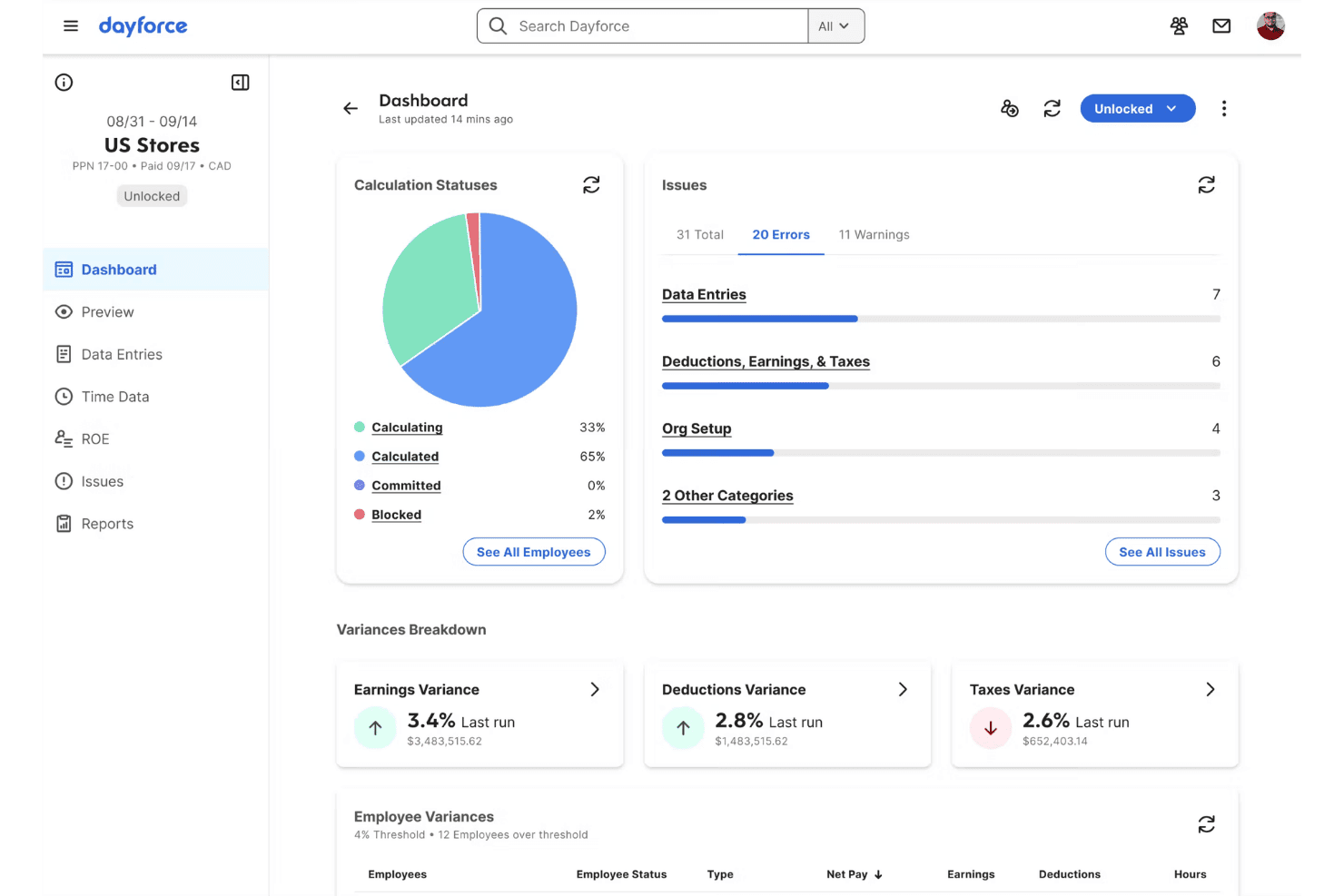
Dayforce surfaces payroll errors and variances on a unified dashboard. Dayforce is a payroll and HCM platform built on a single data model that handles payroll calculation, tax filing, time and attendance, benefits administration, and earned wage access across multi-entity and global organizations.
Who Is Dayforce Best For?
Dayforce is built for mid-market and enterprise organizations—typically 350 or more employees—running payroll across multiple entities, states, or countries on a single platform.
Why I Picked Dayforce
I've included Dayforce because its continuous calculation engine recalculates payroll in real time as time data is recorded. As a result, teams can catch errors before the end of a pay period. That matters for organizations running payroll across multiple entities, states, or countries. I also rate its single-data-model architecture highly. HR, time, benefits, and payroll share one record, which reduces reconciliation work across systems.
Dayforce Key Features
- Dayforce Wallet: A prepaid Mastercard that lets employees access up to 100% of their net earned pay before payday, with automatic tax and garnishment handling on every withdrawal.
- Managed payroll services: A fully outsourced payroll execution option where Dayforce's in-house experts handle tax filings, local compliance, and day-to-day payroll administration on your behalf.
- AI-powered anomaly detection: Dayforce Co-Pilot runs continuous payroll simulations to flag unusual pay variances, duplicate payments, or tax discrepancies before you submit a pay run.
- Multi-jurisdictional tax filing: Dayforce calculates, withholds, files, and remits payroll taxes across thousands of U.S. jurisdictions and 200+ countries, with funds held in an AAA-rated tax trust account.
Dayforce Integrations
Dayforce offers native integrations through the Dayforce Exchange marketplace, including NetSuite, Microsoft Dynamics 365, SAP SuccessFactors, WEX, ForUsAll, HireRight, Checkr, LinkedIn Learning, Culture Amp, and Microsoft Azure AD, with Dayforce Integration Studio and an open API available for custom integrations. Native connectors to QuickBooks, Xero, and Sage Intacct aren't documented, so those connections typically require middleware like Celigo.
Pros and Cons
Pros:
- Earned wage access features included for employees
- Global payroll coverage in over 200 countries
- Real-time payroll recalculation eliminates batch errors
Cons:
- Not usable for small or simple businesses
- No guaranteed coverage for tax filing errors
Learn more about Dayforce: Best for enterprise multi-entity payroll at scale
- Free demo available
- Pricing upon request
Visit WebsiteCustomer Rating:4.3/5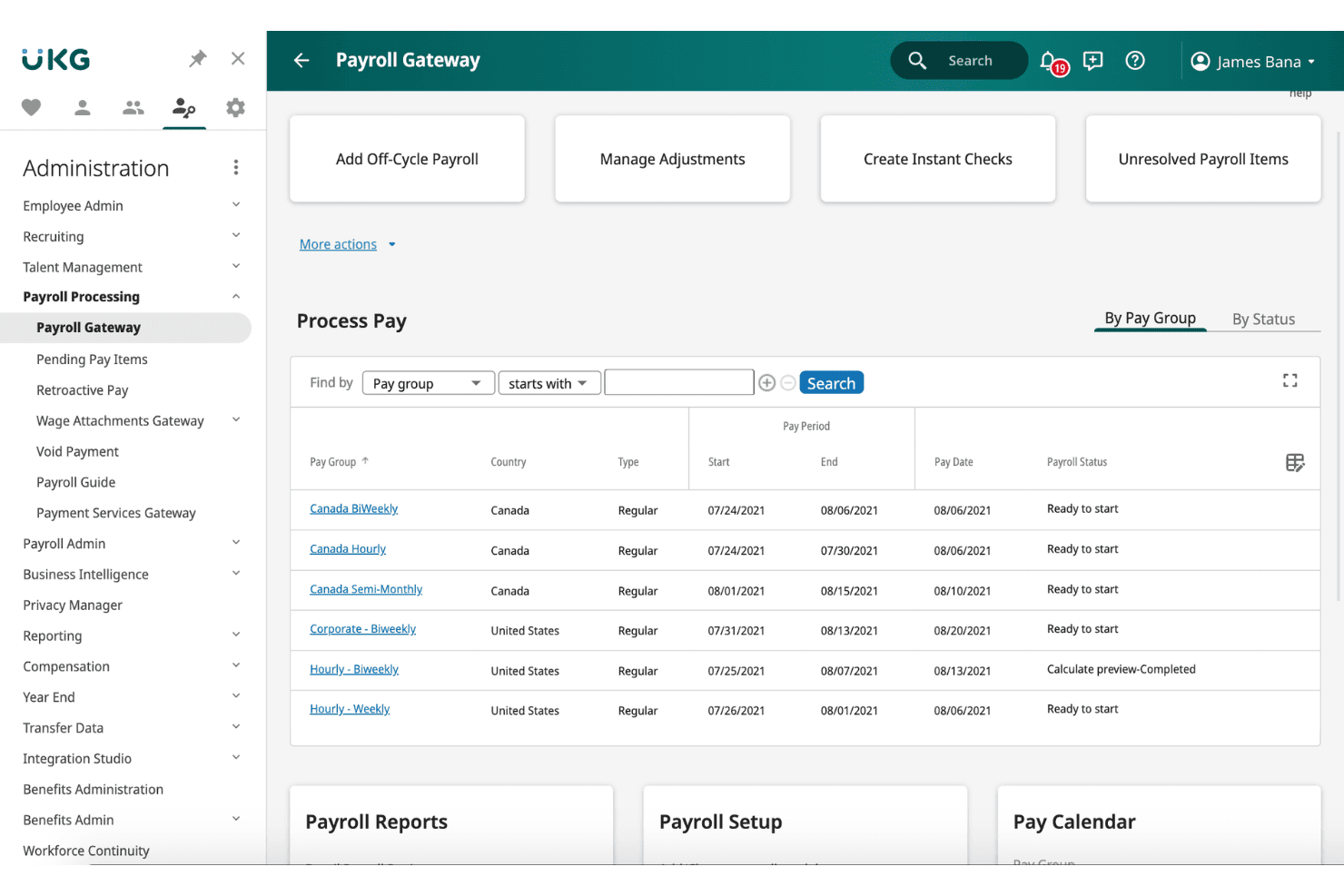
UKG Pro centralizes payroll processing across multiple pay groups and countries. UKG Pro is an enterprise HCM platform with a native payroll engine that handles multi-entity payroll, real-time gross-to-net calculations, tax filing, earned wage access, and built-in time and benefits administration.
Who Is UKG Pro Best For?
UKG Pro is built for mid-market and enterprise organizations with thousands of employees managing payroll across multiple entities, pay groups, or EINs.
Why I Picked UKG Pro
UKG Pro earns its spot on my shortlist because its paymaster interface handles multiple EINs and pay groups from a single screen, which is exactly what enterprise payroll teams need when running payroll across several legal entities simultaneously. I also rate its Bryte AI layer highly: it flags anomalies and payroll variances before submission, catching errors that would otherwise surface as amended returns or penalty filings. The real-time, continuous gross-to-net engine rounds this out, supporting retroactive pay, garnishments, and off-cycle runs without disrupting scheduled payroll.
UKG Pro Key Features
- UKG Wallet: A native earned wage access tool that lets employees draw on wages before payday via a mobile app, with a fee-free Visa payroll card, bill pay, and goal-based savings built in.
- Smart Tax Search: Automatically applies the correct tax jurisdiction based on each employee's work location, covering federal, state, and local tax calculations without manual lookups.
- Garnishment deduction wizard: A built-in tool that automates complex garnishment calculations and deductions directly within the payroll workflow.
- TurboTax W-2 integration: Employees can import their W-2 data directly from UKG Pro into TurboTax at tax time, without manual data entry.
UKG Pro Integrations
UKG Pro offers 550+ marketplace integrations, including native connectors with Oracle NetSuite, Sage Intacct, SAP, Workday, Microsoft Dynamics 365, QuickBooks, Employee Navigator, TurboTax, Okta, and DocuSign. A REST API is available for custom integrations.
Pros and Cons
Pros:
- Native earned wage access through UKG Wallet
- AI-powered payroll anomaly and variance detection
- Real-time gross-to-net calculations for payroll
Cons:
- Customer support inconsistencies reported by users
- No public or transparent pricing available
Learn more about UKG Pro: Best for enterprise payroll and finance on one platform
- Free demo available
- Pricing upon request
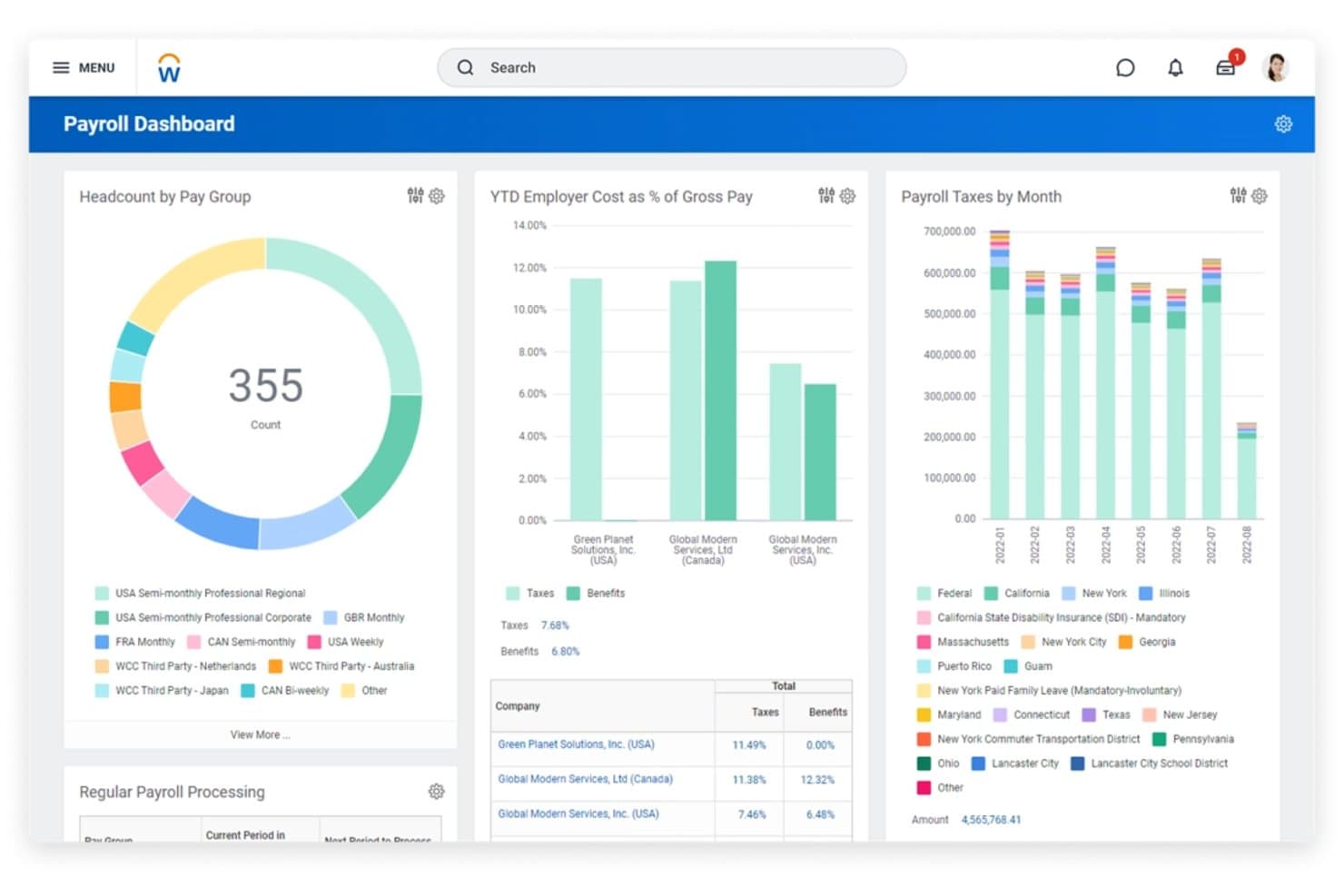
Workday Payroll centralizes tax, headcount, and cost data for CFOs. Workday Payroll is an enterprise payroll platform that runs on a unified HCM and financial management system, handling gross-to-net calculations, multi-country payroll, tax compliance, and employee self-service across a single continuous data model.
Who Is Workday Payroll Best For?
Workday Payroll is a strong fit for mid-market and enterprise organizations that run—or plan to run—HR, finance, and payroll on a single platform.
Why I Picked Workday Payroll
Workday Payroll earns its spot because payroll, HR, and financial management run on a single data model. I particularly like its continuous calculation engine, which updates payroll as compensation or headcount data changes. As a result, the numbers are already current when a payroll run executes. Additionally, its native GL integration posts labor costs directly to the right cost centers. This reduces the need for manual journal entries or middleware.
Workday Payroll Key Features
- Multi-country payroll processing: Run native payroll in 60+ countries and extend coverage to 180+ countries through certified global payroll partners.
- AI-powered pay anomaly detection: Machine learning continuously scans payroll results and flags suspected abnormalities before a pay run completes.
- Employee self-service pay hub: Employees access pay stubs, W-2s, direct deposit settings, and earned wage advances from a single mobile-friendly portal.
- Configurable labor cost allocation: Distribute payroll expenses across departments, cost centers, projects, and locations to support accurate GL reporting.
Workday Payroll Integrations
Workday Payroll offers native integrations across its own ecosystem, including Workday Financial Management, Workday HCM, Workday Time Tracking, Workday Benefits, and Workday Adaptive Planning, plus certified partner integrations with ADP Smart Compliance, Strada, CloudPay, Deel, Rain, DailyPay, Payactiv, TurboTax, Slack, and Microsoft Teams. It also supports NetSuite and SAP through middleware, and provides bidirectional REST APIs for custom integrations.
Pros and Cons
Pros:
- AI flags pay anomalies pre-processing
- Continuous calculation reduces payroll run errors
- Unified payroll, HR, and finance data platform
Cons:
- Challenging for mobile multi-state payrolls
- Tax penalty protection not provided
Learn more about Workday Payroll: Best for multi-entity payroll and GL sync
- Free demo available
- From $8/user/month
Visit WebsiteCustomer Rating:4.9/5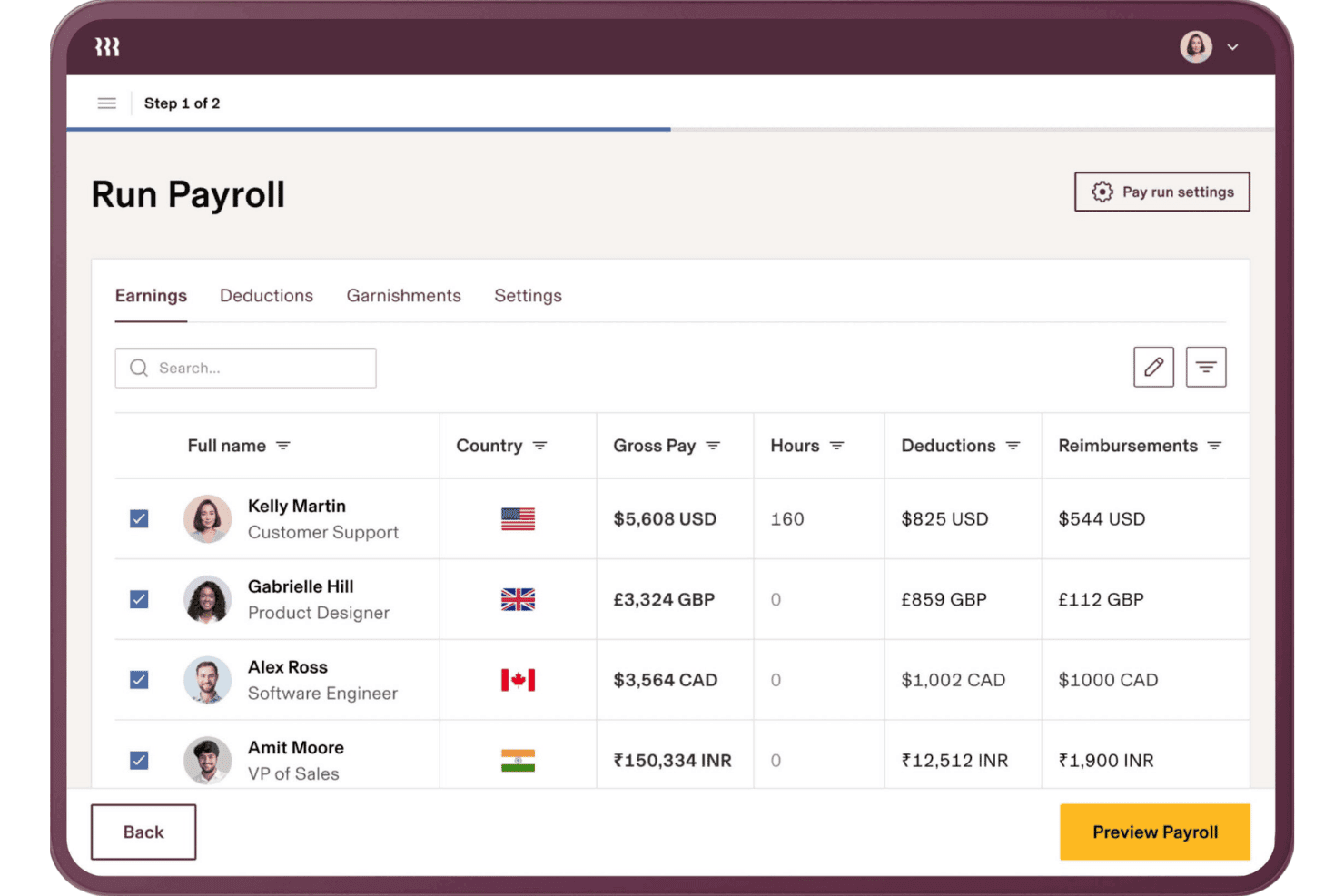
Rippling lets users run global payroll across multiple currencies at once. Rippling is a payroll and HR platform that handles multi-entity payroll processing, tax filing, benefits administration, time tracking, and accounting integrations across domestic and global workforces.
Who Is Rippling Best For?
Rippling is a strong fit for finance and HR teams at mid-market companies managing payroll across multiple entities, states, or countries from a single platform.
Why I Picked Rippling
Rippling earns its spot on my shortlist because of how well it handles multi-entity payroll and GL sync in one place. I like that it offers native, bi-directional integrations with NetSuite, Sage Intacct, QuickBooks, and Xero, with automated journal entries posted after each payroll run and customizable GL mapping by department, class, or location. Running payroll across multiple EINs without manually reconciling entries into your ERP is where Rippling genuinely pulls ahead.
Rippling Key Features
- Tax accuracy indemnification: Rippling covers IRS penalties and interest caused by filing errors made on the platform's end.
- Workflow Studio automation: A no-code workflow builder that lets admins create multi-step automations across payroll, HR, IT, and finance with custom triggers.
- Multi-currency global contractor payments: Rippling pays contractors in 185+ countries across 50+ currencies, with automatic invoice generation.
- AI anomaly detection: The platform flags payroll discrepancies—like duplicate punches or missed clock-outs—before each payroll run is submitted.
Rippling Integrations
Rippling offers 650+ marketplace integrations, including native bi-directional connections with QuickBooks Online, Xero, NetSuite, and Sage Intacct for automated journal entries and GL mapping. An open API supports custom integrations.
Pros and Cons
Pros:
- Multi-entity controls improve financial reporting visibility
- Tax indemnification limits payroll filing exposure
- Automated journal entries reduce reconciliation work
Cons:
- Support escalation can frustrate administrators
- Implementation requires substantial payroll configuration
 Best for SMB payroll with tax penalty coverage
- Free demo available
- From $49/month + $6/month/user
Visit WebsiteCustomer Rating:4.6/5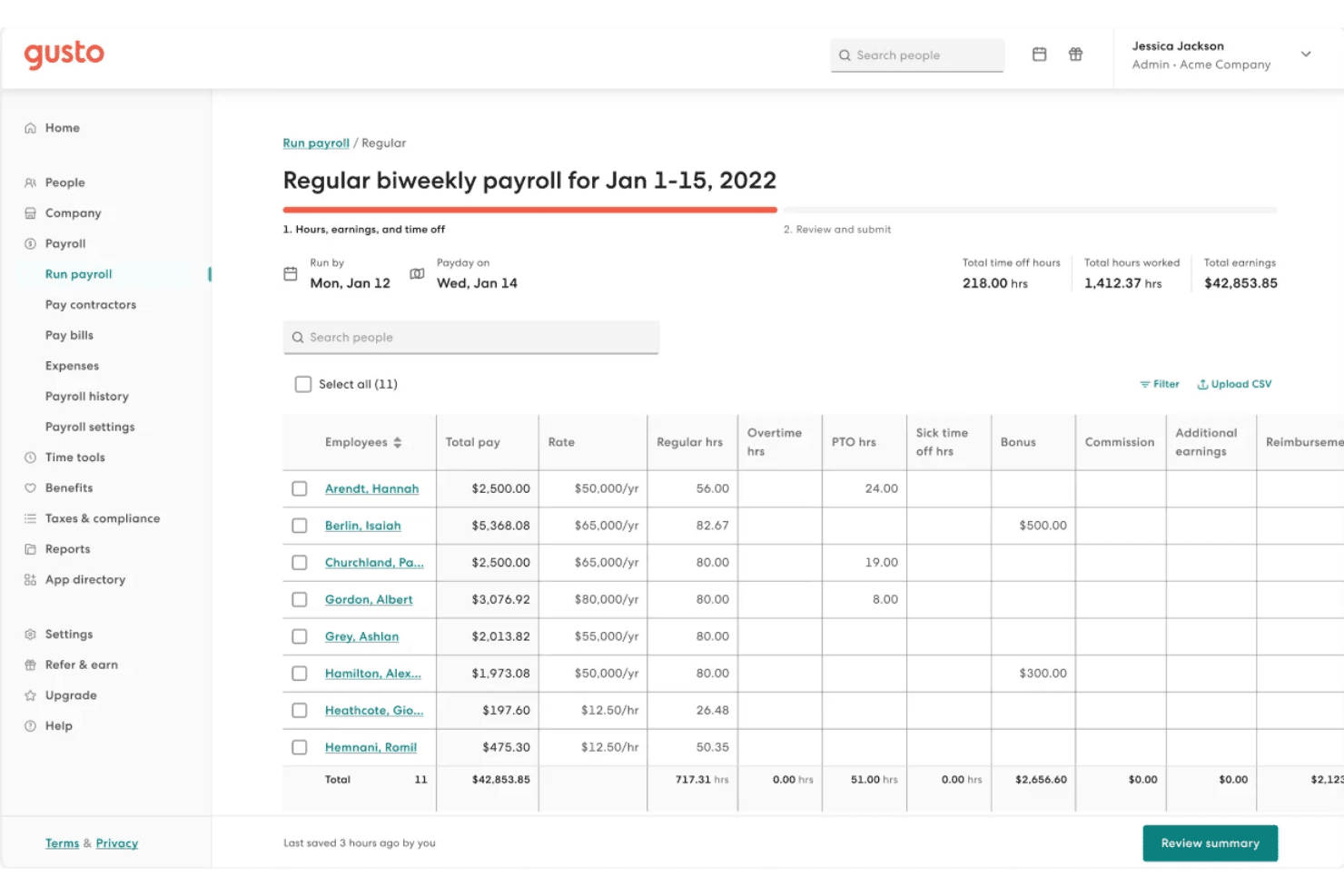
Gusto lets users review and manage employee hours and earnings before submitting payroll. Gusto is a payroll platform for small to mid-sized businesses that handles automated payroll runs, multi-state tax filing, contractor payments, benefits administration, and time tracking in a single system.
Who Is Gusto Best For?
Gusto is a strong fit for small to mid-sized businesses that need payroll, benefits, and tax compliance managed in one place without dedicated HR infrastructure.
Why I Picked Gusto
I picked Gusto because its Tax Penalty Protection covers IRS penalties and interest resulting from its filing errors. Additionally, its Assisted Payroll Prep feature flags unusual payroll amounts and irregular timecards before each run. This can help teams catch errors before payroll is submitted.
Gusto Key Features
- AutoPilot™ automated payroll: Set recurring payroll to run automatically on a fixed schedule without manual input each cycle.
- Multi-state tax filing: Gusto calculates, files, and remits payroll taxes across all 50 states at no extra charge, regardless of how many states your employees work in.
- Global contractor payments: Pay contractors in 120+ countries in local currencies for $5 per payment, with no monthly per-contractor fee.
- Workforce cost reports: Access built-in payroll cost reporting broken down by department, available on the Plus plan and above.
Gusto Integrations
Gusto offers 150+ native integrations, including QuickBooks Online, QuickBooks Desktop, Xero, FreshBooks, Homebase, Hubstaff, Expensify, Checkr, Clover, and Shopify. An API is available for custom integrations through Gusto Embedded Payroll, though native connectors for enterprise ERPs like NetSuite and Sage Intacct are not available.
Pros and Cons
Pros:
- Built-in earned wage access for employees
- Unlimited payroll runs at no extra cost
- Tax penalty coverage included for employer peace of mind
Cons:
- Customer support quality often inconsistent
- Lacks deep integrations with enterprise ERPs
 Best for QuickBooks-native payroll and tax filing
- 30-day free trial
- From $50/month
Visit WebsiteCustomer Rating:4.4/5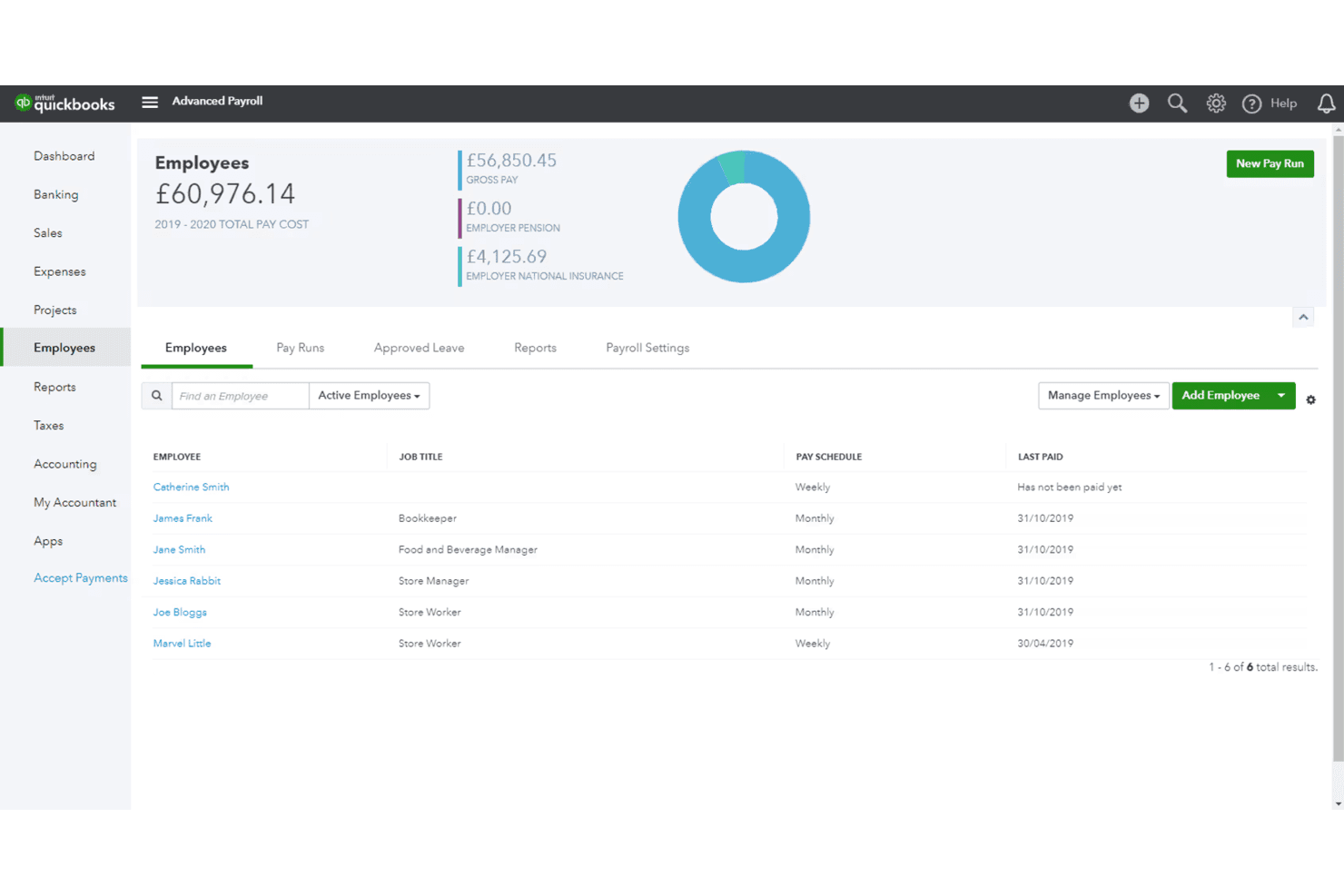
QuickBooks Payroll tracks employee pay schedules and total payroll costs. QuickBooks Payroll is a U.S.-based payroll solution that handles automated pay calculations, tax filing, direct deposit, and benefits administration, with native integration built directly into the QuickBooks Online accounting ecosystem.
Who Is QuickBooks Payroll Best For?
QuickBooks Payroll is a natural fit for small to midsize businesses already running QuickBooks Online that want payroll and accounting tightly connected without third-party workarounds.
Why I Picked QuickBooks Payroll
QuickBooks Payroll earns its spot on my shortlist because the GL sync with QuickBooks Online is genuinely seamless for finance teams already in that ecosystem: payroll expenses, liabilities, and payments post directly to the chart of accounts without any manual journal entries. I also rate the Elite plan's Tax Penalty Protection highly, since Intuit covers up to $25,000 per year in IRS penalties and handles agency correspondence directly on your behalf. On top of that, Payroll AI drafts pre-approved payroll by collecting time data and flagging anomalies before you ever hit submit.
QuickBooks Payroll Key Features
- Auto Payroll: Automatically drafts and submits payroll for salaried employees when direct deposit is active, requiring only admin approval before processing.
- Multi-jurisdictional tax filing: Automatically calculates, files, and remits federal, state, and local payroll taxes, with full local coverage available on Premium and Elite plans.
- QuickBooks Time integration: Built-in time tracking with GPS, geofencing, and scheduling feeds directly into payroll calculations on Premium and Elite plans.
- Payroll reporting suite: Generates reports covering tax liability, wage summaries, deductions, PTO balances, workers' compensation, and multiple worksite data.
QuickBooks Payroll Integrations
QuickBooks Payroll offers native integrations with QuickBooks Online and QuickBooks Time. Marketplace integrations through the QuickBooks App Store include Shopify, PayPal, Bill.com, and Expensify.
Pros and Cons
Pros:
- Payroll AI flags anomalies before processing
- Tax Penalty Protection up to $25,000
- Payroll auto-syncs with QuickBooks Online GL
Cons:
- Manual local tax filing on entry plan
- No support for global payroll needs
Learn more about QuickBooks Payroll: Best for multi-state payroll with ERP sync
- Free demo available
- Pricing upon request
Visit WebsiteCustomer Rating:4.2/5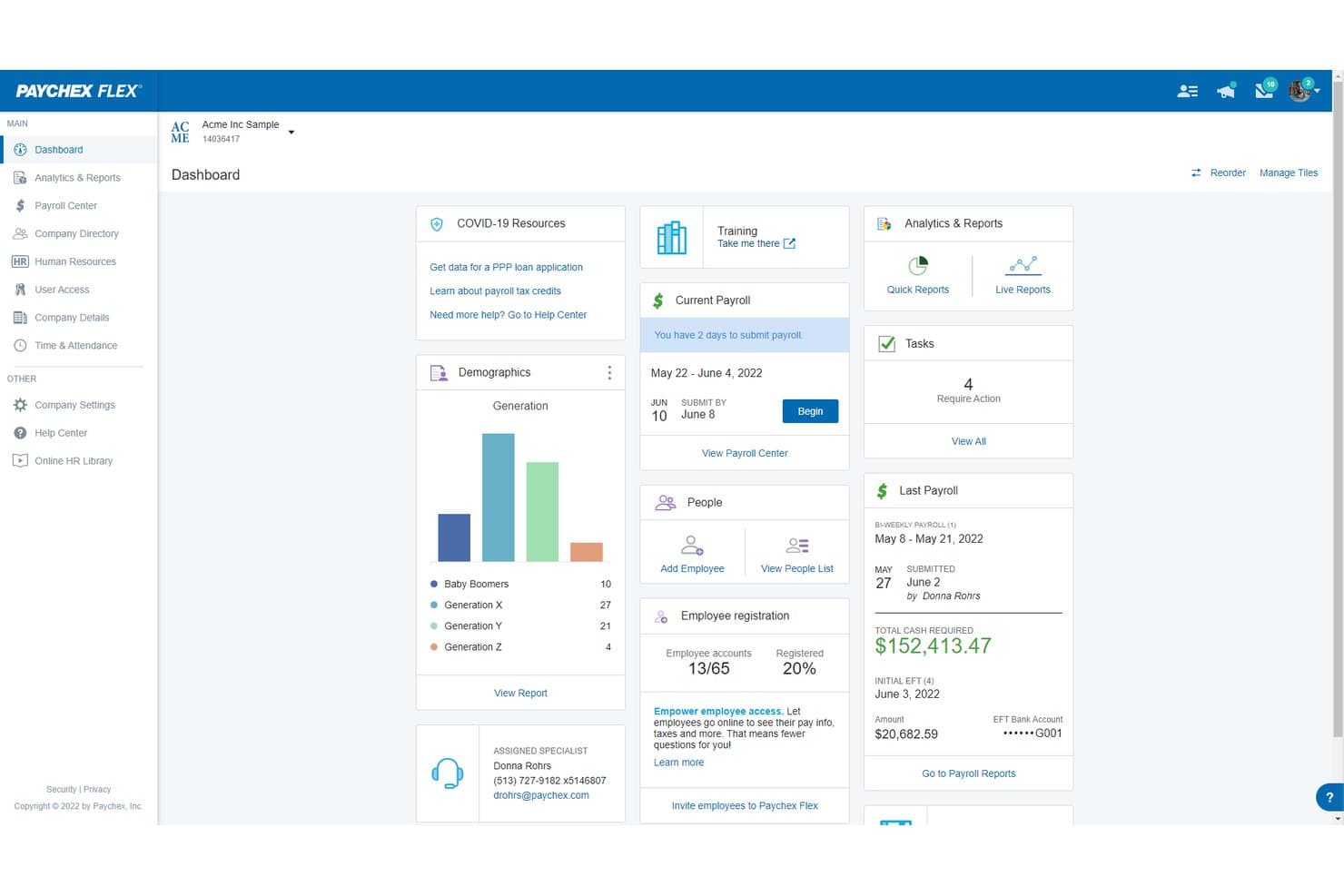
Paychex Flex centralizes payroll, HR, and workforce data in one dashboard. Paychex Flex is a U.S.-focused payroll platform that handles automated gross-to-net calculations, multi-state tax filing, benefits administration, and GL sync with major ERP systems like NetSuite and Sage Intacct.
Who Is Paychex Flex Best For?
Paychex Flex is a strong fit for U.S.-based mid-market businesses managing payroll across multiple states and needing tight GL sync with ERP systems like NetSuite or Sage Intacct.
Why I Picked Paychex Flex
Paychex Flex earns its spot on my shortlist because it handles multi-state payroll and GL sync with ERP systems like NetSuite and Sage Intacct better than most. I particularly like the Taxpay® system, which automates tax calculation, filing, and remittance across every U.S. jurisdiction, and the WISE AI engine, which flags payroll anomalies before a run is finalized. That combination means fewer post-close corrections and cleaner data hitting your general ledger.
Paychex Flex Key Features
- Paychex Pre-check℠: Lets employees review their own paychecks before a payroll run is finalized, catching errors before they hit the ledger.
- WISE anomaly detection: An AI engine trained on 50+ years of Paychex data that flags missing hours, data mismatches, and compliance risks before you submit payroll.
- Tax Center dashboard: A centralized view of tax deadlines, compliance notifications, and penalty notice tracking across all U.S. jurisdictions.
- Paychex Promise®: An add-on that provides a 7-day payroll funding buffer and same-day ACH processing to cover cash flow gaps during payroll cycles.
Paychex Flex Integrations
Paychex Flex offers five documented native integrations with QuickBooks, Xero, Sage Intacct, Oracle NetSuite, and Jirav. Its Developer Center provides open APIs for custom integrations, while the Paychex Marketplace adds partner connections.
Pros and Cons
Pros:
- Deep GL sync with leading ERP platforms
- AI engine flags payroll and compliance errors
- Handles multi-state payroll and tax compliance
Cons:
- Opaque quote-based pricing and add-on fees
- No native global payroll or EOR
Learn more about Paychex Flex: Best for mid-market multi-state tax compliance
- Free demo available
- Pricing upon request
Visit WebsiteCustomer Rating:4.1/5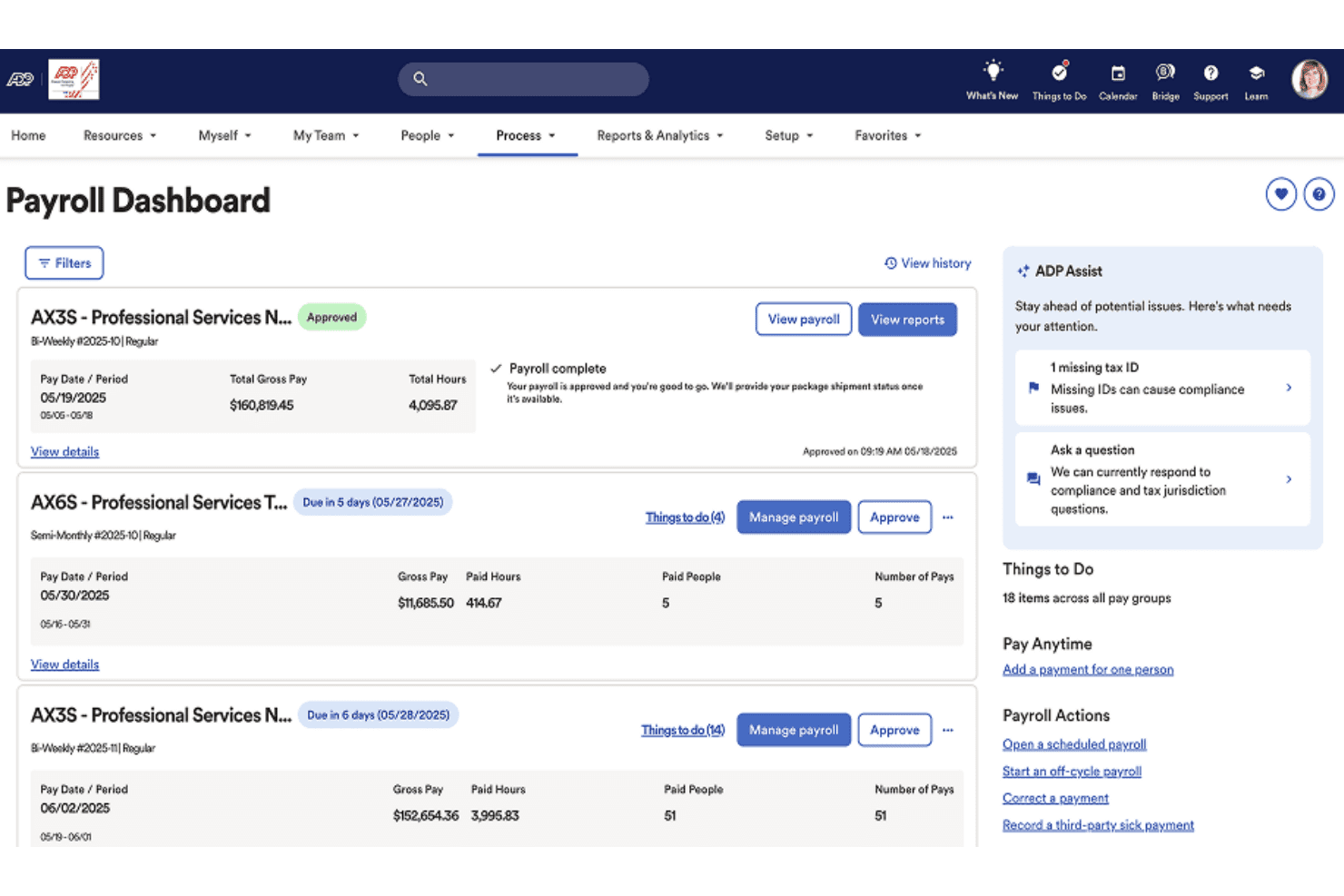
ADP Workforce Now centralizes payroll processing and approvals in one dashboard. ADP Workforce Now is a mid-market payroll and HCM platform that handles gross-to-net payroll processing, multi-jurisdiction tax filing, benefits administration, time tracking, and workforce analytics in one system.
Who Is ADP Workforce Now Best For?
ADP Workforce Now is a strong fit for mid-market companies with 50–1,000+ employees that run payroll across multiple states or jurisdictions and need automated tax filing built into the core system.
Why I Picked ADP Workforce Now
ADP Workforce Now earns its spot because it handles multi-state tax compliance at scale. It automatically calculates, withholds, files, and remits taxes across federal, state, and local jurisdictions. Additionally, ADP covers fines if it makes a filing error on your behalf. ADP Assist also flags payroll inconsistencies before submission, helping teams catch issues earlier in each pay cycle.
ADP Workforce Now Key Features
- Employee self-service portal: Employees can view pay stubs, update direct deposit details, adjust tax withholding, and manage PTO requests through a mobile-accessible portal.
- Wisely pay cards: ADP's native prepaid pay card supports early direct deposit, on-demand pay, and mobile wallet compatibility for unbanked employees.
- Pay-by-Pay workers' compensation: Automatically calculates and remits workers' comp premiums each payroll cycle, eliminating manual reconciliation at year end.
- ADP Marketplace integrations: Connects to 400+ pre-built apps, including NetSuite, Sage Intacct, and earned wage access providers like Payactiv and DailyPay.
ADP Workforce Now Integrations
ADP Workforce Now offers native GL integrations with QuickBooks, Xero, and Wave, plus 400+ marketplace integrations through the ADP Marketplace, including NetSuite, Sage Intacct, Microsoft Dynamics, Payactiv, DailyPay, ZayZoon, JP Morgan, and ZipRecruiter. An open API is available for custom integrations.
Pros and Cons
Pros:
- Handles pay-by-pay workers’ comp payments
- Flags payroll errors with AI detection
- Covers multi-state payroll and tax compliance
Cons:
- Complex workflows slow down initial adoption
- Customer support response time is inconsistent
Learn more about ADP Workforce Now:
Other Payroll Software
Here are some additional payroll software options that didn’t make it onto my shortlist, but are still worth checking out:
- 11PaylocityBest for mid-market payroll with AI anomaly checks
- 12Papaya GlobalBest for global payroll across 180+ countries
- 13PaycomBest for employee-verified payroll at mid-market scale
- 14TriNetBest for PEO-backed payroll compliance risk transfer
- 15BambooHR®Best for HR-led payroll with native ERP sync
- 16PaycorBest for unified HCM payroll with earned wage access
- 17RemoteBest for paying global teams across 100+ countries
- 18JustworksBest for ERP-connected payroll with bundled benefits
- 19OnPayBest for tax penalty protection at flat pricing
How I Evaluate Payroll Software
I split my evaluation into baseline functionality every tool must cover—accurate gross-to-net calculations, tax filing, GL sync—and the differentiators, like multi-entity support and AI anomaly detection, that separate good from great.
Core Functionality (Table Stakes For This List)
When I'm selecting tools for my list, I rank each one on a scale from 0 (does not offer the functionality) to 5 (excels in this area) for each core functionality listed below. I then calculate the tool's total score into a percentage, using 75% as a benchmark to help assess its overall fit for the list.
- Payroll processing and calculation: I evaluate how each tool handles gross-to-net across pay types like hourly, salaried, commissions, and bonuses—including off-cycle and retroactive runs.
- Tax filing and compliance: Each tool's ability to calculate, withhold, file, and remit taxes across multiple jurisdictions matters, along with year-end form generation like W-2s and 1099s.
- Payment distribution: I check whether the platform supports direct deposit to multiple accounts, pay cards, and check printing—plus faster payment options like same-day or next-day processing.
- Employee self-service portal: The portal should give employees mobile access to pay stubs, tax forms, and direct deposit changes without looping in your payroll team for routine requests.
- Accounting and GL integration: I look at how payroll journal entries sync with your GL—whether it's a native connection to platforms like QuickBooks, NetSuite, or Sage Intacct with custom dimension mapping.
- Time and benefits integration: Accurate pay runs depend on clean hours and deduction data, so I evaluate how each tool pulls in time-tracking records and benefits elections without manual imports.
Once I have a list of tools that meet the criteria, I consider what sets each platform apart.
Differentiating Factors (What Sets Vendors Apart)
Here's how I compare and contrast different vendors:
Standout Features
Tax penalty protection is a big one—I check whether the vendor guarantees filing accuracy and covers penalties or interest when errors are on their end. That's real risk transfer for your finance team. I also evaluate AI-powered anomaly detection, which flags duplicate payments, misclassifications, or unusual variances before a pay run posts. For global teams, I look at native contractor payment support across local currencies with built-in compliance, since manual FX and filing workarounds break down fast at scale.
Beyond Features
Integration depth with your finance stack matters most. I check whether each tool offers bi-directional GL sync with custom dimension mapping—department, class, location—so your cost allocation stays clean without manual journal entries. Pricing models also vary widely; PEPM fees look simple until you factor in add-ons for off-cycle runs, year-end filings, or multi-state processing. I evaluate total cost of ownership across those scenarios. For security, SOC 1 and SOC 2 Type II reports are baseline, but I also look for role-based access controls, SSO, and documented uptime SLAs to protect uninterrupted pay cycles.
How to Choose a Payroll Software
The best payroll software for your business depends on your company size, workforce structure, compliance requirements, and accounting setup. Small businesses may prioritize automated tax filing and straightforward payroll processing, while growing and larger organizations may need multi-state payroll, general ledger integrations, multi-entity support, or global payroll capabilities.
Use the priorities below to narrow your options based on what your payroll process actually requires.
| If your priority is… | Look for… |
|---|---|
| If your priority is…Accurate multi-state or international pay | Look for…Native tax compliance and local rules support |
| If your priority is…Fast and reliable general ledger sync | Look for…Direct integrations with your finance ERP |
| If your priority is…Low error rates and fewer manual corrections | Look for…Automation and built-in audit logs |
| If your priority is…Reducing risk of tax penalties | Look for…Written accuracy guarantees and penalty coverage |
| If your priority is…Data security and audit readiness | Look for…SOC 1/SOC 2 Type II certifications |
How to Vet Your Shortlist
- Run a live test pay run: Process payroll for at least 2 entities or locations using sandbox or real (masked) data.
- Request integration documentation: Ask for GL mapping guides and a list of finance system connections to compare against your ERP.
- Submit a support ticket for an edge case: Test response time and accuracy (e.g., multi-state new hire or equity compensation).
- Ask for a verified compliance artifact: Request the most recent SOC 1/SOC 2 Type II report and sample tax filing confirmations.
- Make the tradeoff: Weigh ease of integration and automation against flexibility—do you want rapid deployment with opinionated workflows or full customization with added complexity?
What Is Payroll Software?
Payroll software is a digital solution that automates the calculation, processing, and distribution of employee pay. It handles gross-to-net calculations, tax withholdings, compliance reporting, and payment distribution. Payroll software reduces manual errors, gives employees secure self-service access to pay information, and integrates with accounting systems for efficient month-end close. Finance teams use payroll software to ensure accurate payments, simplify compliance, and maintain control over sensitive payroll and tax data.
Features of Payroll Software
When selecting payroll software, keep an eye out for the following key features:
- Payroll processing and calculation: Automates gross-to-net calculations for hourly, salaried, commissioned, and bonus pay, including off-cycle and retroactive runs, ensuring pay is accurate and consistent for every pay period.
- Tax filing and compliance: Calculates, withholds, files, and remits taxes in multiple jurisdictions, and generates year-end forms like W-2s and 1099s to help you remain compliant with complex regulatory requirements.
- Payment distribution: Supports direct deposit to multiple accounts, pay card distribution, and check printing, while offering options for same-day or next-day payments so employees receive their pay reliably.
- Employee self-service portal: Gives employees secure, mobile-friendly access to pay stubs, tax forms, and the ability to update direct deposit details or personal information without involving the payroll team.
- Accounting and general ledger integration: Syncs payroll entries with your accounting platform or ERP, allowing for accurate, real-time updates to the general ledger and cleaner month-end closes.
- Time tracking integration: Pulls in data from time-tracking systems automatically, which reduces manual entry and helps avoid payroll errors caused by mismatched or missing hours.
- Benefits administration integration: Connects payroll to benefits plans so deductions and contributions are calculated accurately, reflecting employee elections, and ensuring compliance with company policy and law.
- Multi-entity and multi-currency support: Manages payroll for companies with multiple business units, locations, or currencies, so you can pay employees accurately across states or countries.
- Reporting and analytics: Offers built-in reporting tools that track payroll costs, taxes, and other key payroll metrics, supporting audits and financial planning.
- Security and access controls: Provides role-based permissions, single sign-on options, and compliance with industry standards, helping protect sensitive payroll data and maintain audit readiness.
Common Payroll Software AI Features
Beyond the standard payroll software features listed above, many of these solutions are incorporating AI with features like:
- AI anomaly detection: Uses machine learning to flag unusual payroll patterns, such as duplicate payments, misclassified employees, or outlier wage changes, before payroll is finalized. This helps your team catch errors and prevent costly compliance issues.
- AI-powered tax compliance monitoring: Continuously scans changing tax laws and regulations, automatically updating payroll rules and alerting you to potential compliance risks. This reduces manual research and helps you stay ahead of regulatory changes.
- Predictive payroll forecasting: Analyzes historical payroll data and business trends to forecast future payroll expenses, helping you plan budgets and anticipate cash flow needs with greater accuracy.
- Natural language query assistants: Lets you ask payroll-related questions in plain language—like “Show me last quarter’s overtime costs”—and instantly get answers or reports, making payroll data more accessible to non-technical users.
- Automated document classification: Uses AI to sort and categorize payroll documents, such as timesheets and tax forms, reducing manual filing and making it easier to retrieve records during audits or reviews.
Benefits of Payroll Software
Implementing payroll software provides several benefits for your team and your business. Here are a few you can look forward to:
- Error reduction: Automated gross-to-net calculations, time tracking integration, and tax filing features help you avoid common manual mistakes and costly compliance missteps.
- Compliance confidence: Built-in tax compliance tools and SOC 1/SOC 2 Type II certifications keep your payroll processes aligned with current regulations and data protection standards.
- Greater financial insight: Reporting and analytics features let you track payroll costs, taxes, and metrics, supporting more accurate forecasting and audits.
- Faster pay cycles: Direct integration with your GL and finance ERP speeds up payroll journal entries and helps you close the books on time each month.
- Employee empowerment: Secure self-service portals give employees access to pay stubs, tax forms, and the ability to manage direct deposit details independently.
- Centralized multi-entity management: Multi-entity and multi-currency support enables payroll processing across different business units, locations, and countries without workarounds.
- Proactive risk management: AI-powered anomaly detection and written penalty protection identify potential errors or compliance risks before payroll is finalized.
Costs and Pricing of Payroll Software
Payroll software pricing varies by company size, number of employees, payroll complexity, and included HR or compliance features. Many small business payroll providers charge a monthly base fee plus a per-employee fee, while mid-market and enterprise platforms commonly provide custom pricing.
Plan Comparison Table for Payroll Software
| Plan Type | Average Price | Common Features |
|---|---|---|
| Plan TypeFree Plan | Average Price$0-$10/user/month | Common FeaturesSupports basic payroll processing, limited tax compliance, self-service portal, and basic reports. |
| Plan TypePersonal Plan | Average Price$10-$20/user/month | Common FeaturesIncludes all free plan features, adds tax filing, direct deposit, time tracking integration, and basic support. |
| Plan TypeBusiness Plan | Average Price$20-$40/user/month | Common FeaturesOffers advanced payroll automation, multi-state tax filing, GL integration, benefits administration, and analytics dashboards. |
| Plan TypeEnterprise Plan | Average Price$40-$60/user/month | Common FeaturesProvides custom workflows, multi-entity management, advanced security, API access, and premium support. |
Payroll Software FAQs
Here are some answers to common questions about payroll software:
What is the best payroll software?
The best payroll software depends on your company size, workforce, and payroll requirements. Gusto and QuickBooks Payroll are strong options for small businesses, while Rippling and Paylocity can support growing organizations with more complex payroll needs. Larger or global organizations may prefer platforms such as Dayforce, Workday Payroll, or Papaya Global. Compare tax support, accounting integrations, compliance capabilities, and pricing before choosing a provider.
What is the best payroll software for small businesses?
The best payroll software for small businesses depends on your team size, budget, and payroll complexity. Gusto, QuickBooks Payroll, and Paychex Flex are strong options for small businesses that need payroll processing, tax support, and related HR features. As your business grows, consider whether the platform can also support additional employees, locations, and accounting integrations.
How long does it take to implement payroll software?
Implementation can take anywhere from a few days to a few months, depending on your company size and how complex your payroll needs are. Migrating historic data, syncing with accounting systems, and setting up automation or custom integrations usually take the most time. Running a parallel pay cycle is standard practice to make sure calculations and payments match expectations before switching live.
Can payroll software support multi-state or international payroll?
Yes, many payroll software platforms handle multi-state and international payroll, but the depth of support varies. You’ll want to verify the system supports tax compliance rules, local currencies, and required filings for each region where you have workers. For multinational teams, check if the tool manages local payments and year-end reporting for each country.
Is it possible to integrate payroll software with our accounting or ERP system?
Yes, most modern payroll solutions offer either direct integrations or downloadable files for syncing payroll data with accounting or ERP systems. Some platforms support automated, bi-directional GL sync—others may require scheduled exports or third-party middleware. Always test the integration with your system to ensure correct mapping, especially if you have custom account dimensions.
What should I consider when switching from manual payroll to payroll software?
Start by preparing clean, up-to-date employee and pay data. Identify all pay types, deductions, and benefits that need to be automated. You’ll want to document your current workflows and outline any unique payroll scenarios or compliance risks to discuss with the vendor. Running a parallel test cycle and reconciling results with your prior manual process helps catch discrepancies before you fully transition.
How can payroll software help with compliance during audits?
Payroll software centralizes historical pay records, tax filings, and reports, making it much faster to provide supporting documentation during a compliance audit. Look for platforms with built-in audit trails, user access logs, and role-based permissions so you can demonstrate proper controls over sensitive payroll data. Many solutions also offer standard reports to cover common audit requests.How to Choose a Payroll Software