

Intuit Enterprise Suite Review: Key Features, Pros, Cons, and Pricing Details
A spreadsheet is open in one tab, a financial report in another, and numbers from different entities still need to be combined before the day ends. As your grows, managing finances across subsidiaries, forecasting performance, and keeping workflows organized can quickly become difficult without the right ERP software in place. That’s where platforms like Intuit Enterprise Suite […]

We review tools independently, and commissions help fund our testing. See our transparency policy, our methodology, or suggest a tool.
A spreadsheet is open in one tab, a financial report in another, and numbers from different entities still need to be combined before the day ends.
As your grows, managing finances across subsidiaries, forecasting performance, and keeping workflows organized can quickly become difficult without the right ERP software in place.
That’s where platforms like Intuit Enterprise Suite come in.
In this guide, I break down its features, pricing, strengths, and best use cases so you can understand how it works and decide if it fits your organization’s financial management needs.
Intuit Enterprise Suite Evaluation Summary

4.6/5
- Pricing upon request
- Free demo available
Why Trust Our Software Recommendations
6,700+
Reviews
20
Industry experts
16+
Evaluation factors
14
Years
Our team has been testing and reviewing software since 2012. As finance leaders ourselves, we know how difficult—and important—it is to choose the right software.
For this guide, we evaluated tools using hands-on testing and independent research, scoring tools using our selection criteria.
Our reviews reflect our human editorial judgment, not a sales pitch.
Intuit Enterprise Suite Overview
Pros
- Multi-entity management supports complex organizational structures.
- AI-powered forecasting and insights help businesses analyze financial data.
- Built-in migration tools support transitions from QuickBooks Desktop and Advanced.
Cons
- The platform lacks sufficient training for new releases.
- Features can feel overwhelming.
- Reports take longer than expected to load.
Is Intuit Enterprise Suite Right For Your Needs?
Who Would be a Good Fit for Intuit Enterprise Suite?
Intuit Enterprise Suite is best suited for growing or mid-sized organizations that need advanced financial management capabilities. Businesses managing multiple entities, relying on forecasting, or handling structured financial workflows can benefit from its automation, reporting, and consolidated visibility tools.
It’s particularly valuable for data-driven teams, product-based companies managing inventory, and organizations that need detailed financial tracking across departments, locations, or projects.
- Multi-Entity BusinessesCompanies managing multiple subsidiaries, brands, or locations that need consolidated financial visibility while maintaining separate books.
- Finance Teams Focused on ForecastingOrganizations that rely on financial planning and projections to guide budgeting, expansion, and strategic decisions.
- Businesses With Structured Financial WorkflowsCompanies with complex approval processes that want to automate financial workflows and improve internal controls.
- Growing Service BusinessesService businesses needing project profitability tracking, workforce management, and consolidated financial planning across departments benefit significantly.
- Product-Based BusinessesCompanies that manage inventory and sales orders and need accounting, inventory, and order workflows connected in one system.
- Construction FirmsConstruction companies tracking job costing, project budgets, and multi-entity structures gain stronger operational visibility.
Who Would be a Bad Fit for Intuit Enterprise Suite?
Intuit Enterprise Suite may not be the best choice for businesses with simple financial needs or limited operational complexity. Freelancers, very small businesses, or organizations without a dedicated accounting staff may find the platform more advanced than necessary.
Companies looking for lightweight bookkeeping tools or those that rarely rely on forecasting, reporting, or multi-entity management may be better served by simpler accounting solutions.
- Freelancers and Independent ContractorsIndividuals managing basic income and expenses typically don’t need the platform’s multi-entity management, forecasting tools, or workflow automation.
- Very Small BusinessesBusinesses that only need basic accounting features, such as invoicing and expense tracking, may find the platform unnecessarily complex.
- Businesses Without Dedicated Accounting StaffOrganizations without internal finance teams may struggle to manage a platform designed for structured financial processes and reporting.
- Inventory-Heavy ManufacturersManufacturers needing advanced inventory controls like serial numbers, bins, builds, or barcode workflows may struggle.
- Businesses Looking for Lightweight Accounting ToolsCompanies seeking a simple bookkeeping solution may be better served by smaller accounting platforms rather than a full financial management suite.
- Early-Stage StartupsStartups without operational complexity or financial teams gain minimal benefit from enterprise-level accounting features.
How We Test & Score Tools
We’ve spent years building, refining, and improving our software testing and scoring system. The rubric is designed to capture the nuances of software selection and what makes a tool effective, focusing on critical aspects of the decision-making process.
Below, you can see exactly how our testing and scoring works across seven criteria. It allows us to provide an unbiased evaluation of the software based on core functionality, standout features, ease of use, onboarding, customer support, integrations, customer reviews, and value for money.
Core Functionality (25% of final scoring)
The starting point of our evaluation is always the core functionality of the tool. Does it have the basic features and functions that a user would expect to see? Are any of those core features locked to higher-tiered pricing plans? At its core, we expect a tool to stand up against the baseline capabilities of its competitors.
Standout Features (25% of final scoring)
Next, we evaluate uncommon standout features that go above and beyond the core functionality typically found in tools of its kind. A high score reflects specialized or unique features that make the product faster, more efficient, or offer additional value to the user.
We also evaluate how easy it is to integrate with other tools typically found in the tech stack to expand the functionality and utility of the software. Tools offering plentiful native integrations, 3rd party connections, and API access to build custom integrations score best.
Ease of Use (10% of final scoring)
We consider how quick and easy it is to execute the tasks defined in the core functionality using the tool. High scoring software is well designed, intuitive to use, offers mobile apps, provides templates, and makes relatively complex tasks seem simple.
Onboarding (10% of final scoring)
We know how important rapid team adoption is for a new platform, so we evaluate how easy it is to learn and use a tool with minimal training. We evaluate how quickly a team member can get set up and start using the tool with no experience. High scoring solutions indicate little or no support is required.
Customer Support (10% of final scoring)
We review how quick and easy it is to get unstuck and find help by phone, live chat, or knowledge base. Tools and companies that provide real-time support score best, while chatbots score worst.
Customer Reviews (10% of final scoring)
Beyond our own testing and evaluation, we consider the net promoter score from current and past customers. We review their likelihood, given the option, to choose the tool again for the core functionality. A high scoring software reflects a high net promoter score from current or past customers.
Value for Money (10% of final scoring)
Lastly, in consideration of all the other criteria, we review the average price of entry level plans against the core features and consider the value of the other evaluation criteria. Software that delivers more, for less, will score higher.
Core Features
Multi-Entity Financial Management
Manage multiple subsidiaries or business units in one platform with consolidated financial reporting and cross-entity visibility.
Workflow Automation
Automate financial approvals and operational workflows to reduce manual tasks and improve internal controls across your organization.
Business Intelligence and Reporting
Generate customizable financial reports, dashboards, and KPIs to monitor company performance and analyze financial data in real time.
Inventory and Order Management
Track inventory, manage sales orders, and connect operational workflows with accounting data to streamline order-to-cash processes.
Dimension Enhancements
Assign dimensions to transactions to track financial performance across departments, projects, or locations, with options for faster and bulk assignment.
Industry-Specific Business Modules
Intuit Enterprise Suite includes capabilities designed for industries like construction and professional services, helping businesses manage project budgets, proposals, and operational workflows.

Standout Features
AI-Powered Financial Forecasting
Intuit Enterprise Suite uses AI-powered forecasting to analyze historical data and generate financial projections up to three years ahead.
Real-Time Consolidated Financial Reporting
Intuit Enterprise Suite allows finance teams to generate consolidated financial reports across multiple entities, giving organizations a unified view of financial performance without manually combining data from separate systems.

Ease of Use
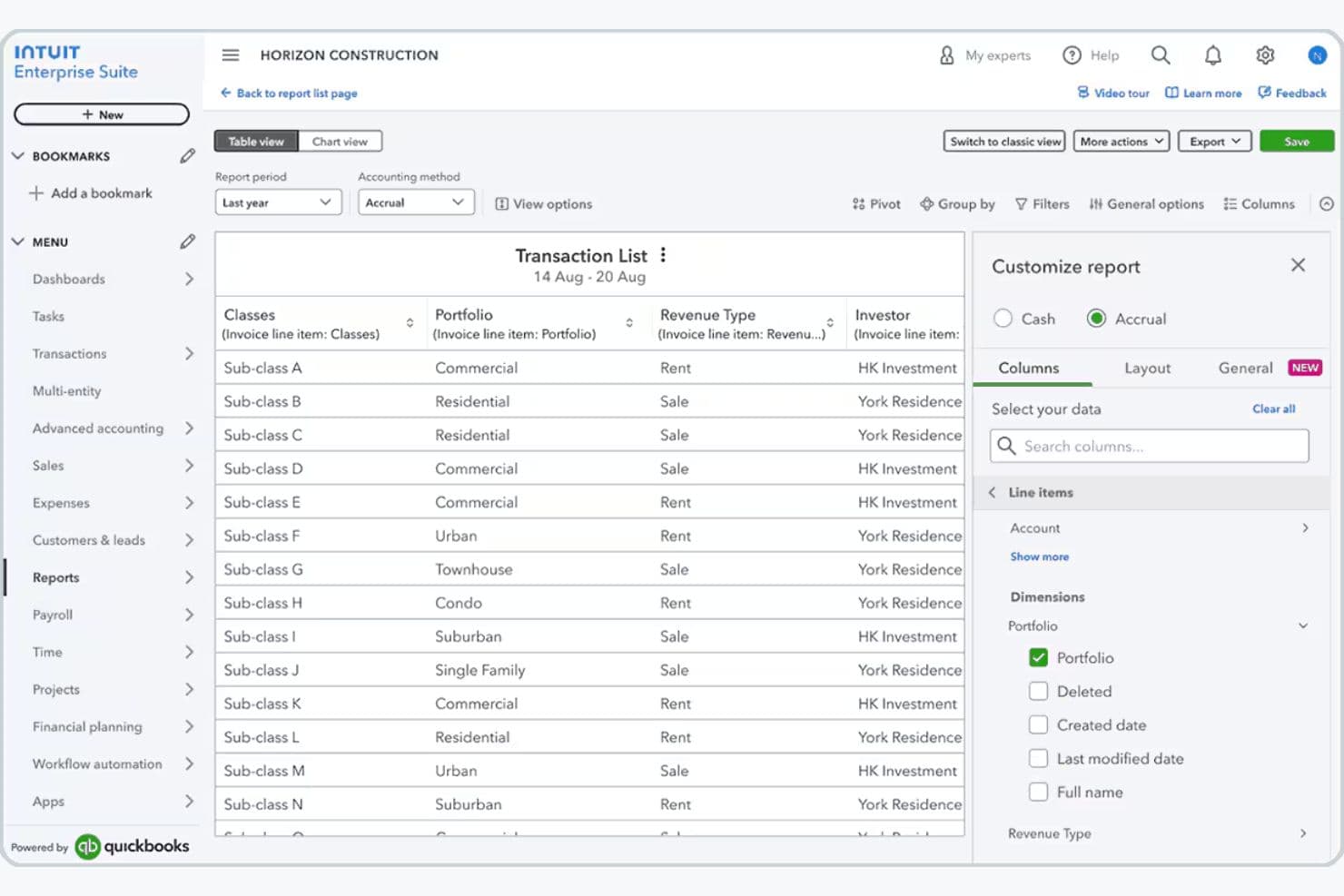
Intuit Enterprise Suite is generally easy to use, especially if you already use QuickBooks, since the interface follows familiar design patterns that shorten your learning curve.
You can manage accounting, payroll, reporting, and multiple entities in one cloud platform, making it easier to collaborate, access data anywhere, and reduce manual work. Most users find the interface intuitive and time-saving, though the advanced features—like multi-entity management and dimensional reporting—can feel overwhelming if you’re new to ERP accounting systems.
Onboarding
Intuit Enterprise Suite offers guided onboarding through a dedicated Customer Success Manager who helps businesses configure the platform, migrate data, and train their teams.
Companies transitioning from QuickBooks or other systems receive migration support from Intuit’s implementation team, while professional services and training resources help organizations adopt the platform more quickly.
This structured onboarding approach allows you to move to the platform with minimal disruption while ensuring your workflows, financial structures, and integrations are properly configured.
Customer Support
Intuit Enterprise Suite provides several customer support options to help businesses adopt and maintain the platform. Customers typically work with a dedicated Customer Success Manager who serves as a primary contact for onboarding, platform configuration, and ongoing guidance.
Additional support is available through phone assistance with Intuit product experts, a searchable knowledge base of help articles, and community forums where users can share solutions and best practices.
Together, these support channels provide both direct assistance and self-service resources for troubleshooting and platform optimization.

Integrations
With Intuit Enterprise Suite, you can connect the platform to hundreds of third-party apps through the broader QuickBooks ecosystem. For example, you can connect Mailchimp for marketing, QuickBooks Payroll and QuickBooks Time for workforce management, and various CRM, project management, and ecommerce apps available through the QuickBooks App Store, helping you keep financial and operational data synced across systems.
If you need deeper customization, you can also use the QuickBooks Online API, which works with Intuit Enterprise Suite out of the box and lets developers build custom integrations or connect internal tools—though if you manage multiple entities, you currently need to connect integrations to each entity individually.

Value for Money
Because pricing is tailored to each business, you’ll need to schedule a consultation with Intuit to receive a quote and determine the appropriate configuration for their needs. This approach allows companies to scale the platform as they grow while paying only for the capabilities and operational scope relevant to their organization.
The final cost depends on factors such as the number of entities, users, modules required, and the complexity of the organization’s financial structure.

Intuit Enterprise Suite Specs
- Accounts Payable: Yes
- Accounts Receivable: Yes
- API: Yes
- Batch Permissions & Access: No
- Budgeting: Yes
- Calendar Management: No
- Customer Management: No
- Dashboard: Yes
- Data Export: Yes
- Data Import: Yes
- Data Visualization: Yes
- Expense Tracking: Yes
- External Integrations: Yes
- Forecasting: Yes
- General Account Ledger: Yes
- Inventory Tracking: Yes
- Lead Management: No
- Lead Scoring: No
- Marketing Automation: No
- Multi-User: Yes
- Notifications: Yes
- Password & Access Management: No
- Payroll: Yes
- Project Management: Yes
- Scheduling: No
- Supplier Management: Yes
- Tax Management: Yes
- Third-Party Plugins/Add-Ons: Yes
- Travel Management: No
Intuit Enterprise Suite FAQs
Intuit Enterprise Suite Company Overview & History
Intuit Enterprise Suite is part of Intuit, a global financial technology company headquartered in Mountain View, California. Intuit is known for building widely used financial software, including QuickBooks, TurboTax, Mailchimp, and Credit Karma.
The platform combines financial management, payroll, payments, automation, and business intelligence tools in a single system to help companies streamline operations and scale efficiently.
Intuit Enterprise Suite Major Milestones
- 1983: Intuit Inc. was founded in Palo Alto, California.
- 2024: Intuit launches Intuit Enterprise Suite, an AI-powered financial management platform designed for growing mid-market businesses.
- 2025: Intuit continues expanding the platform with updates focused on automation, reporting, and operational efficiency.