

Vitruvi Testbericht: Vorteile, Nachteile, Hauptfunktionen und aktuelle Preisgestaltung erklärt
Vitruvi überzeugt durch sein intuitives Design und auf Telekommunikation ausgerichtete Funktionen und ist damit eine starke ERP-Option für Bauteams, die eine effiziente Projektverwaltung gegenüber generischen Lösungen bevorzugen.

Wir bewerten Tools unabhängig; Provisionen helfen, unsere Tests zu finanzieren. Siehe unsere Transparenzrichtlinie und unsere Methodik.
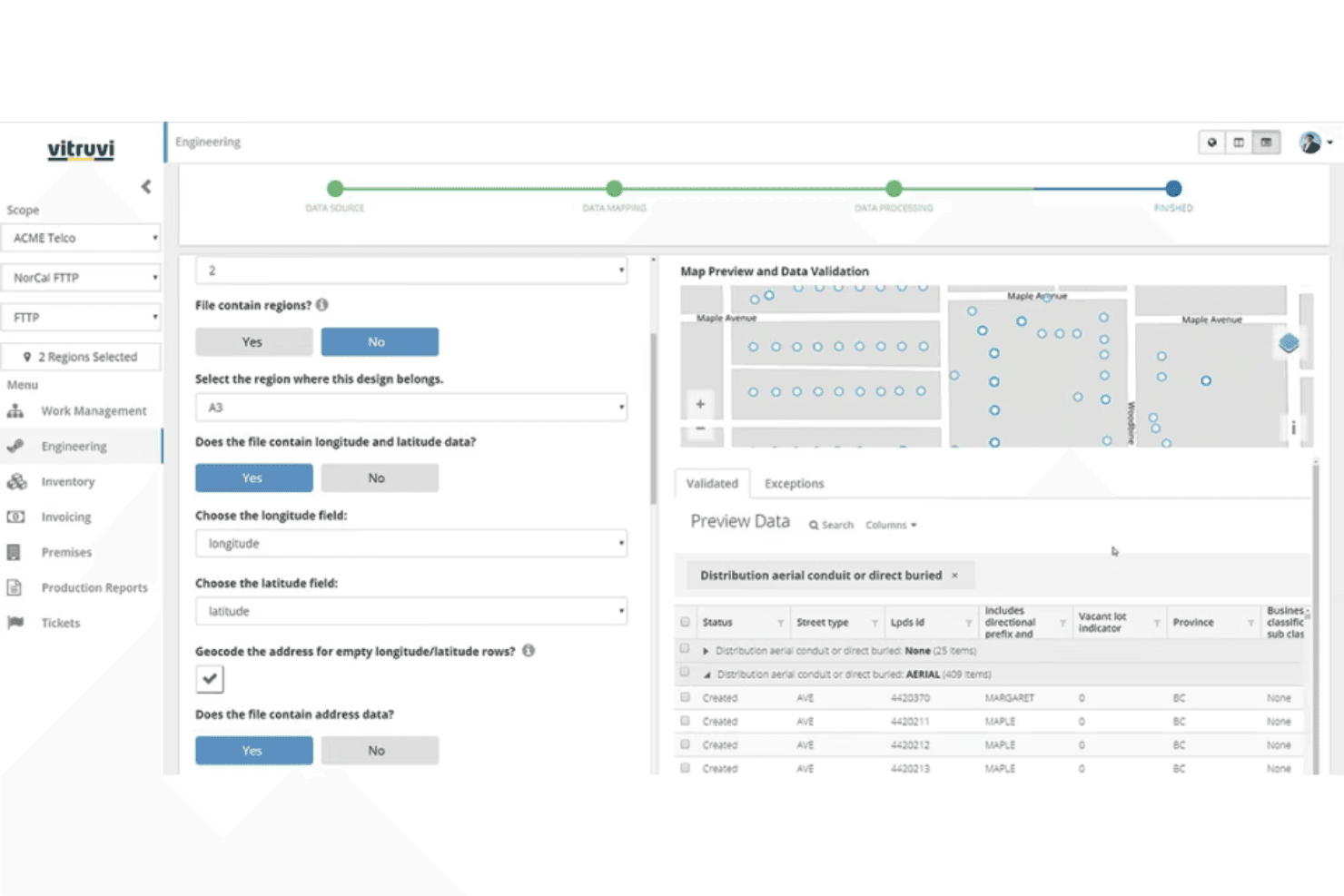
Vitruvi is a construction ERP software built for infrastructure and utility contractors who need to connect field operations, project financials, and workforce management in one platform. I'd consider it if your team runs complex, multi-phase projects where tracking crew activity and job costs across multiple sites is a constant challenge. If you've evaluated Procore, Vitruvi is worth a closer look—it's purpose-built for the infrastructure sector, where Procore offers broader general contracting coverage but less depth for the operational and financial workflows that utility contractors actually deal with.
Vitruvi Evaluation Summary
5/5
- Pricing upon request
- Demo available
Warum Sie unseren Software-Empfehlungen vertrauen können
6,700+
Reviews
20
Industry experts
16+
Evaluation factors
14
Years
Unsere Bewertungen spiegeln unser unabhängiges Urteilsvermögen wider – keine Verkaufsstrategie. Erfahren Sie, wie wir transparent bleiben.
Für diesen Leitfaden haben wir Tools mithilfe von praktischen Tests und unabhängiger Recherche bewertet und dabei unsere Bewertungskriterien angewendet.
Unsere Bewertungen spiegeln unser menschliches redaktionelles Urteilsvermögen wider, keine Verkaufsstrategie.
Vitruvi Overview
When judging construction ERP software, Vitruvi impresses with its telecom project focus, user-friendly interface, and overall functionality. Its pricing is transparent, and onboarding is straightforward, making it accessible for teams new to ERP systems. While its integrations are solid, some advanced analytics features lag behind competitors. Vitruvi is best suited for organizations managing linear infrastructure or telecom projects that need clear cost tracking and field-to-office collaboration. If you’re selecting a solution for complex, multi-site projects and value ease of use over deep customization, Vitruvi is a strong contender.
Pros
- AI-powered quality control reduces manual inspection time.
- Mobile daily reporting improves field documentation accuracy.
- Modular platform supports phased adoption for growing teams.
Cons
- Advanced analytics features are limited compared to peers.
- GIS integration setup can require additional configuration.
- Some users report slow performance with large project files.
Is Vitruvi Right For Your Needs?
Who Would be a Good Fit for Vitruvi?
Vitruvi is a strong choice for organizations managing linear infrastructure, telecom, or utility projects that require detailed cost tracking, structured order management, and field-to-office collaboration. Its modular platform, mobile reporting, and AI-powered quality control make it especially valuable for teams that need real-time project visibility and compliance documentation. Companies with phased adoption plans or scalability operations will benefit from its flexible deployment and support for complex, multi-site projects.
- Telecom ConstructionVitruvi’s telecom project templates and field reporting streamline fiber and wireless builds.
- Utility CompaniesThe platform’s GIS mapping and asset tracking support utility infrastructure management.
- Project Management TeamsMobile daily reporting and centralized documentation improve project oversight and accountability.
- Mid-Sized ContractorsModular features allow phased adoption as project volume grows.
- Field Operations DepartmentsMobile-first tools enable real-time updates from remote job sites.
- Compliance-Focused RolesAudit-ready documentation and quality control features support regulatory compliance.
Who Would be a Bad Fit for Vitruvi?
Vitruvi may not suit organizations with highly specialized workflows, small-scale projects, or those needing deep custom analytics. Its advanced analytics are limited, and GIS integration may require extra setup, making it less ideal for teams with unique data needs or minimal IT resources. Companies outside infrastructure or telecom construction may find its feature set too narrow for their requirements.
- Residential BuildersVitruvi’s focus on linear infrastructure doesn’t match residential project needs.
- Small General ContractorsThe platform’s scale and cost may exceed small project requirements.
- Custom Analytics TeamsLimited advanced analytics restricts deep data exploration.
- Heavy ManufacturingManufacturing-specific workflows and integrations are not supported.
- Minimal IT ResourcesGIS and integration setup may require more technical support than available.
- Design-Only FirmsVitruvi lacks features for design or pre-construction planning workflows.
Wie wir Tools testen und bewerten
Wir haben jahrelang daran gearbeitet, unser System zur Softwarebewertung zu entwickeln, zu verfeinern und stetig zu verbessern. Der Bewertungsleitfaden wurde entworfen, um die Feinheiten der Softwareauswahl und die Qualitätskriterien eines effektiven Tools präzise zu erfassen, mit Fokus auf entscheidende Aspekte im Auswahlprozess. Im Folgenden sehen Sie genau, wie unsere Prüfungen und Bewertungen nach sieben Kriterien funktioniert. So können wir eine objektive Bewertung der Software auf Grundlage der Kernfunktionalitäten, herausragenden Eigenschaften, Benutzerfreundlichkeit, Einführung, Kundensupport, Integrationen, Kundenbewertungen sowie Preis-Leistungs-Verhältnis bieten.
Kernfunktionalität (25 % der Gesamtbewertung)
Der Ausgangspunkt unserer Bewertung ist immer die Kernfunktionalität des Tools. Verfügt es über die grundlegenden Features und Funktionen, die ein Nutzer erwarten würde? Sind einige dieser Kernfunktionen auf höherpreisige Tarife beschränkt? Im Kern erwarten wir, dass ein Tool mit den Basisfunktionen seiner Wettbewerber mithalten kann.
Herausragende Funktionen (25 % der Gesamtbewertung)
Im nächsten Schritt bewerten wir ungewöhnliche, herausragende Funktionen, die über die üblichen Kernfunktionen vergleichbarer Tools hinausgehen. Eine hohe Punktzahl erhält, wer spezialisierte oder einzigartige Funktionen bietet, die das Produkt schneller, effizienter oder besonders wertvoll für den Nutzer machen. Wir prüfen auch, wie einfach sich das Tool mit anderen Programmen des typischen Tech-Stacks integrieren lässt, um den Funktionsumfang und die Nützlichkeit der Software zu erweitern. Vielseitige native Integrationen, Drittanbieter-Anbindungen sowie API-Zugänge für individuelle Integrationen schneiden am besten ab.
Benutzerfreundlichkeit (10 % der Gesamtbewertung)
Wir bewerten, wie schnell und einfach sich die wichtigsten Aufgaben im Tool erledigen lassen. Hoch bewertete Software ist gut gestaltet, intuitiv bedienbar, bietet mobile Apps, Vorlagen und macht selbst komplexere Aufgaben handhabbar.
Einführung (10 % der Gesamtbewertung)
Wir wissen, wie wichtig eine rasche Teamakzeptanz bei neuen Plattformen ist. Deshalb prüfen wir, wie einfach sich ein Tool mit minimalem Trainingsaufwand erlernen und bedienen lässt. Wir bewerten auch, wie schnell ein Teammitglied ohne vorherige Erfahrung startklar ist. Hoch bewertete Lösungen benötigen wenig oder gar keinen Support.
Kundensupport (10 % der Gesamtbewertung)
Wir prüfen, wie leicht und schnell Sie mit Telefon, Live-Chat oder Wissensdatenbank Hilfe erhalten können. Tools und Unternehmen, die Echtzeit-Support bieten, erzielen die besten Ergebnisse, während Chatbots am schlechtesten abschneiden.
Kundenbewertungen (10 % der Gesamtbewertung)
Neben unseren eigenen Tests berücksichtigen wir den Net-Promoter-Score aktueller und ehemaliger Kunden. Wir prüfen, wie wahrscheinlich sie sich erneut für das Tool entscheiden würden, basierend auf der Kernfunktionalität. Hoch bewertete Software spiegelt einen hohen Net-Promoter-Score wider.
Preis-Leistungs-Verhältnis (10 % der Gesamtbewertung)
Abschließend vergleichen wir alle Kriterien und bewerten den Durchschnittspreis der Einstiegstarife im Verhältnis zu den Kernfunktionen und dem Nutzen der weiteren Bewertungskriterien. Software, die mehr für weniger bietet, erhält die besten Bewertungen.
Core Features
AI-Powered Quality Control
Automates inspection workflows and flags issues in real time. Reduces manual review and helps teams maintain compliance standards.
Mobile Daily Reporting
Lets field teams submit progress updates, photos, and notes from any device. Improves accuracy and speeds up communication between job sites and the office.
GIS Mapping and Asset Tracking
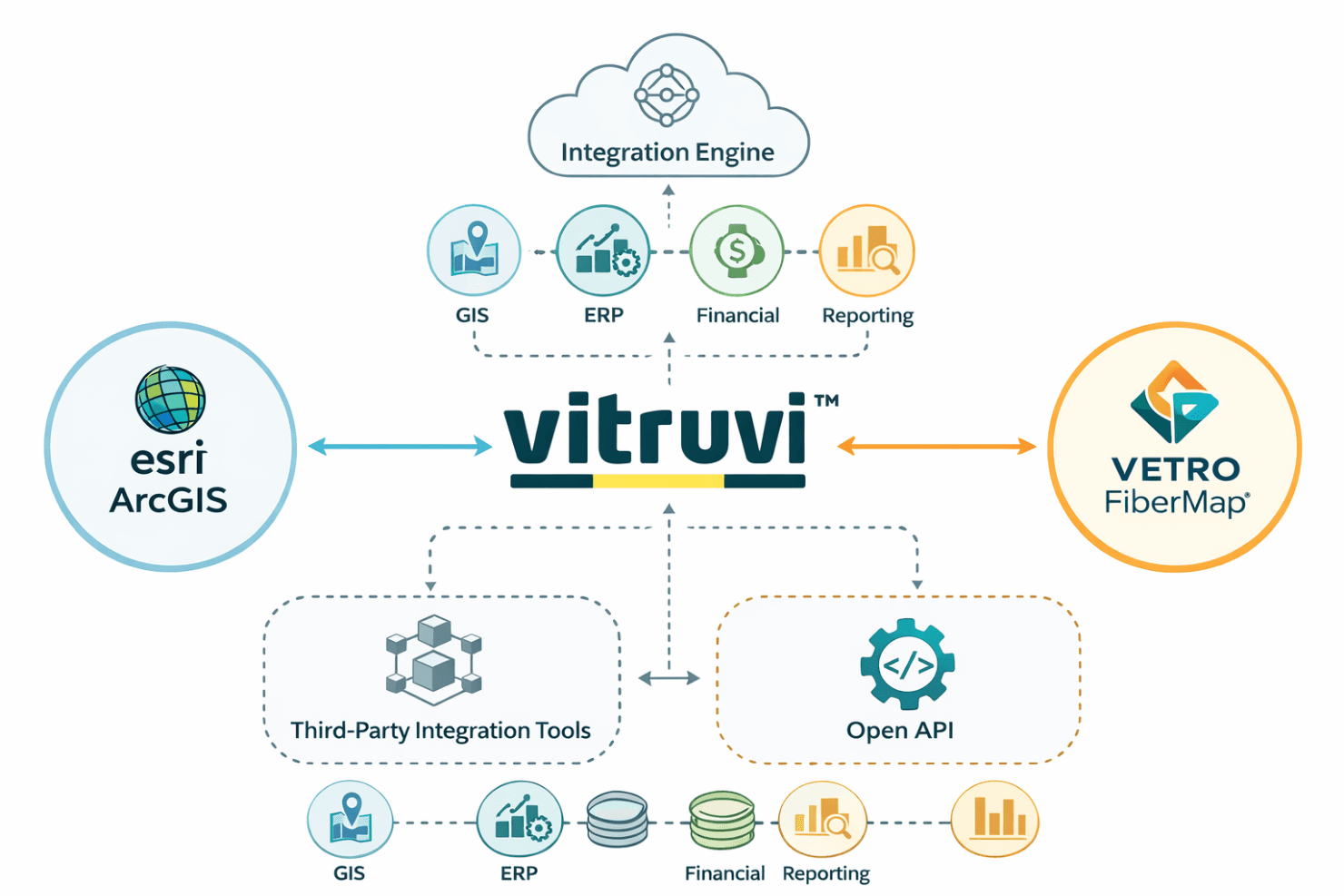
Visualizes project assets and infrastructure on interactive maps. Supports precise location tracking for utilities and telecom builds.
Centralized Document Management
Stores contracts, invoices, permits, and project files in a single, searchable platform to strengthen document control. Ensures everyone accesses the latest documentation.
Cost Tracking and Budget Management
Monitors project expenses, change orders, and budget status in real time. Helps finance teams control costs, forecast spend, and support informed decision-making.
Modular Project Templates
Offers pre-built templates for telecom and utility projects. Enables quick project setup and standardizes workflows across teams.
Ease of Use
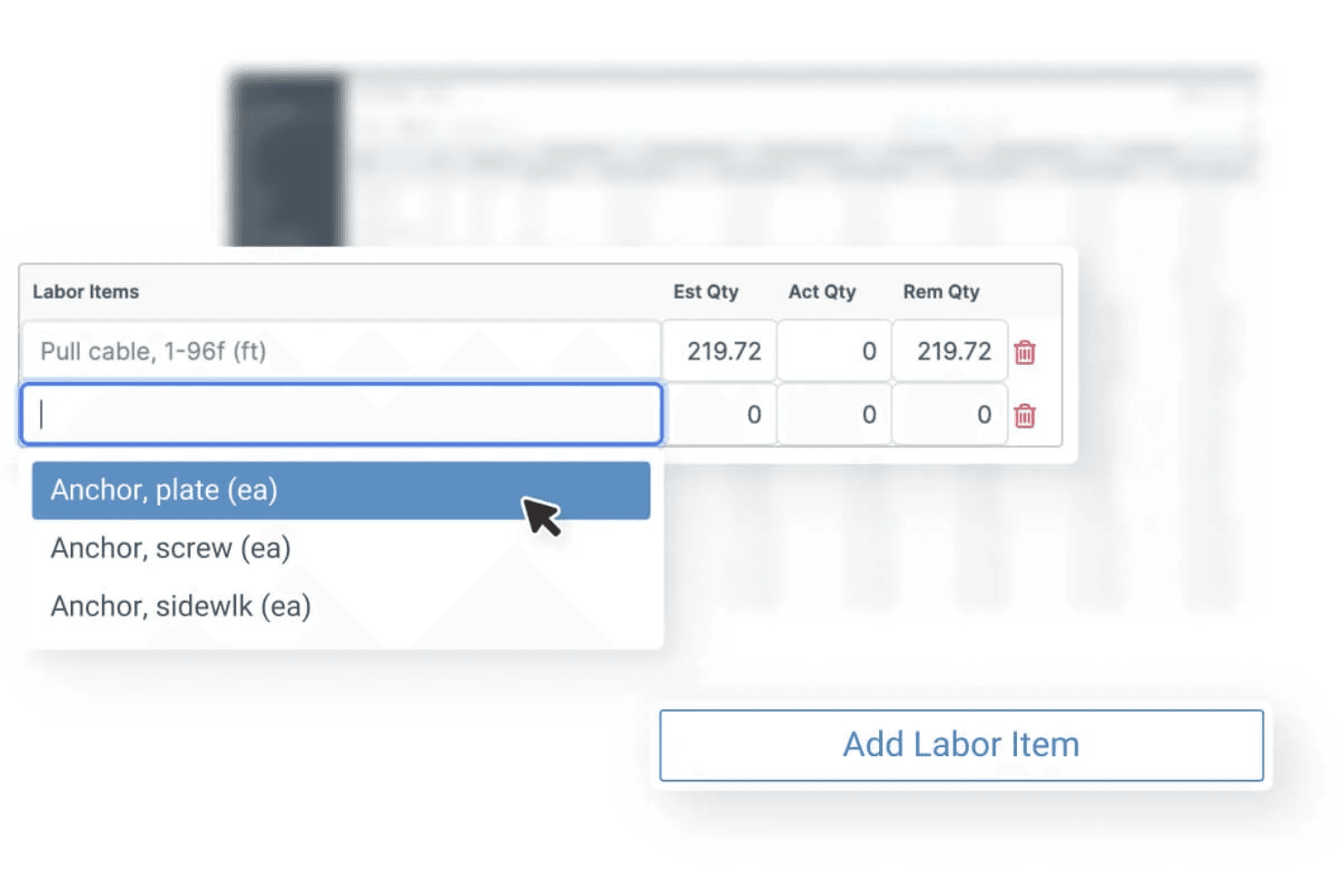
Vitruvi is widely recognized for its clean interface and intuitive navigation, making it approachable for both field and office users. Users highlight the straightforward onboarding process and clear workflows, especially for telecom and utility projects. The mobile app’s daily reporting and real-time updates reduce administrative friction, while centralized document management and project dashboards keeps information accessible. Some users note minor slowdowns with large files, but overall, Vitruvi’s usability stands out in the construction ERP space.
Integrations
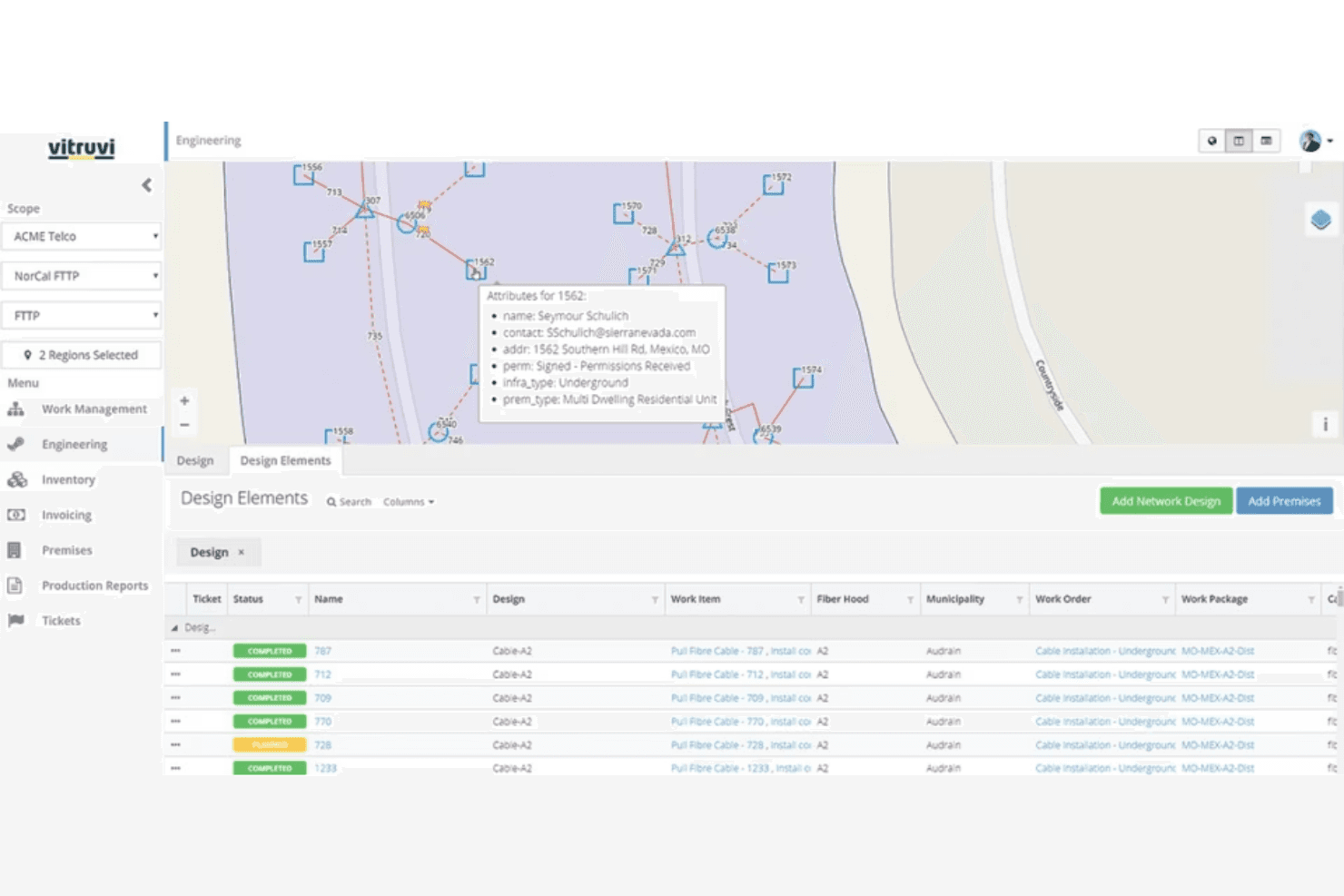
Vitruvi integrates with Esri ArcGIS and VETRO FiberMap and connects with GIS, ERP, financial, and reporting systems through its integration engine, among others.
Vitruvi also offers an open API for custom integrations and supports connections with third-party integration tools.
Vitruvi Specs
- Accounts Payable: Yes
- Accounts Receivable: Yes
- API: Yes
- Budgeting: No
- Calendar Management: No
- Compliance Tracking: No
- Customer Management: No
- Dashboard: Yes
- Data Export: Yes
- Data Import: Yes
- Data Visualization: Yes
- Expense Tracking: Yes
- External Integrations: Yes
- Financial Analysis: Yes
- Forecasting: Yes
- Inventory Tracking: Yes
- Multi-Currency: Yes
- Multi-User: Yes
- Notifications: No
- Order Management: No
- Payroll: Yes
- Project Management: Yes
- Purchase Orders: Yes
- Resource Management: Yes
- Scheduling: Yes
- Supplier Management: Yes
- Task Scheduling/Tracking: No
- Third-Party Plugins/Add-Ons: Yes
- Warehouse Management: Yes
- Workflow Management: No


