

Reseña de Jedox: Pros, Contras, Características y Precios
Probé las funciones de previsión financiera de Jedox y encontré que su interfaz fácil de usar y las opciones de integración sencillas lo convierten en una opción destacada para tu equipo.

Revisamos las herramientas de forma independiente, y las comisiones ayudan a financiar nuestras pruebas. Consulta nuestra política de transparencia, nuestra metodología o sugiere una herramienta.
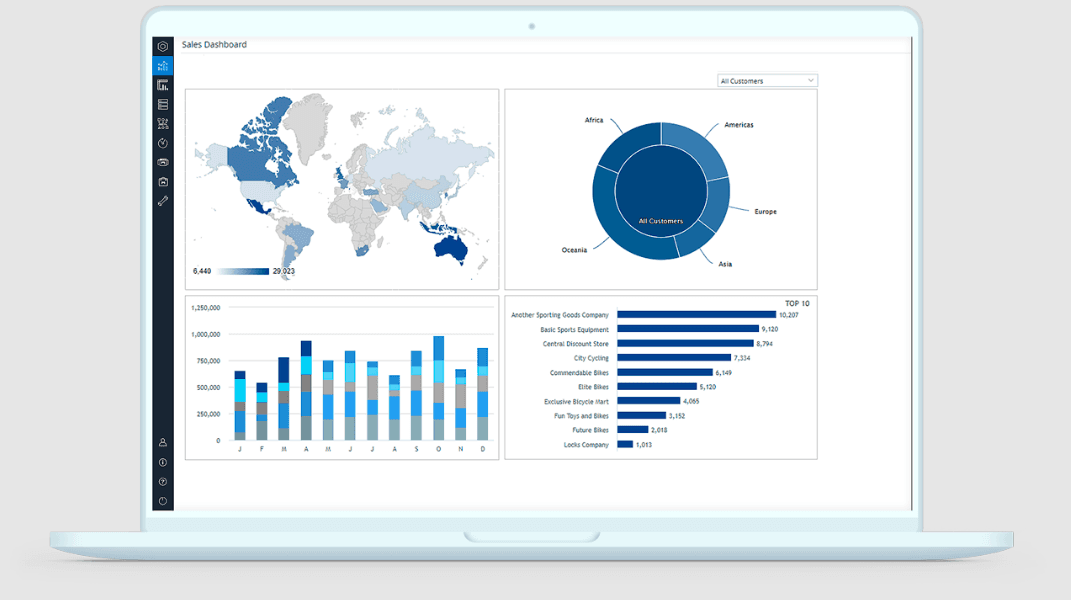
Jedox is a forecasting software built for finance teams that need to plan, budget, and forecast across multiple business units from a single platform. I'd mainly consider it if your team is outgrowing spreadsheets but wants to avoid the steep implementation curve that comes with something like Anaplan—Jedox gives you a familiar, Excel-like environment paired with the collaboration, workflow automation, and model management that spreadsheets simply can't support at scale.
Jedox Evaluation Summary
4.4/5
- Pricing upon request
- Free demo available
Por qué confiar en nuestras recomendaciones de software
6,700+
Reviews
20
Industry experts
16+
Evaluation factors
14
Years
Nuestras reseñas reflejan nuestro criterio independiente, no un discurso de ventas. Descubra cómo mantenemos la transparencia.
Para esta guía, evaluamos las herramientas mediante pruebas prácticas e investigación independiente, puntuando las herramientas según nuestros criterios de selección.
Nuestras reseñas reflejan nuestro criterio editorial humano, no un discurso de ventas.
Jedox Overview
In my opinion, Jedox is a solid choice for financial forecasting and budgeting, especially for large enterprises and complex financial environments. It excels with its data integration capabilities and user-friendly interface, making it ideal for financial institutions that need robust business intelligence and data management. While its onboarding process could be smoother, the support and training resources are commendable.
Jedox’s pricing is competitive, offering good value for the functionality provided. Compared to other providers, it stands out in handling large data sets efficiently with powerful performance management tools. However, it might not be the best fit for small businesses due to its complexity and cost. If your team values integration with existing ERP systems, strong financial reporting, and comprehensive data analysis, Jedox is worth considering.
Pros
- It offers powerful data analysis tools for your team’s forecasting and financial planning needs.
- The intuitive interface and ease of use make it simple for your team to navigate and work with Excel integration and dashboards effectively.
- It provides excellent customization options to fit your specific business requirements and workflows, supporting a scalable EPM ecosystem.
Cons
- The learning curve can be steep for your team when adapting to advanced EPM and automation features.
- Some user reviews find the initial setup to be time-consuming due to connecting multiple data sources and connectors.
- Advanced features might overwhelm smaller teams that don’t require extensive consolidation or visualization capabilities.
Is Jedox Right For Your Needs?
Who Would be a Good Fit for Jedox?
Jedox is a great fit for large enterprises needing complex financial forecasting and budgeting tools. If your team works in industries like manufacturing or retail, you’ll appreciate its strong data integration and analysis capabilities. Jedox’s customizable dashboards help your finance teams tailor reports to specific needs, making data-driven decisions easier. Its powerful analytics tools are ideal for departments that handle large data sets and require detailed insights through real-time financial reporting and business intelligence visualization.
- Large EnterprisesJedox handles complex data and provides detailed insights, making it ideal for large organizations with extensive financial reporting and performance management needs within an enterprise environment.
- Manufacturing IndustryIf you manage complex supply chains, Jedox’s data integration and automation capabilities help streamline your financial planning process.
- Retail CompaniesYour team can use Jedox to analyze sales data and forecast trends, aiding in inventory and financial management through intuitive dashboards and visualization tools.
- Finance TeamsJedox offers comprehensive tools for budgeting and planning, perfect for finance departments needing precise financial forecasts and workflows that connect across ERP systems.
- Data AnalystsJedox helps you with in-depth data analysis, providing insights needed for strategic business decisions and integrating seamlessly with BI tools.
- IT DepartmentsYour IT team can leverage Jedox’s integration capabilities to connect various data sources, simplifying data management and ensuring consistent real-time access to information through built-in connectors and APIs.
Who Would be a Bad Fit for Jedox?
Jedox might not be suitable for small businesses or startups due to its complexity and cost. If your team cannot manage a steep learning curve, you will likely struggle with Jedox’s setup and automation. It’s not the best choice for teams needing simple, quick solutions, as its powerful functionality and dashboards could overwhelm smaller operations. For those who don’t require extensive data analysis, financial consolidation, or business intelligence features, Jedox’s capabilities may be more than you need.
- Small BusinessesJedox’s complexity and cost might be too much for small operations with limited resources or minimal financial reporting requirements.
- StartupsIf your startup needs quick and simple solutions, Jedox’s advanced performance management features could be too much for your team.
- FreelancersAs a freelancer, you might find Jedox’s extensive capabilities unnecessary for your individual projects or Excel-based forecasting needs.
- Simple ForecastingFor basic forecasting tasks, Jedox offers more functionality than is needed, complicating your work.
- Limited IT SupportWithout strong IT support, your team could struggle with Jedox’s setup, data integration, and workflows.
- Non-Technical TeamsIf your team lacks technical expertise, Jedox’s advanced features might pose a challenge to use effectively, even though the platform offers several tutorials and an intuitive, user friendly interface with strong ease of use.
Cómo probamos y puntuamos las herramientas
Hemos dedicado años a construir, perfeccionar y mejorar nuestro sistema de evaluación y puntuación de software. La rúbrica está diseñada para capturar los matices de la selección de software y lo que hace que una herramienta sea efectiva, enfocándose en los aspectos críticos del proceso de toma de decisiones. A continuación, puedes ver exactamente cómo funcionan nuestras pruebas y puntuación en siete criterios. Esto nos permite proporcionar una evaluación imparcial del software basada en la funcionalidad principal, características destacadas, facilidad de uso, onboarding, atención al cliente, integraciones, opiniones de clientes y relación calidad-precio.
Funcionalidad principal (25% de la puntuación final)
Nuestro punto de partida siempre es la funcionalidad principal de la herramienta. ¿Tiene las funciones básicas que un usuario esperaría ver? ¿Alguna de estas características principales está limitada a planes de precios superiores? En esencia, esperamos que una herramienta esté a la altura de las capacidades básicas de sus competidores.
Características destacadas (25% de la puntuación final)
A continuación, evaluamos las características únicas y sobresalientes que van más allá de la funcionalidad principal normalmente encontrada en herramientas de este tipo. Una puntuación alta refleja funciones especializadas o únicas que hacen el producto más rápido, eficiente o que aportan valor adicional al usuario. También evaluamos lo fácil que es integrarse con otras herramientas que normalmente forman parte del stack tecnológico para ampliar la funcionalidad y utilidad del software. Las herramientas que ofrecen numerosas integraciones nativas, conexiones con terceros y acceso API para crear integraciones personalizadas obtienen la mejor puntuación.
Facilidad de uso (10% de la puntuación final)
Consideramos cuán rápido y fácil es ejecutar las tareas definidas en la funcionalidad principal usando la herramienta. El software que obtiene la puntuación más alta está bien diseñado, es intuitivo, ofrece aplicaciones móviles, proporciona plantillas y hace que tareas relativamente complejas parezcan simples.
Onboarding (10% de la puntuación final)
Sabemos lo importante que es una adopción rápida del equipo para una nueva plataforma, por lo que evaluamos cuán sencillo es aprender y utilizar una herramienta con una formación mínima. Analizamos lo rápido que un miembro del equipo puede configurarse y empezar a usar la herramienta sin experiencia previa. Las soluciones con alta puntuación indican que se requiere poco o ningún soporte.
Atención al cliente (10% de la puntuación final)
Revisamos cuán rápido y sencillo es salir de un atasco y encontrar ayuda por teléfono, chat en vivo o base de conocimiento. Las herramientas y empresas que proporcionan soporte en tiempo real obtienen la mejor puntuación, mientras que los chatbots obtienen la peor.
Opiniones de clientes (10% de la puntuación final)
Además de nuestras propias pruebas y evaluaciones, consideramos el net promoter score de clientes actuales y anteriores. Revisamos la probabilidad de que, de tener la opción, elijan nuevamente la herramienta por su funcionalidad principal. Un software con alta puntuación refleja un alto net promoter score de clientes presentes o pasados.
Relación calidad-precio (10% de la puntuación final)
Por último, considerando todos los demás criterios, revisamos el precio medio de los planes de entrada frente a las funciones principales y analizamos el valor de los demás criterios de evaluación. El software que ofrece más por menos obtiene una puntuación superior.
Core Features
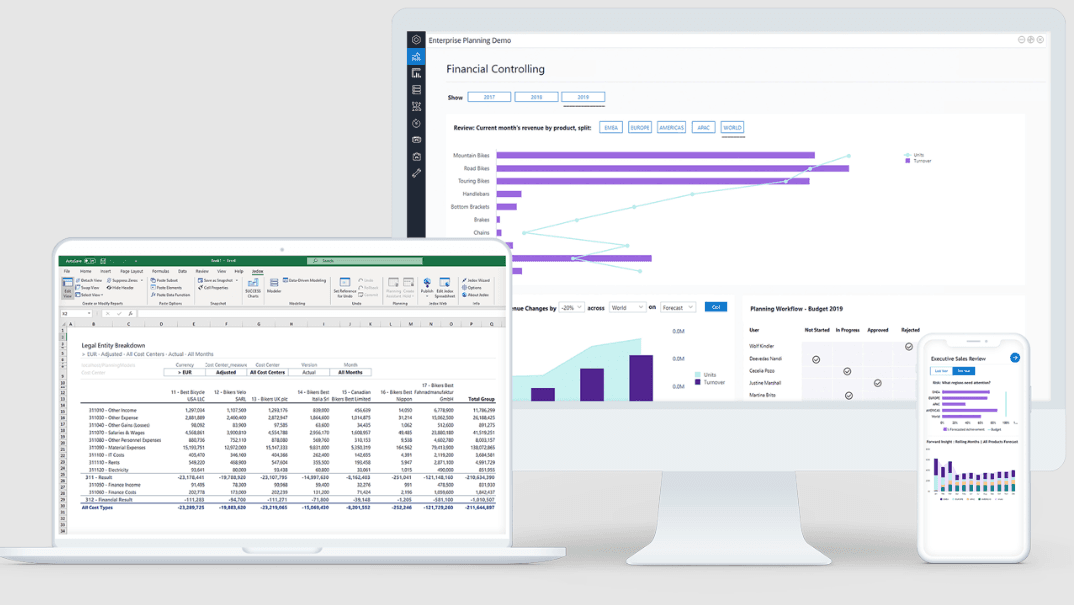
Budgeting and Planning: Jedox lets your team create detailed budgets and plans with ease, using customizable templates and Excel integration. This feature helps you align financial goals with strategic business objectives and improve financial reporting accuracy.
Data Visualization: With Jedox, you can turn complex data into easy-to-understand charts, graphs, and dashboards. This makes it simple for your team to spot trends and make informed decisions through visualization and business intelligence tools.
Scenario Analysis: Jedox allows you to run various financial scenarios to see potential outcomes in real-time. This feature helps your team prepare for different market conditions, enhancing performance management and financial planning.
Collaboration Tools: Jedox enables your team to collaborate in real-time, improving communication and decision-making. You can easily share data and gather input from different departments, ensuring connected workflows.
Automated Reporting: Jedox streamlines financial reporting by automating data collection and report generation. Your team saves time and reduces errors with this efficient automation, delivering accurate insights from consolidated data sources.
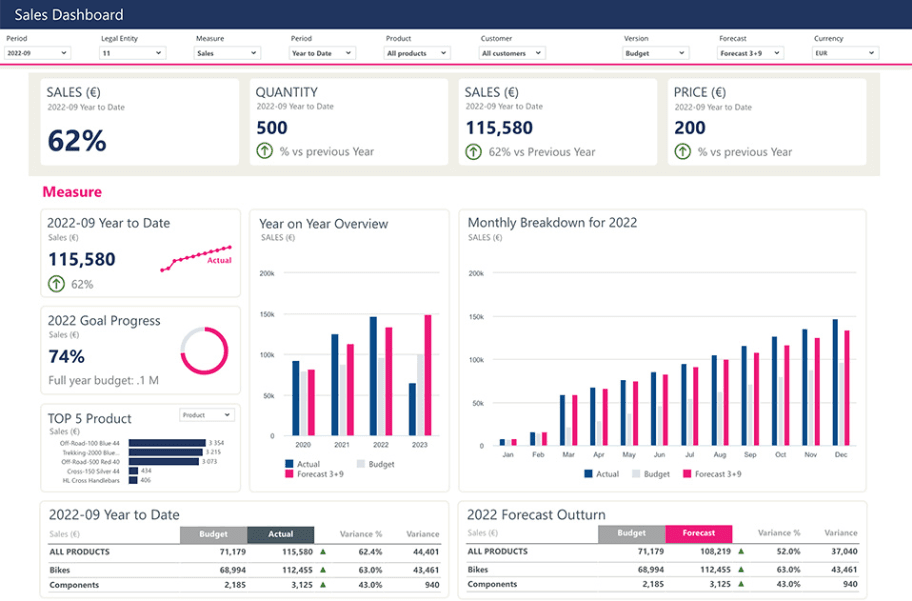
User-Friendly Interface: Jedox’s intuitive interface is easy for your team to navigate, minimizing learning time and maximizing productivity. The platform’s ease of use supports all end users, making financial forecasting and budgeting simpler across departments.
Ease of Use
Jedox offers a user-friendly interface that makes it accessible for your team, even if they’re new to financial forecasting or financial planning. Its intuitive design helps you navigate features without feeling overloaded. While there is an adaptation period, the customizable dashboards and real-time collaboration tools simplify your work. Compared to other platforms, Jedox excels in its ability to tailor functionalities to your specific needs, enhancing overall usability and user experience.
Integrations
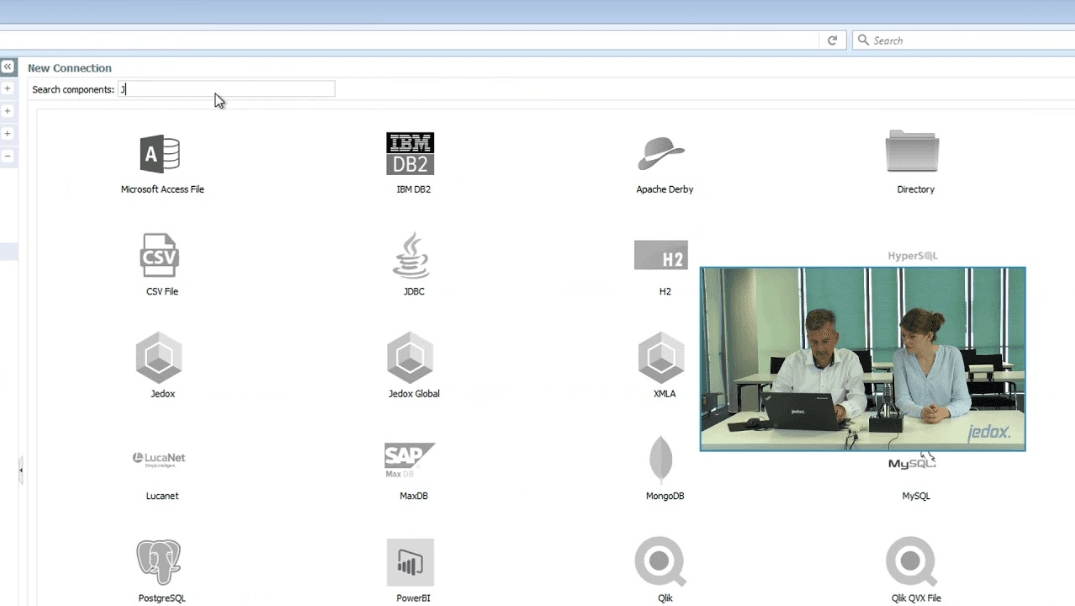
Jedox integrates with Salesforce, Power BI, Qlik, Tableau, SAP, Microsoft Excel, Oracle, IBM DB2, MS SQL Server, and Google Sheets. It also supports deep Excel integration, allowing finance teams to continue using familiar tools within a modern EPM and CPM framework.
Jedox also offers an API, connecting with third-party BI tools and ERP systems for enhanced data integration, automation, and workflows. Its cloud-based architecture and flexible connectors enable organizations to streamline processes and unify their financial data for improved financial reporting and analysis.
Jedox Specs
- 2-Factor Authentication: Yes
- Accounts Payable: Yes
- Accounts Receivable: Yes
- API: Yes
- Approval Workflows: Yes
- Balance Sheet: Yes
- Billing/Invoicing: Yes
- Budgeting: Yes
- Calendar Management: Yes
- Comparative Reporting: Yes
- CRM Integration: Yes
- Custom Reports: Yes
- Customer Management: Yes
- Dashboard: Yes
- Data Export: Yes
- Data Import: Yes
- Data Visualization: Yes
- Expense Tracking: Yes
- External Integrations: Yes
- Forecasting: Yes
- General Account Ledger: Yes
- Historical Data Analysis: Yes
- Inventory Tracking: Yes
- Multi-Currency: Yes
- Multi-User: Yes
- Notifications: Yes
- P&L: Yes
- Payroll: Yes
- Scenario Planning: Yes
- Scheduling: Yes
- Supplier Management: Yes
- Tax Management: Yes
- Time Management: Yes


