
Reseña de Unit4: ventajas, desventajas, características y precios explicados
Here’s my candid take: If you’re evaluating ERP systems, Unit4 stands out for flexibility and people focus—but is it right for your organization's evolving needs? Let’s find out.

Revisamos las herramientas de forma independiente, y las comisiones ayudan a financiar nuestras pruebas. Consulta nuestra política de transparencia, nuestra metodología o sugiere una herramienta.
Unit4 is an ERP software built for people-centric, services-led organizations like professional services firms, higher education institutions, non-profit groups, and public sector agencies. I'd reach for it when your team needs financials, procurement, project accounting, and HR on one platform, but doesn't want the implementation weight of a tier-one suite. Compared with tier-one enterprise resource planning suites, Unit4 is a friendlier fit for mid-market finance teams that value faster configuration and a project-driven data model over deep manufacturing and supply chain coverage.
Unit4 Evaluation Summary
4/5
- Pricing upon request
Por qué confiar en nuestras recomendaciones de software
6,700+
Reviews
20
Industry experts
16+
Evaluation factors
14
Years
Nuestras reseñas reflejan nuestro criterio independiente, no un discurso de ventas. Descubra cómo mantenemos la transparencia.
Para esta guía, evaluamos las herramientas mediante pruebas prácticas e investigación independiente, puntuando las herramientas según nuestros criterios de selección.
Nuestras reseñas reflejan nuestro criterio editorial humano, no un discurso de ventas.
Unit4 Overview
If you’re judging Unit4 against other options, I think you'll find the flexibility and people-first data model a strong advantage, especially for professional services, nonprofits, and higher education. Its interface is approachable and configuration is far less of a project than most enterprise ERPs. Pricing can be a hurdle for smaller organizations and reporting features sometimes feel basic for complex FP&A needs. Across Unit4 reviews the same two themes recur: fast configuration, thin advanced reporting. Still, the onboarding is smoother than most, support is responsive, and integrations cover the main platforms your team will need. I’d suggest Unit4 for teams prioritizing agility and user experience over manufacturing or deep supply chain capabilities.
Pros
- Project-centric data model fits services and nonprofit organizations
- Flexible reporting tools and dimensional accounting options are included
- Modern interface simplifies configuration and daily finance workflows
Cons
- Reporting features are basic for complex FP&A scenarios
- Pricing is expensive for smaller organizations with tight budgets
- Limited manufacturing and supply chain management depth compared to peers
Is Unit4 Right For Your Needs?
Who Would be a Good Fit for Unit4?
Unit4 is a good fit for organizations with people-focused operations that need to customize workflows and quickly onboard new team members. If you deal with complex finance, HR, or multi-entity requirements, the platform’s modular design, guided onboarding, strong support, and broad integration library help your teams adapt fast. I think Unit4’s drag-and-drop reporting, rapid personalizations, and prebuilt integrations with mainstream productivity, BI, and CRM platforms make it ideal for growing businesses or those with evolving processes.
- Nonprofit OrganizationsUnit4 supports multi-entity finance, budget control, and grant tracking that non-profit teams need for accountability and compliance.
- Mid-Sized EnterprisesYou’ll get value from customizable modules and fast onboarding that scale easily for teams outgrowing entry-level ERPs.
- Higher EducationColleges and universities appreciate Unit4’s robust HR, finance, and people management features that work across faculties and schools.
- Professional ServicesConsultancies benefit from workflow automation, fast user training, and real-time project financial tracking.
- Global Finance TeamsUnit4’s advanced reporting, API access, and integration options fit complex, multi-location finance environments.
- HR DepartmentsHR staff can tailor dashboards, automate workflows, and connect Unit4 directly to other HCM and productivity tools.
Who Would be a Bad Fit for Unit4?
Unit4 is often not a great match if you want an ERP that works straight away for narrow industries or if your needs center around high-volume manufacturing or deeply industry-specific logistics. You may find Unit4’s pricing high for very small teams or that its deep configuration options are more than what’s needed for basic accounting or inventory management. Teams with highly technical, product-centric requirements or ultra-lean budgets may get more value elsewhere.
- Small Retail StoresThese businesses usually need simpler inventory and sales modules than what Unit4 provides.
- High-Volume ManufacturingUnit4 doesn’t focus on the granular production controls or engineering integrations manufacturers often require.
- Early-Stage StartupsStartups with basic finance or HR needs may find Unit4’s cost and capabilities excessive.
- E-commerce Pure PlayersPure-play ecommerce teams often prefer ERPs with turnkey marketplace and inventory integrations.
- Construction FirmsConstruction usually needs specialized project costing and field management tools not included in Unit4’s core modules.
- Basic Accounting TeamsSmall organizations seeking only core bookkeeping features will likely find Unit4 more complex than necessary.
Cómo probamos y puntuamos las herramientas
Hemos dedicado años a construir, perfeccionar y mejorar nuestro sistema de evaluación y puntuación de software. La rúbrica está diseñada para capturar los matices de la selección de software y lo que hace que una herramienta sea efectiva, enfocándose en los aspectos críticos del proceso de toma de decisiones. A continuación, puedes ver exactamente cómo funcionan nuestras pruebas y puntuación en siete criterios. Esto nos permite proporcionar una evaluación imparcial del software basada en la funcionalidad principal, características destacadas, facilidad de uso, onboarding, atención al cliente, integraciones, opiniones de clientes y relación calidad-precio.
Funcionalidad principal (25% de la puntuación final)
Nuestro punto de partida siempre es la funcionalidad principal de la herramienta. ¿Tiene las funciones básicas que un usuario esperaría ver? ¿Alguna de estas características principales está limitada a planes de precios superiores? En esencia, esperamos que una herramienta esté a la altura de las capacidades básicas de sus competidores.
Características destacadas (25% de la puntuación final)
A continuación, evaluamos las características únicas y sobresalientes que van más allá de la funcionalidad principal normalmente encontrada en herramientas de este tipo. Una puntuación alta refleja funciones especializadas o únicas que hacen el producto más rápido, eficiente o que aportan valor adicional al usuario. También evaluamos lo fácil que es integrarse con otras herramientas que normalmente forman parte del stack tecnológico para ampliar la funcionalidad y utilidad del software. Las herramientas que ofrecen numerosas integraciones nativas, conexiones con terceros y acceso API para crear integraciones personalizadas obtienen la mejor puntuación.
Facilidad de uso (10% de la puntuación final)
Consideramos cuán rápido y fácil es ejecutar las tareas definidas en la funcionalidad principal usando la herramienta. El software que obtiene la puntuación más alta está bien diseñado, es intuitivo, ofrece aplicaciones móviles, proporciona plantillas y hace que tareas relativamente complejas parezcan simples.
Onboarding (10% de la puntuación final)
Sabemos lo importante que es una adopción rápida del equipo para una nueva plataforma, por lo que evaluamos cuán sencillo es aprender y utilizar una herramienta con una formación mínima. Analizamos lo rápido que un miembro del equipo puede configurarse y empezar a usar la herramienta sin experiencia previa. Las soluciones con alta puntuación indican que se requiere poco o ningún soporte.
Atención al cliente (10% de la puntuación final)
Revisamos cuán rápido y sencillo es salir de un atasco y encontrar ayuda por teléfono, chat en vivo o base de conocimiento. Las herramientas y empresas que proporcionan soporte en tiempo real obtienen la mejor puntuación, mientras que los chatbots obtienen la peor.
Opiniones de clientes (10% de la puntuación final)
Además de nuestras propias pruebas y evaluaciones, consideramos el net promoter score de clientes actuales y anteriores. Revisamos la probabilidad de que, de tener la opción, elijan nuevamente la herramienta por su funcionalidad principal. Un software con alta puntuación refleja un alto net promoter score de clientes presentes o pasados.
Relación calidad-precio (10% de la puntuación final)
Por último, considerando todos los demás criterios, revisamos el precio medio de los planes de entrada frente a las funciones principales y analizamos el valor de los demás criterios de evaluación. El software que ofrece más por menos obtiene una puntuación superior.
Core Features
Financial Management
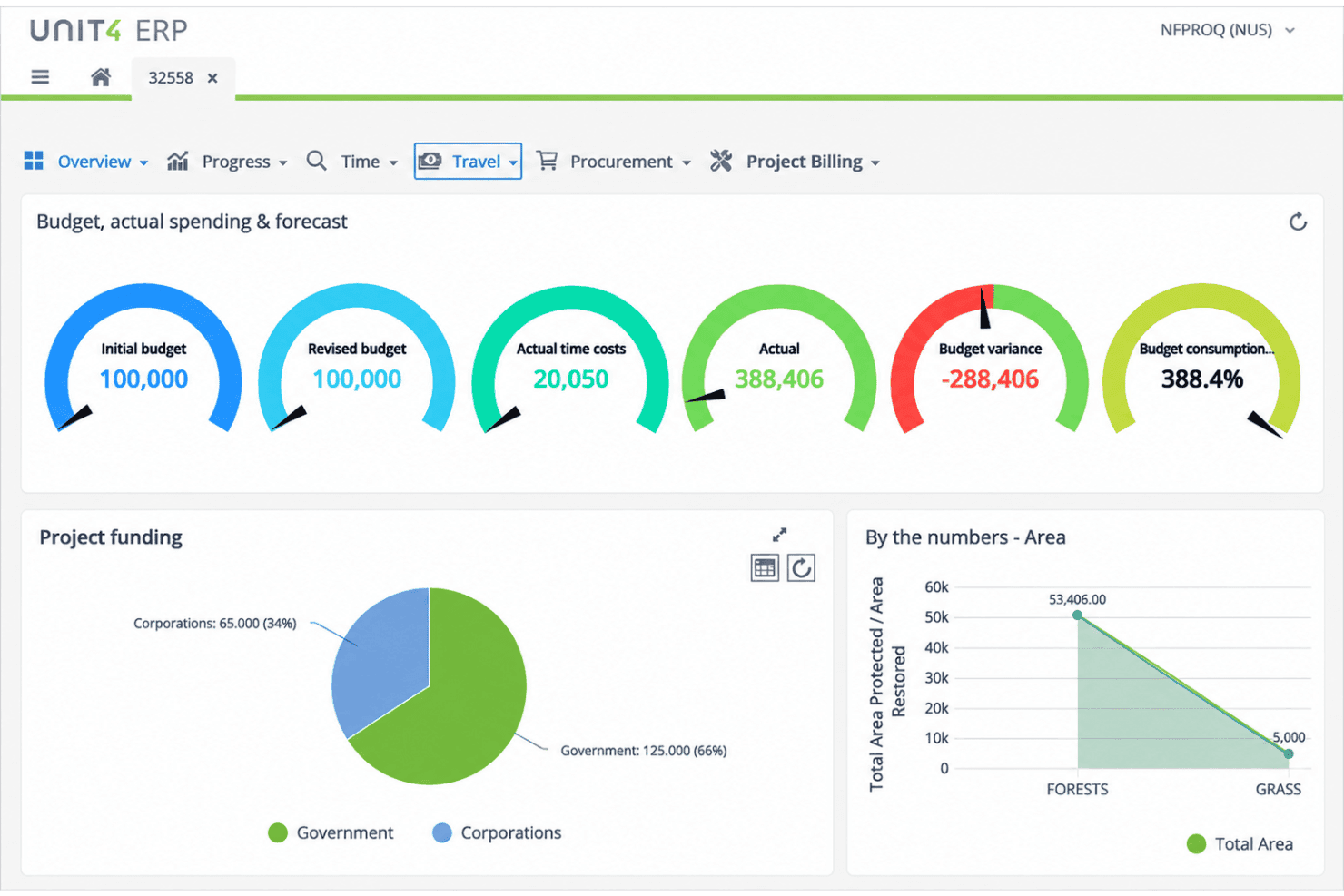
General ledger, accounts payable, accounts receivable, and fixed assets in one place. Multi-dimensional reports give real-time visibility into your financial position.
Project Management and Accounting
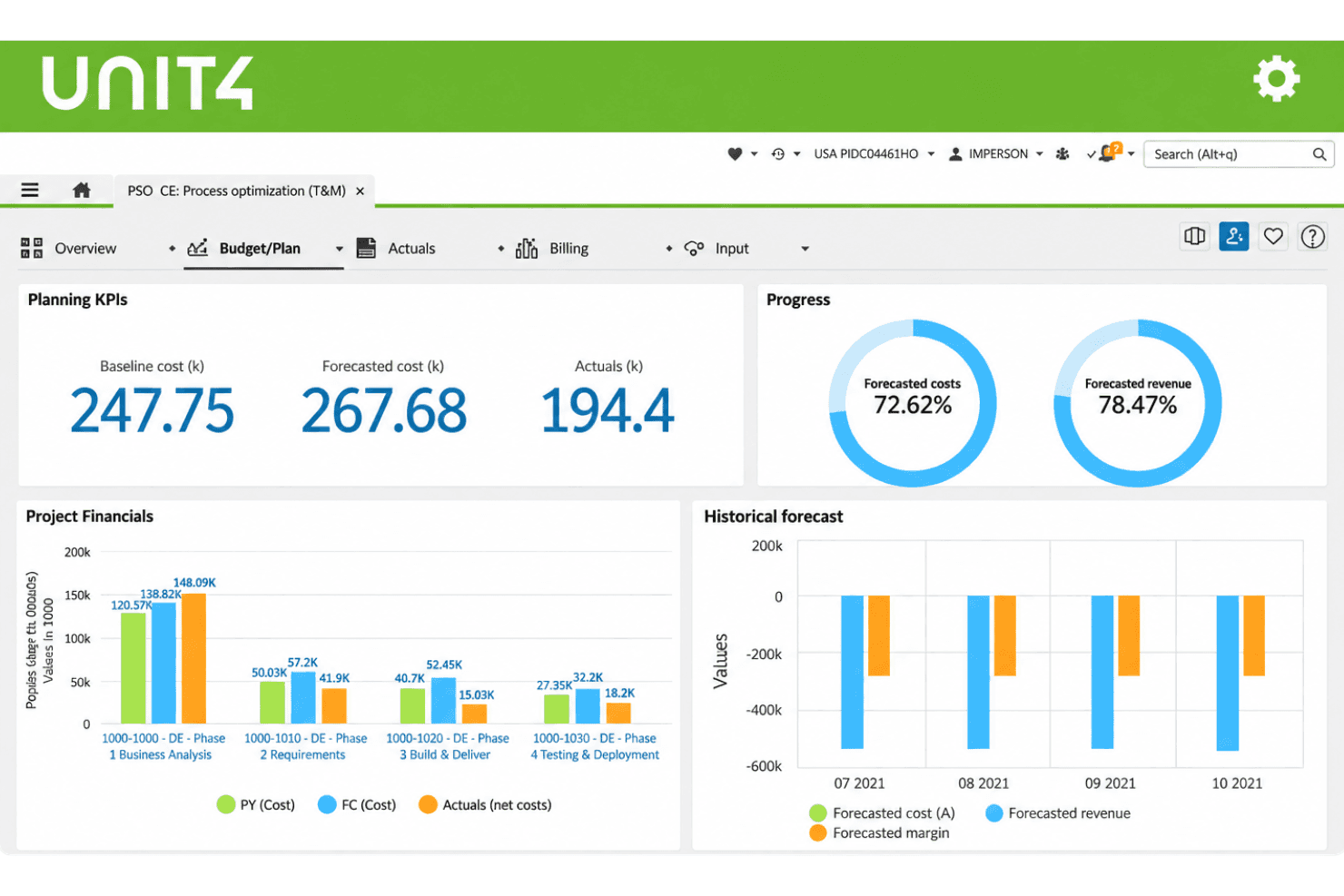
Track project budgets, time, billing, and resources in one system. Live data on project profitability and resource utilization, without the side spreadsheets.
Procurement Management
Manage requisition, purchase orders, supplier catalogs, and approvals end-to-end. Automated workflows tie procurement to budget controls and contract management.
Human Resources and Payroll
Employee records, HR tasks, and payroll in one HCM suite. Self-service covers time off, benefits, and personal data, with talent management alongside it.
Planning, Budgeting, and Forecasting
Rolling budgets, forecasts, and scenario plans update as your data changes. Integrated financial planning lets finance and operations build and approve together.
Reporting and Analytics
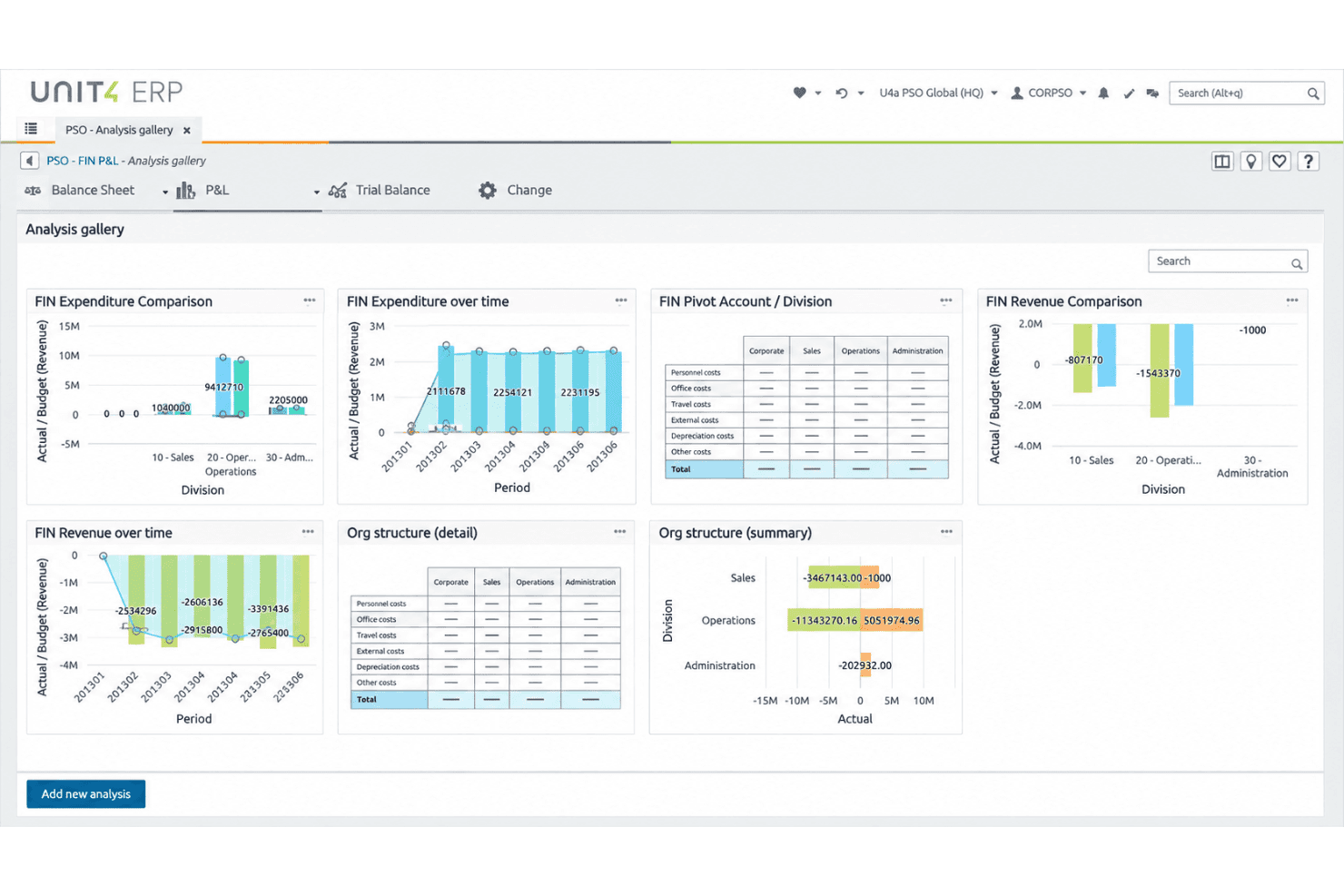
Pre-built and custom financial, operational, and project reports via drag-and-drop. Slice by cost center, project, or region to match how your team reports.
Ease of Use
Unit4 feels approachable from the first login, thanks to a clean, modern interface that doesn’t overwhelm new users. Configuring workflows and personalizing dashboards takes less time than many ERP options, so most teams find onboarding easier. Drag-and-drop reporting tools and guided process prompts keep day-to-day tasks simple, though some finance pros mention complex reporting can take extra steps. Overall, Unit4’s usability makes routine work faster for people-focused teams.
Integrations
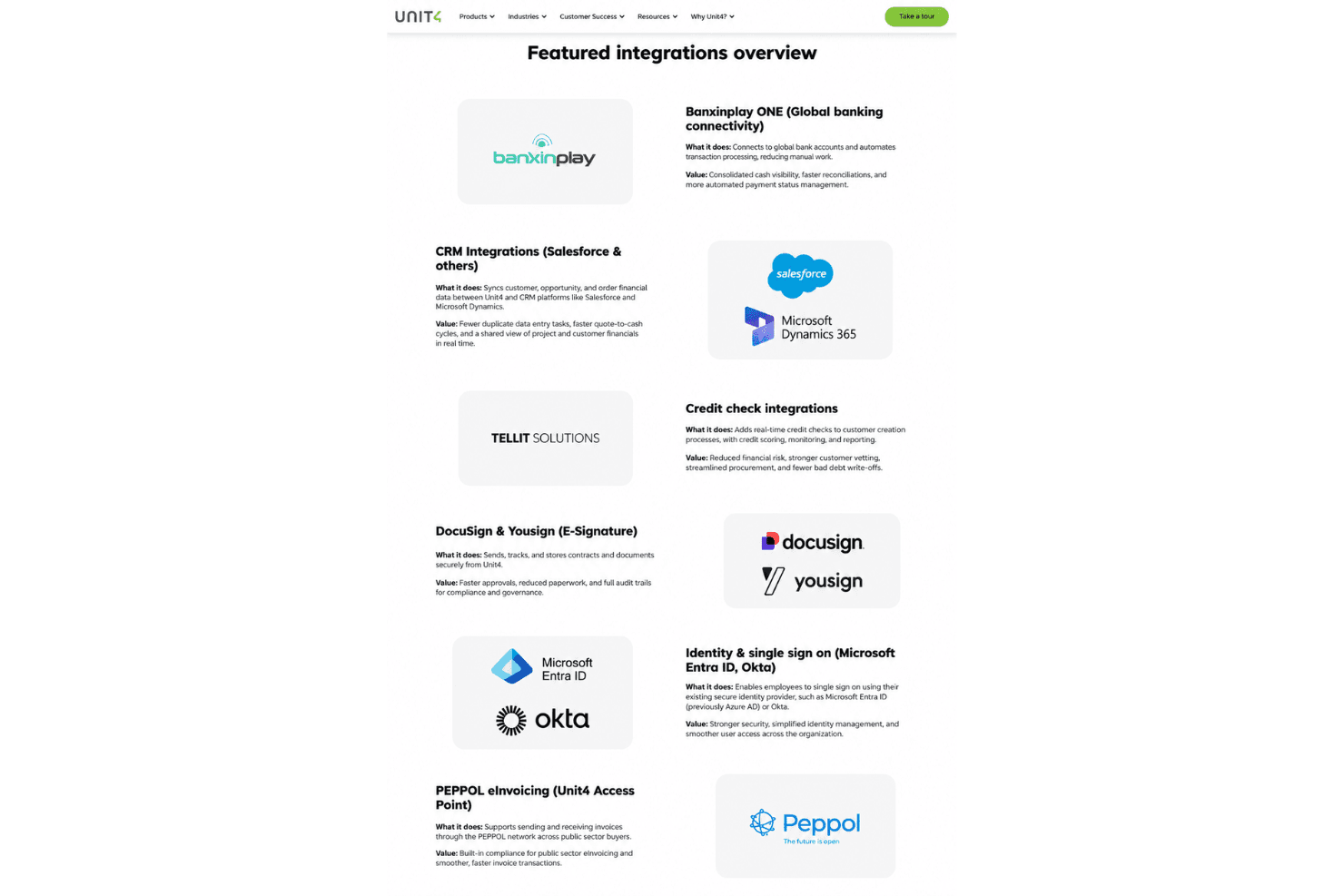
Unit4 integrates with Microsoft Office 365, Microsoft Teams, Salesforce, SAP, Workday, Oracle, Power BI, Google Workspace, Adobe Sign, and DocuSign, among others.
Unit4 also offers an API and connects with third-party integration tools.
Unit4 Specs
- Accounts Payable: Yes
- Accounts Receivable: Yes
- API: Yes
- Budgeting: Yes
- Calendar Management: Yes
- Compliance Tracking: Yes
- Customer Management: Yes
- Dashboard: Yes
- Data Export: Yes
- Data Import: Yes
- Data Visualization: Yes
- Expense Tracking: Yes
- External Integrations: Yes
- Financial Analysis: Yes
- Forecasting: Yes
- Inventory Tracking: Yes
- Multi-Currency: Yes
- Multi-User: Yes
- Notifications: Yes
- Order Management: Yes
- Payroll: Yes
- Project Management: Yes
- Purchase Orders: Yes
- Resource Management: Yes
- Scheduling: Yes
- Supplier Management: Yes
- Task Scheduling/Tracking: Yes
- Third-Party Plugins/Add-Ons: Yes
- Warehouse Management: Yes
- Workflow Management: Yes


