

Cetec ERP -arvostelu: hyvät puolet, huonot puolet, tärkeimmät ominaisuudet ja hinnoittelukatsaus
Curious if Cetec ERP truly streamlines manufacturing ops or just adds noise? I cut through the fluff and reveal where Cetec ERP shines—and where it’ll test your patience.

We review tools independently, and commissions help fund our testing. See our transparency policy, our methodology, or suggest a tool.
Cetec ERP is a cloud-based ERP software built for small to mid-sized manufacturers that need quoting, production scheduling, inventory control, MRP, quality, and accounting running inside one system. I'd consider it if you're outgrowing QuickBooks plus spreadsheets and want shop floor visibility without stitching together separate tools. Compared to NetSuite, Cetec ERP is a better fit when you want manufacturing-specific workflows out of the box and flat per-user pricing, rather than a broader business suite that leans on partner customization and tiered module fees to cover the same production needs. Shops doing electronics assembly and similar discrete work get the tightest fit, since financial accounting sits on the same records as the job.
Cetec ERP Evaluation Summary
4.3/5
- From $50/user/month
- 30-day free trial
Miksi luottaa ohjelmistosuosituksiimme
6,700+
Reviews
20
Industry experts
16+
Evaluation factors
14
Years
Tiimimme on testannut ja arvioinut ohjelmistoja vuodesta 2012 lähtien. Talousjohtajina tiedämme itse, kuinka vaikeaa — ja tärkeää — oikean ohjelmiston valitseminen on.
Tätä opasta varten arvioimme työkaluja käytännön testauksen ja itsenäisen tutkimuksen avulla, pisteyttäen työkalut valintakriteeriemme perusteella.
Arvostelumme perustuvat inhimilliseen toimitukselliseen harkintaamme, eivät myyntipuheeseen.
Cetec ERP Overview
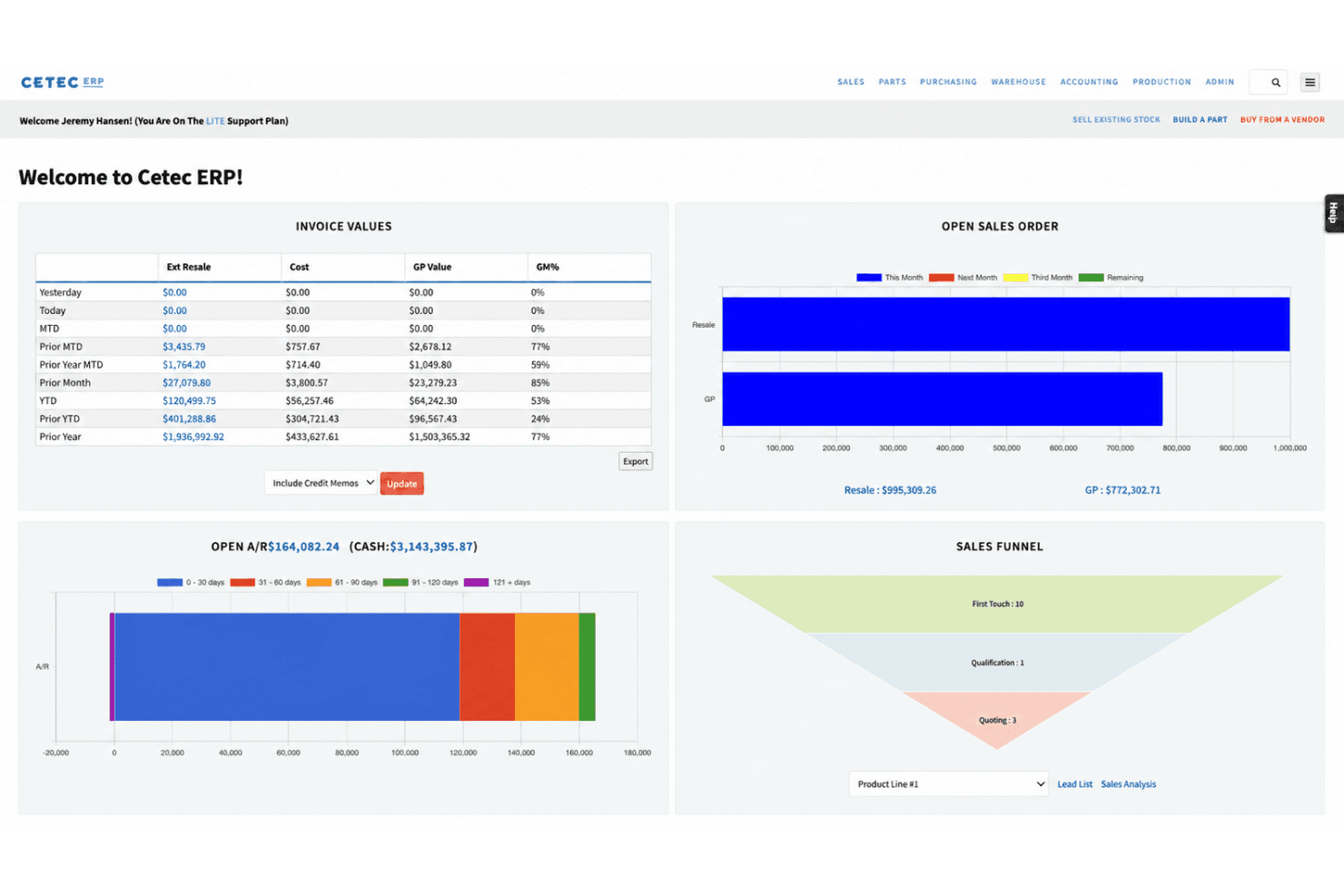
Cetec ERP offers flat per-user pricing, built-in manufacturing features, and real traceability from quoting to invoicing, which makes it an obvious pick if you’re moving away from entry-level accounting tools. I think its deep manufacturing controls, like revision tracking and integrated quality management, are stronger than those in most generic ERP systems. Where it lags is business intelligence—custom reports take work, and the dashboards won’t impress anyone. The interface can feel dated, and onboarding does take commitment, but the functionality outweighs the learning curve for teams who want everything in one system. You’ll get the most value if you need manufacturing workflow coverage out of the box without third-party add-ons.
Pros
- Flat per-user pricing with no hidden module fees
- Deep manufacturing controls like revision and quality tracking
- Strong real-time traceability across quoting to fulfillment
Cons
- Outdated user interface compared to newer ERP platforms
- Limited native reporting and dashboard customization options
- Training and onboarding require significant upfront effort
Is Cetec ERP Right For Your Needs?
Who Would be a Good Fit for Cetec ERP?
Cetec ERP is a good fit for manufacturers and supply chain businesses that need deep shop floor control, strict traceability, and integrated quality management all in one cloud system. Its lower cost, extensive manufacturing modules, and traceability features make it ideal for small to midsize manufacturers, quality managers, and teams that prioritize process oversight. Warehouse management sits in the same system rather than in a separate WMS, which matters if you’re consolidating tools. I think businesses needing advanced inventory, audit trails, or industries under heavy compliance should find the structure and capabilities of Cetec ERP especially valuable.
- Contract ManufacturingCetec ERP supports traceability, work order management, and documentation—key needs for contract manufacturers handling complex jobs.
- Aerospace SuppliersThe system’s audit trails, quality management, and revision controls help aerospace businesses meet tough regulatory and customer requirements.
- Small ManufacturersIts affordable per-user pricing and integrated cloud modules are well-suited for small companies that need detailed production and inventory data.
- Medical Device MakersBuilt-in lot tracking, revision control, and quality management help these businesses address strict compliance mandates.
- Quality Management TeamsIntegrated quality control, audit logging, and documentation tracking help support ISO or customer quality programs.
- Inventory ManagersCetec ERP’s real-time inventory visibility, barcode support, mobile warehousing, and multi-warehouse features address complex stock tracking needs.
Who Would be a Bad Fit for Cetec ERP?
Cetec ERP isn’t suited to service-focused industries, larger enterprises with highly custom processes, or teams needing modern, user-friendly design and deep customization. Retail, project-based service firms, or fast-growing startups needing rapid onboarding could find the interface and structure limiting. If your business depends on frequent customization, lightweight workflows, or managing non-manufacturing operations, Cetec ERP may not align well with your needs.
- Retail ChainsCetec ERP doesn’t focus on retail point-of-sale, multi-store setup, or consumer sales tracking.
- Professional ServicesIt lacks project billing, time tracking, and resource scheduling found in systems designed for consulting or agencies.
- Large EnterprisesHighly complex organizations needing advanced customization, integration, or multi-entity consolidations may outgrow Cetec ERP’s structure.
- Startup TeamsThe dated interface and significant onboarding curve are usually too much for small, fast-paced startup environments.
- NonprofitsCetec ERP doesn’t offer fund accounting, donor management, or grant tracking tools needed for nonprofit financials.
- Field ServicesThe platform doesn’t address dispatch, mobile work order management, or GPS tracking for field service teams.
How We Test & Score Tools
We’ve spent years building, refining, and improving our software testing and scoring system. The rubric is designed to capture the nuances of software selection and what makes a tool effective, focusing on critical aspects of the decision-making process.
Below, you can see exactly how our testing and scoring works across seven criteria. It allows us to provide an unbiased evaluation of the software based on core functionality, standout features, ease of use, onboarding, customer support, integrations, customer reviews, and value for money.
Core Functionality (25% of final scoring)
The starting point of our evaluation is always the core functionality of the tool. Does it have the basic features and functions that a user would expect to see? Are any of those core features locked to higher-tiered pricing plans? At its core, we expect a tool to stand up against the baseline capabilities of its competitors.
Standout Features (25% of final scoring)
Next, we evaluate uncommon standout features that go above and beyond the core functionality typically found in tools of its kind. A high score reflects specialized or unique features that make the product faster, more efficient, or offer additional value to the user.
We also evaluate how easy it is to integrate with other tools typically found in the tech stack to expand the functionality and utility of the software. Tools offering plentiful native integrations, 3rd party connections, and API access to build custom integrations score best.
Ease of Use (10% of final scoring)
We consider how quick and easy it is to execute the tasks defined in the core functionality using the tool. High scoring software is well designed, intuitive to use, offers mobile apps, provides templates, and makes relatively complex tasks seem simple.
Onboarding (10% of final scoring)
We know how important rapid team adoption is for a new platform, so we evaluate how easy it is to learn and use a tool with minimal training. We evaluate how quickly a team member can get set up and start using the tool with no experience. High scoring solutions indicate little or no support is required.
Customer Support (10% of final scoring)
We review how quick and easy it is to get unstuck and find help by phone, live chat, or knowledge base. Tools and companies that provide real-time support score best, while chatbots score worst.
Customer Reviews (10% of final scoring)
Beyond our own testing and evaluation, we consider the net promoter score from current and past customers. We review their likelihood, given the option, to choose the tool again for the core functionality. A high scoring software reflects a high net promoter score from current or past customers.
Value for Money (10% of final scoring)
Lastly, in consideration of all the other criteria, we review the average price of entry level plans against the core features and consider the value of the other evaluation criteria. Software that delivers more, for less, will score higher.
Core Features
Quoting and Order Management
Manufacturing quoting, sales orders, and revisions live in one place. Linked sales management workflows keep every step and version visible to the whole team.
Production Scheduling
Plan, track, and adjust jobs on a built-in scheduling board. Production management runs off visual timelines instead of spreadsheet juggling.
Inventory Control and MRP
Track raw material, WIP, and finished goods in real time to lot or serial number. Inventory management and MRP plan orders straight off the bill of materials.
Quality Management
Quality assurance checks, corrective actions, and traceability from receiving to shipment. NCRs and approval workflows cut mistakes and document compliance.
Revision and Document Control
Attach, manage, and audit product revisions and drawings inside job records. Document management logs every change, so teams work off the right version.
Integrated Accounting
Purchase order, invoicing, payables, and financial reporting in one system. Job and inventory data connect for accurate cost tracking and margin analysis.
Ease of Use
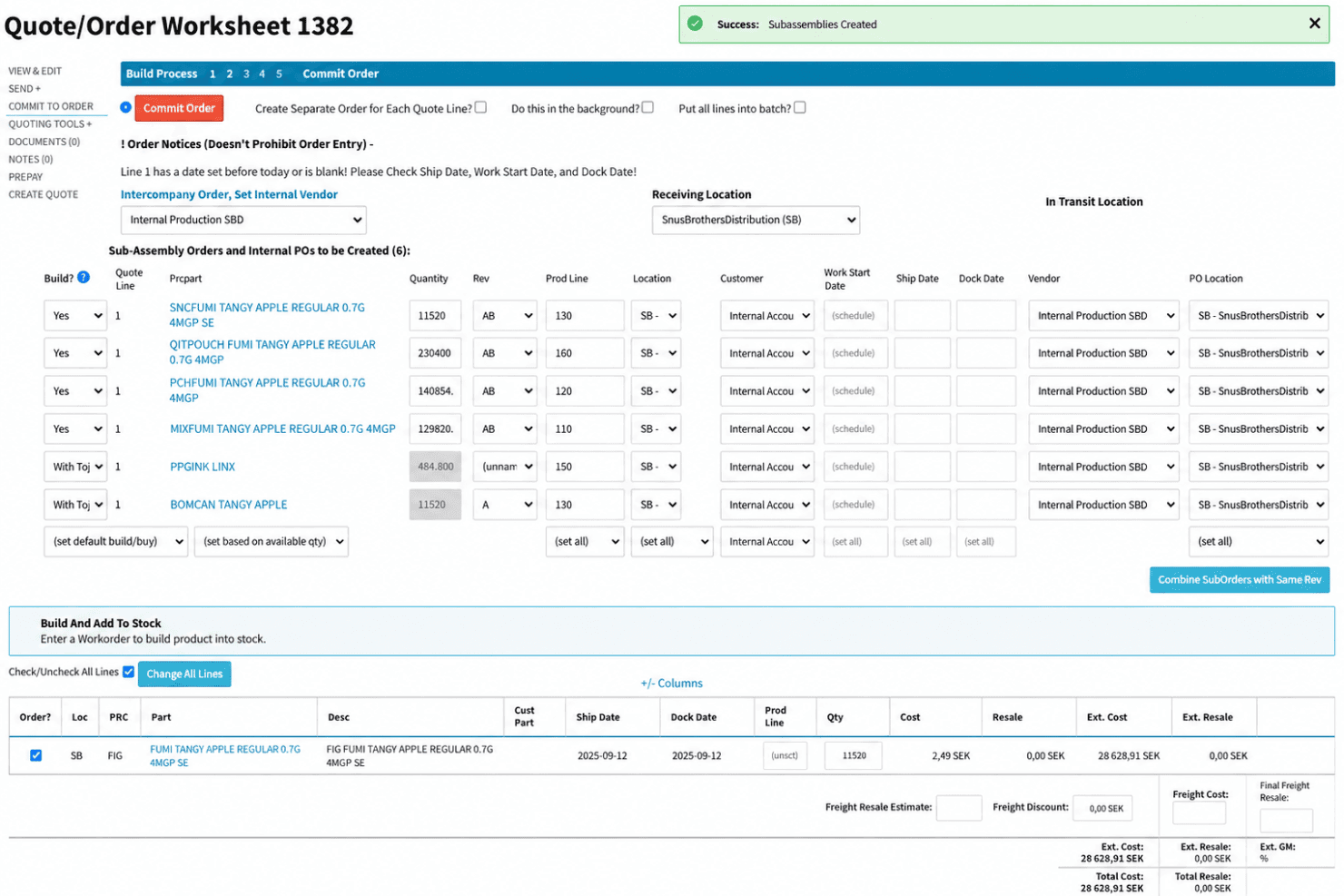
Cetec ERP isn’t the easiest ERP to pick up—the interface feels dated, menus are dense, and building custom reports or dashboards takes some patience. But once you’re past onboarding, the workflows for quoting, scheduling, inventory, and quality management are tightly integrated and logical. Teams who need deep manufacturing features and traceability in one place should find daily use reliable, despite the learning curve.
Integrations
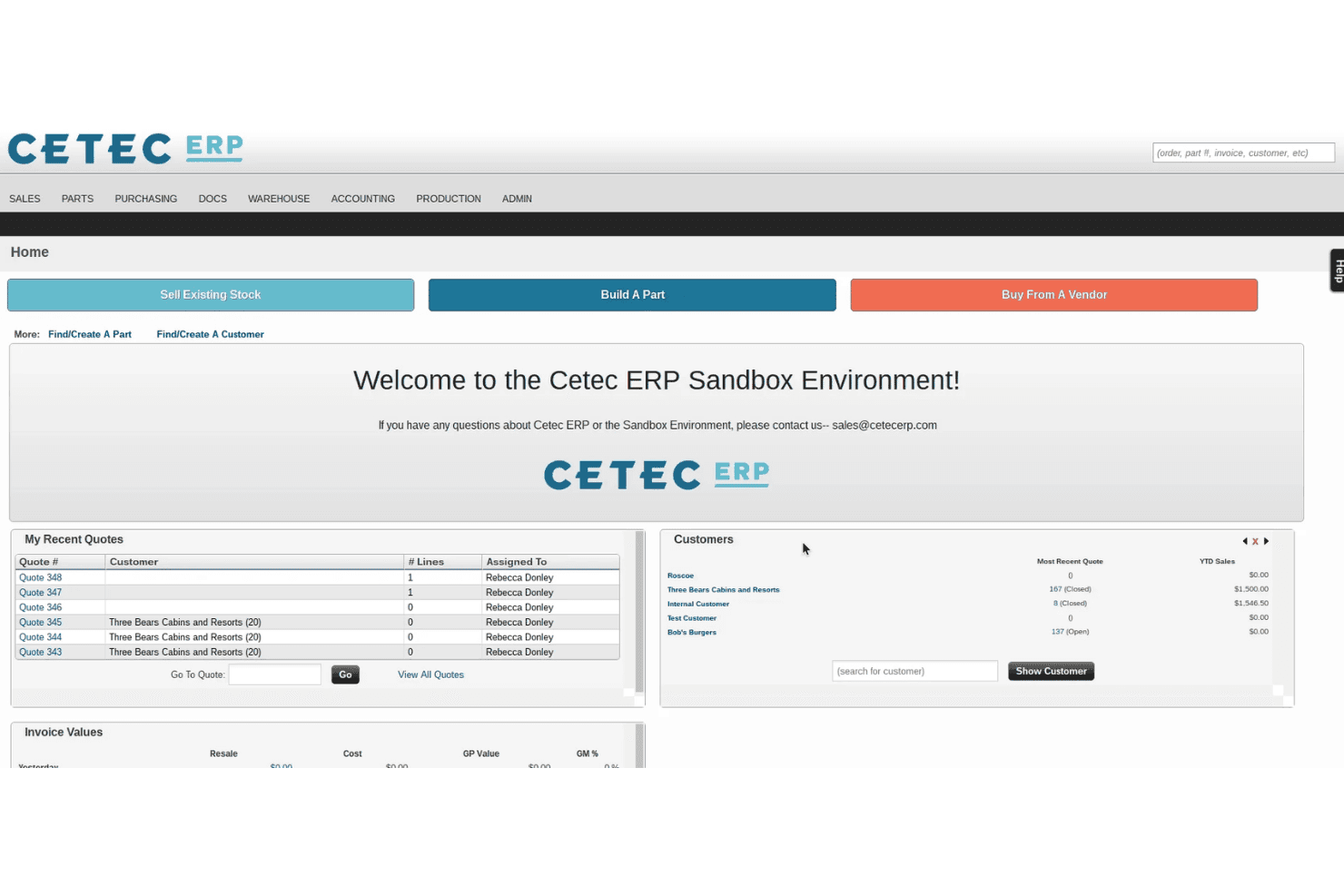
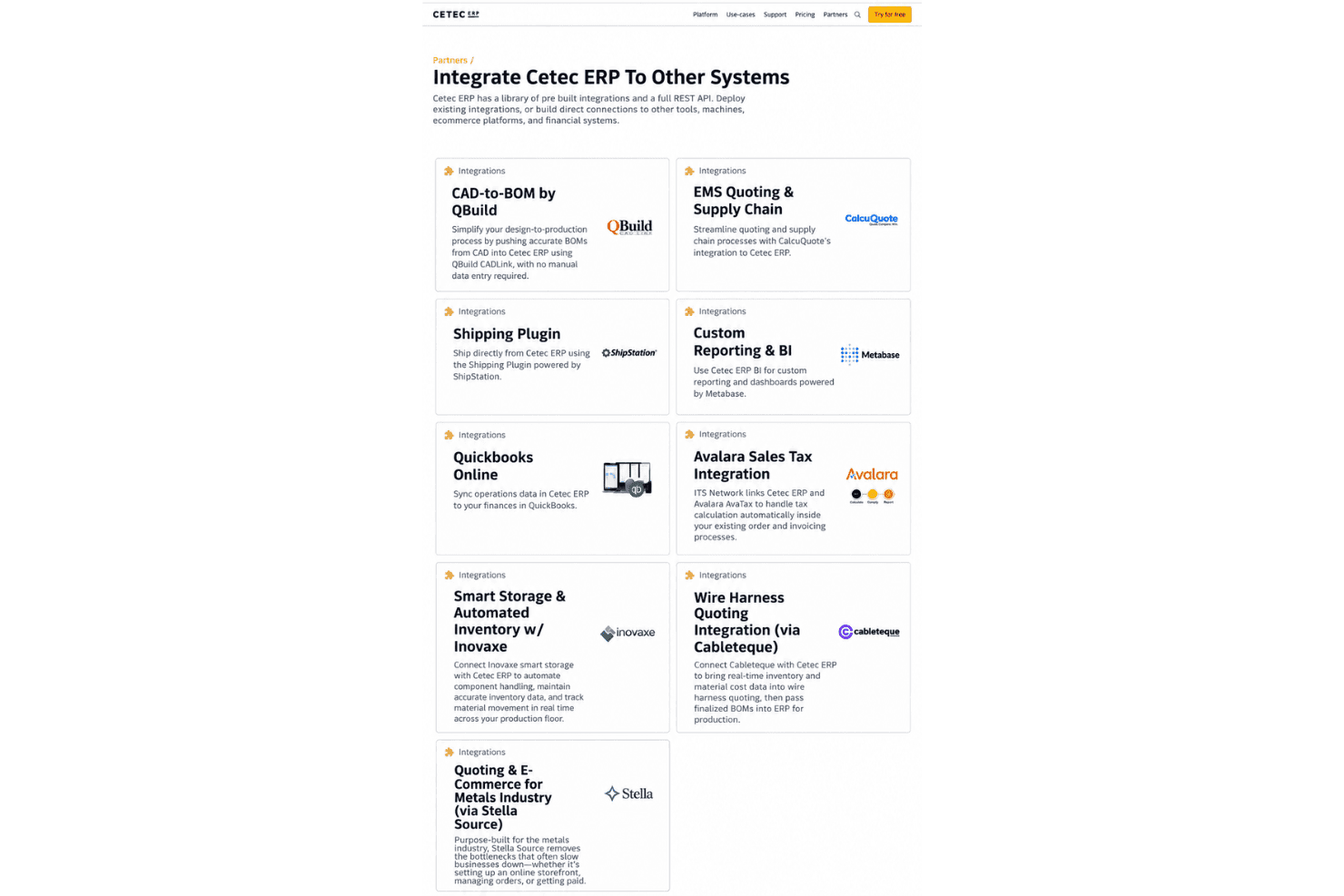
Cetec ERP integrates with QuickBooks Online, Avalara, ShipStation, HubSpot, Microsoft Excel, Zapier, Salesforce, WooCommerce, UPS, and FedEx, among others.
Cetec ERP also offers an open API and supports connections with third-party integration tools like Zapier; the public APIs cover the main record types if you need to build your own.
Cetec ERP Specs
- Accounts Payable: Yes
- Accounts Receivable: Yes
- API: Yes
- Budgeting: Yes
- Calendar Management: Yes
- Compliance Tracking: Yes
- Customer Management: Yes
- Dashboard: Yes
- Data Export: Yes
- Data Import: Yes
- Data Visualization: Yes
- Expense Tracking: Yes
- External Integrations: Yes
- Financial Analysis: Yes
- Forecasting: Yes
- Inventory Tracking: Yes
- Multi-Currency: Yes
- Multi-User: Yes
- Notifications: Yes
- Order Management: Yes
- Payroll: Yes
- Project Management: Yes
- Purchase Orders: Yes
- Resource Management: Yes
- Scheduling: Yes
- Supplier Management: Yes
- Task Scheduling/Tracking: Yes
- Third-Party Plugins/Add-Ons: Yes
- Warehouse Management: Yes
- Workflow Management: Yes


