

OpenEMR-arvostelu: hyvät ja huonot puolet, ominaisuudet ja hinnoittelu selitettynä
OpenEMR erottuu joustavana avoimen lähdekoodin lääketieteellisen laskutuksen ratkaisuna, joka tarjoaa monipuoliset ominaisuudet ja mukautettavuuden ilman lisenssimaksuja.

We review tools independently, and commissions help fund our testing. See our transparency policy, our methodology, or suggest a tool.
OpenEMR is an open-source medical invoicing software built for healthcare practices that need to handle billing, claims processing, and patient records in one place—without paying per-seat licensing fees. I'd consider it if your practice has the IT resources to manage a self-hosted setup and wants full control over its billing configuration. Compared to a paid platform like Kareo, OpenEMR gives you more flexibility to customize workflows and removes recurring subscription costs, making it a practical option for cost-conscious practices willing to invest in the setup.
OpenEMR Evaluation Summary
3.9/5
- Pricing upon request
- Free demo available
Miksi luottaa ohjelmistosuosituksiimme
6,700+
Reviews
20
Industry experts
16+
Evaluation factors
14
Years
Tiimimme on testannut ja arvioinut ohjelmistoja vuodesta 2012 lähtien. Talousjohtajina tiedämme itse, kuinka vaikeaa — ja tärkeää — oikean ohjelmiston valitseminen on.
Tätä opasta varten arvioimme työkaluja käytännön testauksen ja itsenäisen tutkimuksen avulla, pisteyttäen työkalut valintakriteeriemme perusteella.
Arvostelumme perustuvat inhimilliseen toimitukselliseen harkintaamme, eivät myyntipuheeseen.
OpenEMR Overview
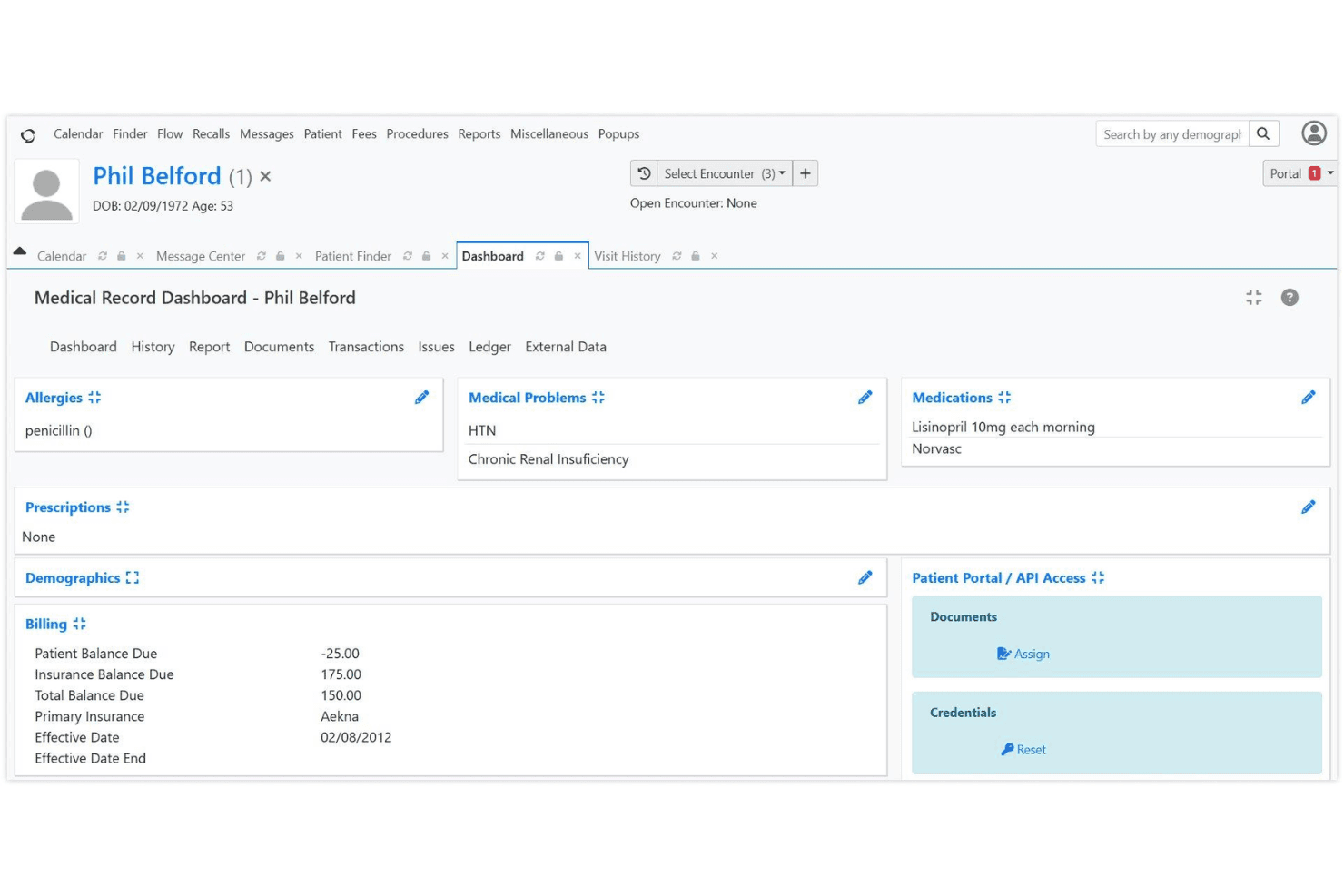
If you’re judging medical invoicing software by flexibility and cost, OpenEMR is hard to beat. Its open-source model means no licensing fees, and you can tailor workflows or reports to your needs. While the interface feels dated and onboarding takes effort, the feature set—claims, scheduling, patient records, and billing—rivals pricier options. Support relies on community forums, so I think it’s best for tech-savvy teams or clinics with IT resources. If you’re comparing options and want control over customization and budget, OpenEMR deserves a close look.
Pros
- No licensing fees for software or updates
- Supports electronic and paper claims billing
- Customizable billing workflows and reporting
Cons
- Billing features are basic for complex needs
- Requires strong IT support for setup and maintenance
- Limited official customer support beyond community forums
Is OpenEMR Right For Your Needs?
Who Would be a Good Fit for OpenEMR?
OpenEMR is a strong choice for organizations that want control over their billing processes, need customizable workflows, and have the technical resources to manage open-source software. It’s especially well-suited for smaller clinics, specialty practices, and nonprofits that want to avoid licensing fees and tailor their invoicing to unique requirements. If your team values flexibility and can handle some IT overhead, OpenEMR’s feature set and cost structure make it a compelling option.
- Small PracticesOpenEMR’s no-cost licensing and customizable billing suit small budgets.
- Community Health CentersThe open-source model supports grant-funded clinics with limited resources.
- Behavioral Health ProvidersCustomizable templates and billing workflows fit specialized documentation needs.
- Rural ClinicsOffline access and local hosting options help clinics with unreliable internet.
- Medical Billing DepartmentsDetailed reporting and claims management support in-house billing teams.
- Nonprofit Healthcare OrganizationsCost savings and open-source flexibility align with nonprofit priorities.
Who Would be a Bad Fit for OpenEMR?
OpenEMR isn’t ideal for organizations that need advanced billing automation, premium support, or seamless integration with a wide range of third-party systems. Large enterprises, hospital networks, and teams without dedicated IT support may find the platform’s setup and maintenance requirements too demanding. If you need out-of-the-box automation or extensive vendor support, OpenEMR may not meet your needs.
- Large Hospital NetworksComplex billing and compliance needs exceed OpenEMR’s core capabilities.
- Multi-Specialty GroupsLacks advanced automation for high-volume, multi-specialty billing.
- Enterprise Healthcare SystemsLimited integration options hinder large-scale interoperability.
- Solo Practitioners Without ITSetup and maintenance require technical skills solo providers may lack.
- Dental PracticesOpenEMR’s billing features are not tailored for dental coding.
- Urgent Care ChainsFast-paced, multi-location operations need more automation and support.
How We Test & Score Tools
We’ve spent years building, refining, and improving our software testing and scoring system. The rubric is designed to capture the nuances of software selection and what makes a tool effective, focusing on critical aspects of the decision-making process.
Below, you can see exactly how our testing and scoring works across seven criteria. It allows us to provide an unbiased evaluation of the software based on core functionality, standout features, ease of use, onboarding, customer support, integrations, customer reviews, and value for money.
Core Functionality (25% of final scoring)
The starting point of our evaluation is always the core functionality of the tool. Does it have the basic features and functions that a user would expect to see? Are any of those core features locked to higher-tiered pricing plans? At its core, we expect a tool to stand up against the baseline capabilities of its competitors.
Standout Features (25% of final scoring)
Next, we evaluate uncommon standout features that go above and beyond the core functionality typically found in tools of its kind. A high score reflects specialized or unique features that make the product faster, more efficient, or offer additional value to the user.
We also evaluate how easy it is to integrate with other tools typically found in the tech stack to expand the functionality and utility of the software. Tools offering plentiful native integrations, 3rd party connections, and API access to build custom integrations score best.
Ease of Use (10% of final scoring)
We consider how quick and easy it is to execute the tasks defined in the core functionality using the tool. High scoring software is well designed, intuitive to use, offers mobile apps, provides templates, and makes relatively complex tasks seem simple.
Onboarding (10% of final scoring)
We know how important rapid team adoption is for a new platform, so we evaluate how easy it is to learn and use a tool with minimal training. We evaluate how quickly a team member can get set up and start using the tool with no experience. High scoring solutions indicate little or no support is required.
Customer Support (10% of final scoring)
We review how quick and easy it is to get unstuck and find help by phone, live chat, or knowledge base. Tools and companies that provide real-time support score best, while chatbots score worst.
Customer Reviews (10% of final scoring)
Beyond our own testing and evaluation, we consider the net promoter score from current and past customers. We review their likelihood, given the option, to choose the tool again for the core functionality. A high scoring software reflects a high net promoter score from current or past customers.
Value for Money (10% of final scoring)
Lastly, in consideration of all the other criteria, we review the average price of entry level plans against the core features and consider the value of the other evaluation criteria. Software that delivers more, for less, will score higher.
Core Features
Integrated Medical Billing
OpenEMR supports HIPAA-compliant electronic and paper claims billing. Users can manage claims, payments, and remittances from a single dashboard.
Advanced Scheduling
Create repeating appointments, automate check-in workflows, and send patient reminders. This helps reduce no-shows and keeps billing aligned with visit schedules.
CMS Reporting
Generate compliance and financial reports with a few clicks. These reports help track billing performance and meet regulatory requirements.
Customizable Billing Workflows
Tailor billing processes to fit your clinic’s needs, including custom codes and templates. This flexibility supports unique payer or specialty requirements.
Patient Statements and Invoices
Produce detailed patient statements and invoices directly from the platform. This feature streamlines communication and payment collection.
Security and Access Controls
HIPAA-friendly access controls and password hashing protect sensitive billing data. You can assign permissions by user role to limit access to financial information.
Ease of Use
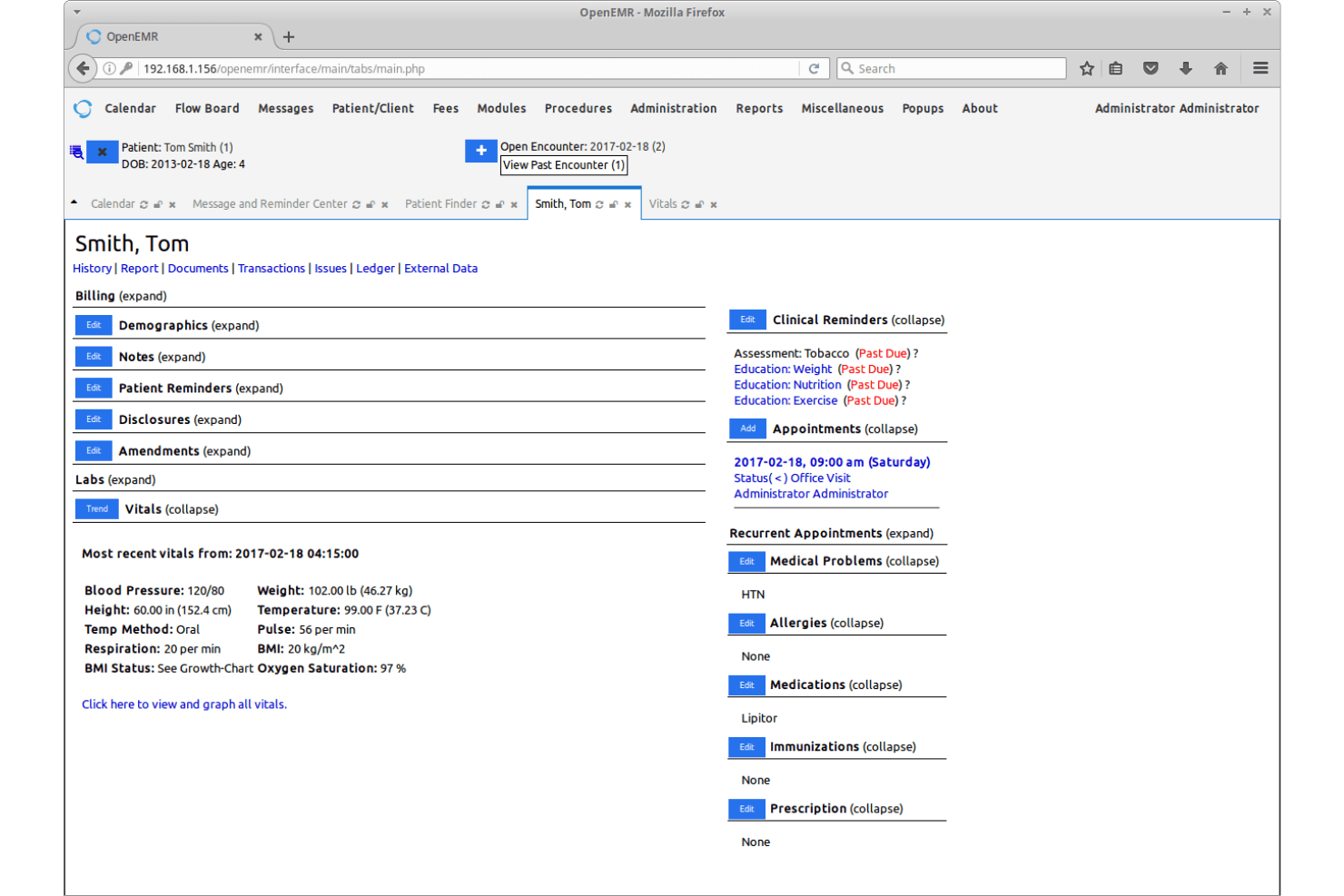
OpenEMR’s user interface feels dated and can be overwhelming for new users, especially compared to more modern medical invoicing software. Many users mention that setup and navigation require a bit of a learning curve, and documentation can be dense. However, once configured, the workflows are logical and customizable, letting experienced teams manage billing efficiently. If your team is comfortable with open-source EMR platforms and values flexibility over user-friendly aesthetics, you’ll find OpenEMR’s usability acceptable for daily invoicing tasks.

Integrations
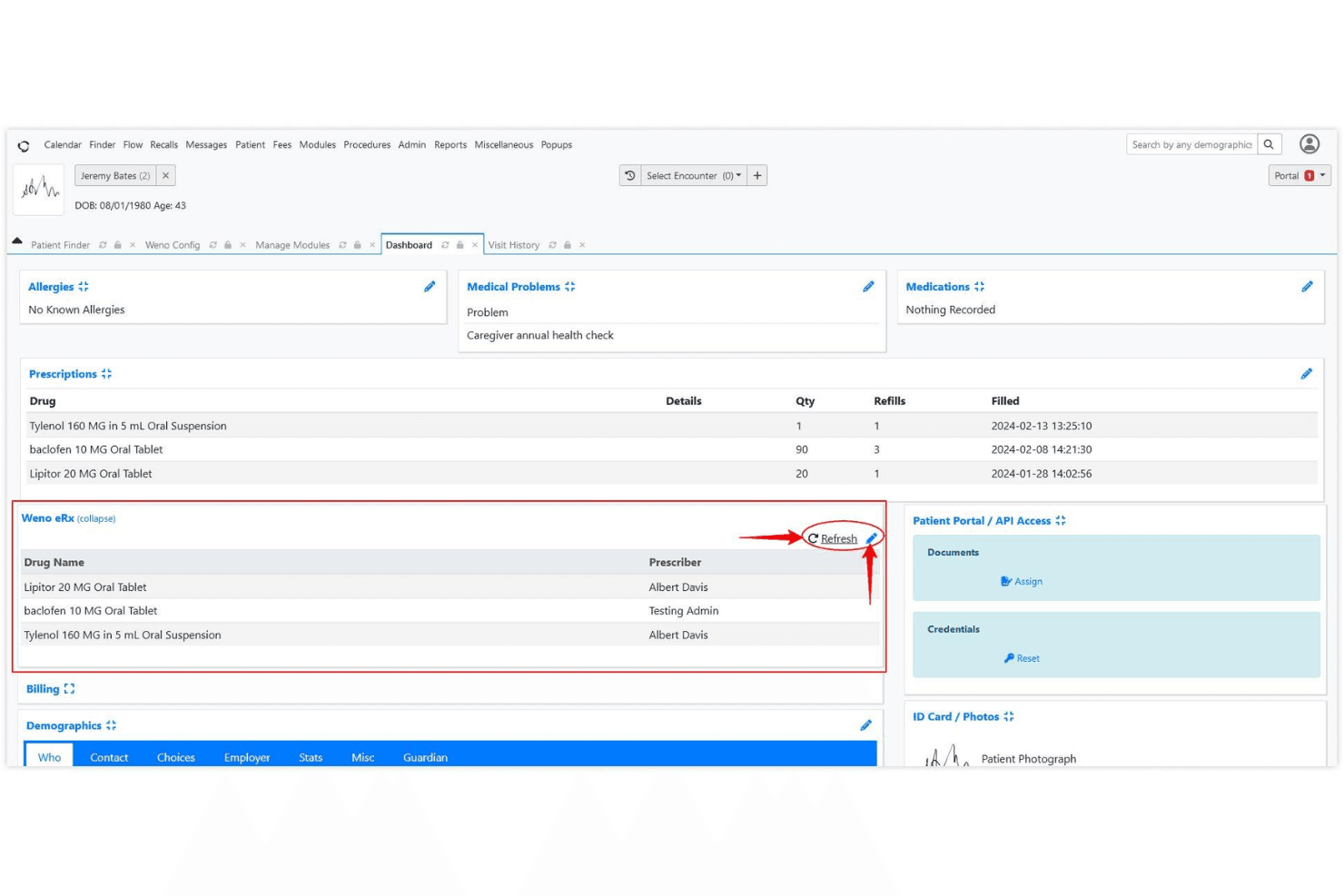
OpenEMR integrates with e-prescribing tools like NewCrop, Weno Exchange, and Allscripts, and can connect to labs such as Quest Diagnostics and LabCorp through third-party interfaces. These integrations often require additional setup and are not always available out of the box.
OpenEMR also offers REST and FHIR APIs, allowing custom integrations and extended functionality.
OpenEMR Specs
- API: Yes
- Appointment Scheduling: Yes
- Athlete Management: No
- Audit Management: Yes
- Calendar Management: No
- Compliance Tracking: Yes
- Customer Management: Yes
- Dashboard: No
- Data Export: Yes
- Data Import: Yes
- Data Visualization: No
- Electronic Prescribing: Yes
- External Integrations: Yes
- File Sharing: No
- File Transfer: No
- Health Management: No
- HIPAA Compliance: Yes
- Inventory Tracking: No
- Multi-User: Yes
- Notifications: Yes
- Organization Management: No
- Patient Management: Yes
- Project Management: No
- Regulatory Alerts: Yes
- Risk Assessment: Yes
- Scheduling: No
- Supplier Management: No


