

SAP Analytics Cloud -arvostelu: hyvät ja huonot puolet, ominaisuudet ja hinnoittelu
SAP Analytics Cloud erottuu edukseen tehokkailla tietojen visualisointi- ja ennakoivan analytiikan työkaluillaan, mikä tekee siitä erinomaisen valinnan dynaamisten talousnäkemysten luomiseen.

We review tools independently, and commissions help fund our testing. See our transparency policy, our methodology, or suggest a tool.
SAP Analytics Cloud is statistical analysis software built for finance and business teams that need to combine BI reporting, financial planning, and predictive analytics in a single platform. I'd consider it most seriously if your organization runs SAP ERP or S/4HANA—the native integration gives it a clear edge over something like Tableau, which requires additional connectors and doesn't include built-in planning capabilities. If you need one tool that handles both analytics and financial planning without stitching together separate systems, SAP Analytics Cloud is worth a serious look.
SAP Analytics Cloud Evaluation Summary

4.3/5
- Pricing upon request
- Free demo available
Miksi luottaa ohjelmistosuosituksiimme
6,700+
Reviews
20
Industry experts
16+
Evaluation factors
14
Years
Tiimimme on testannut ja arvioinut ohjelmistoja vuodesta 2012 lähtien. Talousjohtajina tiedämme itse, kuinka vaikeaa — ja tärkeää — oikean ohjelmiston valitseminen on.
Tätä opasta varten arvioimme työkaluja käytännön testauksen ja itsenäisen tutkimuksen avulla, pisteyttäen työkalut valintakriteeriemme perusteella.
Arvostelumme perustuvat inhimilliseen toimitukselliseen harkintaamme, eivät myyntipuheeseen.
SAP Analytics Cloud Overview
In my opinion, SAP Analytics Cloud is a solid choice for a BI tool in financial data analysis, particularly for finance departments in mid-sized and large enterprises. Its features, including predictive analytics and data visualization, set it apart from competitors, such as Microsoft Power BI. While its onboarding is excellent, the interface can be a bit complex for new users. I think it's best suited for teams that need detailed financial insights and are ready to invest time in mastering the tool. If you're looking for a solution with strong integration capabilities, SAP Analytics Cloud should be on your list.
Pros
- You get powerful predictive analytics for better decision-making.
- Its data visualization tools are top-notch for your reporting needs.
- The onboarding process is smooth and helps your team get started quickly.
Cons
- The interface can feel complex for new users.
- You might find the learning curve steep if you're not tech-savvy.
- Some users say the platform can lag with large datasets.
Is SAP Analytics Cloud Right For Your Needs?
Who Would be a Good Fit for SAP Analytics Cloud?
SAP Analytics Cloud is great for finance teams in mid-sized and large enterprises that need detailed data insights. If your team relies on predictive analytics and data visualization to make informed decisions, this tool's capabilities will serve you well. It's particularly useful in sectors such as health care and manufacturing, where analyzing complex datasets is necessary. The onboarding process helps your team quickly develop a working knowledge of its standout features and integrations, including SAP HANA Cloud, SAP BW, and SAP Datasphere, strengthening your financial planning and analysis efforts.
- Finance DepartmentsFinance teams will benefit from its AI-assisted predictive analytics for more accurate forecasting.
- Manufacturing CompaniesManufacturing companies can use it to analyze production data and improve operational efficiency.
- Retail ChainsRetail companies can gain insights into sales trends and customer behavior with advanced data visualization.
- Health Care OrganizationsHealth care facilities can analyze patient data to improve resource allocation and service delivery.
- Senior Financial AnalystsSenior analysts can get detailed insights using natural language with its strong analytics tools, facilitating strategic decision-making.
- Large EnterprisesLarger companies can leverage its capabilities for extensive financial planning and performance analysis.
Who Would be a Bad Fit for SAP Analytics Cloud?
SAP Analytics Cloud might not suit small businesses or startups with limited budgets and simple data management needs. If you're a small team without technical expertise, the complex interface and learning curve could slow you down. Industries that don't rely heavily on data analysis, such as small local shops, might find it overwhelming and unnecessary. If your team requires quick, straightforward tools without advanced features, this software might not align with your goals.
- Small StartupsThe complex features may overwhelm your team and exceed your budget.
- Local Retail StoresThe advanced tools might be unnecessary if you don't rely on data analysis.
- Non-Technical TeamsIf your team is less tech-savvy, you might struggle with the user interface and steep learning curve.
- FreelancersThis tool might be more than you need if you're looking for simple, quick insights.
- Artisan BusinessesThe advanced analytics could be overly complex for more straightforward operations.
- Budget-Conscious OrganizationsThe investment might not justify its benefits if your budget is tight.
How We Test & Score Tools
We’ve spent years building, refining, and improving our software testing and scoring system. The rubric is designed to capture the nuances of software selection and what makes a tool effective, focusing on critical aspects of the decision-making process.
Below, you can see exactly how our testing and scoring works across seven criteria. It allows us to provide an unbiased evaluation of the software based on core functionality, standout features, ease of use, onboarding, customer support, integrations, customer reviews, and value for money.
Core Functionality (25% of final scoring)
The starting point of our evaluation is always the core functionality of the tool. Does it have the basic features and functions that a user would expect to see? Are any of those core features locked to higher-tiered pricing plans? At its core, we expect a tool to stand up against the baseline capabilities of its competitors.
Standout Features (25% of final scoring)
Next, we evaluate uncommon standout features that go above and beyond the core functionality typically found in tools of its kind. A high score reflects specialized or unique features that make the product faster, more efficient, or offer additional value to the user.
We also evaluate how easy it is to integrate with other tools typically found in the tech stack to expand the functionality and utility of the software. Tools offering plentiful native integrations, 3rd party connections, and API access to build custom integrations score best.
Ease of Use (10% of final scoring)
We consider how quick and easy it is to execute the tasks defined in the core functionality using the tool. High scoring software is well designed, intuitive to use, offers mobile apps, provides templates, and makes relatively complex tasks seem simple.
Onboarding (10% of final scoring)
We know how important rapid team adoption is for a new platform, so we evaluate how easy it is to learn and use a tool with minimal training. We evaluate how quickly a team member can get set up and start using the tool with no experience. High scoring solutions indicate little or no support is required.
Customer Support (10% of final scoring)
We review how quick and easy it is to get unstuck and find help by phone, live chat, or knowledge base. Tools and companies that provide real-time support score best, while chatbots score worst.
Customer Reviews (10% of final scoring)
Beyond our own testing and evaluation, we consider the net promoter score from current and past customers. We review their likelihood, given the option, to choose the tool again for the core functionality. A high scoring software reflects a high net promoter score from current or past customers.
Value for Money (10% of final scoring)
Lastly, in consideration of all the other criteria, we review the average price of entry level plans against the core features and consider the value of the other evaluation criteria. Software that delivers more, for less, will score higher.
Core Features
Data Visualization: Create easy-to-understand charts and graphs to turn your business data into actionable insights. This allows you to quickly spot trends and insights.
Predictive Analytics: Use historical data to create predictive models. This helps you make informed decisions and plan.
Financial Planning: Simplify your budgeting and forecasting processes. Your team can collaborate effectively and adjust plans in real time.
Reporting Tools: Generate detailed reports with a few clicks and share insights across your organization to keep everyone informed.
Data Connectivity: Access data from multiple sources in one place. This reduces data silos, simplifying data preparation.
Collaboration: Work with your team in real time. The platform's collaboration features mean you can share insights and make joint decisions faster.
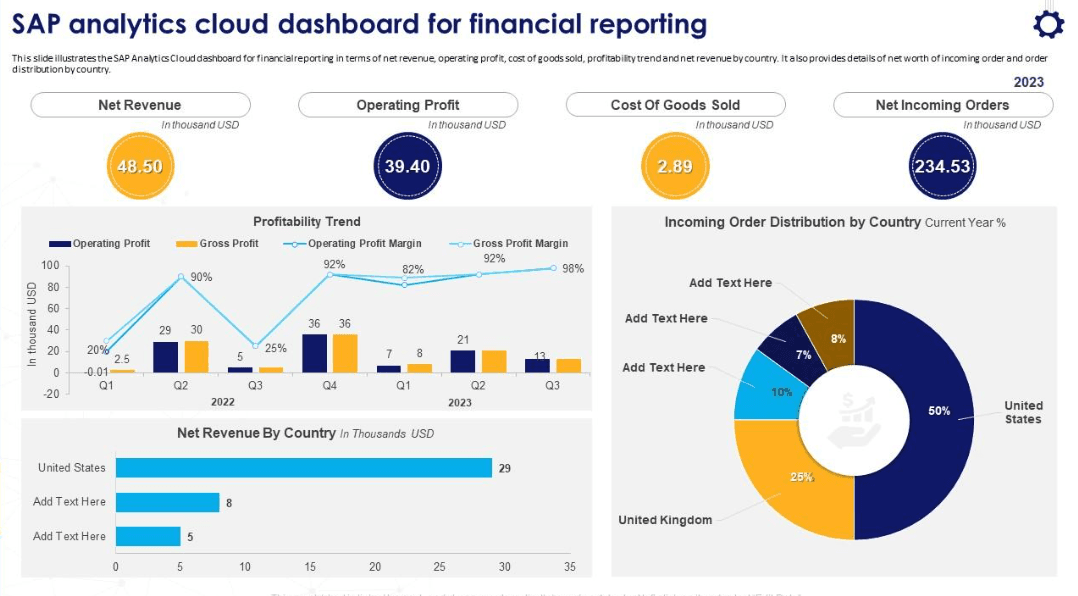
Ease of Use
SAP Analytics Cloud provides a user-friendly interface, but those not familiar with data tools may find it complex. Your team might initially find the learning curve steep, but its thorough onboarding process can help ease the transition. Once your team adapts to it, the intuitive design and drag-and-drop features make data analysis more accessible. The platform's real-time collaboration tools also increase its usability, enabling your team to work together efficiently.

Integrations
SAP Analytics Cloud integrates with SAP S/4HANA, SAP BusinessObjects, Microsoft Excel, Google Analytics, Salesforce, Concur, SAP SuccessFactors, SAP Ariba, Microsoft PowerPoint, and Microsoft Office 365. It also offers an API for custom integrations and connects with third-party integration tools.
SAP Analytics Cloud Specs
- A/B Testing: Yes
- AI Integration: No
- Analytics: No
- API: Yes
- Calendar Management: No
- Comparative Reporting: No
- Conversion Tracking: Yes
- Custom Reports: No
- Dashboard: No
- Data Export: Yes
- Data Import: Yes
- Data Mining: No
- Data Visualization: Yes
- External Integrations: Yes
- Forecasting: Yes
- Historical Data Analysis: No
- Keyword Tracking: Yes
- Link Tracking: Yes
- Multi-Site: Yes
- Multi-User: Yes
- Notifications: Yes
- Referral Tracking: Yes
- Scenario Planning: No
- Scheduling: No
- SEO: Yes
- Time Series Modeling: No
- Workflow Management: No

