

Avis sur le logiciel RH et paie Gusto pour 2026
Gusto simplifie la gestion RH et la paie grâce à son interface conviviale et ses fonctionnalités complètes, en faisant un choix privilégié pour les propriétaires de petites entreprises recherchant l’efficacité.

Nous évaluons les outils indépendamment ; les commissions aident à financer nos tests. Consultez notre politique de transparence et notre méthodologie.
Gusto is a HR and payroll provider that helps you manage employee pay, benefits, and compliance. It integrates easily with leading accounting tools like QuickBooks, Xero, and FreshBooks, ensuring efficient data flow across systems.
Gusto is ideal for small to medium-sized businesses—especially those in tech companies or creative agencies who need an efficient way to manage employee details and payroll without the hassle. Overall, the software helps finance professionals maintain payroll accuracy, minimize manual input, and speed up the month-end close.
In this Gusto review, you’ll get a quick breakdown of the software’s core features, pros and cons, ideal use cases, pricing, and more. If payroll tasks slow down your month-end process, this one’s worth a closer look.
Pourquoi faire confiance à nos recommandations de logiciels
6,700+
Reviews
20
Industry experts
16+
Evaluation factors
14
Years
Nos avis reflètent notre jugement indépendant — et non un argumentaire de vente. Découvrez comment nous restons transparents.
Pour ce guide, nous avons évalué les outils grâce à des tests pratiques et une recherche indépendante, en notant les outils selon nos critères de sélection.
Nos avis reflètent notre jugement éditorial humain, et non un argumentaire de vente.
Gusto Evaluation Summary
4.6/5
- From $49/month + $6/month/user
- Free demo available
Gusto Overview
Gusto excels as an HR and payroll software with its intuitive interface and advanced feature set. Compared to other tools, it offers excellent value with seamless integration options and competitive pricing.
The software offers a strong core feature set, including automated payroll processing, contractor payments, and benefits administration. These capabilities make it an ideal fit for service-based firms or companies with hybrid workforces. However, businesses that require in-depth customization or niche compliance tools may find its offerings less advanced than those of more specialized enterprise platforms.
Overall, Gusto stands out as a reliable, efficient HR solution that prioritizes simplicity and user experience—making it a smart choice for growing businesses focused on operational efficiency.
Pros
- Well-organized dashboard makes it easy for finance teams to onboard quickly.
- The platform streamlines payroll processing with automatic calculations, direct deposits, and end-to-end tax filing.
- Simplifies benefits management by offering integrated access to health insurance, 401(k) plans, and commuter benefit.
Cons
- While support is generally helpful, users may experience delays in response during peak periods.
- Reporting lacks the customization and depth of data analytics required for larger corporations and enterprises.
- Limited flexibility for tailoring workflows, fields, or integrations.
Comment nous testons et évaluons les outils
Nous avons passé des années à construire, affiner et améliorer notre système de test et d’évaluation des logiciels. Notre grille vise à saisir toute la subtilité de la sélection logicielle et les facteurs déterminant l’efficacité d’un outil, en mettant l’accent sur les aspects essentiels du processus de décision. Ci-dessous, vous pouvez voir exactement comment notre test et notre notation fonctionnent selon sept critères. Cela nous permet de fournir une évaluation impartiale des logiciels sur la base des fonctionnalités principales, des fonctionnalités distinctives, de la facilité d’utilisation, de la prise en main, du service client, des intégrations, des avis clients et du rapport qualité/prix.
Fonctionnalité principale (25 % de la note finale)
Le point de départ de notre évaluation est toujours la fonctionnalité principale de l’outil. Dispose-t-il des caractéristiques de base attendues ? Certaines de ces fonctions de base sont-elles réservées aux plans tarifaires supérieurs ? Fondamentalement, nous attendons d’un outil qu’il soit au moins l’égal de ses concurrents en capacités essentielles.
Fonctionnalités Distinctives (25 % de la note finale)
Ensuite, nous évaluons les fonctionnalités rares ou uniques, allant au-delà de la fonctionnalité principale habituellement trouvée dans ce type d’outil. Un score élevé traduit des fonctionnalités spécialisées ou innovantes qui rendent le produit plus rapide, plus efficace, ou apportent une valeur supplémentaire à l’utilisateur. Nous évaluons aussi la facilité d’intégration avec d’autres outils courants de l’écosystème technologique pour étendre les capacités du logiciel. Les outils offrant de nombreuses intégrations natives, des connexions tierces et un accès API pour des intégrations personnalisées obtiennent le meilleur score.
Facilité d’utilisation (10 % de la note finale)
Nous considérons la rapidité et la facilité d’exécution des tâches essentielles avec l’outil. Un logiciel bien conçu, intuitif, proposant des applications mobiles, des modèles et permettant de simplifier des tâches complexes obtient la meilleure note.
Prise en Main (10 % de la note finale)
Nous savons combien il est important d’adopter rapidement une nouvelle plateforme, c’est pourquoi nous évaluons la facilité d’apprentissage et d’utilisation du logiciel avec un minimum de formation. Nous évaluons la rapidité de mise en place d’un nouveau membre d’équipe sans expérience. Un outil ayant un bon score requiert peu voire aucun support pour la prise en main.
Service Client (10 % de la note finale)
Nous évaluons s’il est rapide et facile d’obtenir de l’aide ou de dépanner par téléphone, chat en direct ou base de connaissances. Les outils et entreprises offrant une assistance en temps réel obtiennent le meilleur score, tandis que les chatbots sont moins bien notés.
Avis Clients (10 % de la note finale)
Au-delà de nos propres tests et évaluations, nous prenons en compte le net promoter score fourni par les clients actuels et passés. Nous vérifions leur probabilité de recommander l’outil et d’en refaire le choix pour ses fonctionnalités principales. Un logiciel bien noté se traduit par un net promoter score élevé.
Rapport Qualité/Prix (10 % de la note finale)
Enfin, en tenant compte de tous les autres critères, nous comparons le prix moyen des plans d’entrée de gamme avec les fonctionnalités principales, et le rapport de valeur avec les autres critères d’évaluation. Les logiciels offrant plus pour moins obtiennent la meilleure note.
Core Features
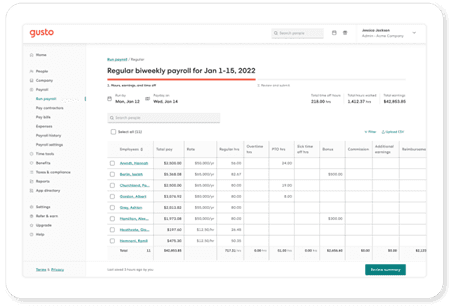
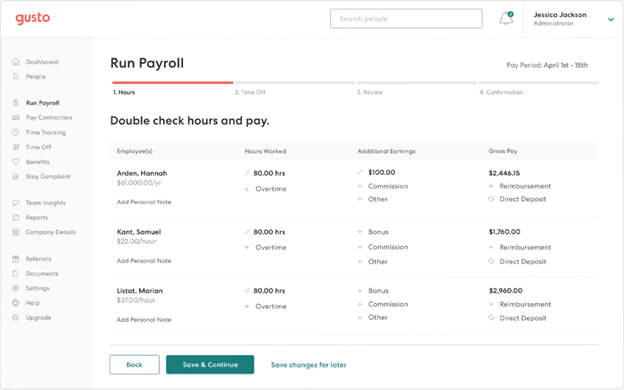
Automated Payroll Processing: Gusto handles all your payroll calculations automatically, saving you time and reducing errors. You can run payroll with just a few clicks, ensuring employees are paid accurately and on time.
Tax Filing: Gusto automatically calculates and files your payroll taxes, keeping you compliant with government regulations. This helps take the hassle out of tax season and bookkeeping by managing quarterly and annual filings.
Employee Benefits Management: Easily manage health insurance, retirement plans, and more through Gusto's benefits platform. Your team can enroll in benefits with minimal effort, enhancing employee satisfaction.
Time Tracking: Gusto offers built-in time tracking so your employees can clock in and out seamlessly. This feature also ensures accurate payroll by integrating directly with your timesheets.
Direct Deposit: With Gusto, you can pay your employees through direct deposit quickly and securely. In such, you eliminate the need for paper checks and pay stubs, and simplify payday for everyone.
HR Tools: Gusto provides essential HR tools for onboarding, employee self-service, and document management. This way, you can streamline your HR processes by keeping everything in one place.
Standout Features
Employee Self-Serve Portal: Gusto's portal allows employees to manage their own benefits and personal information, including bank accounts. This empowers your team and reduces the administrative load on your HR staff.
Compliance Assistance: Gusto offers compliance support to help you navigate labor laws and regulations. As a result, your business stays up-to-date with the latest requirements, reducing legal risks.
Ease of Use
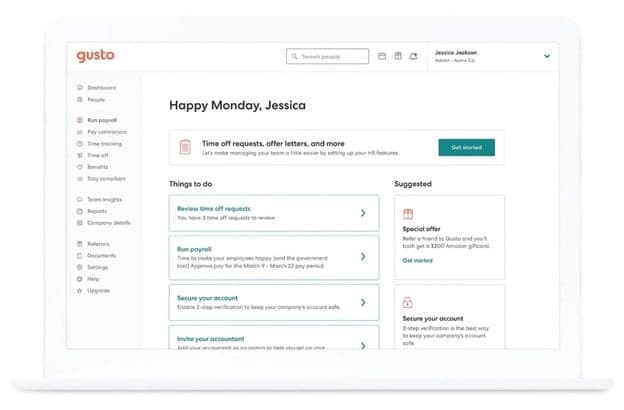
Gusto offers a user-friendly experience, designed to make payroll and human resources tasks simple for your team. Its intuitive layout makes navigation effortless, helping users quickly find what they need without confusion. Plus, with easy-to-use tools for payroll, benefits administration, and onboarding, Gusto minimizes the learning curve, making it accessible even for first-time users. Additional features like automated tax filing and employee self-onboarding also contribute to its ease of use, helping teams save time and avoid common administrative headaches.
Onboarding
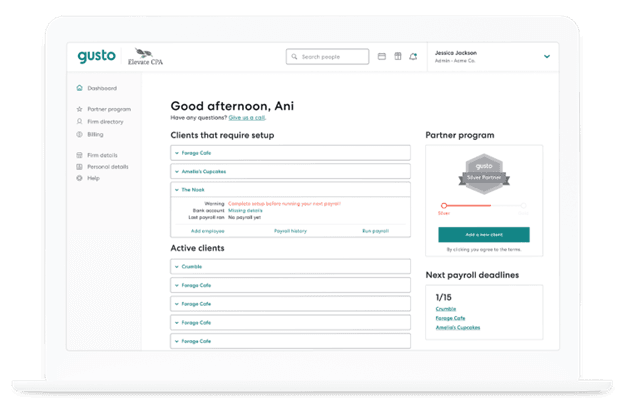
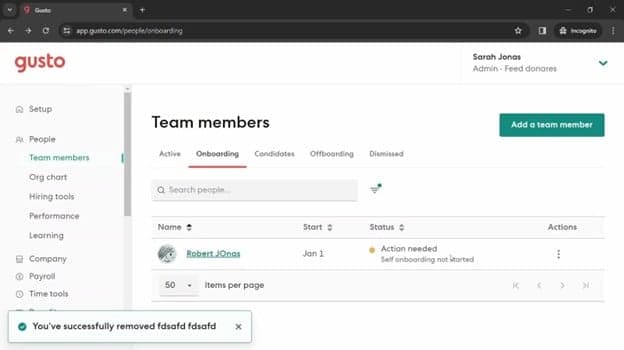
Gusto offers a smooth onboarding process with clear instructions and helpful resources to get you started. You and your team can quickly set up accounts and begin using the platform with minimal hassle. The availability of tutorials and support articles also ensures you have the guidance needed to navigate the system efficiently. All in all, Gusto's onboarding tools and flow are designed to be straightforward and user-centric, helping you integrate the software into your operations seamlessly.
Customer Support
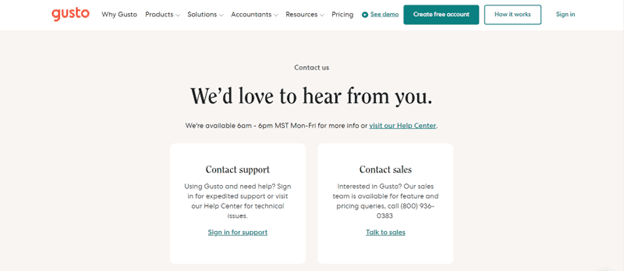
Gusto provides reliable customer support with multiple channels, including phone and email, to assist you and your team. While some users report occasional delays, the support team is generally helpful and knowledgeable. Gusto also offers an advanced help center with articles and guides, ensuring you have access to necessary information when you need it. The availability of these resources aids in resolving issues efficiently, though improvements in response times would enhance the overall experience.
Value for Money
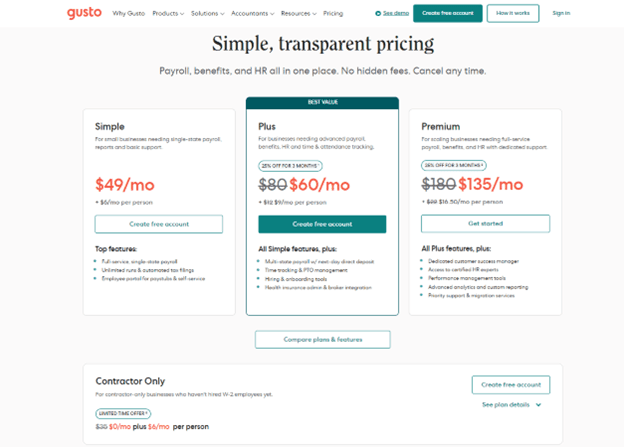
Gusto plans come at a competitive value, making it a solid investment for small to medium-sized businesses. The software provides a transparent pricing model and a good range of features included in each tier. Each of the available plans cater to different needs, ensuring you only pay for what your team requires.
- Simple Plan: Basic payroll processing and employee self-service.
- Plus Plan: Adds benefits administration and time tracking.
- Premium Plan: Includes HR resource center and priority support.
Gusto Specs
- API: Yes
- Application Tracking: Yes
- Approval Workflows: Yes
- Attendance Tracking: No
- Budgeting: Yes
- Calendar Management: Yes
- Compliance Tracking: Yes
- Dashboard: Yes
- Data Export: Yes
- Data Import: No
- Data Visualization: Yes
- Employee Database: Yes
- Employee Incentive Management: No
- Employee Onboarding: Yes
- Expense Tracking: Yes
- External Integrations: Yes
- Feedback Management: No
- Forecasting: No
- Multi-Currency: No
- Multi-User: No
- Notifications: Yes
- Payroll: Yes
- Scheduling: Yes
- Tax Management: Yes
- Time Management: Yes
- Timesheets: Yes
- Travel Management: No
- Vacation & Absence Calendar: Yes
Gusto FAQs
Gusto Company Overview & History
Gusto, originally founded as ZenPayroll in November 2011, is headquartered in San Francisco and specializes in payroll, benefits, and HR management software for U.S. businesses.
The company launched its services in 2012 and rebranded to Gusto in 2015, expanding its offerings to include health benefits and workers' compensation. As of recent reports, Gusto serves over 400,000 businesses nationwide and processes tens of billions of dollars in payroll annually.
They currently employ over 2,400 people and are recognized for their innovative and user-friendly services.
Gusto Major Milestones
- 2011: Founded as ZenPayroll in November.
- 2012: Launched payroll services.
- 2015: Rebranded to Gusto, adding health benefits and workers' compensation.
- 2020: Developed new products, including tools for the Paycheck Protection Program.
Et ensuite ?
Prêt à renforcer vos compétences en tant que professionnel de la finance ? Abonnez-vous à notre newsletter gratuite.