

Avis OpenEMR : Avantages, Inconvénients, Fonctionnalités et Tarification Expliqués
OpenEMR se distingue comme une solution de facturation médicale open source flexible, offrant des fonctionnalités robustes et de la personnalisation sans frais de licence.

Nous évaluons les outils indépendamment ; les commissions aident à financer nos tests. Consultez notre politique de transparence et notre méthodologie.
OpenEMR is an open-source medical invoicing software built for healthcare practices that need to handle billing, claims processing, and patient records in one place—without paying per-seat licensing fees. I'd consider it if your practice has the IT resources to manage a self-hosted setup and wants full control over its billing configuration. Compared to a paid platform like Kareo, OpenEMR gives you more flexibility to customize workflows and removes recurring subscription costs, making it a practical option for cost-conscious practices willing to invest in the setup.
OpenEMR Evaluation Summary
3.9/5
- Pricing upon request
- Free demo available
Pourquoi faire confiance à nos recommandations de logiciels
6,700+
Reviews
20
Industry experts
16+
Evaluation factors
14
Years
Nos avis reflètent notre jugement indépendant — et non un argumentaire de vente. Découvrez comment nous restons transparents.
Pour ce guide, nous avons évalué les outils grâce à des tests pratiques et une recherche indépendante, en notant les outils selon nos critères de sélection.
Nos avis reflètent notre jugement éditorial humain, et non un argumentaire de vente.
OpenEMR Overview
If you’re judging medical invoicing software by flexibility and cost, OpenEMR is hard to beat. Its open-source model means no licensing fees, and you can tailor workflows or reports to your needs. While the interface feels dated and onboarding takes effort, the feature set—claims, scheduling, patient records, and billing—rivals pricier options. Support relies on community forums, so I think it’s best for tech-savvy teams or clinics with IT resources. If you’re comparing options and want control over customization and budget, OpenEMR deserves a close look.
Pros
- No licensing fees for software or updates
- Supports electronic and paper claims billing
- Customizable billing workflows and reporting
Cons
- Billing features are basic for complex needs
- Requires strong IT support for setup and maintenance
- Limited official customer support beyond community forums
Is OpenEMR Right For Your Needs?
Who Would be a Good Fit for OpenEMR?
OpenEMR is a strong choice for organizations that want control over their billing processes, need customizable workflows, and have the technical resources to manage open-source software. It’s especially well-suited for smaller clinics, specialty practices, and nonprofits that want to avoid licensing fees and tailor their invoicing to unique requirements. If your team values flexibility and can handle some IT overhead, OpenEMR’s feature set and cost structure make it a compelling option.
- Small PracticesOpenEMR’s no-cost licensing and customizable billing suit small budgets.
- Community Health CentersThe open-source model supports grant-funded clinics with limited resources.
- Behavioral Health ProvidersCustomizable templates and billing workflows fit specialized documentation needs.
- Rural ClinicsOffline access and local hosting options help clinics with unreliable internet.
- Medical Billing DepartmentsDetailed reporting and claims management support in-house billing teams.
- Nonprofit Healthcare OrganizationsCost savings and open-source flexibility align with nonprofit priorities.
Who Would be a Bad Fit for OpenEMR?
OpenEMR isn’t ideal for organizations that need advanced billing automation, premium support, or seamless integration with a wide range of third-party systems. Large enterprises, hospital networks, and teams without dedicated IT support may find the platform’s setup and maintenance requirements too demanding. If you need out-of-the-box automation or extensive vendor support, OpenEMR may not meet your needs.
- Large Hospital NetworksComplex billing and compliance needs exceed OpenEMR’s core capabilities.
- Multi-Specialty GroupsLacks advanced automation for high-volume, multi-specialty billing.
- Enterprise Healthcare SystemsLimited integration options hinder large-scale interoperability.
- Solo Practitioners Without ITSetup and maintenance require technical skills solo providers may lack.
- Dental PracticesOpenEMR’s billing features are not tailored for dental coding.
- Urgent Care ChainsFast-paced, multi-location operations need more automation and support.
Comment nous testons et évaluons les outils
Nous avons passé des années à construire, affiner et améliorer notre système de test et d’évaluation des logiciels. Notre grille vise à saisir toute la subtilité de la sélection logicielle et les facteurs déterminant l’efficacité d’un outil, en mettant l’accent sur les aspects essentiels du processus de décision. Ci-dessous, vous pouvez voir exactement comment notre test et notre notation fonctionnent selon sept critères. Cela nous permet de fournir une évaluation impartiale des logiciels sur la base des fonctionnalités principales, des fonctionnalités distinctives, de la facilité d’utilisation, de la prise en main, du service client, des intégrations, des avis clients et du rapport qualité/prix.
Fonctionnalité principale (25 % de la note finale)
Le point de départ de notre évaluation est toujours la fonctionnalité principale de l’outil. Dispose-t-il des caractéristiques de base attendues ? Certaines de ces fonctions de base sont-elles réservées aux plans tarifaires supérieurs ? Fondamentalement, nous attendons d’un outil qu’il soit au moins l’égal de ses concurrents en capacités essentielles.
Fonctionnalités Distinctives (25 % de la note finale)
Ensuite, nous évaluons les fonctionnalités rares ou uniques, allant au-delà de la fonctionnalité principale habituellement trouvée dans ce type d’outil. Un score élevé traduit des fonctionnalités spécialisées ou innovantes qui rendent le produit plus rapide, plus efficace, ou apportent une valeur supplémentaire à l’utilisateur. Nous évaluons aussi la facilité d’intégration avec d’autres outils courants de l’écosystème technologique pour étendre les capacités du logiciel. Les outils offrant de nombreuses intégrations natives, des connexions tierces et un accès API pour des intégrations personnalisées obtiennent le meilleur score.
Facilité d’utilisation (10 % de la note finale)
Nous considérons la rapidité et la facilité d’exécution des tâches essentielles avec l’outil. Un logiciel bien conçu, intuitif, proposant des applications mobiles, des modèles et permettant de simplifier des tâches complexes obtient la meilleure note.
Prise en Main (10 % de la note finale)
Nous savons combien il est important d’adopter rapidement une nouvelle plateforme, c’est pourquoi nous évaluons la facilité d’apprentissage et d’utilisation du logiciel avec un minimum de formation. Nous évaluons la rapidité de mise en place d’un nouveau membre d’équipe sans expérience. Un outil ayant un bon score requiert peu voire aucun support pour la prise en main.
Service Client (10 % de la note finale)
Nous évaluons s’il est rapide et facile d’obtenir de l’aide ou de dépanner par téléphone, chat en direct ou base de connaissances. Les outils et entreprises offrant une assistance en temps réel obtiennent le meilleur score, tandis que les chatbots sont moins bien notés.
Avis Clients (10 % de la note finale)
Au-delà de nos propres tests et évaluations, nous prenons en compte le net promoter score fourni par les clients actuels et passés. Nous vérifions leur probabilité de recommander l’outil et d’en refaire le choix pour ses fonctionnalités principales. Un logiciel bien noté se traduit par un net promoter score élevé.
Rapport Qualité/Prix (10 % de la note finale)
Enfin, en tenant compte de tous les autres critères, nous comparons le prix moyen des plans d’entrée de gamme avec les fonctionnalités principales, et le rapport de valeur avec les autres critères d’évaluation. Les logiciels offrant plus pour moins obtiennent la meilleure note.
Core Features
Integrated Medical Billing
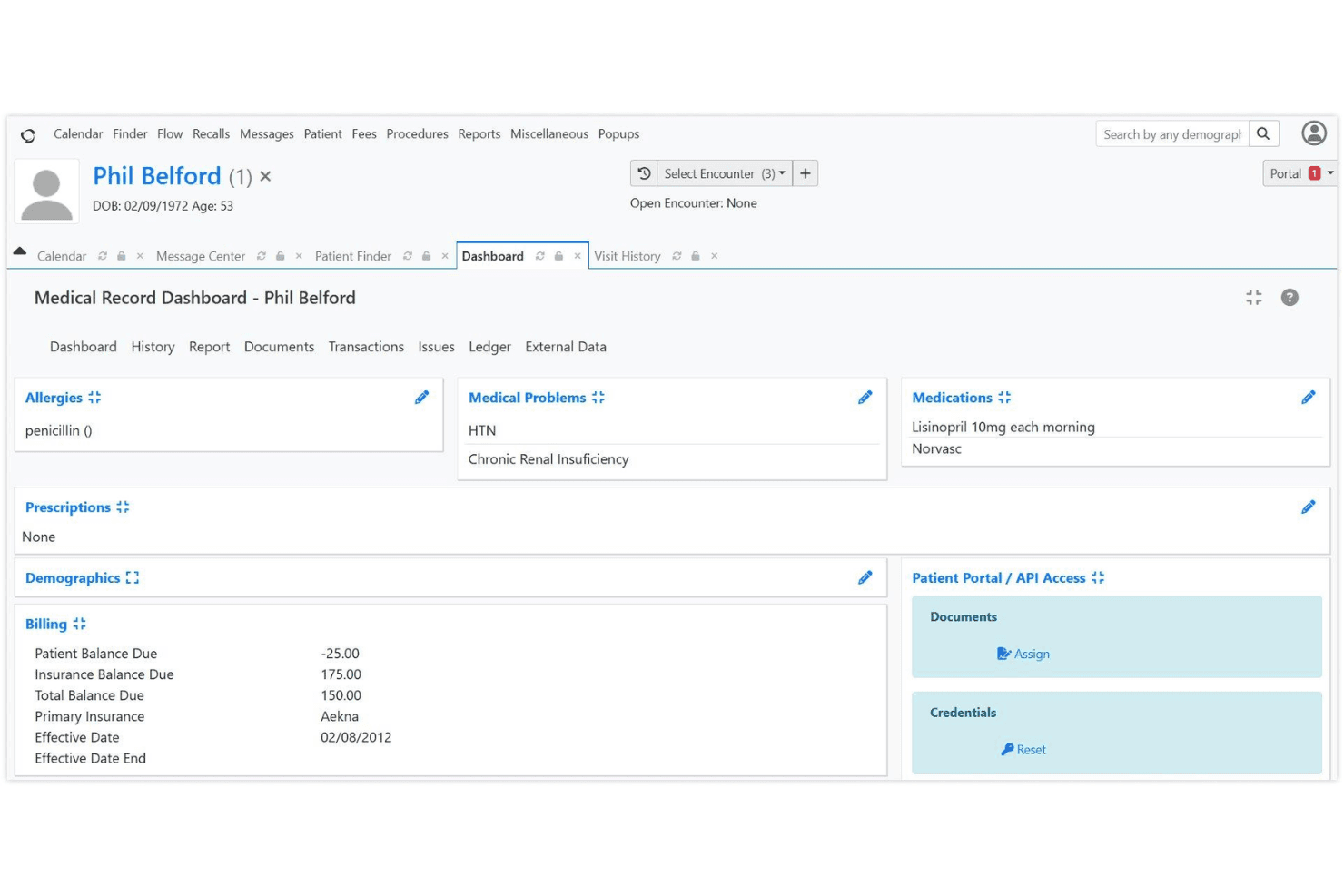
OpenEMR supports HIPAA-compliant electronic and paper claims billing. Users can manage claims, payments, and remittances from a single dashboard.
Advanced Scheduling
Create repeating appointments, automate check-in workflows, and send patient reminders. This helps reduce no-shows and keeps billing aligned with visit schedules.
CMS Reporting
Generate compliance and financial reports with a few clicks. These reports help track billing performance and meet regulatory requirements.
Customizable Billing Workflows
Tailor billing processes to fit your clinic’s needs, including custom codes and templates. This flexibility supports unique payer or specialty requirements.
Patient Statements and Invoices
Produce detailed patient statements and invoices directly from the platform. This feature streamlines communication and payment collection.
Security and Access Controls
HIPAA-friendly access controls and password hashing protect sensitive billing data. You can assign permissions by user role to limit access to financial information.
Ease of Use
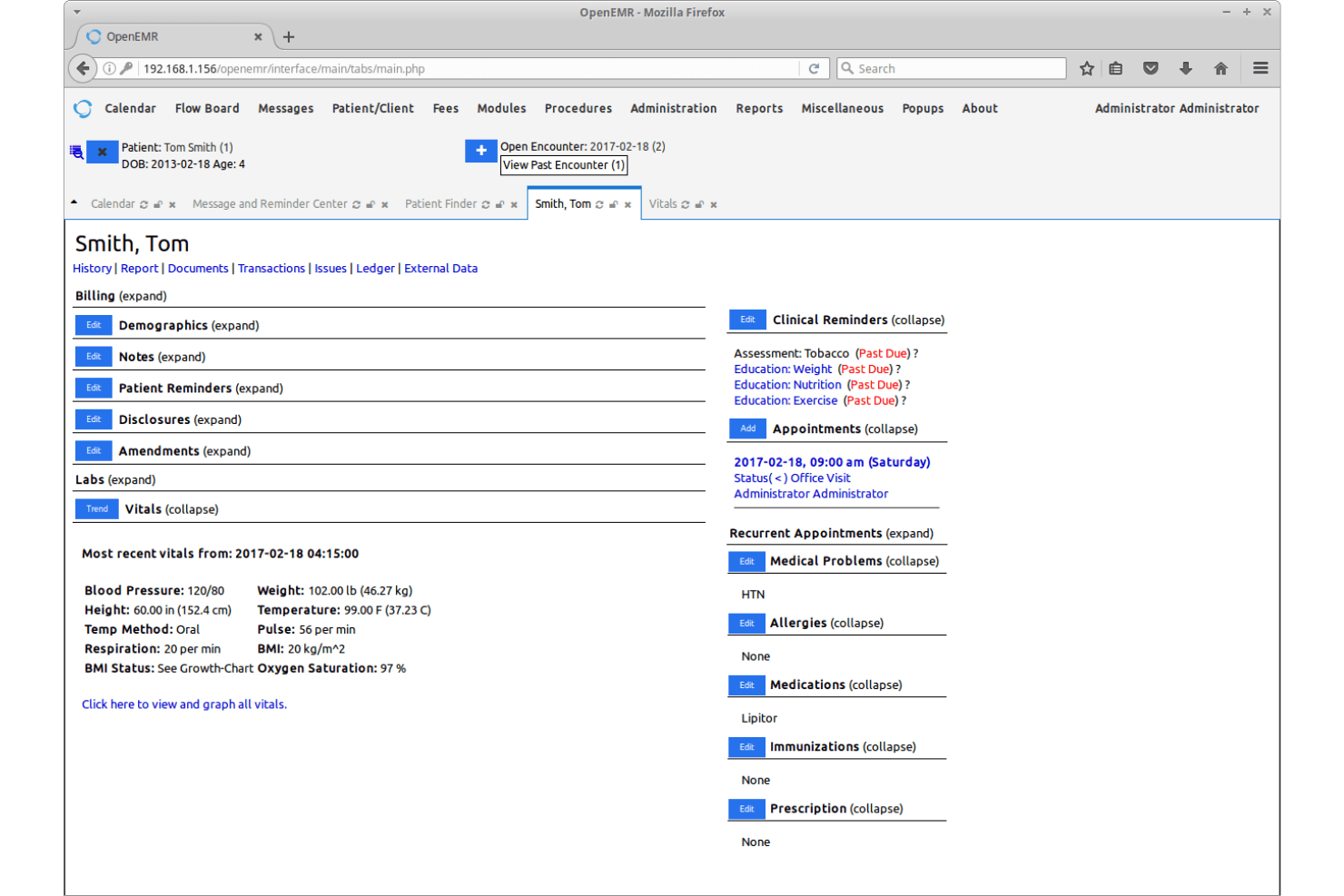
OpenEMR’s user interface feels dated and can be overwhelming for new users, especially compared to more modern medical invoicing software. Many users mention that setup and navigation require a bit of a learning curve, and documentation can be dense. However, once configured, the workflows are logical and customizable, letting experienced teams manage billing efficiently. If your team is comfortable with open-source EMR platforms and values flexibility over user-friendly aesthetics, you’ll find OpenEMR’s usability acceptable for daily invoicing tasks.
Integrations
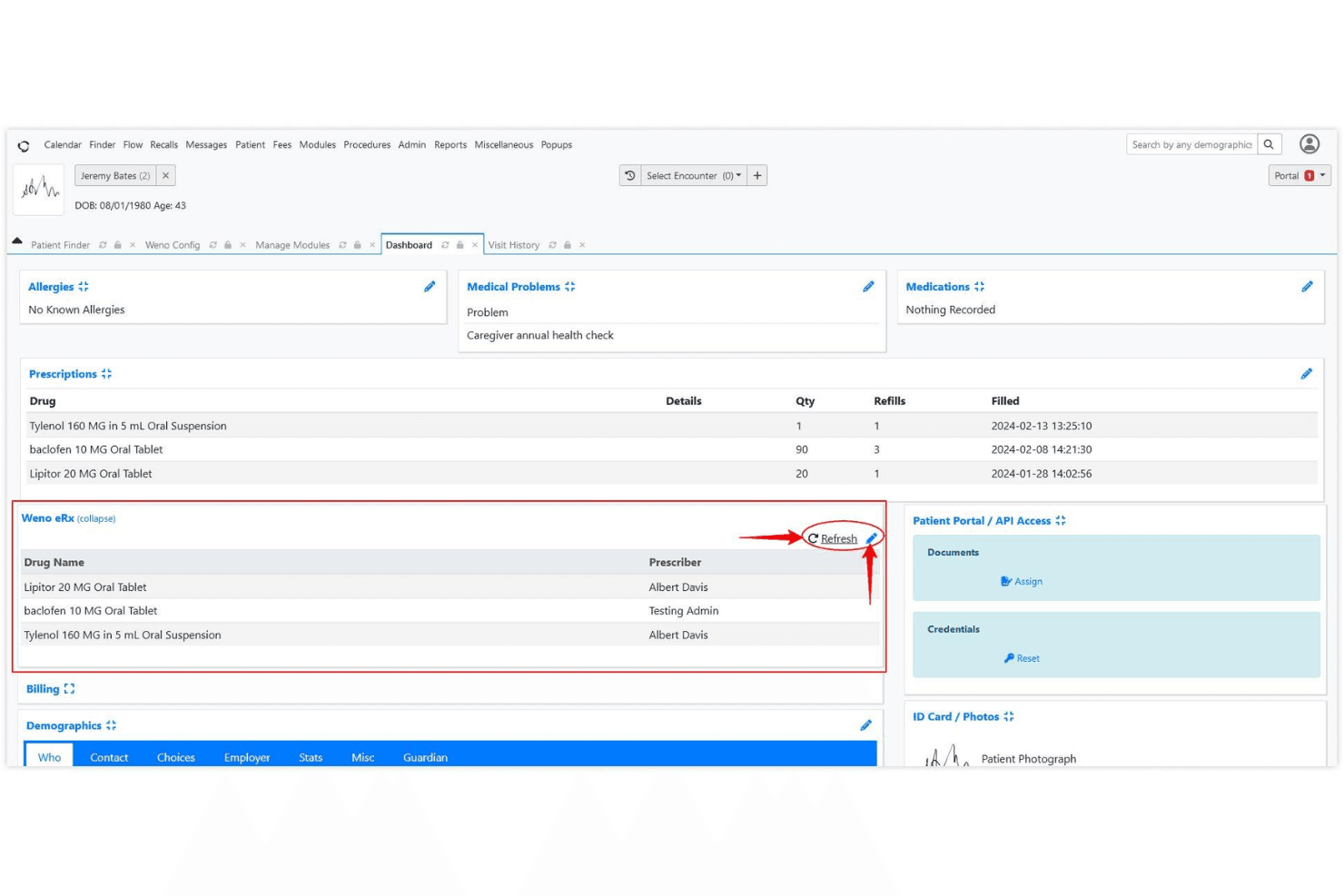
OpenEMR integrates with e-prescribing tools like NewCrop, Weno Exchange, and Allscripts, and can connect to labs such as Quest Diagnostics and LabCorp through third-party interfaces. These integrations often require additional setup and are not always available out of the box.
OpenEMR also offers REST and FHIR APIs, allowing custom integrations and extended functionality.
OpenEMR Specs
- API: Yes
- Appointment Scheduling: Yes
- Athlete Management: No
- Audit Management: Yes
- Calendar Management: No
- Compliance Tracking: Yes
- Customer Management: Yes
- Dashboard: No
- Data Export: Yes
- Data Import: Yes
- Data Visualization: No
- Electronic Prescribing: Yes
- External Integrations: Yes
- File Sharing: No
- File Transfer: No
- Health Management: No
- HIPAA Compliance: Yes
- Inventory Tracking: No
- Multi-User: Yes
- Notifications: Yes
- Organization Management: No
- Patient Management: Yes
- Project Management: No
- Regulatory Alerts: Yes
- Risk Assessment: Yes
- Scheduling: No
- Supplier Management: No


