

Avis sur QuickBooks : Avantages, Inconvénients, Fonctionnalités et Tarifs


I've worked extensively with accounting software over the years, and I've come to learn that choosing the right software can make or break your financial workflow. QuickBooks is one of the most widely used accounting platforms on the market—and with good reason. It’s packed with features that support everything from day-to-day bookkeeping to financial reporting and payroll.
In this review, I’ll share my insights about QuickBooks, including where it delivers, where it falls short, and how it stacks up for different types of businesses. Whether you're managing the books yourself or overseeing a team, this breakdown will help you decide if QuickBooks fits your accounting needs.
QuickBooks Evaluation Summary
- From $38/user/month
- 30-day free trial available
Why Trust Our Software Reviews
We’ve been testing and reviewing financial software since 2023. As finance specialists ourselves, we know how critical and difficult it is to make the right decision when selecting software.
We invest in deep research to help our audience make better software purchasing decisions. We’ve tested more than 2,000 tools for different finance use cases and written over 1,000 comprehensive software reviews. Learn how we stay transparent & our software review methodology.
QuickBooks Overview
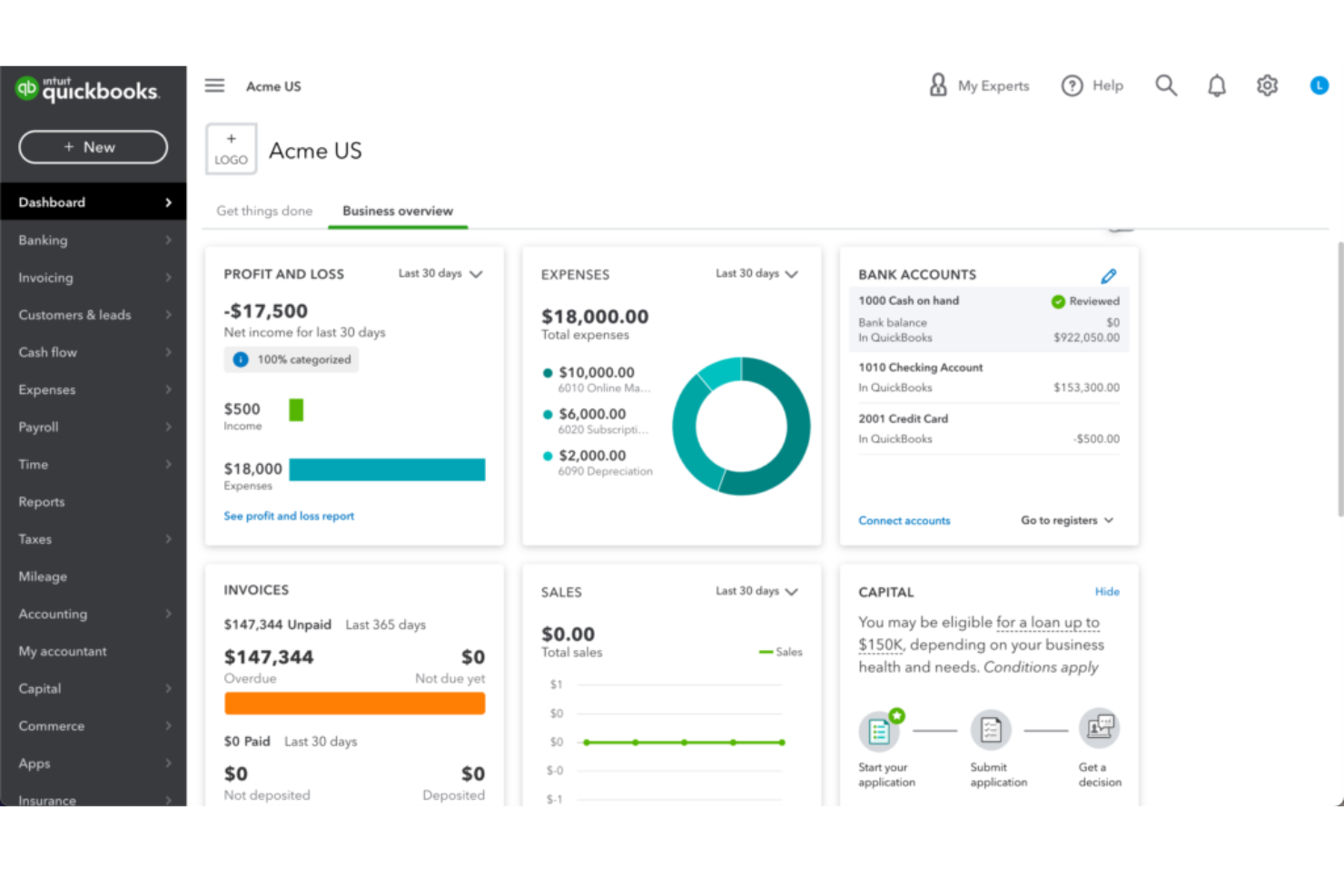
QuickBooks simplifies the hard parts of running a business—tracking expenses, managing invoices, running payroll, and generating reports—into one clean, connected system. It’s built for small to mid-sized teams, freelancers, and accountants who need serious financial oversight without the complexity of a full-scale ERP.
pros
-
The mobile app lets you manage your finances on the go.
-
You can easily track expenses and income, making financial management straightforward.
-
It offers comprehensive reporting tools that help you understand your business's financial health.
cons
-
Doesn't accommodate businesses needing high accounting customization.
-
The interface can feel clunky when switching between views.
-
You’ll hit limits if you manage multiple business entities.
-

LiveFlow
Visit WebsiteThis is an aggregated rating for this tool including ratings from Crozdesk users and ratings from other sites.4.9 -
Float Financial
Visit WebsiteThis is an aggregated rating for this tool including ratings from Crozdesk users and ratings from other sites.4.1 -
Creatio CRM
Visit WebsiteThis is an aggregated rating for this tool including ratings from Crozdesk users and ratings from other sites.4.7


How We Test & Score Tools
We’ve spent years building, refining, and improving our software testing and scoring system. The rubric is designed to capture the nuances of software selection and what makes a tool effective, focusing on critical aspects of the decision-making process.
Below, you can see exactly how our testing and scoring works across seven criteria. It allows us to provide an unbiased evaluation of the software based on core functionality, standout features, ease of use, onboarding, customer support, integrations, customer reviews, and value for money.
Core Functionality (25% of final scoring)
The starting point of our evaluation is always the core functionality of the tool. Does it have the basic features and functions that a user would expect to see? Are any of those core features locked to higher-tiered pricing plans? At its core, we expect a tool to stand up against the baseline capabilities of its competitors.
Standout Features (25% of final scoring)
Next, we evaluate uncommon standout features that go above and beyond the core functionality typically found in tools of its kind. A high score reflects specialized or unique features that make the product faster, more efficient, or offer additional value to the user.
We also evaluate how easy it is to integrate with other tools typically found in the tech stack to expand the functionality and utility of the software. Tools offering plentiful native integrations, 3rd party connections, and API access to build custom integrations score best.
Ease of Use (10% of final scoring)
We consider how quick and easy it is to execute the tasks defined in the core functionality using the tool. High scoring software is well designed, intuitive to use, offers mobile apps, provides templates, and makes relatively complex tasks seem simple.
Onboarding (10% of final scoring)
We know how important rapid team adoption is for a new platform, so we evaluate how easy it is to learn and use a tool with minimal training. We evaluate how quickly a team member can get set up and start using the tool with no experience. High scoring solutions indicate little or no support is required.
Customer Support (10% of final scoring)
We review how quick and easy it is to get unstuck and find help by phone, live chat, or knowledge base. Tools and companies that provide real-time support score best, while chatbots score worst.
Customer Reviews (10% of final scoring)
Beyond our own testing and evaluation, we consider the net promoter score from current and past customers. We review their likelihood, given the option, to choose the tool again for the core functionality. A high scoring software reflects a high net promoter score from current or past customers.
Value for Money (10% of final scoring)
Lastly, in consideration of all the other criteria, we review the average price of entry level plans against the core features and consider the value of the other evaluation criteria. Software that delivers more, for less, will score higher.
Core Features
Invoicing
You can create and send custom invoices fast, and track when clients open and pay them. It makes it easier to stay on top of cash flow.
Expense Tracking
QuickBooks automatically pulls in expenses from bank accounts and cards. You’ll always see where your money goes without manual entry.
Payroll
It runs payroll in just a few clicks, handling taxes and direct deposits. Your team gets paid on time without the headache.
Reporting
You get real-time financial reports like profit and loss or balance sheets. They’re easy to generate and useful for spotting trends.
Time Tracking
QuickBooks lets you log hours directly against projects or clients. It’s simple to see billable work and charge accurately.
Inventory Management
It tracks stock levels, alerts you when items run low, and updates automatically with sales. You won’t lose money on stockouts or overbuying.

Ease of Use
QuickBooks feels easy to pick up, even if you’re not an accountant. The dashboard is clear, menus are simple, and you can find what you need fast. Tasks like sending invoices, running payroll, or checking reports only take a few clicks. Automation cuts down on manual work, and the mobile app lets you handle your books anywhere. You spend less time learning the tool and more time running your business.
Integrations
QuickBooks integrates with a range of platforms, including Expensify, Transaction Pro, Qvinci, Float, BILL, Fundbox, Method CRM, Settle, and Keeper.

QuickBooks Specs
- 2-Factor Authentication
- Accounts Payable
- Accounts Receivable
- API
- Balance Sheet
- Billing/Invoicing
- BitCoin
- Budgeting
- Calendar Management
- Contact Management
- CRM Integration
- Customer Management
- Dashboard
- Data Export
- Data Import
- Data Visualization
- Expense Tracking
- External Integrations
- Forecasting
- General Account Ledger
- Inventory Tracking
- Multi-Currency
- Multi-User
- Notifications
- P&L
- PayPal
- Payroll
- SAP Integration
- Stripe
- Supplier Management
- Tax Management
Alternatives to QuickBooks


QuickBooks FAQs
What is QuickBooks?
Is there a mobile app for QuickBooks?
Is QuickBooks HIPAA compliant?
Is QuickBooks SOC 2 compliant?
Is QuickBooks secure?
Is QuickBooks FedRAMP certified?
Is QuickBooks GDPR compliant?
Can QuickBooks handle multi-currency transactions?
Quelle est la prochaine étape ?
Prêt à décupler vos compétences en tant que professionnel de la finance ? Abonnez-vous à notre newsletter gratuite.