
Avis sur Scoro : avantages, inconvénients, fonctionnalités et tarifs expliqués
Scoro se distingue comme une solution tout-en-un, excellente pour unifier la gestion de projet, la facturation et le reporting, mais elle convient particulièrement aux équipes recherchant des flux de travail ERP rationalisés et personnalisables.

Nous évaluons les outils indépendamment ; les commissions aident à financer nos tests. Consultez notre politique de transparence et notre méthodologie.
Scoro is a CFO ERP software built for professional services firms that need to connect project delivery with financial management in a single platform. I'd consider it if your team manages billable work, tracks time, and handles invoicing, but your current tools leave finance with an incomplete view of project profitability. Compared to NetSuite, Scoro is a more focused option for service-based businesses that don't need inventory or manufacturing modules but do want tighter project-to-cash visibility.
Scoro Evaluation Summary
4.5/5
- From $17/user/month
- 14-day free trial + free demo available
Pourquoi faire confiance à nos recommandations de logiciels
6,700+
Reviews
20
Industry experts
16+
Evaluation factors
14
Years
Nos avis reflètent notre jugement indépendant — et non un argumentaire de vente. Découvrez comment nous restons transparents.
Pour ce guide, nous avons évalué les outils grâce à des tests pratiques et une recherche indépendante, en notant les outils selon nos critères de sélection.
Nos avis reflètent notre jugement éditorial humain, et non un argumentaire de vente.
Scoro Overview
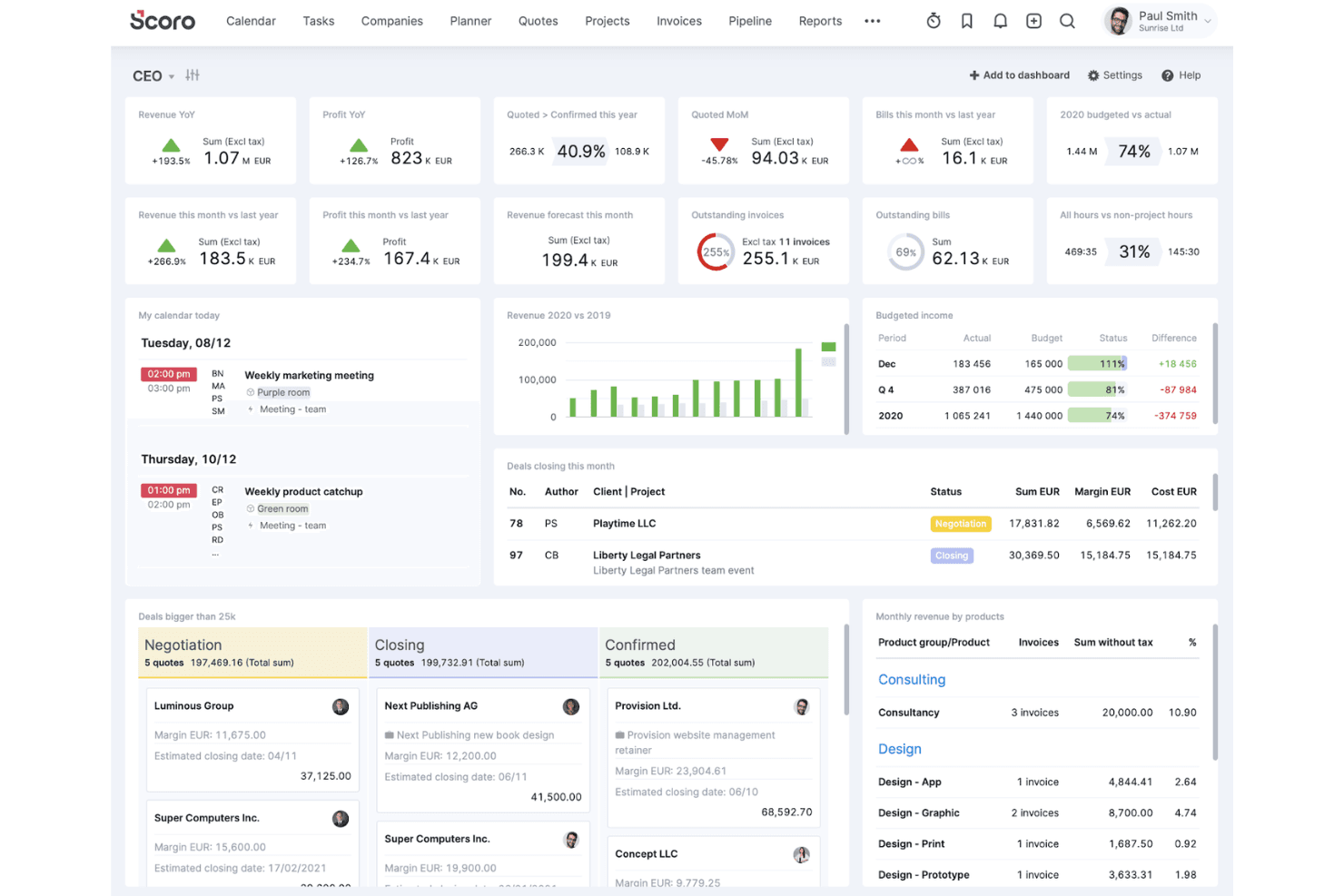
If you’re judging Scoro as an ERP software system, I think its customizable dashboards, project-to-invoice workflows, and strong reporting set it apart for service-based teams. The interface is clean and onboarding is straightforward, but pricing can climb as you add users or advanced modules. Compared to others, Scoro’s integrations and automation are flexible, though some deeper accounting features may be limited. I’d suggest using Scoro if you want a unified, user-friendly platform to manage projects, finances, and collaboration without the complex functionality of traditional ERP systems.
Pros
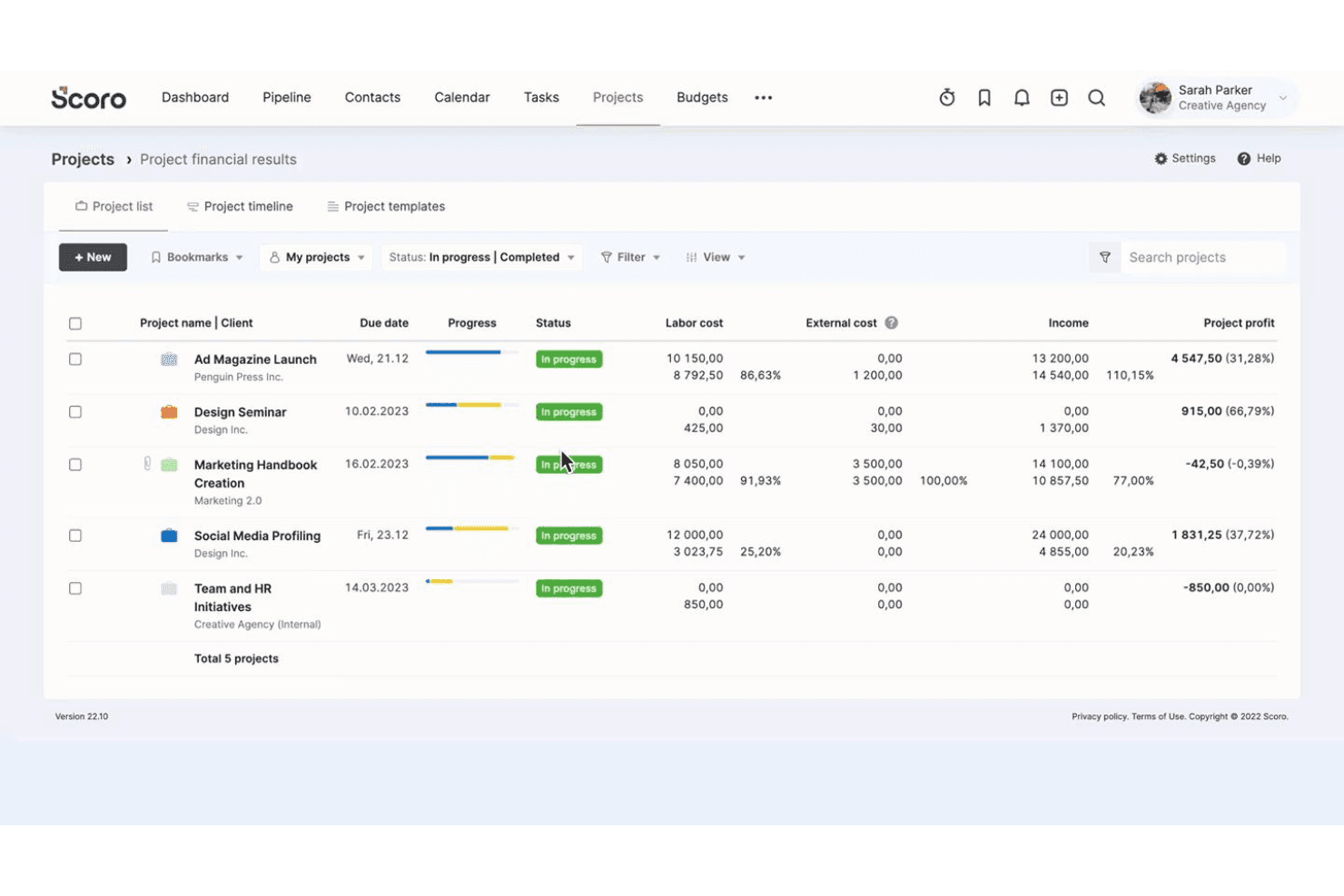
- Real-time project profitability and margin tracking
- Customizable dashboards for financial and operational reporting
- Strong quoting, budgeting, and invoicing features
Cons
- Advanced accounting features are limited
- Pricing increases quickly with more users or modules
- Reporting can be slow with large data sets
Is Scoro Right For Your Needs?
Who Would be a Good Fit for Scoro?
Scoro is a strong choice for service-based businesses, project-driven teams, and finance departments that need unified project, billing, and reporting tools. Its customizable dashboards, quoting, and margin tracking make it ideal for organizations that manage multiple projects and need real-time financial visibility. Scoro’s workflow automation and collaboration features also suit teams that want to reduce manual work and centralize operations.
- Marketing AgenciesScoro’s project budgeting and client invoicing features support agency workflows.
- Consulting FirmsMargin tracking and time billing help consultants manage profitability.
- Professional ServicesIntegrated quoting, project, and billing tools fit service delivery teams.
- Finance DepartmentsCustom dashboards and reporting provide real-time financial oversight.
- Mid-Sized CompaniesScoro scales well for teams needing project and financial management.
- Project Management OfficesCentralized task, resource, and cost tracking streamline project oversight.
Who Would be a Bad Fit for Scoro?
Scoro isn’t the best fit for product-centric industries, large enterprises with complex ERP needs, or teams requiring deep inventory or manufacturing modules. Its accounting features are limited compared to full-suite ERP systems, and costs can rise for larger organizations or those needing advanced modules.
- Manufacturing CompaniesScoro lacks advanced inventory and production management features.
- Large EnterprisesComplex ERP requirements may exceed Scoro’s capabilities.
- Retail BusinessesNo built-in POS or inventory management for retail operations.
- Supply Chain TeamsLimited logistics and procurement tools restrict supply chain oversight.
- Nonprofit OrganizationsFund accounting and grant management features are missing.
- Construction FirmsNo dedicated tools for job costing or field resource management.
Comment nous testons et évaluons les outils
Nous avons passé des années à construire, affiner et améliorer notre système de test et d’évaluation des logiciels. Notre grille vise à saisir toute la subtilité de la sélection logicielle et les facteurs déterminant l’efficacité d’un outil, en mettant l’accent sur les aspects essentiels du processus de décision. Ci-dessous, vous pouvez voir exactement comment notre test et notre notation fonctionnent selon sept critères. Cela nous permet de fournir une évaluation impartiale des logiciels sur la base des fonctionnalités principales, des fonctionnalités distinctives, de la facilité d’utilisation, de la prise en main, du service client, des intégrations, des avis clients et du rapport qualité/prix.
Fonctionnalité principale (25 % de la note finale)
Le point de départ de notre évaluation est toujours la fonctionnalité principale de l’outil. Dispose-t-il des caractéristiques de base attendues ? Certaines de ces fonctions de base sont-elles réservées aux plans tarifaires supérieurs ? Fondamentalement, nous attendons d’un outil qu’il soit au moins l’égal de ses concurrents en capacités essentielles.
Fonctionnalités Distinctives (25 % de la note finale)
Ensuite, nous évaluons les fonctionnalités rares ou uniques, allant au-delà de la fonctionnalité principale habituellement trouvée dans ce type d’outil. Un score élevé traduit des fonctionnalités spécialisées ou innovantes qui rendent le produit plus rapide, plus efficace, ou apportent une valeur supplémentaire à l’utilisateur. Nous évaluons aussi la facilité d’intégration avec d’autres outils courants de l’écosystème technologique pour étendre les capacités du logiciel. Les outils offrant de nombreuses intégrations natives, des connexions tierces et un accès API pour des intégrations personnalisées obtiennent le meilleur score.
Facilité d’utilisation (10 % de la note finale)
Nous considérons la rapidité et la facilité d’exécution des tâches essentielles avec l’outil. Un logiciel bien conçu, intuitif, proposant des applications mobiles, des modèles et permettant de simplifier des tâches complexes obtient la meilleure note.
Prise en Main (10 % de la note finale)
Nous savons combien il est important d’adopter rapidement une nouvelle plateforme, c’est pourquoi nous évaluons la facilité d’apprentissage et d’utilisation du logiciel avec un minimum de formation. Nous évaluons la rapidité de mise en place d’un nouveau membre d’équipe sans expérience. Un outil ayant un bon score requiert peu voire aucun support pour la prise en main.
Service Client (10 % de la note finale)
Nous évaluons s’il est rapide et facile d’obtenir de l’aide ou de dépanner par téléphone, chat en direct ou base de connaissances. Les outils et entreprises offrant une assistance en temps réel obtiennent le meilleur score, tandis que les chatbots sont moins bien notés.
Avis Clients (10 % de la note finale)
Au-delà de nos propres tests et évaluations, nous prenons en compte le net promoter score fourni par les clients actuels et passés. Nous vérifions leur probabilité de recommander l’outil et d’en refaire le choix pour ses fonctionnalités principales. Un logiciel bien noté se traduit par un net promoter score élevé.
Rapport Qualité/Prix (10 % de la note finale)
Enfin, en tenant compte de tous les autres critères, nous comparons le prix moyen des plans d’entrée de gamme avec les fonctionnalités principales, et le rapport de valeur avec les autres critères d’évaluation. Les logiciels offrant plus pour moins obtiennent la meilleure note.
Core Features
Project Management Tools
Plan, track, and oversee projects with task management, timelines, and resource allocation. Visual boards and Gantt charts help team members stay on top of deliverables.
Quoting and Invoicing
Create, send, and track quotes and invoices directly from Scoro. Automated reminders and customizable templates speed up billing cycles.
Budgeting and Cost Tracking
Set project budgets, monitor expenses, and track profitability in real time. Margin analysis tools help teams control costs and improve financial outcomes.
Custom Dashboards
Build personalized dashboards to monitor KPIs, financials, and project status. Drag-and-drop widgets let users tailor views to their needs.
Time Tracking
Log billable and non-billable hours across projects and clients. Built-in timers and timesheets simplify accurate time reporting.
Reporting and Analytics
Generate detailed financial, operational, and project reports with a few clicks. Scheduled reports and export options support regular business reviews.
Standout Features
Automated Recurring Billing
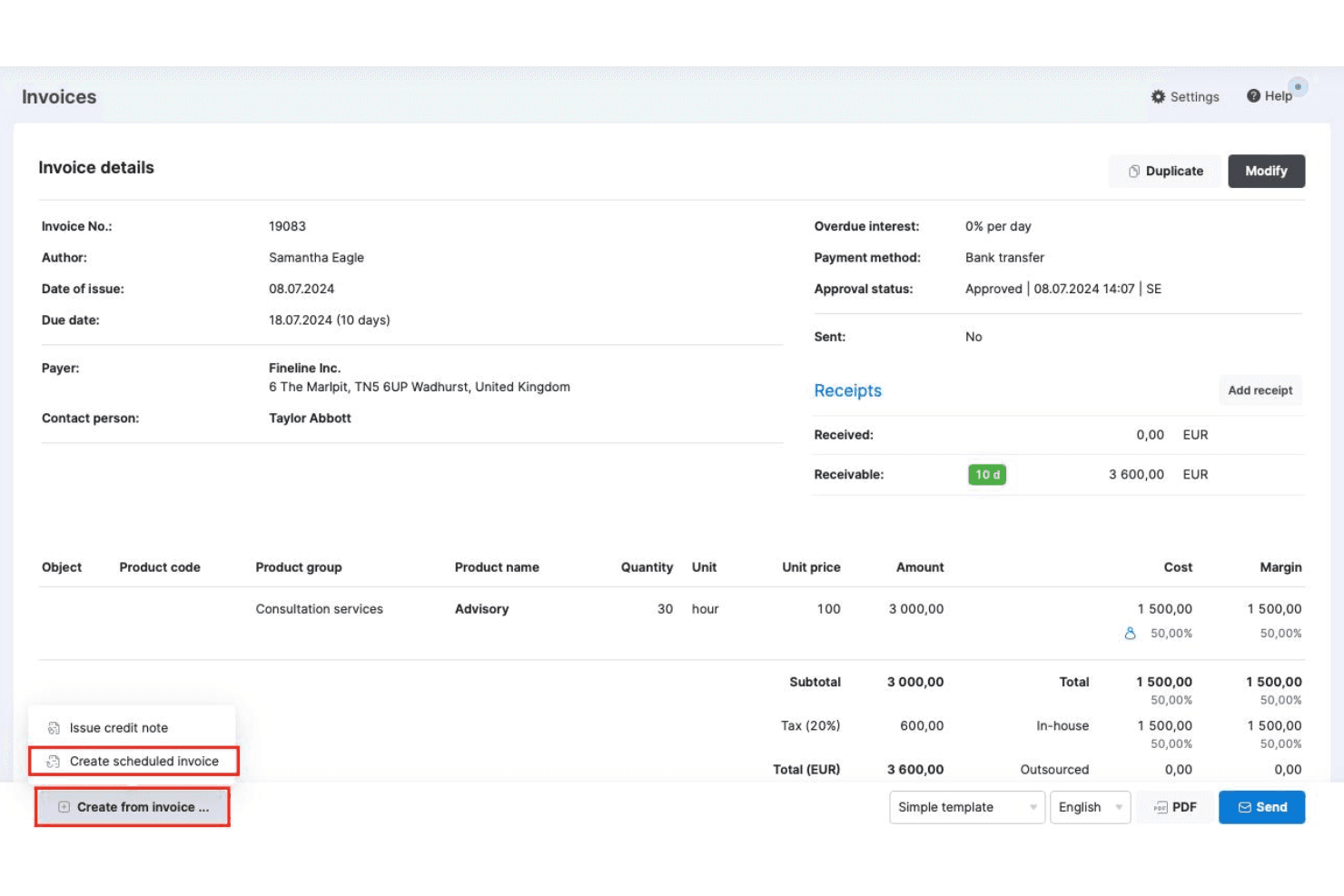
Set up recurring invoices and automate billing cycles for retainer clients or ongoing services. This reduces manual work and ensures consistent cash flow without missing deadlines.
Task Automation Rules
Create custom automation rules to trigger actions like task assignments, dependencies, or notifications based on project events. This helps teams eliminate repetitive admin work.
Ease of Use
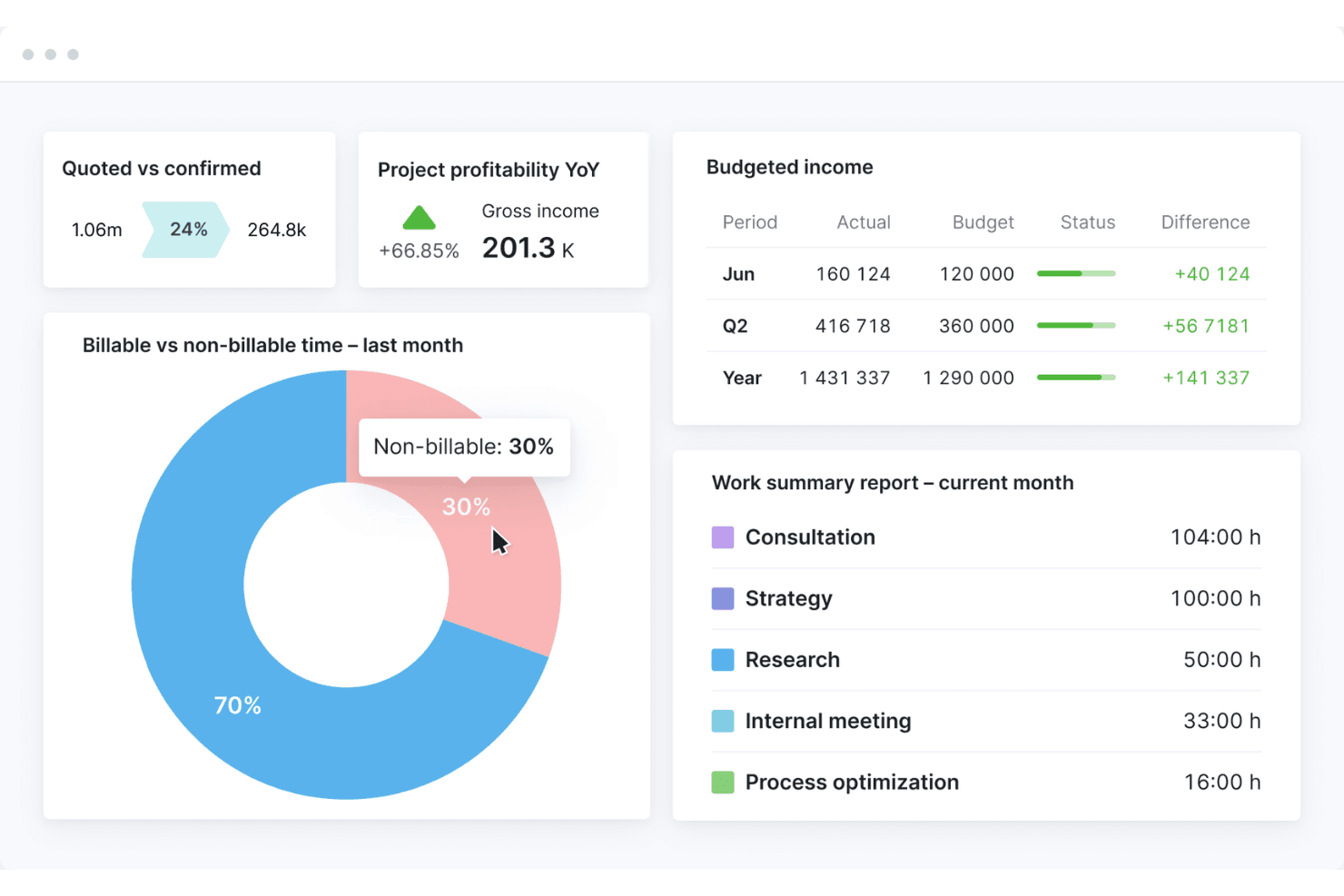
Scoro’s user interface is clean, intuitive, and easy to navigate, especially for teams new to ERP software systems. Users often mention that onboarding is quick, with helpful guided tours and clear menu structures. Customizable dashboards and drag-and-drop tools make it simple to tailor workflows — and the mobile app ensures you can access Scoro on the go. While some advanced reporting features require setup, most users find day-to-day tasks—like work management, invoicing, and the time tracker—straightforward and make for a seamless user experience.
Onboarding
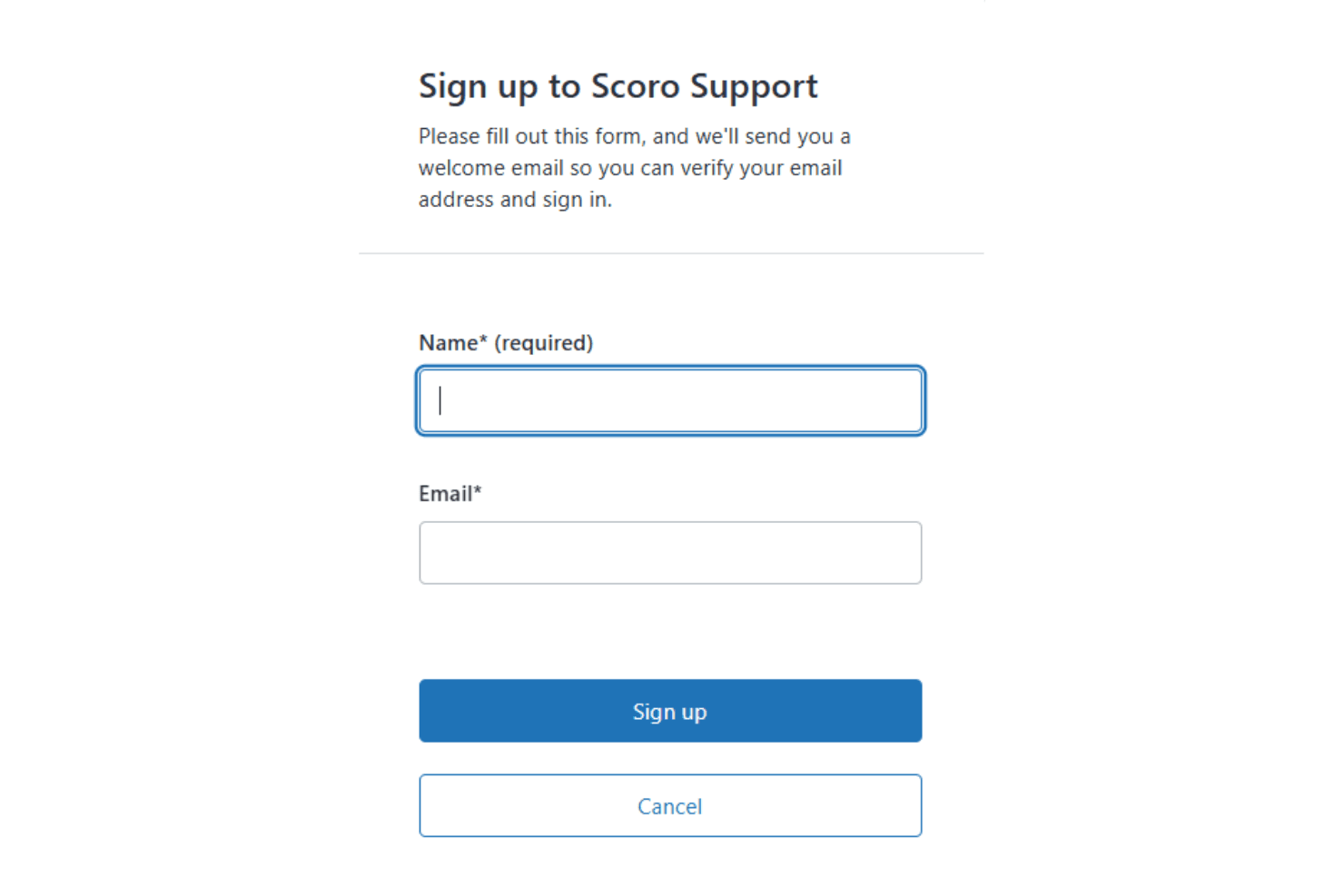
Scoro offers a guided onboarding process with step-by-step setup wizards, video tutorials, and a detailed knowledge base, which helps new users get up to speed quickly. Many users highlight responsive customer support and access to live training sessions as valuable for resolving questions early on. The platform’s structured onboarding flow and clear documentation make it easier for teams to realize value without a steep learning curve or lengthy implementation period.
Customer Support
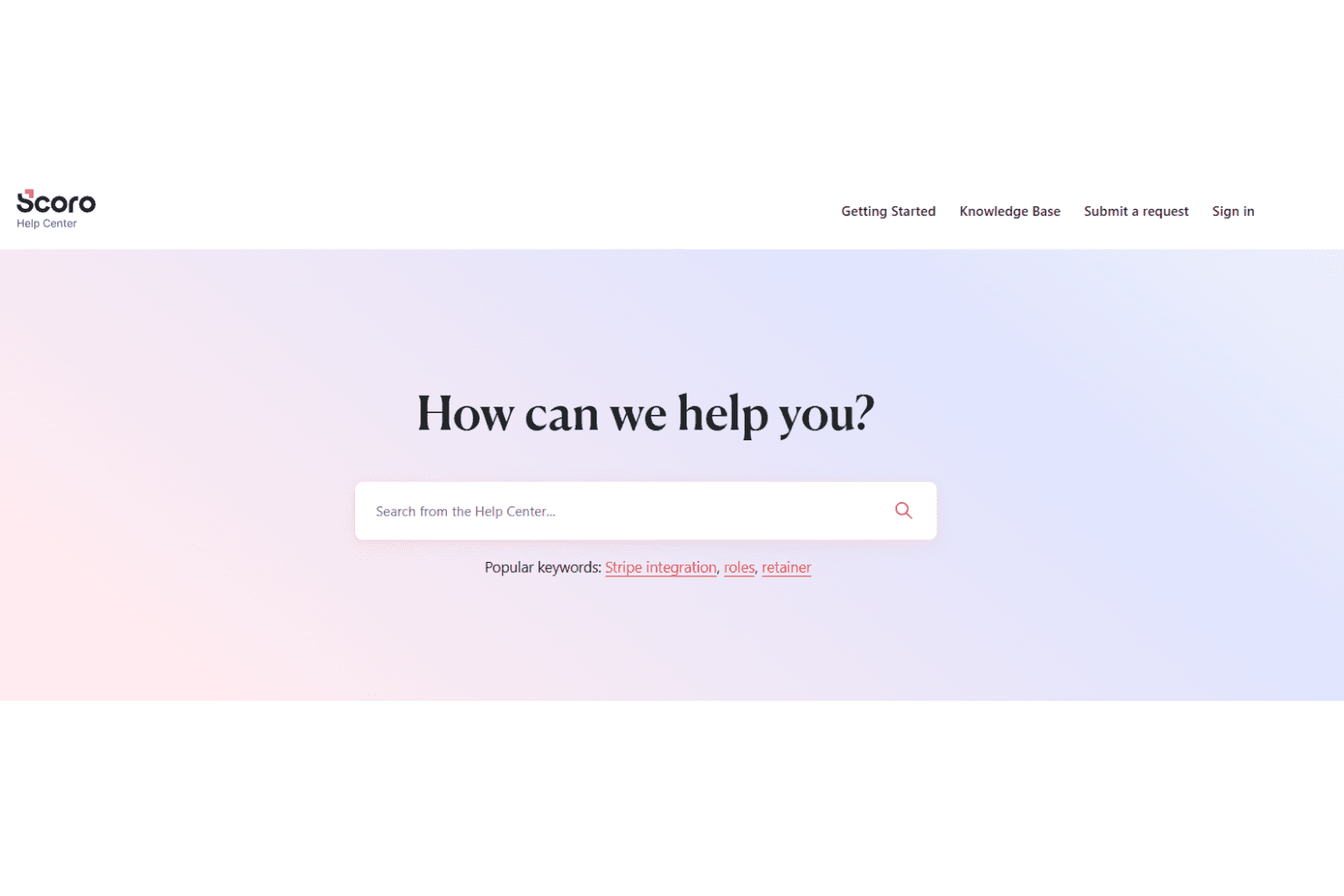
Scoro’s customer support is frequently praised for its responsiveness and knowledgeable staff, with users noting quick turnaround times on tickets and helpful guidance during setup and troubleshooting. Support is available through live chat, email, and a comprehensive help center, making it easy to find answers or connect with a real person. Many users appreciate the proactive follow-ups and personalized assistance, especially during onboarding and when configuring more advanced features.
Integrations
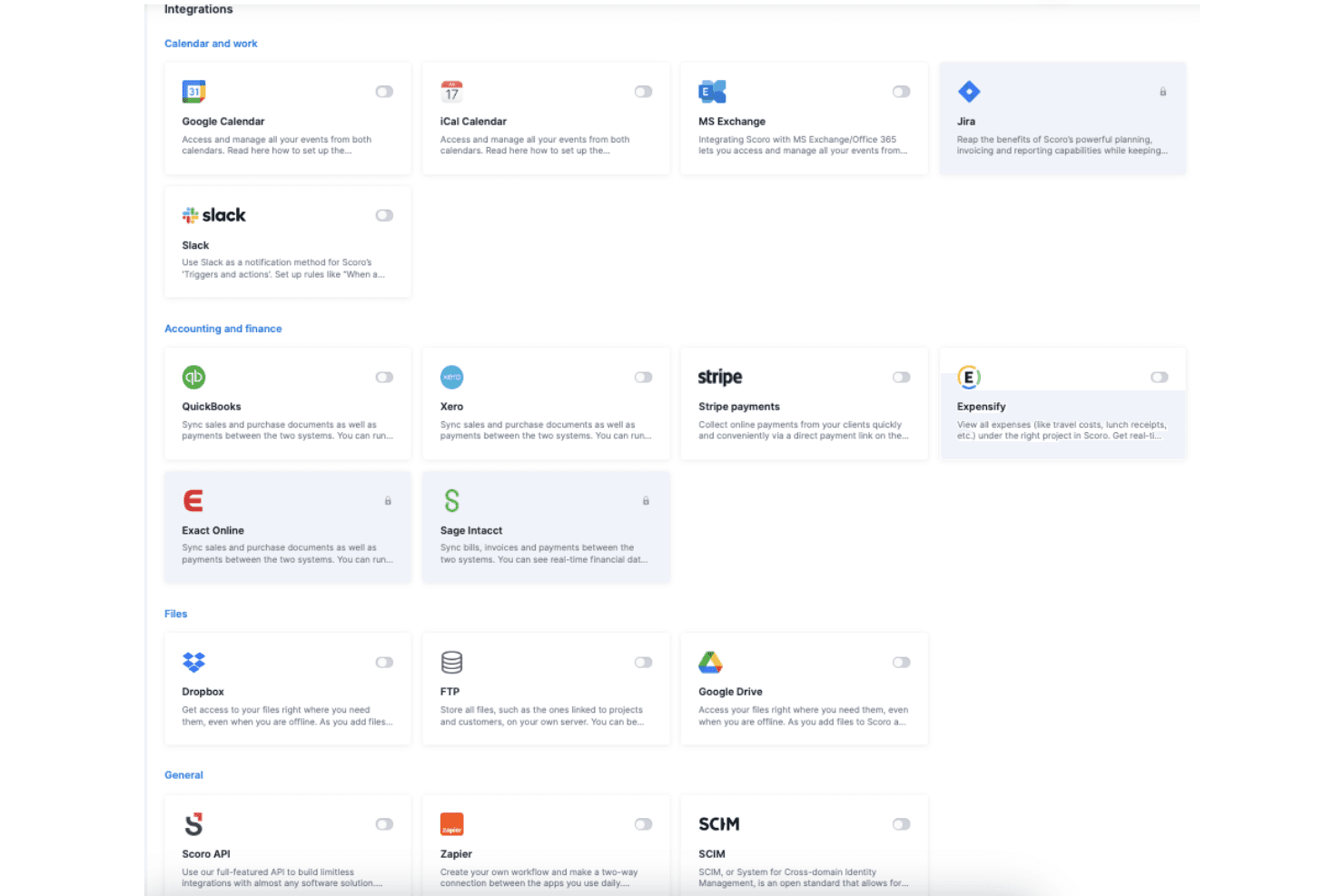
Scoro integrates with Google Calendar, Xero, QuickBooks, Zapier, Jira, Sage, and Dropbox, among others.
Scoro also offers a public API and connects with third-party integration tools for custom workflows and extended connectivity.
Value for Money
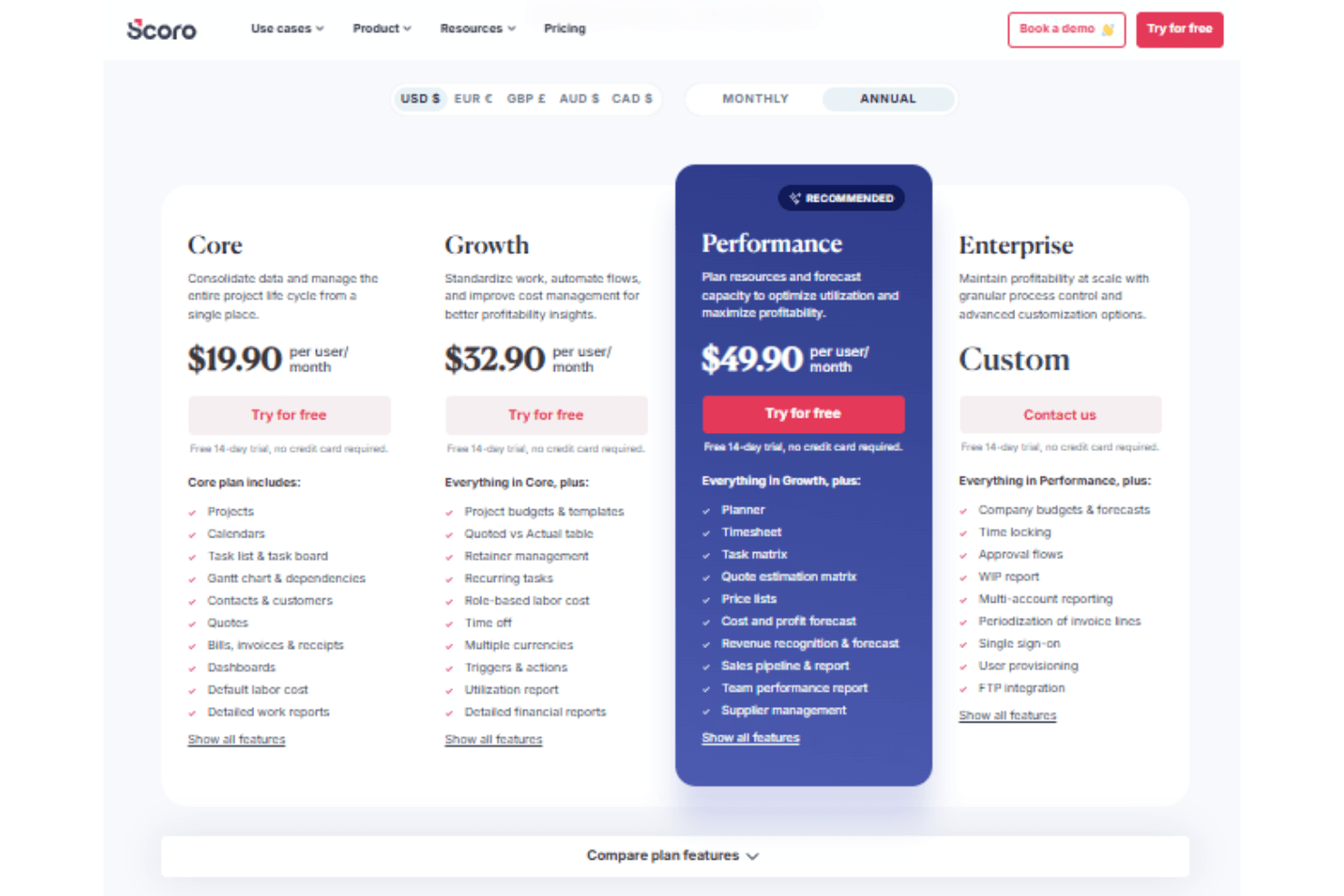
Scoro is seen as a strong investment for project-based teams that need unified project, billing, and reporting tools. Its tiered pricing structure scales with business needs, offering increasing levels of financial control, automation, and forecasting. While the platform provides transparent pricing and robust features, smaller teams may find entry-level plans limiting as complexity grows. A 14-day free trial is available to assess the software’s features before committing.
- Core: Includes project and calendar management, Gantt chart views, dashboards, and detailed work reports.
- Growth: Adds budgeting, automation, profitability tracking features, and detailed financial reports..
- Performance: Includes advanced forecasting, resource planning, and supplier management.
- Enterprise: Offers FTP integration, approval flows, SSO, and multi-account reporting.
New Product Updates from Scoro
 Opens new window
Scoro Adds Time Mobile App and ELI Improvements
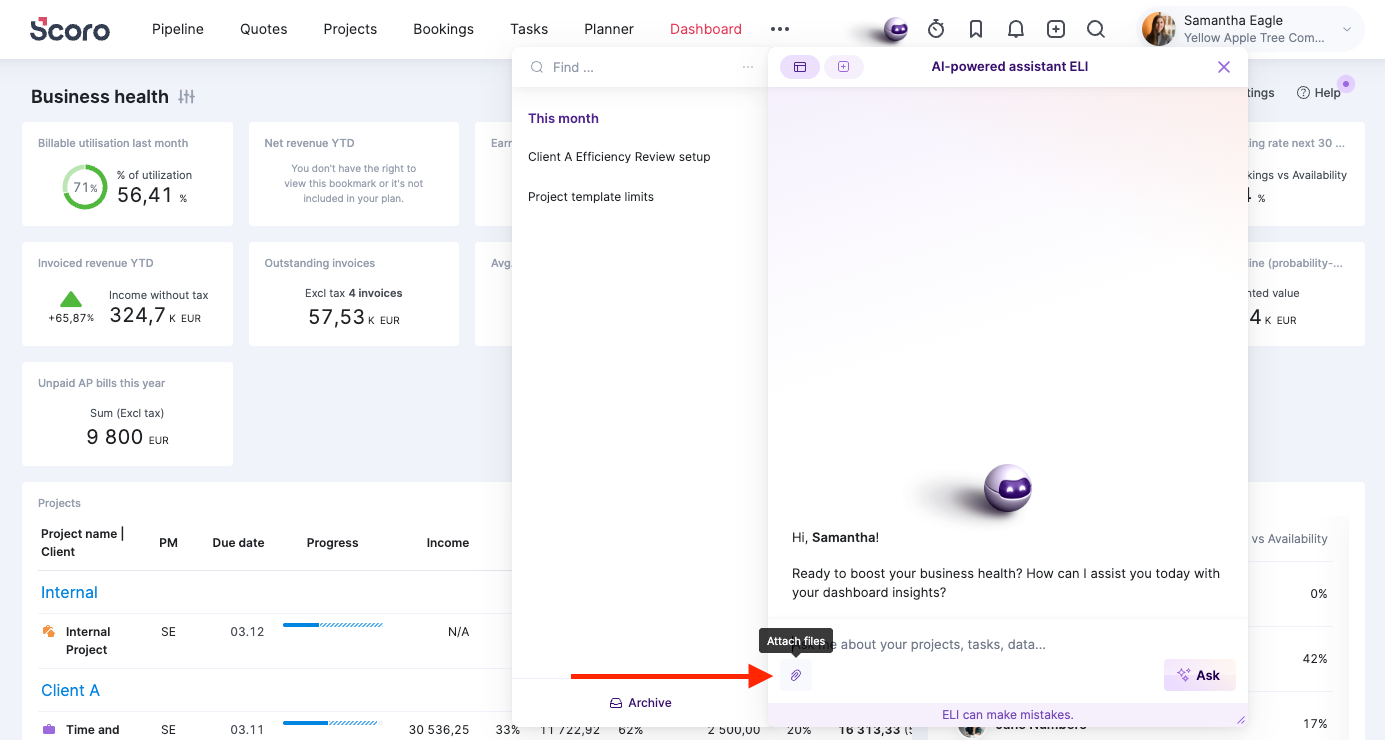
Scoro’s latest update focuses on making time tracking more flexible and day-to-day work faster. The new Scoro Time mobile app supports on-the-go time logging, while ELI gains capabilities that help teams automate and manage work more efficiently. Highlights include:
- Scoro Time Mobile App: Log time, run timers, and manage daily tasks from iOS or Android.
- Offline Time Tracking: Cache time entries and running timers until the device reconnects.
- ELI File Attachments: Upload documents, spreadsheets, images, and other supported files directly in ELI chat.
- ELI Smart Filters: Create filtered list and report views using natural-language requests.
- Expanded ELI Automation: Let administrators configure automation rules where ELI acts on behalf of a selected user.
Visit Scoro’s official site for more details.
 Opens new window
Scoro Adds Quote Timelines, ELI Automation, and Partial Invoicing
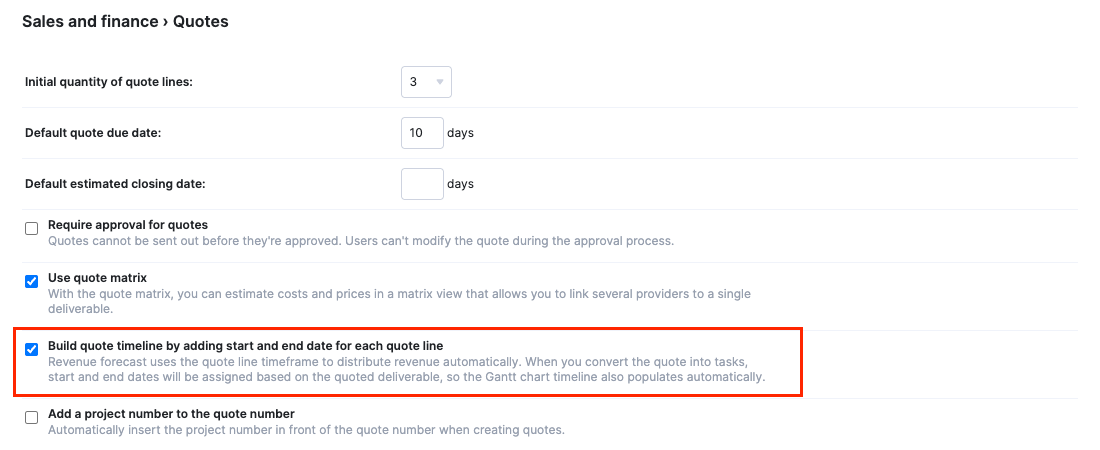
Scoro adds quote timelines, ELI trigger actions, partial invoicing by amount, and new integration options for QuickBooks, Exact Online, and BambooHR. These updates make it easier to plan projects earlier, automate routine actions, and manage billing and data sync. Highlights include:
- Quote Timelines: Lets users add start and end dates to quote line items and carry those timelines into project tasks and Gantt charts.
- ELI Trigger Actions: Lets ELI perform actions automatically when configured trigger conditions are met.
- Partial Invoicing by Amount: Lets users invoice a specific total or line-item amount instead of relying only on percentages.
- QuickBooks Expense Sync: Syncs expenses from Scoro to QuickBooks for more connected expense tracking.
- Exact Online Purchase Invoices: Adds more options for syncing purchase documents to Exact Online.
- BambooHR User Sync: Syncs BambooHR employees to Scoro as users.
Visit Scoro’s official site for more details.
 Opens new window
Scoro Adds Revenue Models, Forecasting, and Sage Intacct Updates
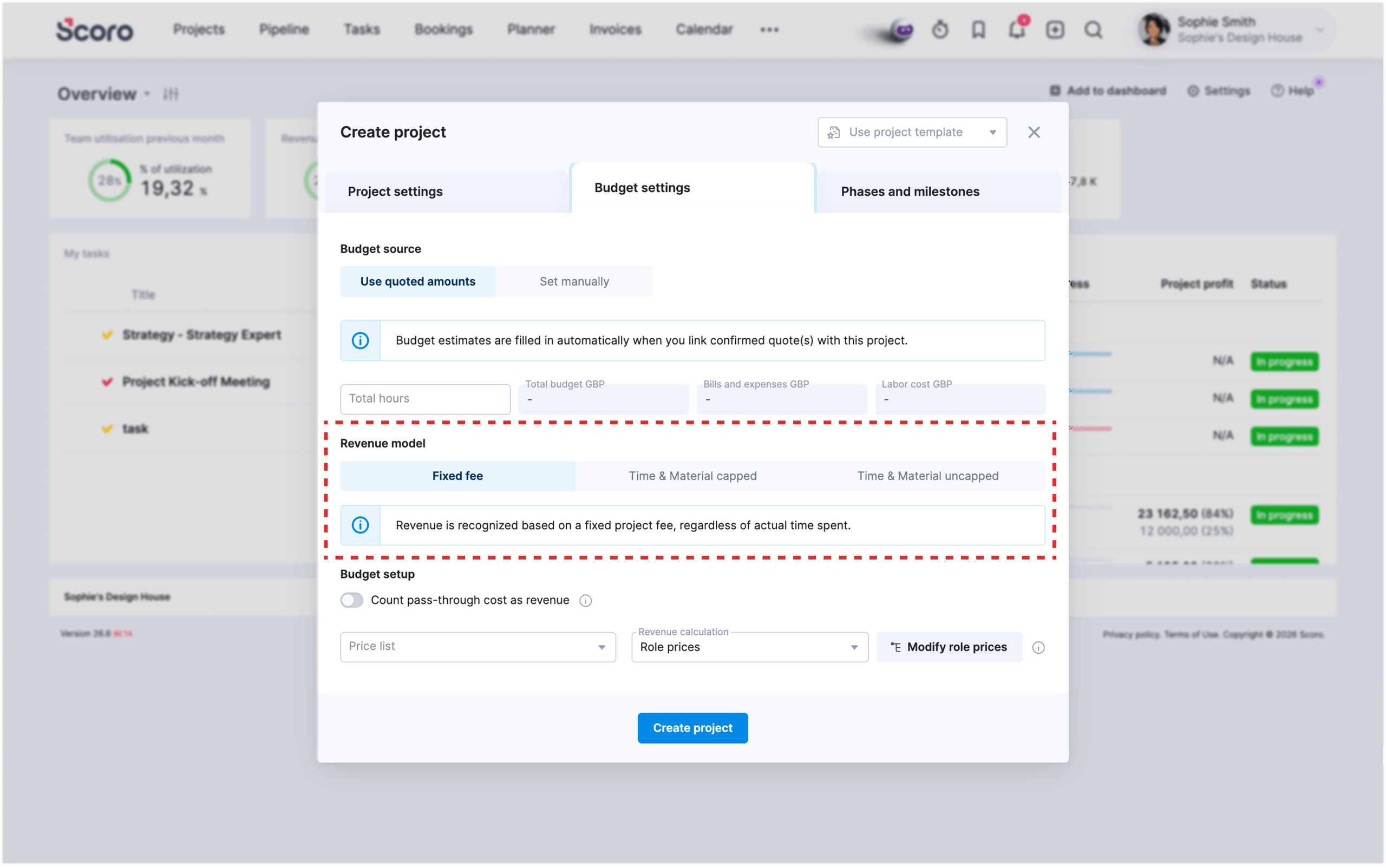
Scoro adds Project Revenue Models, updated Forecasting Metrics, and Sage Intacct integration improvements to improve project financial tracking and accounting processes. These updates help teams manage revenue calculations, forecast project performance, and sync financial data more efficiently. Highlights include:
- Project Revenue Models: Track and calculate revenue using Fixed Fee, Time & Material Capped, and Time & Material Uncapped models.
- Forecasting Metrics: View updated revenue and profit forecasts based on project revenue models and contract terms.
- Sage Intacct Integration Updates: Sync expenses, credit bills, and inter-office billing data between Scoro and Sage Intacct.
Visit Scoro’s official site for more details.
 Opens new window
Scoro Launches New Apps and Optimizes Work Management
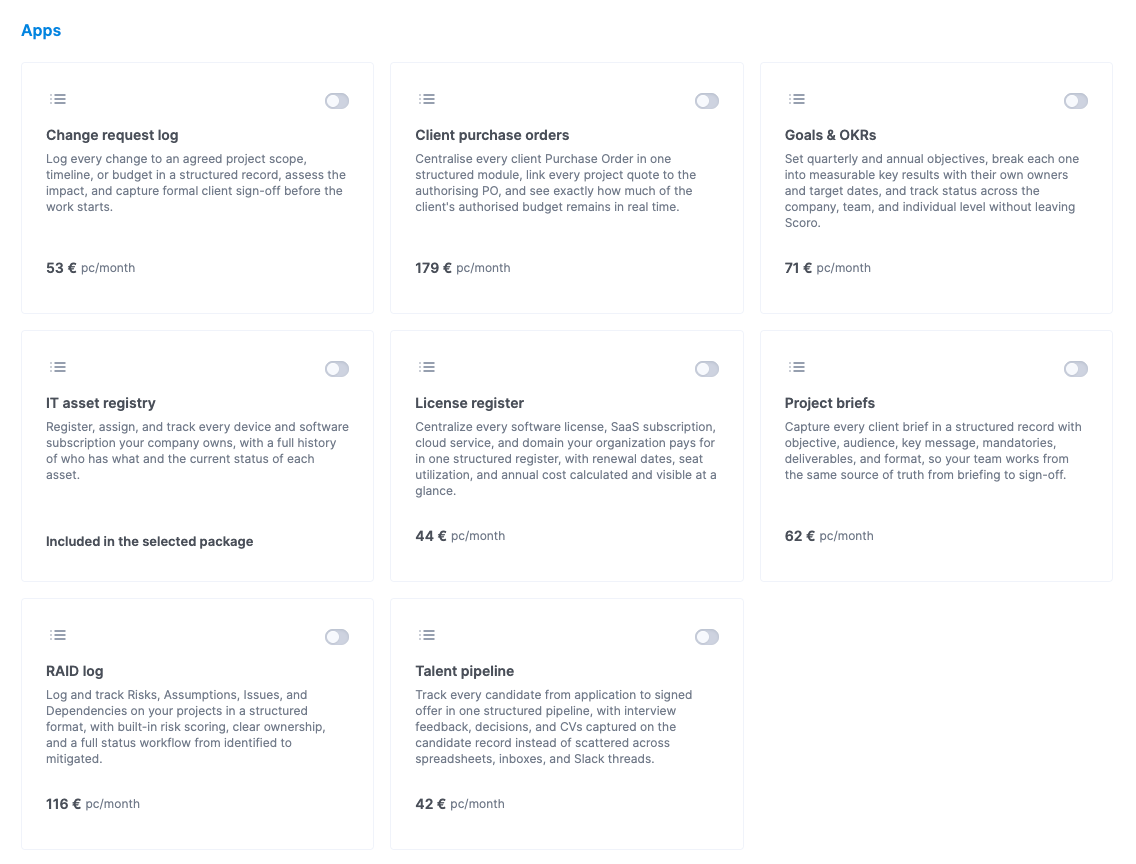
Scoro introduces a suite of new apps and improves booking tools, task management, and integrations with platforms like Envoice, Xero, and Avalara. These updates enhance workflow efficiency by centralizing data, reducing manual work, and improving visibility across projects and finances. Highlights include:
- New Scoro Apps: Centralize workflows like project tracking, recruitment, and asset management within dedicated modules.
- Booking and Task Improvements: Manage schedules, split bookings, and update task timelines more efficiently.
- Finance Integrations: Sync expenses and automate cost tracking with Envoice, Xero, and Avalara integrations.
- Improved Project Planning: Manage phases, milestones, and team capacity with better visibility and controls.
- Dashboard and Reporting Updates: Track availability and performance with enhanced reporting and dashboard support.
Visit Scoro’s official site for more details.
Scoro Specs
- API: Yes
- Billing/Invoicing: Yes
- Budgeting: Yes
- CRM Integration: Yes
- Dashboards: Yes
- Data Export: Yes
- Data Import: Yes
- Document Management: Yes
- Expense Tracking: Yes
- External Integrations: Yes
- Financial Analysis: Yes
- Forecasting: Yes
- Gantt Charts: Yes
- Inventory Tracking: Yes
- Multi-Currency: Yes
- Multi-User: Yes
- Notifications: Yes
- Project Management: Yes
- Resource Management: Yes
- Scheduling: Yes
- Status Notifications: Yes
- Task Scheduling/Tracking: Yes
- Time Management: Yes
- Workflow Management: Yes
Scoro Customers


Scoro FAQs
Scoro Company Overview & History
Scoro is a professional services automation platform headquartered in London, UK, with a focus on unifying project management, resource planning, and financial tracking for consultancies, agencies, and service firms. The company is known for its modern, intuitive interface and deep financial insights, helping clients improve profitability and operational visibility. Scoro is not affiliated with other products or companies and is independently operated. Notable clients include agencies, consultancies, and IT service firms, with customer testimonials highlighting improved utilization rates and project profitability.
Scoro Major Milestones
- 2013: Scoro founded and began development of its unified PSA platform.
- 2015: Product officially launched for professional services businesses.
- 2021: Achieves ISO 27001 certification for information security management.
- 2023: Recognized for financial depth and usability in industry publications.
- 2026: Serves thousands of users globally from its London headquarters.