

Bonsai regroupe la facturation, les contrats, le suivi du temps et la gestion de projet sur une seule plateforme, mais ce ne sera pas la solution adaptée à toutes les entreprises. Vous pouvez avoir besoin d'une facturation plus flexible, de rapports financiers plus complets, de meilleures intégrations comptables ou d'une plateforme capable de répondre à des besoins plus complexes au fur et à mesure du développement de votre entreprise.
Lorsque j'évalue les alternatives à Bonsai, j'accorde une attention particulière aux flux de travail financiers et administratifs qui peuvent rapidement devenir contraignants à mesure qu'une entreprise se développe. La facturation et les paiements, le temps et les dépenses facturables, les rapports et les intégrations comptables sont tous importants, mais les contrats, la gestion des clients et les outils de gestion des flux de travail qui assurent le bon déroulement des opérations quotidiennes le sont tout autant.
Dans ce guide, j'ai comparé les meilleures alternatives à Bonsai dans ces différents domaines afin de vous aider à trouver une plateforme offrant le juste équilibre entre contrôle financier, gestion des clients et flexibilité opérationnelle.
Qu'est-ce que Bonsai ?
Bonsai est un logiciel de gestion d'activité pour freelances conçu pour aider les freelances et les propriétaires de petites entreprises à gérer leurs projets, leurs factures et leurs contrats. Il est couramment utilisé par les professionnels de la création, les consultants et les travailleurs indépendants qui doivent organiser leurs activités professionnelles. Des fonctionnalités telles que le suivi du temps, la facturation et la gestion des contrats contribuent à simplifier les tâches administratives, ce qui vous permet de vous concentrer sur votre travail. Dans l'ensemble, Bonsai fournit une plateforme centralisée pour gérer les activités de votre entreprise indépendante.
Tableau comparatif des alternatives à Bonsai
Ce tableau comparatif présente les tarifs et les options d’essai gratuit des meilleures alternatives à Bonsai que j’ai sélectionnées afin de vous aider à trouver une solution adaptée à votre budget et aux besoins de votre entreprise.
| Tool | Best For | Trial Info | Price | ||
|---|---|---|---|---|---|
| 1 | Idéal pour les outils de facturation gratuits | Formule gratuite disponible | À partir de $11.67/mois (facturé annuellement) | Website | |
| 2 | Idéal pour une productivité tout-en-un | Forfait gratuit disponible | À partir de $7/utilisateur/mois (facturé annuellement) | Website | |
| 3 | Idéal pour accélérer la gestion des documents | Essai gratuit de 14 jours | À partir de $19/utilisateur/mois (facturé annuellement) | Website | |
| 4 | Idéal pour la gestion d'entreprises créatives | Essai gratuit + démonstration gratuite disponibles | À partir de $35/mois | Website | |
| 5 | Idéal pour la gestion de services tout-en-un | Essai gratuit + démonstration gratuite disponible | À partir de $29/mois | Website | |
| 6 | Idéal pour la gestion des opérations d'une agence | Essai gratuit disponible | À partir de 39 $/mois (facturé annuellement) | Website | |
| 7 | Idéal pour l’automatisation des entreprises de services | Démo gratuite disponible | Tarifs sur demande | Website | |
| 8 | Idéal pour les professionnels indépendants | Essai gratuit disponible | À partir de $29/mois (facturé annuellement) | Website | |
| 9 | Idéal pour améliorer l'efficacité du travail grâce à l'IA | Essai gratuit de 14 jours + forfait gratuit disponible | À partir de $9/utilisateur/mois (facturé annuellement) | Website | |
| 10 | Idéal pour la gestion flexible de bases de données | Formule gratuite + démonstration gratuite disponible | À partir de $20/utilisateur/mois (facturé annuellement) | Website |


Pourquoi faire confiance à nos recommandations de logiciels
6,700+
Reviews
20
Industry experts
16+
Evaluation factors
14
Years
Nos avis reflètent notre jugement indépendant — et non un argumentaire de vente. Découvrez comment nous restons transparents.
Pour ce guide, nous avons évalué les outils grâce à des tests pratiques et une recherche indépendante, en notant les outils selon nos critères de sélection.
Nos avis reflètent notre jugement éditorial humain, et non un argumentaire de vente.
Avis sur les meilleures alternatives à Bonsai
\u003cspan style=\u0022font-weight: 400;\u0022\u003eVous trouverez ci-dessous mes résumés détaillés des meilleures alternatives à Bonsai qui ont été retenues dans ma liste restreinte. Mes avis proposent un aperçu détaillé des principales fonctionnalités, des avantages et inconvénients, des intégrations et des cas d’utilisation idéaux de chaque outil afin de vous aider à trouver celui qui vous convient le mieux.\u003c/span\u003e
 Idéal pour les outils de facturation gratuits
- Formule gratuite disponible
- À partir de $11.67/mois (facturé annuellement)
Visit WebsiteCustomer Rating:4.7/5
Invoice Ninja est un outil de facturation et de gestion des factures permettant aux freelances de gérer leurs factures, dépenses et paiements. Invoice Ninja est un logiciel de facturation et de gestion des factures adapté aux freelances et aux petites entreprises. Il propose des outils pour créer des factures, suivre les dépenses et gérer les paiements.
Pourquoi c'est une bonne alternative à Bonsai : Invoice Ninja se distingue par ses outils de facturation gratuits, idéaux pour les freelances soucieux de leurs dépenses. Vous pouvez créer facilement des factures professionnelles et suivre vos dépenses sans frais supplémentaires. La plateforme prend en charge plusieurs passerelles de paiement, offrant une grande flexibilité dans la gestion des paiements. L'interface conviviale d'Invoice Ninja permet de commencer rapidement et de gérer simplement vos processus de facturation.
Fonctionnalités et intégrations remarquables :
Les fonctionnalités comprennent des modèles de factures personnalisables adaptés à votre marque, le suivi du temps pour garantir une facturation précise et la gestion des dépenses pour garder vos finances organisées.
Les intégrations comprennent Stripe, PayPal, Authorize.Net, WePay, Braintree, Slack, Zapier, Xero, QuickBooks et Google Wallet.
Pros and Cons
Pros:
- Fonctionnalités de facturation gratuites
- Prend en charge plusieurs passerelles de paiement
- Modèles de factures personnalisables et adaptés à votre marque
Cons:
- La comptabilité est limitée aux utilisateurs de niveau entreprise
- L'assistance client est limitée aux formules payantes
Learn more about Invoice Ninja: Idéal pour une productivité tout-en-un
- Forfait gratuit disponible
- À partir de $7/utilisateur/mois (facturé annuellement)
Visit WebsiteCustomer Rating:4.7/5
ClickUp est une plateforme de productivité permettant de gérer les tâches, les documents, les objectifs et le suivi du temps. ClickUp est un outil de productivité et de gestion de projets conçu pour les équipes de toutes tailles. Il aide les utilisateurs à gérer les tâches, les documents, les objectifs et le suivi du temps.
Pourquoi c'est une bonne alternative à Bonsai : ClickUp propose une plateforme tout-en-un qui combine la gestion des tâches avec la collaboration sur les documents et le suivi du temps. Ses fonctionnalités personnalisables répondent aux divers besoins des équipes et améliorent la productivité. Vous pouvez gérer plusieurs projets au sein d'une seule interface, ce qui réduit le besoin d'utiliser plusieurs outils. Les vues flexibles et les capacités d'automatisation de ClickUp favorisent davantage l'efficacité des flux de travail des équipes.
Fonctionnalités et intégrations remarquables :
Les fonctionnalités comprennent le suivi des objectifs pour garder votre équipe concentrée, des tableaux de bord personnalisés pour visualiser vos projets et le suivi du temps pour surveiller la productivité.
Les intégrations comprennent Slack, Google Drive, Dropbox, Microsoft Teams, Outlook, Zoom, GitHub, Salesforce, HubSpot et Evernote.
Pros and Cons
Pros:
- Outils de collaboration en temps réel
- Prend en charge le suivi des objectifs
- Suite complète de gestion des projets et des tâches
Cons:
- L'interface mobile ne dispose pas d'écrans essentiels
- Surcharge de notifications due au volume élevé de données
Learn more about ClickUp: Idéal pour accélérer la gestion des documents
- Essai gratuit de 14 jours
- À partir de $19/utilisateur/mois (facturé annuellement)
Visit WebsiteCustomer Rating:4.5/5
PandaDoc est un logiciel d’automatisation des documents permettant de créer et de gérer des flux de travail simplifiés. PandaDoc est un logiciel d’automatisation des documents qui s’adresse aux entreprises ayant besoin d’une création et d’une gestion efficaces des documents. Il est destiné aux équipes commerciales, aux services des ressources humaines et à toute personne nécessitant des flux de travail documentaires efficaces.
Pourquoi c’est une bonne alternative à Bonsai : PandaDoc excelle dans l’accélération des processus de gestion des documents grâce à ses fonctionnalités d’automatisation. Vous pouvez créer, envoyer et signer électroniquement des documents rapidement, ce qui réduit le temps consacré aux tâches administratives. Ses analyses intégrées fournissent des informations sur les performances des documents et vous aident à comprendre ce qui fonctionne le mieux. Les modèles et les outils de modification du logiciel améliorent encore l’efficacité, ce qui en fait un choix solide pour vos besoins documentaires.
Fonctionnalités et intégrations remarquables :
Les fonctionnalités comprennent une bibliothèque de modèles personnalisables adaptés aux besoins de votre entreprise, un suivi en temps réel pour surveiller l’état des documents et des capacités de signature électronique pour finaliser les contrats plus rapidement.
Les intégrations comprennent Salesforce, HubSpot, Zoho CRM, Pipedrive, Microsoft Dynamics, Slack, Google Drive, Dropbox, Stripe et QuickBooks.
Pros and Cons
Pros:
- Rapports d’activité et analyses avancés
- Suivi des documents intégré
- Chiffrement de bout en bout et hébergement sécurisé
Cons:
- Manque d’outils essentiels de modification et de mise en forme
- Les fonctionnalités avancées sont réservées aux niveaux supérieurs
Learn more about PandaDoc: Idéal pour la gestion d'entreprises créatives
- Essai gratuit + démonstration gratuite disponibles
- À partir de $35/mois

Dubsado est un outil de gestion d'entreprise permettant aux travailleurs indépendants de gérer leurs clients, leurs projets et leur facturation. Dubsado est une solution de gestion d'entreprise conçue pour les entrepreneurs créatifs et les travailleurs indépendants. Elle aide les utilisateurs à gérer les relations avec les clients, les projets et les processus de facturation.
Pourquoi c'est une bonne alternative à Bonsai : Dubsado propose des fonctionnalités de gestion d'entreprise créative qui répondent aux besoins uniques des travailleurs indépendants. Ses flux de travail personnalisables vous permettent d'adapter les processus à vos exigences spécifiques. Vous pouvez automatiser les communications avec les clients et gérer efficacement les projets grâce à sa suite d'outils. Les fonctionnalités de facturation et de gestion des contrats de Dubsado renforcent également vos opérations commerciales, ce qui en fait un choix polyvalent.
Fonctionnalités et intégrations remarquables :
Les fonctionnalités comprennent des flux de travail personnalisables adaptés à votre modèle d'entreprise, la communication automatisée avec les clients pour gagner du temps et des outils complets de gestion de projets pour que tout reste organisé.
Les intégrations comprennent QuickBooks, Xero, Stripe, Square, Zapier, Google Calendar, Gmail, Mailchimp, Zoom et Slack.
Pros and Cons
Pros:
- Modèles de contrats personnalisables et juridiquement contraignants
- Portails clients pour les clients récurrents
- Tableaux de bord avec listes de tâches dynamiques
Cons:
- Rapports de base sans analyses avancées
- Pas de prise en charge de plusieurs devises dans la facturation
Learn more about Dubsado: Idéal pour la gestion de services tout-en-un
- Essai gratuit + démonstration gratuite disponible
- À partir de $29/mois
Visit WebsiteCustomer Rating:4.7/5
OneSuite est une plateforme tout-en-un permettant aux agences de gérer leurs clients, leurs projets, leur facturation et leurs documents. OneSuite est une plateforme tout-en-un conçue pour les entreprises de services, en particulier les agences, afin d'améliorer la gestion des clients et l'efficacité opérationnelle. Elle propose des outils de gestion de projets, de CRM, de facturation et de gestion documentaire.
Pourquoi c'est une bonne alternative à Bonsai : OneSuite offre une gestion complète des services avec des fonctionnalités adaptées aux besoins des agences. Son portail client favorise la transparence et améliore les interactions avec les clients. Le système de facturation de la plateforme prend en charge les paiements en ligne, garantissant des transactions financières plus fluides. De plus, les outils de gestion de projets d'OneSuite contribuent à simplifier les opérations, de l'intégration au départ des clients, ce qui en fait un choix polyvalent pour les agences.
Fonctionnalités et intégrations remarquables :
Fonctionnalités comprennent une facturation personnalisable pour une gestion financière simplifiée, un espace documentaire pour gérer les contrats et les propositions, ainsi qu'un portail client pour une collaboration sécurisée.
Intégrations avec Stripe, PayPal, QuickBooks, Google Calendar, Zapier, Slack, Zoom, Mailchimp, Microsoft Teams et HubSpot.
Pros and Cons
Pros:
- Stockage et partage sécurisés des fichiers
- Fonctionnalités d'autonomie pour les clients
- Prise en charge de plusieurs passerelles de paiement
Cons:
- L'application mobile ne dispose pas de toutes les fonctionnalités de la version de bureau
- Fonctionnalités limitées d'automatisation des flux de travail
Learn more about Onesuite: Idéal pour la gestion des opérations d'une agence
- Essai gratuit disponible
- À partir de 39 $/mois (facturé annuellement)

ManyRequests est une plateforme de portail client destinée aux agences pour gérer les projets, les clients et la facturation. ManyRequests est une plateforme conçue pour permettre aux agences de gérer leurs clients, leurs projets et leur facturation. Elle s'adresse principalement aux entreprises de services telles que les agences de design, de marketing et de développement. Ses principales fonctions comprennent un portail client personnalisé, la gestion de projets et la facturation.
Pourquoi c'est une bonne alternative à Bonsai : ManyRequests propose un portail client personnalisé, le suivi du temps et des fonctionnalités de CRM qui favorisent la gestion des opérations d'une agence. Vous pouvez gérer efficacement les demandes des clients et suivre l'avancement des projets. Les fonctionnalités de facturation de la plateforme vous permettent de synchroniser les paiements et la gestion de projets au même endroit, sans outils supplémentaires. Ses outils de reporting fournissent des informations précieuses sur la satisfaction des clients et les données financières.
Fonctionnalités et intégrations remarquables :
Les fonctionnalités comprennent un portail client pour centraliser les échanges avec les clients, le suivi du temps pour une facturation précise et des outils de gestion de projets pour tout garder organisé.
Les intégrations comprennent Zapier, Calendly, HiBob, Xero, Stripe, Google Calendar, Slack, QuickBooks, Asana et HubSpot.
Pros and Cons
Pros:
- Portail client et domaines personnalisés aux couleurs de la marque
- Facturation intégrée à la gestion de projets
- Assistance client multilingue
Cons:
- Fonctionnalités limitées de reporting et de collecte de données
- Aucune hiérarchie de tâches ni délégation de sous-tâches
Learn more about ManyRequests: Idéal pour l’automatisation des entreprises de services
- Démo gratuite disponible
- Tarifs sur demande
Visit WebsiteCustomer Rating:4.4/5
Accelo est une plateforme cloud qui automatise le travail avec les clients et améliore la productivité des équipes de services. Accelo est une plateforme cloud d’automatisation des opérations de services conçue pour les entreprises de services. Elle aide à gérer le travail avec les clients, à centraliser les opérations et à améliorer la productivité des équipes.
Pourquoi c’est une bonne alternative à Bonsai : Accelo propose l’automatisation des entreprises de services avec des fonctionnalités telles que la gestion de projet, le suivi des clients et la facturation. Ses flux de travail automatisés garantissent une gestion efficace des tâches et réduisent le travail manuel. Les rapports en temps réel de la plateforme fournissent des informations sur les performances de votre entreprise, vous aidant ainsi à prendre des décisions éclairées. Le portail client d’Accelo améliore la communication et en fait une solution complète pour répondre aux besoins de votre entreprise de services.
Fonctionnalités et intégrations remarquables :
Fonctionnalités : des flux de travail automatisés pour gagner du temps, des rapports en temps réel pour améliorer la prise de décision et un portail client pour améliorer la communication.
Intégrations : QuickBooks, Xero, Slack, Google Workspace, Office 365, Salesforce, HubSpot, Mailchimp, Stripe et PayPal.
Pros and Cons
Pros:
- Gestion de projet intégrée à la facturation
- Rapports en temps réel
- Outils de gestion des ressources
Cons:
- Fonctionnalités limitées de l’application mobile
- Les données des projets sont cloisonnées et fragmentées
 Idéal pour les professionnels indépendants
- Essai gratuit disponible
- À partir de $29/mois (facturé annuellement)
Visit WebsiteCustomer Rating:5/5
HoneyBook est une plateforme client alimentée par l’IA pour gérer les projets, les paiements et la croissance de l’entreprise. HoneyBook est une plateforme de gestion des relations clients alimentée par l’IA, conçue pour les professionnels indépendants aux États-Unis et au Canada. Elle propose des outils pour gérer les clients, les projets, les paiements et la croissance de l’entreprise.
Pourquoi c’est une bonne alternative à Bonsai : HoneyBook fournit un système complet de gestion des relations clients qui s’adresse spécifiquement aux professionnels indépendants. Ses outils d’IA augmentent la productivité en automatisant des tâches telles que les propositions commerciales, la planification et la facturation. Les fonctionnalités CRM de la plateforme vous aident à gérer efficacement les interactions avec vos clients. De plus, l’accent mis par HoneyBook sur la gestion des projets et des finances favorise la croissance et l’organisation de l’entreprise.
Fonctionnalités et intégrations clés :
Les fonctionnalités comprennent des outils de gestion de projets pour organiser votre travail, des automatisations pilotées par l’IA pour vous faire gagner du temps et une plateforme centralisée pour les contrats et les factures. HoneyBook Academy, qui propose une vaste bibliothèque de cours approfondis, de webinaires et de tutoriels, constitue un avantage supplémentaire.
Les intégrations comprennent QuickBooks, Google Calendar, Zapier, Mailchimp, Gmail, Square, Slack, Zoom, Outlook et Stripe.
Pros and Cons
Pros:
- Outils CRM alimentés par l’IA
- Accès aux outils de formation de HoneyBook Academy
- Automatisation personnalisable des flux de travail
Cons:
- Limité aux États-Unis et au Canada
- Le prix peut augmenter avec les modules complémentaires
Learn more about HoneyBook: Idéal pour améliorer l'efficacité du travail grâce à l'IA
- Essai gratuit de 14 jours + forfait gratuit disponible
- À partir de $9/utilisateur/mois (facturé annuellement)
Visit WebsiteCustomer Rating:5/5
La gestion du travail de monday.com est une plateforme flexible qui permet aux équipes de planifier, suivre et gérer efficacement leurs projets. La plateforme monday.com de gestion du travail est conçue pour la collaboration en équipe et la gestion de projets. Elle s'adresse aux entreprises de toutes tailles en proposant des outils permettant de planifier, suivre et réaliser le travail efficacement.
Pourquoi c'est une bonne alternative à Bonsai : le logiciel de gestion du travail de monday.com propose des outils optimisés par l'IA qui améliorent l'efficacité et la collaboration. Ses tableaux de bord personnalisables vous permettent d'adapter les vues aux besoins de votre équipe. Les fonctionnalités d'automatisation réduisent les tâches manuelles et vous libèrent du temps pour des travaux plus importants. Les calendriers visuels et le suivi de l'avancement de la plateforme permettent à chacun de rester coordonné et de respecter les délais.
Fonctionnalités et intégrations remarquables :
Les fonctionnalités comprennent l'automatisation pour réduire les tâches répétitives, des calendriers visuels pour le suivi des projets et des tableaux de bord personnalisables adaptés à vos besoins spécifiques.
Les intégrations comprennent Slack, Microsoft Teams, Google Calendar, Dropbox, Zoom, Excel, Outlook, Jira, Salesforce et Trello.
Pros and Cons
Pros:
- Calendriers visuels des projets et tableaux de bord personnalisables
- Outils de collaboration interfonctionnelle
- Suivi des portefeuilles et des mises à jour des projets
Cons:
- Les outils d'administration sont réservés aux forfaits premium
- Les fonctionnalités avancées nécessitent une configuration
Learn more about monday.com: 10Idéal pour la gestion flexible de bases de données
Airtable
- Formule gratuite + démonstration gratuite disponible
- À partir de $20/utilisateur/mois (facturé annuellement)
Visit WebsiteCustomer Rating:4.6/5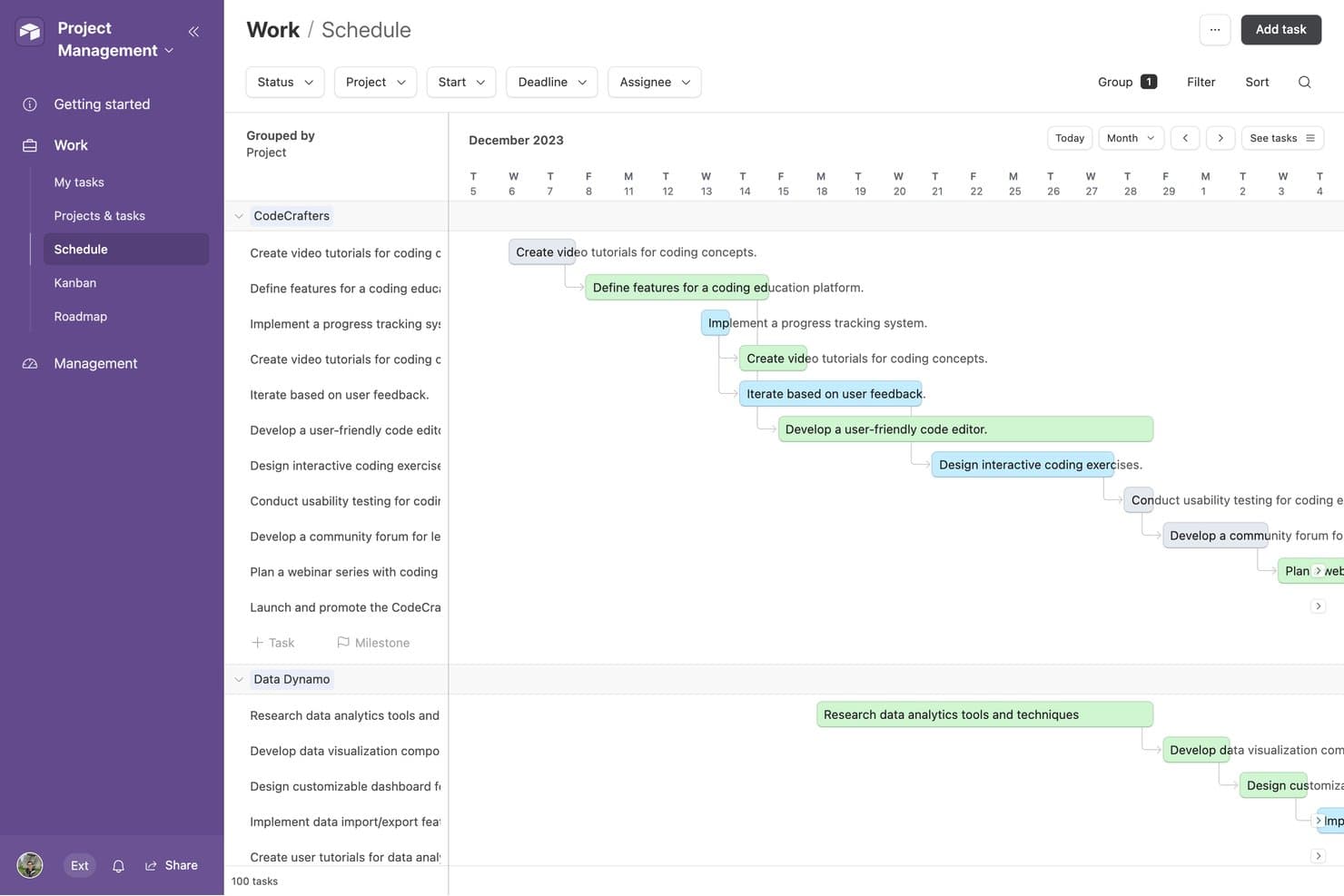
Airtable propose une vue de planification qui affiche les tâches des projets regroupées par projet, avec des flèches de dépendance et des chronologies codées par couleur dans une présentation mensuelle du calendrier. Airtable est une plateforme de base de données relationnelle sans code conçue pour les indépendants, les agences et les équipes opérationnelles. Elle propose des outils permettant de créer des flux de travail personnalisés, de suivre les clients et les projets, et d’organiser des données connectées sans nécessiter de compétences en programmation.
Pourquoi c’est une bonne alternative à Bonsai : Airtable offre une approche flexible de la gestion des clients, des projets et des flux de travail grâce à son modèle de base de données relationnelle. Vous pouvez relier les fiches clients, les projets et les livrables dans votre espace de travail, ce qui le rend plus adaptable qu’une feuille de calcul classique. Ses plus de 40 types de champs, notamment les champs de durée, de devise et de code-barres, aident les équipes à structurer les données en fonction de leurs processus spécifiques. Des outils visuels tels que les vues de Gantt et de chronologie facilitent également la planification des projets et la gestion des flux de travail opérationnels.
Fonctionnalités et intégrations remarquables :
Les fonctionnalités comprennent des formulaires personnalisables pour recueillir les informations sur les clients et les projets, des contrôles d’autorisation détaillés pour gérer l’accès des collaborateurs, ainsi qu’un historique des modifications et des journaux d’audit pour suivre les éditions et restaurer les versions précédentes. Airtable propose également plusieurs vues visuelles, notamment les vues de Gantt et de chronologie, pour gérer les projets et les flux de travail.
Intégrations avec Google Workspace, Slack, Salesforce, Jira, GitHub, Dropbox et Zapier. Airtable fournit également une API permettant de créer des intégrations personnalisées.
Pros and Cons
Pros:
- Structure de base de données relationnelle très flexible
- Plusieurs vues pour organiser les données clients
- Les automatisations réduisent les tâches administratives répétitives
Cons:
- Aucun outil natif de facturation ou de gestion des paiements
- La création de rapports financiers nécessite une configuration manuelle importante
Learn more about Airtable:
Autres alternatives à Bonsai
\u003cspan style=\u0022font-weight: 400\u0022\u003eVoici quelques alternatives supplémentaires à Bonsai qui n’ont pas été retenues dans ma liste restreinte, mais qui méritent tout de même d’être examinées :\u003c/span\u003e
- 11TogglIdéal pour le suivi simple du temps
- 12Brain LinkIdéal pour la prise de notes et la collaboration
Comment j'évalue les alternatives à Bonsai
J'évalue chaque outil en fonction des exigences de base—facturation, signatures électroniques, suivi du temps—puis je recherche des éléments différenciateurs comme l'automatisation fiscale et les portails clients.
Fonctionnalités principales (Critères de base pour cette liste)
Lorsque je sélectionne des outils pour ma liste, j'attribue à chacun une note de 0 (ne propose pas la fonctionnalité) à 5 (excelle dans ce domaine) pour chaque fonctionnalité principale mentionnée ci-dessous. Ensuite, je calcule le score total de l'outil en pourcentage. Chaque outil doit obtenir un score total minimum de 65% pour être pris en compte.
- Facturation & Paiements : Je vérifie s'il est possible de créer des factures personnalisées, de mettre en place des cycles de facturation récurrents et de recevoir des paiements via plusieurs passerelles comme Stripe ou PayPal.
- Propositions & Contrats : Chaque outil doit permettre de rédiger des propositions, d'ajouter des contrats et de recueillir des signatures électroniques pour que les clients puissent valider et signer sans quitter la plateforme.
- Suivi du temps & des dépenses : Je recherche un chronomètre intégré, l'attribution de tarifs facturables par client ou projet, et une saisie des dépenses qui s'intègre directement aux factures.
- Gestion des clients & des projets : Une base de données centralisée des clients couplée à un suivi des projets est essentielle ici—organiser les livrables, les échéances et les fichiers par mission.
- Rapports financiers & comptabilité : J'évalue si l'outil génère des bilans de profits et pertes, suit les revenus et dépenses par catégorie et produit des rapports prêts pour la fiscalité.
- Automatisation des tâches & des workflows : Les déclencheurs automatiques pour l'envoi de rappels de factures, l'intégration de nouveaux clients ou la création de tâches de suivi permettent de gagner de précieuses heures administratives.
Une fois que j'ai une liste d'outils répondant à ces critères, j'analyse ce qui distingue chaque plateforme.
Facteurs différenciants (Ce qui distingue les fournisseurs)
Voici comment je compare et évalue différents fournisseurs :
Fonctionnalités clés
L'automatisation fiscale est un réel différenciateur—je privilégie les outils qui gèrent l'estimation trimestrielle, le suivi des déductions et la génération de formulaires 1099 sans nécessiter une plateforme distincte. Un portail client est aussi un atout, en particulier pour les experts-comptables qui gèrent plusieurs missions et dont les clients doivent consulter des factures ou déposer eux-mêmes des documents. J'évalue aussi le niveau d'intégration de chaque outil avec des logiciels comptables comme QuickBooks ou Xero, car la double saisie dans des systèmes isolés entraîne de réels problèmes de rapprochement.
Au-delà des fonctionnalités
La structure tarifaire est importante pour cette catégorie. J'examine si un outil évolue raisonnablement à mesure que l'on ajoute des clients ou des membres à l'équipe, car de nombreux freelances et dirigeants de petits cabinets commencent seuls et se développent avec le temps. La sécurité est un autre critère : gérer des données financières sensibles implique de vérifier les normes de chiffrement, les accès basés sur les rôles et les certifications de conformité. Je considère aussi l'expérience d'intégration, car un comptable indépendant sans support IT a besoin d'une configuration guidée et de solutions de migration depuis des outils comme Bonsai, et non d'un processus de mise en place sur plusieurs semaines.
Pourquoi chercher une alternative à Bonsai ?
Bien que Bonsai soit un bon choix de logiciel de gestion d'activité pour freelances, plusieurs raisons peuvent pousser certains utilisateurs à rechercher d'autres solutions. Vous pouvez chercher une alternative à Bonsai parce que…
- Vous avez besoin de davantage d'options de personnalisation
- Votre équipe est plus grande que ce que Bonsai peut prendre en charge
- Vous devez respecter des exigences de conformité propres à votre secteur
- Vous recherchez de meilleures possibilités d'intégration
- Vous avez besoin de prendre en charge plusieurs devises
- Vous vous trouvez dans une zone géographique où Bonsai n'est pas disponible
Si vous vous reconnaissez dans l'une de ces situations, vous êtes au bon endroit. Ma liste comprend plusieurs solutions de logiciels de gestion d'activité pour freelances mieux adaptées aux équipes confrontées à ces difficultés avec Bonsai et à la recherche d'autres solutions.
Principales fonctionnalités de Bonsai
Voici quelques-unes des principales fonctionnalités de Bonsai, afin de vous aider à comparer les offres des autres solutions :
- Automatisation : Automatise la gestion des tâches, la facturation et les flux de travail des projets afin d'améliorer la productivité.
- Outils de collaboration : Offre des espaces de travail partagés pour la collaboration en équipe et les échanges avec les clients.
- Contrôle d'accès : Fournit une gestion des autorisations et des rôles utilisateur personnalisés pour garantir la sécurité des données.
- Interface conviviale : Présente une navigation intuitive et une conception adaptative pour une utilisation aisée sur tous les appareils.
- Gestion des factures : Permet une numérotation personnalisée des factures et des incréments automatiques pour des dossiers financiers organisés.
- Intégration des paiements : Prend en charge plusieurs passerelles et options de paiement pour des transactions sécurisées.
- Factures personnalisables : Permet de créer des factures adaptées et de gérer les postes de facturation de manière flexible.
- Flux de travail personnalisés : Facilite la mise en place de flux de travail personnalisés et de déclencheurs d'automatisation pour assurer une prestation de services cohérente.
- Portail de paiement client : Offre aux clients un portail en ligne sécurisé pour gérer leurs paiements et leurs factures.
- Cycles de facturation flexibles : Permet de personnaliser les calendriers de facturation et d'automatiser les processus de facturation.