

Una valida alternativa ad ADP offre un'elaborazione affidabile delle buste paga, funzionalità HR flessibili e supporto per la conformità normativa all'altezza o superiore a ciò che ti aspetti da ADP. Se stai cercando alternative ad ADP, probabilmente cerchi soluzioni più adatte alle dimensioni, al settore o alle esigenze di integrazione della tua azienda, senza rinunciare a precisione o controllo. Questo elenco ti aiuterà a confrontare le opzioni principali, comprenderne i punti di forza distintivi e scegliere una piattaforma per le buste paga e le risorse umane in linea con le esigenze del tuo team e con i tuoi piani di crescita.
Che cos'è ADP?
ADP è un fornitore di software per le buste paga e le risorse umane che aiuta le aziende a gestire le buste paga, le attività HR, la conformità fiscale e i benefit dei dipendenti. Le aziende utilizzano ADP per automatizzare l'elaborazione delle buste paga, gestire gli adempimenti fiscali e supportare funzioni HR come l'inserimento dei nuovi dipendenti e il monitoraggio delle ore lavorate. ADP è ampiamente riconosciuta per le sue soluzioni scalabili, che la rendono una scelta comune per organizzazioni di tutte le dimensioni che necessitano di strumenti affidabili per la gestione delle buste paga e delle risorse umane.
Tabella comparativa delle alternative ad ADP
Questa tabella comparativa riassume i dettagli sui prezzi delle migliori alternative ad ADP che ho selezionato:
| Tool | Best For | Trial Info | Price | ||
|---|---|---|---|---|---|
| 1 | Ideale per l'inserimento completo di dipendenti a livello globale | Demo gratuita disponibile | A partire da 599 $/dipendente/mese | Website | |
| 2 | Ideale per la gestione delle paghe basata sul rilevamento del tempo con un budget prestabilito | Prova gratuita di 30 giorni + demo gratuita disponibile | A partire da $50/utente/mese | Website | |
| 3 | Ideale per i pagamenti globali ai collaboratori | Piano gratuito disponibile | A partire da $19/utente/mese | Website | |
| 4 | Ideale per la gestione delle paghe nel commercio al dettaglio e nella ristorazione | Non disponibile | A partire da $35/mese + $6/persona/mese | Website | |
| 5 | Ideale per la semplicità della gestione paghe nelle piccole imprese | Prova gratuita di 30 giorni | A partire da $20/mese | Website | |
| 6 | Ideale per l'amministrazione automatizzata dei benefit | Dimostrazione gratuita + piano gratuito disponibile | A partire da $49/mese + $6/utente/mese | Website | |
| 7 | Ideale per l'integrazione con il software di contabilità | Prova gratuita di 30 giorni disponibile | A partire da $38/utente/mese | Website | |
| 8 | Ideale per l'elaborazione interna delle buste paga | Demo gratuita disponibile | Prezzi disponibili su richiesta | Website | |
| 9 | Ideale per strumenti di reportistica personalizzabili | Demo gratuita disponibile | Prezzi su richiesta | Website | |
| 10 | Ideale per soluzioni HR scalabili | Demo gratuita disponibile | Prezzi su richiesta | Website |


Perché fidarsi dei nostri consigli sui software
6,700+
Reviews
20
Industry experts
16+
Evaluation factors
14
Years
Le nostre recensioni riflettono il nostro giudizio indipendente, non un discorso di vendita. Scopri come manteniamo la trasparenza.
Per questa guida, abbiamo valutato gli strumenti attraverso test pratici e ricerche indipendenti, assegnando un punteggio agli strumenti in base ai nostri criteri di selezione.
Le nostre recensioni riflettono il nostro giudizio editoriale umano, non un discorso di vendita.
Recensioni delle alternative ad ADP
Di seguito trovi le mie recensioni dettagliate delle alternative ad ADP incluse nella mia selezione. Le mie recensioni offrono una panoramica dettagliata delle funzionalità, delle integrazioni e dei casi d’uso migliori di ogni piattaforma, per aiutarti a trovare quella più adatta a te.
 Ideale per l'inserimento completo di dipendenti a livello globale
- Demo gratuita disponibile
- A partire da 599 $/dipendente/mese
Visit WebsiteCustomer Rating:4.9/5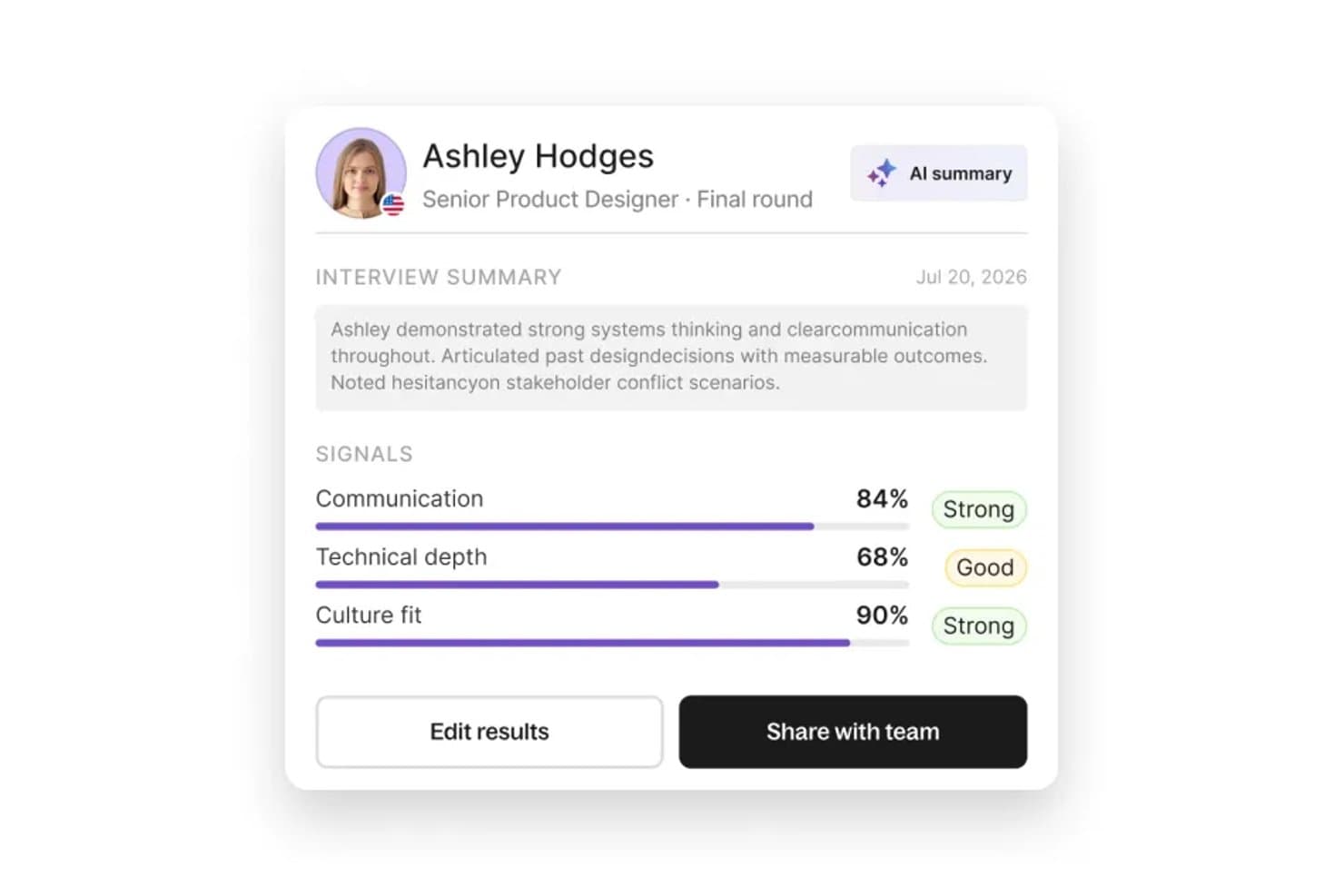
Deel Hire mette in evidenza i segnali dei colloqui valutati dall'intelligenza artificiale per velocizzare le decisioni di assunzione. Deel Hire è una piattaforma globale per l'assunzione e la gestione delle paghe, pensata per le aziende che devono inserire, pagare e gestire dipendenti o collaboratori in più Paesi senza dover coordinare entità legali, strumenti per la conformità o sistemi HR separati.
Per chi è più adatto Deel Hire?
Deel Hire è una soluzione particolarmente adatta alle aziende di medie e grandi dimensioni che assumono in più Paesi e hanno bisogno di gestire paghe, contratti e risorse umane conformi alla normativa in un unico luogo.
Perché Deel Hire è una buona alternativa ad ADP
Ho scelto Deel Hire come una delle migliori soluzioni perché il suo flusso completo di inserimento lo distingue davvero dall'insieme frammentario di partner regionali di ADP. Mentre ADP si affida a entità di terze parti in molti mercati, Deel opera tramite entità legali proprie in oltre 50 Paesi, così contratti conformi alle normative locali, verifiche dei precedenti e fornitura delle apparecchiature avvengono tutti all'interno di un unico flusso integrato. Apprezzo in particolare il fatto che una nuova assunzione a Berlino possa essere completamente inserita e pronta per la gestione delle paghe in pochi giorni, non settimane.
Funzionalità principali di Deel Hire
- Motore per la gestione delle paghe in più Paesi: Automatizza l'elaborazione delle paghe, la presentazione delle dichiarazioni fiscali e i pagamenti per dipendenti e collaboratori in oltre 100 Paesi.
- Sincronizzazione integrata con la contabilità: Si collega nativamente a QuickBooks, Xero, NetSuite e Sage Intacct per sincronizzare in tempo reale le registrazioni contabili delle paghe.
- Avvisi di conformità basati sull'intelligenza artificiale: Segnala aggiornamenti normativi, modifiche fiscali e rischi di errata classificazione prima dell'elaborazione delle paghe.
- Portale autonomo per i dipendenti: Consente ai lavoratori di accedere ai cedolini, ai documenti fiscali e di gestire i propri dati personali da computer o dispositivo mobile.
Integrazioni di Deel Hire
Deel Hire offre oltre 65 integrazioni native, tra cui QuickBooks, Xero, NetSuite, Sage Intacct, BambooHR, Workday, HiBob, Rippling, Greenhouse, Lever e Zapier, oltre a fornire un'API per le integrazioni personalizzate.
Pros and Cons
Pros:
- Entità legali proprie in oltre 50 Paesi
- Inserisce i dipendenti internazionali in pochi giorni, non settimane
- Gestisce a livello globale le paghe di collaboratori e dipendenti
Cons:
- I tempi di risposta dell'assistenza clienti possono essere lunghi
- Non è l'ideale per esigenze di gestione delle paghe limitate agli Stati Uniti
Learn more about Deel Hire: Ideale per la gestione delle paghe basata sul rilevamento del tempo con un budget prestabilito
- Prova gratuita di 30 giorni + demo gratuita disponibile
- A partire da $50/utente/mese
Visit WebsiteCustomer Rating:4.5/5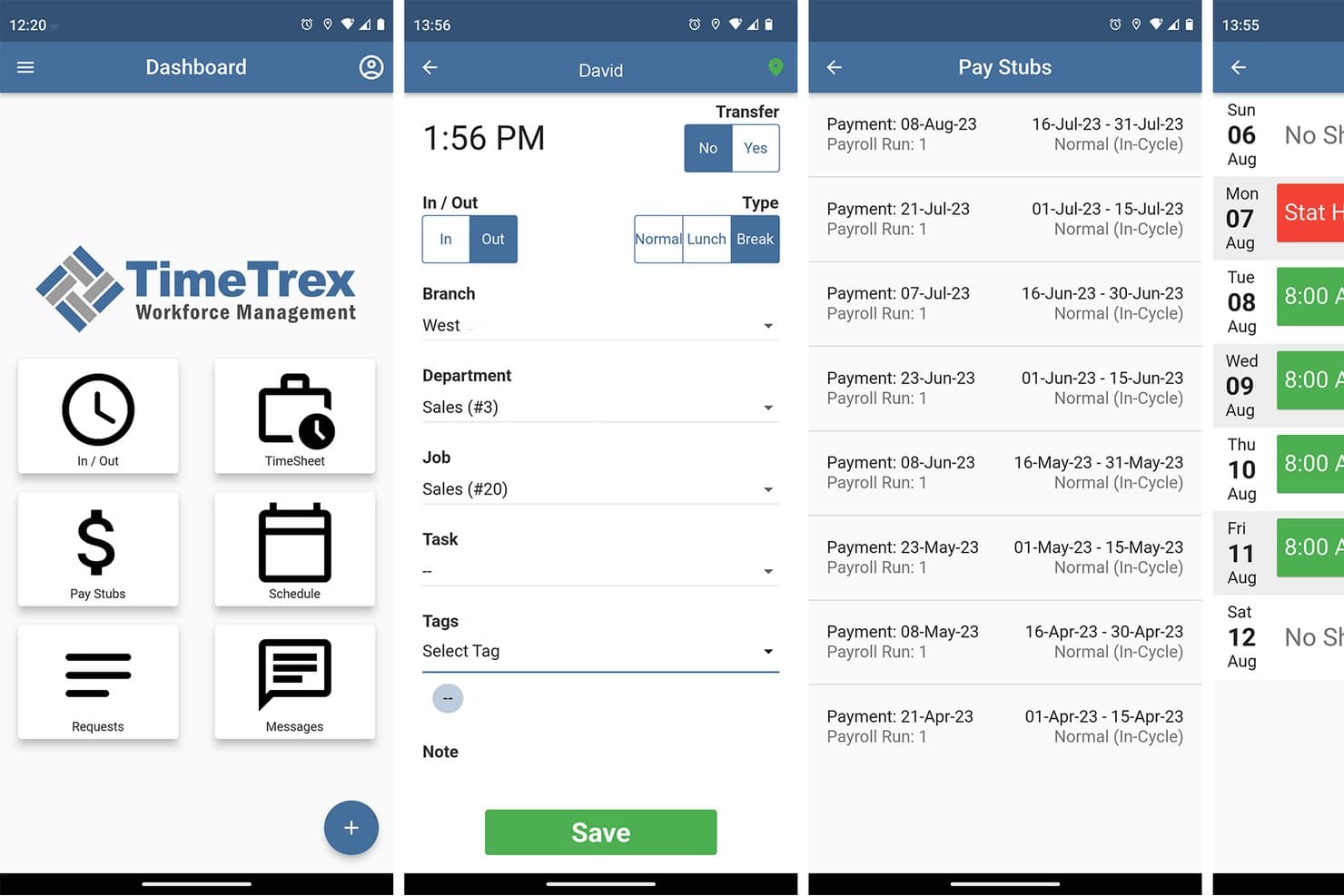
TimeTrex consente agli utenti di timbrare l'ingresso, visualizzare le buste paga e gestire i turni sui dispositivi mobili. TimeTrex è una piattaforma per la gestione delle paghe e della forza lavoro che collega le ore lavorate, i turni e le presenze dei dipendenti all'elaborazione delle paghe, aiutando i team finanziari a gestire i costi del lavoro e i calcoli delle retribuzioni.
Per chi è più indicato TimeTrex?
TimeTrex è adatto alle piccole imprese con team retribuiti a ore o organizzati su turni che desiderano collegare le paghe alle ore lavorate registrate, rispettando un budget prestabilito.
Perché ho scelto TimeTrex
Ho scelto TimeTrex come alternativa ad ADP, soprattutto per la sua capacità di offrire “paghe basate sul rilevamento del tempo con un budget prestabilito”. Calcola le retribuzioni a partire dalle ore registrate e trasferisce nella gestione delle paghe i dati relativi a orari, pause e straordinari. Le timbrature tramite web, dispositivi mobili e riconoscimento facciale offrono ai team organizzati su turni metodi pratici per registrare le ore prima del giorno di paga.
Caratteristiche principali di TimeTrex
- Detrazioni dalle paghe: Configura le ritenute fiscali, per benefit, previdenziali e per pignoramenti.
- Calendari di pagamento: Imposta periodi di paga settimanali, bisettimanali, semimensili o mensili.
- Deposito diretto: Invia i pagamenti a più conti bancari dei dipendenti.
- Documenti fiscali digitali: Fornisci ai dipendenti un accesso sicuro alle buste paga e ai moduli fiscali.
Integrazioni di TimeTrex
TimeTrex documenta integrazioni con QuickBooks, ADP, Sage, Paychex, Surepay e Ceridian per lo scambio di dati contabili, relativi alle paghe e alle risorse umane. Fornisce inoltre un'API per le integrazioni personalizzate.
Pros and Cons
Pros:
- Le ore registrate vengono trasferite direttamente nella gestione delle paghe
- Il calcolo dettagliato dei costi per commessa supporta l'analisi del lavoro
- I recensori apprezzano l'assistenza reattiva per la gestione delle paghe
Cons:
- La configurazione complessa richiede un'impostazione accurata
- L'interfaccia affollata rende difficile trovare le funzionalità
Learn more about TimeTrex: Ideale per i pagamenti globali ai collaboratori
- Piano gratuito disponibile
- A partire da $19/utente/mese
Visit WebsiteCustomer Rating:4.6/5
Plane gestisce le buste paga globali, i servizi EOR e la conformità in diversi Paesi. Se devi pagare collaboratori in più Paesi, Plane offre una soluzione mirata per i pagamenti globali e la conformità. È progettato per i team finanziari e delle risorse umane delle aziende che assumono talenti internazionali e vogliono evitare la complessità dei fornitori di servizi paghe tradizionali come ADP. Plane si distingue per la gestione dell'onboarding dei collaboratori, dei pagamenti nelle valute locali e della conformità alle leggi locali sul lavoro, tutto in un'unica piattaforma.
Perché Plane è una buona alternativa ad ADP
A differenza dei fornitori di servizi paghe tradizionali, Plane è progettato specificamente per gestire i pagamenti e la conformità dei collaboratori a livello globale. Ho scelto Plane perché consente di effettuare l'onboarding di collaboratori internazionali, automatizzare i pagamenti in oltre 240 Paesi e gestire la documentazione fiscale locale da un'unica dashboard.
Oltre alle conversioni valutarie, Plane contribuisce anche a garantire la conformità alle leggi locali sul lavoro, un aspetto che può essere complesso con l'approccio più incentrato sulle buste paga di ADP. Per le aziende che danno priorità alla gestione dei collaboratori oltre i confini nazionali, Plane offre una soluzione specializzata difficile da eguagliare.
Funzionalità principali di Plane
Tra le altre funzionalità di Plane che possono essere utili ai team che confrontano le alternative ad ADP figurano:
- Generazione automatica delle fatture: I collaboratori possono generare e inviare le fatture direttamente tramite la piattaforma.
- Flussi di onboarding personalizzabili: Configura fasi di onboarding personalizzate per diversi ruoli e aree geografiche dei collaboratori.
- Gestione dei documenti: Archivia, condividi e gestisci contratti e documenti relativi alla conformità in un unico luogo.
- Elaborazione dei pagamenti in blocco: Invia i pagamenti a più collaboratori contemporaneamente con una singola azione.
Integrazioni di Plane
Al momento Plane non elenca integrazioni native.
Pros and Cons
Pros:
- Soluzione software progettata specificamente per gestire i pagamenti globali ai collaboratori in oltre 200 Paesi
- Automatizza l'onboarding dei collaboratori, la fatturazione e i pagamenti transfrontalieri da un'unica dashboard
- Supporta i pagamenti in più valute e la gestione della documentazione fiscale internazionale
Cons:
- Non offre buste paga tradizionali per i dipendenti né funzionalità complete di gestione delle paghe
- Integrazioni limitate con le piattaforme di contabilità o HCM utilizzate dalle aziende di ogni dimensione
Learn more about Plane: Ideale per la gestione delle paghe nel commercio al dettaglio e nella ristorazione
- Non disponibile
- A partire da $35/mese + $6/persona/mese
Visit WebsiteCustomer Rating:4.2/5
Square Payroll offre una gestione semplice delle paghe, la presentazione delle dichiarazioni fiscali e integrazioni con Square. Square Payroll è progettato per le attività di vendita al dettaglio e i ristoranti che devono gestire il personale retribuito a ore, le mance e il lavoro su turni con il minimo sforzo. È una soluzione particolarmente adatta a proprietari e manager che desiderano una gestione delle paghe strettamente integrata con i cartellini delle ore, il punto vendita e la rendicontazione delle mance. A differenza di ADP e di molte altre alternative, Square Payroll offre strumenti integrati per la gestione della suddivisione delle mance, della pianificazione dei turni e della conformità alla FLSA e alle leggi statali sui salari.
Perché Square Payroll è una buona alternativa ad ADP
Se gestisci un negozio al dettaglio o un ristorante, Square Payroll è progettato per gestire le esigenze specifiche della tua attività in materia di paghe. Ho scelto Square Payroll perché si sincronizza automaticamente con il sistema del punto vendita di Square per monitorare in tempo reale ore, mance e commissioni.
La piattaforma gestisce anche la suddivisione e la ripartizione delle mance, aspetti essenziali per la conformità e la trasparenza nel settore dell’ospitalità. Per le attività che necessitano di una gestione delle paghe strettamente collegata alle operazioni quotidiane, Square Payroll offre funzionalità specializzate che ADP non è in grado di eguagliare.
Funzionalità principali di Square Payroll
Alcune delle altre funzionalità che distinguono Square Payroll includono:
- Presentazione automatica delle imposte: Gestisce per tuo conto la presentazione delle dichiarazioni relative alle imposte federali, statali e locali sulle paghe.
- Opzioni di deposito diretto e carta paga: Offre ai dipendenti la possibilità di scegliere tra il deposito diretto e una Square Pay Card per ricevere lo stipendio.
- Portale per l'autonomia dei dipendenti: Consente ai dipendenti di accedere online ai cedolini, ai moduli fiscali e di aggiornare le informazioni personali.
- Pagamenti ai collaboratori: Supporta i pagamenti e la presentazione dei moduli 1099 per i collaboratori indipendenti insieme ai dipendenti con modulo W-2.
Integrazioni di Square Payroll
Le integrazioni includono Square POS, QuickBooks Online, Xero, TSheets, Gusto, Deputy, Homebase, When I Work ed Expensify.
Pros and Cons
Pros:
- Si integra direttamente con Square POS per fornire dati sulle paghe in tempo reale
- Automatizza la rendicontazione e la suddivisione delle mance per il personale dei ristoranti
- Gestisce la presentazione delle dichiarazioni relative alle imposte sulle paghe per le autorità federali, statali e locali
Cons:
- Supporto limitato per le attività che operano al di fuori degli Stati Uniti
- Le opzioni di reportistica sono meno dettagliate rispetto ad alcune alternative ad ADP
Learn more about Square Payroll: Ideale per la semplicità della gestione paghe nelle piccole imprese
- Prova gratuita di 30 giorni
- A partire da $20/mese
Visit WebsiteCustomer Rating:5/5
Patriot Software offre servizi convenienti per la gestione delle paghe e la contabilità delle piccole imprese. Patriot Software è progettato per le piccole imprese che desiderano un approccio semplice alla gestione delle paghe. Se stai cercando un'alternativa ad ADP con un'interfaccia intuitiva e prezzi chiari, questa piattaforma si distingue. È una buona soluzione per titolari e commercialisti che devono elaborare le paghe rapidamente senza complessità superflue.
Perché Patriot Software è una buona alternativa ad ADP
Ciò che distingue Patriot Software come alternativa ad ADP è la sua attenzione alla semplicità della gestione paghe per le piccole imprese. L'ho scelto per questo elenco perché offre elaborazioni delle paghe semplici e strumenti chiari per la compilazione e l'invio delle imposte, che non richiedono una lunga curva di apprendimento. Puoi gestire i depositi diretti, stampare assegni e amministrare gli adempimenti fiscali da un'unica interfaccia. Questo rende facile per i titolari di piccole imprese rimanere conformi e pagare i dipendenti puntualmente senza passaggi aggiuntivi.
Funzionalità principali di Patriot Software
Tra le altre funzionalità di Patriot Software che potrebbero interessare gli utenti delle piccole imprese figurano:
- Portale self-service per i dipendenti: I dipendenti possono accedere online ai cedolini, ai moduli fiscali e alle informazioni personali senza dover contattare il personale addetto alle paghe.
- Monitoraggio di orari e presenze: Monitora direttamente nella piattaforma le ore e le presenze dei dipendenti per elaborare le paghe con maggiore precisione.
- Detrazioni personalizzabili: Configura e gestisci diverse detrazioni sulle paghe, inclusi benefici, pignoramenti e contributi pensionistici.
- Report sulle paghe: Genera report dettagliati sulle paghe, sulle imposte e sui dipendenti per supportare verifiche e revisioni finanziarie.
Integrazioni di Patriot Software
Le integrazioni includono QuickBooks, Xero e diverse altre soluzioni contabili e per la gestione delle paghe.
Pros and Cons
Pros:
- Flusso di lavoro semplice per la gestione delle paghe, progettato per i titolari di piccole imprese senza team HR
- Prezzi trasparenti con un costo base contenuto rispetto ai fornitori di servizi paghe per grandi aziende
- Include servizi di compilazione e invio delle dichiarazioni fiscali sulle paghe senza costi aggiuntivi legati a livelli di servizio
Cons:
- Non dispone di una gestione integrata dei benefit rispetto ad ADP
- Supporta solo la gestione delle paghe negli Stati Uniti, non a livello internazionale
Learn more about Patriot Software: Ideale per l'amministrazione automatizzata dei benefit
- Dimostrazione gratuita + piano gratuito disponibile
- A partire da $49/mese + $6/utente/mese

Gusto semplifica paghe, benefit e inserimento per le piccole imprese. Se stai cercando una soluzione per le paghe che automatizzi l'amministrazione dei benefit, vale la pena prendere in considerazione Gusto. È progettata per le piccole e medie imprese che desiderano semplificare paghe, benefit e conformità in un'unica piattaforma. A differenza di ADP, Gusto pone una forte enfasi sull'automazione dell'iscrizione e della gestione dei benefit, rendendo più semplice per le squadre gestire l'assicurazione sanitaria, i piani pensionistici e altro ancora senza interventi manuali.
Perché Gusto è una buona alternativa ad ADP
Gusto si distingue come alternativa ad ADP perché automatizza l'amministrazione dei benefit in modi che fanno risparmiare tempo e riducono gli errori manuali. Ho scelto Gusto per questo elenco perché consente di gestire l'assicurazione sanitaria, i piani 401(k) e altri benefit per i dipendenti direttamente nel flusso di lavoro delle paghe.
La piattaforma sincronizza automaticamente le detrazioni dei benefit e le modifiche alle iscrizioni, quindi non è necessario gestire gli aggiornamenti separatamente. Questo livello di automazione è particolarmente utile per le piccole e medie imprese che desiderano offrire benefit competitivi senza l'onere amministrativo.
Funzionalità principali di Gusto
Alcune altre funzionalità di Gusto che possono essere utili per le aziende alla ricerca di alternative ad ADP includono:
- Presentazione automatica delle imposte: Gusto calcola, presenta e paga automaticamente le imposte federali, statali e locali sulle paghe.
- Lista di controllo per l'inserimento: Crea e gestisce attività digitali di inserimento per i nuovi assunti.
- Monitoraggio del tempo: Monitora le ore dei dipendenti, il PTO e sincronizza i dati temporali direttamente con le paghe.
- Portale per i dipendenti a uso autonomo: I dipendenti possono accedere via internet ai cedolini e ai moduli fiscali, nonché aggiornare le informazioni personali.
Integrazioni di Gusto
Le integrazioni includono QuickBooks, Xero, FreshBooks, 7shifts, Deputy, Trainual, Expensify, Clover, Shopify e Slack.
Pros and Cons
Pros:
- L'amministrazione automatizzata dei benefit riduce il lavoro manuale per le squadre delle risorse umane
- La presentazione delle imposte sulle paghe viene gestita automaticamente in tutti i 50 stati
- Il portale per i dipendenti a uso autonomo consente al personale di accedere ai documenti in qualsiasi momento
Cons:
- I benefit sanitari non sono disponibili in tutti gli stati degli Stati Uniti
- Le funzionalità di reportistica potrebbero non soddisfare i requisiti delle aziende complesse
Learn more about Gusto: Ideale per l'integrazione con il software di contabilità
- Prova gratuita di 30 giorni disponibile
- A partire da $38/utente/mese

QuickBooks Payroll integra le paghe con la contabilità e i pagamenti nello stesso giorno. QuickBooks Payroll è una scelta eccellente per i team finanziari che desiderano far lavorare insieme i dati relativi alle paghe e alla contabilità senza sincronizzazioni manuali. È particolarmente utile per le piccole e medie imprese che utilizzano già QuickBooks per la contabilità e la rendicontazione finanziaria. A differenza di ADP, QuickBooks Payroll offre un'integrazione nativa e in tempo reale con il software di contabilità QuickBooks, riducendo i problemi di riconciliazione e l'inserimento duplicato dei dati.
Perché Intuit QuickBooks Payroll è una buona alternativa ad ADP
Per le aziende che si affidano a QuickBooks per la contabilità, QuickBooks Payroll offre un livello di integrazione che ADP non può eguagliare. Ho scelto QuickBooks Payroll perché i dati delle paghe confluiscono direttamente nel libro mastro generale, eliminando l'inserimento manuale e riducendo gli errori di riconciliazione. Il sistema aggiorna inoltre in tempo reale le spese e le passività relative alle paghe, così i tuoi report finanziari riflettono sempre le attività di elaborazione delle paghe più recenti. Se vuoi che le paghe e la contabilità funzionino come un unico processo integrato, QuickBooks Payroll è una valida alternativa ad ADP.
Caratteristiche principali di Intuit QuickBooks Payroll
Altre caratteristiche che rendono QuickBooks Payroll interessante includono:
- Calcolo e presentazione automatica delle imposte: Calcola, presenta e paga automaticamente le imposte federali e statali sulle paghe.
- Deposito diretto nello stesso giorno: Consente di elaborare le paghe e pagare i dipendenti nello stesso giorno.
- Portale autonomo per i dipendenti: Permette ai dipendenti di visualizzare i cedolini, i moduli fiscali e aggiornare online i propri dati personali.
- Centro di assistenza HR: Offre accesso a risorse HR, modelli e indicazioni di esperti per le domande sulla conformità.
Integrazioni di Intuit QuickBooks Payroll
Le integrazioni includono QuickBooks Online, TSheets, Gusto, Square, Shopify, PayPal, ADP, Xero, Expensify e HubSpot.
Pros and Cons
Pros:
- L'integrazione nativa con la contabilità QuickBooks riduce il lavoro di riconciliazione
- Deposito diretto nello stesso giorno disponibile per un'elaborazione più rapida delle paghe
- Servizi automatizzati di presentazione e pagamento delle imposte sulle paghe
Cons:
- Funziona al meglio all'interno dell'ecosistema QuickBooks, con meno integrazioni esterne
- Mancano strumenti HR avanzati, come il reclutamento e la gestione delle prestazioni
Learn more about Intuit QuickBooks Payroll: Ideale per l'elaborazione interna delle buste paga
- Demo gratuita disponibile
- Prezzi disponibili su richiesta

AME Software semplifica la gestione delle buste paga con assistenza con sede negli Stati Uniti e una configurazione semplice. Se la tua azienda desidera il pieno controllo sull'elaborazione delle buste paga senza affidarsi a fornitori basati sul cloud, AME Software merita di essere preso in considerazione. Questa soluzione desktop per la gestione delle buste paga è progettata per le aziende che preferiscono gestire internamente i dati sensibili relativi alle retribuzioni e necessitano di strumenti dettagliati per la gestione fiscale e della conformità. AME Software offre accesso diretto ai file e ai calcoli delle buste paga, risultando particolarmente adatto alle organizzazioni con rigorosi requisiti in materia di privacy dei dati o IT.
Perché AME Software è una valida alternativa ad ADP
Per le organizzazioni che desiderano mantenere completamente interna l'elaborazione delle buste paga, AME Software offre un livello di controllo che le soluzioni basate sul cloud come ADP non possono eguagliare. Ho scelto AME Software perché consente di installare il software per la gestione delle buste paga direttamente sui propri server, mantenendo così la piena proprietà dei dati sensibili relativi alle retribuzioni.
AME Software include inoltre strumenti dettagliati per la gestione delle tabelle fiscali e della conformità, che aiutano a rimanere aggiornati sui requisiti federali e statali senza affidarsi ad aggiornamenti di terze parti. Questo approccio è particolarmente utile per le aziende con rigorose politiche di privacy dei dati o che operano in settori altamente regolamentati.
Funzionalità principali di AME Software
Alcune altre funzionalità di AME Software che possono essere utili alle aziende alla ricerca di alternative ad ADP includono:
- Gestione delle buste paga per più aziende: Gestisci le buste paga di più aziende o entità aziendali da un'unica installazione.
- Tipi di retribuzione e detrazioni personalizzabili: Configura codici retributivi, tipi di detrazione e categorie di guadagno personalizzati in base alle esigenze della tua organizzazione.
- Elaborazione dei depositi diretti: Genera file ACH per i pagamenti tramite deposito diretto sui conti bancari dei dipendenti.
- Stampa degli assegni integrata: Stampa gli assegni delle buste paga direttamente dal software utilizzando modelli di assegno personalizzabili.
Integrazioni di AME Software
Le integrazioni includono AmericanEFT e InStaff.
Pros and Cons
Pros:
- Il costo della licenza una tantum evita i costi mensili ricorrenti del software per la gestione delle buste paga
- Pieno controllo sui dati delle buste paga grazie all'installazione in locale
- Supporta l'elaborazione delle buste paga per più aziende da un unico sistema
Cons:
- Non dispone di integrazioni native con piattaforme contabili popolari come QuickBooks
- Nessun accesso al cloud o funzionalità per l'elaborazione remota delle buste paga
Learn more about AME Software: Ideale per strumenti di reportistica personalizzabili
- Demo gratuita disponibile
- Prezzi su richiesta
Visit WebsiteCustomer Rating:4.3/5
Paylocity riunisce strumenti per paghe, risorse umane e coinvolgimento dei dipendenti per i team di medie dimensioni. Per i team finanziari che necessitano di una flessibilità avanzata nella reportistica, Paylocity offre una piattaforma per paghe e risorse umane con strumenti di reportistica altamente personalizzabili. È particolarmente adatta alle organizzazioni di medie e grandi dimensioni che desiderano analizzare più a fondo i dati della forza lavoro e personalizzare le analisi in base alle proprie esigenze specifiche. A differenza di ADP, Paylocity offre un maggiore controllo sulla progettazione dei report, sui filtri e sulla visualizzazione dei dati, aiutandoti a mettere in evidenza gli approfondimenti più rilevanti per la tua azienda.
Perché Paylocity è una buona alternativa ad ADP
Se hai bisogno di un maggiore controllo sui dati relativi a paghe e risorse umane, Paylocity è una valida alternativa ad ADP grazie ai suoi strumenti di reportistica personalizzabili. Ho scelto Paylocity per questo elenco perché consente di creare report personalizzati da zero, applicare filtri avanzati e visualizzare i dati in modo adeguato alle esigenze della tua organizzazione.
La funzione di creazione dei report supporta campi trascinabili e aggiornamenti dei dati in tempo reale, permettendoti di modificare e analizzare rapidamente le informazioni quando cambiano le priorità. Questo livello di flessibilità è particolarmente prezioso per i professionisti della finanza che desiderano andare oltre i modelli standard e mettere in evidenza dati specifici della propria azienda.
Funzionalità principali di Paylocity
Altre funzionalità di Paylocity che possono essere utili per le organizzazioni che stanno valutando alternative ad ADP includono:
- Elaborazione automatizzata delle paghe: Gestisci i cicli di pagamento con calcoli automatizzati e accredito diretto.
- Portale self-service per i dipendenti: I dipendenti possono visualizzare i cedolini, i moduli fiscali e aggiornare online i propri dati personali.
- Monitoraggio di orari e presenze: Monitora le ore dei dipendenti, gestisci i turni e sincronizza i dati con il sistema paghe.
- Accesso tramite app mobile: Accedi alle funzionalità per paghe, risorse umane e monitoraggio degli orari da qualsiasi dispositivo mobile.
Integrazioni di Paylocity
Le integrazioni includono QuickBooks, NetSuite, Microsoft Dynamics 365, Sage Intacct, Xero, Google Workspace, Okta, Microsoft Entra, Indeed e LinkedIn.
Pros and Cons
Pros:
- Il generatore di report personalizzati consente un controllo granulare sulle analisi della forza lavoro
- L'elaborazione delle paghe supporta molteplici calendari di pagamento e cicli straordinari
- Il portale self-service per i dipendenti riduce il carico amministrativo delle risorse umane
Cons:
- Supporto limitato per le paghe internazionali rispetto ad ADP
- Alcune funzionalità avanzate richiedono costi aggiuntivi o piani di livello superiore
Learn more about Paylocity: Ideale per soluzioni HR scalabili
- Demo gratuita disponibile
- Prezzi su richiesta
Visit WebsiteCustomer Rating:4.2/5
Paychex Flex offre strumenti personalizzabili per la gestione delle buste paga e delle risorse umane, adatti ai team in crescita. Paychex Flex offre una piattaforma modulare per le risorse umane e le buste paga che si adatta alla crescita della tua azienda. È particolarmente adatta alle organizzazioni che desiderano passare da una gestione di base delle buste paga a funzionalità avanzate per risorse umane, benefit e conformità senza cambiare sistema. Se cerchi un'alternativa ad ADP che possa adattarsi al variare del numero di dipendenti e della complessità aziendale, Paychex Flex è progettata proprio per questo tipo di crescita.
Perché Paychex Flex è una valida alternativa ad ADP
Ciò che distingue Paychex Flex come alternativa ad ADP è la sua capacità di ampliare i servizi per le risorse umane e le buste paga insieme alla crescita dell'organizzazione. Ho scelto Paychex Flex perché puoi iniziare con la gestione di base delle buste paga e aggiungere funzionalità come l'amministrazione dei benefit, la gestione di presenze e orari e il supporto HR man mano che le tue esigenze evolvono.
La struttura modulare della piattaforma significa che non devi cambiare sistema né riqualificare il tuo team quando l'azienda si espande. Questa flessibilità rende Paychex Flex una scelta valida per le aziende che prevedono un cambiamento nel tempo delle proprie esigenze in materia di risorse umane.
Funzionalità principali di Paychex Flex
Tra le altre funzionalità di Paychex Flex che potrebbero interessare le organizzazioni alla ricerca di alternative ad ADP figurano:
- App mobile per la gestione delle buste paga: Elabora le buste paga, visualizza i report e gestisci i dati dei dipendenti da un dispositivo mobile.
- Portale self-service per i dipendenti: I dipendenti possono accedere online ai cedolini, ai moduli fiscali e aggiornare i propri dati personali.
- Servizi di pagamento dei pignoramenti: La piattaforma gestisce e versa direttamente alle agenzie le trattenute sullo stipendio.
- Integrazione con il sistema di gestione dell'apprendimento: Si collega agli strumenti di apprendimento per erogare e monitorare la formazione dei dipendenti.
Integrazioni di Paychex Flex
Le integrazioni includono QuickBooks Online, Xero, Sage Intacct, Microsoft Dynamics 365, NetSuite, BambooHR, Indeed, Greenhouse, Abacus e Vestwell.
Pros and Cons
Pros:
- Piattaforma HCM scalabile che offre gestione delle buste paga, risorse umane, amministrazione dei benefit e servizi PEO opzionali
- Supporto completo per la gestione delle buste paga, con specialisti dedicati che si occupano della conformità e degli adempimenti di fine anno
- Soluzione software flessibile progettata per aziende di tutte le dimensioni che stanno passando dalla gestione delle buste paga di ADP
Cons:
- Trasparenza sui prezzi limitata prima di entrare in contatto con il team commerciale
- La personalizzazione di report e analisi è meno avanzata rispetto ad alcune piattaforme HCM aziendali come UKG
Learn more about Paychex Flex:
Altre alternative ad ADP
Ecco alcune opzioni aggiuntive alternative ad ADP che non sono state incluse nella mia selezione, ma che vale comunque la pena prendere in considerazione:
- 11HomebaseIdeale per la gestione della forza lavoro retribuita a ore
- 12PaycomIdeale per flussi di lavoro unificati delle risorse umane e delle buste paga
- 13OnPayIdeale per le esigenze di gestione delle paghe agricole e non profit
- 14SurePayrollIdeale per le esigenze di gestione delle buste paga dei datori di lavoro domestici
- 15APSIdeale per flussi di lavoro HR personalizzabili
Come valuto le alternative ad ADP
Valuto le alternative ad ADP su due livelli: i requisiti fondamentali—pagamento automatico degli stipendi, presentazione delle tasse, sincronizzazione GL—che qualificano uno strumento, e i fattori differenzianti come prezzo e supporto alla migrazione.
Funzionalità principali (requisiti essenziali per questa lista)
Quando seleziono gli strumenti per la mia lista, valuto ciascuno su una scala da 0 (non offre la funzionalità) a 5 (eccelle in questo ambito) per ciascuna funzionalità di base indicata di seguito. Successivamente, calcolo il punteggio totale dello strumento come percentuale. Ogni strumento deve raggiungere un punteggio minimo totale del 65% per essere incluso.
- Gestione delle paghe e presentazione delle tasse: Cerco piattaforme che automatizzino l'intero ciclo paghe e gestiscano i calcoli fiscali, le presentazioni e i pagamenti a livello federale, statale e locale.
- Deposito diretto e opzioni di pagamento: Ogni strumento deve supportare il deposito diretto sia per i dipendenti W-2 sia per i collaboratori 1099, con programmazioni di pagamento flessibili e diversi metodi di erogazione.
- Integrazione con software di contabilità: Verifico se la piattaforma sincronizza le scritture contabili delle paghe con strumenti come QuickBooks, Xero, NetSuite o Sage per mantenere aggiornato il GL.
- Conformità e reportistica: La generazione dei moduli di fine anno, il monitoraggio delle normative multi-giurisdizionali e la segnalazione delle nuove assunzioni sono tutte aree che valuto per profondità e automazione.
- Portale self-service per i dipendenti: Un portale valido permette ai dipendenti di scaricare buste paga, documenti fiscali e aggiornare i dati bancari senza aprire un ticket al team HR.
- Gestione di benefit e detrazioni: Analizzo come ogni piattaforma gestisce le detrazioni pre-tax, post-tax e di pignoramento, oltre a verificare se si collega ai provider di benefit per la registrazione.
Dopo aver raccolto una lista di strumenti che soddisfano questi criteri, considero ciò che distingue ciascuna piattaforma.
Fattori differenzianti (cosa distingue i fornitori)
Ecco come metto a confronto i vari fornitori:
Funzionalità distintive
Le capacità di paghe globali sono importanti se il tuo team copre più paesi—cerco piattaforme che gestiscano conversioni di valuta, regole fiscali locali e servizi EOR in un unico posto. L'integrazione della rilevazione delle presenze è un altro elemento differenziante da valutare, poiché consente di trasferire automaticamente ore lavorate e maturazioni di PTO nel ciclo paghe senza inserimenti manuali. Considero inoltre come ogni strumento gestisce i flussi di lavoro dei collaboratori, dall'onboarding e generazione moduli 1099 fino ai pagamenti internazionali.
Oltre le funzionalità
La trasparenza dei prezzi è una delle ragioni principali per cui i team abbandonano ADP, quindi valuto se ogni fornitore pubblica tariffe chiare per dipendente senza costi nascosti per presentazioni fiscali o paghe fuori ciclo. Anche il supporto alla migrazione è importante—verifico se la piattaforma offre trasferimenti guidati dei dati da ADP, perché una transizione disordinata nel mezzo del trimestre può ritardare le riconciliazioni. L’ecosistema di integrazioni è altrettanto importante; uno strumento paghe che si collega nativamente a GL, provider di benefit e gestori di piani pensionistici risparmia al tuo team finanziario l'inserimento manuale dei dati a ogni ciclo di pagamento.
Perché cercare un'alternativa ad ADP?
Sebbene ADP sia una buona scelta tra le alternative ad ADP, esistono diversi motivi per cui alcuni utenti cercano soluzioni alternative. Potresti cercare un'alternativa ad ADP perché…
- Desideri un'integrazione più stretta con il tuo software di contabilità
- Hai bisogno di prezzi più trasparenti o prevedibili
- Richiedi un'assistenza clienti più rapida o reattiva
- Cerchi funzionalità pensate per piccole o medie imprese
- Hai bisogno di un supporto migliore per le buste paga multi-statali o internazionali
- Desideri un'esperienza utente più semplice e meno complessa
Se ti riconosci in una di queste situazioni, sei nel posto giusto. Il mio elenco contiene diverse alternative ad ADP più adatte ai team che affrontano queste difficoltà con ADP e sono alla ricerca di soluzioni alternative.
Funzionalità principali di ADP
Ecco alcune delle funzionalità principali di ADP, per aiutarti a mettere a confronto ciò che offrono le soluzioni alternative:
- Elaborazione automatizzata delle buste paga per dipendenti e collaboratori
- Calcolo e presentazione delle imposte federali, statali e locali sui salari
- Portale self-service per i dipendenti con accesso ai cedolini paga e ai moduli fiscali
- Monitoraggio delle ore lavorate e delle presenze con strumenti di pianificazione
- Gestione dei benefit per i piani sanitari, dentistici e pensionistici
- Supporto alla conformità alle leggi sul lavoro e alle normative fiscali
- Dashboard personalizzabili per report e analisi
- Integrazione con i più diffusi software di contabilità e gestione delle risorse umane
- Accesso tramite app mobile per le attività relative a paghe e risorse umane
- Gestione dei pignoramenti e delle trattenute per gli ordini di pagamento sul salario