

Il software per il rimborso spese aiuta le aziende a monitorare, gestire e approvare le spese dei dipendenti senza ricorrere a fogli di calcolo disordinati o subire ritardi nei pagamenti. Se il tuo team si occupa ancora di processi manuali o deve rincorrere le ricevute via e-mail, è arrivato il momento di adottare un modo più rapido e accurato per gestire i rimborsi.
In qualità di esperto di software digitali, so quanto sia difficile trovare uno strumento che si adatti davvero al tuo flusso di lavoro. Alcuni sono troppo complessi, altri troppo limitati e molti non riescono semplicemente a crescere insieme alle tue esigenze. Ti serve qualcosa che faccia risparmiare tempo e funzioni perfettamente con i sistemi che già utilizzi.
Ho esaminato e testato le principali piattaforme per trovare strumenti facili da usare, in grado di automatizzare i flussi di approvazione e sincronizzarsi con il software di contabilità. Queste selezioni di software per il rimborso spese aiuteranno il tuo team a lavorare più velocemente, a mantenere la conformità e a restituire il denaro ai dipendenti senza i soliti ritardi.
Perché fidarsi dei nostri consigli sui software
6,700+
Reviews
20
Industry experts
16+
Evaluation factors
14
Years
Le nostre recensioni riflettono il nostro giudizio indipendente, non un discorso di vendita. Scopri come manteniamo la trasparenza.
Per questa guida, abbiamo valutato gli strumenti attraverso test pratici e ricerche indipendenti, assegnando un punteggio agli strumenti in base ai nostri criteri di selezione.
Le nostre recensioni riflettono il nostro giudizio editoriale umano, non un discorso di vendita.
Riepilogo dei migliori software per il rimborso spese
Questa tabella comparativa riassume i dettagli sui prezzi delle mie migliori selezioni di software per il rimborso spese, per aiutarti a trovare quello più adatto al tuo budget e alle esigenze della tua azienda.
| Tool | Best For | Trial Info | Price | ||
|---|---|---|---|---|---|
| 1 | Ideale per l'automazione delle politiche di rimborso | Demo gratuita disponibile | Da $8/utente/mese (fatturazione annuale) | Website | |
| 2 | Ideale per l'invio delle ricevute in tempo reale | Demo gratuita disponibile | Da $11,99/utente/mese (fatturato annualmente) | Website | |
| 3 | Ideale per l’acquisizione massiva di documenti per i team | Prova gratuita di 14 giorni | Prezzo su richiesta | Website | |
| 4 | Ideale per la sincronizzazione automatica dei rimborsi | Piano gratuito + demo gratuita disponibili | Da $49/utente/mese | Website | |
| 5 | Ideale per carte aziendali | Piano gratuito + prova gratuita di 30 giorni + demo gratuita disponibile | Da $15/utente/mese | Website | |
| 6 | Ideale per il supporto multivaluta | Demo gratuita disponibile | Prezzo su richiesta | Website | |
| 7 | Ideale per l'integrazione con la contabilità | Prova gratuita di 30 giorni disponibile | Da $2.50/mese | Website | |
| 8 | Ideale per pagamenti automatizzati | Demo gratuita disponibile | Da $99/mese | Website | |
| 9 | Ideale per la conformità globale | Demo gratuita disponibile | Da $8.50 a $12/utente attivo | Website | |
| 10 | Ideale per i budget di piccoli team | Demo gratuita disponibile | Da $8/utente/mese (fatturazione annuale) | Website |


Recensione dei migliori software per il rimborso spese
Di seguito trovi i miei riepiloghi dettagliati dei migliori software per il rimborso spese inclusi nel mio elenco. Le mie recensioni offrono un’analisi approfondita delle funzionalità principali, dei pro e & contro, delle integrazioni e dei casi d’uso ideali di ogni strumento, per aiutarti a trovare quello più adatto a te.
 Ideale per l'automazione delle politiche di rimborso
- Demo gratuita disponibile
- Da $8/utente/mese (fatturazione annuale)
Visit WebsiteCustomer Rating:4.8/5
La dashboard paghe di Rippling Spend mostra i rimborsi insieme alle spese dei dipendenti. Rippling Spend è una soluzione di gestione delle spese che ti aiuta a controllare e monitorare le spese aziendali da un'unica piattaforma. È progettata per semplificare il modo in cui il tuo team gestisce i rimborsi, l'uso delle carte aziendali e i costi di viaggio.
Perché ho scelto Rippling Spend: Ho scelto Rippling Spend perché ti consente di controllare i rimborsi delle spese tramite politiche automatizzate che segnalano o rifiutano i costi fuori policy. Ti permette anche di emettere carte aziendali con limiti preimpostati, così previeni problemi prima che accadano invece di risolverli successivamente. Questi controlli fanno risparmiare tempo al team finanziario e riducono le verifiche manuali. Insieme, rendono i rimborsi più prevedibili e conformi in tutta l’azienda.
Funzionalità e integrazioni principali:
Le funzionalità includono controlli di spesa globali che permettono di gestire rimborsi e spese in diversi paesi, strumenti di viaggio che ti aiutano a ridurre i costi e gestire le prenotazioni in modo più efficiente, e analisi che forniscono report dettagliati su dove vengono spesi i soldi dell’azienda.
Le integrazioni includono Zoom, Asana, Salesforce, Microsoft 365, Guideline, GitHub, Carta, Jira, Datadog, Hubspot, Microsoft Teams e Slack.
Pros and Cons
Pros:
- Strumenti robusti per l'applicazione delle policy spesa
- Supporto multivaluta per team globali
- Flussi di approvazione dei rimborsi automatizzati
Cons:
- Può risultare complesso per team molto piccoli
- Personalizzazione limitata dei report
Learn more about Rippling Spend: Ideale per l'invio delle ricevute in tempo reale
- Demo gratuita disponibile
- Da $11,99/utente/mese (fatturato annualmente)
Visit WebsiteCustomer Rating:4.6/5
Monitora le ricevute tramite SMS e abbinale automaticamente alle transazioni della carta aziendale con Sage Expense Management (precedentemente Fyle). Sage Expense Management (precedentemente Fyle) è un software avanzato per il rimborso delle spese progettato per semplificare la gestione delle tue spese. Con funzionalità come l’invio delle ricevute in tempo reale e l'approvazione automatica, Sage Expense Management rende più facile per te e il tuo team gestire il monitoraggio delle spese e i rimborsi.
Perché ho scelto Sage Expense Management: Ho scelto Sage Expense Management per la cattura delle ricevute in tempo reale tramite SMS o app, utile per eliminare la confusione dei documenti cartacei e migliorare l’organizzazione. La sua codifica delle spese basata su intelligenza artificiale riduce l’inserimento manuale dei dati, mentre la riconciliazione automatica delle carte di credito collega le transazioni alle carte aziendali per un monitoraggio più semplice. Sage Expense Management segnala inoltre le spese fuori dalle policy aziendali per favorire la conformità.
Caratteristiche principali & integrazioni:
Le caratteristiche includono il monitoraggio del budget che ti offre informazioni sulle tue abitudini di spesa, aiutandoti a gestire meglio le tue finanze. Sage Expense Management offre anche un’app mobile intuitiva, che ti permette di gestire le spese ovunque tu sia, sia che tu sia una piccola impresa o una grande azienda. Un’altra funzione da evidenziare è l’assistente AI, che fornisce rapide analisi sulle tue spese, rendendo più semplice tenere sotto controllo la gestione finanziaria.
Le integrazioni includono NetSuite, Sage Intacct, Xero, QuickBooks Online, QuickBooks Desktop, Sage 300 CRE, TravelPerk e Bamboo HR.
Pros and Cons
Pros:
- Riconciliazione in tempo reale delle carte di credito
- Categorizzazione delle spese tramite AI
- Cattura delle ricevute via SMS
Cons:
- Personalizzazione limitata per casi complessi
- La velocità di archiviazione automatica può variare
Learn more about Sage Expense Management (formerly Fyle): 3Ideale per l’acquisizione massiva di documenti per i team
Dext
- Prova gratuita di 14 giorni
- Prezzo su richiesta
Visit WebsiteCustomer Rating:4.5/5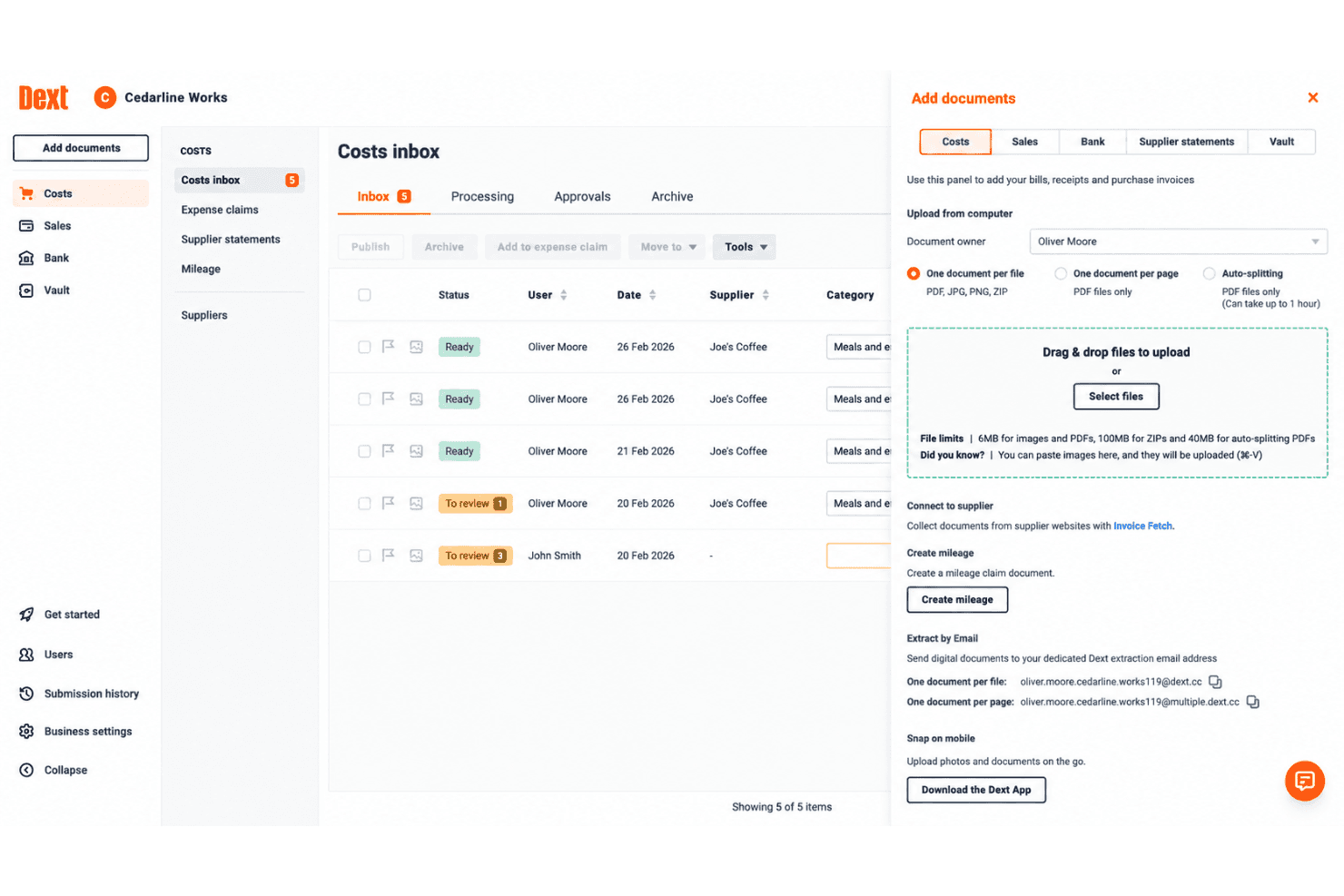
Dext offre diversi metodi di caricamento documenti, inclusi drag-and-drop, invio tramite email, scatto mobile e collegamento fornitori per una registrazione spese senza intoppi. Dext è una piattaforma di acquisizione documenti e automazione della contabilità che consente ai team di inviare ricevute, fatture e note spese tramite mobile, email o caricamento diretto, con estrazione OCR potenziata dall’AI e sincronizzazione diretta con i principali software di contabilità.
Per chi è ideale Dext?
Dext è particolarmente adatto a piccole imprese e studi di contabilità che hanno bisogno che i team inviino e gestiscano grandi volumi di ricevute e fatture con il minimo intervento manuale.
Perché ho scelto Dext
Ho scelto Dext tra i migliori per come gestisce l’acquisizione massiva di documenti in team distribuiti. Il personale può inviare le ricevute tramite WhatsApp, email, Dropbox o l’app mobile, tutto convogliato in una casella di posta condivisa. Le modalità multi-acquisizione e combinazione della fotocamera mobile permettono di fotografare in blocco tutte le ricevute di una settimana in un’unica sessione, invece che una alla volta.
Funzionalità principali di Dext
- OCR potenziato dall’AI ed estrazione dettagli per singolo articolo: Estrae istantaneamente dettagli di fornitori, imposte e pagamenti da ricevute, fatture e estratti conto.
- Integrazioni con software di contabilità: Si sincronizza con Xero, QuickBooks, Sage e oltre 30 piattaforme contabili.
- Gestione transazioni in valuta estera: Elabora spese in più valute per team internazionali e remoti.
- Funzione di tracciamento chilometrico: Consente agli utenti di registrare le distanze di trasferte di lavoro e aggiungerle direttamente alle note spese.
Integrazioni di Dext
Dext offre integrazioni native con Xero, QuickBooks, Sage, FreeAgent, KashFlow e Gusto. È disponibile un’API per integrazioni personalizzate.
Pros and Cons
Pros:
- Acquisizione ricevute in blocco da diversi canali di invio
- Elevata precisione dell’OCR su formati documentali diversi
- Casella di posta condivisa per tutto il team per l'invio delle spese
Cons:
- Nessun rimborso nativo per i dipendenti
- I flussi di approvazione sono basilari rispetto alla concorrenza
Learn more about Dext: 4Ideale per la sincronizzazione automatica dei rimborsi
BILL
- Piano gratuito + demo gratuita disponibili
- Da $49/utente/mese
Visit WebsiteCustomer Rating:4.5/5
Bill offre azioni rapide per le tue fatture per tenere traccia dei rimborsi. BILL è una piattaforma di operazioni finanziarie che combina conti da pagare, conti da ricevere e la gestione delle spese e dei costi, inclusi carte aziendali, rimborsi ai dipendenti e monitoraggio delle spese a livello di budget.
Per chi è più adatto BILL?
BILL è adatto a piccole e medie imprese che necessitano di una piattaforma unica per gestire sia i rimborsi spesa dei dipendenti che i flussi di lavoro AP e AR più ampi.
Perché ho scelto BILL
BILL si guadagna il suo posto nella mia selezione perché ogni transazione di rimborso crea automaticamente una propria traccia di controllo, inclusi scontrini, storico delle approvazioni e note, che vengono allegati a ogni registrazione contemporaneamente. Mi piace che le regole di spesa siano applicabili a livello di politica, così che le richieste fuori politica vengano segnalate prima ancora di essere approvate. La funzione di acquisizione scontrini tramite AI di BILL significa inoltre che la documentazione carente è rara, poiché il sistema recupera le ricevute dalle integrazioni oppure consente ai dipendenti di inviare una foto tramite SMS a un numero dedicato BILL, compilando automaticamente ogni campo.
Caratteristiche principali di BILL
- Monitoraggio rimborso chilometraggio: Registra i rimborsi basati su chilometraggio con aggiornamenti automatici delle tariffe IRS ogni anno, così calcoli sempre con la tariffa corretta.
- Rimborsi collegati al budget: Collega ogni richiesta di rimborso a una specifica voce di budget, offrendoti visibilità in tempo reale sulla spesa rispetto ai budget approvati.
- Richieste in valuta locale: I dipendenti possono inoltrare richieste di rimborso nella loro valuta locale, rendendolo pratico per team con personale internazionale.
- Payout tramite ACH e payroll: Paga i rimborsi approvati direttamente via ACH o falli passare dal payroll, senza dover cambiare sistema.
Integrazioni BILL
BILL offre integrazioni native con QuickBooks Online e Desktop, Xero, Oracle NetSuite, Sage Intacct, Microsoft Dynamics e Acumatica. Si integra anche con Slack e piattaforme HR, tra cui BambooHR, Workday, Gusto e ADP Workforce Now per la sincronizzazione dell'onboarding dei dipendenti. È disponibile un'API per integrazioni personalizzate.
Pros and Cons
Pros:
- Carte aziendali gratuite con rimborso integrato
- Traccia di controllo automatica per ogni transazione
- Catene di approvazione multilivello in base all'importo della spesa
Cons:
- I pagamenti dei rimborsi sono limitati al solo ACH
- La cattura dei ricevute da mobile può essere talvolta incoerente
Learn more about BILL: 5Ideale per carte aziendali
Ramp
- Piano gratuito + prova gratuita di 30 giorni + demo gratuita disponibile
- Da $15/utente/mese
Visit WebsiteCustomer Rating:4.8/5
Ramp ottimizza le operazioni finanziarie gestendo spese, fatture e pagamenti. Ramp è una piattaforma di gestione delle spese progettata per le aziende che desiderano semplificare le proprie operazioni finanziarie. Si rivolge a imprese di tutte le dimensioni, offrendo strumenti per la gestione di spese, fatture e pagamenti.
Perché ho scelto Ramp: Ramp si distingue per l'offerta di carte aziendali, una risorsa significativa per le aziende che vogliono gestire efficacemente le spese. La piattaforma mette a disposizione carte virtuali e fisiche illimitate, consentendo al tuo team di effettuare acquisti con facilità. Offre inoltre la raccolta automatica delle ricevute, riducendo l'inserimento manuale e gli errori. Inoltre, le analisi in tempo reale delle spese di Ramp ti aiutano a monitorare le uscite e a ottimizzare i budget in modo efficiente.
Funzionalità e integrazioni principali:
Funzionalità includono la categorizzazione automatica delle spese, che fa risparmiare tempo al tuo team e minimizza gli errori. Il software offre controlli di spesa avanzati, permettendoti di impostare limiti e monitorare le transazioni. Ramp mette inoltre a disposizione una dashboard avanzata che offre una visione chiara dei dati finanziari e delle tendenze.
Integrazioni includono QuickBooks, Xero, Sage, Microsoft Dynamics, SAP, Oracle, Slack, Google Workspace e Salesforce.
Pros and Cons
Pros:
- Carte virtuali e fisiche illimitate
- Raccolta automatica delle ricevute
- Analisi delle spese in tempo reale
Cons:
- Capacità offline limitate
- Opzioni di personalizzazione limitate
 Ideale per il supporto multivaluta
- Demo gratuita disponibile
- Prezzo su richiesta
Visit WebsiteCustomer Rating:4.7/5
Spendesk controlla la spesa con strumenti per monitorare le spese, i budget e i pagamenti. Spendesk è una piattaforma di gestione delle spese pensata per le aziende che desiderano gestire in modo efficace le proprie uscite. Offre strumenti per il monitoraggio delle spese, la gestione dei budget e la gestione dei pagamenti.
Perché ho scelto Spendesk: Spendesk è ideale per le aziende che gestiscono più valute, offrendo funzionalità che semplificano le transazioni internazionali. Le sue carte virtuali permettono al tuo team di effettuare acquisti in diverse valute senza difficoltà. Il software fornisce inoltre informazioni in tempo reale sulle spese, aiutandoti a tenere traccia delle uscite nelle varie aree geografiche. Inoltre, i controlli automatici sulle spese garantiscono la conformità alle policy aziendali.
Funzionalità e integrazioni principali:
Funzionalità includono la gestione delle fatture, che aiuta il tuo team a gestire in modo efficiente i pagamenti ai fornitori. Spendesk offre anche il monitoraggio del budget, permettendoti di controllare le spese rispetto ai limiti stabiliti. Inoltre, i flussi di approvazione del software possono essere personalizzati in base ai processi della tua organizzazione.
Integrazioni includono QuickBooks, Xero, Sage, Microsoft Dynamics, SAP, Oracle, Slack, Google Workspace e Office 365.
Pros and Cons
Pros:
- Informazioni sulle spese in tempo reale
- Controlli automatici sulle spese
- Funzionalità di monitoraggio del budget
Cons:
- Funzionalità offline limitate
- Processo di onboarding complesso
Learn more about Spendesk: 7Ideale per l'integrazione con la contabilità
Xero
- Prova gratuita di 30 giorni disponibile
- Da $2.50/mese
Visit WebsiteCustomer Rating:4.4/5
Xero offre gestione finanziaria con strumenti per monitoraggio delle spese e reportistica. Xero è una soluzione software di contabilità pensata per aziende di piccole e medie dimensioni. Offre strumenti per la gestione finanziaria, inclusi il monitoraggio delle spese e la reportistica.
Perché ho scelto Xero: Xero offre una sincronizzazione automatica e senza interruzioni dei dati sulle spese direttamente nel sistema contabile, eliminando l'inserimento manuale e riducendo gli errori. Il suo API aperto e il vasto ecosistema di integrazioni consentono alle aziende di collegare strumenti di gestione spese popolari come Expensify, Pleo o Receipt Bank, garantendo aggiornamenti in tempo reale su ricevute, rimborsi e transazioni con carta di credito.
Secondo Mark Gilham, un dirigente finanziario con oltre 20 anni di esperienza nel settore, l'integrazione tramite API è stata la caratteristica più utile. 'Sono riuscito a creare personalmente una connessione API con la nostra piattaforma e-commerce, permettendoci di emettere automaticamente le fatture con tutti i dettagli e gli allegati necessari. Ho trovato tutte le informazioni che mi servivano su API e integrazioni senza dover chiamare ulteriori esperti.'
Caratteristiche e integrazioni principali:
Funzionalità includono la fatturazione, che aiuta il tuo team a inviare e gestire le fatture facilmente. Il software offre anche la riconciliazione bancaria, che consente di abbinare le transazioni agli estratti conto bancari. Inoltre, la funzionalità di gestione dell'inventario aiuta a monitorare le scorte e gestire gli ordini.
Integrazioni includono PayPal, Stripe, Square, HubSpot, Shopify, Salesforce, Gusto, Mailchimp, Harvest e Bill.com.
Pros and Cons
Pros:
- Reportistica finanziaria in tempo reale
- Strumenti avanzati per la fatturazione
- Funzionalità di riconciliazione bancaria
Cons:
- Accesso offline limitato
- Opzioni limitate di supporto clienti
Learn more about Xero: Ideale per pagamenti automatizzati
- Demo gratuita disponibile
- Da $99/mese
Visit WebsiteCustomer Rating:4.5/5
Tipalti automatizza le operazioni finanziarie con strumenti per spese, pagamenti e conformità. Tipalti è una piattaforma di gestione delle spese pensata per le aziende che desiderano automatizzare le proprie operazioni finanziarie. Serve imprese di tutte le dimensioni, offrendo strumenti per la gestione delle spese, dei pagamenti e della conformità normativa.
Perché ho scelto Tipalti: Tipalti si distingue per i pagamenti automatizzati, offrendo funzionalità che semplificano il processo di pagamento per le aziende. La piattaforma permette al tuo team di automatizzare i flussi di lavoro dei pagamenti, riducendo il lavoro manuale e gli errori. Inoltre, offre funzionalità di pagamento globale, assicurando transazioni fluide tra diverse valute. Tipalti fornisce anche controlli di conformità per aiutare il tuo team a rispettare i requisiti normativi.
Funzionalità e integrazioni principali:
Funzionalità includono la gestione dei fornitori, che ti permette di mantenere e organizzare in modo efficiente i registri dei fornitori. Inoltre, il monitoraggio in tempo reale dei pagamenti di Tipalti offre una visibilità costante sullo stato delle transazioni, garantendo trasparenza.
Integrazioni includono QuickBooks, Xero, Sage, SAP, Microsoft Dynamics, Oracle, Salesforce, Workday e Intacct.
Pros and Cons
Pros:
- Flussi di lavoro di pagamento automatizzati
- Funzionalità di pagamento globale
- Controlli di conformità inclusi
Cons:
- Opzioni di personalizzazione limitate
- Rallentamenti occasionali del sistema
Learn more about Tipalti: Ideale per la conformità globale
- Demo gratuita disponibile
- Da $8.50 a $12/utente attivo
Visit WebsiteCustomer Rating:4.4/5
Webexpenses semplifica il controllo finanziario con strumenti per monitorare e gestire le spese. Webexpenses è un software di gestione delle spese progettato per le aziende che desiderano migliorare il controllo finanziario. Si rivolge a imprese di varie dimensioni, offrendo strumenti per gestire e monitorare le spese in modo efficiente.
Perché ho scelto Webexpenses: Webexpenses è ideale per le aziende che necessitano di conformità globale, offrendo funzionalità che garantiscono il rispetto degli standard internazionali. Il software offre supporto multi-valuta, facilitando al tuo team la gestione delle spese provenienti da diverse regioni. Inoltre, i controlli automatici delle policy aiutano a mantenere la conformità con le normative locali.
Funzionalità e integrazioni principali:
Funzionalità includono un'app mobile che permette al tuo team di inviare le spese ovunque si trovi. La piattaforma offre anche la scansione delle ricevute per ridurre l'inserimento manuale, risparmiando tempo e minimizzando gli errori.
Integrazioni includono QuickBooks, Xero, Sage, SAP, Oracle, Microsoft Dynamics, Salesforce, Workday e ADP.
Pros and Cons
Pros:
- Supporto multi-valuta
- Controlli automatici delle policy
- Flussi di lavoro personalizzabili
Cons:
- Funzionalità offline limitate
- Curva di apprendimento per i nuovi utenti
Learn more about Webexpenses: 10Ideale per i budget di piccoli team
Rydoo
- Demo gratuita disponibile
- Da $8/utente/mese (fatturazione annuale)
Visit WebsiteCustomer Rating:4.4/5
Rydoo traccia e gestisce le spese per team di piccole e medie dimensioni. Rydoo è un software di gestione delle spese pensato per team di piccole e medie dimensioni. Aiuta gli utenti a monitorare e gestire le spese in modo efficiente, garantendo controllo finanziario e conformità.
Perché ho scelto Rydoo: Rydoo unisce la semplicità nel monitoraggio delle spese a flussi di approvazione automatizzati, consentendo ai team di evitare spese eccessive senza aggravio amministrativo. La rendicontazione in tempo reale offre ai manager visibilità immediata sulle spese, facilitando il rispetto dei limiti di budget e l’individuazione precoce di opportunità di risparmio. Inoltre, il design mobile-first permette ai dipendenti di fotografare ricevute e inviare le note spese in mobilità, riducendo i ritardi ed eliminando la necessità di documentazione cartacea.
Funzionalità e integrazioni principali:
Funzionalità includono approvazioni automatizzate che semplificano l’invio delle spese. La scansione delle ricevute con intelligenza artificiale rende l’inserimento delle spese rapido e semplice, riducendo gli errori di inserimento manuale. La funzione Insights offre una panoramica chiara dei modelli di spesa, aiutando il tuo team a prendere decisioni finanziarie consapevoli.
Integrazioni disponibili con QuickBooks, Xero, NetSuite, SAP, Workday, Microsoft Dynamics, Salesforce, Egencia, Sage ed Expensify.
Pros and Cons
Pros:
- Scansione delle ricevute tramite IA
- Approvazioni automatizzate
- Riconciliazione delle carte di credito aziendali
Cons:
- Limitato per grandi aziende
- Strumenti di reportistica di base
Learn more about Rydoo:
Altri software per il rimborso spese
Ecco alcune ulteriori opzioni di software per il rimborso spese che non sono entrate nel mio elenco, ma che vale comunque la pena prendere in considerazione:
Come Valuto il Software di Rimborso Spese
Divido la mia valutazione in due livelli: le capacità di base che uno strumento deve possedere—come OCR, flussi di lavoro di approvazione e processi di rimborso—e i fattori differenzianti che distinguono i vari fornitori.
Funzionalità di Base (Requisiti Minimi per Questa Lista)
Quando seleziono gli strumenti per la mia lista, valuto ciascuno su una scala da 0 (non offre la funzionalità) a 5 (eccelle in quest'area) per ogni funzionalità di base elencata di seguito. Successivamente, calcolo il punteggio totale dello strumento come percentuale. Ogni strumento deve ottenere un punteggio totale minimo del 75% per essere considerato per l'inclusione.
- Acquisizione Ricevute & OCR: Verifico se la cattura mobile e l'OCR estraggono in modo affidabile nomi dei commercianti, date e voci—o se i team finanziari finiscono ancora per correggere manualmente la maggior parte dei campi.
- Flussi di Lavoro dei Report Spese: Gli inoltri per approvazione a più livelli sono importanti, soprattutto le catene configurabili dove i report sopra una certa soglia vengono automaticamente inoltrati a un secondo responsabile.
- Motore di Conformità alle Policy: Valuto se lo strumento segnala violazioni come invii duplicati o tariffe alberghiere fuori policy già al momento dell'inserimento, prima che i report arrivino nella coda degli approvatori.
- Processo di Rimborso: Lo strumento dovrebbe supportare l'erogazione diretta ai dipendenti tramite bonifico, sincronizzazione payroll o altro metodo elettronico—non solo generare un file da caricare manualmente altrove.
- Integrazione Contabile & ERP: Cerco connessioni native con sistemi come QuickBooks, NetSuite, Sage Intacct o SAP, con codifica GL e associazione centri di costo che si sincronizzino senza scritture manuali.
- Calcolo Chilometraggio & Supporto Multivaluta: I team con personale in trasferta o dipendenti internazionali hanno bisogno di tracciamento chilometraggio e conversione automatica delle valute; verifico se queste funzioni sono integrate o se richiedono soluzioni alternative.
Una volta che dispongo di una lista di strumenti che soddisfano tali criteri, considero ciò che distingue ogni piattaforma.
Fattori Differenzianti (Cosa Distingue i Fornitori)
Ecco come confronto e metto a confronto i vari fornitori:
Caratteristiche Distintive
L'integrazione con carte aziendali è un fattore cruciale di differenziazione. Strumenti come Brex, Ramp e Navan associano carte virtuali e fisiche a feed di transazione in tempo reale, eliminando completamente le spese anticipate dal dipendente. Cerco inoltre funzionalità di audit con intelligenza artificiale che scandagliano automaticamente ogni report alla ricerca di duplicati e segnali di frode, poiché i controlli manuali a campione sono troppo lacunosi. Anche le analisi avanzate delle spese sono importanti. Valuto se i dashboard evidenziano trend utili come la concentrazione di fornitori o i tassi di conformità alle policy per reparto.
Oltre le Caratteristiche
La struttura dei prezzi conta più di quanto la maggior parte degli acquirenti si aspetti. Alcuni fornitori come Ramp e Brex basano il loro modello sulle intermediazioni delle carte, mentre altri applicano tariffe per utente o per utente attivo—con impatti diversi in base alla volatilità dell'organico. Valuto anche il supporto globale e multi-società, soprattutto se una piattaforma gestisce allocazioni tra aziende e rimborsi localizzati nelle diverse filiali. Le certificazioni di conformità come SOC 2 Type II e GDPR completano la mia valutazione, poiché i dati sulle spese includono informazioni finanziarie sensibili dei dipendenti.
Come scegliere il software per il rimborso spese
È facile perdersi in lunghi elenchi di funzionalità e strutture tariffarie complesse. Per aiutarti a rimanere concentrato mentre affronti il tuo esclusivo processo di selezione del software, ecco una lista di fattori da tenere presenti:
| Fattore | Cosa considerare |
|---|---|
| FattoreScalabilità | Cosa considerareIl software crescerà insieme alla tua azienda? Considera l'espansione futura e valuta se lo strumento è in grado di gestire un numero maggiore di utenti e transazioni senza costi aggiuntivi. |
| FattoreIntegrazioni | Cosa considerareSi collega ai sistemi che utilizzi attualmente? Assicurati che sia compatibile con il software di contabilità, ERP, risorse umane e altri sistemi, per evitare l'inserimento manuale dei dati. |
| FattorePersonalizzazione | Cosa considerarePuoi adattare il software ai tuoi flussi di lavoro? Cerca opzioni che consentano di modificare i processi di approvazione e i report in base alle tue esigenze. |
| FattoreFacilità d'uso | Cosa considerareL'interfaccia è intuitiva per il tuo team? Un design facile da usare riduce i tempi di formazione e gli errori. Prova le demo per valutarne l'usabilità. |
| FattoreImplementazione e avvio | Cosa considerareCon quale rapidità puoi iniziare? Valuta i tempi e le risorse necessari per la configurazione. Cerca strumenti con procedure guidate per l'avvio e materiali di formazione. |
| FattoreCosto | Cosa considerareIl prezzo rientra nel tuo budget? Confronta i costi dei diversi fornitori, comprese le commissioni nascoste per funzionalità aggiuntive e vantaggi per gli utenti. |
| FattoreMisure di sicurezza | Cosa considerareI tuoi dati e le tue transazioni sono protetti? Assicurati che il software rispetti i protocolli di sicurezza standard del settore, tra cui la crittografia e l'autenticazione a due fattori. |
| FattoreRequisiti di conformità | Cosa considerareRispetta le normative legali e finanziarie? Verifica la presenza di funzionalità che aiutino a mantenere la conformità alle leggi e agli standard pertinenti. |
Che cos'è il software per il rimborso delle spese?
Il software per il rimborso delle spese è uno strumento digitale che automatizza il modo in cui i team presentano le spese e le aziende rimborsano i dipendenti. Semplifica il processo di approvazione, monitoraggio ed erogazione dei rimborsi, riducendo la documentazione cartacea e le frodi.
Utilizzato dai team finanziari, dai dipartimenti delle risorse umane e dai dipendenti di diversi settori, questo software elimina le note spese manuali e accelera i rimborsi.
Le funzionalità principali includono generalmente la scansione delle ricevute, i controlli di conformità alle policy, le approvazioni automatizzate e le integrazioni con i sistemi paghe o contabili. È particolarmente utile per le aziende che mirano a migliorare il controllo del flusso di cassa e a garantire la conformità alle policy interne e fiscali.
Funzionalità del software per il rimborso delle spese
Quando scegli un software per il rimborso delle spese, presta attenzione alle seguenti funzionalità principali:
- Monitoraggio automatizzato delle spese: questa funzionalità registra automaticamente le spese, riducendo l'inserimento manuale e minimizzando gli errori nella gestione delle uscite.
- Acquisizione delle ricevute: consente agli utenti di acquisire e archiviare digitalmente le ricevute con strumenti integrati per la gestione delle ricevute, facilitando il monitoraggio e la verifica delle spese.
- Controlli di conformità alle policy: garantisce che tutte le spese rispettino le policy aziendali, prevenendo le spese non autorizzate.
- Supporto multivaluta: facilita le transazioni internazionali gestendo più valute senza difficoltà.
- Flussi di approvazione personalizzabili: consentono di adattare i processi di approvazione alle esigenze specifiche dell'organizzazione per la contabilità fornitori.
- Integrazione con i sistemi contabili: si collega al software contabile esistente per semplificare le operazioni finanziarie.
- Reportistica in tempo reale: fornisce informazioni aggiornate sui modelli di spesa aziendali, aiutandoti a prendere decisioni finanziarie consapevoli.
- Accesso tramite app mobile: consente agli utenti di gestire le spese ovunque si trovino, aumentando la praticità e la flessibilità per le spese dei dipendenti.
- Gestione della conformità fiscale: aiuta nella reportistica e nella documentazione fiscale, garantendo il rispetto dei requisiti di legge.
- Gestione delle carte virtuali: offre carte virtuali per una spesa sicura e controllata, riducendo il rischio di frode.
Vantaggi del software per il rimborso delle spese
L'implementazione di un software per il rimborso delle spese offre diversi vantaggi al tuo team e alla tua azienda. Ecco alcuni dei benefici che puoi aspettarti:
- Risparmio di tempo: il monitoraggio automatizzato e l'acquisizione delle ricevute riducono il tempo dedicato all'inserimento manuale dei dati.
- Maggiore precisione: i controlli di conformità alle policy e la reportistica in tempo reale riducono gli errori e garantiscono registrazioni finanziarie e contabili accurate.
- Controllo potenziato: i flussi di approvazione personalizzabili e la gestione delle carte virtuali offrono un controllo migliore sulle spese.
- Praticità: l'accesso tramite app mobile o basato sul cloud consente agli utenti di gestire le spese ovunque, aumentando la flessibilità per il lavoro da remoto.
- Efficienza dei costi: l'integrazione con i sistemi contabili semplifica i processi di gestione delle spese, riducendo i costi amministrativi.
- Migliore processo decisionale: la reportistica in tempo reale offre informazioni sui modelli di spesa e sulle spese aziendali, aiutandoti a prendere decisioni finanziarie consapevoli.
- Garanzia di conformità: la gestione della conformità fiscale garantisce il rispetto dei requisiti di legge e delle policy sulle spese, riducendo il rischio di sanzioni.
Costi e prezzi del software per il rimborso delle spese
La scelta di un software per il rimborso delle spese richiede una conoscenza dei diversi modelli di prezzo e dei piani disponibili. I costi variano in base alle funzionalità, alle dimensioni del team, agli strumenti aggiuntivi e ad altri fattori.
La tabella seguente riassume i piani più comuni, i relativi prezzi medi e le funzionalità tipicamente incluse nelle soluzioni software per il rimborso delle spese:
Tabella di confronto dei piani del software per il rimborso delle spese
| Tipo di piano | Prezzo medio | Funzionalità comuni |
|---|---|---|
| Tipo di pianoPiano gratuito | Prezzo medio$0 | Funzionalità comuniMonitoraggio di base delle spese, acquisizione delle ricevute e integrazioni limitate. |
| Tipo di pianoPiano personale | Prezzo medio$5-$15/utente/mese | Funzionalità comuniAcquisizione delle ricevute, monitoraggio automatizzato delle spese e accesso all’app mobile. |
| Tipo di pianoPiano aziendale | Prezzo medio$20-$40/utente/mese | Funzionalità comuniFlussi di approvazione personalizzabili, supporto per più valute e integrazione con i sistemi di contabilità. |
| Tipo di pianoPiano aziendale avanzato | Prezzo medio$50-$100/utente/mese | Funzionalità comuniReportistica avanzata, gestione della conformità fiscale e gestione delle carte virtuali. |
Domande frequenti sul software per il rimborso spese
Ecco alcune risposte alle domande più comuni sul software per il rimborso spese:
In che modo il software per il rimborso spese automatizza le approvazioni?
Il software per il rimborso spese automatizza le approvazioni impostando regole e flussi di lavoro predefiniti in linea con la politica aziendale. Quando i dipendenti inviano le spese, il sistema le inoltra automaticamente per l’approvazione in base a queste regole. Ciò riduce l’intervento manuale, accelera il processo e garantisce la conformità alle politiche aziendali.
Il software per il rimborso spese può integrarsi con i sistemi di contabilità esistenti?
Sì, la maggior parte dei software per il rimborso spese può integrarsi con sistemi di contabilità diffusi come QuickBooks e NetSuite. Questa integrazione consente un trasferimento fluido dei dati, riducendo l’inserimento manuale e gli errori. Garantisce inoltre la sincronizzazione di tutti i dati finanziari, semplificando la gestione delle spese e della reportistica finanziaria da parte del team finanziario.
Quali misure di sicurezza vengono adottate per proteggere i dati nel software per il rimborso spese?
Il software per il rimborso spese include spesso misure di sicurezza come la crittografia dei dati, controlli di accesso sicuri e audit di sicurezza periodici. Queste misure proteggono i dati finanziari sensibili dagli accessi non autorizzati. Quando valuti le opzioni, assicurati che il software soddisfi gli standard di sicurezza del settore per proteggere le informazioni della tua azienda.
In che modo il software per il rimborso spese gestisce le transazioni in più valute?
Il software che supporta le transazioni in più valute converte automaticamente le spese nella valuta di base della tua azienda utilizzando i tassi di cambio correnti. Questa funzionalità è particolarmente utile per le aziende con attività internazionali, poiché semplifica il processo di rimborso e garantisce una reportistica finanziaria accurata nelle diverse valute.
È possibile personalizzare i flussi di lavoro nel software per il rimborso spese?
Sì, molte soluzioni software per il rimborso spese consentono di personalizzare i flussi di lavoro in base alle esigenze specifiche della tua azienda. Puoi configurare processi di approvazione unici, definire limiti di spesa e creare categorie specifiche per le spese. Questa flessibilità contribuisce ad adattare il software ai processi aziendali esistenti, invece di costringerti a modificarli.
Quale tipo di supporto è disponibile per gli utenti del software per il rimborso spese?
La maggior parte dei fornitori offre diverse opzioni di supporto, tra cui documentazione online, tutorial e operatori del servizio clienti. Alcuni forniscono anche assistenza tramite chat dal vivo o telefono. Quando scegli il software, considera il livello di supporto disponibile e valuta se soddisfa le esigenze del tuo team, soprattutto durante l’implementazione e l’avvio.
Cosa succede ora:
Se stai cercando un software per il rimborso spese, contatta gratuitamente un consulente SoftwareSelect per ricevere consigli.
Compili un modulo e partecipi a una breve conversazione durante la quale vengono analizzate nel dettaglio le tue esigenze. In seguito riceverai una selezione ristretta di software da valutare. Ti supporteranno inoltre durante l’intero processo di acquisto, comprese le trattative sul prezzo.
Related Reviews