

10 Best Xero Alternatives for Financial Ops in 2026

Best Xero Alternatives Shortlist


Xero is a popular accounting software that offers features like invoicing, payroll, and bank reconciliation, making it a valuable tool for businesses to manage their finances effectively. However, some users might seek alternatives due to specific feature limitations or pricing concerns. Here are my suggestions for the best Xero alternatives.
What Is Xero?
Xero is a cloud-based accounting software designed to assist small and medium-sized businesses with their financial management needs. Business owners, accountants, and bookkeepers commonly use Xero to handle invoicing, bank reconciliation, and financial reporting tasks.
It provides users with tools to manage their finances efficiently, ensuring accurate tracking of income and expenses, and compliance with accounting standards.
Why Trust Our Software Recommendations
Our team has been testing and reviewing software since 2012. As finance leaders ourselves, we know how difficult—and important—it is to choose the right software.
For this guide, we evaluated tools using hands-on testing and independent research, scoring tools using our selection criteria.
Our reviews reflect our human editorial judgment, not a sales pitch.
Xero Alternatives Comparison Table
| Tool | Best For | Trial Info | Price | ||
|---|---|---|---|---|---|
| 1 | Best AI-driven general ledger | Free demo available | Pricing upon request | Website | |
| 2 | Best for Amazon integration | 30-day free trial + free plan available | From £33/month | Website | |
| 3 | Best for project management in agencies | Free demo + 7-day free trial | From $9/user/month (billed annually) | Website | |
| 4 | Best for user-friendly invoicing and bookkeeping | Free plan + 30-day free trial available | From $15/month | Website | |
| 5 | Best for privacy-focused accounting solutions | Free plan + free demo available | From $15/month (billed annually) | Website | |
| 6 | Best for automated bookkeeping for small businesses | 14-day free trial available | From $30/month | Website | |
| 7 | Best for accounting and inventory management | 30-day free trial + free demo available | From $20/month | Website | |
| 8 | Best for advanced financial management | Free demo available | Pricing upon request | Website | |
| 9 | Best for automated expense management | 14-day free trial | From $7/company/month + $0.15/additional document | Website | |
| 10 | Best for free accounting | Free plan available | From $20/month | Website |

Best Xero Alternatives
In this analysis, I delve into various alternatives to Xero, examining each one’s features, pros, and cons. I’ll guide you through their best use cases to help you find the perfect fit for your business needs.

Best AI-driven general ledger

DualEntry is an AI-native enterprise accounting platform designed to help finance teams automate and scale their operations. It offers a full suite of tools for managing financial processes like accounts payable, accounts receivable, and general ledger accounting.
Why it's a good Xero alternative: DualEntry stands out as a strong alternative to Xero because of its AI-driven general ledger, which supports unlimited classifications and custom fields. This flexibility allows your team to tailor the ledger to your specific business needs, ensuring detailed and insightful financial reporting. I also like DualEntry's multi-entity consolidation capabilities. You can manage unlimited subsidiaries and legal entities in one place, with automated intercompany transactions and real-time consolidation reporting.
Standout features & integrations:
Features include automated revenue recognition that complies with ASC 606 and IFRS 15 standards, allowing you to manage complex contract revenue with detailed waterfall reporting. Additionally, the platform's fixed asset management automates depreciation and amortization schedules, providing full control over the asset lifecycle.
Integrations include BambooHR, Bill.com, Brex, Deel, Google SSO, Gusto, HubSpot, Ramp, Rippling, Salesforce, Stripe Billing, and Stripe Invoicing.
Pros and Cons
Pros:
- Automated revenue recognition ensures compliance with standards
- Supports multi-entity and multi-currency operations
- Advanced AI features help with complex accounting tasks
Cons:
- Customization options require careful setup
- No option to try the system before buying

Best for Amazon integration

FreeAgent offers tools for invoicing, expense tracking, and project time tracking. Its built-in tax management feature ensures users can easily calculate and submit taxes and oversee their financials.
Why it's a good Xero alternative: FreeAgent simplifies financial management for sellers by automatically importing transactions from Amazon and categorizing them. This automation reduces manual entry, ensures accurate bookkeeping, and provides real-time financial insights, making it easier for Amazon sellers to manage taxes, profits, and overall cash flow.
Standout features & integrations:
Features include automated invoicing for sending and tracking invoices, time tracking for managing project hours and costs, and a tax management system that simplifies the calculation and filing of taxes. FreeAgent also offers real-time bank feeds, keeping your accounts up-to-date automatically and provides clear financial reports to help you monitor your business performance.
Integrations include Amazon, PayPal, Stripe, GoCardless, HMRC, Wise, Google Calendar, Mailchimp, Zapier, and Dropbox.
Pros and Cons
Pros:
- Convenient expense tracking
- Automatic bank feeds
- Deep Amazon integration
Cons:
- No audit trail
- Limited financial reporting customization

Bonsai
Best for project management in agencies

Bonsai simplifies complex workflows for businesses in the creative and service industries. It helps agencies manage their projects, clients, and finances in one place with its tracking, invoicing, contracts, and task management features.
Why it's a good Xero alternative: Bonsai’s project tracking and task management features help you organize and schedule everything. It provides invoicing tools that automatically sync with project tasks and contract management features for creating and sending contracts directly from the platform. Additionally, the software includes time tracking, allowing your team to log hours seamlessly and stay productive.
Standout features & integrations:
Features include project management tools that allow you to track tasks, deadlines, and team progress in real-time. Bonsai also offers invoicing that automatically syncs with your project tasks, making billing easy. Additionally, it provides contract management tools, letting you draft, send, and sign contracts all in one platform.
Integrations include QuickBooks, Zapier, Stripe, PayPal, Google Calendar, Slack, Dropbox, Google Drive, Trello, and Asana.
Pros and Cons
Pros:
- Automatic invoice syncing with tasks
- Built-in contract management
- All-in-one project and financial management
Cons:
- No multi-currency support
- Limited advanced features

ZipBooks
Best for user-friendly invoicing and bookkeeping
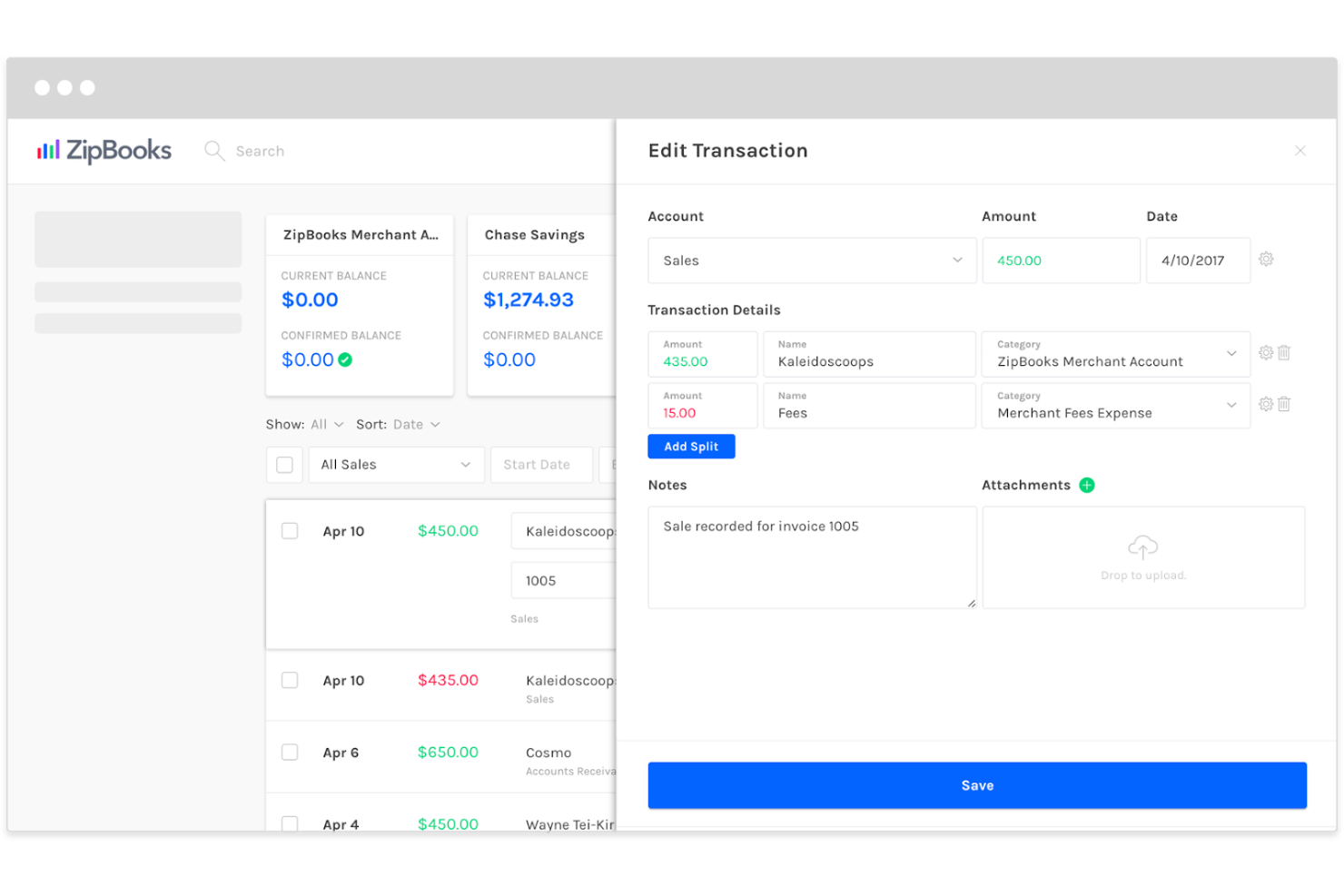
ZipBooks is a simple yet effective tool for users with minimal accounting experience. It offers simple yet effective invoicing and expense tracking tools, financial reporting, and color-coded financial health scores to help users stay on top of their cash flow.
Why it's a good Xero alternative: ZipBooks simplifies invoicing with automated invoice creation and reminders. It also tracks and categorizes your expenses, and provides real-time financial insights through easy-to-understand reports. Overall, the software has a clean, intuitive interface, making it easy to navigate essential bookkeeping functions.
Standout features & integrations:
Features include easy-to-use invoicing for quickly creating and sending invoices, smart expense tracking to help you categorize and organize your business expenses, and financial health scoring, which provides a color-coded view of business performance. You can also track time and manage your projects, all within the same platform.
Integrations include PayPal, Stripe, Square, Google Drive, Gusto, QuickBooks, Slack, Google Contacts, Zapier, and Asana.
Pros and Cons
Pros:
- Ease of use for non-accountants
- Automated payment reminders
- Visual financial health score
Cons:
- Not suitable for large businesses
- Limited advanced accounting features

Best for privacy-focused accounting solutions

Zoho Books ensures your financial data is secure with role-based access control and a detailed audit trail. It’s best suited for small and medium-sized businesses looking for privacy-focused tools with invoicing, expense tracking, tax compliance, and real-time financial insights.
Why it's a good Xero alternative: Zoho Books focuses on data privacy, offering role-based access control where only authorized members can view sensitive financial data. You can easily manage invoicing, track expenses, reconcile your bank accounts, and handle tax and regulations with the built-in compliance features. Additionally, Zoho Books offers a detailed audit trail, giving you full visibility over every transaction and change made to your financial records.
Standout features & integrations:
Features include role-based access control, real-time financial insights to keep you updated on your business’s performance, and built-in tax management tools for compliance. Zoho Books also offers automated bank reconciliation, invoicing, expense tracking, and an intuitive interface.
Integrations include Zoho CRM, Zoho Inventory, PayPal, Stripe, Square, Microsoft Office 365, Dropbox, Google Drive, Slack, and Zoho Analytics.
Pros and Cons
Pros:
- Invoice and payment reminders
- Audit trail visibility
- Automatic tax calculations
Cons:
- Delayed automatic bank feeds
- Limited integrations with accounting tools

Kashoo
Best for automated bookkeeping for small businesses

Kashoo offers easy-to-use tools for automating day-to-day financial tasks. It helps users manage everything from expense tracking to invoicing and financial reporting, focusing on simplifying bookkeeping processes.
Why it's a good Xero alternative: Kashoo simplifies tasks such as expense tracking, categorization, and invoicing through AI-powered features. Its automation significantly reduces manual entry and helps maintain accurate financial records in real-time, making it efficient for business owners with limited time or accounting experience.
Standout features & integrations:
Features include automated expense categorization, creating and sending professional invoices, and payment tracking. It offers one-click financial reporting, bank reconciliation, and sales tax tracking.
Integrations include Stripe, Square, PayPal, BluePay, FreshBooks, Plaid, Dropbox, Gusto, and Google Workspace.
Pros and Cons
Pros:
- Multi-currency support
- One-click and customizable reports
- Automated categorization
Cons:
- Limited chart of account customization
- Limited support for multi-entity accounting

ZarMoney
Best for accounting and inventory management

ZarMoney is more than just basic bookkeeping. It integrates inventory management for product tracking needs with flexible invoicing, customizable reporting, and automated workflows for billing and online payments.
Why it's a good Xero alternative: ZarMoney offers tools for managing accounting and inventory. It simplifies accounting tasks with automated invoicing and bill payment and includes inventory management tools for tracking stock levels, pricing, and product movement. The software also allows you to turn financial data into detailed reports to understand your business’s performance.
Standout features & integrations:
Features include invoicing tools for creating, sending, and tracking invoices, customizable financial reports, and expense tracking. It has a detailed inventory management system for monitoring product levels and movements. Plus, it allows you to set user permissions for secure access.
Integrations include Shopify, Stripe, PayPal, Square, Authorize.net, Amazon, UPS, FedEx, USPS, and QuickBooks.
Pros and Cons
Pros:
- Custom financial reports
- Automated workflows
- Advanced inventory management
Cons:
- Limited budgeting tools
- Manual expense tracking
Best for advanced financial management
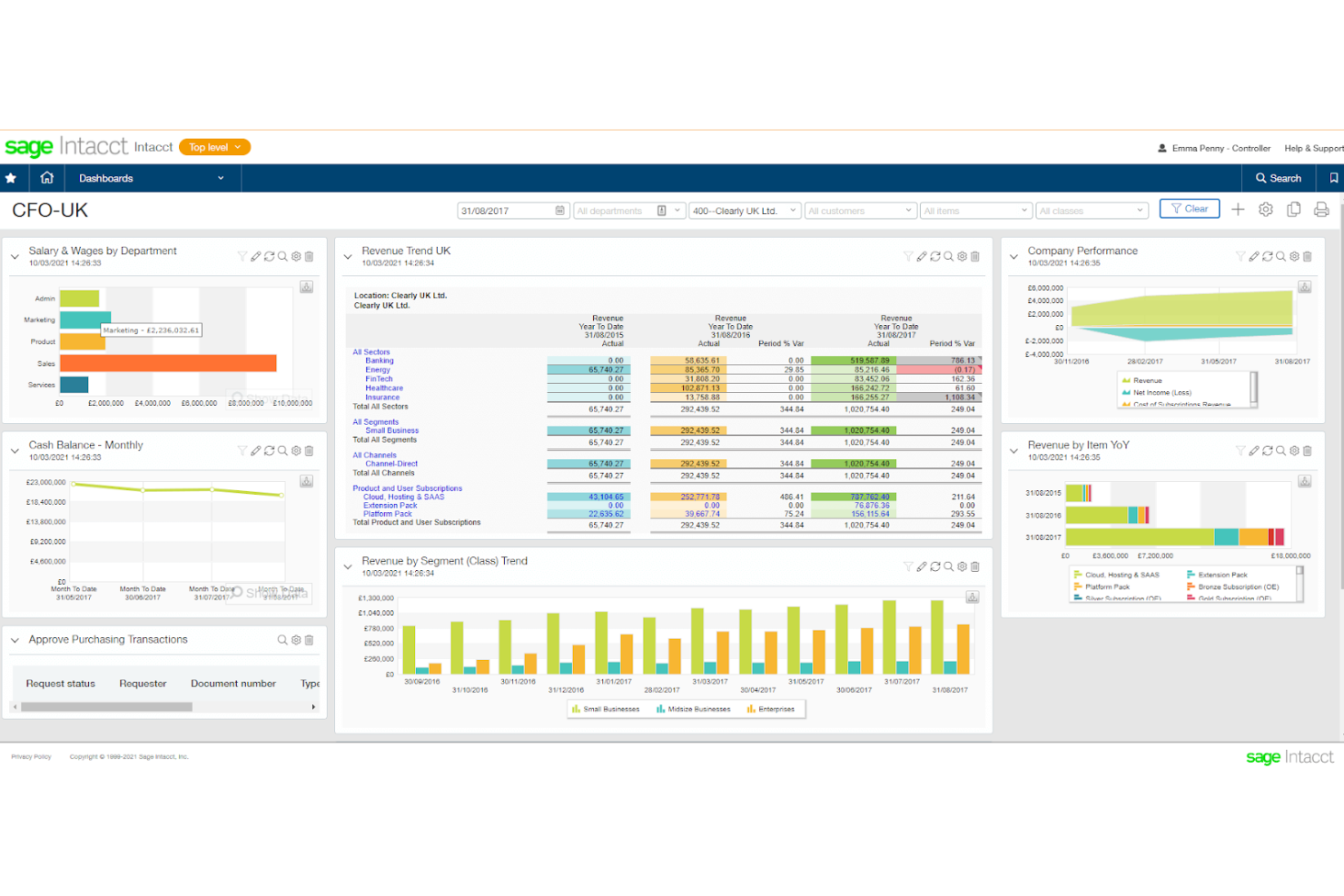
Sage Intacct offers automation tools, in-depth financial reports, and real-time insights. It automates expense management, billing, revenue recognition, and multi-entity consolidations, making it an excellent software for businesses needing advanced accounting solutions
Why it's a good Xero alternative: Sage Intacct handles complex financial workflows with multi-entity consolidations and automated expense management features. The software offers real-time financial insights, allowing your team to monitor performance, and provides customizable dashboards. Additionally, the software excels in advanced revenue recognition, giving you better control over financial compliance.
Standout features & integrations:
Features include advanced financial reporting, automated revenue recognition for tracking complex contracts and streams, and multi-entity consolidations to manage multiple companies. It also offers customizable dashboards and automation tools for expense management and billing.
Integrations include Salesforce, ADP, Bill.com, Expensify, Avalara, American Express, Paychex, MineralTree, Stripe, and Square.
Pros and Cons
Pros:
- Built-in contract revenue management
- Customizable reporting capabilities
- Advanced multi-entity management
Cons:
- Limited accounts receivable automation
- Limited project accounting tools

Envoice
Best for automated expense management

Envoice simplifies expenses automation and management. It offers receipt capturing, invoicing processing, and financial reporting reporting, helping businesses streamline their online accounting processes and ensuring more accurate and efficient financial management.
Why it's a good Xero alternative: Envoice allows you to capture receipts and instantly process invoices, saving your team time on manual data entry. It automates expense approvals and categorization, provides real-time financial reporting, and has built-in VAT compliance tools. Plus, the software allows you to reconcile accounts effortlessly, keeping your financial records accurate and up-to-date.
Standout features & integrations:
Features include automatic invoice processing that extracts data from receipts and invoices, real-time expense tracking, and automated approval workflows, allowing you to manage and approve expenses more efficiently.
Integrations include QuickBooks, Xero, FreshBooks, Sage, Microsoft Dynamics, Visma, NetSuite, Fortnox, and Procountor.
Pros and Cons
Pros:
- VAT compliance
- Real-time receipt scanning
- Automated expense categorization
Cons:
- No automatic bank feeds
- Limited full accounting features

ProfitBooks
Best for free accounting
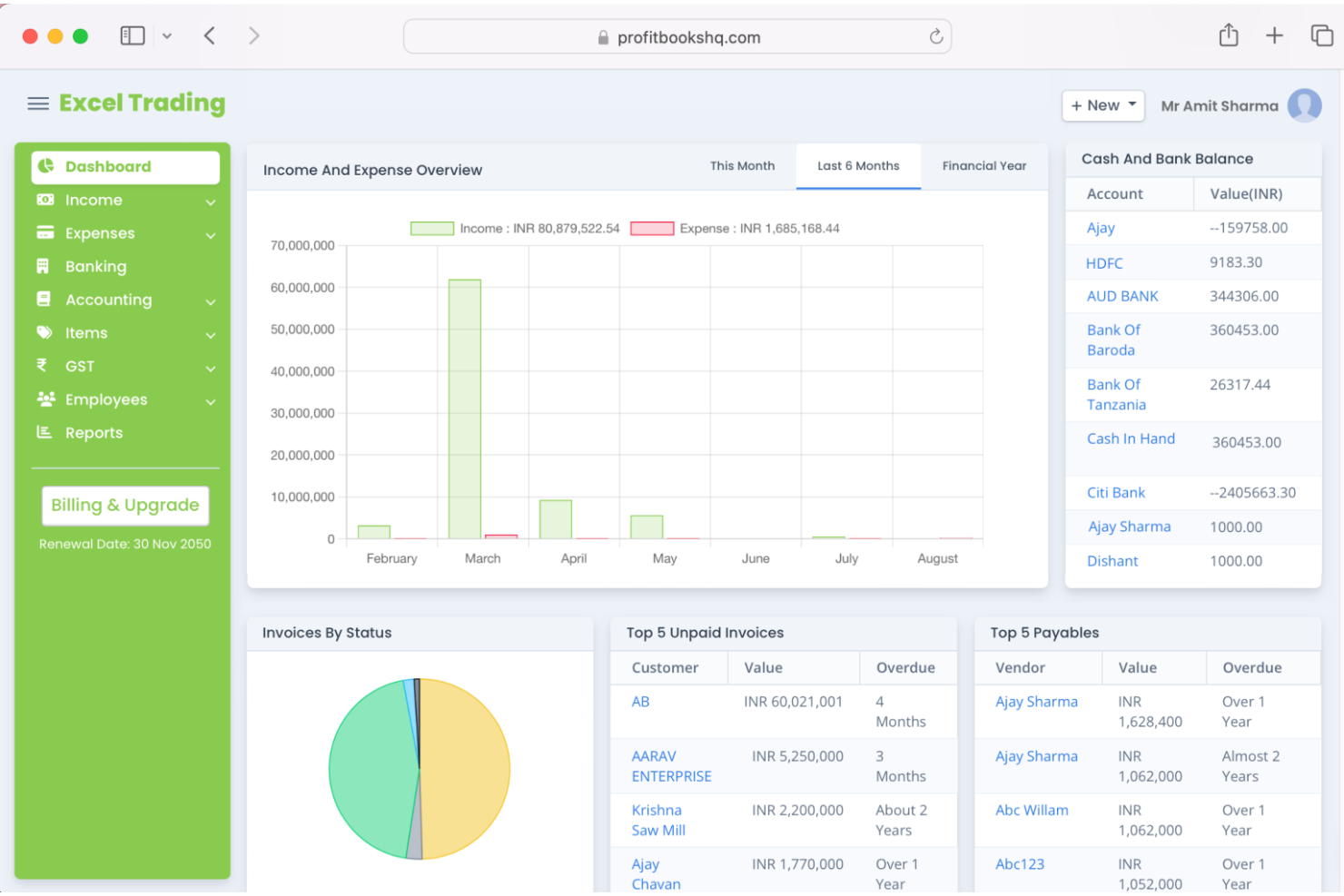
ProfitBooks is a free cloud-based accounting software with financial reporting, stock level monitoring, invoicing, and inventory management. It’s ideal for small businesses with simple financial needs and minimal accounting experience.
Why it's a good Xero alternative: ProfitBooks offers essential features like invoicing, expense tracking, and inventory management without any cost. It simplifies accounting needs, making it accessible for non-accountants while providing strong functionality to help businesses manage their finances effectively. The platform also provides simple financial reports and overviews of your business’s performance.
Standout features & integrations:
Features include simple invoicing for creating and sending professional invoices, easy expense tracking, and built-in inventory management. Its intuitive design makes managing accounting tasks accessible for users with little to no experience.
Integrations include PayPal, Stripe, Google Drive, Dropbox, Zoho CRM, QuickBooks, Slack, Mailchimp, HubSpot, and Shopify.
Pros and Cons
Pros:
- Customizable invoicing templates
- Expense management
- Integrated inventory management
Cons:
- No tax compliance automation
- No detailed budgeting tools
Other Xero Alternatives
Below is a list of additional Xero alternatives that I shortlisted. While they didn’t make the top 10, they’re still valuable and worth further research.
- Puzzle
For dual accounting capabilities
- Akaunting
For open-source financial management
- Reckon
For affordable accounting and payroll services
- Slash
For crypto and fiat currency management
- PocketSmith
For future financial forecasting
- HoneyBook
For project-based businesses and creatives
- Odoo Accounting
For customizable business solutions
- Wave
For freelancers and small businesses


How I Evaluate Xero Alternatives
Whether you're a bookkeeper juggling multiple clients or a founder reconciling bank feeds solo, I evaluate every tool on two levels: the baseline it must hit and what sets it apart.
Core Functionality (Table Stakes For This List)
When I'm selecting tools for my list, I rank each one on a scale from 0 (does not offer the functionality) to 5 (excels in this area) for each core functionality listed below. Then, I calculate the tool's total score into a percentage. Each tool needs to achieve a minimum total score of 75% to be considered for inclusion.
- General Ledger & Double-Entry Bookkeeping: I check whether the platform offers a full chart of accounts, journal entries, and an audit trail—basics like posting adjusting entries at month-end should feel straightforward.
- Invoicing & Accounts Receivable: A good alternative lets you create custom invoices, accept online payments, and automate payment reminders so you're not chasing down outstanding balances manually.
- Bank Feeds & Reconciliation: I evaluate how many banks the tool connects to, how transaction matching works, and whether you can set up rules—like auto-categorizing recurring SaaS subscriptions.
- Accounts Payable & Expense Tracking: From snapping receipt photos to scheduling vendor payments, I look for tools that handle the full AP cycle rather than just basic bill entry.
- Financial Reporting & Tax Compliance: Every tool should generate a P&L, balance sheet, and cash flow statement at minimum, plus support region-relevant tax reports like VAT, GST, or sales tax returns.
- Multi-User Access & Integrations: I evaluate role-based permissions for accountants and collaborators, along with native integrations to payment processors, CRMs, and payroll tools your team already uses.
Once I have a list of tools that meet this criteria, I consider what sets each platform apart.
Differentiating Factors (What Sets Vendors Apart)
Here's how I compare and contrast different vendors:
Standout Features
Integrated payroll is a big differentiator—tools that handle pay runs and tax filings natively save you from stitching together separate systems just to run a monthly payroll cycle. I also evaluate multi-entity and multi-currency support, which matters the moment you open a second location or start invoicing clients abroad. For bookkeepers managing multiple clients, a client collaboration portal with document requests and review workflows can replace a lot of back-and-forth over email.
Beyond Features
Pricing and scalability matter a lot here—I look at whether a freelancer can start on a free or low-cost tier and grow into a mid-market plan without migrating to a new platform entirely. Migration support is another factor I weigh, especially dedicated import tools or guided workflows for moving the chart of accounts and historical data from Xero. I also evaluate the integration ecosystem, because your accounting tool needs to connect to whatever payment processors, ecommerce platforms, and CRMs your business already runs on.
Why Look for a Xero Alternative?
Although Xero is a valuable software, there are several reasons you might be looking for an alternative, such as:
- Pricing Concerns: Xero may not offer the pricing flexibility that some businesses need, leading them to seek more cost-effective solutions.
- Feature Limitations: Companies might require features Xero lacks, such as more advanced finance management tools or features tailored for particular industries.
- Scalability Issues: As businesses grow, they may find that Xero's capabilities do not scale effectively with their increasing needs.
- Customer Support: Some businesses might be dissatisfied with Xero’s customer support and look for alternatives with more responsive service.
- Integration Needs: Companies that rely on various software applications may need accounting solutions with better integration capabilities than Xero.
Key Features of Xero Alternatives
Here are some key features of Xero that your alternative software should be able to replicate or improve upon in order to be a good fit.
- Invoicing: Easily create and customize invoices and set up automated reminders for due or overdue payments.
- Bank Reconciliation: Import bank statements, categorize transactions, and reconcile accounts payable.
- Expense Tracking: Monitor, categorize, and manage business expenses in real-time.
- Inventory Management: Keep track of stock levels, and manage inventory across multiple locations.
- Multi-Currency: Can handle transactions in multiple currencies with automatic exchange rate updates.
- Payroll Management: Simplify payroll processing, handle employee records, track hours worked, and ensure compliance with tax and labor laws.
- Financial Reporting: Generate detailed financial reports for comprehensive business insights.
- Project Tracking: Track time, costs, and billable hours on specific projects to ensure profitability and accurate client billing.
- Tax Management: Calculate, track, and submit tax returns accurately and comply with local tax laws.
- Mobile Access: Fully functional mobile app for managing business finances on the go.