

10 Best Multi-Company Accounting Software Reviewed In 2026

Best Multi-Company Accounting Software Shortlist


The best multi-company accounting software makes it easy to manage financial operations across subsidiaries, franchises, and global divisions—without the fragmented ledgers, messy intercompany transactions, or unreliable reports that slow teams down. If your current system can’t consolidate entities cleanly or keep compliance aligned across jurisdictions, it may be creating more risk than clarity.
With more than 15 years of experience in financial management and digital software, I’ve helped finance leaders streamline consolidations, strengthen controls, and gain real visibility across complex organizational structures. The right platform doesn’t just simplify entity management—it gives you the confidence that every number is accurate, aligned, and audit-ready.
To help you find that fit, I’ve reviewed real user feedback, tested leading platforms, and compared the features that matter most for multi-entity operations. Here are the solutions that can reduce complexity, improve accuracy, and help you manage every entity with clarity and control.
Why Trust Our Software Recommendations
Our team has been testing and reviewing software since 2012. As finance leaders ourselves, we know how difficult—and important—it is to choose the right software.
For this guide, we evaluated tools using hands-on testing and independent research, scoring tools using our selection criteria.
Our reviews reflect our human editorial judgment, not a sales pitch.
Best Multi-Company Accounting Software Summary
When you work for a multi company organization, time isn’t something readily available. This comparison chart outlines the costs and trial information for each of my best multi company accounting software picks, to help you decide quickly and with confidence.
| Tool | Best For | Trial Info | Price | ||
|---|---|---|---|---|---|
| 1 | Best for managing unlimited subsidiaries | Free demo available | Pricing upon request | Website | |
| 2 | Best for manage vendor relationships | Free plan + free demo available | From $15/user/month | Website | |
| 3 | Best for automated bank reconciliation | 30-day free trial available | From $2.50/month | Website | |
| 4 | Best free accounting solution | 30-day free trial | From $40/month | Website | |
| 5 | Best for global payables automation | Free demo available | From $99/month | Website | |
| 6 | Best for smooth Zoho ecosystem integration | Free plan + free demo available | From $15/month (billed annually) | Website | |
| 7 | Best for complex multi-entity financial management | Free demo available | Pricing upon request | Website | |
| 8 | Best for multi-entity reporting | 14-day free trial available | From $24/month (billed annually) | Website | |
| 9 | Best for mid-sized companies | Free demo available | From $210/user/month/ | Website | |
| 10 | Best for AI-powered multi-entity accounting | Free demo available | Pricing upon request | Website |

Best Multi-Company Accounting Software Reviews
I’ve explored the best multi company accounting software so you can easily manage finances across your businesses. My summaries break down key features, pros and cons, integrations, and when each tool works best.

Best for managing unlimited subsidiaries

DualEntry is an AI-native enterprise accounting platform designed to support businesses managing complex financial operations. It offers tools for general ledger management, accounts payable and receivable, and financial reporting.
Why I picked DualEntry: DualEntry stands out for multi-company accounting with its ability to manage unlimited subsidiaries and legal entities within a single platform. You can add new entities at any time and get real-time metrics across all your companies without switching between systems. Its intercompany automation features allow for automated intercompany transactions and efficient reconciliation of intercompany balances, reducing manual adjustments.
Standout features & integrations:
Features include automated journal entries with smart approval workflows that verify threshold amounts and approval limits, centralizing management, and enhancing compliance. DualEntry also simplifies complex allocation processes with fully automated, multi-dimensional allocations across products, projects, and departments, allowing you to auto-schedule recurring allocations across numerous entities.
Integrations include BambooHR, Bill.com, Brex, Deel, Google SSO, Gusto, HubSpot, Ramp, Rippling, Salesforce, Stripe Billing, and Stripe Invoicing.
Pros and Cons
Pros:
- Automated revenue recognition ensures compliance with standards
- Supports multi-entity and multi-currency operations
- Advanced AI features help with complex accounting tasks
Cons:
- Customization options require careful setup
- No option to try the system before buying

Ramp
Best for manage vendor relationships

Ramp is a spend management platform that helps businesses automate accounts payable, manage corporate cards, and track expenses in real time. It supports multi-entity operations with features that simplify financial management across subsidiaries.
Why I picked Ramp: Ramp offers real-time expense tracking and automated accounts payable, which make it a strong fit for businesses managing multiple entities. You can customize approval workflows for each entity and manage vendor relationships in one place. Ramp’s Seat Intelligence feature also connects to Okta to help you track SaaS subscriptions across your entire organization.
Standout features & integrations:
Features include real-time expense tracking, automated receipt matching, customizable spending controls, vendor management with Seat Intelligence, and accounts payable automation. Ramp also offers corporate cards with policy-based controls and real-time transaction visibility.
Integrations include NetSuite, Sage, Xero, QuickBooks, Microsoft Dynamics Business Central, Acumatica, Uber, Lyft, Okta, Google, Rippling, and Gmail.
Pros and Cons
Pros:
- Comprehensive reporting features
- Ability to issue multiple virtual cards with customizable controls
- Automated expense reporting and receipt matching
Cons:
- Mostly focuses on accounts payable and spend management
- Could offer more advanced accounting features
New Product Updates from Ramp

Ramp Adds VAT-Compliant Reimbursement Statements
Ramp added VAT and entity address details to reimbursement statements, helping teams in the EU, UK, and Canada reclaim VAT with less manual paperwork. For more information, visit Ramp’s official site.
 .
.
Xero
Best for automated bank reconciliation
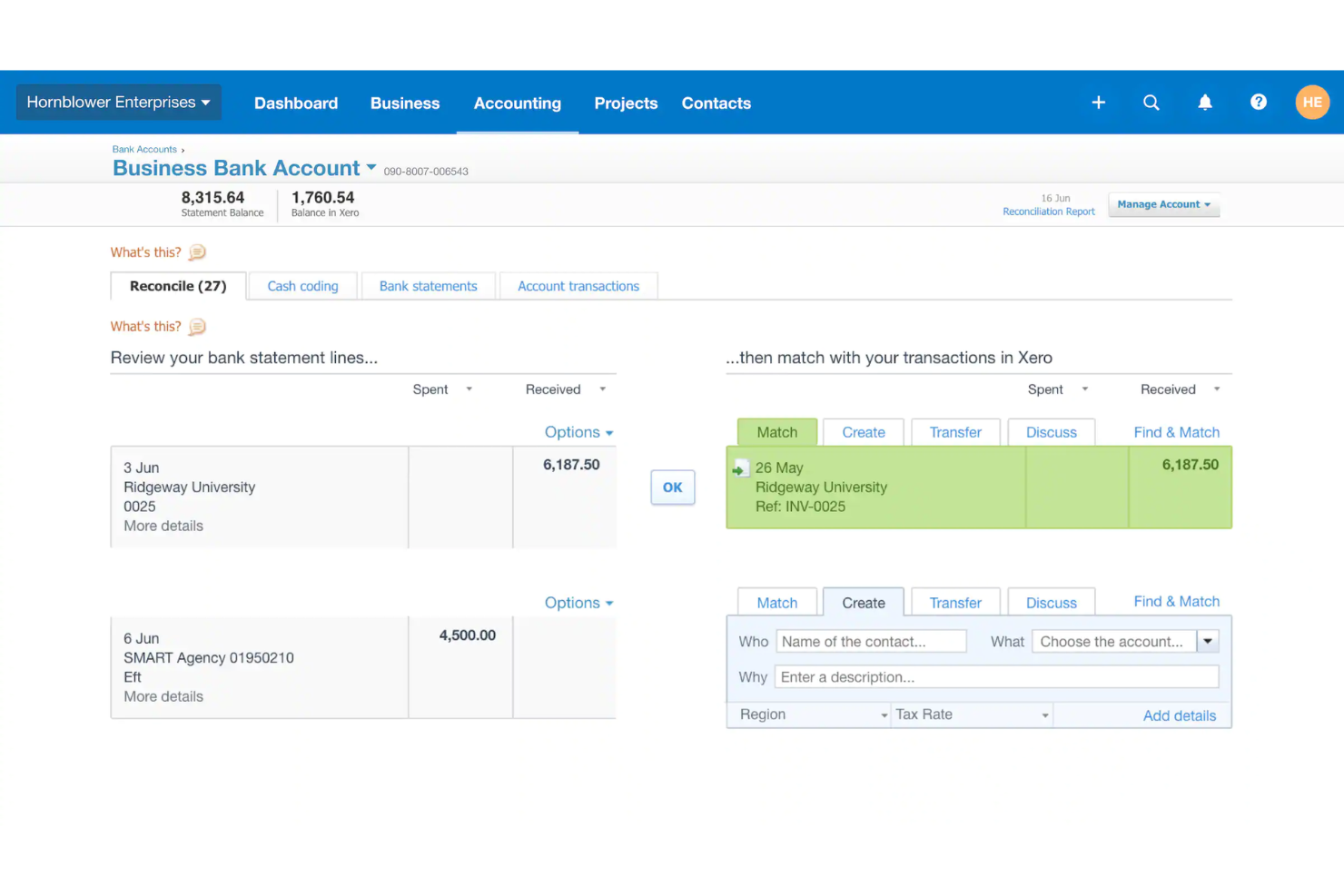
Managing the financial operations of multiple companies can be complex, but Xero offers an intuitive cloud-based accounting solution tailored for small businesses and growing enterprises. With automated bank reconciliation, the platform helps reduce manual data entry while keeping transactions accurate across multiple entities. It is ideal for teams managing intercompany transactions and consolidated financial reporting. Xero stands out by offering features that simplify daily accounting tasks and improve financial visibility.
Why I Picked Xero
I chose Xero for its automated bank reconciliation, which makes it easier to match transactions across multiple company accounts without manual checking. This helps reduce errors and saves time when managing finances for several entities. Xero also supports consolidated reporting and inter-company transaction tracking, so you can keep each business separate while still viewing overall performance in one place.
Xero Key Features
In addition to automated bank reconciliation, Xero offers:
- Multi-Currency Support: Allows management of finances in different currencies, ideal for international operations.
- Customizable Reports: Enables generation of various financial reports for insights into business performance.
- Third-Party App Integrations: Connects with numerous apps to enhance functionality and automate workflows.
Xero Integrations
Integrations include Shopify, Stripe, PayPal, HubSpot, Square, Mailchimp, Gusto, Harvest, Expensify, and Bill.com.
Pros and Cons
Pros:
- Built-in reporting supports consolidated financial oversight
- Real-time collaboration improves accountant and team workflows
- Automatic bank reconciliation saves daily bookkeeping time
Cons:
- Higher-tier plans required for advanced features
- Price increases impact small business budgets

Wave
Best free accounting solution

Wave is a bookkeeping and accounting management software designed for small businesses, freelancers, and creators. It handles invoicing, payments, payroll, and basic accounting functions.
Why I picked Wave: Wave provides free invoicing and accounting services, making it ideal for small business owners. You can track unlimited income and expenses at no cost. Additionally, the software supports managing multiple businesses under one account, making it easier to stay organized. It also offers receipt scanning and bank reconciliation to simplify your accounting tasks.
Standout features & integrations:
Features include free invoicing and accounting services, receipt scanning, and bank reconciliation. You can manage multiple businesses under one account and track income and expenses seamlessly. The platform also offers payroll services for a fee.
Integrations include PayPal, Etsy, Shoeboxed, Zapier, Google Sheets, Stripe, PayPal, BluePay, QuickBooks, and HubSpot.
Pros and Cons
Pros:
- Bank reconciliation
- Receipt scanning
- Unlimited invoicing
Cons:
- Mobile app limitations
- Limited support options

Tipalti
Best for global payables automation

Tipalti is an accounts payable automation software designed for finance teams to manage global payables operations. It helps businesses automate their entire payables workflow, from invoice processing to global payments.
Why I picked Tipalti: Tipalti automates the entire payables process, including supplier onboarding, invoice processing, and tax compliance. You can manage multi-entity payables, ensuring your payments are accurate and compliant with global financial regulations. The platform also provides real-time payment reconciliation and built-in fraud detection to safeguard your transactions. It’s designed to scale with your business as you grow, making it a fit for companies of various sizes.
Standout features & integrations:
Features include automated invoice processing, tax compliance management, and multi-entity support. Your team can benefit from real-time payment reconciliation and fraud detection features. The platform also supports global payments, allowing you to pay suppliers in multiple currencies.
Integrations include NetSuite, QuickBooks, Xero, Sage Intacct, Oracle, SAP Concur, Expensify, Bill.com, Stripe, and PayPal.
Pros and Cons
Pros:
- Built-in fraud detection
- Real-time reconciliation
- Multi-entity support
Cons:
- Limited customization options
- Complex initial setup

Best for smooth Zoho ecosystem integration

Zoho Books is a cloud-based accounting system designed primarily for small and medium-sized businesses. It handles key business functions such as invoicing, expense tracking, and compliance with tax regulations.
Why I picked Zoho Books: Zoho Books software automates data entry, streamlining accounting tasks for greater efficiency. Its client portal enables collaboration with customers, enhancing transparency and communication. Zoho Books provides detailed reporting tools to offer insights into your financial health. Additionally, multi-currency support allows for smooth global business transactions.
Standout features & integrations:
Features include automated bank feeds, recurring invoices, and project accounting. You can streamline your business processes by setting up workflow rules that automate repetitive tasks. The comprehensive dashboard gives you a real-time view of your financial status, helping you make informed decisions.
Integrations include Zoho CRM, Zoho Inventory, Zoho Analytics, Zoho Expense, Zoho Payroll, Zoho Subscriptions, Zoho Projects, Zoho Sign, and Zoho Checkout.
Pros and Cons
Pros:
- Workflow automation
- Automated bank feeds
- Multi-currency support
Cons:
- Basic payroll features
- Limited third-party integrations

Best for complex multi-entity financial management
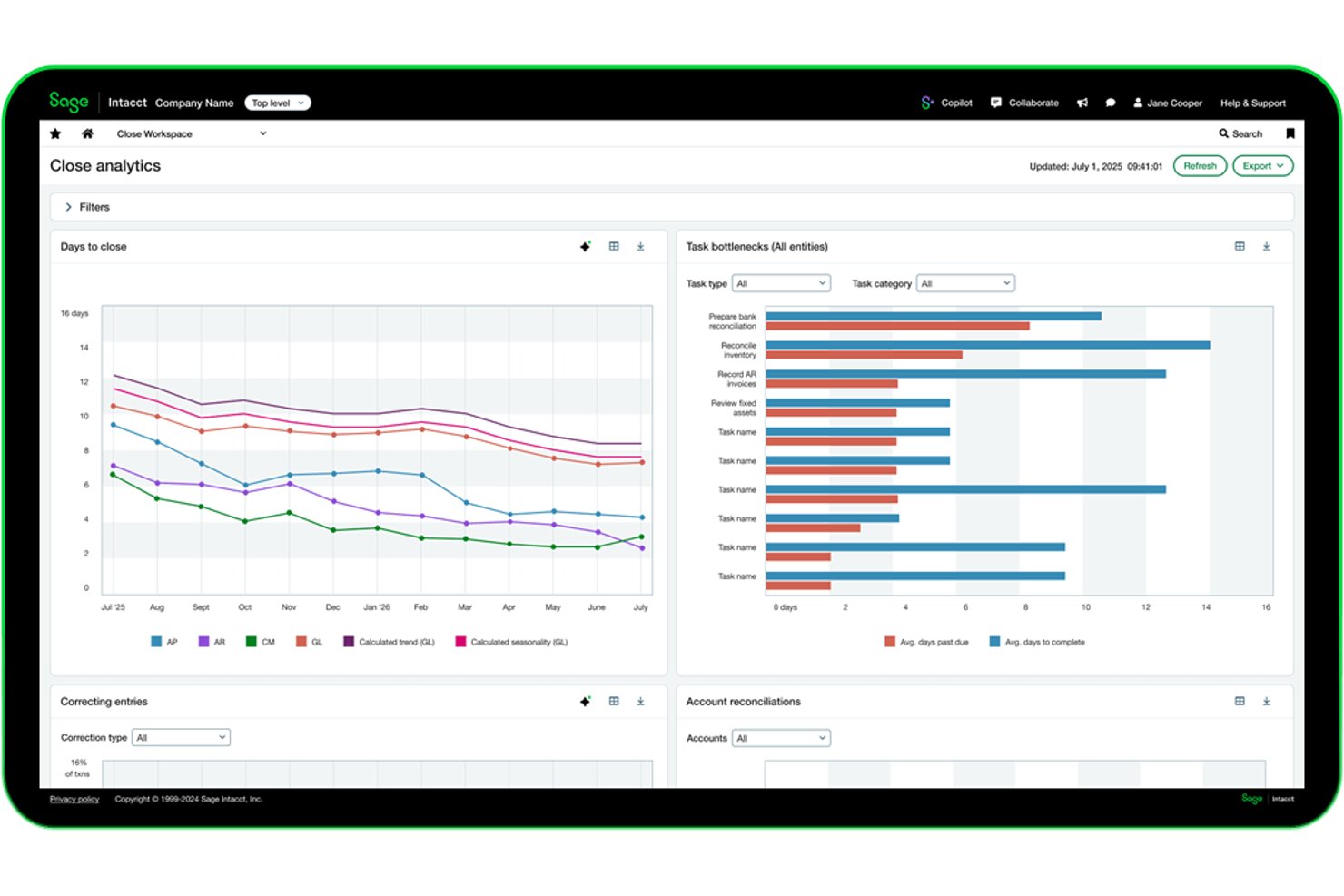
Sage Intacct is a cloud-based accounting platform built for multi-entity organizations, offering general ledger management, automated consolidations, revenue recognition, and financial reporting across multiple subsidiaries, currencies, and dimensions.
Who Is Sage Intacct Best For?
Sage Intacct suits finance teams managing multiple subsidiaries or legal entities that need automated consolidations and real-time visibility across the full org structure.
Why I Picked Sage Intacct
Sage Intacct earns its spot on my shortlist because of how well it handles multi-entity close and consolidation at scale. I love that it automates intercompany eliminations and currency translations across subsidiaries, so month-end close doesn't turn into a manual reconciliation nightmare. Its dimensional reporting also lets you slice financials by entity, department, or location without running separate reports for each.
Sage Intacct Key Features
- Revenue recognition: Automates revenue schedules in compliance with ASC 606 and IFRS 15 across multiple entities and contract types.
- Accounts payable automation: Routes vendor invoices through configurable approval workflows, matching purchase orders and flagging discrepancies before payment.
- Role-based dashboards: Delivers real-time financial metrics to specific users based on their role, entity, or department within the org structure.
- Audit trail: Logs every transaction, approval, and system change with a timestamped record to support internal controls and external audits.
Sage Intacct Integrations
Sage Intacct offers marketplace integrations, including native connectors with Salesforce, Expensify, BILL, ADP, Ramp, Avalara, FloQast, HubSpot, and ServiceTrade. A REST API and legacy XML web services API are available for custom integrations, alongside Smart Events for code-free automation.
Pros and Cons
Pros:
- Provides dimensional financial reporting flexibility
- Automates currency translation and intercompany eliminations
- Handles complex multi-entity consolidations smoothly
Cons:
- Some users report occasional performance slowdowns
- Initial setup for multi-entity can be lengthy

Joiin
Best for multi-entity reporting

Joiin is a financial consolidation and reporting tool tailored for multi-company accounting. It helps you manage and analyze financial data across several entities, giving you a clear picture of your business's financial status.
Why I Picked Joiin: I picked Joiin for its standout multi-entity reporting, which consolidates financial data across entities into a unified dashboard for real-time performance tracking. Its budgeting, forecasting, and intercompany management tools streamline planning and coordination across multiple businesses.
Standout features & integrations:
Features include multi-currency reporting for smooth international operations, user management for team collaboration, and strong security with encryption and multi-factor authentication.
Integrations include Xero, QuickBooks, Sage, Pennylane, Puzzle, Beeswax, Calendly, Freshworks, Google, and Stripe.
Pros and Cons
Pros:
- Effective for group consolidations and inter-company finance management
- Effective for group consolidations and inter-company finance management
- Supports multi-currency reporting
Cons:
- Lacks financial rollup capabilities and editing features
- Report editor can be clunky with limitations on flexibility

Best for mid-sized companies

Gravity Software is multi-entity accounting software designed for mid-market businesses. It helps organizations manage and consolidate financial data across multiple legal entities.
Why I picked Gravity Software: Gravity Software simplifies multi-entity accounting by enabling multiple legal entities in one database. It automates inter-company transactions and streamlines month-end financial reporting. Shared customer and vendor files enhance efficiency, and multi-currency accounting is supported for businesses operating across regions.
Standout features & integrations:
Features include automated intercompany transactions, streamlined financial reporting, and multi-currency accounting. You can also manage shared master files for customers and vendors.
Integrations include Microsoft Dynamics 365, QuickBooks, Sage, Salesforce, HubSpot, Zoho CRM, Shopify, WooCommerce, Amazon, and eBay.
Pros and Cons
Pros:
- Shared master files
- Single database for all entities
- Supports multi-currency
Cons:
- Complex setup process
- Steep learning curve

Fulfil
Best for AI-powered multi-entity accounting

Fulfil is an AI-native ERP and accounting software built for ecommerce and wholesale businesses. It centralizes multi-company financial management in a single platform, combining accounting, inventory, and operations under one system. Designed for global businesses, Fulfil supports multiple entities, currencies, and markets to simplify consolidations and ensure compliance across jurisdictions.
Why I picked Fulfil: I picked Fulfil because it combines powerful automation with deep financial visibility, which is essential for managing complex, multi-entity structures. You can view consolidated financials across subsidiaries in real time and automate intercompany transactions without needing separate systems. I also like that Fulfil enforces strong security standards, including SOC 1 and SOC 2 compliance, fine-grained permissions, and multi-factor authentication. These controls help you manage multi-company data confidently while maintaining compliance across regions.
Standout features & integrations:
Features include AI-powered reporting that generates insights in seconds, automation for recurring workflows, and real-time inventory and order management across entities. You can also create custom financial reports using natural language prompts to simplify analysis.
Integrations include Amazon Shipping, DHL, FedEx, UPS, AfterPay, Authorize.net, PayPal, Stripe, Amazon, Etsy, Shopify, and eBay.
Pros and Cons
Pros:
- AI-driven financial reporting
- SOC-compliant data protection controls
- Supports multiple entities and currencies
Cons:
- Complex setup for smaller teams
- Pricing available only on request
Other Multi-Company Accounting Software
Here are some additional multi-company accounting software options that didn’t make it onto my shortlist, but are still worth checking out:
- Puzzle
For AI-powered transaction reviewing
- Inkle Books
For founder-focused compliance management
- Accounting Seed
For Salesforce users
- AccountsIQ
For multi-entity consolidations
- Jonas Construction Software
For construction businesses
- SAMPro ERP
For field service management
- SapphireOne
For comprehensive ERP integration


How I Evaluate Multi-Company Accounting Software
I split my evaluation into baseline requirements—like native multi-entity ledgers and automated consolidation—and differentiators that separate the right tool from a merely adequate one.
Core Functionality (Table Stakes For This List)
When I'm selecting tools for my list, I rank each one on a scale from 0 (does not offer the functionality) to 5 (excels in this area) for each core functionality listed below. Then, I calculate the tool's total score into a percentage. Each tool needs to achieve a minimum total score of 65% to be considered for inclusion.
- Multi-Entity Management: I check whether you can create, switch between, and manage all your legal entities from a single login rather than juggling separate instances per subsidiary.
- Financial Consolidation: The ability to roll up P&L, balance sheet, and cash flow across entities matters—especially for controllers closing books on a group of ten or more subsidiaries.
- Intercompany Transactions: I evaluate how each tool handles intercompany journals, transfers, and eliminations, like a shared services entity billing operating subsidiaries for overhead.
- Multi-Currency Support: For groups with entities in different countries, I look at automated FX conversion, revaluation workflows, and whether translation adjustments post correctly at period end.
- Unified Chart of Accounts: A shared or centrally mappable COA is key. I look at whether acquired entities with legacy account structures can be mapped into the parent's COA without re-keying.
- Cross-Entity Reporting: I evaluate whether you can pull consolidated or comparative reports across a subset of entities—say, all retail locations—with drill-down into individual company detail.
Once I have a list of tools that meet the criteria, I consider what sets each platform apart.
Differentiating Factors (What Sets Vendors Apart)
Here's how I compare and contrast different vendors:
Standout Features
Automated period close workflows make a real difference when you're closing books for a dozen subsidiaries on the same timeline. I look for platforms that let controllers run parallel close tasks across entities with built-in checklists and status tracking. Dimensional accounting is another separator—tagging transactions by department, location, or project across entities gives you granular analysis without duplicating GL accounts. Role-based entity access also matters, especially for holding companies where franchise-level bookkeepers should only see their own entity's data.
Beyond Features
Scalability matters—I evaluate whether adding a new subsidiary is a simple configuration step or a full re-implementation project. Pricing models vary widely too; some vendors charge per entity, which adds up fast for PE portfolios or franchise groups acquiring new units regularly. Integration depth is equally important, particularly native connections to payroll, AP automation, and banking systems each entity relies on. I also consider audit readiness, checking for immutable audit trails, SOX-compatible controls, and read-only access modes for external auditors.
How to Choose Multi-Company Accounting Software
I know it’s easy to get lost in endless features and pricing. If you’re choosing multi company accounting software, stay focused on what matters. Use this checklist to help you find the right solution for your multi company organization and its needs:
| Factor | What to Consider |
| Scalability | Will this software grow with your business needs? |
| Integrations | Does it integrate with the existing tools you use? |
| Customizability | Can it be tailored to fit your specific requirements? |
| Ease of Use | Is the software user-friendly for your team? |
| Budget | Does it fit within your financial constraints? |
| Security Safeguards | Does it provide robust security measures to protect your data? |
| Support | Is customer support responsive and helpful? |
| Reporting | Does it offer detailed and customizable reporting features? |
Trends In Multi-Company Accounting Software
In my research for the best multi company accounting software, I dug deep into product updates and release notes from the top providers. Here are trends I’m watching, that you should too:
- AI-Powered Financial Insights: Companies like Xero and Wave use AI to provide more accurate financial forecasting and insights. This helps businesses predict financial outcomes and make better decisions.
- Blockchain for Transparency: Blockchain technology is being integrated to ensure transparency and security in financial transactions. This is particularly useful for multi-company accounting where trust and verification are paramount.
- Customizable Reporting Dashboards: Vendors are offering more customizable reporting dashboards that can be tailored to the specific needs of different businesses. QuickBooks Enterprise, for instance, allows users to create custom reports that pull data from multiple companies.
- Virtual CFO Services: Some software now offers virtual CFO services, providing expert financial advice without the need for a full-time CFO. NetSuite offers this feature to help smaller enterprises manage their finances more effectively.
- Enhanced Data Analytics: Advanced data analytics tools are becoming more common, helping businesses analyze financial performance across multiple entities. Xero, for example, has enhanced its analytics capabilities to provide detailed insights into financial metrics across different companies.
What Is Multi-Company Accounting Software?
Multi-company accounting software is a financial management tool that helps businesses manage accounting for multiple entities within a single system. It’s used by finance teams, accountants, and CFOs who oversee subsidiaries, franchises, or multi-division organizations. By automating intercompany transactions, streamlining consolidations, and centralizing reporting, it eliminates manual ledger work and reduces compliance risks. This gives leaders real-time visibility across all entities and simplifies financial oversight from one unified dashboard.
Features of Multi-Company Accounting Software
Outside of features like strong multi-currency support and multi-tax compliance, there are other key features to look for in an accounting software for multiple companies. This includes:
- Separation of Entities: Allows each company to maintain distinct financial records, ensuring clear and accurate bookkeeping. This is beneficial if you run multiple retail stores or have several construction businesses across locations.
- Consolidated Financial Reporting: Aggregates financial data from multiple entities into a single report, providing a comprehensive overview.
- Multi-Currency Support: Handles transactions in various currencies, useful for companies operating in different countries.
- Intercompany Transactions: Automates the recording and reconciliation of transactions between related entities, simplifying intercompany accounting.
- Customizable Chart of Accounts: Enables customization of the chart of accounts to meet the specific needs of each entity.
- Centralized Control Settings: Allows for the central management of key settings across all entities, ensuring consistency and control.
- Automated Workflows: Streamlines accounting processes through automation, reducing manual entry and the risk of errors.
- Scalability: Supports the addition of new entities without significant changes to the system, catering to growing businesses.
Benefits of Multi-Company Accounting Software
Implementing an accounting software for multiple companies can lead to real advantages, such as less manual work and more accuracy. Other common benefits include:
- Centralized Financial Management: Manage financial data from all your companies in one place, reducing the need to switch between multiple systems.
- Intercompany Transactions: Easily record and reconcile transactions between your different entities, saving time and reducing errors.
- Consolidated Reporting: Generate financial reports that combine data from all your companies (or nonprofit locations), giving you a complete picture of your overall financial health.
- Compliance Tracking: Ensure each of your companies meets its specific regulatory requirements with built-in compliance tools.
- Scalability: Add new companies to your system as your business grows without needing to invest in new software.
- Cost Allocation: Allocate costs and revenues across your different entities accurately, improving financial transparency.
- User Access Control: Set different access levels for users in each company, ensuring that sensitive information is only accessible to authorized personnel.
Costs & Pricing of Multi-Company Accounting Software
I know choosing the best multi company accounting software can feel complex. Pricing depends on features, user count, and extras. Plans also often scale with your team’s needs. Below, I’ve outlined common options, average costs, and key features to help you compare and find the right fit for your organization.
Plan Comparison Table for Multi-Company Accounting Software
| Plan Type | Average Price | Common Features |
| Free Plan | $0 | Basic bookkeeping, limited users, essential reports, and basic integrations |
| Personal Plan | $15 - $30/user/month | Advanced bookkeeping, more users, custom reports, invoicing, and integrations |
| Business Plan | $30-$60/user/month | Project management,multi-currency, comprehensive reports, and payroll features |
| Enterprise Plan | $100-$300/user/month | Unlimited users, advanced security, custom workflows, and dedicated support |
Multi-Company Accounting Software FAQs
Here are some answers to common questions about multi-company accounting software:
How do I switch businesses on accounting software like FreshBooks?
In FreshBooks, switching between businesses is done by navigating to the business settings and selecting the desired business from a dropdown menu. This feature enables managing multiple businesses under one account without the need to repeatedly log in and out.
How does multi-company accounting software enhance expense tracking for organizations with multiple entities?
Multi-company accounting software enhances expense tracking by centralizing expense data across multiple entities, ensuring seamless tracking of inter-company expenses. It allows consolidated reporting and compliance with different regulatory requirements, making it easier to manage finances across multiple businesses.
Can I manage inter-company transactions with multi-company accounting software?
multi-company accounting software typically allows you to manage intercompany transactions efficiently. This includes recording transactions between different entities and ensuring that all accounts are balanced across your companies.
Can multi-company accounting software consolidate financial reports across subsidiaries?
Yes, multi-company accounting software is designed to consolidate financial reports across multiple subsidiaries or entities. The software allows users to create consolidated financial statements, such as income statements and balance sheets, by aggregating data from different entities within the organization. This feature makes it easier to analyze the overall financial health of the entire business group, while also allowing for a breakdown by individual company or division.
Can you integrate multi-company accounting software with financial services CRM software?
Yes, many financial services CRM software solutions offer integration capabilities with multi-company accounting software. This integration allows businesses to synchronize client financial data, automate billing processes, and provide a unified view of financial and customer data, which enhances decision-making and operational efficiency.
Can billing management software integrate with multi-company accounting systems?
Yes, many billing management solutions are designed to integrate seamlessly with multi-company accounting software. This integration ensures that billing data is accurately reflected across all entities, supporting consolidated financial statements and providing a unified view of the organization’s financial health.
What are the key considerations when selecting ERP accounting software for multi-company operations?
When choosing ERP accounting software for multi-company operations, consider factors such as scalability, ease of integration with existing systems, support for multiple currencies and languages, and the ability to generate consolidated financial reports. Additionally, ensure the software complies with the regulatory requirements of all regions where your entities operate.
What are the benefits of integrating expense reporting software with multi-company accounting systems?
Integrating these systems offers several advantages:
- Efficiency: Automates data entry and reduces manual errors.
- Consistency: Ensures uniform expense policies across all entities.
- Real-Time Insights: Provides up-to-date financial data for informed decision-making.
- Compliance: Helps maintain adherence to financial regulations across different jurisdictions.
- Cost Savings: Streamlines processes, reducing administrative overhead and associated costs.
By combining expense reporting software and multi-company accounting software, businesses can achieve a more streamlined and effective financial management system.
What’s Next?
If you're in the process of researching multi company accounting software, connect with a SoftwareSelect advisor for free recommendations.
You fill out a form and have a quick chat where they get into the specifics of your needs. Then you'll get a shortlist of software to review. They'll even support you through the entire buying process, including price negotiations.