Il software per le previsioni comprende strumenti digitali che aiutano le aziende a prevedere i risultati futuri analizzando i dati storici e individuando le tendenze. Dalla previsione delle vendite e dei ricavi alla pianificazione della domanda e alla gestione dell'inventario, queste piattaforme supportano processi decisionali più strategici e basati sui dati in ambito finanziario e operativo.
Negli ultimi anni ho scritto di strumenti digitali per i team finanziari, collaborando a stretto contatto con professionisti FP&A che vivono e respirano di previsioni. Quando le vostre previsioni influenzano decisioni importanti, avete bisogno di strumenti accurati, agili e progettati per le reali esigenze aziendali. Tuttavia, con così tanti strumenti disponibili sul mercato, è difficile capire quali soddisfino davvero le esigenze dei moderni team finanziari.
Per questo ho attinto alla mia esperienza nel campo del software digitale per individuare i migliori software per le previsioni oggi disponibili. Questo elenco include una combinazione di strumenti: alcuni progettati specificamente per le previsioni, altri parte di sistemi CPM o ERP più ampi. Dopo ore di test e ricerca, questi sono gli strumenti che possono contribuire a ridurre lo stress della pianificazione finanziaria.
Perché fidarsi dei nostri consigli sui software
6,700+
Reviews
20
Industry experts
16+
Evaluation factors
14
Years
Le nostre recensioni riflettono il nostro giudizio indipendente, non un discorso di vendita. Scopri come manteniamo la trasparenza.
Per questa guida, abbiamo valutato gli strumenti attraverso test pratici e ricerche indipendenti, assegnando un punteggio agli strumenti in base ai nostri criteri di selezione.
Le nostre recensioni riflettono il nostro giudizio editoriale umano, non un discorso di vendita.
Tabella comparativa dei software per le previsioni
Questa tabella comparativa riassume i dettagli dei prezzi delle mie migliori selezioni di software per le previsioni:
| Tool | Best For | Trial Info | Price | ||
|---|---|---|---|---|---|
| 1 | Ideale per la previsione del flusso di cassa | Demo gratuita disponibile | Prezzo su richiesta | Website | |
| 2 | Ideale per previsioni trasversali tra reparti | Demo gratuita disponibile | Prezzo su richiesta | Website | |
| 3 | Ideale per la previsione finanziaria aziendale in Excel | Demo gratuita disponibile | Prezzo su richiesta | Website | |
| 4 | Ideale per la previsione dei ricavi basata sulle risorse | Prova gratuita disponibile | A partire da $16/utente/mese (fatturato annualmente) | Website | |
| 5 | Ideale per previsioni di redditività per agenzie | Prova gratuita di 14 giorni | Da $10/utente/mese | Website | |
| 6 | Ideale per il valore del portafoglio per ora vincolata | Prova gratuita di 30 giorni + demo gratuita | Da €22.5/utente/mese (fatturati annualmente) | Website | |
| 7 | Ideale per le previsioni dei tre prospetti nella fascia media | Demo gratuita disponibile | A partire da 1.750 $/mese (con fatturazione annuale) | Website | |
| 8 | Miglior strumento di previsione nativo per fogli di calcolo | Prova gratuita di 14 giorni | Prezzo su richiesta | Website | |
| 9 | Ideale per approfondimenti finanziari in tempo reale | Piano gratuito + prova gratuita di 30 giorni + demo gratuita disponibile | Da $15/utente/mese | Website | |
| 10 | Il miglior software CPM con funzionalità di previsione | Demo gratuita disponibile. | Prezzo su richiesta | Website |


Recensioni dei migliori software per le previsioni
Ho raccolto i migliori software per le previsioni pensando agli analisti finanziari. Ognuno viene valutato per ciò che conta davvero: accuratezza, efficienza e capacità di rendere più fluido il processo di reporting.
 Ideale per la previsione del flusso di cassa
- Demo gratuita disponibile
- Prezzo su richiesta
Visit WebsiteCustomer Rating:4.5/5
La dashboard di Payout offre monitoraggio e gestione in tempo reale di fatture e pagamenti per supportare la previsione del flusso di cassa. Payouts è una piattaforma di automazione dei pagamenti per team finanziari e aziende che gestiscono pagamenti in uscita ad alto volume e necessitano di una visibilità in tempo reale sul flusso di cassa e sulle operazioni di pagamento.
Per chi è ideale Payouts?
Payouts è indicato per i team finanziari di aziende in rapida crescita o marketplace che elaborano grandi volumi di pagamenti in uscita e necessitano di un controllo più stretto sul flusso di cassa.
Perché ho scelto Payouts
Ho scelto Payouts tra i migliori perché il suo monitoraggio in tempo reale delle fatture e dei pagamenti consente ai team finanziari di avere una visione aggiornata delle uscite di cassa in qualsiasi momento del ciclo di pagamento. Quando si gestiscono grandi volumi di pagamenti a fornitori o partner, sapere esattamente cosa è in coda, approvato e processato costituisce la base di qualsiasi previsione affidabile del flusso di cassa. Apprezzo anche il fatto che Payouts si colleghi a oltre 600 sistemi tramite i suoi Universal Connectors, raccogliendo dati di pagamento da API, parsing di email e caricamenti di file in un unico luogo. Questo flusso dati consolidato significa che il mio team non deve più riconciliare manualmente le cifre provenienti da cinque fonti diverse prima di proiettare le posizioni di liquidità.
Caratteristiche principali di Payouts
- Motore fiscale dinamico: Automatizza la raccolta dei moduli fiscali, la validazione e il calcolo delle aliquote di ritenuta in diverse giurisdizioni per mantenere la conformità dei pagamenti.
- Automazione dei pagamenti tramite AI: Ti consente di creare regole personalizzate per i pagamenti con trigger automatici e flussi di lavoro di approvazione per supportare qualsiasi struttura di commissioni o calendario di pagamento.
- Dashboard di reportistica in tempo reale: Visualizza le performance dei fornitori, lo stato del ciclo dei pagamenti e i dati di conformità in report personalizzabili che puoi consultare in qualsiasi momento.
- Automazione AP: Gestisce i flussi di lavoro dell'account payable end-to-end, dall'acquisizione della fattura fino all'esecuzione del pagamento, senza necessità di intervento manuale.
Integrazioni di Payouts
Le integrazioni includono sorgenti dati API, parsing di email, caricamento di file, piattaforme di monitoraggio, eWallet, reti di bonifici bancari, reti di pagamento in criptovaluta, emittenti di carte virtuali, fornitori di gift card e emittenti di carte prepagate.
Pros and Cons
Pros:
- Supporta la scalabilità delle operazioni
- Automazione semplice di flussi di lavoro di pagamento complessi
- Solido supporto multivaluta per la previsione del flusso di cassa
Cons:
- Potrebbe richiedere tempo per una personalizzazione completa
- Potrebbe non integrarsi con tutti i sistemi esistenti
Learn more about Payouts: Ideale per previsioni trasversali tra reparti
- Demo gratuita disponibile
- Prezzo su richiesta
Visit WebsiteCustomer Rating:4.6/5
Phocas offre funzionalità di forecasting complete tra le varie funzioni di business, come vendite, operations e HR. Phocas è una piattaforma di forecasting finanziario e analisi costruita per i team finanziari e i leader aziendali che hanno bisogno di trasformare dati complessi in previsioni e report chiari e azionabili.
Per Chi è Ideale Phocas?
Phocas è particolarmente adatto alle aziende di fascia media dove i team finanziari devono collaborare con vendite, operazioni e altri reparti sulla pianificazione del budget e le previsioni.
Perché Ho Scelto Phocas
Ho scelto Phocas tra i migliori per la sua capacità di gestire le previsioni in modo trasversale tra i reparti, non solo all’interno della finanza. Quello che apprezzo di più è la funzionalità di budgeting basata su driver, che consente a vendite, operazioni e magazzino di inserire direttamente nel modello di budget i propri dati – come quantità di personale o volumi di vendita. In pratica, significa che il mio team non deve più inseguire aggiornamenti dei fogli di calcolo dai responsabili di reparto o riconciliare versioni in conflitto. Il workflow di collaborazione in tempo reale, con tracciamento della cronologia a livello di cella e controlli di sicurezza integrati, mantiene tutti responsabili senza permettere accessi a dati non autorizzati.
Caratteristiche Principali di Phocas
- Previsione continuativa: Collega i budget ai dati reali in tempo reale e ai report finanziari così da poter aggiornare le previsioni dopo ogni chiusura mensile.
- Budgeting a 3 stati: Sincronizza automaticamente conto economico, stato patrimoniale e previsioni di flusso di cassa per mantenere una visione accurata della posizione di cassa.
- Modellazione di scenari: Modifica driver e assunzioni per condurre analisi di tipo 'what-if' e confrontare risultati in diversi scenari di pianificazione.
- Analisi delle varianze: Esplora nel dettaglio i dati a livello transazionale e confronta anno su anno per identificare dove i reali si discostano dai piani.
Integrazioni di Phocas
Le integrazioni includono Epicor, Infor, Klipboard, Oracle Cloud EPM, Board, Jedox, Prophix, Vena ed è disponibile un’API per integrazioni personalizzate.
Pros and Cons
Pros:
- Funzioni di previsione per diversi reparti
- Dashboard e report personalizzabili
- Funzione AI per insight rapidi
Cons:
- Potrebbe essere necessario del tempo per imparare a usare completamente il software
- L’ampio accesso ai dati può risultare complesso
Learn more about Phocas: 3Ideale per la previsione finanziaria aziendale in Excel
Vena
- Demo gratuita disponibile
- Prezzo su richiesta
Visit WebsiteCustomer Rating:4.5/5
Vena offre modellazione finanziaria, permettendo agli utenti di esplorare diversi esiti finanziari sulla base di varie ipotesi. Vena è una piattaforma di pianificazione e analisi finanziaria progettata per i team finanziari di grandi organizzazioni che hanno bisogno di gestire forecast, budget e report complessi direttamente in Excel, mantenendo controllo, collaborazione e integrità dei dati.
Per chi è migliore Vena?
Vena è particolarmente adatto ai team finanziari di medie e grandi aziende che utilizzano Excel nei loro processi di pianificazione e cercano una soluzione strutturata e scalabile che si integri con esso.
Perché ho scelto Vena
Vena si guadagna un posto nella mia lista perché è l'unica piattaforma FP&A per le aziende che tratta Excel come uno strumento centrale invece che un compromesso. Apprezzo in particolare il modo in cui Vena CubeFLEX si posiziona sotto i tuoi modelli Excel come un database OLAP, permettendo ai modelli esistenti di continuare a funzionare esattamente come sono stati costruiti, ma con una governance centralizzata dei dati e un controllo delle versioni. La previsione basata su driver consente al mio team di generare previsioni strutturate di ricavi e spese direttamente in Excel tramite l'interfaccia in linguaggio naturale dell'Agente di Pianificazione—senza dover ricostruire i modelli. La funzionalità di modellazione di scenario permette inoltre di eseguire analisi what-if illimitate su più scenari contemporaneamente, un compito che la maggior parte dei team aziendali gestisce manualmente attraverso decine di versioni di fogli di calcolo.
Funzionalità chiave di Vena
- Agente di reporting: Genera report finanziari ad-hoc per qualsiasi visualizzazione, inclusi dettagli sui dati sottostanti, utilizzando richieste in linguaggio naturale direttamente in Excel.
- Automazione dei flussi di lavoro: Inoltra budget e forecast attraverso flussi di lavoro strutturati di approvazione con tracciamento dei compiti, promemoria e una dashboard in tempo reale per monitorare i progressi.
- Dashboard KPI interattivi: Monitora e analizza KPI finanziari e operativi con dashboard live costruiti direttamente in Excel, senza esportare i dati su uno strumento di reportistica separato.
- Vena Copilot per Microsoft Teams: Accedi a insight FP&A, analisi e report ad-hoc all'interno di meeting e chat Teams utilizzando prompt in linguaggio naturale.
Integrazioni Vena
Le integrazioni native di Vena includono Microsoft Excel, Microsoft Teams, Microsoft Power BI, Microsoft PowerPoint, NetSuite, Sage Intacct, Microsoft Dynamics 365, Salesforce, Workday e QuickBooks Online.
Pros and Cons
Pros:
- Implementazione solitamente rapida
- Interfaccia nota di Microsoft Excel
- Modelli e scenari finanziari avanzati
Cons:
- Problemi di compatibilità con Mac
- Nessuna app mobile
Learn more about Vena: Ideale per la previsione dei ricavi basata sulle risorse
- Prova gratuita disponibile
- A partire da $16/utente/mese (fatturato annualmente)
Visit WebsiteCustomer Rating:4.6/5
Pianifica e programma accuratamente le risorse grazie alle heatmap di VOGSY, che mostrano le loro allocazioni fatturabili e non fatturabili e il tracciamento delle ore. VOGSY è una piattaforma di gestione progetti e risorse creata per le società di servizi professionali che hanno bisogno di prevedere i ricavi, gestire i margini di progetto e ottimizzare l'allocazione delle risorse in un unico sistema unificato.
Per chi è più indicato VOGSY?
VOGSY è particolarmente adatto a società di servizi professionali—come consulenza, servizi IT e agenzie—che fatturano a ore e necessitano di una visibilità finanziaria a livello di progetto.
Perché ho scelto VOGSY
VOGSY si guadagna un posto nella mia lista perché collega la pianificazione delle risorse direttamente alla previsione dei ricavi in modalità che la maggior parte degli strumenti non offre. Quando una nuova opportunità entra nella pipeline, VOGSY permette di modellare l'impatto sulla capacità prima ancora che un contratto venga firmato—così non dovrai precipitarti a trovare il personale per un progetto all'ultimo minuto. Apprezzo anche la funzione di previsione dell'utilizzo, che offre una panoramica prospettica della capacità del team per settimana o mese, aiutando a individuare i vuoti prima che abbiano effetti sui margini. Inoltre, la previsione dei margini monitora i margini passati, presenti e futuri a livello di progetto, cliente, dipartimento e fonte di ricavo—tutto in un unico posto.
Funzionalità chiave di VOGSY
- Riconoscimento dei ricavi: Supporta metodi di riconoscimento dei ricavi flessibili, inclusa la valutazione dei lavori in corso, per mantenere la contabilità di progetto accurata attraverso i diversi cicli di fatturazione.
- Reportistica P&L: Genera report di profitti e perdite che confrontano la performance effettiva con gli obiettivi finanziari, consentendo la reportistica simultanea sia in valuta base che in valuta locale operativa.
- Prenotazioni opportunità: Permette di definire la richiesta di risorse e le competenze necessarie per le opportunità in pipeline, così puoi vedere chi è già prenotato su opportunità future prima della firma di un contratto.
- Assistente AI VOGSY: Uno strumento AI in linguaggio naturale che consente di interrogare in tempo reale dati di progetto, finanziari e sulle risorse—come la redditività dei clienti o la capacità del team—senza lasciare la piattaforma.
Integrazioni VOGSY
Le integrazioni includono Xero, Sage, QuickBooks Online, Oracle, Tally, Wave, ABSS, Omie, Datev e Jira.
Pros and Cons
Pros:
- Strumenti robusti di pianificazione delle risorse
- Configurazione e onboarding rapidi
- Panoramica finanziaria globale in tempo reale
Cons:
- Funzionalità mobile limitate
- Opzioni di personalizzazione restrittive
Learn more about VOGSY: Ideale per previsioni di redditività per agenzie
- Prova gratuita di 14 giorni
- Da $10/utente/mese
Visit WebsiteCustomer Rating:4.6/5
Gli utenti possono prevedere ricavi e spese future con Productive, facilitando la pianificazione finanziaria e le decisioni aziendali. Productive è una piattaforma di gestione di progetti e finanze progettata per agenzie e aziende di servizi che necessitano di previsioni accurate, pianificazione delle risorse e dati in tempo reale per gestire la redditività e le performance dei progetti.
Per chi è ideale Productive?
Productive è particolarmente adatto ad agenzie creative e di servizi professionali che hanno bisogno di collegare la consegna dei progetti, la pianificazione delle risorse e la performance finanziaria in un unico luogo.
Perché ho scelto Productive
Ho inserito Productive nella mia lista perché collega in modo efficace la consegna dei progetti alle previsioni di redditività. Mi piace poter passare da una visualizzazione Budget a una di Redditività su qualsiasi progetto, per vedere i margini di profitto previsti in tempo reale—senza generare report finanziari separati. Lo Scenario Builder è particolarmente utile: puoi modellare più versioni di un progetto modificando chi svolge i lavori, quando iniziano e quali sono i costi, quindi confrontare i risultati affiancati prima di prendere una decisione finale. Per le agenzie che devono spesso calcolare accuratamente i prezzi e tutelare i margini, una modellazione finanziaria pre-progetto come questa è difficile da replicare in strumenti generici.
Caratteristiche principali di Productive
- Previsione dei ricavi: Genera report sui ricavi previsti per trimestre in base alle trattative in corso e ai dati dei progetti attivi.
- Previsione finanziaria per progetto: Monitora in tempo reale l'utilizzo previsto del budget e i margini di profitto per ciascun progetto.
- Reportistica con intelligenza artificiale: Chiedi all’IA di generare report specifici—come l’utilizzo del team o la redditività per progetto—senza doverli costruire manualmente.
- Avvisi di sforamento budget: Imposta soglie personalizzate che ti avvisano prima che un progetto superi il budget assegnato.
Integrazioni con Productive
Le integrazioni includono Jira, HubSpot, Xero, Google Calendar, Sage, Gmail, Microsoft Outlook, Slack, BugHerd e QuickBooks.
Pros and Cons
Pros:
- Possibilità di monitorare la redditività dei progetti
- Consolida diverse funzioni in un'unica piattaforma
- Buone capacità di reportistica e gestione delle risorse
Cons:
- La configurazione iniziale può richiedere tempo
- Potrebbero essere utili maggiori integrazioni
Learn more about Productive: Ideale per il valore del portafoglio per ora vincolata
- Prova gratuita di 30 giorni + demo gratuita
- Da €22.5/utente/mese (fatturati annualmente)
Visit WebsiteCustomer Rating:4.6/5
Il grafico Future Load di Epicflow visualizza carico di lavoro, capacità e output previsti così puoi individuare precocemente i colli di bottiglia nelle risorse e mantenere i progetti in programma. Epicflow è una piattaforma di previsione per organizzazioni orientate ai progetti e ai PMO che necessitano di prevedere colli di bottiglia delle risorse, ottimizzare i portafogli di progetto e migliorare il processo decisionale grazie ad analisi in tempo reale e pianificazione di scenari.
Per chi è Epicflow?
Epicflow è particolarmente adatto a PMO e project manager in ingegneria, IT e sviluppo prodotto che gestiscono più progetti contemporaneamente su pool di risorse condivise.
Perché ho scelto Epicflow
Epicflow si è guadagnato un posto tra le mie scelte grazie al modo in cui affronta la previsione del portafoglio dal punto di vista delle risorse vincolate. Mi piace che la funzionalità Pipeline ordini i progetti in base al valore di business e ricalcoli in tempo reale le priorità ogni volta che qualcosa cambia, così il mio team sa sempre quali progetti meritano la prossima ora disponibile da un gruppo di risorse sovraccarico. La modalità Analisi What-If mi consente di testare scenari come la sfalsatura delle date di inizio dei progetti o la riallocazione delle risorse nel portafoglio prima di impegnare cambiamenti nell'ambiente live. In combinazione con il grafico Future Load, che prevede la domanda di risorse e segnala il sovraccarico prima che comprometta la consegna, posso prendere decisioni a livello di portafoglio su base concreta e non solo istintiva.
Caratteristiche principali di Epicflow
- Gestione di competenze e attributi: Abbina risorse ai compiti in base a competenze, esperienza e disponibilità tramite un Advisor di Allocazione Risorse semi-automatizzato.
- Grafico Storico del Carico: Analizza il carico di lavoro e i dati di produzione passati per individuare lacune di performance e migliorare le stime dei progetti futuri.
- Bubble graph: Monitora simultaneamente tutti i progetti attivi rispetto a vincoli di tempo e budget in una sola vista grafica.
- Assistente virtuale Epica: Ricevi suggerimenti e notifiche AI su cambiamenti dei progetti, rischi e conflitti di risorse man mano che emergono.
Integrazioni di Epicflow
Le integrazioni includono Jira, Microsoft Project e Oracle Primavera; sono disponibili anche integrazioni personalizzate tramite API.
Pros and Cons
Pros:
- Prevede con precisione i colli di bottiglia delle risorse
- L'AI prevede le date di completamento dei progetti
- Pianificazione risorse multi-progetto molto efficace
Cons:
- Curva di apprendimento inizialmente ripida
- Meno adatto per progetti singoli
Learn more about Epicflow: Ideale per le previsioni dei tre prospetti nella fascia media
- Demo gratuita disponibile
- A partire da 1.750 $/mese (con fatturazione annuale)
Visit WebsiteCustomer Rating:4.1/5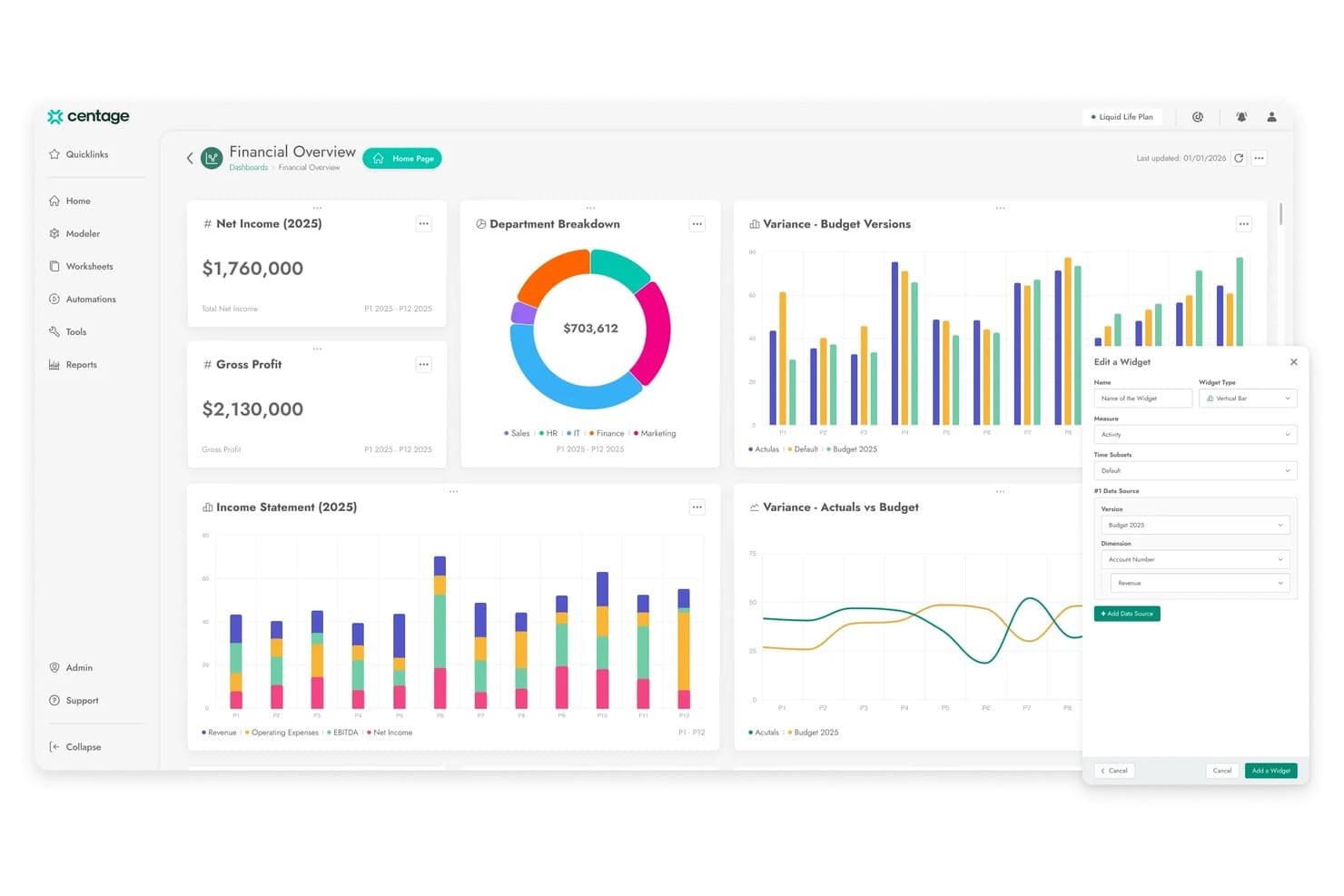
Centage consente agli utenti di creare e personalizzare cruscotti finanziari con dati di budget aggiornati. Centage è una piattaforma FP&A per aziende della fascia media, basata su previsioni sincronizzate dei tre prospetti, budgeting basato sui driver, previsioni rolling e modellazione degli scenari.
Per chi è più indicato Centage?
Centage è adatto ai team finanziari di aziende della fascia media, in genere operanti nei settori della sanità, delle organizzazioni non profit o dei servizi professionali, che necessitano di previsioni complete dei tre prospetti senza la complessità o i costi delle soluzioni enterprise.
Perché ho scelto Centage
Ho scelto Centage come una delle migliori soluzioni perché le sue previsioni sincronizzate dei tre prospetti sono davvero rare nella fascia di prezzo della fascia media. Quando modifico un'ipotesi sui ricavi, il conto economico, lo stato patrimoniale e il rendiconto finanziario si aggiornano automaticamente, senza necessità di riconciliazioni manuali. Il modulo Personale integrato gestisce inoltre nativamente gli stipendi, i benefit e le imposte sul lavoro a livello di posizione, un aspetto particolarmente importante quando il numero di dipendenti è il principale fattore determinante delle previsioni.
Funzionalità principali di Centage
- Modellazione illimitata degli scenari: Crea e confronta un numero illimitato di scenari ipotetici affiancati senza duplicare i file, quindi unisci lo scenario preferito al budget di lavoro con un solo clic.
- Gestione collaborativa dei flussi di lavoro: Assegna attività di budgeting con scadenze, inoltra le approvazioni dai responsabili dei dipartimenti fino al CFO e blocca le modifiche una volta finalizzate le proposte.
- Modulo Personale: Crea il budget a livello di posizione con calcoli automatici per stipendi, benefit, imposte sul lavoro e oneri accessori sull'intero organico.
- Oltre 40 modelli di report GAAP/IFRS: Genera conti economici, stati patrimoniali, rendiconti finanziari e analisi degli scostamenti pronti per il consiglio di amministrazione direttamente dai dati delle previsioni aggiornate.
Integrazioni di Centage
Centage offre 11 integrazioni native, tra cui NetSuite, Sage Intacct, QuickBooks Enterprise, Microsoft Dynamics 365, Acumatica, SAP Business One, Blackbaud, ADP, UKG, Paylocity e Salesforce. Fornisce inoltre l'accesso API per integrazioni personalizzate.
Pros and Cons
Pros:
- Le previsioni sincronizzate dei tre prospetti si aggiornano automaticamente
- Modellazione basata sui driver e senza formule per i team finanziari
- Pianificazione illimitata degli scenari senza duplicare i file
Cons:
- Nessun supporto nativo per QuickBooks Online o Xero
- La reportistica del componente aggiuntivo di Excel non è in tempo reale
Learn more about Centage: Miglior strumento di previsione nativo per fogli di calcolo
- Prova gratuita di 14 giorni
- Prezzo su richiesta
Visit WebsiteCustomer Rating:4.9/5
LiveFlow è integrato direttamente in Excel e Sheets e si collega anche con QuickBooks e Xero. LiveFlow collega i dati contabili in tempo reale ai fogli di calcolo, offrendo a team finanziari, commercialisti e titolari d'azienda un modo più rapido per creare, aggiornare e condividere previsioni finanziarie senza inserimento manuale dei dati.
Per chi è ideale LiveFlow?
LiveFlow è particolarmente adatto a piccole e medie imprese e studi contabili che gestiscono reportistica finanziaria e previsioni principalmente in Google Sheets o Excel.
Perché ho scelto LiveFlow
LiveFlow si guadagna il posto nella mia shortlist tra i migliori perché mantiene le previsioni nell'ambiente dei fogli di calcolo già usato dai team finanziari. Mi piace come estrae dati in tempo reale da QuickBooks direttamente in Google Sheets, così i miei modelli previsionali si aggiornano automaticamente senza esportazioni manuali o copia-incolla. Utilizzo anche i modelli finanziari predefiniti di LiveFlow per impostare previsioni continue e proiezioni di flusso di cassa, personalizzandoli poi per adattarli a specifiche strutture di report. La possibilità di bloccare la struttura del foglio di calcolo ricevendo comunque dati in tempo reale è una funzione che ho trovato in pochi altri strumenti.
Funzionalità principali di LiveFlow
- Consolidamento multi-entità: Combina dati finanziari da più account QuickBooks in un unico report o previsione consolidata all'interno del foglio di calcolo.
- Pianificazione di scenari: Crea e confronta diverse ipotesi di previsione affiancate per modellare differenti risultati finanziari.
- Pianificazione automatica dei report: Imposta report che si aggiornano e vengono inviati automaticamente a intervalli regolari senza intervento manuale.
- Dashboard condivisibili: Pubblica dashboard finanziarie in tempo reale che possono essere visualizzate anche da chi non fa parte del team finanziario, senza accedere al foglio di calcolo sottostante.
Integrazioni di LiveFlow
Le integrazioni includono QuickBooks Online, Google Sheets, Excel, Ramp e Plaid.
Pros and Cons
Pros:
- Ottime previsioni di flusso di cassa
- Ottime funzionalità di automazione
- Piattaforma versatile con molti modelli predefiniti
Cons:
- Integrazioni limitate
Learn more about LiveFlow: 9Ideale per approfondimenti finanziari in tempo reale
Ramp
- Piano gratuito + prova gratuita di 30 giorni + demo gratuita disponibile
- Da $15/utente/mese
Visit WebsiteCustomer Rating:4.8/5
Ramp fornisce una dashboard contabile automatizzata che categorizza le transazioni, sincronizza le spese e segnala le note mancanti per la revisione. Ramp è una piattaforma di automazione finanziaria progettata per i team finanziari e i responsabili aziendali che devono monitorare le spese, gestire i budget e prevedere i flussi di cassa con dati e analisi in tempo reale.
Per chi è ideale Ramp?
Ramp è una soluzione ideale per aziende in rapida crescita e imprese di medie dimensioni i cui team finanziari necessitano di una visibilità centralizzata delle spese e di controlli automatizzati in tutta l'organizzazione.
Perché ho scelto Ramp
Ho scelto Ramp come uno dei migliori perché fornisce dati di spesa in tempo reale senza richiedere alcun lavoro manuale di reportistica. Appena avviene una transazione, il mio team può visualizzarla su carte, fatture e rimborsi—senza dover aspettare la fine del mese per capire lo stato del budget. Apprezzo anche il sistema di avvisi proattivi, che segnala immediatamente le transazioni fuori policy, permettendoci di intervenire prima che una piccola eccedenza si trasformi in un problema più grande. E, grazie alle esportazioni dirette dei dati su Excel, Snowflake o BigQuery, il mio team può creare previsioni aggiornate sulla base dei dati di spesa effettivi senza dover passare da uno strumento all’altro.
Caratteristiche principali di Ramp
- Gestione dei fornitori: Monitora contratti, termini di pagamento e storico delle spese dei fornitori in un unico posto per supportare la pianificazione dei flussi di cassa.
- Creazione e monitoraggio dei budget: Imposta budget a livello di team o progetto e monitora in tempo reale le spese effettive rispetto ai budget.
- Analisi delle spese guidate dall’IA: Ricevi raccomandazioni automatizzate per ridurre i costi in base ai trend dei tuoi dati di transazione.
- Flussi personalizzati di approvazione: Configura regole di approvazione a più livelli per gli acquisti così da applicare controlli di spesa prima che vengano effettuate le transazioni.
Integrazioni di Ramp
Le integrazioni includono NetSuite, Sage Intacct, QuickBooks, Microsoft Dynamics Business Central, Xero, Workday Financial Management, Acumatica, Oracle Fusion Cloud, Zoho Books e Amazon Business.
Pros and Cons
Pros:
- Funzionalità di reportistica completa
- Possibilità di emettere più carte virtuali con controlli personalizzabili
- Reportistica delle spese automatizzata e abbinamento delle ricevute
Cons:
- Si concentra principalmente su contabilità fornitori e gestione delle spese
- Opzioni di personalizzazione limitate per report e analisi
 10Il miglior software CPM con funzionalità di previsione
Anaplan
- Demo gratuita disponibile.
- Prezzo su richiesta
Visit WebsiteCustomer Rating:4.5/5
La suite di gestione delle performance di vendita di Anaplan ti aiuta a perfezionare il tuo processo di vendita. Anaplan è una piattaforma di pianificazione basata su cloud progettata per team finanziari e aziende che necessitano di avanzate funzionalità di previsione, modellazione di scenari e pianificazione collaborativa per supportare decisioni aziendali migliori.
Per Chi È Ideale Anaplan?
Anaplan è particolarmente adatto a grandi imprese e aziende di fascia media con esigenze di pianificazione complesse e trasversali nei settori finanziario, vendite e operativo.
Perché Ho Scelto Anaplan
Anaplan si guadagna il suo posto tra i migliori nella mia shortlist perché è una delle poche piattaforme CPM in cui la previsione e la gestione delle performance sono realmente unificate invece che semplicemente integrate. Apprezzo in particolare la funzione di rolling forecast, che permette al mio team di aggiornare costantemente le proiezioni man mano che arrivano nuovi dati invece di aspettare la chiusura del ciclo trimestrale. L'agente di analisi finanziaria guidato dall'intelligenza artificiale va oltre: esamina le previsioni, individua i fattori di costo e segnala automaticamente le variazioni, così passo meno tempo a cercare la storia nascosta tra i numeri. Il motore di modellazione multidimensionale di Anaplan gestisce inoltre livelli di scala che fanno 'piegare' altri strumenti, elaborando centinaia di milioni di righe di dati senza perdere reattività in tempo reale.
Caratteristiche Principali di Anaplan
- Pianificazione di scenari: Crea e confronta molteplici scenari 'what-if' fianco a fianco per testare le ipotesi prima di impegnarsi in un piano.
- Pianificazione della forza lavoro: Modella headcount, compensi e tempistiche di assunzione direttamente all'interno della piattaforma accanto alle previsioni finanziarie.
- Dashboard e reportistica: Crea dashboard personalizzabili che evidenziano KPI e confronti tra piani e risultati effettivi per stakeholder finanziari e aziendali.
- Gestione dei flussi di lavoro e delle approvazioni: Inoltra i piani attraverso flussi di revisione strutturati e procedure di approvazione per mantenere i cicli di pianificazione sulla buona strada.
Integrazioni di Anaplan
Le integrazioni includono Salesforce, Workday, Microsoft Power BI, Tableau, Oracle NetSuite, SAP, Google BigQuery, Snowflake, Amazon Redshift e Microsoft Excel.
Pros and Cons
Pros:
- Caratteristiche estese per budget e pianificazione
- Previsioni e analisi avanzate
- Eccellente reportistica e analisi
Cons:
- L'implementazione può richiedere settimane
- Curva di apprendimento ripida
Learn more about Anaplan:
Altre opzioni di software per le previsioni
Se non avete trovato lo strumento giusto per la vostra organizzazione, potrebbe valere la pena dare un’occhiata a questi fornitori alternativi di software per le previsioni:
- 11JiravIl miglior software di previsione con integrazioni semplici
- 12LivePlanIdeale per startup
- 13Bonsai Agency SoftwareIdeale per prevedere la redditività dei progetti
- 14Sage IntacctIdeale per la modellizzazione dettagliata di scenari
- 15CubeIdeale per facilità d'uso
- 16PuzzleIdeale per una visibilità finanziaria in tempo reale
- 17Zoho Finance PlusMigliore suite software finanziaria con funzionalità di previsione
- 18SlashIdeale per analizzare il flusso di cassa in tempo reale
- 19PigmentIdeale per la collaborazione
- 20Rippling SpendIdeale per la previsione delle spese
- 21AbacumIdeale per team da 100 a 500 utenti
- 22DualEntryIdeale per la previsione finanziaria guidata dall'IA
- 23XactlyIdeale per la prevedibilità finanziaria nelle aziende enterprise
Come valuto i software di previsione
Divido la mia valutazione in due livelli: la base che uno strumento deve coprire—come la modellizzazione basata sui driver e l'integrazione con sistemi ERP—e i fattori distintivi che separano i migliori dagli altri.
Funzionalità di base (requisiti minimi per questa lista)
Quando seleziono gli strumenti per la mia lista, valuto ognuno su una scala da 0 (non offre la funzionalità) a 5 (eccelle in quest'area) per ogni funzionalità di base elencata qui sotto. Poi, calcolo il punteggio totale convertendolo in percentuale. Ogni strumento deve raggiungere un punteggio totale minimo del 65% per essere considerato per l'inclusione.
- Modelli di previsione basati su driver: Verifico se posso collegare le previsioni dei ricavi a driver come numero di dipendenti, unità vendute o tassi di conversione del pipeline invece di inserimenti costanti e semplici.
- Modellizzazione di scenari e what-if: Uno strumento dovrebbe permettermi di creare versioni best-case, worst-case e base-case di una previsione e confrontarle fianco a fianco in un'unica vista.
- Previsioni e budget rolling: Cerco orizzonti temporali flessibili—previsioni rolling mensili o trimestrali—così che i team finanziari non siano bloccati in un unico budget annuale statico.
- Integrazione dati finanziari: La piattaforma deve importare i dati effettivi da sistemi come NetSuite, Sage Intacct o QuickBooks in modo automatico, senza affidarsi a caricamenti manuali di CSV.
- Previsioni di flusso di cassa e P&L: Valuto se lo strumento collega le previsioni di P&L, stato patrimoniale e flussi di cassa in modo che le variazioni in un rendiconto si riflettano correttamente sugli altri.
- Dashboard di analisi scostamenti e reportistica: L'analisi degli scostamenti tra budget e consuntivo e il monitoraggio dell'accuratezza delle previsioni devono essere integrati tramite dashboard condivisibili con gli stakeholder.
Una volta che ho l'elenco degli strumenti che soddisfano i criteri, considero cosa distingue ciascuna piattaforma.
Fattori differenzianti (cosa distingue i fornitori)
Ecco come confronto i diversi fornitori:
Funzionalità distintive
La previsione supportata da AI è un vero elemento distintivo: cerco strumenti che generano previsioni basate sulle tendenze e segnalano anomalie, aiutando i team FP&A a dedicare meno tempo alle ipotesi manuali durante le revisioni trimestrali. Anche i workflow collaborativi di pianificazione sono importanti. Quando i responsabili di budget possono inserire dati e approvazioni all'interno della piattaforma, si elimina il continuo scambio di fogli di calcolo che rallenta ogni ciclo di pianificazione. Un motore di formule flessibile completa l'offerta per i team che costruiscono modelli complessi multi-entity o intercompany.
Oltre alle funzionalità
Pongo molta attenzione ai tempi di implementazione: alcune piattaforme rendono operativo il team finance in poche settimane con template preimpostati, mentre altre richiedono mesi di configurazioni guidate da consulenti. La scalabilità è un altro fattore chiave, in particolare se lo strumento supporta la consolidazione multi-entity e la gestione multi-valuta durante la crescita aziendale. Valuto anche la profondità della connettività ERP, perché una piattaforma con connettori nativi verso la contabilità generale mantiene il flusso automatico dei dati effettivi ed evita problemi di riconciliazione durante la chiusura.
Come scegliere il software per le previsioni
Ho spiegato perché ciascun software per le previsioni è stato inserito nell'elenco, ma la scelta di quello giusto spetta a voi. Quando confrontate le diverse opzioni, tenete presenti questi punti fondamentali:
| Fattore | Considerazioni |
|---|---|
| FattoreScalabilità | ConsiderazioniCambiare software è un problema amministrativo; pertanto, lo strumento per le previsioni scelto dovrebbe essere in grado di crescere e cambiare di pari passo con la vostra azienda. Se siete una startup in rapida crescita, date maggiore importanza a questo aspetto. Se siete una multinazionale consolidata, forse la scalabilità è meno importante. |
| FattoreIntegrazioni | ConsiderazioniSe scegliete uno strumento indipendente, deve integrarsi con i sistemi esistenti, come il vostro software ERP o le piattaforme di contabilità, per funzionare correttamente. Chiarite quali strumenti rimarranno, quali potrete sostituire e come si collegano tra loro. |
| FattoreCaso d'uso | ConsiderazioniSiate chiari sulle funzionalità analitiche che volete ottenere, come la modellazione predittiva e la pianificazione degli scenari. Sebbene tutti questi strumenti per le previsioni analizzino le tendenze passate per prevedere i risultati futuri, alcune aziende avranno bisogno di analisi avanzate per, ad esempio, gestire la volatilità del mercato, mentre per altre non sarà necessario. Chiarite a quale categoria appartenete. |
| FattoreNumero di utenti | ConsiderazioniChi interagirà maggiormente con il software? Qual è il suo livello di competenza digitale? Queste domande vi aiuteranno a capire di quante licenze avrete bisogno e quanto potrà essere complessa l'interfaccia prima che i vantaggi inizino a diminuire. |
| FattoreCompatibilità con l'azienda | ConsiderazioniValutate ogni strumento inserito nella selezione insieme ai vostri flussi di lavoro e alla metodologia di distribuzione. Analizzate ciò che attualmente funziona bene, oltre alle aree che stanno causando problemi e devono essere risolte. Poi verificate se possono funzionare insieme. Ricordate che ogni azienda è diversa: non presumete che uno strumento funzioni per voi solo perché è popolare. |
Tendenze nei software per le previsioni
Ho esaminato dozzine di aggiornamenti di prodotto, comunicati stampa e registri delle modifiche dei principali fornitori di software per le previsioni. Queste sono le tendenze da tenere d'occhio:
Analisi avanzate e integrazione dell'IA
- Apprendimento automatico e modellazione predittiva: molti strumenti di previsione stanno ora integrando algoritmi avanzati di apprendimento automatico per migliorare l'accuratezza delle previsioni. Questi modelli apprendono dai dati storici e migliorano nel tempo, facendo funzionare meglio i tuoi strumenti quanto più a lungo li utilizzi. Questo, insieme al miglior software per l'analisi statistica, può contribuire notevolmente alla reportistica finanziaria e alla raccolta dei dati.
- Elaborazione dei dati in tempo reale: la possibilità di elaborare e analizzare i dati in tempo reale è diventata una funzionalità fondamentale. Ciò consente alle aziende di prendere decisioni immediate sulla base dei dati finanziari più recenti, migliorando la reattività e la pianificazione strategica.
Esperienza utente migliorata
- Interfacce utente intuitive: le interfacce utente sono diventate più facili da usare, con funzionalità di trascinamento e rilascio e pannelli di controllo personalizzabili. Questa tendenza riduce la curva di apprendimento e aumenta l'adozione da parte degli utenti, consentendo ai team finanziari di sfruttare più rapidamente tutte le funzionalità del software.
- Strumenti di collaborazione: i moderni software di previsione includono funzionalità avanzate di collaborazione, come la modifica e la condivisione in tempo reale, che favoriscono una migliore comunicazione tra i reparti. Ciò migliora l'allineamento e garantisce che tutte le parti interessate siano informate e coinvolte nel processo di pianificazione finanziaria.
Integrazione completa
- Integrazione fluida di ERP e CRM: si pone sempre maggiore enfasi sull'integrazione fluida degli strumenti di previsione con i sistemi ERP e CRM. Ciò garantisce un ambiente di dati unificato, riducendo lo sforzo manuale necessario per consolidare le informazioni provenienti da fonti disparate. Non sorprende, considerando che l'utilità degli strumenti di previsione dipende da questi dati.
Pianificazione avanzata degli scenari
- Simulazione e analisi degli scenari: gli strumenti offrono sempre più solide funzionalità di pianificazione degli scenari, consentendo alle aziende di modellare e confrontare molteplici scenari finanziari. Ciò aiuta a prepararsi meglio alle incertezze e a prendere decisioni strategiche informate.
Automazione ed efficienza
- Processi di previsione automatizzati: le funzionalità di automazione stanno diventando sempre più sofisticate, riducendo lo sforzo manuale necessario per l'inserimento e l'analisi dei dati. Ciò aumenta l'efficienza e consente ai professionisti della finanza di concentrarsi su attività a maggior valore aggiunto, come prendere decisioni basate su quei dati.
Che cos'è il software per le previsioni?
Il software per le previsioni è uno strumento digitale che aiuta le aziende a prevedere tendenze, domanda e risultati futuri utilizzando dati storici e analisi. Queste piattaforme sono essenziali per la pianificazione finanziaria, delle scorte, della forza lavoro e delle operazioni, soprattutto nei settori in cui anticipare i cambiamenti è fondamentale.
Dai semplici modelli statistici alle proiezioni avanzate basate sull'IA, gli strumenti di previsione riducono le congetture e favoriscono decisioni più sicure e basate sui dati.
Funzionalità principali degli strumenti di previsione
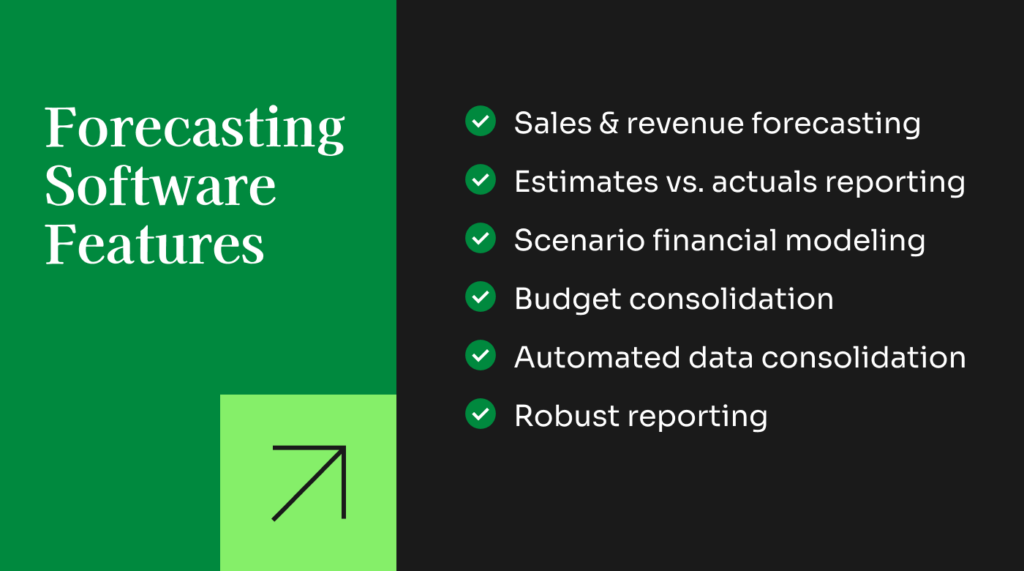
Quando valuti gli strumenti di previsione, cerca un software che migliori l'accuratezza, semplifichi i flussi di lavoro della pianificazione e supporti il processo decisionale finanziario strategico. Le funzionalità principali includono:
- Integrazione dei dati: Una previsione efficace inizia con dati completi e affidabili. I migliori strumenti si connettono senza problemi a ERP, CRM, fogli di calcolo e altri sistemi finanziari, consentendo di creare previsioni utilizzando un set di dati unificato e aggiornato.
- Analisi avanzate: Le solide funzionalità di analisi aiutano a individuare schemi e tendenze che potrebbero non essere evidenti a prima vista. Questo porta a previsioni più precise e a una migliore allocazione delle risorse in tutta l'organizzazione.
- Pianificazione degli scenari: Gli strumenti di previsione dovrebbero semplificare la modellazione di scenari ottimistici, pessimistici e più probabili. Ciò consente alla dirigenza di sottoporre a stress test le ipotesi e prepararsi sia ai rischi sia alle opportunità.
- Elaborazione automatizzata dei dati: L'automazione riduce il lavoro manuale di preparazione occupandosi della pulizia, del consolidamento e dell'aggiornamento dei dati. Questo minimizza gli errori e libera tempo da dedicare ad analisi finanziarie di livello superiore.
- Modellazione predittiva: Con la modellazione predittiva, il software utilizza i dati storici e gli schemi consolidati per proiettare i risultati futuri. Questo rafforza l'accuratezza della pianificazione e aiuta i team ad anticipare le variazioni delle condizioni di mercato.
- Consolidamento del budget: Un software di previsione completo può consolidare i dati relativi a budget, pianificazione e previsioni in informazioni utili per prendere decisioni. Che venga effettuato annualmente o con maggiore frequenza, il consolidamento automatizzato migliora la visibilità e accelera i cicli di reportistica.
- Reportistica degli scostamenti: Gli strumenti migliori consentono di confrontare i valori preventivati o le cifre previste con i risultati effettivi. Questi report evidenziano le lacune nelle ipotesi precedenti e aiutano a perfezionare la pianificazione futura.
- Integrazione dell'apprendimento automatico: Gli algoritmi di apprendimento automatico migliorano l'accuratezza delle previsioni apprendendo continuamente dai dati storici. Nel tempo, lo strumento diventa più efficace nell'identificare le correlazioni e prevedere i risultati finanziari.
- Previsione delle vendite e programmazione della produzione: Gli strumenti di previsione dovrebbero aiutare a stimare le vendite in base alla stagionalità, alle tendenze dei prezzi e alle prestazioni passate. Supportano inoltre la programmazione della produzione, consentendo ai team di allineare l'offerta alla domanda prevista.
- Reportistica personalizzata: Una reportistica chiara e intuitiva è essenziale. Cerca strumenti che trasformino previsioni e analisi in report comprensibili, condivisibili con i portatori di interesse interni o esterni, anche se non hanno familiarità con la piattaforma.
Funzionalità AI comuni degli strumenti di previsione
Molte piattaforme di previsione includono ora funzionalità basate sull'AI progettate per migliorare velocità, accuratezza e capacità di analisi, come:
- Rilevamento automatizzato degli schemi: L'AI analizza i dati storici alla ricerca di tendenze, anomalie e schemi emergenti che potrebbero influenzare le prestazioni future, segnalando informazioni che l'analisi manuale potrebbe non rilevare.
- Modellazione degli scenari potenziata dall'AI: Invece di creare manualmente gli scenari, l'AI può suggerire risultati plausibili sulla base delle condizioni attuali, offrendo ai responsabili una visione più ampia e accurata dei possibili sviluppi futuri.
- Aggiornamenti delle previsioni in tempo reale: L'AI modifica le proiezioni man mano che arrivano nuovi dati finanziari, operativi o di mercato. Questo fornisce previsioni continuamente aggiornate, che riflettono le condizioni reali e non ipotesi vecchie di un mese.
- Richieste in linguaggio naturale: Gli utenti possono porre domande semplici come “Come saranno confrontate le spese del prossimo trimestre con quelle di questo trimestre?” e l'AI recupererà i dati pertinenti e genererà istantaneamente la previsione corretta.
- Spiegazioni degli scostamenti basate sull'AI: Invece di analizzare manualmente i report, l'AI riassume i motivi per cui i dati effettivi si sono discostati dalle previsioni, ad esempio picchi imprevisti della domanda, variazioni dei costi o ritardi operativi, rendendo l'analisi degli scostamenti più rapida e utile per prendere decisioni.
Vantaggi degli strumenti di previsione
Gli strumenti di previsione fanno più che indicare semplicemente un risultato. Abbandonando i fogli di calcolo e scegliendo una soluzione software, puoi usufruire di:
- Maggiore accuratezza: Grazie all'utilizzo di algoritmi avanzati e all'integrazione dei dati, il software di previsione migliora la precisione delle proiezioni finanziarie, consentendo alle aziende di prendere decisioni più informate e ridurre i rischi.
- Incrementi di efficienza: L'automazione dell'elaborazione dei dati e della generazione dei report fa risparmiare tempo e riduce gli errori manuali, permettendo ai team finanziari di concentrarsi sull'analisi strategica invece che sulle attività ripetitive.
- Migliore pianificazione strategica: La pianificazione degli scenari e la modellazione predittiva forniscono informazioni sui possibili risultati futuri, aiutando le aziende a prepararsi a diverse eventualità e ad apportare modifiche proattive.
- Migliore collaborazione: L'integrazione con i servizi cloud e gli strumenti di collaborazione garantisce a tutti i portatori di interesse l'accesso a informazioni aggiornate, favorendo una migliore comunicazione e un maggiore allineamento tra i reparti.
- Scalabilità e flessibilità: Il software di previsione può scalare insieme alla crescita dell'azienda, gestendo volumi e complessità dei dati crescenti senza compromettere le prestazioni e garantendo una continua rilevanza e utilità.
Costi e prezzi del software di previsione
Ho incluso sopra i prezzi specifici dei fornitori, ma, considerando quanto le funzionalità di ciascuno strumento possano variare rispetto agli altri, ho voluto creare una tabella dei prezzi generale per i software di previsione, basata sulle dimensioni dell'azienda.
Ecco una panoramica delle opzioni di piano e dei relativi prezzi:
Tabella comparativa dei piani per gli strumenti di previsione
| Tipo di piano | Prezzo medio (/utente/mese) | Funzionalità comuni | Ideale per | Frequenza di integrazione |
|---|---|---|---|---|
| Tipo di pianoGratuito | Prezzo medio (/utente/mese)$0 | Funzionalità comuni- Strumenti di previsione di base - Integrazione dati limitata - Funzionalità di reportistica di base | Ideale perStartup e piccole imprese | Frequenza di integrazioneAlcuni autonomi (piani introduttivi), ma spesso integrati in strumenti più ampi |
| Tipo di pianoBase | Prezzo medio (/utente/mese)$50 | Funzionalità comuni- Modelli di previsione standard - Analisi di base - Integrazione con le principali fonti di dati | Ideale perPiccole e medie imprese | Frequenza di integrazioneIl più delle volte autonomo |
| Tipo di pianoProfessionale | Prezzo medio (/utente/mese)$150 | Funzionalità comuni- Analisi avanzate - Dashboard personalizzabili - Pianificazione degli scenari - Integrazione cloud | Ideale perAziende in crescita | Frequenza di integrazioneFrequentemente integrato |
| Tipo di pianoAziendale | Prezzo medio (/utente/mese)$500+ | Funzionalità comuniSuite completa di funzionalità avanzate - Apprendimento automatico - Elaborazione dei dati in tempo reale - Assistenza dedicata | Ideale perGrandi imprese | Frequenza di integrazioneIl più delle volte integrato |
Sebbene cambiare software possa essere una vera seccatura, cambiare livello non è poi così complicato. Le aziende cambiano comunemente il livello degli strumenti di previsione man mano che le loro esigenze evolvono, a causa della crescita, della maggiore complessità dei dati o della necessità di funzionalità avanzate come l'apprendimento automatico e la modellazione predittiva.
Le transizioni avvengono spesso durante le revisioni annuali, dopo significative fasi di crescita o quando vengono implementati nuovi sistemi ERP o CRM, che potrebbero disporre di funzionalità di previsione proprie.
Quali sono i diversi tipi di software di previsione?
Il software di previsione può assumere diverse forme. Di seguito sono illustrate le principali categorie.

- Software di budgeting e previsione: si concentra sui dettagli finanziari, includendo le stime dei ricavi, la pianificazione delle spese operative e il budgeting finanziario. Le funzionalità di base in questo ambito possono essere incluse nelle piattaforme di contabilità, ma molte organizzazioni potrebbero trarre vantaggio da un software dedicato alla previsione finanziaria.
- Software di previsione delle vendite: si concentra sul lato commerciale e in genere offre più funzionalità per analizzare gli effetti di diverse strategie di marketing (sconti, vendite abbinate, ecc.). Gli strumenti di previsione delle vendite sono utili per fornire ai team commerciali obiettivi più accurati, aiutando al contempo i responsabili della catena di approvvigionamento e della produzione a pianificare di conseguenza i livelli delle scorte e gli obiettivi di produzione.
- Software di previsione della domanda: si concentra sul lato della domanda, aiutando le aziende a ottimizzare i livelli delle scorte, pianificare i cambiamenti della domanda stagionale e monitorare le tendenze dei consumatori e il comportamento degli acquirenti.
- Software di previsione della capacità e della forza lavoro: si concentra sul personale, sulla capacità produttiva e sulla pianificazione dei flussi di lavoro, integrando i dati previsti sulla domanda e sulle vendite. È utile per i team delle risorse umane e dirigenziali, per garantire che la forza lavoro riesca a tenere il passo con le vendite previste.
- Software di pianificazione delle risorse aziendali (ERP): offre un insieme versatile di funzionalità per centralizzare la maggior parte o la totalità delle attività operative e di pianificazione. Le piattaforme ERP sono le più costose del gruppo, ma anche le più flessibili in termini di implementazione e utilizzo.
Alcuni strumenti software combinano più aree di interesse, mentre altri sono dedicati a un insieme specifico di funzionalità. Il miglior strumento di previsione per il tuo team dipende dalle tue esigenze specifiche, oltre che dalle dimensioni dell'azienda, dal settore e da altre variabili.
FAQ sui software di previsione
Di seguito troverai le mie risposte ad alcune domande comuni che le persone pongono sui software di previsione.
Quali funzionalità dovrei considerare prioritarie nella scelta di un software di previsione per il mio team finanziario?
Dai priorità a dashboard intuitive, report personalizzabili e modelli basati sui driver, così da poter adattare le previsioni alle esigenze della tua azienda. Cerca strumenti dotati di un solido controllo delle versioni, importazione automatica dei dati e integrazioni fluide con i sistemi ERP o di contabilità.rnrnInoltre, funzionalità come la pianificazione degli scenari e la collaborazione in tempo reale possono aiutare il tuo team a verificare insieme le ipotesi, mentre i registri di controllo garantiscono l’integrità dei dati. Scegliere un software di previsione finanziaria con avvisi automatici e controlli delle autorizzazioni semplifica anche i flussi di lavoro e protegge le informazioni sensibili.
Gli strumenti di previsione possono integrarsi con i software ERP o di contabilità?
Sì, molti software per la previsione della liquidità offrono integrazioni preconfigurate o API per connettersi ai sistemi ERP e di contabilità. Ciò consente di importare automaticamente i dati finanziari, risparmiando ore di inserimento manuale e riducendo al minimo gli errori.rnrnCon la sincronizzazione in tempo reale, le tue previsioni riflettono sempre le transazioni e i saldi più recenti. Le integrazioni semplificano anche i registri di controllo e favoriscono una collaborazione più efficace tra i team. Prima di scegliere uno strumento, verifica che supporti la tua specifica piattaforma ERP o di contabilità, per garantire una configurazione fluida.
Quali sono le difficoltà più comuni nell'implementazione di un software di previsione?
Le difficoltà più comuni nell’implementazione di un software per la previsione della domanda includono problemi di migrazione dei dati, formazione degli utenti e integrazione del software. I team spesso incontrano resistenza quando devono modificare processi consolidati. Anche le considerazioni relative al budget e la gestione di più autorizzazioni utente possono complicare ulteriormente l’avvio.rnrnPer superare questi ostacoli, coinvolgi le parti interessate fin dalle prime fasi, esegui implementazioni pilota e fai affidamento sul supporto e sulla documentazione del fornitore. Inoltre, stabilire tempistiche e obiettivi realistici aiuta a garantire una transizione più fluida e un’adozione efficace e duratura.
Excel dispone di uno strumento di previsione?
Sì, Excel include funzioni di previsione integrate come Foglio di previsione, regressione e analisi delle serie temporali. Sono utili per proiezioni occasionali o semplici e funzionano bene con set di dati di piccole dimensioni.rnrnTuttavia, tieni presente che Excel non dispone di connessioni dati automatiche, controllo delle versioni e pianificazione avanzata degli scenari, funzionalità di cui la maggior parte dei team finanziari ha bisogno. Molti team iniziano con Excel, ma passano a un software di previsione specializzato per ottenere una migliore automazione, collaborazione e riduzione degli errori.
Come funzionano la pianificazione degli scenari e l'analisi ‘ipotetica’ nei software di previsione?
I software di previsione consentono di creare scenari diversi modificando input come vendite, spese o condizioni di mercato. Puoi confrontare immediatamente le proiezioni più favorevoli, più sfavorevoli e di base per comprenderne gli impatti finanziari.rnrnL’analisi ‘ipotetica’ semplifica la valutazione degli effetti dei cambiamenti in tempo reale, favorendo una migliore gestione del rischio. Questo aiuta il tuo team a prepararsi alle incertezze, definire piani di emergenza e comunicare i potenziali risultati con elementi visivi chiari e basati sui dati.
In che modo il software di previsione aiuta i team finanziari?
Il software di previsione semplifica la pianificazione del budget, elimina gli errori manuali e centralizza i dati finanziari. Il tuo team può creare rapidamente modelli, eseguire più scenari e generare report in tempo reale. Questa efficienza libera gli analisti dalle attività ripetitive, consentendo loro di concentrarsi su informazioni utili e pianificazione strategica.rnrnLe funzionalità collaborative e i registri di controllo garantiscono che tutti siano aggiornati. In definitiva, questi strumenti migliorano precisione, trasparenza e velocità, permettendoti di fornire alla dirigenza previsioni più tempestive e utili per prendere decisioni.