

Vena Financial Planning and Analysis Review for 2026
Vena empowers your team with flexible reporting and budgeting, standing out for its ease of integration with existing systems.

Reviewed by Kianna Walpole
We review tools independently, and commissions help fund our testing. See our transparency policy, our methodology, or suggest a tool.
Vena is a forecasting software built for finance teams that need structured FP&A planning—budgeting, rolling forecasts, and reporting—without abandoning the Excel workflows they already rely on. I'd consider it if your team wants more governance and collaboration than raw spreadsheets provide, but doesn't need the heavy technical lift of a platform like Anaplan. Where Anaplan often requires dedicated implementation resources and technical expertise, Vena's Excel-native interface means finance teams can own the tool directly, without leaning on IT or external consultants to get productive.
Vena Evaluation Summary
4.5/5
- Pricing upon request
- Free demo available
Why Trust Our Software Recommendations
6,700+
Reviews
20
Industry experts
16+
Evaluation factors
14
Years
Our team has been testing and reviewing software since 2012. As finance leaders ourselves, we know how difficult—and important—it is to choose the right software.
For this guide, we evaluated tools using hands-on testing and independent research, scoring tools using our selection criteria.
Our reviews reflect our human editorial judgment, not a sales pitch.
Vena Overview
Pros
- Vena makes it easy to build detailed reports that actually help you make sense of your real-time data.
- The layout is clean and intuitive, so most users can pick it up quickly without needing hours of training.
- Vena’s financial planning features take a lot of the headache out of budgeting. With dashboards, templates, and built-in tools, it helps keep everything organized and moving forward.
Cons
- Getting everything up and running can be a bit of a project, especially if you’ve got a lot of moving parts to connect. It’s manageable, but you’ll want to set aside some time.
- When you’re working with really large datasets or doing heavy calculations, you might notice some lag. It’s not a dealbreaker, but something to be aware of during crunch time.
- Vena covers a lot out of the box, but if you’re looking to customize it deeply, you might run into some limits. Power users may need to get creative or loop in extra support.
Are You a Good Fit for Vena?
Who Would Be a Good Fit for Vena?
Vena is a great financial planning platform for mid-sized to large companies, particularly those with finance and operations teams that need to manage complex data. It’s especially useful in industries like retail and manufacturing, where detailed planning and quick decision-making are key. If your team is looking for advanced budgeting and reporting tools to stay on top of it all, Vena’s features are likely to hit the mark.
Best Use Cases for Vena
- Retail ChainsVena helps your team manage large volumes of sales data and generate insightful forecasts.
- Manufacturing FirmsYou can use Vena to track costs and optimize production planning with accurate financial reports.
- Finance DepartmentsVena's detailed and versatile budgeting tools—such as audit trails, what-if scenario modeling, and variance analysis—enhance your team's strategic planning.
- Operations TeamsWith Vena, you get better visibility into operational costs, aiding in efficient resource allocation.
- Educational InstitutionsVena assists in managing funding and expenses across your institution, providing clear financial insights.
Who Would Be a Bad Fit for Vena?
Vena might not be the best choice for small businesses or startups with limited budgets and resources. Freelancers and smaller teams focused on basic financial tasks may find Vena’s advanced capabilities excessive for their needs, as its setup and management might require more time and investment than you’re willing to allocate. If your team needs a simple, low-cost solution, Vena’s detailed features and pricing structure could be overwhelming.
Worst Use Cases for Vena
- FreelancersVena’s advanced features may be too complicated for simple budgeting and financial planning tasks.
- Small StartupsVena's complexity and cost might not align with your limited budget and simpler needs.
- Non-Financial TeamsIf your work doesn't involve detailed financial analysis, Vena's capabilities could be unnecessary.
- Local Retail ShopsYou might find Vena too complex for straightforward sales and expense tracking.
- ConsultantsVena's extensive reporting tools may not be needed for your personal financial management.
- Small NonprofitsYou can use simpler tools for managing donations and expenses without needing Vena's extensive setup.
Core Features
Budgeting and Forecasting: Vena lets you create detailed budgets and forecasts, helping your team plan financial strategies effectively. You can gain access to real-time insights that aid in making informed decisions.
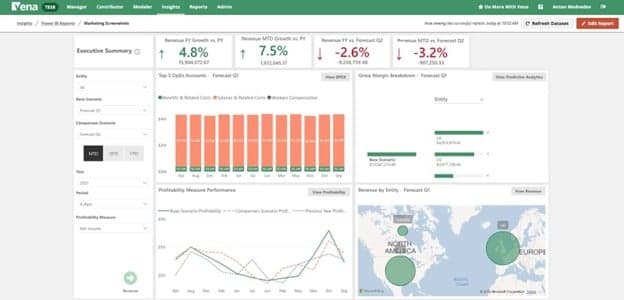
Reporting: With Vena, you can generate detailed financial reports that simplify complex data entry. Your team can also customize reports to fit specific needs, enhancing clarity and communication.
Data Consolidation: Vena seamlessly consolidates data from various sources, saving your team time and reducing errors at month end. This feature ensures you have a single source of truth for financial analysis.
Scenario Modeling: With Vena, you can simulate different business scenarios, allowing your team to prepare for various outcomes. This helps enhance strategic planning by evaluating potential risks and opportunities.
Workflow Automation: Vena automates repetitive tasks, freeing up your finance team's time for more strategic activities. This boosts productivity by reducing manual workload, which can be very valuable during the financial close and financial consolidation processes.
Collaboration Tools: Vena's collaboration features let your team work together efficiently, sharing insights and updates in real-time. As a result, you can streamline processes and ensure everyone stays aligned and informed.
Ease of Use
Vena's onboarding process might feel a bit involved, but the payoff is worth it. Throughout the process, your team will have access to advanced resources and support, ensuring a smoother transition to the system. The detailed guides and responsive support team will also help you get up to speed, though it may take some time initially. After you're familiar, the platform's advanced capabilities become more accessible, allowing you to realize its full value in your financial planning tasks.

Vena Specs
- 2-Factor Authentication: Yes
- Accounts Payable: No
- Accounts Receivable: No
- API: No
- Approval Workflows: No
- Balance Sheet: Yes
- Billing/Invoicing: No
- Budgeting: Yes
- Calendar Management: No
- Comparative Reporting: No
- CRM Integration: Yes
- Custom Reports: No
- Customer Management: No
- Dashboard: Yes
- Data Export: Yes
- Data Import: Yes
- Data Visualization: Yes
- Expense Tracking: Yes
- External Integrations: Yes
- Forecasting: Yes
- General Account Ledger: Yes
- Historical Data Analysis: No
- Inventory Tracking: No
- Multi-Currency: Yes
- Multi-User: Yes
- Notifications: Yes
- P&L: Yes
- Payroll: No
- Scenario Planning: No
- Scheduling: Yes
- Supplier Management: No
- Tax Management: No
- Time Management: No
Alternatives to Vena


Vena FAQs
What's Next?
Ready to compound your abilities as a finance professional? Subscribe to our free newsletter.