

10 Best Business Budgeting Software Reviewed In 2026

Best Business Budgeting Software Shortlist


Business budgeting software is designed to help companies create, manage, and track financial budgets with greater accuracy and efficiency. Whether you're overseeing cash flow, projecting future revenue, or aligning departmental budgets, these tools provide the structure and automation needed to strengthen financial control and strategic planning.
In my experience as a digital software expert with a background in financial management, I’ve seen how the wrong budgeting tool can lead to fragmented workflows, unreliable forecasts, and time-consuming manual processes. For finance professionals who are juggling growth targets, cross-team collaboration, and evolving reporting demands, the right software is not a luxury. It's a necessity.
That’s why I’ve spent hours researching user reviews, testing platforms, and evaluating what actually works in practice. This list is built to help you find a business budgeting software that brings clarity, control, and confidence to your budgeting process.
Why Trust Our Software Recommendations
Our team has been testing and reviewing software since 2012. As finance leaders ourselves, we know how difficult—and important—it is to choose the right software.
For this guide, we evaluated tools using hands-on testing and independent research, scoring tools using our selection criteria.
Our reviews reflect our human editorial judgment, not a sales pitch.
Best Business Budgeting Software Summary
This comparison chart summarizes pricing details for my top business budgeting software selections to help you find the best one for your budget and business needs.
| Tool | Best For | Trial Info | Price | ||
|---|---|---|---|---|---|
| 1 | Best for enterprise Excel integration | Free demo available | Pricing upon request | Website | |
| 2 | Best for budget collaboration | Free demo available | Pricing upon request | Website | |
| 3 | Best for automated financial reporting | Free demo available | Pricing upon request | Website | |
| 4 | Best for integrating workforce and financial planning | Free demo available | Pricing upon request | Website | |
| 5 | Best for automated insights for small businesses | 30-day free trial | From $38/month | Website | |
| 6 | Best for unifying financial and operational data | Free demo available | Pricing upon request | Website | |
| 7 | Best for large enterprises | Free demo available | Pricing upon request | Website | |
| 8 | Best for financial consolidation | Free demo available | Pricing upon request | Website | |
| 9 | Best for workforce planning | Free demo available | Pricing upon request | Website | |
| 10 | Best for real-time scenario modeling with AI | Free demo available | Pricing upon request | Website |
Best Business Budgeting Software Reviews
Below are my detailed summaries of the best business budgeting software that made it onto my shortlist. My reviews offer a detailed look at the key features, pros and cons, integrations, and ideal use cases of each tool to help you find the best one for you.

Vena
Best for enterprise Excel integration

For those seeking a Business Budgeting Software solution, Vena stands out by transforming your familiar Excel environment into a powerful budgeting tool. It caters to finance professionals and businesses across industries who require accurate data management and streamlined financial planning. With Vena, you can effortlessly navigate the intricacies of budgeting, reducing the time spent on manual processes and focusing instead on strategic financial insights.
Why I Picked Vena
I picked Vena because its unparalleled Excel integration transforms your familiar spreadsheets into a dynamic budgeting tool, perfect for enterprises that rely heavily on Excel. Vena allows you to maintain the ease of Excel while accessing a centralized database for accurate data management, supporting various budgeting methods like zero-based and driver-based budgeting. The integration also facilitates real-time data updates and collaborative workflows, making your financial planning processes more efficient and insightful. With Vena, you can leverage advanced forecasting and scenario modeling features, ensuring your team can make well-informed financial decisions.
Vena Key Features
In addition to its exceptional Excel integration, Vena offers a suite of features designed to enhance your budgeting processes.
- Workflow Automation: Streamline your budgeting tasks with automated workflows that guide your team through each step, ensuring accuracy and consistency.
- Version Control: Easily manage and track multiple versions of your budgets and forecasts, allowing your team to collaborate without losing historical data.
- Audit Trail: Maintain transparency with a comprehensive audit trail that records all changes and updates, providing accountability and facilitating compliance.
- Data Visualization: Utilize built-in data visualization tools to create insightful dashboards and reports, helping your team to better interpret financial data.
Vena Integrations
Integrations include Sage Intacct, NetSuite, Salesforce, Microsoft Dynamics, ADP, Workday, Excel, CSV, and other formats.
Pros and Cons
Pros:
- Deep Excel integration
- Customizable workflow automation
- Multi-scenario planning options
Cons:
- Complex advanced customization
- No mobile app
New Product Updates from Vena
Vena Adds Analytics Agent and Expands MCP Capabilities
Vena adds an Analytics Agent in open beta and expands Vena MCP for governed financial data access across enterprise AI tools. These updates support deeper financial analysis, recurring AI workflows, and controlled use of Vena data outside finance. For more information, visit Vena’s official site.
 .
.
Phocas
Best for budget collaboration

For those seeking a business budgeting solution that integrates financial planning with business intelligence, Phocas offers a unique approach tailored for wholesalers and manufacturers. By providing AI-driven analytics and real-time data access, Phocas empowers your team to make informed decisions and optimize financial health. Its user-friendly interface and rapid implementation can transform how you handle budgeting, forecasting, and performance insights, addressing challenges like data consolidation and outdated static budgets.
Why I Picked Phocas
I picked Phocas for its capability in budget collaboration, which is crucial for teams seeking an integrated approach to financial planning. Its real-time collaboration feature allows your team to streamline the assignment, submission, and approval processes, eliminating version control issues. With customizable templates that integrate sales and inventory data, you can engage in demand planning and scenario modeling. Additionally, its user-friendly interface, designed to resemble Excel, ensures quick adoption and ease of use, enabling your team to easily navigate and manage tasks in a collaborative environment.
Phocas Key Features
In addition to its exceptional budget collaboration capabilities, Phocas offers a range of features that enhance its utility as a Business Budgeting Software.
- Financial Reporting: Enables the generation of customized financial statements such as profit and loss, balance sheets, and cash flow statements directly from ERP data for comprehensive financial analysis.
- Visual Financial Dashboards: Provides visual tools like charts and gauges to offer a clear overview of business performance, facilitating easy sharing and understanding of financial data across your organization.
- ERP Integration: Seamlessly connects with various ERP systems to enhance financial analysis and reporting capabilities, ensuring comprehensive data consolidation and accessibility.
- Automated Budgeting: Simplifies budget creation by automatically extracting data from multiple sources, ensuring real-time updates and reducing manual input errors.
Phocas Integrations
Integrations include Infor, Oracle NetSuite, Epicor, Microsoft, MYOB, Sage, SAP, XERO, Salesforce, and SYSPRO.
Pros and Cons
Pros:
- Provides real-time updates
- Offers customizable dashboards and data modeling
- Integrates data from multiple sources
Cons:
- May not integrate with all data sources
- Potential learning curve
Best for automated financial reporting

For those seeking a business budgeting software solution that integrates with existing workflows, DataRails is designed to enhance financial operations and decision-making within Excel. This AI-powered platform is tailored for finance teams who wish to automate data consolidation, budgeting, and reporting, allowing them to focus on strategic insights rather than manual tasks. With integration capabilities across over 200 accounting systems, DataRails offers real-time cash visibility and advanced data analysis, making it appealing to industries like manufacturing, healthcare, and retail that require precise financial management.
Why I Picked DataRails
I picked DataRails for its exceptional ability to automate financial reporting while allowing you to maintain the familiarity of Excel. With features like centralized data consolidation and real-time access to insights, your finance team can eliminate manual data entry and complex formulas, focusing instead on data-driven decisions. The platform's version control ensures accuracy and promotes collaboration, addressing the common challenges of lengthy analyses and data integrity. By enhancing existing workflows without the need for drastic changes, DataRails stands out as a practical choice for those seeking efficient business budgeting software.
DataRails Key Features
In addition to its automated financial reporting capabilities, DataRails offers several features that enhance your budgeting processes:
- Scenario Modeling: This feature allows you to explore various financial scenarios and projections, enabling informed decision-making based on real-time data.
- User-Friendly Dashboards: These dashboards provide visualizations of key performance indicators (KPIs), making it easier for you and your team to track financial metrics at a glance.
- Centralized Data Source: With a single source of truth, you benefit from improved data integrity and visibility, eliminating the chaos of scattered spreadsheets.
- No-Code Platform: This feature facilitates quick adoption and use without requiring IT support, allowing your team to efficiently manage budgets and forecasts.
DataRails Integrations
Integrations include BambooHR, Oracle NetSuite, HubSpot, OneDrive, Dynamics 365, Power BI, QuickBooks, Square, SAP Business One, and Salesforce.
Pros and Cons
Pros:
- Real-time cash flow visibility
- Powerful scenario modeling tools
- Automates consolidation and reporting
Cons:
- Implementation may take time to customize
- Requires Excel proficiency

HiBob
Best for integrating workforce and financial planning
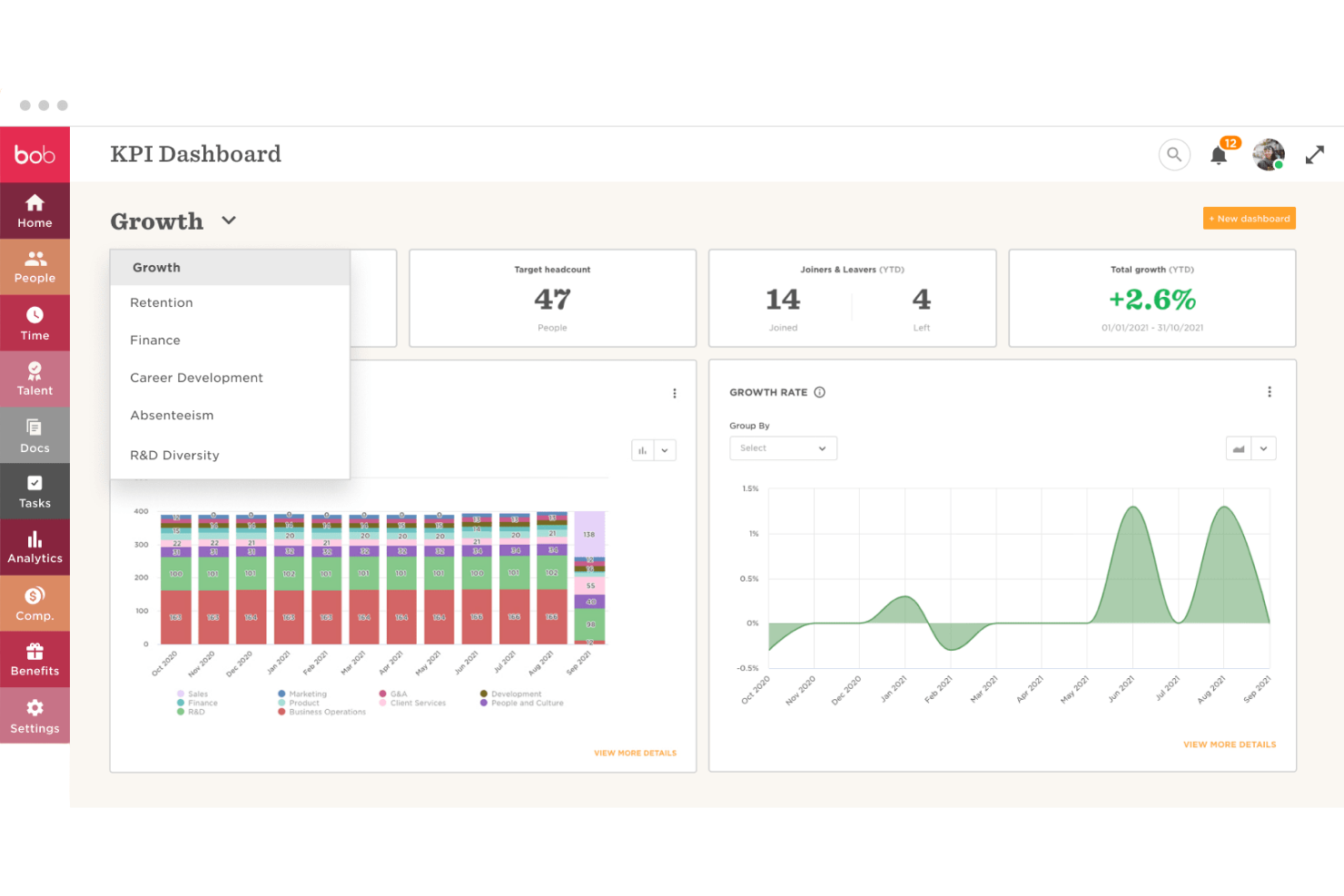
HiBob is an HR and workforce management platform that covers headcount planning, compensation management, payroll, and people analytics across the employee lifecycle.
Who Is HiBob Best For?
HiBob is a strong fit for mid-sized, fast-growing companies where HR and finance teams need to plan headcount and compensation from shared, real-time people data.
Why I Picked HiBob
I've included HiBob in my top picks because it's one of the few HR platforms that pulls finance directly into the headcount planning process. Its workforce planning module lets you build multiple scenario-based headcount plans—think reorgs, new office openings, or acquisitions—and attach budget management and allocation to each one, so finance isn't reviewing a separate spreadsheet. I also like that compensation cycles for salary reviews, bonuses, and equity run inside the same system, keeping people costs tied to live workforce data rather than a static export.
HiBob Key Features
- People analytics: Generate reports on headcount, attrition, and labor cost trends across departments and time periods.
- Payroll management: Run payroll in-house or sync payroll data to external providers directly from Bob.
- Benefits management: Track and manage employee benefits packages, enrollment, and associated costs across your workforce.
- Time and attendance tracking: Log and approve employee hours, PTO balances, and absences to inform labor cost reporting.
HiBob Integrations
HiBob offers a large marketplace of integrations, including ADP Workforce Now, Xero, Paylocity, Slack, Microsoft Teams, Jira, Google Workspace, Deel, Brex, Ramp, and Navan. It connects with Zapier and provides an API for custom integrations.
Pros and Cons
Pros:
- Scenario-based workforce plans attach cost projections
- Compensation cycles include salary and equity
- Real-time headcount data feeds budget planning
Cons:
- Financial reporting depth trails dedicated FP&A platforms
- No native general ledger or accounting tools

Best for automated insights for small businesses
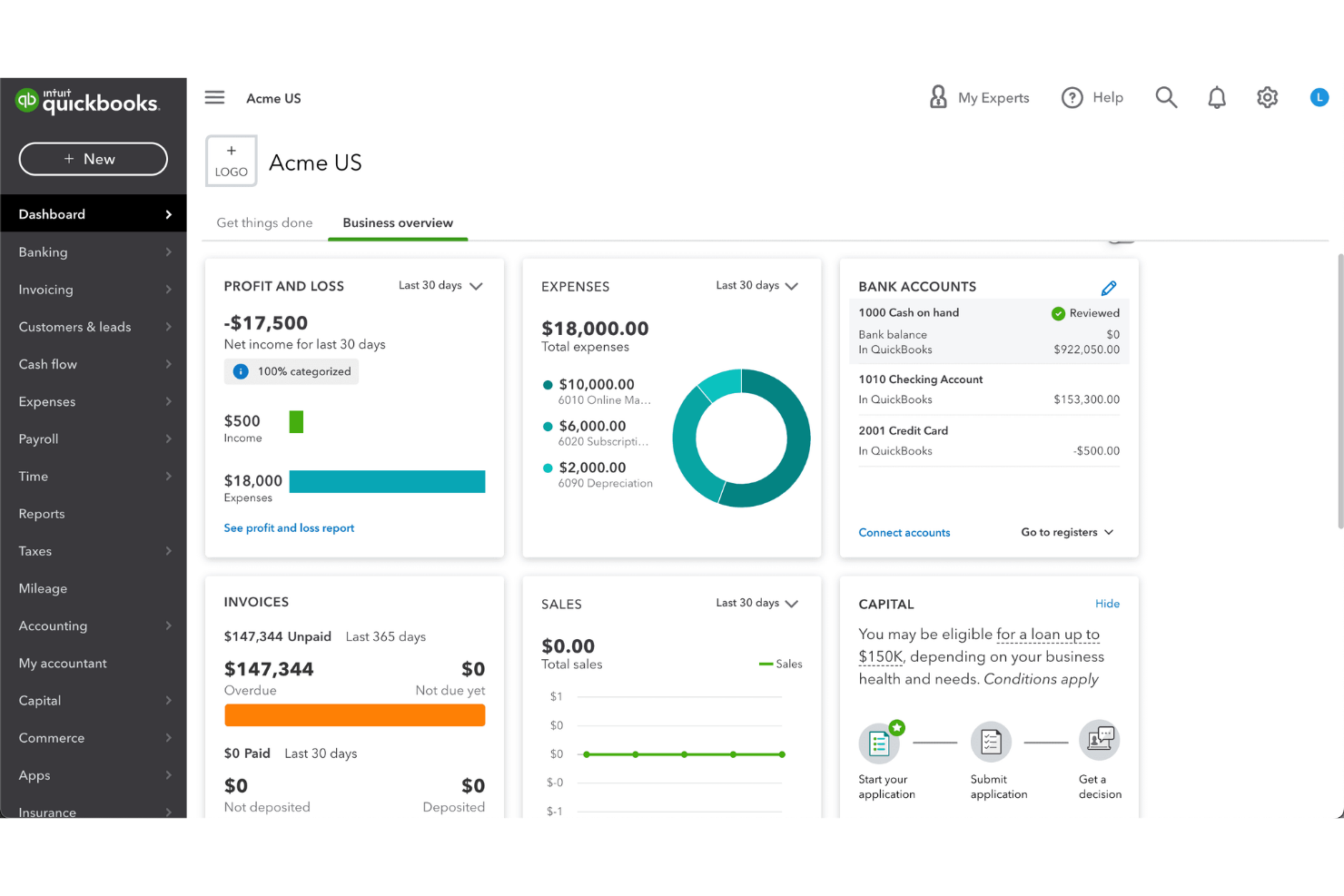
QuickBooks is an accounting and financial management platform that covers income and expense tracking, invoicing, payroll, tax preparation, and budget reporting, primarily built for small business owners and their accountants.
Who Is QuickBooks Best For?
QuickBooks is a natural fit for small business owners who manage their own books, as well as the accountants and bookkeepers who support them.
Why I Picked QuickBooks
QuickBooks earns its spot on my shortlist because of how much financial intelligence it surfaces without you having to build anything. The built-in insights dashboard automatically flags trends like rising expenses, shrinking margins, or overdue receivables the moment you log in. I also like the cash flow planner, which projects your cash position forward using open invoices and scheduled bills. That kind of automatic, always-on visibility is genuinely rare in accounting tools pitched at small businesses.
QuickBooks Key Features
- Budget vs. actuals reporting: Compare your planned budget against real income and expense data pulled directly from your books.
- Class and location tracking: Tag transactions by department, project, or location to break budgets down by segment.
- Custom report builder: Create and save tailored financial reports, including profit and loss by class or time period.
- Automated expense categorization: Automatically sorts imported bank transactions into expense categories using rules you set.
QuickBooks Integrations
QuickBooks integrates with over 800 popular business apps through its App Marketplace, including Shopify, PayPal, Square, Gusto, BILL, Mailchimp, HubSpot, Stripe, Amazon Business, and Expensify. It's available on Zapier and has an API for custom integrations.
Pros and Cons
Pros:
- AI-powered budget import from Excel spreadsheets
- Highly customizable reporting with granular filters
- AI-powered Intuit Assist flags budget deviations automatically
Cons:
- Multi-dimensional budgeting needs workarounds or exports
- Budgeting requires a Plus plan or higher

Best for unifying financial and operational data

OneStream is an enterprise financial planning and consolidation platform that combines FP&A, financial close, account reconciliation, and integrated business planning in a single, AI-powered system.
Who Is OneStream Best For?
OneStream is a strong fit for enterprise finance teams that need a single platform to manage complex consolidations, multi-entity reporting, and integrated planning.
Why I Picked OneStream
I've included OneStream in my top picks because it's the only platform I know of that handles financial close, consolidation, budgeting, planning, and reporting in a single unified data model. What I find most compelling is its Agile Financial Analytics capability, which pulls together fast-changing operational and transactional data alongside financial data so you can actually plan and model from it. Pair that with SensibleAI Forecast, which layers AI-driven predictions directly into existing planning workflows, and you get a level of financial and operational data unification that's genuinely rare at this scale.
OneStream Key Features
- Zero-based budgeting support: Plan budgets from scratch using built-in zero-based, driver-based, and top-down planning methods within a single workflow.
- Workflow control and automation: Automate close, planning, and reporting processes with a configurable workflow engine that tracks task status, confirmations, and dependencies.
- Always-on audit and compliance: Maintain continuous audit trails across data, metadata, and process changes, with built-in support for US GAAP, IFRS, SOX, and lease accounting standards.
- Self-service reporting and analytics: Build dashboards, formatted reports, and visualizations that dynamically update as your business data changes, accessible on any device.
OneStream Integrations
OneStream offers built-in data integration with no-code connectors, direct connectors, and REST APIs to connect to over 250 ERP, CRM, and other data sources, including SAP, Oracle, Microsoft Dynamics, PeopleSoft, JD Edwards, Infor, Workday, and PLeX. It also has a certified Power BI Connector with support for Microsoft Fabric. Zapier support is not clearly documented.
Pros and Cons
Pros:
- Pre-built solutions via the Solution Exchange marketplace
- Flexible dimensionality with drill-down data analysis
- Consolidation, planning, and reporting unified natively
Cons:
- Excel add-in frustrates end users during training
- Implementation is complex and resource-intensive

Anaplan
Best for large enterprises

Anaplan is a cloud-based platform designed to help businesses with complex financial planning and analysis. It supports enterprise-wide planning, allowing organizations to connect data, people, and plans in a unified environment for more informed decision-making.
Why I picked Anaplan:
Anaplan offers scalable planning capabilities that make it ideal for large enterprises managing extensive financial processes. It features multi-dimensional modeling, enabling your team to analyze data from various perspectives. The platform's real-time collaboration tools help synchronize planning across different departments. Anaplan's flexibility in creating dynamic scenarios allows your organization to adjust strategies quickly in response to market changes.
Standout Features & Integrations:
Features include dynamic financial modeling, multi-dimensional scenario analysis, and real-time data updates to help your team make informed decisions. Anaplan supports detailed planning across various departments to unify data and strategy. It also allows for detailed forecasting, improving the accuracy of financial projections.
Integrations include Microsoft Excel, Salesforce, Workday, SAP, Oracle, NetSuite, Google Sheets, Snowflake, Tableau, and Power BI.
Pros and Cons
Pros:
- Adaptable for complex modeling
- Real-time data calculations
- Flexible multi-use cases
Cons:
- Challenging metadata management
- Limited visualization compared to competitors

Planful
Best for financial consolidation

Planful is a financial planning and analysis platform designed to help businesses with budgeting, forecasting, and financial reporting. It’s built for teams looking to streamline and automate complex financial processes while gaining better visibility into company-wide financials.
Why I picked Planful:
Planful excels at financial consolidation, enabling your team to combine data from multiple entities and create a unified financial view. It offers automated data validation and built-in compliance checks, reducing the risk of errors. The platform also provides customizable dashboards, allowing your team to monitor key metrics across various business units. Planful’s reporting capabilities are geared toward improving users’ financial health while maintaining accurate and consistent records.
Standout Features & Integrations:
Features include automated financial consolidation, which helps your team manage multi-entity data with ease. Planful also offers dynamic reporting that allows you to create and modify reports in real time. With workflow automation, your team can streamline approvals and reduce the time spent on manual tasks.
Integrations include NetSuite, Sage Intacct, Microsoft Dynamics 365, Oracle, SAP, Xero, QuickBooks, Workday, Salesforce, and Google Sheets.
Pros and Cons
Pros:
- Smooth Excel integration
- Fast budget consolidation
- Easy scenario analysis setup
Cons:
- Limited training materials available
- Dependence on external consultants for setup

Best for workforce planning

Workday Adaptive Planning is a cloud-based solution that helps organizations with budgeting, forecasting, and financial analysis. It supports collaborative planning, making it easier for teams to align their financial strategies with their overall business goals.
Why I picked Workday Adaptive Planning:
This tool excels in workforce planning, offering features that help your team analyze headcount, compensation, and workforce-related expenses. Its intuitive dashboards and visual analytics make it easy to track and manage workforce trends.
Workday Adaptive Planning also allows for scenario analysis, enabling you to adjust forecasts quickly based on changing business needs. The platform’s data-driven approach helps ensure that your financial and operational plans stay aligned.
Standout Features & Integrations:
Features include real-time budgeting and forecasting that helps your team quickly adjust to changes in your financial landscape. It also offers scenario planning, allowing you to test various business outcomes and model potential impacts. The tool provides visual dashboards, giving clear insights into your financial and workforce data.
Integrations include Microsoft Excel, Salesforce, Workday HCM, NetSuite, QuickBooks, Xero, SAP, Oracle, Google Sheets, and Microsoft Dynamics 365.
Pros and Cons
Pros:
- Excel add-on for easy reporting
- Useful dimensions in financial reports
- Supports both fiscal and calendar years
Cons:
- Advanced features require customization
- The interface could be improved for better usability

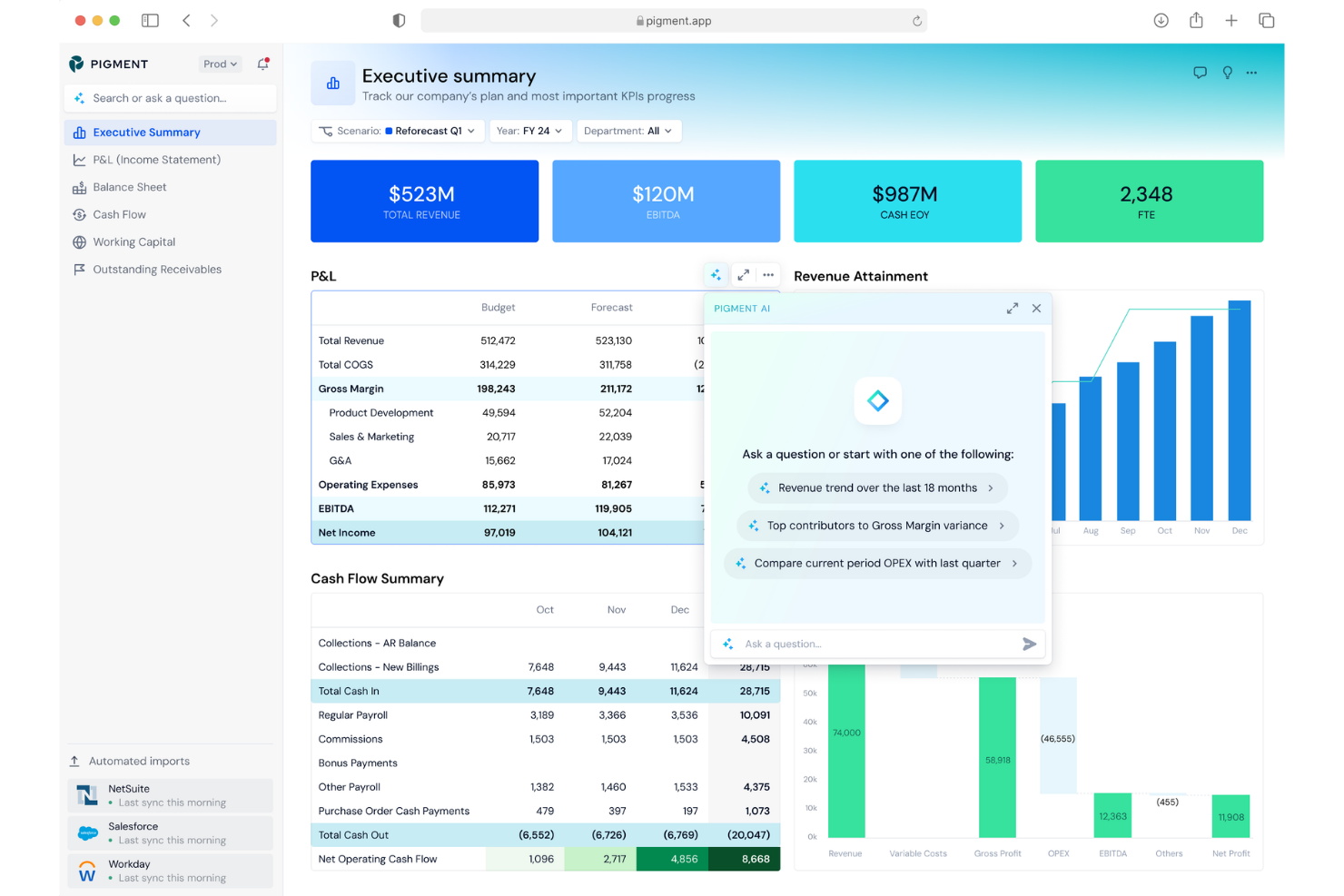
Pigment is a business planning platform built around agentic AI, covering FP&A, budgeting, headcount planning, sales planning, and scenario modeling across finance, HR, sales, and supply chain functions.
Who Is Pigment Best For?
Pigment is a strong fit for mid-market and enterprise FP&A teams that need to run and compare multiple budget scenarios quickly as business conditions shift.
Why I Picked Pigment
Pigment earns its spot on my shortlist because of the Planner Agent, which simulates scenarios in real time using your live models and actual business data. I also like the Analyst Agent, which proactively scans your metrics, flags anomalies, and generates reports without you needing to prompt it. Together, these two AI agents make it possible to move from "what if" to a decision-ready answer without leaving your planning environment.
Pigment Key Features
- Driver-based modeling: Build financial models using business drivers and assumptions that automatically recalculate when inputs change.
- Machine learning predictions: Generate automated forecasts for revenue, expenses, or headcount directly from your live business data, with accuracy that updates continuously.
- Sheet view: Work in a spreadsheet-style interface with native scenario planning and cross-functional data built in, without switching tools.
- Modeler Agent: Describe a model in natural language and Pigment builds or evolves it, with full documentation and logic transparency.
Pigment Integrations
Pigment offers native connectors for ERP systems like SAP, NetSuite, Sage Intacct, Xero, and QuickBooks, along with Salesforce for CRM, and HRIS tools like Workday, BambooHR, HiBob, and Personio. It also connects to data platforms like Snowflake, Google BigQuery, and Amazon Redshift, plus Power BI and Google Sheets. An API is available for custom integrations.
Pros and Cons
Pros:
- Rapid product updates driven by user feedback
- Cross-functional planning spans finance, HR, and sales
- Real-time what-if scenario comparison across models
Cons:
- Complex models can hit performance bottlenecks at scale
- Dashboard formatting and chart customization are limited
Other Business Budgeting Software
Here are some additional business budgeting software options that didn’t make it onto my shortlist, but are still worth checking out:
- Prophix
For midsize companies
- Jedox
For AI-driven financial forecasting
- Cube
For advanced analytics integration
- PlanGuru
For 10-year integrated financial forecasting
- Limelight
For custom workflow-driven software solutions
- IBM Planning Analytics
For Excel integration in financial planning
- Oracle Cloud EPM
For connected enterprise performance management
- Wave
For small businesses seeking built-in payroll
- Kepion
For customizable dashboards
- Xero
For easy setup with onboarding support
- Centage
For fast multi-entity budget consolidation


Related Tax Software Reviews
If you still haven't found what you're looking for here, check out these tools closely related to tax software that we've tested and evaluated.
How I Evaluate Business Budgeting Software
I split evaluation into two layers: the baseline every tool must clear—budget modeling, actuals integration, variance reporting—and differentiators that make one platform a better fit than another.
Core Functionality (Table Stakes For This List)
When I'm selecting tools for my list, I rank each one on a scale from 0 (does not offer the functionality) to 5 (excels in this area) for each core functionality listed below. Then, I calculate the tool's total score into a percentage. Each tool needs to achieve a minimum total score of 75% to be considered for inclusion.
- Budget Creation & Modeling: I evaluate whether you can build multi-dimensional budgets across departments, cost centers, and time periods—and whether the tool supports driver-based logic or limits you to flat-line entry.
- Forecasting & Scenario Planning: Rolling forecasts and what-if modeling matter here. I look for the ability to compare multiple scenarios side by side, like modeling a hiring freeze against a growth plan.
- Actuals Integration: Each tool should connect to your GL or ERP to pull in actuals automatically. I check for native connectors to systems like QuickBooks, NetSuite, Sage Intacct, and Xero.
- Variance & Financial Reporting: Reports need to go beyond raw data exports. I look for customizable P&L, cash flow, and variance views with drill-down so your team can trace a budget gap back to specific line items.
- Collaborative Workflows: Finance teams rarely budget in isolation. I evaluate how each tool handles multi-user input, approval routing, version control, and role-based permissions for department owners.
- Multi-Entity Consolidation: For organizations with subsidiaries or multiple business units, I check whether the platform supports entity-level roll-ups, multi-currency handling, and intercompany eliminations.
Once I have a list of tools that meet this criteria, I consider what sets each platform apart.
Differentiating Factors (What Sets Vendors Apart)
Here's how I compare and contrast different vendors:
Standout Features
Workforce planning is a big differentiator. I look for tools that tie headcount, salary, and benefits projections directly into the operating budget. This saves FP&A teams from reconciling separate spreadsheets during planning season. Native Excel integration matters too—many finance teams still prefer modeling in spreadsheets. Two-way sync with Excel keeps everyone in familiar tools without sacrificing a central source of truth. AI-powered insights that surface anomalies or auto-generate variance commentary can save hours during the monthly close.
Beyond Features
Integration ecosystem is one of the first things I evaluate. A budgeting tool that doesn't sync with your ERP or HRIS creates manual reconciliation work that defeats the purpose. I also consider implementation timelines—some platforms take months to deploy, which matters when you're trying to get a new budget cycle off the ground. Security and compliance round out my evaluation. For finance teams subject to SOX or similar requirements, I check for SOC 2 certification, role-based access controls, and detailed audit trails.
How to Choose Business Budgeting Software
It’s easy to get bogged down in long feature lists and complex pricing structures. To help you stay focused as you work through your unique software selection process, here’s a checklist of factors to keep in mind:
| Factor | What to Consider |
| Scalability | Will the software grow with your team's needs? |
| Integrations | Does it integrate with your existing tools and systems? |
| Customizability | Can you tailor the software to fit your team's workflow? |
| Ease of Use | Is the software intuitive for your team to learn quickly? |
| Budget | Does it fit within your financial constraints? |
| Security Safeguards | How well does it protect your sensitive financial data? |
| Support | What kind of customer support options are available? |
| Reporting Features | Does it offer the specific financial reports you need? |
Trends in Business Budgeting Software
In my research, I sourced countless product updates, press releases, and release logs from different business budgeting software vendors. Here are some of the emerging trends I’m keeping an eye on:
- AI-Driven Forecasting: More tools are using AI to predict future financial outcomes with greater accuracy. AI can analyze historical data to identify patterns and trends that manual forecasting might miss. For example, some vendors now offer AI-based scenario planning to help businesses make better decisions under uncertainty.
- Collaborative Budgeting: There's a growing focus on collaboration features that allow multiple team members to work on budgets simultaneously. Real-time updates and shared dashboards are becoming standard, enabling finance teams to align better and make decisions faster.
- Scenario Modeling: Advanced scenario modeling is becoming a must-have, letting users test various financial assumptions in real-time. This trend helps businesses understand the impact of different strategies before making decisions. Vendors like Anaplan offer flexible scenario analysis to help companies explore multiple outcomes quickly.
- Enhanced Data Visualization: Data visualization capabilities are improving to make complex financial information more accessible. Interactive dashboards, visual analytics, and clear charts are becoming key elements that help users grasp revenue management insights faster.
- Integration With Non-Financial Data: There's a shift towards combining financial and non-financial data for a more holistic view of business performance. Budgeting tools are increasingly pulling in data from HR, sales, and operations to provide insights that go beyond traditional financial metrics. This integration helps businesses align their financial planning with overall strategic goals.
What is Business Budgeting Software?
Business budgeting software is a digital tool that helps businesses plan, track, and handle their finances more efficiently. It allows companies to create and manage budgets, forecast revenue and expenses, monitor cash flow, and compare actuals against financial goals, all in one platform.
Used by startups, SMBs, and finance teams in larger enterprises, business budgeting software reduces reliance on spreadsheets, improves accuracy, and supports smarter decision-making. Many tools also offer automation, real-time reporting, and integrations with accounting systems.
Features of Business Budgeting Software
When selecting business budgeting software, look for tools that streamline planning, improve visibility, and support more agile financial decision-making. The right platform should help you forecast accurately, collaborate efficiently, and maintain full control over your organization’s financial outlook. Key features include:
- Cash flow forecasting: Strong budgeting software helps predict future cash needs and availability so you can plan ahead, avoid liquidity gaps, and make more confident financial decisions.
- Scenario modeling: This capability lets you test different assumptions—such as pricing changes, hiring plans, or market shifts—to see how each scenario impacts your budget and long-term strategy.
- Customizable dashboards: Visual dashboards allow you to monitor key metrics and tailor your view based on what matters most, whether you're tracking revenue, expenses, or performance KPIs.
- Data visualization: Charts and graphs transform complex financial data into digestible insights, making it easier for stakeholders to understand trends and make informed decisions.
- Multi-user collaboration: Budgeting often involves multiple departments. Collaborative tools let teams work on budgets simultaneously, improving accuracy, communication, and speed.
- Automated financial reporting: Automated reporting saves time by generating financial statements, variance analyses, and other key reports without manual data entry.
- Real-time data updates: Live data syncing ensures your budgets and forecasts reflect the latest information, reducing the risk of planning based on outdated numbers.
- Integration with accounting software: Seamless integrations allow data to flow directly from your accounting system into your budgeting tool, cutting manual input and maintaining consistency across platforms.
- Expense tracking: Real-time monitoring and categorization of expenses help you stay within budget and spot spending issues early.
- Security controls: Robust permissions, encryption, and access management protect sensitive financial data and ensure only authorized users can make changes.
Common Business Budgeting Software AI Features
Many budgeting platforms now incorporate AI-driven features that enhance forecasting accuracy, streamline workflows, and provide deeper financial insights, such as:
- Predictive budgeting models: AI analyzes historical data and current trends to project future revenue, expenses, and cash flow with greater accuracy.
- AI-generated scenario simulations: Instead of manually creating what-if models, AI can automatically generate realistic scenarios based on market conditions, seasonality, or internal performance patterns.
- Automated variance insights: AI highlights the key drivers behind budget variances and explains why actuals differ from projections, saving time during monthly reviews.
- Smart allocation recommendations: Machine learning suggests budget adjustments based on performance trends, helping teams optimize resources across departments.
- Natural language queries: Users can ask questions like “How will next quarter’s expenses compare to this quarter?” and instantly receive clear, data-backed answers without digging through reports.
Benefits of Business Budgeting Software
Implementing business budgeting software provides several benefits for your team and your business. Here are a few you can look forward to:
- Improved Financial Accuracy: Automated calculations reduce human errors and provide more reliable financial data for decision-making.
- Better Cash Flow Management: Real-time tracking of income and expenses helps you avoid overspending and maintain a healthy cash flow.
- Faster Decision-Making: Instant access to up-to-date financial information speeds up the decision-making process for your team. This is extremely helpful, especially during the operational and capital expenditure management processes.
- Enhanced Collaboration: Multi-user access allows different departments to contribute to the budgeting process, leading to more cohesive planning.
- Increased Efficiency: Automation of repetitive tasks like data entry and report generation frees up time for more strategic activities.
- Scalability: Adaptable features ensure that the software can grow with your business as your financial needs become more complex.
- Data-Driven Insights: Detailed reporting and visualization tools help identify trends and opportunities to optimize your financial strategy.
Costs and Pricing of Business Budgeting Software
Selecting business budgeting software requires an understanding of the various pricing models and plans available. Costs vary based on features, team size, add-ons, and more.
The table below summarizes common plans, their average prices, and typical features included in business budgeting software solutions:
Plan Comparison Table for Business Budgeting Software
| Plan Type | Average Price | Common Features |
| Free Plan | $0/user/month | Basic budgeting tools, limited reporting, single-user access, and minimal support. |
| Personal Plan | $10-$30/user/month | Expanded budgeting tools, basic cash flow forecasting, personalized reports, and email support. |
| Business Plan | $30-$75/user/month | Multi-user access, advanced forecasting, customizable dashboards, automated reporting, and priority support. |
| Enterprise Plan | $75-$150+/user/month | Full financial consolidation, scenario modeling, unlimited users, real-time data updates, dedicated account manager, and enterprise-grade security. |
Business Budgeting Software FAQs
Here are some answers to common questions about business budgeting software:
Can business budgeting software handle multiple departments or entities?
Yes, most budgeting software for businesses can manage multiple departments or legal entities under one account. This lets you create separate budgets, run consolidated reports, and assign different access permissions, which is essential for organizations with complex structures.
Is scenario planning important in budgeting software?
Yes, scenario planning is important if you want to prepare for best, worst, or most-likely cases. It lets you model multiple financial outcomes, test assumptions, and respond quickly to market shifts, so you can guide your business strategy more confidently.
Can business budgeting software integrate with existing accounting systems?
Yes, the best business budgeting software connects directly with popular accounting software like QuickBooks, Xero, or NetSuite. This streamlines data sync, minimizes manual entry, and ensures financials are always accurate and up to date.
How secure is my financial data in business budgeting software?
With business budgeting software, your financial data is typically protected by bank-grade encryption, secure cloud hosting, and regular security audits. Look for vendors with SOC 2 or ISO 27001 certifications to ensure compliance and strong access control.
How do business budgeting tools help manage forecast variances throughout the year?
Modern budgeting software lets you track actual vs budgeted numbers in real time, so you can spot and analyze forecast variances as they happen. Additionally, automated alerts, rolling forecasts, and built-in analytics tools help you adjust your plan to stay on target.
Can I consolidate budgets from multiple subsidiaries with budgeting software?
Yes, many budgeting platforms offer consolidation features that let you roll up budgets from separate subsidiaries or entities. This supports intercompany eliminations and unified reporting, saving time for group finance teams.
What is the best budgeting software for small businesses?
The best small business budgeting software usually includes strong automation, easy setup, and affordable pricing. Top options include Float, QuickBooks Online, and FreshBooks, which support fast-growing companies with straightforward budgeting, integration, and reporting.
What’s Next?
Ready to compound your abilities as a finance professional? Subscribe to our free newsletter for expert advice, guides, and insights from finance leaders shaping the tech industry.