

Il software fiscale è una soluzione digitale progettata per automatizzare, gestire e semplificare la preparazione e la presentazione delle dichiarazioni fiscali nelle diverse giurisdizioni. Per i CFO e i professionisti fiscali, si tratta di molto più che selezionare la casella della conformità: la soluzione giusta riduce i rischi, accelera i flussi di lavoro e garantisce che ogni calcolo sia in linea con le normative vigenti.
In qualità di esperto di software digitali con esperienza nella gestione finanziaria, ho aiutato team del settore finanziario, sanitario e di altri settori regolamentati a trovare strumenti in grado di bilanciare controllo, conformità ed efficienza. So quanto sia importante rimanere allineati alle normative fiscali in continua evoluzione, ma comprendo anche la necessità di semplificare i processi interni. Trovare un software che faccia entrambe le cose senza aggiungere complessità non è un compito da poco.
Per questo ho trascorso diverse ore a testare i principali software fiscali, esaminando i feedback degli utenti e confrontando le funzionalità più importanti. Gli strumenti riportati di seguito sono quelli che consiglierei a qualsiasi CFO alla ricerca di automazione, precisione e maggiore tranquillità.
Perché fidarsi dei nostri consigli sui software
6,700+
Reviews
20
Industry experts
16+
Evaluation factors
14
Years
Le nostre recensioni riflettono il nostro giudizio indipendente, non un discorso di vendita. Scopri come manteniamo la trasparenza.
Per questa guida, abbiamo valutato gli strumenti attraverso test pratici e ricerche indipendenti, assegnando un punteggio agli strumenti in base ai nostri criteri di selezione.
Le nostre recensioni riflettono il nostro giudizio editoriale umano, non un discorso di vendita.
Tabella comparativa dei software fiscali
Questa tabella comparativa riassume i dettagli dei prezzi delle mie principali selezioni di software fiscali.
| Tool | Best For | Trial Info | Price | ||
|---|---|---|---|---|---|
| 1 | Ideale per le imposte indirette in oltre 190 giurisdizioni | Demo gratuita disponibile | Prezzi su richiesta | Website | |
| 2 | Ideale per l'automazione dei pagamenti globali | Demo gratuita disponibile | Prezzo su richiesta | Website | |
| 3 | Ideale per la sincronizzazione dei dati in tempo reale | Prova gratuita di 30 giorni disponibile | Da $2.50/mese | Website | |
| 4 | Ideale per preparatori fiscali completi | Prova gratuita disponibile | Da $359.99/mese | Website | |
| 5 | Ideale per integrazione ERP su Salesforce | Demo gratuita disponibile | Prezzo su richiesta | Website | |
| 6 | Ideale per l’automazione dell’imposta sulle vendite | Demo gratuita disponibile | Prezzo su richiesta | Website | |
| 7 | Ideale per l’allineamento tra tax provision e reporting | Demo gratuita disponibile | Prezzo su richiesta | Website | |
| 8 | Ideale per la dichiarazione fiscale aziendale guidata | Piano gratuito disponibile | Da $99/dichiarazione | Website | |
| 9 | Ideale per scenari fiscali complessi | Demo gratuita disponibile | A partire da $479/anno (fatturazione annuale) | Website | |
| 10 | Ideale per la dichiarazione dei redditi aziendali | Prezzo su richiesta | Website |


Recensioni dei migliori software fiscali
Scopri le mie valutazioni e i miei riepiloghi approfonditi dei principali software fiscali. Ogni recensione ti guiderà attraverso vantaggi, svantaggi, funzionalità e scenari d’uso ideali.
 Ideale per le imposte indirette in oltre 190 giurisdizioni
- Demo gratuita disponibile
- Prezzi su richiesta
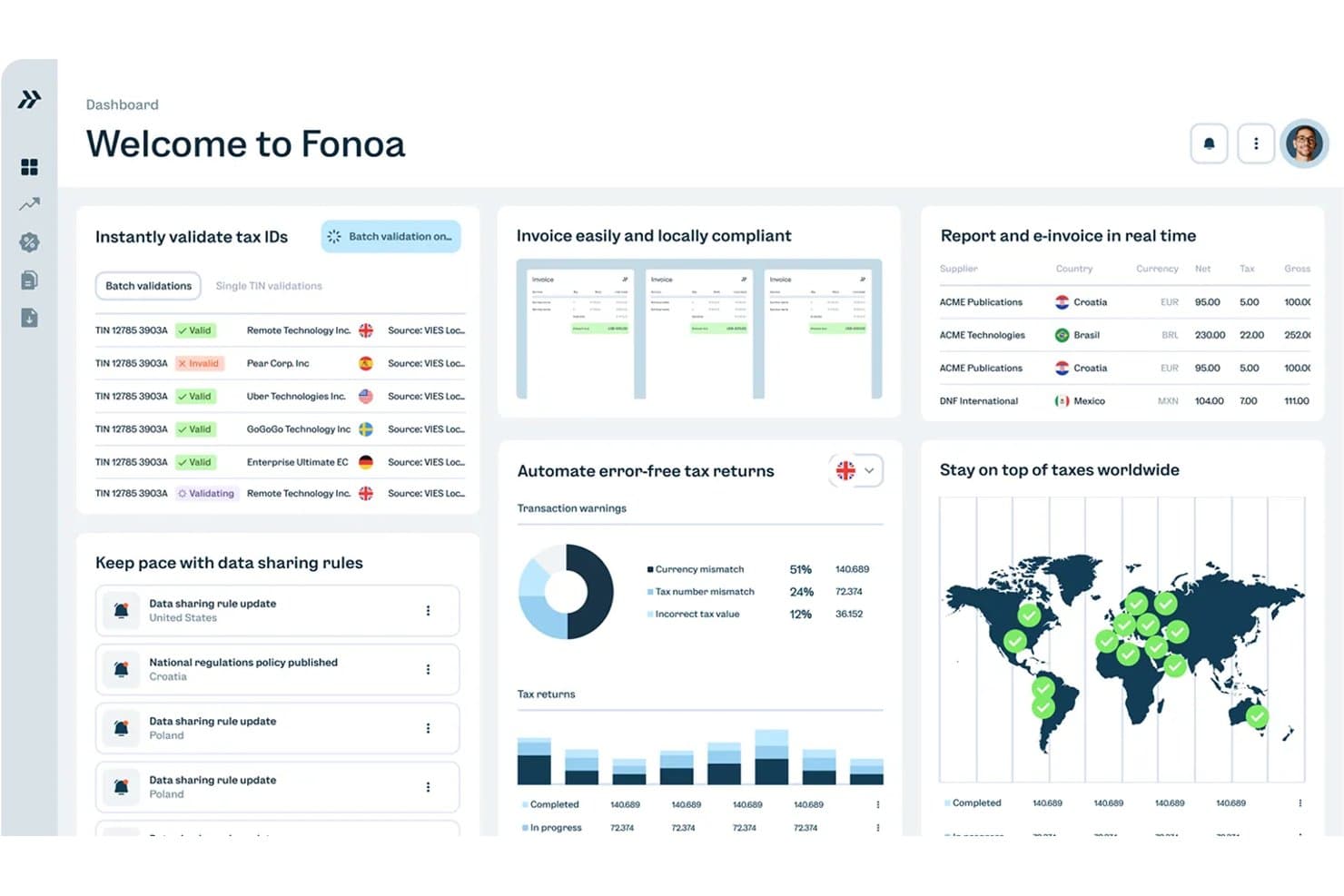
Fonoa centralizza la convalida degli identificativi fiscali, la fatturazione e la conformità fiscale globale. Fonoa è una piattaforma per la conformità fiscale indiretta che automatizza il calcolo di IVA, GST e imposte sulle vendite, la fatturazione elettronica, la convalida degli identificativi fiscali, la presentazione delle dichiarazioni e la gestione delle tracce di audit in oltre 190 giurisdizioni tramite un'architettura basata innanzitutto sulle API.
Per chi è più adatto Fonoa?
Fonoa è progettato per i team finanziari e fiscali delle aziende digitali con elevati volumi di transazioni, che gestiscono obblighi fiscali indiretti in più Paesi.
Perché ho scelto Fonoa
Ho scelto Fonoa come una delle soluzioni migliori perché nessun'altra piattaforma di questo elenco gestisce le imposte indirette su una scala geografica simile: il calcolo in tempo reale di IVA, GST e imposte sulle vendite in oltre 190 giurisdizioni tramite un'unica API. Ciò che trovo davvero impressionante è il tempo di risposta inferiore a 200 ms del motore fiscale, abbinato agli aggiornamenti automatici delle regole, così i calcoli rimangono conformi senza che nessuno debba monitorare manualmente le modifiche normative. Il modulo Audit aggiunge un ulteriore livello che apprezzo, creando istantaneamente una traccia di audit completa e interrogabile quando un'autorità fiscale si presenta.
Funzionalità principali di Fonoa
- Convalida degli identificativi fiscali: verifica gli identificativi fiscali di fornitori e clienti rispetto ai registri governativi aggiornati in oltre 120 Paesi, con elaborazione in batch fino a 50.000 record alla volta.
- API per la fatturazione elettronica: invia e riceve fatture elettroniche conformi in oltre 50 Paesi tramite un'unica API, con conversione automatica dei formati in base ai requisiti delle giurisdizioni locali.
- Preparazione delle dichiarazioni per più Paesi: compila automaticamente i moduli per le dichiarazioni di IVA, GST e imposte sulle vendite a partire dai dati delle transazioni, con controlli di convalida integrati prima dell'invio.
- Avvisi normativi in tempo reale: invia avvisi personalizzati, classificati in base alla rilevanza, quando cambiano le leggi fiscali, con spiegazioni in linguaggio semplice e assegnazione basata sui ruoli ai membri del team appropriati.
Integrazioni di Fonoa
Fonoa si connette a SAP S/4HANA, Oracle Fusion Cloud, NetSuite e alle piattaforme di fatturazione tramite la sua API REST aperta. Non offre integrazioni native o tramite marketplace chiaramente documentate, pertanto è necessaria un'attività di sviluppo personalizzata.
Pros and Cons
Pros:
- Gestisce le imposte indirette in oltre 190 giurisdizioni
- Fornisce tracce di audit istantanee e interrogabili
- Mantiene automaticamente aggiornate le regole fiscali nelle diverse regioni
Cons:
- Supporta le imposte indirette, non le imposte sul reddito
- Richiede configurazione tecnica e integrazione tramite API
Learn more about Fonoa: Ideale per l'automazione dei pagamenti globali
- Demo gratuita disponibile
- Prezzo su richiesta
Visit WebsiteCustomer Rating:4.5/5
Payouts aiuta i team a rispettare con facilità diverse normative fiscali in tutto il mondo. Payouts rientra nella mia lista perché gestisce la complessità dei flussi di lavoro relativi ai pagamenti in diversi paesi per team che amministrano collaboratori o fornitori globali. Automatizza attività come la conversione di valuta, i controlli di conformità e la programmazione massiva—così non dovrai più verificare requisiti o calcolare pagamenti paese per paese.Ciò che colpisce è come riduce il rischio operativo legato ai pagamenti. Invece di ritardare i trasferimenti per la mancanza di moduli fiscali, dati errati o problemi di tempistiche, puoi vedere tempestivamente le criticità—come documentazione incompleta o lacune di conformità—prima che i fondi vengano inviati.Ideale per
- Team finanziari che gestiscono pagamenti globali e transazioni in più valute
- Organizzazioni che necessitano di conformità fiscale automatizzata per collaboratori internazionali
Non adatto a
- Aziende focalizzate solo su dichiarazioni fiscali nazionali
- Team che desiderano strumenti integrati per il calcolo o la preparazione fiscale
Cosa rende Payouts diverso
Payouts si distingue per come gestisce i pagamenti globali di massa. A differenza di piattaforme come QuickBooks che danno priorità alla contabilità, Payouts è progettato per organizzazioni che trasferiscono regolarmente fondi a collaboratori e fornitori in numerosi paesi. Di fatto, i flussi di lavoro legati a pagamento e conformità sono al centro, riducendo al minimo le attività manuali quando si lavora con tanti paesi diversi.
Invece di voler essere una soluzione fiscale completa, semplifica i pagamenti transfrontalieri e mantiene i dati facilmente accessibili per software fiscali esterni.
Compromessi di Payouts
Payouts è ottimizzato per pagamenti e conformità, ma mancano le funzionalità integrate di calcolo fiscale: sarà necessario un software separato per la preparazione e l’invio delle dichiarazioni.
Pros and Cons
Pros:
- Supporta più valute
- Flussi di lavoro personalizzabili che si adattano alle esigenze specifiche dell’azienda
- Offre una varietà di metodi di pagamento, comprese le criptovalute
Cons:
- Scarsa compatibilità mobile limita la gestione da dispositivi portatili
- Possibili ritardi nelle transazioni e nell'elaborazione dei pagamenti
Learn more about Payouts: 3Ideale per la sincronizzazione dei dati in tempo reale
Xero
- Prova gratuita di 30 giorni disponibile
- Da $2.50/mese
Visit WebsiteCustomer Rating:4.4/5
Xero ti permette di calcolare automaticamente l'imposta sulle vendite sulle transazioni e di generare report per le dichiarazioni fiscali. Xero entra nella mia lista dei preferiti perché è il migliore che abbia trovato per la sincronizzazione in tempo reale dei dati fiscali e finanziari tra diversi sistemi. Vedo Xero funzionare al meglio per i team finanziari che gestiscono transazioni provenienti da varie banche, processori di pagamenti e canali di vendita e che hanno bisogno che tutto sia aggiornato per la stagione fiscale.
Ciò che colpisce è il suo motore di workflow configurabile, che ti permette di assegnare fasi di revisione, monitorare lo stato delle approvazioni e gestire le tracce di audit in un unico posto—così i team non devono più coordinare le verifiche tramite email o fogli di calcolo.
Per chi è ideale Xero
- Aziende multinazionali che sincronizzano dati fiscali e finanziari in tempo reale
- Team che gestiscono frequenti calcoli di IVA, GST e imposte sulle vendite
Per chi Xero non è ideale
- Organizzazioni che necessitano di funzionalità avanzate per le imposte sul reddito degli Stati Uniti
- Studi che cercano un'automazione molto personalizzata dei flussi di lavoro fiscali
Cosa distingue Xero
Xero è progettato per chi ha bisogno che i dati finanziari e fiscali riflettano fedelmente l’attività aziendale reale senza interventi manuali. Si aspetta che tu gestisca le registrazioni quotidiane man mano che avvengono (flussi bancari, note spese, fatture online) così il tuo report fiscale non sarà mai fuori sincronia con la realtà. A differenza di QuickBooks, che punta di più sulla personalizzazione della contabilità, Xero preferisce record sempre aggiornati invece che numerose rettifiche a fine mese.
Compromessi con Xero
Puntando su dati in tempo reale e automazione, si rinuncia ad alcune delle funzionalità avanzate di preparazione e invio delle dichiarazioni fiscali offerte dagli strumenti fiscali statunitensi più completi.
Pros and Cons
Pros:
- Interfaccia intuitiva
- Buone funzionalità di report
- Accessibilità cloud
Cons:
- Potrebbe non essere adatto per grandi aziende
- L'app mobile non è robusta come la versione desktop
Learn more about Xero: Ideale per preparatori fiscali completi
- Prova gratuita disponibile
- Da $359.99/mese
Visit WebsiteCustomer Rating:4.6/5
Drake Tax offre soluzioni approfondite per la dichiarazione dei redditi, l'invio elettronico e la pianificazione fiscale per commercialisti e professionisti del settore. Drake Tax entra nella mia selezione perché gestisce costantemente un'elevata quantità di pratiche fiscali complesse su larga scala. Lo consiglio ai professionisti fiscali che gestiscono numerose dichiarazioni federali, statali e locali con scadenze strette.
Quello che apprezzo davvero di Drake Tax è il suo supporto completo all'invio elettronico, i controlli di errore avanzati e la copertura integrata dei moduli per praticamente ogni scenario del cliente. È l’opzione ideale quando hai bisogno di una copertura approfondita per flussi di lavoro dettagliati, inclusa la gestione avanzata dei clienti e l’elaborazione in massa delle dichiarazioni.
Drake Tax è ideale per
- Professionisti fiscali che gestiscono grandi volumi di dichiarazioni di clienti diversi
- Studi che necessitano di strumenti avanzati per la conformità e l’invio elettronico in massa
Drake Tax non è indicato per
- Liberi professionisti con esigenze fiscali basilari
- Utenti che cercano uno strumento fiscale leggero o fai-da-te
Cosa distingue Drake Tax
Drake Tax si aspetta che i professionisti fiscali gestiscano dichiarazioni complesse e di grande volume in modo efficiente. Invece dell’interfaccia semplificata che trovi in strumenti come TurboTax, Drake Tax è costruito su flussi di lavoro che si occupano di più clienti, moduli specializzati e attività di conformità dettagliate contemporaneamente.
In pratica, funziona al meglio per gli studi fiscali che danno priorità all’ampiezza della copertura fiscale e a un controllo approfondito delle dichiarazioni dei clienti.
Compromessi con Drake Tax
Drake Tax è ottimizzato per gestire scenari fiscali professionali e complessi, il che significa che si sacrifica la semplicità in favore della velocità nella gestione delle dichiarazioni più semplici. Se desideri una configurazione facile e autonoma, la curva di apprendimento e la quantità di funzionalità possono risultare eccessive.
Pros and Cons
Pros:
- Gestisce tutti i tipi di dichiarazioni fiscali
- Disponibile sia su desktop che su piattaforma cloud
- Offre soluzioni sicure per lo scambio di file e opzioni di pagamento
Cons:
- L’hosting cloud richiede un costo mensile aggiuntivo
- Interfaccia datata e meno intuitiva
Learn more about Drake Tax: Ideale per integrazione ERP su Salesforce
- Demo gratuita disponibile
- Prezzo su richiesta
Visit WebsiteCustomer Rating:4/5
Certinia è un potente software fiscale che offre soluzioni semplificate per la conformità fiscale, la reportistica e la gestione fiscale per aziende e imprese. Certinia guadagna il suo posto nella mia lista dei preferiti per il modo in cui collega direttamente i dati di Salesforce ai flussi di lavoro fiscali e contabili. Lo consiglio quando si desidera che i processi fiscali risiedano dove sono già presenti i dati di CRM ed ERP, soprattutto per i team che hanno già scelto la piattaforma Salesforce.
Mi piace il fatto che sia possibile utilizzare calcolo delle imposte, riconoscimento dei ricavi e tracciamento audit direttamente all'interno di Salesforce, mantenendo tutto connesso e aggiornato. Durante i miei test sulle capacità di reportistica, vedere le posizioni finanziarie e fiscali in tempo reale utilizzando strumenti nativi Salesforce è stato davvero notevole.
Certinia è ideale per
- Team finanziari che utilizzano Salesforce come sistema ERP principale
- Organizzazioni che necessitano di dati unificati tra fiscalità, contabilità e CRM
Certinia non è indicato per
- Aziende che non hanno investito nell’ecosistema Salesforce
- Piccole imprese con esigenze fiscali semplici
Cosa distingue Certinia
Certinia è progettato per le organizzazioni che già gestiscono le loro operazioni su Salesforce e vogliono che anche i processi fiscali seguano gli stessi flussi di lavoro dei team commerciali, finanziari e di assistenza. A differenza dei motori fiscali indipendenti o dei sistemi contabili tradizionali, Certinia presuppone l’utilizzo di Salesforce come hub centrale. In pratica, ciò funziona meglio per le aziende che intendono avere un’unica fonte di verità finanziaria senza dover passare tra più piattaforme.
Compromessi con Certinia
Certinia è ottimizzato per offrire un’esperienza unificata su Salesforce, ma questo focus significa che si perde flessibilità se si utilizzano anche altre piattaforme principali. Ci si ritrova fortemente legati all’ecosistema Salesforce, il che può essere limitante se l’azienda si basa su una combinazione di sistemi ERP e CRM diversi.
Pros and Cons
Pros:
- Integrazione profonda con Salesforce per un'esperienza di gestione aziendale unificata
- Set di funzionalità completo per gestire ogni aspetto delle operazioni di servizio
- Forte attenzione al miglioramento del flusso di cassa, della redditività dei progetti e dell’utilizzo del personale
Cons:
- Richiede un numero minimo di utenti, il che potrebbe non essere adatto per aziende molto piccole
- Opzioni di personalizzazione limitate per particolari processi aziendali e necessità di reportistica
Learn more about Certinia: Ideale per l’automazione dell’imposta sulle vendite
- Demo gratuita disponibile
- Prezzo su richiesta
Visit WebsiteCustomer Rating:4/5
Avalara è un software di automazione fiscale che offre soluzioni scalabili per la conformità, il calcolo e la rendicontazione fiscale per aziende di tutte le dimensioni. Avalara finisce nella mia shortlist perché automatizza il calcolo e la dichiarazione dell’imposta sulle vendite in diverse giurisdizioni, permettendo di evitare aggiornamenti manuali delle aliquote e problemi di conformità. Quando la rendicontazione multistatale si complica o i team gestiscono centinaia di codici fiscali, questo strumento elimina molte difficoltà.
Ciò che colpisce è il calcolo e la dichiarazione dell’imposta in tempo reale sia negli Stati Uniti che a livello internazionale. In pratica, calcola l’imposta corretta al momento del checkout in base a località e tipo di prodotto, applica automaticamente certificati di esenzione e tiene traccia delle transazioni in un unico posto, così non bisogna più mantenere tabelle fiscali o riconciliare dati tra fogli di calcolo. Genera inoltre report pronti per il deposito, riducendo il lavoro manuale nella preparazione delle dichiarazioni in più giurisdizioni.
Avalara è ideale per
- Aziende che gestiscono l’imposta sulle vendite in più stati USA
- Team che cercano automazione per calcolo e dichiarazione fiscale
Avalara non è adatto a
- Imprese con esigenze fiscali semplici e monostato
- Utenti che necessitano di soluzioni complete per imposte societarie o sul reddito
Cosa distingue Avalara
Avalara integra l’automazione nella gestione della conformità dell’imposta sulle vendite, permettendoti di delegare il calcolo delle aliquote e le dichiarazioni invece di tracciarle tramite fogli di calcolo. Ho notato che si aspetta che tu strutturi i tuoi processi fiscali attorno all’automazione e all’integrazione con piattaforme di vendita o finance. Rispetto a strumenti come QuickBooks, che presume che tu gestisca più lavoro fiscale manualmente, Avalara è progettato per volume e complessità.
Compromessi con Avalara
Avalara è ottimizzato per l’automazione dell’imposta sulle vendite, ma si rinuncia a una certa flessibilità nel gestire scenari fiscali unici o personalizzazioni oltre il suo framework di automazione. Se dichiari solo in uno stato o devi gestire tipologie fiscali meno comuni, può risultare eccessivo.
Pros and Cons
Pros:
- Funzionalità dettagliate di conformità fiscale per diverse tipologie di tasse
- Si integra con oltre 1.200 applicazioni aziendali
- Offre soluzioni per la conformità dell’imposta sulle vendite sia nazionale che internazionale
Cons:
- Il costo può variare notevolmente in base alle dimensioni dell’azienda e al volume delle transazioni
- Configurazione e integrazione complesse e potenzialmente lunghe
 Ideale per l’allineamento tra tax provision e reporting
- Demo gratuita disponibile
- Prezzo su richiesta

Oracle Cloud EPM Tax Reporting include funzionalità per la gestione della compliance Pillar Two. Oracle Cloud EPM Tax Reporting merita un posto in questa lista perché porta i processi di tax provision in linea con il reporting finanziario più ampio, utilizzando per entrambi lo stesso nucleo dati. Tendo a consigliarlo ai team finanziari che hanno bisogno di mantenere strettamente sincronizzati contabilità fiscale e reporting finanziario, soprattutto per gruppi globali o multi-societari.
Quello che mi colpisce maggiormente è il flusso dati in tempo reale tra la componente fiscale e la chiusura finanziaria, oltre al potente strumento di simulazione di scenari per gestione delle provision e della compliance. Apprezzo la rapidità con cui puoi individuare discrepanze ed effettuare aggiustamenti senza dover rielaborare l’intero processo.
Oracle Cloud EPM Tax Reporting è ideale per
- Gruppi multinazionali che vogliono allineare fiscalità e reporting finanziario
- Team che gestiscono cicli complessi di tax provision e compliance
Oracle Cloud EPM Tax Reporting non è adatto per
- Piccole imprese con esigenze fiscali di base
- Studi o aziende che vogliono una soluzione fiscale indipendente senza integrazione contabile
Cosa distingue Oracle Cloud EPM Tax Reporting
Oracle Cloud EPM Tax Reporting è progettato affinché i tuoi flussi di lavoro fiscali utilizzino la stessa base dati e logica dei processi di chiusura finanziaria. Invece di funzionare come un motore fiscale separato (come CCH Axcess Tax), Oracle offre una soluzione che presuppone l’esigenza di far procedere fiscalità e contabilità in parallelo. Trovo che questo approccio sia perfetto quando i team fiscali devono attingere direttamente agli stessi dati finanziari real-time utilizzati per reporting e compliance.
Compromessi con Oracle Cloud EPM Tax Reporting
Ottimizzare per l’allineamento con la chiusura finanziaria significa rinunciare a parte della flessibilità e semplicità tipica dei sistemi di preparazione fiscale tradizionali. Se la tua attività è esclusivamente fiscale, l’approccio unificato potrebbe risultare eccessivo.
Pros and Cons
Pros:
- In linea con US GAAP e IFRS
- Robuste capacità di compliance globale
- Integrazione profonda con l’ecosistema Oracle
Cons:
- Ideale soprattutto per grandi aziende
- Flessibilità limitata fuori dall'ambiente Oracle
Learn more about Oracle Cloud EPM Tax Reporting: Ideale per la dichiarazione fiscale aziendale guidata
- Piano gratuito disponibile
- Da $99/dichiarazione

TurboTax Business è un software fiscale completo che fornisce strumenti specializzati per una preparazione fiscale aziendale accurata ed efficiente. TurboTax si guadagna il suo posto automatizzando le parti più noiose della dichiarazione fiscale guidata per le aziende, specialmente quando moduli e prospetti iniziano ad accumularsi. Trovo che i suoi flussi di lavoro in stile intervista e i controlli di errore in tempo reale eliminino molte incertezze, soprattutto per le S corporation e le SRL.
Mi piace come individua possibili fattori che possono attivare una verifica dell'IRS e ti fornisce un riepilogo chiaro prima di inviare la dichiarazione. Questo è solitamente il momento in cui vedo i titolari d'azienda tirare un sospiro di sollievo per non aver perso detrazioni o per gestire dichiarazioni multistatali.
Ideale per
- Titolari di piccole imprese che necessitano di supporto guidato per la dichiarazione federale e statale
- S corporation o SRL con rendicontazione semplice
Non indicato per
- Team fiscali aziendali con esigenze complesse e personalizzate
- Aziende con ampia esposizione fiscale internazionale
Cosa distingue TurboTax
TurboTax si distingue perché guida completamente nella dichiarazione fiscale aziendale, suddividendo il processo in passaggi chiari basati su domande. A differenza di QuickBooks, che presume tu conosca già i flussi di lavoro fiscali, TurboTax mantiene tutto strutturato e riduce il tempo di apprendimento. Gestisci caricamenti di documenti e controlli di conformità su binari prestabiliti, seguendo l'ordine che imposta. Questo tende a soddisfare le piccole imprese che preferiscono una guida pratica piuttosto che il controllo totale sul processo.
Compromessi con TurboTax
TurboTax dà priorità a flussi di lavoro guidati e strutturati, ma ciò significa perdere flessibilità nel modificare scenari fiscali aziendali complessi secondo le proprie esigenze. Per le aziende che necessitano di personalizzazioni su misura o gestiscono molti casi fiscali irregolari, questo può essere un limite.
Pros and Cons
Pros:
- Accesso ad esperti fiscali per una consulenza personalizzata
- Difesa contro gli audit inclusa senza costi aggiuntivi
- Interfaccia intuitiva per una facile dichiarazione dei redditi
Cons:
- Costi aggiuntivi per la dichiarazione statale e altri servizi
- Potrebbe non adattarsi a tutti i tipi di entità aziendali o situazioni fiscali complesse
Learn more about TurboTax: Ideale per scenari fiscali complessi
- Demo gratuita disponibile
- A partire da $479/anno (fatturazione annuale)

Lacerte Tax è un software fiscale professionale che offre funzionalità avanzate per una preparazione accurata ed efficiente delle dichiarazioni fiscali a commercialisti ed esperti del settore. Lacerte Tax si distingue per la gestione di situazioni fiscali altamente specializzate e complesse che molte piattaforme non riescono a coprire adeguatamente. Lo consiglio quando ci si trova a gestire dichiarazioni multi-statali, trust, successioni o dichiarazioni complesse di società di persone e non si vogliono incontrare limitazioni nel pieno della stagione fiscale.
Quello che apprezzo è l’ampia gamma di moduli avanzati e strumenti diagnostici progettati per individuare errori e preparare dichiarazioni fiscali articolate. Nella pratica, i commercialisti che lavorano con clienti ad alto patrimonio o strutture societarie particolari fanno affidamento su queste funzionalità per evitare rallentamenti e imprevisti dell’ultimo minuto.
A chi è più adatto Lacerte Tax
- Commercialisti che gestiscono dichiarazioni multi-statali o di entità complesse
- Studi specializzati in trust, successioni e clienti ad alto patrimonio
A chi non è ideale Lacerte Tax
- Preparatori individuali con solo clienti privati e situazioni semplici
- Piccoli studi che cercano un flusso di lavoro semplificato basato su domande guidate
Cosa rende unico Lacerte Tax
Lacerte Tax è progettato per gestire esigenze fiscali complesse, non solo dichiarazioni semplici. Nei fatti, si aspetta che tu abbia una solida conoscenza fiscale e che gestisca dettagli che strumenti come TurboTax o Drake tendono a semplificare o automatizzare. Vedo commercialisti utilizzarlo per situazioni con strutture societarie complicate, normative statali articolate o casi particolari come trust e successioni in cui i moduli standard non bastano.
A differenza dei software fiscali più generici, punta su personalizzazione, profondità nei moduli e guide diagnostiche per chi ha bisogno di molto più di un semplice flusso Q&A.
Compromessi nell’utilizzo di Lacerte Tax
Lacerte Tax ottimizza per il dettaglio e la profondità tecnica, ma in cambio si sacrifica velocità e semplicità quando si devono gestire preparazioni fiscali di base. Per dichiarazioni personali standard, le opzioni aggiuntive rendono la configurazione e la navigazione più lente rispetto a strumenti più leggeri.
Pros and Cons
Pros:
- Ampia libreria con oltre 5.700 moduli fiscali
- Oltre 25.000 controlli diagnostici per rilevare errori
- Integrazione con QuickBooks e altri software principali
Cons:
- Costo superiore rispetto ad altri software fiscali
- Scarsa flessibilità e possibilità di personalizzazione
Learn more about Lacerte Tax: Ideale per la dichiarazione dei redditi aziendali
- Prezzo su richiesta

Il software fiscale di Thomson Reuters offre soluzioni avanzate di conformità fiscale, pianificazione e rendicontazione per professionisti e aziende di tutto il mondo. Thomson Reuters GoSystem Tax RS si guadagna un posto qui per come gestisce le dichiarazioni fiscali aziendali complesse su larga scala. Vedo i team contabili di grandi gruppi aziendali affidarsi alla sua architettura cloud sicura per la preparazione, la revisione e l’invio elettronico delle dichiarazioni federali e statali.
Quello che lo distingue, secondo me, è la sua capacità di gestire dichiarazioni consolidate complesse, l’organizzazione automatizzata dei workpaper e i flussi di revisione pensati per team distribuiti. Mi piace come permette di gestire volumi elevati di dichiarazioni con controlli su collaborazione e conformità.
GoSystem Tax RS è ideale per
- Team fiscali aziendali che devono presentare dichiarazioni societarie complesse
- Studi che gestiscono la preparazione di molte dichiarazioni fiscali per più entità
GoSystem Tax RS non è adatto per
- Piccole imprese con esigenze fiscali di base
- Utenti che desiderano una configurazione rapida senza formazione
Ciò che distingue GoSystem Tax RS
GoSystem Tax RS è progettato per ambienti ad alta criticità, dove la conformità fiscale e la collaborazione richiedono controlli di livello enterprise. Diversamente da soluzioni come ProSeries dedicate a studi più piccoli, questo strumento mette al primo posto la struttura: organizza i flussi di lavoro multi-entità, i permessi utenti e i livelli di revisione attorno a scadenze ravvicinate e standard regolatori stringenti. In pratica, l’esperienza è più simile a quella di un ERP orientato alla conformità che non a una soluzione fiscale consumer.
Compromessi con GoSystem Tax RS
GoSystem Tax RS è ottimizzato per il controllo e la conformità, ma si perde in velocità e semplicità, il che significa che l’onboarding è lento e i cambiamenti di routine richiedono maggiore sforzo.
Pros and Cons
Pros:
- Gestisce in modo efficiente dichiarazioni fiscali aziendali complesse
- Piattaforma basata sul cloud per la collaborazione in tempo reale
- Si integra con altre applicazioni Thomson Reuters e software di terze parti
Cons:
- Non ideale per studi che gestiscono principalmente dichiarazioni individuali o semplici
- Richiede connessione a internet per la piena funzionalità
Learn more about Thomson Reuters GoSystem Tax RS:
Altri software fiscali
Di seguito è riportato un elenco di altri software fiscali che ho selezionato. Sebbene non siano entrati nella top 10, sono comunque validi e meritano ulteriori approfondimenti.
- 11Cash App TaxesIdeale per compilazione fiscale gratuita
- 12Bloomberg TaxIdeale per analisi di problematiche fiscali
- 13Longview TaxIdeale per la gestione di dati fiscali su larga scala
- 14TaxAct BusinessIdeale per la dichiarazione fiscale aziendale fai-da-te
- 15SovosIdeale per la conformità fiscale globale
- 16VertexIdeale per la determinazione fiscale in tempo reale
- 17IrisIdeale per la conformità fiscale nel Regno Unito
- 18Jackson HewittIdeale per la Garanzia di Accuratezza a Vita
- 19TrolleyIdeale per la conformità fiscale sui pagamenti globali
- 20TaxWise OnlineIdeale per i professionisti fiscali che lavorano da remoto
- 21TaxCalcIdeale per esigenze fiscali diversificate
Recensioni correlate sui software fiscali
Se non hai ancora trovato qui ciò che stai cercando, dai un'occhiata a questi strumenti strettamente correlati ai software fiscali che abbiamo testato e valutato.
- Software di contabilità
- Sistemi POS
- Software di fatturazione
- Servizi per la gestione delle buste paga
- Servizi per conti esercenti
Come valuto i software fiscali
Valuto i software fiscali su due livelli: requisiti di base come l'invio elettronico multi-giurisdizione e aggiornamenti di conformità, poi elementi differenzianti che distinguono uno strumento per commercialisti da una soluzione enterprise.
Funzionalità di base (requisiti fondamentali per questa lista)
Quando seleziono gli strumenti per la mia lista, valuto ciascuno su una scala da 0 (non offre la funzionalità) a 5 (eccelle in quest'area) per ogni funzionalità di base elencata di seguito. Poi calcolo il punteggio totale dello strumento come percentuale. Ogni strumento deve raggiungere un punteggio totale minimo del 75% per essere preso in considerazione.
- Preparazione della dichiarazione dei redditi: Verifico che una piattaforma copra i tipi di dichiarazioni che il tuo team effettivamente compila—persone fisiche, società di persone, S-corp, trust—non solo un semplice modulo base.
- Capacità di invio elettronico: Ogni strumento dovrebbe supportare l'invio diretto alle agenzie federali e statali con tracciamento, non solo generare moduli da stampare e inviare per posta.
- Motore di calcolo fiscale: Valuto come il motore gestisce scenari multi-giurisdizione, come un'azienda con nexus in diversi stati che necessita calcoli accurati di ritenute e crediti.
- Aggiornamenti di conformità e normativi: Le regole fiscali cambiano continuamente, quindi cerco piattaforme che forniscano aggiornamenti automatici di moduli e aliquote invece di richiedere download manuali di patch.
- Integrazione di dati contabili e finanziari: Che si tratti di importare dati dal libro contabile di QuickBooks, sincronizzare le paghe da ADP o importare 1099, valuto la facilità con cui ogni strumento si integra con il tuo stack esistente.
- Audit Trail e reportistica: Valuto se la piattaforma registra le attività dei compilatori, traccia le versioni delle dichiarazioni e genera prospetti di supporto che puoi consegnare a un revisore senza dover correre ai ripari.
Una volta che ho una lista di strumenti che soddisfano questi criteri, considero cosa distingue ciascuna piattaforma.
Fattori differenzianti (cosa distingue i fornitori)
Ecco come confronto e metto a confronto i diversi fornitori:
Caratteristiche distintive
La gestione multi-entità è fondamentale se il tuo studio gestisce dichiarazioni per filiali o più clienti—cerco piattaforme che permettano di passare tra entità senza uscire e rientrare. Un portale clienti sicuro fa la differenza durante la stagione delle dichiarazioni, sostituendo le lunghe catene di email con richieste documentali organizzate e firme elettroniche. Valuto anche strumenti di scenario planning, in particolare quelli che simulano le passività previste per aiutare i responsabili fiscali aziendali a consigliare la direzione sull'impatto di ristrutturazioni o espansioni.
Oltre le funzionalità
La sicurezza è una considerazione primaria—verifico la conformità SOC 2 Type II e l'autenticazione a più fattori, visto che le piattaforme fiscali gestiscono dati finanziari sensibili tutto l'anno. Valuto anche la disponibilità del supporto nei periodi di massimo carico, quando una risposta tardiva può comportare scadenze mancate. La trasparenza sui prezzi completa la mia recensione. Analizzo come ogni fornitore struttura i costi per dichiarazione, per utente o per entità per comprendere il costo totale quando cresce il volume delle dichiarazioni.
Come scegliere un software fiscale
È facile perdersi in lunghi elenchi di funzionalità e strutture di prezzo complesse. Per aiutarti a rimanere concentrato mentre segui il tuo processo di selezione del software, ecco un elenco dei fattori da tenere a mente:
| Fattore | Cosa considerare |
|---|---|
| FattoreScalabilità | Cosa considerareIl software sarà in grado di adattarsi alla crescita della tua azienda? Assicurati che possa gestire un aumento dei dati e degli utenti. Cerca modelli di prezzo flessibili che crescano insieme alle tue esigenze. |
| FattoreIntegrazioni | Cosa considerareSi collega agli strumenti che già utilizzi? Verifica la compatibilità con i software di contabilità e altri sistemi essenziali per evitare l'inserimento manuale dei dati. |
| FattorePersonalizzazione | Cosa considerarePuoi adattarlo ai tuoi processi? Cerca opzioni per modificare i flussi di lavoro e i report in base ai tuoi requisiti specifici. |
| FattoreSemplicità d'uso | Cosa considerareÈ facile da usare per il tuo team? Considera la curva di apprendimento e cerca interfacce intuitive che riducano al minimo il tempo necessario per la formazione. |
| FattoreImplementazione e avviamento | Cosa considerareQuanto è semplice la configurazione? Valuta il supporto del fornitore durante l'introduzione. Un avviamento rapido può far risparmiare tempo e ridurre le interruzioni. |
| FattoreCosto | Cosa considerareRientra nel tuo budget? Confronta il costo totale di proprietà, comprese le commissioni nascoste, per assicurarti che sia conveniente nel lungo periodo. |
| FattoreMisure di sicurezza | Cosa considerareI tuoi dati sono protetti? Cerca una crittografia solida, la conformità a standard come il GDPR e aggiornamenti di sicurezza regolari. |
| FattoreRequisiti di conformità | Cosa considerareSoddisfa le esigenze normative? Verifica che il software supporti i requisiti di conformità fiscale specifici del tuo settore per evitare sanzioni. |
Tendenze del software fiscale
Ho notato che il software fiscale continua a evolversi, grazie alla rapida innovazione tecnologica e al cambiamento delle normative.
Durante la ricerca e la valutazione delle migliori soluzioni disponibili oggi, sono emerse alcune tendenze chiave: l'automazione sta diventando più intelligente, l'accesso da dispositivi mobili si sta ampliando e l'IA sta iniziando a svolgere un ruolo più importante nella preparazione delle dichiarazioni fiscali.
Ecco cos'altro ho scoperto:
- Integrazione con le piattaforme di contabilità: Il software fiscale sta migliorando la propria compatibilità con le piattaforme di contabilità, consentendo la rendicontazione fiscale in tempo reale e la semplificazione della conformità. Questo sviluppo semplifica la gestione finanziaria delle aziende sincronizzando perfettamente i dati fiscali e contabili.
- Previsioni fiscali basate sull'IA: L'intelligenza artificiale viene utilizzata per prevedere gli obblighi fiscali e analizzare i dati finanziari al fine di stimare i pagamenti futuri. Questa tendenza è interessante perché contribuisce alla pianificazione finanziaria e alla gestione del rischio.
- Misure di sicurezza dei dati avanzate: Il software fiscale sta dando priorità a misure di sicurezza avanzate, tra cui la crittografia e l'autenticazione a più fattori, per proteggere i dati fiscali sensibili. Questa maggiore attenzione è essenziale vista la natura riservata delle informazioni finanziarie.
- Applicazioni mobili intuitive: Le applicazioni mobili per il software fiscale stanno diventando più intuitive e offrono agli utenti un modo pratico per gestire le imposte ovunque si trovino. Questa tendenza è significativa perché riflette il crescente utilizzo dei dispositivi mobili nelle attività aziendali.
- Soluzioni fiscali basate sul cloud: Le soluzioni fiscali basate sul cloud sono in crescita perché offrono scalabilità e accesso remoto ai dati fiscali. Questo è importante per le aziende che cercano flessibilità ed efficienza nella gestione fiscale.
Che cos'è il software fiscale?
Il software fiscale è uno strumento digitale che aiuta privati e aziende a preparare, presentare e gestire le dichiarazioni dei redditi in modo efficiente. Automatizza i calcoli, garantisce la conformità alle normative fiscali vigenti e riduce al minimo gli errori umani.
Progettato per tutti, dai liberi professionisti alle grandi aziende e alle strutture societarie, il software fiscale fa risparmiare tempo, riduce i rischi di verifica fiscale e spesso individua detrazioni che gli utenti potrebbero non notare manualmente. Che tu debba presentare una dichiarazione semplice o gestire imposte aziendali complesse, questo software semplifica il processo e contribuisce a garantirne l'accuratezza.
Funzionalità del software fiscale
Quando scegli un software fiscale, presta attenzione alle seguenti funzionalità chiave:
- Interfaccia intuitiva: Il software dovrebbe avere un layout chiaro e intuitivo che ti guidi passo dopo passo nella presentazione della dichiarazione dei redditi. Un'interfaccia semplice può farti risparmiare tempo e rendere un'attività stressante molto più gestibile.
- Calcoli automatici: Il software fiscale esegue automaticamente i calcoli al posto tuo, riducendo il rischio di errori e aiutandoti a evitare sbagli che potrebbero costarti denaro o far scattare controlli.
- Guida a detrazioni e crediti: Cerca una piattaforma che segnali le detrazioni e i crediti a cui hai diritto in base ai tuoi dati personali e finanziari. Questa funzione ti aiuta a massimizzare il rimborso (e ti impedisce di lasciare denaro sul tavolo).
- Possibilità di presentazione elettronica: Ti consente di inviare la dichiarazione dei redditi per via elettronica, direttamente dal software. La presentazione elettronica è più rapida, più sicura e di solito permette di ricevere il rimborso più velocemente rispetto all'invio dei moduli cartacei.
- Importazione dei dati finanziari: Il software fiscale spesso consente di importare i moduli W-2, 1099 o persino le dichiarazioni dell'anno precedente dal tuo datore di lavoro, dalla banca o dal software utilizzato in passato. Questa funzione riduce l'inserimento manuale, aiutandoti a risparmiare tempo e a evitare errori di battitura.
- Assistenza in caso di controllo: Se sei così sfortunato da essere sottoposto a un controllo, alcuni software fiscali offrono risorse, strumenti o l'aiuto di esperti per guidarti nel processo. Questo può darti tranquillità nel caso in cui l'IRS si metta in contatto con te.
- Presentazione delle dichiarazioni statali: Molti prodotti consentono di gestire sia le dichiarazioni fiscali federali sia quelle statali in un'unica esperienza, semplificando il processo e aiutandoti a mantenere l'organizzazione.
- Sicurezza dei dati: Il software fiscale dovrebbe proteggere i tuoi dati sensibili con una crittografia avanzata e misure di sicurezza adeguate. In questo modo le tue informazioni finanziarie rimangono al sicuro da occhi indiscreti.
Funzioni comuni dell'intelligenza artificiale nei software fiscali
Oltre alle funzioni standard dei software fiscali elencate sopra, molte di queste soluzioni stanno integrando l'intelligenza artificiale con funzioni come:
- Riconoscimento intelligente dei documenti: L'intelligenza artificiale analizza e riconosce vari documenti fiscali (come i moduli W-2 o 1099), estraendo i dati pertinenti e compilando automaticamente i moduli, facendoti risparmiare tempo e riducendo gli errori.
- Suggerimenti personalizzati sulle detrazioni: Analizzando le tue informazioni finanziarie, l'intelligenza artificiale può consigliare detrazioni e crediti adatti alla tua situazione specifica, aiutandoti a ottimizzare il risultato fiscale.
- Rilevamento e correzione degli errori: Gli algoritmi di intelligenza artificiale individuano incoerenze o errori comuni nella tua dichiarazione e suggeriscono correzioni prima dell'invio, aiutandoti a evitare errori imbarazzanti e possibili sanzioni.
- Assistenza tramite chat in tempo reale: I chatbot basati sull'intelligenza artificiale forniscono risposte alle domande fiscali e assistenza per la risoluzione dei problemi 24 ore su 24, 7 giorni su 7, offrendoti supporto immediato quando incontri una sezione poco chiara della dichiarazione.
- Stima predittiva del rimborso: L'intelligenza artificiale può fornirti una stima aggiornata del rimborso previsto o dell'importo dovuto mentre inserisci i dati, consentendoti di pianificare in anticipo e apportare le modifiche necessarie.
Vantaggi dei software fiscali
Automatizzando i processi complessi e garantendo la conformità alle leggi fiscali, i software fiscali offrono una serie di vantaggi, tra cui:
- Precisione e riduzione degli errori: Il software fiscale riduce al minimo gli errori umani nei calcoli. Automatizzando il processo di calcolo, il software garantisce che tutti i dati inseriti siano accurati, riducendo la probabilità di errori che possono comportare sanzioni o controlli.
- Risparmio di tempo: Gli utenti possono risparmiare molto tempo utilizzando un software fiscale, poiché automatizza molte delle attività ripetitive coinvolte nella preparazione delle dichiarazioni, consentendo di completarle più rapidamente.
- Conformità aggiornata alle leggi fiscali: Il software fiscale viene aggiornato regolarmente per riflettere i codici e i regolamenti fiscali più recenti, garantendo che gli utenti siano sempre conformi alle leggi in vigore. Ad esempio, il software fiscale australiano può aiutare le aziende a rimanere aggiornate sui requisiti dell'ATO e sugli obblighi BAS/GST, mentre il software fiscale canadese può supportare la presentazione in linea con i requisiti della CRA.
- Facilità d'uso: Grazie a interfacce intuitive e indicazioni passo dopo passo, il software fiscale facilita la presentazione delle dichiarazioni da parte di privati e aziende senza richiedere conoscenze fiscali approfondite.
- Convenienza economica: Utilizzando un software fiscale, gli utenti possono spesso evitare i costi più elevati associati all'assunzione di professionisti fiscali, rendendolo una soluzione più conveniente per gestire gli obblighi fiscali.
Costi e prezzi dei software fiscali
Quando scelgo un software fiscale, guardo sempre prima i diversi piani e i relativi prezzi. La maggior parte degli strumenti offre opzioni a più livelli: di base per le dichiarazioni fiscali personali semplici e avanzate per le aziende o le dichiarazioni complesse.
Ogni piano di solito include funzioni chiave come la presentazione elettronica, l'assistenza clienti e il monitoraggio delle detrazioni. Di seguito trovi un breve riepilogo di ciò che è incluso e dei relativi costi, così potrai trovare facilmente l'opzione più adatta alle tue esigenze.
Tabella di confronto dei piani per i software fiscali
| Tipo di piano | Prezzo medio | Caratteristiche comuni |
| Opzione gratuita | $0 | Presentazione di base per dichiarazioni dei redditi semplici, detrazioni standard e assistenza clienti limitata. |
| Base | $30 - $50 | Include tutte le funzionalità dell'opzione gratuita, oltre a detrazioni aggiuntive, crediti d'imposta e assistenza clienti. |
| Avanzato | $50 - $70 | Tutte le funzionalità del piano Base, oltre a detrazioni dettagliate, interessi sul mutuo e detrazioni per donazioni. |
| Premium | $70 - $100 | Tutte le funzionalità del piano Avanzato, oltre alla dichiarazione dei redditi da investimenti, dei redditi da immobili in affitto e del rifinanziamento. |
| Lavoratore autonomo | $100 - $120 | Funzionalità del piano Premium, oltre a redditi e spese aziendali, detrazioni per l'ufficio domestico e ammortamento dei beni. |
| Aziendale | $120 - $170 | Progettato per i titolari di piccole imprese, include tutte le funzionalità del piano Lavoratore autonomo, oltre ai moduli fiscali per i datori di lavoro. |
FAQ sul software fiscale
Ecco alcune domande frequenti che ho ricevuto sul software fiscale:
In che modo il software fiscale può integrarsi con i sistemi contabili o ERP già esistenti della mia azienda?
La maggior parte dei software fiscali offre integrazioni con le piattaforme contabili o ERP più diffuse tramite API o connettori integrati. Di solito è possibile sincronizzare automaticamente i dati, riducendo l’inserimento manuale e gli errori. Prima di scegliere uno strumento, consulta le guide all’integrazione per assicurarti che sia compatibile con i sistemi attuali.
Alcuni fornitori offrono anche servizi di assistenza o migrazione per aiutarti a configurare un flusso di dati uniforme tra le applicazioni.
Quali funzionalità di audit e conformità dovrebbero cercare i professionisti fiscali in un software fiscale?
I professionisti fiscali dovrebbero cercare funzionalità come registri di controllo automatici, verifiche di conformità integrate, archiviazione sicura dei documenti e conferma dell’invio elettronico. Molte piattaforme segnalano dati mancanti o errori prima dell’invio. Funzionalità di conformità solide contribuiscono a ridurre il rischio di audit e a mantenere lo studio in linea con gli aggiornamenti della normativa fiscale.
Cerca strumenti che supportino anche la condivisione sicura dei documenti con i clienti o l’IRS.
Il software fiscale viene aggiornato in base alle normative fiscali più recenti?
Sì, i software fiscali affidabili vengono aggiornati regolarmente per riflettere le nuove normative fiscali e le regole dell’IRS. La maggior parte dei fornitori rilascia aggiornamenti prima di ogni stagione fiscale, garantendo la presentazione di dichiarazioni accurate.
Per studi e professionisti, le piattaforme principali introducono anche modifiche durante l’anno quando viene approvata una nuova legge, così i clienti possono restare conformi. Verifica sempre il calendario degli aggiornamenti del software e consulta le note di rilascio prima di preparare dichiarazioni complesse.
In che modo le principali soluzioni software fiscali gestiscono le dichiarazioni fiscali di più entità o consolidate?
Le principali piattaforme software fiscali supportano le dichiarazioni di più entità consentendo di gestire diverse aziende o società controllate da un’unica pannello di controllo. Spesso automatizzano le dichiarazioni consolidate e generano la reportistica combinata richiesta.
Se gestisci più clienti o unità aziendali, assicurati che il software supporti autorizzazioni a livello di entità, report personalizzati e separazione sicura dei dati.
Esiste una differenza tra il software fiscale per computer desktop e quello basato sul cloud per l'utilizzo da parte di tutto lo studio?
Sì, il software fiscale basato sul cloud offre accesso da remoto, aggiornamenti automatici e una collaborazione più semplice tra i team. Le soluzioni per computer desktop possono offrire una maggiore personalizzazione o velocità per grandi quantità di dati, ma non consentono la condivisione dei dati in tempo reale.
Per gli studi con più utenti o sedi, le opzioni cloud migliorano il flusso di lavoro e riducono i problemi informatici. Confronta sempre i protocolli di sicurezza prima di scegliere una delle due piattaforme.
Qual è il miglior software fiscale gratuito?
Diverse piattaforme, come TurboTax Free Edition e Credit Karma Tax, offrono versioni realmente gratuite per le dichiarazioni fiscali personali di base. In genere supportano semplici moduli W-2 e un numero limitato di moduli 1099.
Per esigenze più complesse o dichiarazioni aziendali, puoi provare i periodi di prova gratuiti di fornitori come TaxAct o TaxBit, anche se le funzionalità e l’assistenza potrebbero essere limitate senza passare alle versioni a pagamento.
Qual è il miglior software fiscale per le criptovalute?
Koinly, CoinTracker e TaxBit sono tra i leader nella gestione della reportistica fiscale sulle criptovalute. Questi strumenti importano i dati delle transazioni da portafogli e piattaforme di scambio per calcolare plusvalenze, minusvalenze ed eventi imponibili.
Molti si integrano con i principali software di preparazione delle dichiarazioni fiscali, così puoi gestire le imposte su valute fiat e criptovalute in un unico posto. Verifica sempre che il software fiscale per criptovalute sia aggiornato con le normative specifiche del Paese.
Che tipo di assistenza posso aspettarmi dai fornitori di software fiscali?
Le opzioni di assistenza variano, ma la maggior parte dei fornitori di software fiscali offre supporto tramite telefono, chat o e-mail. I professionisti ricevono spesso assistenza prioritaria, supporto per l’avvio e responsabili dedicati nel caso degli studi più grandi.
Alcuni dei migliori software fiscali offrono anche assistenza per l’integrazione, formazione dal vivo o basi di conoscenza per la risoluzione dei problemi. Se gestisci dichiarazioni sensibili o complesse, cerca fornitori che offrano assistenza 24 ore su 24 o specializzata per i professionisti fiscali.