

Drake Tax Review: Pros, Cons, Features, and Pricing



Drake Tax is a tax software built for professional tax preparers who handle high volumes of individual, business, and entity returns. If your firm needs a full-featured professional solution but finds Lacerte's pricing hard to justify, Drake Tax delivers comparable depth at a significantly lower cost per return.
Drake Tax Evaluation Summary

- From $359.99/month
- Free trial available
Why Trust Our Software Recommendations
Our team has been testing and reviewing software since 2012. As finance leaders ourselves, we know how difficult—and important—it is to choose the right software.
For this guide, we evaluated tools using hands-on testing and independent research, scoring tools using our selection criteria.
Our reviews reflect our human editorial judgment, not a sales pitch.
Drake Tax Overview
In my opinion, Drake Tax offers a solid option for tax professionals, CPAs, and accounting teams seeking reliable tax and accounting software for managing tax returns. Its standout features, cloud-based capabilities, and exceptional customer support set it apart from many competitors, making it a great choice for small to mid-sized firms and growing tax practices.
While the onboarding process could be smoother and the learning curve may take some time for new users, the software’s ease of use, strong automation, and value for money make it an attractive option. It’s best suited for those who prioritize accuracy, workflow efficiency, and dependable support in their tax management tools.
pros
-
Its user-friendly interface makes it easy for teams to navigate.
-
Customer support is exceptional, offering quick and helpful responses.
-
It provides accurate and efficient tax calculations, saving you time.
cons
-
Your team might find the onboarding process a bit complex.
-
It may lack some advanced features found in other tax software.
-
Scheduled updates can occasionally cause minor workflow disruptions.
Is Drake Tax Right For Your Needs?
Who Would be a Good Fit for Drake Tax?
Drake Tax is a great fit for small to mid-sized accounting firms, tax professionals, CPAs, and tax practices that need a reliable and user-friendly tax solution. Your team will benefit from its efficient tax calculations, real-time processing, client portal access, and exceptional customer support. The software’s ease of use makes it ideal for those who want to focus on accuracy without getting bogged down by complex interfaces or excessive bookkeeping tasks. If you’re in a financial department that values quick problem-solving, streamlined workflows, and automation, Drake Tax can support your work effectively.
-
Small Accounting Firms
Drake Tax simplifies tax prep with its straightforward interface, making it perfect for small teams handling multiple taxpayers.
-
Tax Professionals
You’ll find the accurate calculations, strong workflow management, and peerless support ideal for managing your tax workload.
-
Mid-Sized Businesses
The software’s ease of use and cloud-based access help your financial department focus on accuracy and efficiency.
-
Financial Departments
Drake Tax supports your team with quick responses, helpful solutions, and streamlined workflows, keeping your work on track.
-
Consulting Firms
You’ll appreciate the time-saving features, automation, and client portal tools that allow you to manage multiple client accounts seamlessly.
-
Self-Employed Individuals
Drake Tax provides user-friendly solutions for managing tax returns, tax documents, and state returns without needing extensive accounting knowledge.
Who Would be a Bad Fit for Drake Tax?
Drake Tax may not suit large enterprises or those needing advanced features, deep integrations, or complex accounting system customization. If your work involves handling complex tax scenarios requiring specialized tools beyond standard tax preparation software, you might find Drake Tax lacking. Its onboarding process can be cumbersome for teams needing quick implementation.
Your team might also miss out on some advanced reporting and multi-platform integrations found in other accounting software solutions. If you rely heavily on streamlined onboarding, advanced workflow automation, and integration with other platforms, Drake Tax might not meet your expectations.
-
Large Enterprises
Your team may find Drake Tax insufficient for handling complex, large-scale tax operations across multiple divisions.
-
Advanced Tax Needs
If your work involves intricate tax scenarios, you might need more specialized tools than Drake Tax offers.
-
Rapid Deployment
Drake Tax's onboarding can be slow, making it a poor choice for teams needing quick setup.
-
Integration-Heavy Environments
Your team will struggle if you rely on seamless integration with a variety of business tools, bookkeeping platforms, or accounting software.
-
Complex Reporting
If advanced reporting is crucial, you may find Drake Tax's functionality limited compared to other options.
-
Tech-Savvy Teams
Tech-savvy teams needing cutting-edge features might find Drake Tax's offerings too basic.
How We Test & Score Tools
We’ve spent years building, refining, and improving our software testing and scoring system. The rubric is designed to capture the nuances of software selection and what makes a tool effective, focusing on critical aspects of the decision-making process.
Below, you can see exactly how our testing and scoring works across seven criteria. It allows us to provide an unbiased evaluation of the software based on core functionality, standout features, ease of use, onboarding, customer support, integrations, customer reviews, and value for money.
Core Functionality (25% of final scoring)
The starting point of our evaluation is always the core functionality of the tool. Does it have the basic features and functions that a user would expect to see? Are any of those core features locked to higher-tiered pricing plans? At its core, we expect a tool to stand up against the baseline capabilities of its competitors.
Standout Features (25% of final scoring)
Next, we evaluate uncommon standout features that go above and beyond the core functionality typically found in tools of its kind. A high score reflects specialized or unique features that make the product faster, more efficient, or offer additional value to the user.
We also evaluate how easy it is to integrate with other tools typically found in the tech stack to expand the functionality and utility of the software. Tools offering plentiful native integrations, 3rd party connections, and API access to build custom integrations score best.
Ease of Use (10% of final scoring)
We consider how quick and easy it is to execute the tasks defined in the core functionality using the tool. High scoring software is well designed, intuitive to use, offers mobile apps, provides templates, and makes relatively complex tasks seem simple.
Onboarding (10% of final scoring)
We know how important rapid team adoption is for a new platform, so we evaluate how easy it is to learn and use a tool with minimal training. We evaluate how quickly a team member can get set up and start using the tool with no experience. High scoring solutions indicate little or no support is required.
Customer Support (10% of final scoring)
We review how quick and easy it is to get unstuck and find help by phone, live chat, or knowledge base. Tools and companies that provide real-time support score best, while chatbots score worst.
Customer Reviews (10% of final scoring)
Beyond our own testing and evaluation, we consider the net promoter score from current and past customers. We review their likelihood, given the option, to choose the tool again for the core functionality. A high scoring software reflects a high net promoter score from current or past customers.
Value for Money (10% of final scoring)
Lastly, in consideration of all the other criteria, we review the average price of entry level plans against the core features and consider the value of the other evaluation criteria. Software that delivers more, for less, will score higher.
Core Features
Tax Calculation Engine
This feature ensures your calculations are accurate and up-to-date with the latest tax codes. It helps your team save time and reduce errors across tax returns, business returns, and state returns.
E-Filing Capabilities
You can file returns electronically, which speeds up the process and reduces paperwork. It's convenient for you, your clients, and taxpayers during peak tax season.
Client Management
Keep track of your clients’ information, prior year data, and tax history in one place using the built-in client portal. This feature helps your team stay organized and efficient.
Document Management
Store and access important tax documents securely. It's easy for you to retrieve information whenever needed.
Reporting Tools
Generate detailed reports to analyze your tax data. This feature supports your decision-making with clear insights into your tax practice performance.
Audit Support
Be prepared for audits with built-in support features. It gives you peace of mind knowing your work is compliant.

Standout Features
Quick Estimator
A tool that allows you to calculate a quick summary of a tax return to give clients a refund or liability estimate without entering every single detail.
Amortization Schedules
A built-in calculator that generates loan amortization schedules, which can be printed for clients or used to figure out interest deductions.

Ease of Use
Drake Tax is quite user-friendly, with a user interface that lets your team navigate effortlessly, even if they're not tech experts. Its layout is straightforward, making your work easier and reducing the time spent on training. Compared to other tax preparation software, it stands out for its simplicity, helping you focus on tax preparation rather than dealing with complicated menus or settings. This ease of use boosts your team’s productivity and minimizes errors.

Onboarding
Drake Tax's onboarding process can be a bit challenging, so your team will need patience. While the setup might feel overwhelming initially, the available resources, tutorials, and responsive customer support help ease the transition. You’ll find that the support team is helpful when guidance is needed. Though the time to value might be longer than desired, once your team gets the hang of it, the software’s benefits become apparent, supporting your tax management tasks effectively.

Customer Support
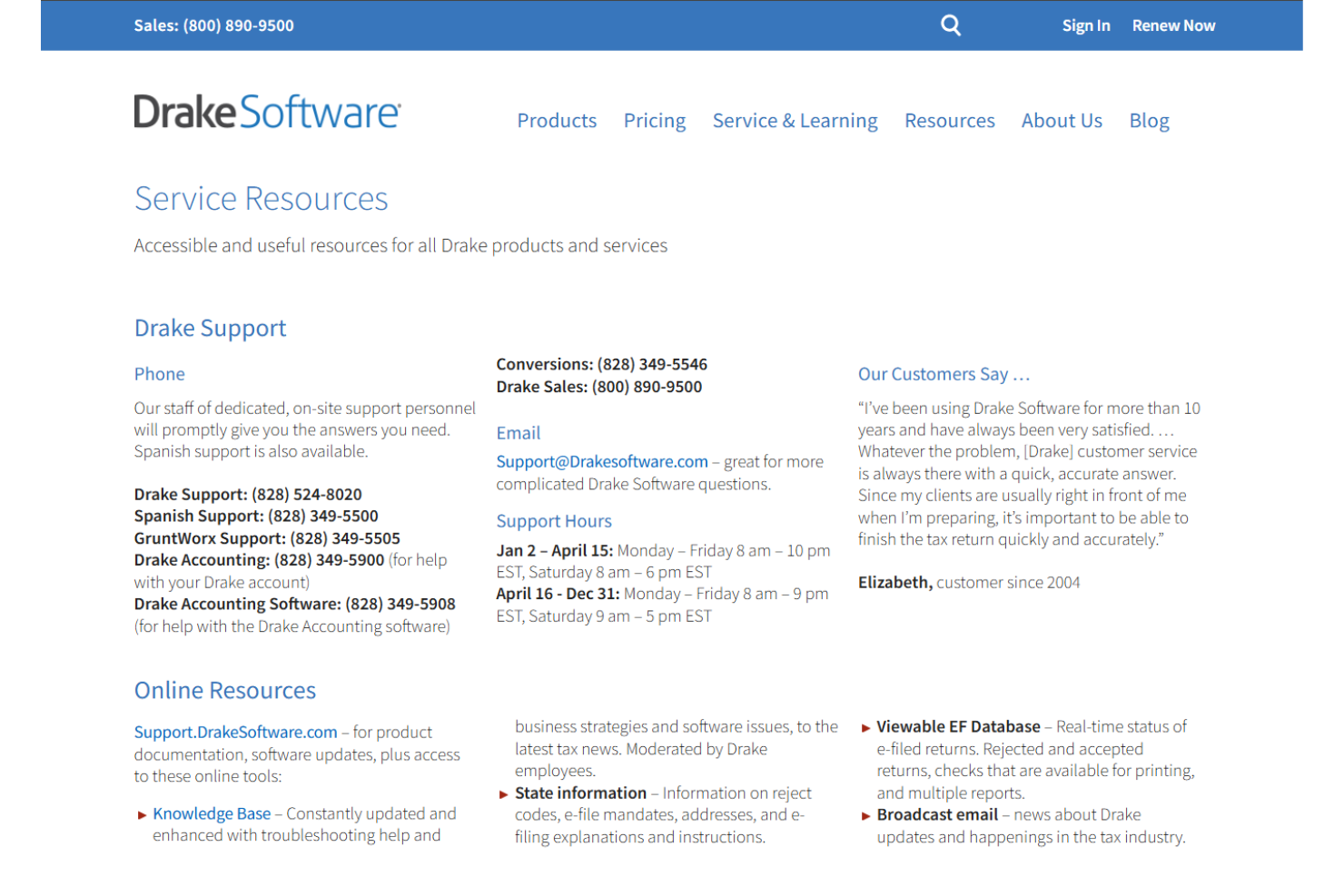
Drake Tax offers exceptional customer support, ensuring your team gets timely and effective assistance. User reviews often praise the quick response times and knowledgeable staff who help resolve issues efficiently. The support channels are accessible, providing you with peace of mind when facing challenges. Whether through phone or email, you’ll find the support team ready to guide you, enhancing your overall experience with the software. This reliable support is a standout feature that benefits your work significantly.
Integrations
Drake Tax integrates with QuickBooks, SecureFilePro, GruntWorx, E-Pay by EPS Financial, TicTie Calculate, SmartVault, Drake Accounting, Drake Documents, eFileCabinet, and more. Drake Tax does not currently have an API or connect with third-party integration tools.

Value for Money
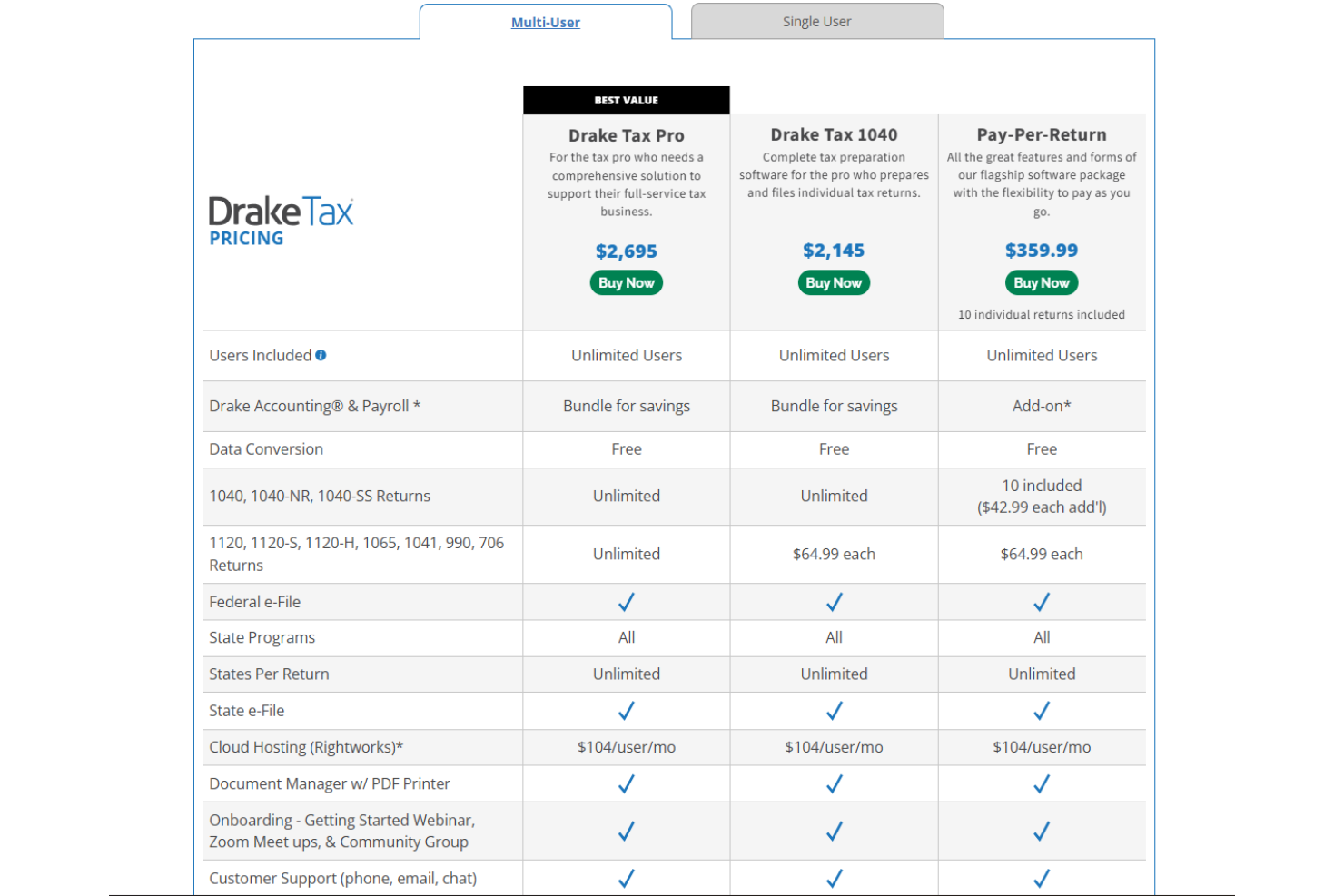
Drake Tax's pricing offers a fair balance between cost and functionality. Users appreciate the clear structure of its tiered plans, which cater to various business sizes. While not the cheapest option, the comprehensive features included at each level justify the price. A free trial is available, allowing your team to evaluate the software's fit before purchasing. For the multi-user option, here is information about its pricing:
- Drake Tax Pro: Suits the tax pro who needs a comprehensive solution to support their full-service tax business, for $2,695.
- Drake Tax 1040: The complete tax preparation software for the professionals who file individual tax returns, for $2,145.
- Pay-Per-Return: You’ll get all the great features of its flagship software package, with the flexibility to pay as you go for $359.99.
The single-user option is priced as follows:
- Drake Tax Pro: Best choice for the tax pro in need of a detailed solution to support their full-service tax business, for $2,345.
- Drake Tax 1040: A comprehensive option for the pro who prepares and files individual tax returns, for $1,945.
- Pay-Per-Return: You get all the features of its flagship software package, with the ability to pay as you go, for $359.99.
Drake Tax Specs
- Accounts Payable
- Accounts Receivable
- API
- Balance Sheet
- Billing/Invoicing
- Budgeting
- Calendar Management
- CRM Integration
- Dashboard
- Data Export
- Data Import
- Data Visualization
- Expense Tracking
- External Integrations
- Forecasting
- General Account Ledger
- Multi-Currency
- Multi-User
- Notifications
- P&L
- Payroll
- Scheduling
- Tax Management
Drake Tax FAQs
How does Drake Tax handle data security and compliance?
Can Drake Tax support multiple users in my team?
What kind of customer support does Drake Tax offer?
Is there a way to back up data in Drake Tax?
How does Drake Tax handle software updates?
Can I customize reports in Drake Tax?
How user-friendly is Drake Tax for new users?
Does Drake Tax offer training resources for my team?
Drake Tax Company Overview & History
Drake Software, founded in 1977, is headquartered in Franklin, North Carolina, and serves more than 70,000 tax professionals across the United States, processing over 36 million federal and state tax returns annually. It is known for its strong customer support and comprehensive product offerings. The company continues to be recognized for helping tax professionals streamline operations, grow their practices, and better serve clients.
Drake Tax Major Milestones
- 1977: Founded as a provider of professional tax preparation software.
- 2022: Became part of Taxwell, following the merger of Drake Software and TaxAct.
- 2023: Reported processing over 36 million federal and state tax returns.
- 2025: Continued growth leads to serving over 70,000 tax professionals in the U.S.