Il software di automazione della contabilità fornitori è una soluzione digitale che semplifica l'elaborazione delle fatture, i flussi di approvazione e i pagamenti. Senza questo strumento, i team finanziari si ritrovano spesso sommersi dai fogli di calcolo, a rincorrere firme e a darsi da fare per correggere i pagamenti in ritardo invece di concentrarsi sul quadro generale.
Con un background nella gestione finanziaria e anni trascorsi ad analizzare strumenti per la finanza, ho testato più software per la contabilità fornitori di quanti riesca a contare. La soluzione giusta non si limita a far risparmiare tempo. Rafforza i controlli, aumenta l'efficienza del team e offre ai responsabili la visibilità in tempo reale di cui hanno bisogno per guidare l'azienda verso il futuro. Trasforma la contabilità fornitori da un'attività amministrativa disordinata a un'operazione fluida e strategica.
Dopo numerosi test pratici e un'attenta analisi dei feedback degli utenti, ho selezionato le migliori piattaforme di automazione della contabilità fornitori disponibili. Sono gli strumenti che offrono un aiuto concreto, sia che la tua azienda stia crescendo rapidamente, che tu debba gestire molti fornitori o che tu sia semplicemente pronto a smettere di rincorrere le approvazioni e iniziare ad avere il controllo.
Perché fidarsi dei nostri consigli sui software
6,700+
Reviews
20
Industry experts
16+
Evaluation factors
14
Years
Le nostre recensioni riflettono il nostro giudizio indipendente, non un discorso di vendita. Scopri come manteniamo la trasparenza.
Per questa guida, abbiamo valutato gli strumenti attraverso test pratici e ricerche indipendenti, assegnando un punteggio agli strumenti in base ai nostri criteri di selezione.
Le nostre recensioni riflettono il nostro giudizio editoriale umano, non un discorso di vendita.
Tabella di confronto dei software di automazione della contabilità fornitori
Questa tabella di confronto riassume i dettagli sui prezzi delle mie migliori selezioni di software di automazione della contabilità fornitori:
| Tool | Best For | Trial Info | Price | ||
|---|---|---|---|---|---|
| 1 | Ideale per aziende in rapida crescita | Demo del prodotto disponibile | Da $25/mese (fatturato annualmente) | Website | |
| 2 | Ideale con rilevamento integrato delle frodi | Demo gratuita disponibile | Prezzo su richiesta | Website | |
| 3 | Ideale per workflow di approvazione automatizzati | Demo gratuita disponibile | A partire da $499/mese (fatturazione annuale) | Website | |
| 4 | Ideale per l'elaborazione automatica delle fatture | Demo gratuita disponibile | Prezzi su richiesta | Website | |
| 5 | Ideale per l’inserimento fatture alimentato dall’IA | Prova gratuita di 21 giorni disponibile | A partire da $99/mese | Website | |
| 6 | Ideale per la verifica automatica tra ordine, fattura e ricevimento | Demo gratuita disponibile | Prezzo su richiesta | Website | |
| 7 | Ideale per l'automazione delle fatture tramite IA | Demo gratuita disponibile | Prezzo su richiesta | Website | |
| 8 | Ideale per startup | Piano gratuito disponibile. | Prezzo su richiesta | Website | |
| 9 | Ideale per il supporto a pagamenti con più metodi | Piano gratuito + prova gratuita di 30 giorni + demo gratuita disponibile | Da $15/utente/mese | Website | |
| 10 | Ideale per approfondimenti automatizzati sul flusso di cassa | Prova gratuita di 30 giorni disponibile | A partire da $2.50/mese | Website |


Recensioni dei migliori software di automazione della contabilità fornitori
Scopri i migliori software di automazione della contabilità fornitori attraverso le mie recensioni rapide e chiare. Approfondisci funzionalità, pro, contro e integrazioni, così potrai trovare lo strumento che ti aiuti a semplificare i flussi di lavoro, ridurre gli errori manuali e ottenere un maggiore controllo sulla contabilità fornitori.
 Ideale per aziende in rapida crescita
- Demo del prodotto disponibile
- Da $25/mese (fatturato annualmente)
Visit WebsiteCustomer Rating:4.2/5
In Melio, puoi combinare i pagamenti ed effettuare pagamenti parziali, offrendoti flessibilità quando effettui i pagamenti. Inoltre, puoi utilizzare le carte di credito per pagare i fornitori tramite Melio—anche se tali fornitori non accettano carte. Per le piccole e medie imprese che desiderano ottimizzare le operazioni finanziarie, Melio offre una soluzione pensata per semplificare la gestione dei pagamenti ai fornitori. Grazie a funzionalità come il riconoscimento ottico dei caratteri per l’estrazione dei dati dalle fatture e la programmazione automatica dei pagamenti, Melio migliora i processi di pagamento e la gestione del flusso di cassa. Questo permette al tuo team di concentrarsi maggiormente su opportunità di crescita strategica, riducendo le attività manuali e aumentando l’efficienza complessiva.
Perché ho scelto Melio
Ho scelto Melio per la sua capacità unica di migliorare il processo dei conti da pagare offrendo opzioni di pagamento flessibili e flussi di lavoro automatizzati. La possibilità della piattaforma di integrarsi perfettamente con QuickBooks e altri sistemi di contabilità offre un modo semplice per gestire i pagamenti ai fornitori e ridurre gli errori di inserimento manuale. Inoltre, la funzione di Melio che permette di effettuare pagamenti tramite carta di credito, anche quando i fornitori accettano solo assegni o bonifici bancari, offre una flessibilità senza precedenti nella gestione del flusso di cassa. Questo lo rende una scelta convincente per le aziende che vogliono snellire le proprie operazioni finanziarie ed aumentare l’efficienza.
Caratteristiche principali di Melio
Oltre alle opzioni di pagamento flessibili e alle capacità di integrazione senza soluzione di continuità, Melio offre una gamma di funzionalità che migliorano l’esperienza di automazione dei conti da pagare.
- App mobile: Gestisci i pagamenti ovunque ti trovi con semplicità, inviando e monitorando i pagamenti in qualsiasi momento, ideale per imprenditori sempre in movimento.
- Carte virtuali: Utilizza carte virtuali per spese aziendali online in modo sicuro, aggiungendo un livello di protezione contro frodi e transazioni non autorizzate.
- Flussi di approvazione personalizzabili: Digitalizza i processi di approvazione assegnando ruoli e permessi, garantendo trasparenza e controllo sulle operazioni di pagamento.
- Pagamenti internazionali: Agevola i pagamenti a fornitori all’estero, una funzionalità essenziale per le aziende impegnate nel commercio globale.
Integrazioni di Melio
Le integrazioni includono QuickBooks Online, QuickBooks Desktop e Xero. È inoltre disponibile un’API per integrazioni personalizzate.
Pros and Cons
Pros:
- Interfaccia semplice e intuitiva
- Si possono pagare i fornitori con carte di credito anche se non le accettano
- È possibile programmare i pagamenti in anticipo
Cons:
- La configurazione di nuovi fornitori potrebbe essere migliorata
- Nessuna funzione di automazione oltre alle basi
 Ideale con rilevamento integrato delle frodi
- Demo gratuita disponibile
- Prezzo su richiesta
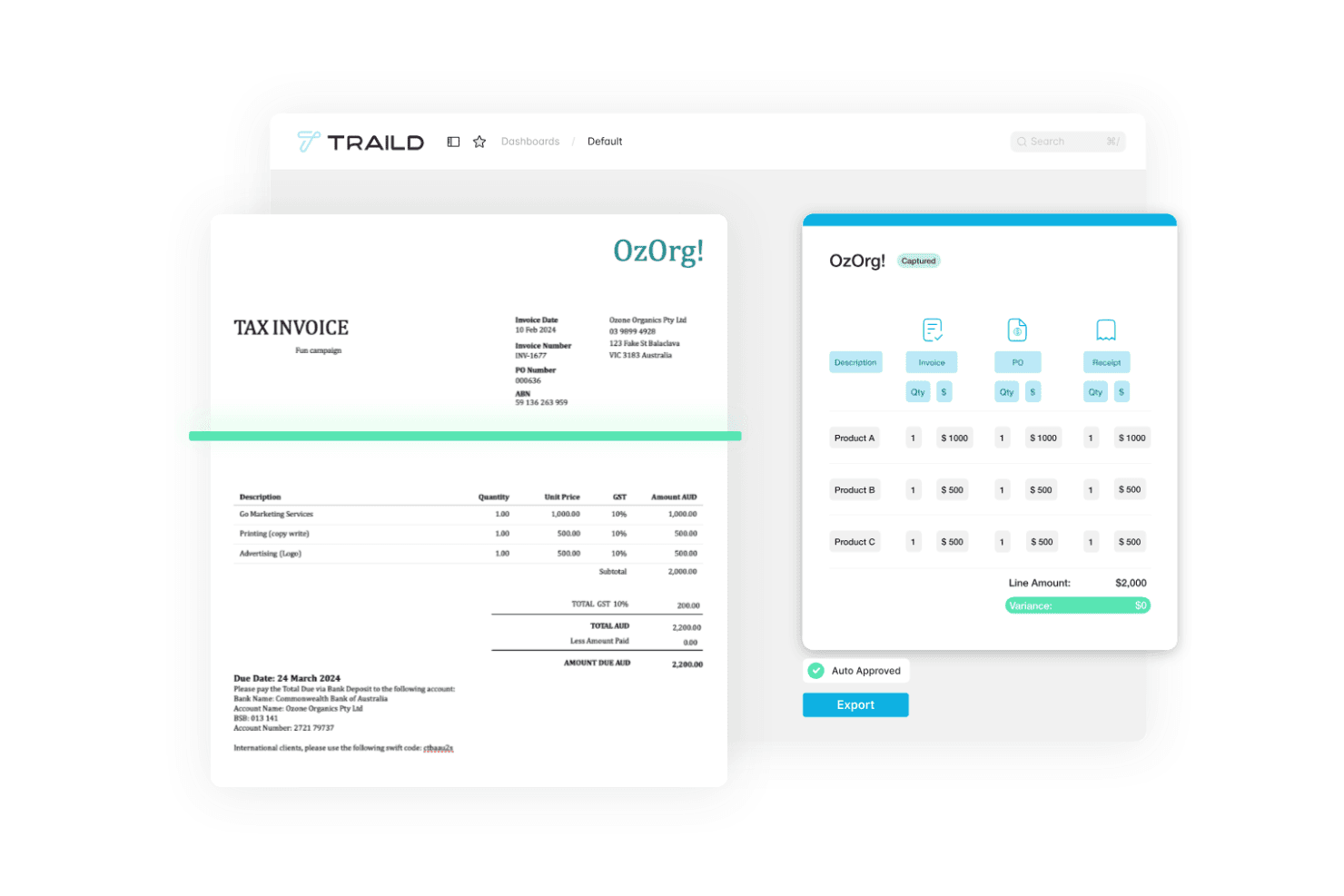
Traild mostra una dashboard di automazione della contabilità fornitori che acquisisce i dati delle fatture, valida le voci di dettaglio e automatizza l'approvazione delle fatture. Traild è una piattaforma per l'automazione dei processi di contabilità fornitori (AP) che gestisce l'acquisizione delle fatture tramite IA, riconciliazione con ordini di acquisto, flussi di approvazione multi-livello, verifica dei fornitori e rilevamento delle frodi durante l’intero ciclo dalla fattura al pagamento.
Per chi è più adatto Traild?
Traild è ideale per team finanziari di fascia media che necessitano di controlli strutturati sui processi AP senza la complessità di una soluzione pensata per grandi aziende.
Perché ho scelto Traild
Ho incluso Traild tra le mie scelte principali perché il suo costruttore di flussi di approvazione offre ai team AP un vero controllo su come le fatture vengono gestite all'interno dell'azienda. Mi piace che sia possibile configurare modelli con regole di instradamento personalizzate in base al tipo di fattura, fornitore, centro di costo o soglia di spesa, così ogni categoria di fattura segue percorsi differenti senza intervento manuale. Inoltre, è possibile aggiungere logiche condizionali, il che significa che, ad esempio, una fattura per le utenze segua un percorso diverso rispetto a una per investimenti, senza dover ricostruire ogni volta tali regole da zero.
Caratteristiche principali di Traild
- Acquisizione fatture tramite IA: Estrae e codifica automaticamente i dati delle fatture tramite intelligenza artificiale, riducendo l'inserimento manuale dei dati su tutti i formati di fattura.
- Riconciliazione ordini di acquisto 2-3 vie: Confronta le fatture con ordini di acquisto e ricevute per segnalare eventuali discrepanze prima dell'approvazione.
- Verifica dei fornitori: Valida i dati bancari e le informazioni di contatto dei fornitori per ridurre il rischio di frodi nei pagamenti.
- Riconciliazione automatica degli estratti conto: Riconcilia gli estratti conto dei fornitori con le registrazioni AP per individuare fatture mancanti o duplicate.
Integrazioni Traild
Traild offre integrazioni native con Acumatica, SYSPRO, IFS, NetSuite, SAP Business One, MYOB e Xero, garantendo un flusso dati bidirezionale in tempo reale con ciascun ERP.
Pros and Cons
Pros:
- Rilevamento integrato di frodi e anomalie tramite IA
- Gestisce bene flussi AP specifici di settore
- Gestione multi-entità con un solo accesso
Cons:
- Numero limitato di integrazioni ERP
- Nessuna prova gratuita self-service disponibile
Learn more about Traild: Ideale per workflow di approvazione automatizzati
- Demo gratuita disponibile
- A partire da $499/mese (fatturazione annuale)
Visit WebsiteCustomer Rating:4.8/5
La dashboard di Precoro centralizza tutti gli ordini di acquisto e include stati, dettagli dell'acquirente e documenti correlati. Per chi è alla ricerca di una soluzione affidabile per l'automazione dei conti da pagare, Precoro offre una piattaforma che centralizza la gestione delle fatture e aumenta la precisione finanziaria. Progettato per aziende di medie dimensioni, Precoro si integra con diversi sistemi di contabilità, fornendo visibilità in tempo reale e flussi di approvazione personalizzabili. Le sue funzionalità basate sull'IA riducono al minimo le attività manuali, prevengono errori e garantiscono pagamenti puntuali, rendendola un'opzione adatta per i team finanziari che desiderano migliorare i propri processi AP.
Perché ho scelto Precoro
Ho scelto Precoro per la sua capacità di aumentare precisione e controllo nei processi di conti da pagare grazie alla cattura automatica delle fatture basata su IA e ai flussi di lavoro di approvazione personalizzabili. Queste funzionalità riducono notevolmente l'intervento manuale, consentendo al tuo team di concentrarsi su attività strategiche invece di inserimenti dati ripetitivi. L'integrazione di Precoro con diversi sistemi di contabilità garantisce anche un funzionamento senza interruzioni, fornendo visibilità in tempo reale su più entità e valute. Questo lo rende una scelta ideale per i team finanziari che desiderano migliorare le operazioni AP senza la complessità delle configurazioni difficili.
Funzionalità principali di Precoro
Oltre alla cattura delle fatture e ai flussi di approvazione, Precoro offre numerose altre funzionalità che migliorano il processo di conti da pagare:
- Matching a tre vie: Questa funzionalità garantisce che le fatture siano abbinate correttamente a ordini di acquisto e ricevute, riducendo il rischio di errori e di attività fraudolente.
- Portale fornitori: Consente una comunicazione semplificata con i fornitori, migliorando la gestione delle relazioni e facilitando una più rapida soluzione delle discrepanze.
- Controlli di spesa integrati: Questi controlli aiutano il team a mantenere la conformità al budget impostando limiti e avvisi di spesa, assicurando disciplina finanziaria.
- Visibilità in tempo reale: Grazie a dashboard completi, il tuo team può monitorare fatture, budget e spese tra i vari reparti ed entità, aumentando trasparenza e capacità decisionale.
Integrazioni Precoro
Le integrazioni includono NetSuite, QuickBooks Online, QuickBooks Desktop, Xero, Sage Intacct e Microsoft Dynamics 365.
Pros and Cons
Pros:
- Flussi di lavoro personalizzabili si adattano a diverse esigenze aziendali
- Robusto sistema di matching a tre vie
- Creazione e monitoraggio degli ordini di acquisto efficiente
Cons:
- L'app mobile potrebbe essere migliorata
- Dipendenza dalla tecnologia per i processi AP
Learn more about Precoro: Ideale per l'elaborazione automatica delle fatture
- Demo gratuita disponibile
- Prezzi su richiesta
Visit WebsiteCustomer Rating:4.3/5
La dashboard di Paylocity mostra i flussi di lavoro automatizzati delle fatture e la visibilità in tempo reale sulle approvazioni dei pagamenti. Per le aziende che desiderano semplificare le operazioni finanziarie, il software di automazione dei conti fornitori di Paylocity offre un approccio snello alla gestione dei processi di pagamento e al miglioramento della supervisione finanziaria. È particolarmente indicato per le organizzazioni che vogliono ridurre gli errori manuali e prendere decisioni più informate grazie all'automazione dei flussi di lavoro e alla visibilità in tempo reale sulle transazioni. Integrandosi con soluzioni HR e IT, Paylocity consente al tuo team di concentrare le risorse sulla crescita strategica, posizionandosi come un partner prezioso nella gestione finanziaria.
Perché ho scelto Paylocity
Ho scelto Paylocity per la sua capacità di trasformare le tradizionali attività dei conti fornitori in un processo più efficiente e preciso grazie all'automazione basata su intelligenza artificiale. Il software offre una gestione automatizzata delle fatture e dei flussi di approvazione, riducendo l'inserimento manuale dei dati e minimizzando gli errori. Inoltre, Paylocity supporta il monitoraggio in tempo reale e un'integrazione senza soluzione di continuità con i sistemi finanziari esistenti, fornendo al tuo team maggiore visibilità e controllo sulle operazioni finanziarie. Queste funzionalità consentono alle aziende di ottimizzare i processi dei conti fornitori, con un risparmio sui costi e un miglioramento delle relazioni con i fornitori.
Caratteristiche principali di Paylocity
Oltre ai motivi già citati, ecco alcune altre funzionalità chiave che fanno risaltare il software di automazione dei conti fornitori di Paylocity:
- Rilevamento frodi: Il software utilizza l'IA per monitorare le transazioni e identificare attività sospette, aumentando la sicurezza e riducendo il rischio di frodi.
- Analisi della spesa: Questa funzione offre approfondimenti dettagliati sui modelli di spesa, aiutando il tuo team a prendere decisioni basate sui dati e individuare aree di ottimizzazione dei costi.
- Conformità alle policy: I controlli automatizzati garantiscono che tutte le transazioni rispettino le policy aziendali e gli standard normativi, semplificando le verifiche e mantenendo la conformità.
- Gestione dei fornitori: L'onboarding e la gestione semplificata dei fornitori migliora le relazioni e garantisce pagamenti puntuali, ottimizzando l'efficienza del team nella gestione delle attività connesse ai fornitori.
Integrazioni di Paylocity
Le integrazioni includono AxisCare, BenefitsMe, CompareMedsRX, Crunchtime, 15Five, 3rd Degree Screening, 401GO, 4MyBenefits, 7shifts e ABG (Alliance Benefit Group).
Pros and Cons
Pros:
- Automazione delle fatture basata su IA
- Analisi della spesa in tempo reale
- Integra flussi di lavoro HR e finanziari
Cons:
- La configurazione dei report può richiedere formazione
- Set di funzionalità complesso per team più piccoli
Learn more about Paylocity: Ideale per l’inserimento fatture alimentato dall’IA
- Prova gratuita di 21 giorni disponibile
- A partire da $99/mese
Visit WebsiteCustomer Rating:4.9/5
Fattura digitale di MakersHub con dettagli di acquisto specifici per articolo, termini di pagamento e importo totale dovuto. Immagina di trasformare il flusso di lavoro del tuo reparto finanziario con uno strumento che si integra nei sistemi già esistenti, eliminando la noiosa immissione manuale dei dati e riducendo i tempi di elaborazione fino al 90%. Il software di automazione dei conti da pagare di MakersHub è concepito per settori come l’edilizia e la manifattura, offrendo un centro centralizzato per la gestione delle approvazioni e dei pagamenti. Questa piattaforma intelligente acquisisce automaticamente i dettagli delle fatture, liberando il tuo team per concentrarsi su compiti più strategici e garantendo al contempo precisione e conformità nei registri finanziari.
Perché ho scelto MakersHub
Ho scelto MakersHub per la sua innovativa tecnologia WiseVision, che riduce drasticamente l’inserimento manuale dei dati grazie all’acquisizione di tutte le informazioni rilevanti da diversi formati di fattura. Questa funzione è particolarmente preziosa per le aziende che desiderano snellire i processi di contabilità fornitori, poiché migliora la precisione e fa risparmiare molto tempo. Inoltre, la perfetta integrazione del software con QuickBooks permette una gestione efficiente di fatture e pagamenti, creando automaticamente fornitori e articoli per garantire un funzionamento finanziario senza intoppi. I flussi di approvazione personalizzabili e il controllo granulare degli accessi degli utenti sostengono ulteriormente una collaborazione efficace tra i team, rispondendo alle esigenze delle organizzazioni con flussi di lavoro complessi.
Funzionalità principali di MakersHub
Oltre alle ragioni per cui ho scelto MakersHub, ci sono numerose funzionalità chiave che lo rendono una scelta interessante per l’automazione dei conti da pagare.
- Regole di mappatura automatica: Questa funzione ti consente di configurare una sola volta le regole di mappatura, assicurando che le spese siano codificate correttamente e che i nuovi articoli siano creati automaticamente nel piano dei conti.
- Hub collaborativo AP: Il tuo team può collaborare con contesto aggiungendo note e documenti, facilitando un processo di revisione più efficiente.
- Ricerca e filtri potenti: Puoi individuare rapidamente fatture specifiche utilizzando diversi filtri di ricerca, aumentando l’efficienza nell’individuazione dei documenti.
- Accesso granulare degli utenti: Imposta permessi flessibili per ogni utente in modo che possa accedere solo alle informazioni necessarie senza compromettere la sicurezza del tuo sistema contabile.
Integrazioni MakersHub
Le integrazioni includono Sage Intacct e QuickBooks.
Pros and Cons
Pros:
- Automazione di fatture e pagamenti
- Processo di approvazione multilivello
- Integrazione con QuickBooks
Cons:
- Curva di apprendimento ripida per i nuovi utenti
- Alcune funzionalità sono limitate ai piani di livello superiore
Learn more about MakersHub: Ideale per la verifica automatica tra ordine, fattura e ricevimento
- Demo gratuita disponibile
- Prezzo su richiesta
Visit WebsiteCustomer Rating:4.6/5
La dashboard di Procurify offre una panoramica del processo di approvvigionamento e pagamento, permettendo agli utenti di gestire e monitorare gli acquisti in modo efficiente. Per chi desidera migliorare i processi di contabilità fornitori, Procurify offre una soluzione che integra funzioni di approvvigionamento e pagamento, progettata specificamente per le aziende di fascia media. Presenta l'elaborazione delle fatture basata su intelligenza artificiale e accesso mobile, aiutando a risolvere sfide come errori manuali e cicli di pagamento lenti, garantendo la precisione delle operazioni finanziarie. Grazie alla gestione dei fornitori e al controllo del budget, Procurify è compatibile con i principali sistemi contabili, rappresentando una soluzione pratica per i team che vogliono ottimizzare la gestione finanziaria.
Perché ho scelto Procurify
Ho scelto Procurify per la sua elaborazione delle fatture basata su intelligenza artificiale e la riconciliazione automatizzata, che affrontano le attività manuali tediose spesso incontrate dai team finanziari. Queste funzionalità migliorano la precisione e riducono il rischio di errori, permettendo al tuo team di concentrarsi sulla pianificazione finanziaria strategica. Inoltre, l'integrazione con sistemi contabili popolari come QuickBooks facilita la gestione dei dati, rendendolo una scelta pratica per le aziende che desiderano modernizzare la gestione delle spese. L'approccio di Procurify alla semplificazione dei processi da approvvigionamento a pagamento si allinea bene alle organizzazioni che mirano a migliorare l'efficienza e la precisione finanziaria.
Caratteristiche principali di Procurify
Oltre all'elaborazione delle fatture tramite intelligenza artificiale e alla riconciliazione automatizzata, Procurify offre altre funzionalità interessanti per l'automazione della contabilità fornitori.
- Gestione delle fatture: Questa funzione permette di gestire e monitorare facilmente le fatture, offrendo visibilità in tempo reale sulle obbligazioni finanziarie e contribuendo a mantenere solide relazioni con i fornitori.
- Opzioni di pagamento flessibili: Procurify supporta diversi metodi di pagamento, tra cui ACH, bonifici bancari e assegni, assicurandoti la possibilità di gestire i pagamenti ai fornitori nel modo più adatto alle tue esigenze aziendali.
- Monitoraggio in tempo reale: Con questa funzione, il tuo team può monitorare gli stanziamenti e i dati finanziari in tempo reale, consentendo previsioni di budget e pianificazioni finanziarie più accurate.
- Accesso mobile: L'app mobile di Procurify permette di gestire richieste, spese e approvazioni ovunque ti trovi, garantendo che i processi di contabilità fornitori non siano limitati dalla posizione geografica.
Integrazioni di Procurify
Le integrazioni includono QuickBooks Online, QuickBooks Desktop, NetSuite, Sage Intacct, Microsoft Dynamics 365 e supporto API per integrazioni personalizzate.
Pros and Cons
Pros:
- Monitoraggio del budget in tempo reale
- Offre report personalizzabili
- L'app mobile permette approvazioni e gestione in mobilità
Cons:
- Potrebbe avere funzionalità di analisi più avanzate
- La modifica delle richieste d'ordine può risultare complicata
Learn more about Procurify: Ideale per l'automazione delle fatture tramite IA
- Demo gratuita disponibile
- Prezzo su richiesta
Visit WebsiteCustomer Rating:4.8/5
La funzione di elaborazione automatica delle fatture di DOKKA velocizza e automatizza l'estrazione e l'organizzazione dei dati delle fatture. Per chi cerca una soluzione per automatizzare i processi di contabilità fornitori, DOKKA offre una piattaforma alimentata dall'IA progettata per semplificare i flussi di lavoro finanziari. Questo strumento è ideale per professionisti della finanza come CFO e Responsabili Contabilità Fornitori che desiderano aumentare l'efficienza e migliorare la visibilità del flusso di cassa. Integrandosi con diversi sistemi ERP, DOKKA riduce le attività manuali e limita le frodi, offrendo soluzioni su misura che migliorano i risultati complessivi dell'azienda.
Perché ho scelto DOKKA
Ho scelto DOKKA perché la sua piattaforma basata sull'intelligenza artificiale eccelle nell'automazione completa delle attività di contabilità fornitori, rendendola una scelta distintiva per i team finanziari. La tecnologia avanzata di DOKKA consente un'integrazione fluida con vari sistemi ERP, permettendo al tuo team di adottarla facilmente nei flussi di lavoro esistenti. Con funzioni come l'elaborazione automatica delle fatture e flussi di approvazione multilivello, DOKKA riduce notevolmente le attività manuali e gli errori, favorendo cicli di pagamento più rapidi e una migliore gestione del flusso di cassa. Questa attenzione all'efficienza e alla precisione consente al team di spostare il focus dalle attività di routine a iniziative finanziarie più strategiche.
Caratteristiche principali di DOKKA
Oltre alle solide capacità di automazione, DOKKA offre diverse funzionalità che migliorano il processo di contabilità fornitori per il tuo team finanziario:
- Ricerca documenti in stile Google: individua rapidamente fatture, commenti o storici di approvazione con un potente sistema di indicizzazione e ricerca per parole chiave.
- Abbinamento automatico degli ordini d'acquisto: riconcilia in modo accurato ordini d'acquisto e fatture, minimizzando gli errori di pagamento grazie alla visualizzazione delle discrepanze.
- Estrazione delle singole voci: estrai facilmente informazioni dettagliate dalle fatture alle registrazioni contabili, migliorando velocità e precisione nell'elaborazione.
- Workspace centralizzato: facilita la collaborazione in tempo reale, la gestione documentale e la trasparenza tra i membri del team, assicurando che tutti siano informati e allineati.
Integrazioni DOKKA
Le integrazioni native di DOKKA includono QuickBooks Online, Xero, Sage 50, Sage 200, Microsoft Dynamics 365, Oracle NetSuite, SAP Business One, Priority ERP, Exact e Zoho Books.
Pros and Cons
Pros:
- Estrazione dei dati molto accurata
- Flussi di lavoro personalizzabili
- Offre funzionalità di collaborazione avanzate
Cons:
- Scalabilità limitata per grandi aziende
- Capacità offline limitate
Learn more about DOKKA:

Airbase ti consente di personalizzare le politiche di spesa e impostare regole per automatizzare molte attività generali di gestione delle spese insieme alla contabilità fornitori. Per i professionisti della finanza che cercano una soluzione affidabile per ottimizzare le operazioni di contabilità fornitori, Airbase offre una piattaforma pensata per semplificare l'elaborazione delle fatture, i flussi di approvazione e la gestione dei fornitori. L'integrazione della tecnologia AI garantisce precisione e riduce gli errori manuali, offrendo efficienza operativa e visibilità finanziaria. Sfruttando Airbase, puoi trasformare i flussi di lavoro tradizionali e soggetti a errori in processi efficienti, ottenendo così un maggiore controllo finanziario e supportando la crescita della tua organizzazione.
Perché ho scelto Airbase
Ho scelto Airbase perché offre una soluzione specializzata per l'automazione della contabilità fornitori particolarmente vantaggiosa per le startup. Il sistema di acquisizione fatture e l'automazione dei flussi di lavoro guidati dall'AI riducono significativamente il carico di lavoro manuale e migliorano la conformità. L'integrazione della piattaforma con i più diffusi ERP garantisce la sincronizzazione dei dati finanziari, offrendo visibilità e controllo in tempo reale sulle operazioni. Questa combinazione di funzionalità consente alle startup di gestire in modo efficiente i processi di contabilità fornitori, concentrandosi sulla crescita strategica.
Funzionalità principali di Airbase
Oltre a essere ideale per le startup, Airbase offre diverse funzionalità chiave che migliorano l'automazione della contabilità fornitori.
- Approvvigionamento guidato: Questa funzione semplifica il processo di acquisto per i dipendenti grazie a un sistema di instradamento senza codice che garantisce conformità senza complessità tecnica.
- Gestione delle spese: Il sistema OCR basato su AI genera automaticamente i report delle spese dalle immagini delle ricevute, riducendo l'inserimento manuale dei dati e assicurando la conformità.
- Carte aziendali: Airbase integra pre-approvazioni e dettagli di spesa direttamente nella contabilità generale, con opzioni sia per programmi di carte virtuali che fisiche.
- Sincronizzazione automatica con la contabilità generale: Questa funzione assicura che tutti i dettagli dei fornitori e dei pagamenti siano sincronizzati senza soluzione di continuità con la contabilità generale, migliorando la trasparenza e l'efficienza contabile.
Integrazioni Airbase
Le integrazioni includono Xero, NetSuite, Slack, QuickBooks Online, Sage Intacct, Indent, Microsoft Dynamics 365 Business Central e Intuit QuickBooks Desktop.
Pros and Cons
Pros:
- L'app mobile consente la gestione delle spese ovunque ti trovi
- Reportistica in tempo reale per tutte le spese non di payroll
- Le carte di credito virtuali offrono spese sicure e controllate
Cons:
- Le capacità di reportistica sono limitate
- Le funzionalità dell'app mobile sono limitate
 9Ideale per il supporto a pagamenti con più metodi
Ramp
- Piano gratuito + prova gratuita di 30 giorni + demo gratuita disponibile
- Da $15/utente/mese
Visit WebsiteCustomer Rating:4.8/5
Ramp offre una dashboard automatizzata per la contabilità fornitori che categorizza le transazioni, sincronizza le spese e segnala le note mancanti per la revisione. Per chi desidera migliorare i processi di contabilità fornitori, Ramp offre una soluzione innovativa pensata per le aziende che vogliono accelerare le proprie operazioni finanziarie. Come strumento progettato con elaborazione delle fatture guidata dall'IA e capacità di integrazione senza interruzioni, si rivolge in particolare ai team finanziari desiderosi di eliminare le inefficienze dei flussi di lavoro manuali. Automatizzando attività come l'acquisizione delle fatture e l'instradamento per l'approvazione, Ramp non solo accelera i tempi di elaborazione, ma fornisce anche informazioni in tempo reale sul flusso di cassa, aiutando il tuo team a concentrarsi sulla gestione finanziaria strategica invece che su compiti ripetitivi.
Perché ho scelto Ramp
Ho scelto Ramp per la sua particolare capacità di affrontare le inefficienze del processo di contabilità fornitori con funzionalità come il riconoscimento ottico dei caratteri (OCR) per un'estrazione accurata dei dati e l'instradamento automatico delle approvazioni. Queste funzionalità permettono al tuo team di elaborare le fatture più rapidamente e ridurre gli errori, affrontando le sfide dei sistemi manuali. Inoltre, l'integrazione di Ramp con i sistemi finanziari già in uso mantiene un flusso di lavoro coerente, migliorando visibilità e controllo sul flusso di cassa. Queste capacità rendono Ramp una soluzione interessante per i team finanziari che mirano a ottimizzare le operazioni di contabilità fornitori.
Caratteristiche principali di Ramp
Oltre alle funzionalità che mi hanno inizialmente attirato su Ramp, ci sono molte altre caratteristiche che possono potenziare notevolmente le operazioni di contabilità fornitori.
- Reportistica in tempo reale: Fornisce dashboard e report che offrono informazioni sui tempi di elaborazione, modelli di spesa e prestazioni dei fornitori, permettendo al tuo team di prendere decisioni finanziarie consapevoli.
- Tracciamento digitale delle verifiche: Mantiene una documentazione completa di tutte le azioni sulle fatture, supportando la conformità e i controlli interni, fondamentali durante le verifiche.
- Rilevamento delle frodi: Utilizza il confronto a due e tre vie per individuare discrepanze e prevenire pagamenti non autorizzati, garantendo la sicurezza delle tue transazioni finanziarie.
- Capacità di pagamento globale: Facilita i pagamenti ai fornitori in tutto il mondo, permettendo al tuo team di gestire le transazioni internazionali in modo fluido ed efficiente.
Integrazioni Ramp
Le integrazioni includono Xero, QuickBooks, Netsuite, Sage ed è disponibile un'API per integrazioni personalizzate.
Pros and Cons
Pros:
- Funzionalità di reporting complete
- Possibilità di emettere più carte virtuali con controlli personalizzabili
- Rendicontazione delle spese automatizzata e abbinamento delle ricevute
Cons:
- Funzionalità di contabilità avanzate limitate
- Difficoltà di integrazione con sistemi ERP meno comuni
 10Ideale per approfondimenti automatizzati sul flusso di cassa
Xero
- Prova gratuita di 30 giorni disponibile
- A partire da $2.50/mese
Visit WebsiteCustomer Rating:4.4/5
Xero ti permette di monitorare e gestire efficacemente le fatture, offrendo una visione chiara della contabilità fornitori e del flusso di cassa. Per chi cerca di affrontare le sfide della contabilità fornitori, Xero offre una soluzione su misura per le piccole imprese. Automatizza attività come l'elaborazione delle fatture e il monitoraggio dei pagamenti, facendoti risparmiare tempo e riducendo gli errori, offrendo al contempo una migliore visibilità sul flusso di cassa. Questo lo rende una scelta interessante per gli imprenditori che desiderano migliorare l'efficienza, ridurre i costi operativi e mantenere solide relazioni con i fornitori.
Perché ho scelto Xero
Ho scelto Xero per la sua capacità di trasformare i processi di contabilità fornitori attraverso funzionalità come il caricamento automatico delle fatture tramite OCR e AI e i flussi di approvazione semplificati. Queste capacità risolvono le problematiche delle registrazioni manuali laboriose e degli errori potenziali. Le dashboard in tempo reale del software migliorano la gestione del flusso di cassa consentendoti di monitorare con facilità i pagamenti in scadenza. Con Xero, non solo beneficerai di tempi di elaborazione ridotti e maggiore accuratezza, ma anche di mantenere buoni rapporti con i fornitori grazie a pagamenti puntuali.
Caratteristiche principali di Xero
Oltre alle funzionalità già evidenziate, Xero offre numerose altre funzioni che lo rendono una scelta solida per automatizzare i tuoi processi di contabilità fornitori.
- Acquisizione automatica dei dati: Xero utilizza la tecnologia OCR e AI per caricare ed elaborare automaticamente le fatture, riducendo le attività di inserimento manuale dei dati.
- Pagamenti elettronici: Puoi facilitare i pagamenti ai fornitori direttamente nel software, semplificando il processo di transazione finanziaria.
- Associazione fatture: Il software confronta automaticamente ordini di acquisto e fatture per garantire coerenza e minimizzare gli errori.
- Visibilità in tempo reale: Xero offre dashboard e report che consentono di monitorare i pagamenti in scadenza e gestire il flusso di cassa in modo più efficace.
Integrazioni di Xero
Le integrazioni includono Hubdoc, Syft, Stripe, Xero Inventory Plus, Integrazione Shopify, Xero Practice Manager, Integrazione HubSpot CRM, Xero Analytics Plus, Etsy e Xero Workpapers.
Pros and Cons
Pros:
- Accessibilità cloud
- Ottime funzionalità di reportistica
- Interfaccia intuitiva
Cons:
- L'app mobile non è robusta quanto la versione desktop
- Potrebbe non essere adatto a grandi imprese
Learn more about Xero:
Altre opzioni di software per l'automazione della contabilità fornitori
Ecco alcune altre ottime opzioni che non sono rientrate nella lista dei migliori software per l’automazione della contabilità fornitori, ma che vale comunque la pena considerare:
- 11TipaltiIdeale per le organizzazioni globali
- 12CentimeIdeale per la gestione della liquidità tutto-in-uno
- 13XledgerIdeale per la gestione finanziaria multi-ente
- 14SettleIdeale per piccole imprese CPG
- 15Quadient AP By BeanworksIdeale per la gestione di più sedi
- 16SlashIdeale per la visibilità in tempo reale del flusso di cassa
- 17PairsoftIdeale per aziende in rapida crescita
- 18RoutableIdeale per pagamenti a fornitori internazionali
- 19Rippling SpendIdeale per i controlli avanzati delle policy
- 20Doxis SpendControlIdeale per il supporto multivaluta
- 21BILLIdeale per pagamenti internazionali
Software finanziari correlati
Se non hai ancora trovato ciò che cerchi, dai un'occhiata ad altri strumenti strettamente correlati che abbiamo testato e valutato:
- Software di contabilità
- Software per la contabilità fornitori
- Software per le note spese
- Software per il monitoraggio delle spese
- Software per la rendicontazione finanziaria
- Software ERP
- Sistemi POS
- Software per la fatturazione
- Software per le previsioni
- Servizi per conti esercenti
Come Valuto i Software di Automazione dei Conti da Pagare
Analizzo gli strumenti AP da due prospettive: i requisiti di base come la riconciliazione a 3 vie e la sincronizzazione con l'ERP, oltre ai fattori differenzianti—come i pagamenti globali o la codifica AI—che distinguono la soluzione giusta dalle altre.
Funzionalità Core (Requisiti Fondamentali per Questa Lista)
Quando seleziono gli strumenti per la mia lista, valuto ciascuno su una scala da 0 (non offre la funzionalità) a 5 (eccelle in quest'area) per ogni funzionalità core elencata di seguito. Poi trasformo il punteggio totale dello strumento in una percentuale. Ogni strumento deve raggiungere un punteggio totale minimo del 75% per essere considerato per l'inclusione.
- Acquisizione Fatture & OCR: Verifico se lo strumento può acquisire fatture da email, caricamento e EDI, poi estrarre i dati delle singole voci con sufficiente precisione da ridurre le correzioni manuali nelle elaborazioni ad alto volume.
- Automazione del Workflow di Approvazione: Qui contano l'instradamento multilivello con regole condizionali: cerco delega, approvazioni da mobile e notifiche che evitano che le fatture rimangano bloccate nella casella di posta di qualcuno.
- Abbinamento PO & Fatture: Valuto se la piattaforma gestisce in modo automatico l'abbinamento a 2 vie e a 3 vie con tolleranze configurabili, poiché anche piccole discrepanze possono generare problematiche riconciliative a fine mese.
- Esecuzione Integrata dei Pagamenti: Lo strumento dovrebbe permettere di pianificare ed effettuare pagamenti tramite ACH, assegno, bonifico e carta virtuale da un'unica postazione, senza costringere il team ad accedere a un portale bancario separato.
- Integrazione con ERP & Contabilità: Cerco una sincronizzazione bidirezionale con sistemi come NetSuite, QuickBooks, SAP o Sage Intacct—i codici contabili, i dati dei fornitori e le informazioni sugli ordini di acquisto devono fluire in tempo reale in entrambe le direzioni.
- Gestione Fornitori & Conformità: Esamino come la piattaforma gestisce l'onboarding dei fornitori, la raccolta dei moduli W-9/W-8 e la rilevazione dei duplicati, oltre a verificare che mantenga registri pronti per audit che il controller può recuperare durante una revisione.
Una volta che ho una lista di strumenti che soddisfano i criteri, considero cosa rende unica ciascuna piattaforma.
Fattori Differenzianti (Cosa Distingue i Fornitori)
Ecco come confronto e analizzo i diversi fornitori:
Funzionalità Distintive
La codifica AI delle voci contabili è un grande elemento differenziante. Cerco piattaforme in cui l'apprendimento automatico assegna automaticamente conti, centri di costo e dipartimenti in base a schemi storici. Solo questa funzione può ridurre di ore la coda di codifica nei flussi ad alto volume. Meritano una valutazione anche i programmi di cashback per carte virtuali, poiché consentono al team AP di generare ritorni sui pagamenti ai fornitori. Per le organizzazioni con più filiali che gestiscono fornitori esteri, l'assistenza globale con pagamenti multi-valuta nativi e conformità fiscale locale fa davvero la differenza.
Oltre le Funzionalità
La dimensione dell'azienda conta più di quanto molti acquirenti pensino. Valuto se il modello di pricing della piattaforma—per fattura, per utente o a tariffa fissa—si adatta al volume AP senza penalizzare la crescita. Vale la pena verificare anche le certificazioni di sicurezza e conformità come SOC 2 Type II e PCI-DSS, soprattutto se il team gestisce i pagamenti all'interno della piattaforma. La trasparenza sui prezzi completa il quadro. Cerco dettagli chiari sulle commissioni che includano i costi dei canali di pagamento e della messa in opera, così non ci sono sorprese dopo la firma del contratto.
Come scegliere il software di automazione della contabilità fornitori
Scegliere il software giusto può sembrare complicato, considerando i lunghi elenchi di funzionalità e i piani tariffari poco chiari. Per semplificare le cose, ecco alcuni fattori chiave da tenere a mente durante il processo di selezione.
| Fattore | Cosa considerare |
|---|---|
| FattoreScalabilità | Cosa considerareQuesto software crescerà insieme alla tua azienda? |
| FattoreIntegrazioni | Cosa considerareSi integra con i tuoi sistemi esistenti, ovvero sistemi ERP e CRM? |
| FattorePersonalizzazione | Cosa considerarePuoi adattarlo alle tue esigenze specifiche? |
| FattoreSemplicità d'uso | Cosa considerareLe persone che lo utilizzeranno lo trovano intuitivo? |
| FattoreBudget | Cosa considerareRientra nei tuoi vincoli finanziari? |
| FattoreSicurezza dei dati | Cosa considerareSono presenti misure per proteggere i tuoi dati? |
| FattoreAssistenza | Cosa considerareÈ disponibile un servizio affidabile di assistenza clienti? |
| FattoreConformità | Cosa considerareTi aiuta a mantenere la conformità alle normative? |
Tendenze nei software per l'automazione della contabilità fornitori
I software per l'automazione della contabilità fornitori si stanno evolvendo rapidamente. Dopo aver analizzato le versioni più recenti e gli aggiornamenti delle funzionalità, sono emerse tre tendenze chiare. Se stai cercando di ridurre i costi, aumentare il controllo e diminuire gli errori manuali, tieni d'occhio queste tendenze:
- Intelligenza artificiale e apprendimento automatico: queste tecnologie rendono più intelligente l'automazione della contabilità fornitori, migliorando le previsioni dei flussi di cassa, potenziando il rilevamento delle frodi e gestendo autonomamente decisioni complesse.
- Iperautomazione: va oltre l'automazione di base combinando strumenti come l'intelligenza artificiale e la RPA per automatizzare il maggior numero possibile di processi della contabilità fornitori. L'obiettivo? Flussi di lavoro più rapidi, meno errori e maggiore efficienza.
- Analisi avanzata dei dati: un numero crescente di soluzioni per la contabilità fornitori utilizza l'analisi dei dati per offrire alle aziende informazioni più approfondite sui modelli di spesa e sulla salute finanziaria. NetSuite, ad esempio, aiuta le aziende a gestire le spese e i flussi di cassa con i suoi potenti strumenti di analisi.
- Tecnologia blockchain: alcuni fornitori stanno iniziando a esplorare la blockchain come strumento per proteggere i registri delle transazioni, ridurre i rischi di frode e garantire la trasparenza. Creando un registro digitale immodificabile, la blockchain potrebbe rendere l'elaborazione delle fatture più sicura ed efficiente.
- Funzionalità di prevenzione delle frodi: la sicurezza è più importante che mai e gli strumenti automatizzati di rilevamento delle frodi stanno diventando indispensabili. Questi algoritmi aiutano le aziende a individuare e bloccare le attività fraudolente prima che diventino un problema.
Che cos'è un software per l'automazione della contabilità fornitori?
Un software per l'automazione della contabilità fornitori è uno strumento digitale che automatizza l'elaborazione, l'approvazione e il pagamento delle fatture dei fornitori.
Sostituisce i flussi di lavoro manuali della contabilità fornitori con funzionalità come l'acquisizione automatizzata delle fatture, il confronto a tre vie, l'instradamento delle approvazioni e i pagamenti programmati. Progettato per i team contabili e i CFO, questo software riduce gli errori umani, accelera i tempi del ciclo di elaborazione delle fatture e garantisce la conformità ai controlli interni.
Offrendo una visibilità in tempo reale sulle passività e sui flussi di cassa, il software per l'automazione della contabilità fornitori aiuta i responsabili finanziari a ottimizzare il capitale circolante e a espandere le attività in modo efficiente.
Funzionalità dei software per l'automazione della contabilità fornitori
Quando scegli un software per l'automazione della contabilità fornitori, presta attenzione alle seguenti funzionalità chiave:
- Elaborazione delle fatture: questa funzionalità consente di acquisire, scansionare e digitalizzare le fatture, così puoi abbandonare l'inserimento manuale e ridurre gli errori umani. Accelera le approvazioni e ripaga in termini di tempo risparmiato.
- Flussi di lavoro automatizzati per le approvazioni: puoi definire i processi di approvazione con regole e instradamenti personalizzati. In questo modo invii le fatture alle persone giuste al momento giusto, senza dover più rincorrere le firme.
- Integrazione con i sistemi contabili: collega direttamente gli strumenti contabili o ERP esistenti. In questo modo i dati fluiscono senza interruzioni, eliminando i doppi inserimenti e garantendo la sincronizzazione di tutti i dati.
- Rilevamento dei duplicati e delle frodi: il software segnala automaticamente le fatture sospette o duplicate. È un modo pratico per individuare potenziali frodi prima che passino inosservate.
- Programmazione dei pagamenti: programma e automatizza i pagamenti per non perdere mai una scadenza e non pagare troppo presto. Questo mantiene stabili i flussi di cassa e soddisfatti i fornitori.
- Gestione dei documenti: archivia, organizza e recupera le fatture e i registri dei pagamenti con pochi clic. Non dovrai più cercare tra pile di documenti quando arriverà il momento delle verifiche.
- Report e analisi: ottieni una visibilità chiara sulla spesa, sui tempi di approvazione e sui colli di bottiglia dei flussi di lavoro grazie ai pannelli di controllo integrati e ai report personalizzabili. Questi dati ti aiutano a individuare le tendenze e a trovare modi per risparmiare.
- Controlli degli accessi degli utenti: imposta le autorizzazioni per stabilire chi può visualizzare, approvare o modificare ogni parte del processo di contabilità fornitori. In questo modo le informazioni sensibili restano nelle mani giuste e contribuisci a garantire la conformità.
- Accessibilità da dispositivi mobili: controlla le fatture o approva i pagamenti mentre sei fuori ufficio. Questa flessibilità aiuta le attività a procedere ovunque ti trovi.
Funzionalità comuni dell'intelligenza artificiale nei software di automazione dei debiti verso fornitori
Oltre alle funzionalità standard dei software di automazione dei debiti verso fornitori elencate sopra, molte di queste soluzioni stanno integrando l'intelligenza artificiale con funzionalità come:
- Estrazione intelligente dei dati: l'intelligenza artificiale analizza e interpreta i dettagli delle fatture, come date, importi e fornitori, senza che sia necessario inserire manualmente alcun dato. Questo riduce drasticamente gli errori e fa risparmiare molto tempo.
- Rilevamento automatizzato delle anomalie: il software utilizza l'intelligenza artificiale per rilevare modelli di pagamento insoliti, spese non conformi alle policy o potenziali frodi, segnalando problemi che potrebbero sfuggire all'occhio umano.
- Analisi predittiva: l'intelligenza artificiale esamina lo storico delle fatture e anticipa le esigenze di flusso di cassa o i rischi di pagamenti tardivi, consentendo di prendere decisioni finanziarie più ponderate prima che la situazione diventi urgente.
- Instradamento intelligente delle approvazioni: grazie all'intelligenza artificiale, il sistema apprende le abitudini dell'azienda e suggerisce o instrada automaticamente le approvazioni in base alle effettive tendenze del flusso di lavoro, riducendo i colli di bottiglia e il carico mentale.
- Abbinamento automatizzato dei fornitori: l'intelligenza artificiale abbina le fatture agli ordini di acquisto e alle ricevute, anche quando i dettagli non corrispondono perfettamente. In questo modo le discrepanze vengono risolte rapidamente e si evitano molti problemi.
Vantaggi dei software di automazione dei debiti verso fornitori
Passare a un software di automazione dei debiti verso fornitori può fare una grande differenza per il team e per l'azienda. Ecco alcuni dei principali vantaggi che ci si può aspettare:
- Maggiore visibilità: dati centralizzati e report in tempo reale offrono una visione più chiara del processo di gestione dei debiti verso fornitori e della salute finanziaria complessiva.
- Risparmio di tempo: l'automazione di attività ripetitive come l'inserimento dei dati e l'elaborazione delle fatture lascia al team più tempo da dedicare al lavoro più importante.
- Riduzione degli errori: il software riduce al minimo gli errori umani acquisendo e abbinando automaticamente i dati delle fatture agli ordini di acquisto.
- Migliore gestione del flusso di cassa: il monitoraggio in tempo reale delle fatture e dei pagamenti aiuta a gestire meglio il flusso di cassa e a prevedere le esigenze future.
- Maggiore conformità: l'automazione garantisce che tutte le fatture vengano elaborate in conformità ai requisiti normativi, riducendo il rischio di non conformità.
- Rapporti migliori con i fornitori: un'elaborazione dei pagamenti più rapida e accurata mantiene soddisfatti i fornitori e può portare a condizioni di pagamento o sconti migliori.
- Risparmio sui costi: la riduzione dei processi manuali abbassa i costi amministrativi e diminuisce la probabilità di errori costosi.
Costi e prezzi dei software di automazione dei debiti verso fornitori
Il prezzo dei software di automazione dei debiti verso fornitori varia generalmente in base alle funzionalità e alle dimensioni del team. La maggior parte degli strumenti segue una struttura a livelli prevedibile. Utilizza la tabella seguente per confrontare rapidamente i piani più comuni, i costi medi e le funzionalità principali, così da definire il budget in modo oculato e scegliere la soluzione più adatta al team finanziario.
| Tipo di piano | Prezzo medio (per utente, al mese) | Funzionalità comuni |
|---|---|---|
| Tipo di pianoGratuito | Prezzo medio (per utente, al mese)$0 | Funzionalità comuniElaborazione di base delle fatture, spazio di archiviazione limitato per i documenti, assistenza via e-mail e report di base. |
| Tipo di pianoAvvio | Prezzo medio (per utente, al mese)$20-30 | Funzionalità comuniElaborazione delle fatture, archiviazione dei documenti, assistenza via e-mail e chat, integrazioni di base e report. |
| Tipo di pianoAziendale | Prezzo medio (per utente, al mese)$50-70 | Funzionalità comuniElaborazione avanzata delle fatture, spazio di archiviazione dei documenti ampliato, accesso multiutente, integrazioni avanzate e report dettagliati. |
| Tipo di pianoGrandi imprese | Prezzo medio (per utente, al mese)$100-150 | Funzionalità comuniElaborazione completa delle fatture, spazio di archiviazione illimitato per i documenti, assistenza dedicata, integrazioni personalizzate e analisi avanzate. |
Domande frequenti sul software di automazione della contabilità fornitori
Hai altre domande sull’automazione della contabilità fornitori o su cosa tenere presente quando cerchi una soluzione? Ecco alcune domande frequenti con le relative risposte:
Quali sono i principali vantaggi dell'automazione della contabilità fornitori?
Ecco cosa può fare il software per la contabilità fornitori per il tuo reparto finanziario:
- Risparmiare tempo: Il tuo team dedica molto meno tempo all’inserimento manuale dei dati, alle comunicazioni con i fornitori e ad attività simili.
- Ridurre i costi del personale: Non è necessario assumere altri membri del team della contabilità fornitori quando l’azienda cresce: il software aiuta a gestire l’aumento del volume dei pagamenti.
- Ridurre gli errori: L’automazione riduce la possibilità di errori che potrebbero derivare dall’inserimento manuale.
- Visibilità sui dati: I report finanziari si aggiornano in tempo reale. Puoi utilizzare dati aggiornati per prendere decisioni, non dati obsoleti.
Quali attività possono gestire le soluzioni di automazione della contabilità fornitori?
Ecco cosa può gestire per te l’automazione della contabilità fornitori:
- Approvazione e instradamento delle richieste di acquisto, degli ordini di acquisto e delle fatture.
- Acquisizione dei dati delle fatture tramite OCR e AI.
- Comunicazioni con venditori e fornitori.
- Pagamenti, in particolare quelli ricorrenti.
Come si implementa l'automazione della contabilità fornitori?
Per implementare l’automazione della contabilità fornitori, inizia valutando i processi attuali della contabilità fornitori e individuando le tue esigenze. Crea un business case per ottenere il consenso degli stakeholder. Documenta i requisiti e scegli un fornitore di soluzioni di automazione della contabilità fornitori adatto alle tue esigenze. Crea ed esegui un piano di implementazione con fasi e tempistiche chiare.
Quanto tempo consente di risparmiare l'automazione della contabilità fornitori?
L’automazione della contabilità fornitori può far risparmiare molto tempo riducendo le attività manuali. In media, puoi aspettarti di risparmiare dal 60% all’80% del tempo normalmente dedicato alla ricezione delle fatture e all’acquisizione dei dati. Questa efficienza permette al tuo team di concentrarsi su attività a maggior valore aggiunto.
Come possono essere utilizzati RPA e AI per automatizzare la contabilità fornitori?
RPA (Robotic Process Automation) e AI (Artificial Intelligence) possono automatizzare attività ripetitive come l’elaborazione delle fatture, l’inserimento dei dati e la convalida. Queste tecnologie rendono il flusso di lavoro della contabilità fornitori più efficiente e accurato, riducendo gli errori e accelerando i tempi di elaborazione.
Come si gestiscono le eccezioni nell'automazione della contabilità fornitori?
La gestione delle eccezioni nell’automazione della contabilità fornitori prevede la configurazione di flussi di lavoro per gestire discrepanze come fatture non corrispondenti o informazioni mancanti. Il tuo team può esaminare e risolvere manualmente queste eccezioni oppure utilizzare algoritmi di apprendimento automatico per identificare e correggere nel tempo i problemi più comuni.
Quali misure di sicurezza sono previste per il software di automazione della contabilità fornitori?
Il software di automazione della contabilità fornitori include generalmente diverse misure di sicurezza, come la crittografia dei dati, i controlli degli accessi degli utenti e i registri di audit. Queste funzionalità aiutano a proteggere i dati finanziari dagli accessi non autorizzati e garantiscono la conformità agli standard di settore.