

The best Airbase alternatives stand out with real-time expense tracking, easy approval workflows, reliable integrations with your accounting stack, and transparent pricing—features finance teams count on when evaluating expense management software. If you’re searching for Airbase alternatives, you’re likely frustrated with gaps in controls, visibility, or flexibility that make month-end and audits tougher than they should be. In this list, you’ll discover tools designed to give you greater expense oversight, help your team move faster, and maintain strong financial controls—without the headaches that slow you down. You’ll get practical details to compare the top options and pick the best fit for your team’s workflow and requirements.
What Is Airbase?
Airbase is an expense management platform that centralizes company spending, from bill payments to employee expenses and card management. It helps finance teams automate approval workflows, track spending in real time, control payment methods, and sync transactions with accounting systems. Airbase is built for organizations that need tighter controls, better expense visibility, and efficient processes for managing business payments across teams, cards, and vendors.
Airbase Alternatives Comparison Table
This comparison table summarizes pricing details for my top Airbase alternative selections.
| Tool | Best For | Trial Info | Price | ||
|---|---|---|---|---|---|
| 1 | Best for real-time expense tracking | Free demo available | From $11.99/user/month (billed annually) | Website | |
| 2 | Best for procure-to-pay with built-in AP | Free demo available | From $499/month (billed annually) | Website | |
| 3 | Best for automated spend control and insights | Free plan + free demo available | From $15/user/month | Website | |
| 4 | Best for automated employee expense tracking | Free trial available | From £9.5/month | Website | |
| 5 | Best for combining travel and expense management | Free plan available | Pricing upon request | Website | |
| 6 | Best for team-based card management | Free demo available | Pricing upon request | Website | |
| 7 | Best for compliance in multi-entity organizations | Free demo available | From $99/month | Website | |
| 8 | Best for high-growth company scalability | Free plan available | From $12/user/month | Website | |
| 9 | Best for comprehensive procurement integration | Free demo available | Pricing upon request | Website | |
| 10 | Best for real-time virtual card issuing | Free plan + free demo available | From $13/user/month | Website |


Why Trust Our Software Recommendations
6,700+
Reviews
20
Industry experts
16+
Evaluation factors
14
Years
Our team has been testing and reviewing software since 2012. As finance leaders ourselves, we know how difficult—and important—it is to choose the right software.
For this guide, we evaluated tools using hands-on testing and independent research, scoring tools using our selection criteria.
Our reviews reflect our human editorial judgment, not a sales pitch.
Best Airbase Alternatives Reviews
Below are my detailed summaries of the best Airbase alternatives that made it onto my shortlist. My reviews offer a detailed look at the features, pricing, and integrations of each software to help you find the best one for you.
 Best for real-time expense tracking
- Free demo available
- From $11.99/user/month (billed annually)
Visit WebsiteCustomer Rating:4.6/5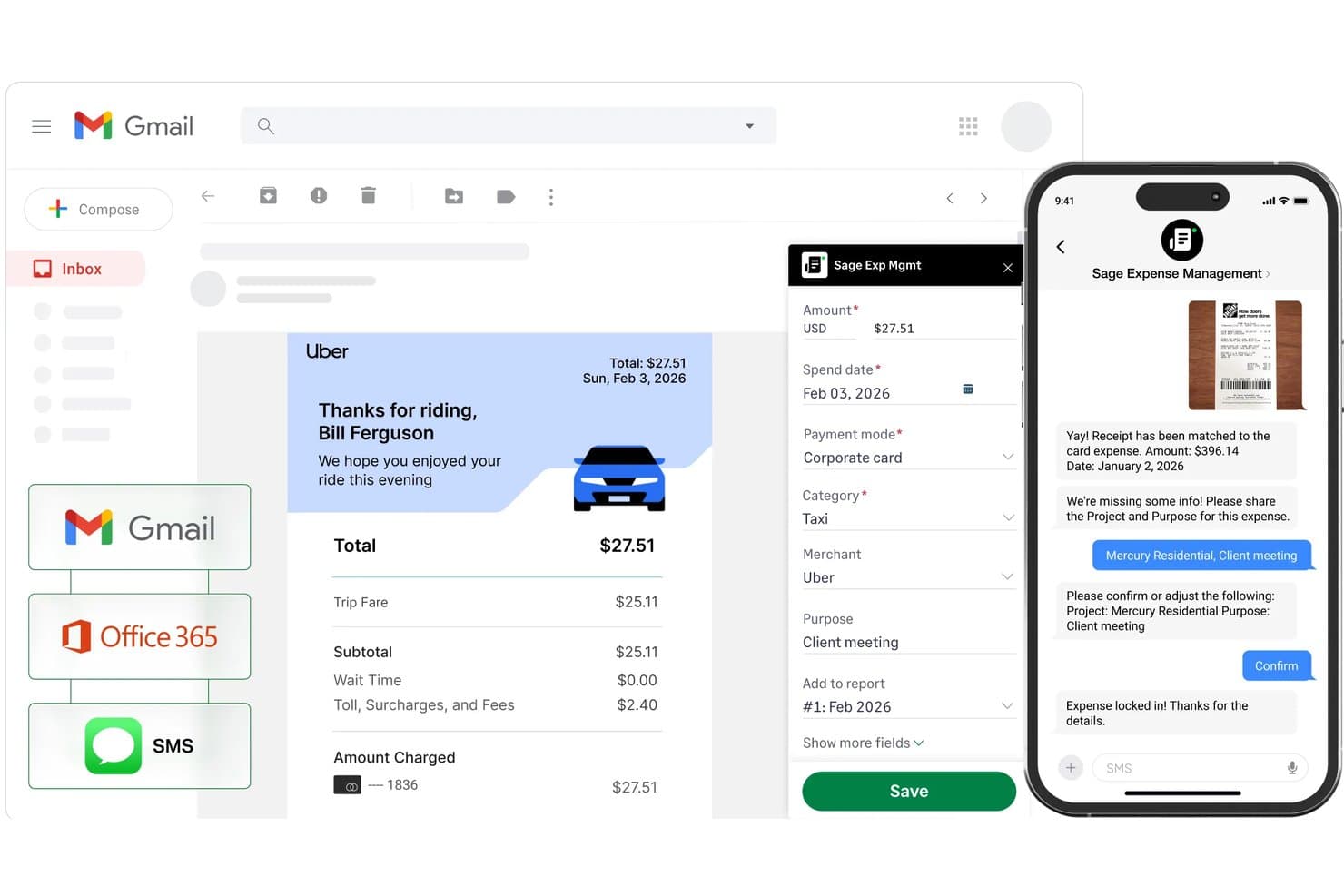
Sage Expense Management (formerly Fyle) automatically extracts receipt data from Gmail, Office 365, and SMS to populate expense fields like amount, date, merchant, category, and purpose. Sage Expense Management (formerly Fyle) helps finance teams control employee spending and reduce manual expense reviews, making it Best for real-time expense tracking.
Who Is Sage Expense Management Best For?
Sage Expense Management suits finance and accounting teams that oversee employee spending and need a structured expense review process.
Why I Picked Sage Expense Management (formerly Fyle)
I picked Sage Expense Management (formerly Fyle) as an Airbase alternative for its “Best for real-time expense tracking” focus. Employees can send receipts by text, email, or app, and OCR captures details while matching them to card transactions. I like that finance can check purchases against policy and route them through configurable approvals before they linger until close.
Sage Expense Management (formerly Fyle) Key Features
- Mileage tracking: Use Google Maps to log trips and calculate reimbursements.
- Per diem rates: Set rates by currency, employee level, department, and location.
- Project expense tracking: Assign expenses to projects for project-level cost tracking.
- Accounting integrations: Sync approved expenses with QuickBooks, Xero, and Sage.
Sage Expense Management (Formerly Fyle) Integrations
Sage Expense Management supports integrations with six accounting products: QuickBooks Online, QuickBooks Desktop, Sage Intacct, Xero, Sage 300 CRE, and Sage 50. It automatically syncs coded expense and receipt data to these systems.
Pros and Cons
Pros:
- Policy checks route expenses for approval
- Real-time card transaction matching
- Quick mobile receipt submission
Cons:
- OCR can misread or duplicate receipts
- Receipt matching sometimes misses transactions
Learn more about Sage Expense Management (formerly Fyle): Best for procure-to-pay with built-in AP
- Free demo available
- From $499/month (billed annually)
Visit WebsiteCustomer Rating:4.8/5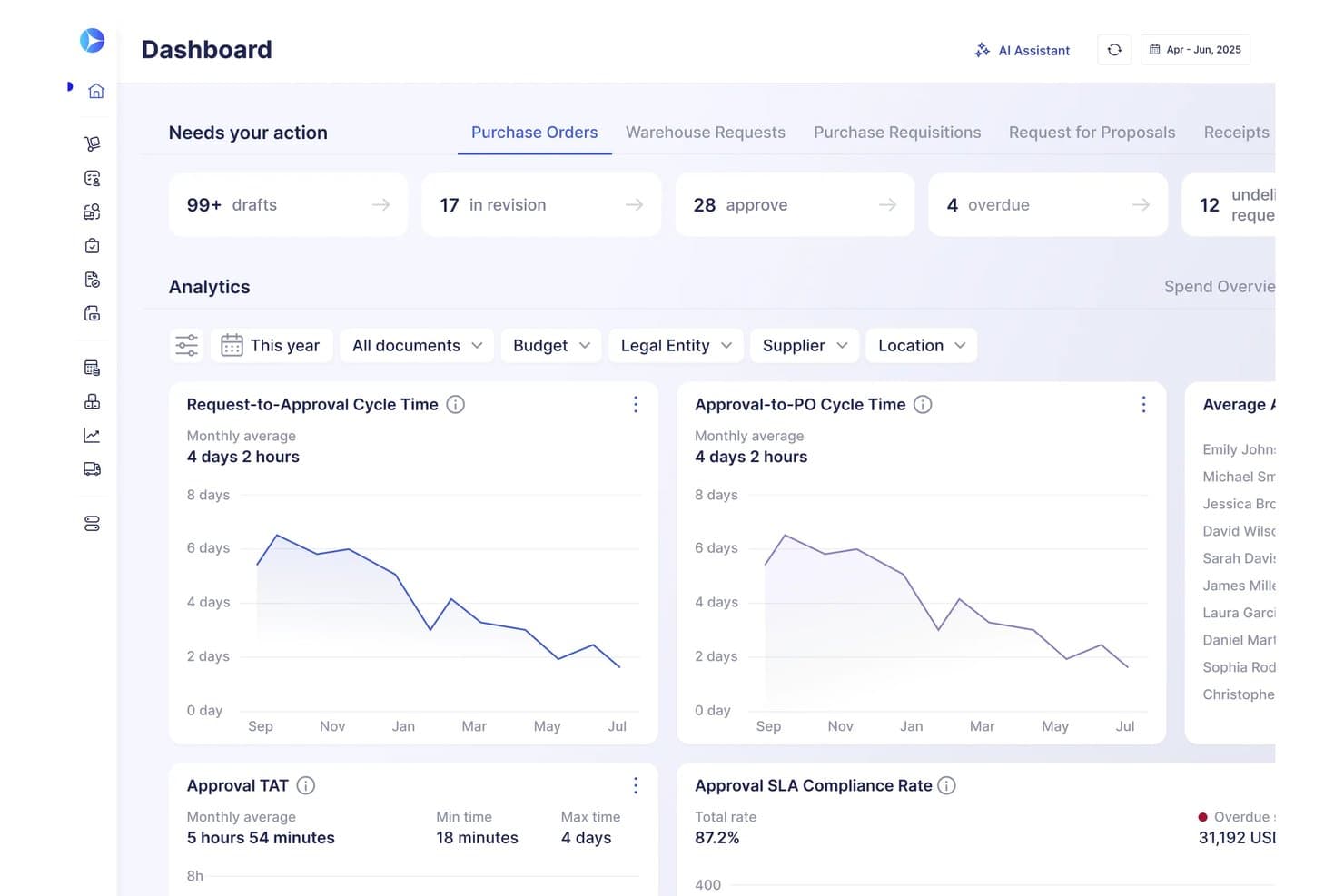
Precoro's dashboard centralizes procurement approvals and cycle time analytics. Precoro gives finance and procurement teams a central place to manage purchase requests, approvals, budgets, and supplier spend, helping growing businesses improve spending control across departments.
Who Is Precoro Best For?
Precoro suits finance and procurement teams that want to connect purchasing approvals with accounts payable in one system.
Why I Picked Precoro
I picked Precoro as an Airbase alternative because it’s a “Best for procure-to-pay with built-in AP” choice. I like how teams can route purchase requests for approval, create purchase orders, and match supplier invoices against orders and receipts, keeping the purchasing trail connected through accounts payable.
Precoro Key Features
- Budget tracking: Monitor allocated, reserved, and used funds by department, project, or location.
- PunchOut catalogs: Shop on approved supplier sites and sync items, prices, and shipping details.
- Supplier portal: Let suppliers manage RFP responses, documents, and status updates.
- Contract management: Store agreements, track expiry dates, and review extracted terms and renewal dates.
Precoro Integrations
Precoro documents integrations with QuickBooks Online, NetSuite, Xero, BILL, and Power BI, plus connector-based links to Microsoft Dynamics 365 Business Central and other systems. It also offers an API and SFTP connector for custom integrations.
Pros and Cons
Pros:
- Routes purchasing approvals by spend limits and teams
- Tracks committed and available budgets in real time
- Matches invoices against purchase orders and receipts
Cons:
- Approval-step notifications can miss payment deadlines
- Inventory controls may not suit stock replenishment
Learn more about Precoro: 3Best for automated spend control and insights
Ramp
- Free plan + free demo available
- From $15/user/month
Visit WebsiteCustomer Rating:4.8/5
Ramp offers reporting dashboards for spend, compliance, and efficiency. Ramp is an all-in-one spend management platform that combines corporate cards, expense management, accounts payable, travel, and procurement—making it a strong fit for finance teams that want to consolidate point solutions and reduce manual work across their entire spend cycle.
Who Is Ramp Best For?
Ramp is a strong fit for mid-sized to enterprise finance teams that need centralized spend visibility and automated controls across multiple departments.
Why Ramp Is a Good Airbase Alternative
I picked Ramp as one of the best because its automated spend controls genuinely remove the back-and-forth that slows finance teams down. I particularly like the Policy Agent, which reviews 100% of expenses, auto-approves compliant ones, and only escalates exceptions with a full audit trail. Paired with real-time spend reporting across teams, vendors, and cardholders, I find Ramp gives you a level of spend visibility that goes well beyond what most expense platforms offer.
Ramp Key Features
- Receipt capture and auto-coding: Ramp automatically captures receipts and pre-fills memos and expense categories the moment a card is swiped.
- Employee reimbursements: Employees submit out-of-pocket expenses via SMS, Slack, or Microsoft Teams, with approved reimbursements deposited to their bank accounts within 1-2 business days.
- Spend templates: Ramp generates reusable spend templates for recurring funds, pre-populating limits, approvals, and controls so issuing a card takes one click.
- Multi-entity and multi-currency support: Finance teams can consolidate spend visibility across global entities, pay vendors in foreign currencies, and reimburse employees in local currency.
Ramp Integrations
Ramp offers 200+ integrations spanning accounting, banking, HR and payroll, procurement, and receipt automation. Key integrations include NetSuite, Sage Intacct, QuickBooks, Xero, Workday, Oracle Fusion Cloud, ADP, BambooHR, Gusto, and Slack. An open API is also available for custom integrations.
Pros and Cons
Pros:
- Multi-level approval workflows for spend control
- Real-time spend reporting for all transactions
- Automated savings insights
Cons:
- No built-in payroll or HR management features
- Limited international card support
 4Best for automated employee expense tracking
Pleo
- Free trial available
- From £9.5/month
Visit WebsiteCustomer Rating:4.8/5
Pleo offers employee expense tracking with filters and export tools. Pleo is a spend management platform built around smart company cards that automate the receipt capture, categorization, and reconciliation side of employee expenses, making it a practical choice for SMBs and mid-market finance teams tired of manual expense reporting.
Who Is Pleo Best For?
Pleo is a natural fit for growing SMBs and mid-market companies where employees make frequent purchases and finance teams need visibility without chasing receipts.
Why Pleo Is a Good Airbase Alternative
I picked Pleo because of how much of the expense tracking process it removes from employees and finance teams alike. When an employee makes a purchase, Pleo's OCR automatically captures receipt details the moment they snap a photo, and the AI flags out-of-policy spend before the claim is even submitted. I also like the automatic approval routing, which sends every claim to the right approver based on spend amount, with no manual routing needed.
Pleo Key Features
- Mileage tracking: Pleo automatically applies fuel rates between a start and end point when employees log a mileage claim.
- Payout scheduling: Set approved reimbursements to pay out automatically on a daily, weekly, or monthly schedule without manual triggers.
- Duplicate detection: Pleo flags repeat expenses before they're processed, so finance doesn't accidentally reimburse the same claim twice.
- Temporary virtual cards: Issue one-off virtual cards for large purchases so employees don't need to pay out of pocket.
Pleo Integrations
Pleo offers native integrations with accounting, ERP, and HR tools, including Xero, NetSuite, QuickBooks, DATEV, Exact Online, FreeAgent, XLedger, Twinfield, BambooHR, HiBob, Personio, and SAP SuccessFactors. It's available on Zapier and has a REST API for custom integrations.
Pros and Cons
Pros:
- Uses optical character recognition
- Real-time transaction notifications for every card
- Issue unlimited virtual and physical cards
Cons:
- Limited spend analytics compared to Airbase
- No native bill payments or invoice management
Learn more about Pleo: Best for combining travel and expense management
- Free plan available
- Pricing upon request
Visit WebsiteCustomer Rating:4.7/5
Navan provides a dashboard with transaction tracking and receipt management. Navan is a travel and expense management platform that combines corporate travel booking, spending cards, and expense tracking in a single system, making it a strong fit for finance teams managing both employee travel spend and day-to-day expenses.
Who Is Navan Best For?
Navan is a strong fit for mid-market and enterprise companies with frequent business travel, where linking travel bookings directly to expense reporting is a priority.
Why Navan Is a Good Airbase Alternative
Navan earns its spot on my shortlist because it handles something Airbase doesn't: corporate travel booking and expense management in one place. I appreciate that when my team books through Navan, spend is automatically categorized without manual entry. The Navan card also enforces policy limits at the point of purchase, so out-of-policy travel charges are blocked before they become a reimbursement dispute.
Navan Key Features
- Multi-currency expense submission: Employees submit expenses in their local currency, and Navan converts amounts automatically for reporting and reimbursement.
- Approval workflow configuration: Finance teams build multi-step approval chains for expense reports based on amount thresholds, department, or expense category.
- Delegate travel booking: Employees can book travel on behalf of colleagues, with all expenses still attributed to the correct traveler's profile.
- Real-time spend dashboards: Finance teams view categorized spend by department, cost center, or trip directly within the Navan reporting interface.
Navan Integrations
Navan offers 40+ native integrations across accounting, HR, security, and expense automation categories, including Oracle NetSuite, Sage Intacct, Xero, Workday, BambooHR, Slack, Okta, Uber for Business, Lyft, and Brex. An API and SFTP connections are also available for custom integrations with ERP and HRIS systems.
Pros and Cons
Pros:
- Direct integration with HR and ERP systems
- Built-in mileage and per diem tracking
- Scans documentation for upload
Cons:
- Limited support for non-travel expenses
- No purchase order management features
Learn more about Navan: Best for team-based card management
- Free demo available
- Pricing upon request
Visit WebsiteCustomer Rating:4.7/5
Spendesk offers card requests, approvals, and virtual card management. Spendesk is a spend management platform that gives finance teams granular control over employee spending through virtual cards, physical cards, invoice processing, and expense reimbursements managed from a single dashboard.
Who Is Spendesk Best For?
Spendesk is a strong fit for mid-sized European companies where finance teams need department-level card controls without relying on a centralized card pool.
Why Spendesk Is a Good Airbase Alternative
I picked Spendesk because of how deliberately it's built around team-level card control. Each team or department gets its own wallet with a defined budget, and managers can issue unlimited virtual cards directly from that wallet without involving finance for every request. I also like that approval workflows are configurable per spending type, so a marketing manager requesting a one-time virtual card for ad spend follows a completely different flow than a recurring subscription purchase.
Spendesk Key Features
- Invoice management: Upload, review, and schedule supplier invoices for payment directly within Spendesk.
- Out-of-pocket expense reimbursement: Employees submit personal expenses with receipts, and finance can review and approve payouts in-platform.
- Receipt collection with OCR: Spendesk automatically extracts receipt data using optical character recognition to reduce manual entry.
- Spend analytics dashboard: View real-time spend breakdowns by team, category, or payment method across the organization.
Spendesk Integrations
Spendesk offers native integrations with Xero, Oracle NetSuite, QuickBooks, DATEV, Odoo, Exact Online, Microsoft Business Central, Slack, TravelPerk, and BambooHR. Additional HR integrations include Workday, Personio, HiBob, Deel, and SAP SuccessFactors, with Okta and Azure AD for identity management. An API is also available for custom integrations.
Pros and Cons
Pros:
- Native integrations with leading HR platforms
- Pre-approval workflows for purchase requests
- Automated invoice capture reduces manual entry
Cons:
- Limited physical card cash withdrawals
- No built-in bill payments or ACH transfers
Learn more about Spendesk: Best for compliance in multi-entity organizations
- Free demo available
- From $99/month
Visit WebsiteCustomer Rating:4.5/5
Tipalti offers bill management across multiple payer entities. For finance teams drowning in supplier invoices, global payments, and tax documentation, Tipalti automates the full accounts payable cycle from onboarding to reconciliation.
Who Is Tipalti Best For?
Tipalti suits high-growth companies in digital media, ad tech, and marketplace businesses that pay large volumes of suppliers or partners across multiple countries.
Why Tipalti Is a Good Airbase Alternative
Tipalti earns its spot on my shortlist because of how it handles compliance across multiple legal entities, which is where Airbase falls short for growing organizations. I particularly like the entity-level configuration: each subsidiary gets its own approval workflows, tax onboarding rules, and payment methods, all managed from one platform. I also appreciate that Tipalti uses a KPMG-approved tax engine to collect and validate supplier tax IDs across 62 countries, and screens every payee against OFAC and EU sanctions lists automatically.
Tipalti Key Features
- Supplier self-service portal: Suppliers submit their own banking details, tax forms, and payment preferences directly through a branded portal.
- Automated invoice processing: Tipalti captures, codes, and routes invoices for approval without manual data entry.
- Global payment execution: Send payments via ACH, wire, PayPal, and local bank transfers across 190+ countries in 120+ currencies.
- Payment reconciliation: Tipalti auto-reconciles payment confirmations against your ERP records after each payment run.
Tipalti Integrations
Tipalti offers native integrations with Oracle NetSuite, Sage Intacct, Microsoft Dynamics 365 Business Central, Microsoft Dynamics GP, QuickBooks, Xero, SAP Business One, SAP S/4HANA, Oracle Fusion, and Workday, along with additional integrations for Acumatica, Infor, Odoo, Slack, BambooHR, Okta, and OneLogin. An API is available for custom integrations.
Pros and Cons
Pros:
- Built-in early payment discount management
- Automated sanctions and regulatory screening tools
- Supplier self-service onboarding and document collection
Cons:
- Mobile app functionality is not fully developed
- Invoice approval workflows lack advanced branching
Learn more about Tipalti: 8Best for high-growth company scalability
Brex
- Free plan available
- From $12/user/month
Visit WebsiteCustomer Rating:4.5/5
Brex offers reports to track company spending by team and vendor. Brex is a spend management platform built for startups and high-growth companies that need corporate cards, expense tracking, reimbursements, and bill pay consolidated into one system.
Who Is Brex Best For?
Brex is a natural fit for venture-backed startups and scaling companies where finance teams need spend controls that grow alongside headcount and entity complexity.
Why Brex Is a Good Airbase Alternative
I picked Brex because it's genuinely built to scale with a business, not just support it at a single point in time. I particularly like how Brex uses HRIS fields to automatically provision cards and set spend limits as headcount grows, meaning finance teams don't have to manually onboard every new hire. The AI-powered policy enforcement also auto-approves in-policy spend and auto-declines violations at the point of purchase, so control tightens as the org expands without adding admin overhead.
Brex Key Features
- Receipt capture: Snap and upload receipts via mobile, with automatic matching to the corresponding card transaction.
- Budget tracking: Create budgets with set limits, assigned owners, and real-time spend visibility across departments or projects.
- Employee reimbursements: Submit, review, and pay out-of-pocket expenses directly through Brex without a separate reimbursement tool.
- Vendor cards: Issue single-use or recurring virtual cards locked to specific vendors with custom spend limits.
Brex Integrations
Brex offers native integrations with QuickBooks Online, Oracle NetSuite, Xero, Sage Intacct, Microsoft Dynamics 365 Business Central, and Oracle Fusion, along with HRIS platforms like Rippling, Workday, ADP, and Gusto, plus Slack, Okta, Navan, and Zapier. An API is also available for custom integrations.
Pros and Cons
Pros:
- Real-time spend controls by department or user
- Multi-entity management for complex organizations
- Global card issuing supports international teams
Cons:
- Limited support for non-U.S. bank accounts
- No accounts payable automation or bill pay
 Best for comprehensive procurement integration
- Free demo available
- Pricing upon request
Visit WebsiteCustomer Rating:4.2/5
Coupa offers a procurement dashboard with spend analytics and approval metrics. Coupa is an enterprise-grade platform for finance and procurement teams that brings expense management, AP automation, purchasing, and supplier risk into a single AI-powered system, making it a strong fit for large organizations that need spend controls across the entire source-to-pay cycle.
Who Is Coupa Best For?
Coupa is built for enterprise finance and procurement teams that need a unified system to manage spend across multiple business units, regions, and supplier networks.
Why Coupa Is a Good Airbase Alternative
I picked Coupa because it connects expense management directly to the procurement cycle in a way that most standalone expense tools simply can't. When an employee submits an expense, Coupa can match it against an existing purchase order or contract, so finance teams don't have to reconcile spend after the fact. I also like that budget consumption updates in real time across both procurement and travel and expense, giving controllers a single view of committed spend before it hits the ledger.
Coupa Key Features
- OCR-based receipt capture: Coupa uses optical character recognition to automatically pull expense line items and receipt data, removing manual entry from the reporting process.
- SmarterTrip location tracking: Coupa's mobile app uses location data to automate mileage tracking and receipt capture as employees travel.
- SpendGuard fraud detection: Coupa's built-in fraud monitoring runs 12+ expense alerts in real time, flagging suspicious behavior, out-of-policy spend, and duplicate transactions without manual audits.
- Coupa Pay direct reimbursement: Finance teams can reimburse employees directly through bank integrations, bypassing the payroll cycle entirely.
Coupa Integrations
Coupa connects to up to 160 ERPs, including SAP, Oracle, NetSuite, Microsoft Dynamics, and Workday, along with supplier networks like Amazon Business, CDW, Grainger, and Office Depot through its App Marketplace. An API is available for custom integrations.
Pros and Cons
Pros:
- Automated compliance checks for spend policies
- Real-time budget tracking across departments
- Advanced procurement for large enterprises
Cons:
- Mobile app features are less comprehensive
- Requires a direct quote request
Learn more about Coupa: Best for real-time virtual card issuing
- Free plan + free demo available
- From $13/user/month

Mesh offers virtual card management with spend limits and transactions. Mesh Payments is a travel and expense platform built for global enterprises, combining virtual and physical corporate cards, AI-powered receipt processing, and automatic GL coding to cut out manual work across the full T&E cycle.
Who Is Mesh Payments Best For?
Mesh Payments is a strong fit for mid-market and enterprise finance teams that manage high volumes of employee spend across multiple countries and currencies.
Why Mesh Payments Is a Good Airbase Alternative
I picked Mesh Payments because of how it handles virtual card issuing in practice. When an employee needs a budget approved, they get a Mesh card instantly, with spend limits and vendor restrictions already baked in. I also like the Plug & Pay physical card, which links to any approved virtual card, so finance keeps full control while employees can pay on the go. And because every transaction auto-categorizes in real time, there's no manual coding waiting at month-end.
Mesh Payments Key Features
- Mia AI expense assistant: Mia is a conversational AI that handles T&E in tools employees already use, automatically matching receipts to meetings, catching out-of-policy charges at the point of swipe, and routing approvals.
- SaaS subscription management: Lock corporate cards to specific vendors, cancel SaaS subscriptions in one click, and set spend limits with 24/7 alerts to keep recurring software spend in check.
- Global reimbursements: Send reimbursements directly to employee bank accounts in local currencies across 100+ countries, without routing through payroll.
- Customizable approval workflows: Set pre-purchase approval rules for budget requests, travel bookings, and vendor payments, with configurable escalation paths per entity or geography.
Mesh Payments Integrations
Mesh Payments integrates with ERP, HRIS, TMC, and other tools across its partners and integrations marketplace. Verified native integrations include Oracle NetSuite, QuickBooks Online, Sage Intacct, Xero, Unanet AE, Slack, ADP Workforce Now, and AlexisHR, with additional banking and SSO partners available through the platform.
Pros and Cons
Pros:
- Automated receipt capture and matching
- Virtual cards for vendor-specific purchases
- Real-time spend tracking for all transactions
Cons:
- Approval workflows lack advanced conditional logic
- No built-in travel booking features
Learn more about Mesh Payments:
Other Airbase Alternatives
Here are some additional Airbase alternatives options that didn’t make it onto my shortlist, but are still worth checking out:
- 11ProcurifyBest for purchasing workflow customization
- 12BILLBest for AP automation with integrated payments
- 13PayhawkBest for multicurrency global operations
- 14MineralTreeBest for mid-market AP management
- 15StampliBest for invoice collaboration workflows
- 16Zoho ExpenseBest for policy rule customization
- 17MelioBest for payables with flexible payment options
- 18YoozBest for AI-powered invoice processing
- 19ExpensifyBest for employee receipt capture
- 20SAP ConcurBest for large enterprise travel integration
How I Evaluate Airbase Alternatives
I evaluate each platform across two layers: the baseline must-haves (unified cards, AP, and expense workflows) and the differentiators that make one tool a better fit than another.
Core Functionality (Table Stakes For This List)
When I'm selecting tools for my list, I rank each one on a scale from 0 (does not offer the functionality) to 5 (excels in this area) for each core functionality listed below. Then, I calculate the tool's total score into a percentage. Each tool needs to achieve a minimum total score of 65% to be considered for inclusion.
- Corporate Card Issuing: I check whether a platform lets you spin up virtual cards for things like ad spend or SaaS subscriptions with per-card limits and merchant restrictions.
- Accounts Payable Automation: From invoice OCR to multi-tier approval routing to payment execution via ACH, check, or wire, I evaluate how much of the AP cycle a tool covers.
- Employee Expense Reimbursements: I look for mobile receipt capture, mileage logging, and direct-deposit reimbursement so your team can ditch spreadsheet-based claims.
- Pre-Approval & Spend Controls: The best platforms let managers approve requests before money leaves the account, with budget checks and policy rules built into the workflow.
- ERP & Accounting Integration: I evaluate native sync depth with systems like NetSuite, Sage Intacct, QuickBooks Online, and Xero, including GL coding, classes, and departments.
- Real-Time Reporting & Dashboards: Consolidated views across cards, bills, and reimbursements matter. I look for drill-downs by vendor, department, and budget with live data.
Once I have a list of tools that meet this criteria, I consider what sets each platform apart.
Differentiating Factors (What Sets Vendors Apart)
Here's how I compare and contrast different vendors:
Standout Features
Multi-entity and multi-currency support matters if your company operates across subsidiaries or pays international vendors. I evaluate whether a platform handles FX natively and consolidates reporting across entities. AI-powered automation is another separator—tools that auto-code invoices based on historical patterns save AP teams hours each close. I also look for procurement intake workflows that capture purchase requests before a PO is issued, giving controllers upstream visibility into committed spend.
Beyond Features
Pricing transparency is a big one—some platforms are interchange-funded while others charge per-seat subscriptions, so I compare total cost of ownership including payment fees and module add-ons. Security and compliance posture also weighs heavily. Finance teams preparing for audits need SOC 2 Type II certification, SOX-ready audit trails, and segregation of duties controls baked in. I also evaluate how deep the integrations ecosystem goes, especially HRIS sync for automated user provisioning and Slack or Teams-based approval workflows.
Why Look For an Airbase Alternative?
While Airbase is a good choice for spend management platform, there are several reasons why some users seek out alternative solutions. You might be looking for an Airbase alternative because…
- You need advanced global payment and compliance to manage international cash flow
- Your organization requires deeper ERP and accounting software integrations
- You want more flexible invoice approval workflows
- You need support for multi-entity or complex subsidiaries that require enterprise-grade security and financial controls
- Your team operates in regions where Airbase is unavailable
- You prefer a solution with built-in supplier onboarding tools to manage business spending and the entire procure-to-pay lifecycle
If any of these sound like you, you’ve come to the right place. My list contains several spend management platform options that are better suited for teams facing these challenges with Airbase and looking for alternative solutions.
Airbase Key Features
Here are some of the key features of Airbase, to help you contrast and compare what alternative solutions offer:
- Virtual and physical corporate cards: Issue controlled payment cards to employees, set spending limits, and track all transactions in real time to reduce out-of-policy purchases.
- Automated bill payment workflows: Manage the entire accounts payable process from invoice capture to approval and payment, replacing manual bill pay and ensuring compliance.
- Expense reimbursement: Allow employees to submit out-of-pocket expenses for quick review, approval, and payment, integrating seamlessly with accounting.
- Custom approval routing: Build multi-level approval workflows that adapt to spend thresholds, department, or project, so no purchase goes unreviewed.
- Accounting integrations: Sync transaction data to accounting tools like NetSuite, QuickBooks, and Xero, including custom field mapping and automated GL coding.
- Spend controls: Enforce policy rules at every stage of spend, from pre-approval to payment, with built-in restrictions for merchant categories, amount, and more.
- Real-time reporting and analytics: Access detailed dashboards and exports that break down spend by user, vendor, category, and project for better decision-making.
- Receipt capture and document management: Automate receipt matching to transactions, store supporting documents for audit trails, and reduce paperwork for finance teams.
- Multi-entity support: Manage finances across entities, subsidiaries, or locations from a single platform, with local workflows and consolidated reporting.
- Mobile app: Allow employees to capture receipts, submit expenses, approve requests, and monitor spend on the go, no matter where business takes them.