

10 Best Travel & Expense Management Software for 2026

Best Travel And Expense Management Software Shortlist


Travel and expense management software is a valuable asset for any company. With the right software, teams can improve financial accuracy and save time in expense reporting. However, finding the right software can be challenging, especially with many available options.
Using my experience with finance and accounting software, I tested and compared several of the top travel and expense management software programs available. Then, I compiled my results into detailed reviews to help you find the best software for your needs.
Why Trust Our Software Recommendations
Our team has been testing and reviewing software since 2012. As finance leaders ourselves, we know how difficult—and important—it is to choose the right software.
For this guide, we evaluated tools using hands-on testing and independent research, scoring tools using our selection criteria.
Our reviews reflect our human editorial judgment, not a sales pitch.
Best Travel And Expense Management Software Summary
This comparison chart summarizes pricing details for my top travel and expense management software selections, helping you find the best one for your budget and business needs.
| Tool | Best For | Trial Info | Price | ||
|---|---|---|---|---|---|
| 1 | Best for AI-powered invoice capture | Free plan + free demo available | From$49/user/month | Website | |
| 2 | Best for real-time tracking & policy controls | Free plan + free demo available | From $15/user/month | Website | |
| 3 | Best for group travel planning | Free demo available | From $19/month (billed annually) | Website | |
| 4 | Best for multi-currency corporate cards | Free plan + free demo available | From $12/user/month | Website | |
| 5 | Best for real-time expense tracking | Free demo available | Pricing upon request | Website | |
| 6 | Best for a mobile-first experience | Free plan available | Pricing upon request | Website | |
| 7 | Best for real-time travel booking flexibility | Free plan available | From $99/month (+ 3% per booking) | Website | |
| 8 | Best for AI-driven global spend controls | Free plan available | From $12/user/month | Website | |
| 9 | Best for easy receipt scanning | Not available | From $5/user/month | Website | |
| 10 | Best for enterprise system integrations | Free demo available | Pricing upon request | Website |

Best Travel And Expense Management Software Reviews
Below are my detailed summaries of the best travel and expense management solution on my shortlist. My reviews look at each tool’s essential features, pros and cons, integrations, and ideal use cases to help you find the best one.

BILL
Best for AI-powered invoice capture
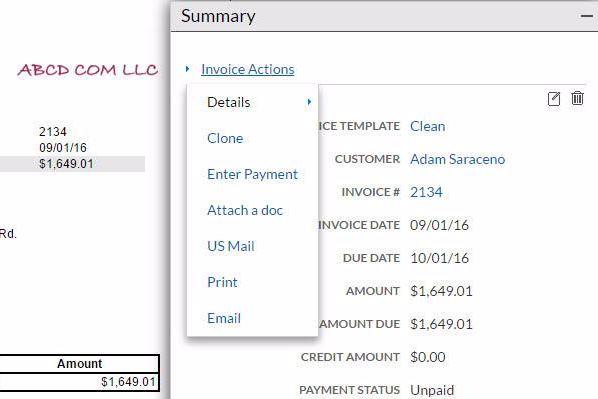
BILL is a financial operations platform that covers accounts payable automation, corporate card management, expense tracking with AI-powered receipt capture, budget controls, and travel booking—all synced with your accounting software.
Who Is BILL Best For?
BILL is a strong fit for small to midsize businesses that need to manage AP, expenses, and payments in one place without a dedicated finance team.
Why I Picked BILL
I've included BILL in my top picks because its AI-powered invoice capture genuinely cuts down on manual data entry—it auto-extracts vendor details, line items, and due dates directly from uploaded documents. I also like that you can build multi-step approval workflows that route invoices based on amount thresholds or department, so nothing slips through without sign-off. BILL also flags duplicate invoices automatically, which I find especially useful when managing high-volume AP cycles.
BILL Key Features
- Corporate card issuance: Issue physical and virtual corporate cards with custom spend limits and category-level restrictions per employee or team.
- Travel booking: Search and book flights, hotels, and rental cars directly in BILL, with company travel policies applied automatically at checkout.
- Receipt capture: Snap and upload receipts from the mobile app, with automatic matching to the corresponding card transaction.
- Employee reimbursements: Submit, review, and approve out-of-pocket expense claims with direct deposit reimbursement built into the platform.
BILL Integrations
BILL offers native two-way syncs with QuickBooks Online, QuickBooks Desktop, Xero, Oracle NetSuite, Sage Intacct, Microsoft Dynamics, and Acumatica. It also integrates with HR platforms like BambooHR, Workday, Gusto, and UKG for employee onboarding, plus Slack and Lyft for expense automation. An API is available for building custom integrations.
Pros and Cons
Pros:
- Unified AP, AR, and expense platform
- Instant mobile receipt capture after transactions
- Real-time budget controls per employee card
Cons:
- Limited approval levels for complex policies
- Requires use of BILL's own card
New Product Updates from BILL
BILL Travel Adds Employee Booking Permissions
BILL Travel adds booking permissions that let admins and travel managers control which employees can book trips. This gives teams more flexibility over travel access and spending policies. For more information, visit BILL’s official site.

Ramp
Best for real-time tracking & policy controls

Ramp is a financial operations platform that helps businesses automate spend management and track expenses in real time. The software offers accounts payable tools, corporate card management, and policy enforcement features to improve financial oversight.
Why I Picked Ramp: I picked Ramp because it excels at automating receipt tracking and expense categorization, helping finance teams cut down on manual tasks. You can set custom spending policies to keep employee expenses aligned with your company’s guidelines. While Ramp doesn’t offer built-in travel booking, it provides strong support for travel expenses through real-time tracking and policy controls, which may suit companies focused on managing spend rather than arranging travel.
Standout features & integrations:
Features include automated receipt tracking, customizable spending rules, real-time expense visibility, AI-powered transaction monitoring, corporate cards with pre-approval controls, and real-time ERP syncing for faster month-end closings.
Integrations include NetSuite, Sage, Xero, QuickBooks, Microsoft Dynamics Business Central, Acumatica, Uber, Lyft, Okta, Google, Rippling, and Gmail.
Pros and Cons
Pros:
- Comprehensive reporting features
- Ability to issue multiple virtual cards with customizable controls
- Automated expense reporting and receipt matching
Cons:
- Mostly focuses on accounts payable and spend management
- Could offer more advanced accounting features
New Product Updates from Ramp

Ramp Adds VAT-Compliant Reimbursement Statements
Ramp added VAT and entity address details to reimbursement statements, helping teams in the EU, UK, and Canada reclaim VAT with less manual paperwork. For more information, visit Ramp’s official site.
 .
.
YouLi
Best for group travel planning

YouLi is a platform designed to simplify travel planning and group management. It supports organizing trips, managing participants, and handling essential trip logistics.
Why I picked YouLi: It gives you everything needed to manage group trips, including tools for creating personalized itineraries and keeping everyone on the same page. YouLi offers booking, payment, and document collection options in one place so your team can focus on planning rather than chasing paperwork. The ability to manage trip members and track payments simplifies coordinating group travel from start to finish.
Standout features & integrations:
Features include itinerary creation, automated reminders, and trip member management. You can also track payments and send invoices from one dashboard. The platform also makes it easy to collect necessary documents and waivers.
Integrations include Xero, Stripe, PayPal, Google Calendar, Zapier, Square, WeTravel, Mailchimp, QuickBooks, and ActiveCampaign.
Pros and Cons
Pros:
- Task management and reminders
- Highly customizable trip pages
- Easy onboarding for new users
Cons:
- Somewhat cluttered user interface
- Occasional delays with notifications

Best for multi-currency corporate cards
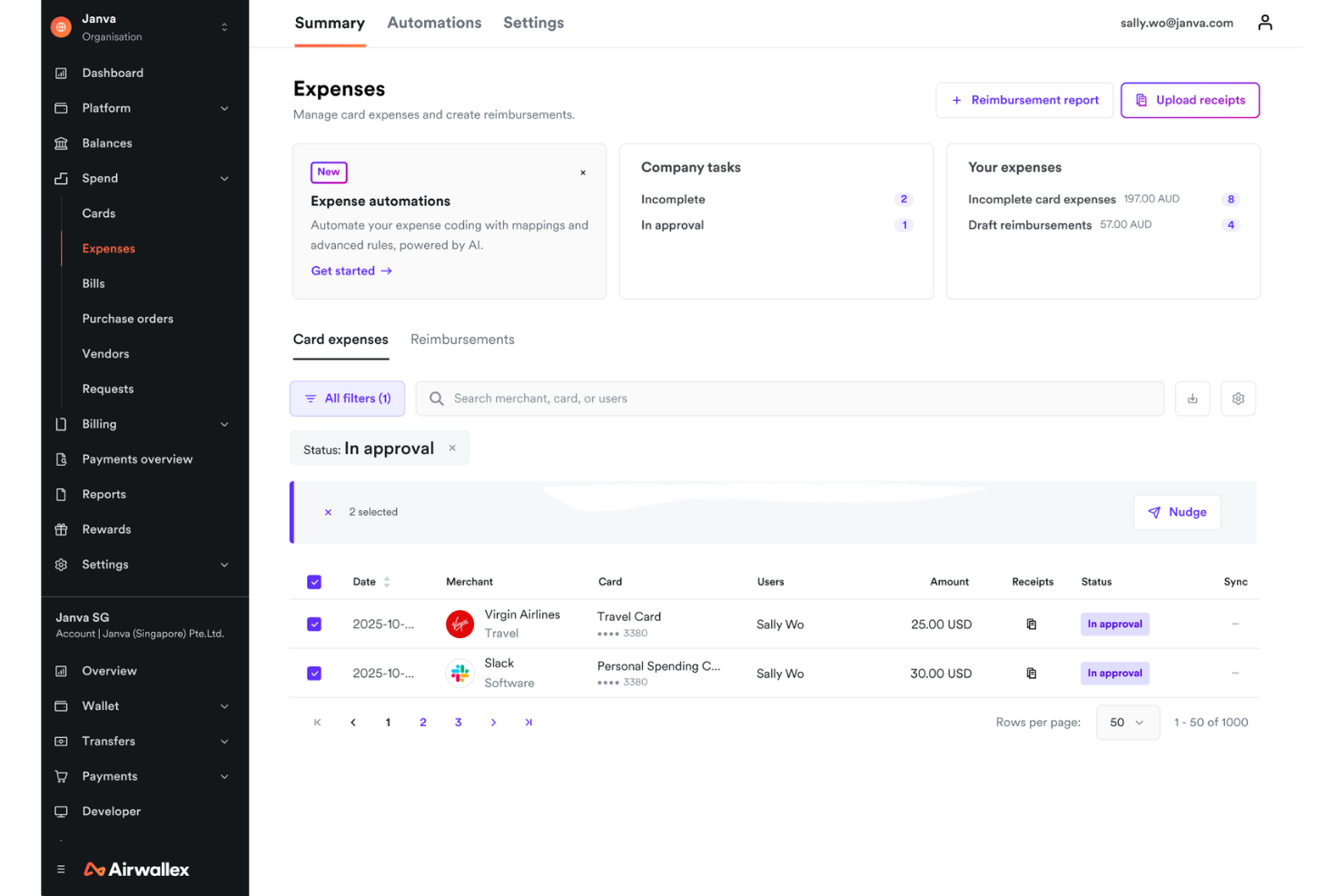
Airwallex is a global spend management and payments platform that covers multi-currency corporate cards, expense tracking, employee reimbursements, bill pay, and international transfers across 200+ countries.
Who Is Airwallex Best For?
Airwallex is a strong fit for finance teams at internationally operating businesses that regularly transact in multiple currencies and need centralized global spend management.
Why I Picked Airwallex
I've included Airwallex in my top picks because it's the only platform I've used where corporate cards are genuinely multi-currency by design. Cards spend directly from held currency balances in your Airwallex wallet, which means my team avoids FX conversion fees on international purchases entirely. When the needed currency isn't held, Airwallex auto-converts at interbank FX rates rather than the bank-inflated rates most corporate card providers charge. I also like that you can instantly create, freeze, or cancel employee cards and set daily, weekly, or monthly spend limits per card.
Airwallex Key Features
- AI receipt extraction: Snap or forward a receipt and Airwallex's AI reads, categorizes, and matches it to a transaction automatically.
- Bill pay with AI invoice processing: Upload vendor invoices for automated field extraction, PO matching, and approval routing before paying in 90+ currencies.
- Purchase orders: Create and manage POs within the platform to control the purchasing process before spend is committed.
- Employee reimbursements: Submit out-of-pocket expenses via mobile and reimburse employees directly in their local currency.
Airwallex Integrations
Airwallex offers 30+ native integrations, including Xero, QuickBooks, NetSuite, Sage, Odoo, BambooHR, Workday, Employment Hero, ApprovalMax, and HubSpot. It's available on Zapier and has an API for custom integrations.
Pros and Cons
Pros:
- No travel booking tool needed separately
- Instant virtual card creation with controls
- Zero FX fees on multi-currency card spend
Cons:
- Customer support slow during peak hours
- No built-in subscription spend tracking


Emburse Abacus is travel and expense management software that automates expense reporting. It provides businesses with tools to track and manage expenses in real-time, offering smooth data integration and visibility into spending patterns for finance teams.
Why I picked Emburse Abacus: It provides real-time expense tracking, which allows your team to submit and approve transactions as they happen, eliminating reporting delays. You can automatically match receipts with expenses, enforcing policy compliance without manual oversight. The system also simplifies reimbursement and vendor payments. Additionally, it offers tailored expense solutions, making managing both virtual and corporate card programs easy.
Standout features & integrations:
Features include real-time expense tracking, automated receipt matching, and virtual card management. The platform allows your team to manage expenses, reimbursements, and payments without waiting for month-end reports. It also supports proactive policy enforcement, ensuring your team complies with company guidelines as they incur expenses.
Integrations include QuickBooks, Xero, NetSuite, Salesforce, Slack, Microsoft Dynamics, Oracle, SAP Concur, Workday, and Expensify.
Pros and Cons
Pros:
- Allows geolocation for vendors
- Customizable categories for different trips
- Tracks expenses in real-time
Cons:
- Limited flexibility for small teams
- Can feel complex during onboarding

Navan
Best for a mobile-first experience

Navan is a travel and expense management software designed to simplify the entire process of booking, managing, and reconciling business travel and expenses. It’s ideal for companies looking to empower employees with self-service travel options while maintaining control over expenses through real-time tracking and policy enforcement.
Why I picked Navan: It allows your team to book trips and manage expenses entirely through a mobile app, making it perfect for users on the go. You can set dynamic spending limits and control costs while your team enjoys an easy-to-use interface for booking flights, hotels, and transportation. The app’s real-time monitoring helps you track spend across multiple trips instantly. Additionally, the platform offers rewards for business trips, which your team can redeem for personal travel.
Standout features & integrations:
Features include automated expense categorization, real-time visibility, and ERP system integration. The platform also supports setting spending guardrails for compliance. Additionally, Navan provides 24/7 support and sustainability features for eco-friendly travel.
Integrations include SAP Concur, QuickBooks, Xero, Microsoft Dynamics, Oracle, Salesforce, NetSuite, Stripe, Slack, and Google Workspace.
Pros and Cons
Pros:
- Comprehensive audit-friendly reporting
- Real-time travel policy enforcement
- Amazon gift card rewards
Cons:
- Challenges during the initial corporate setup
- Limited customization for travel plans

Perk
Best for real-time travel booking flexibility

TravelPerk is a corporate travel and expense management platform that covers trip booking, expense reporting, invoice management, spend controls, and event coordination in one place.
Who Is TravelPerk Best For?
TravelPerk is a strong fit for mid-sized businesses with frequent travelers who need self-serve booking with built-in spend controls.
Why I Picked TravelPerk
TravelPerk earns its spot on my shortlist because no other platform I've used makes it as easy to change a trip mid-travel day. The FlexiPerk feature lets my team cancel any flight or hotel up to two hours before departure and recover at least 80% of the cost, with no paperwork and no back-and-forth with support. On top of that, rebooking happens directly in the app in just a few taps, which matters when a meeting gets moved and your traveler is already at the airport.
TravelPerk Key Features
- Travel policy controls: Set per diem limits and approved vendor rules directly in the platform to keep bookings in policy.
- VAT reclaim: Automatically identifies and recovers VAT on eligible business travel invoices across supported countries.
- GreenPerk: Lets travelers offset trip emissions by funding certified carbon reduction projects at checkout.
- Consolidated invoicing: Merges all trip bookings into a single monthly invoice per traveler or cost center.
TravelPerk Integrations
TravelPerk offers a broad marketplace of integrations spanning expense, HR, spend management, and travel safety categories, including Expensify, Rydoo, Spendesk, Ramp, Pleo, BambooHR, Personio, Slack, Deel, and Expensya. An open API is available for custom integrations.
Pros and Cons
Pros:
- Built-in spend and sustainability reporting
- Auto-payment through preset company cards
- Real-time flights, hotels, and cars overview
Cons:
- Airline booking data occasionally syncs slowly
- Limited hotel inventory and filtering options

Brex
Best for AI-driven global spend controls
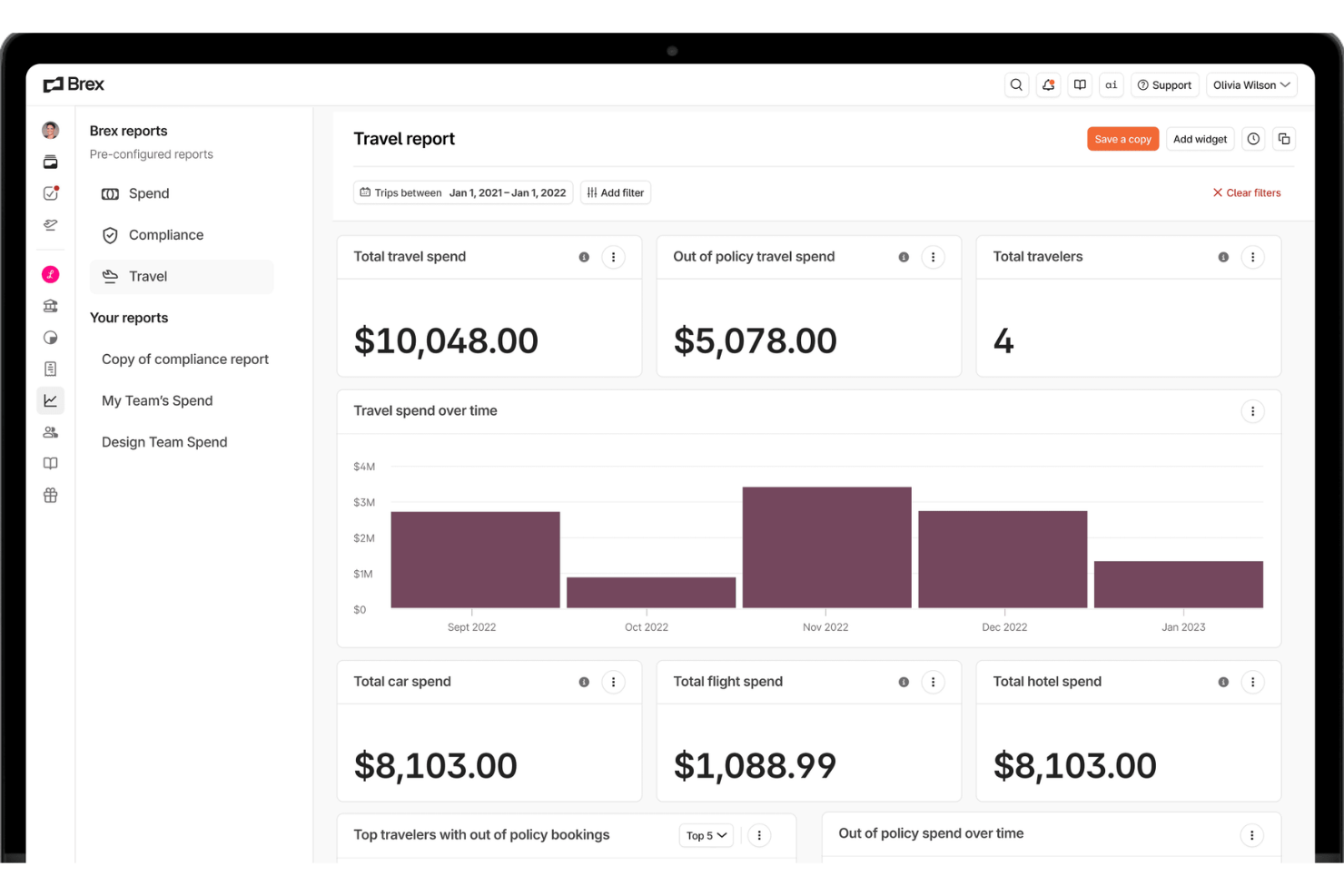
Brex is a finance platform for businesses that combines corporate cards, expense management, travel booking, bill pay, and banking with AI-powered spend controls and accounting automation.
Who Is Brex Best For?
Brex is a strong fit for fast-growing startups and mid-market companies that need centralized spend controls across global teams.
Why I Picked Brex
Brex earns its spot on my shortlist because of how its AI handles spend enforcement before a transaction is even approved. I love that Brex AI auto-applies your expense policies at the point of purchase, blocking out-of-policy spend in real time rather than flagging it after the fact. For global teams, the multi-currency support and local reimbursement tools mean you're not stitching together separate systems for different regions. The auto-generated receipts and AI-powered GL coding are also genuinely useful during month-end close.
Brex Key Features
- Travel booking with policy guardrails: Search and book flights and hotels within preset travel policies and spend limits, with no excluded inventory.
- Live Budgets: Set department-level budgets, assign them to department heads, and track spend usage in real time across global teams.
- Group event management: Invite unlimited attendees to book travel under a shared spend limit, with RSVP tracking and traveler monitoring built in.
- Real-time spend reporting: Run reports across cards, reimbursements, travel, and bill pay in one dashboard, with AI-flagged spend anomalies.
Brex Integrations
Brex offers native integrations across categories like ERP, HRIS, procurement, authentication, and travel, including QuickBooks Desktop, Oracle NetSuite, Sage Intacct, Xero, Workday Financials, Rippling, Gusto, Slack, Navan, and Uber for Business. It also connects with Zapier and provides an API for custom integrations.
Pros and Cons
Pros:
- Travel booking unified with expense capture
- Real-time alerts for receipt and expense logging
- Virtual cards tied to specific budgets
Cons:
- Receipt auto-fill sometimes requires manual corrections
- Mileage tracking lacks multi-stop trip grouping

Best for easy receipt scanning

Expensify is an expense management software that simplifies the process of capturing, organizing, and submitting expenses for businesses of all sizes. Its primary functions include receipt scanning, expense categorization, and travel expense management, all accessible through its mobile or desktop platform.
Why I picked Expensify: You can snap a picture of your receipt, and the software will automatically categorize and add it to your expense report, saving time and reducing manual entry errors. Expensify offers real-time expense reporting, which ensures your team can quickly approve and reimburse expenses. Additionally, the mobile app allows receipt scanning on the go, making it easier for employees to submit reports while traveling. You can also manage business trips and track all expenses in one place, ensuring clear visibility into company spending.
Standout features & integrations:
Features include intuitive receipt scanning, automatic expense categorization, and real-time expense tracking. The platform also supports policy enforcement to help maintain compliance. Your team can manage expenses with its user-friendly mobile app.
Integrations include QuickBooks, Xero, NetSuite, Sage Intacct, Oracle, Microsoft Dynamics, Salesforce, Slack, Google Workspace, and Dropbox.
Pros and Cons
Pros:
- Policy enforcement supported
- Automatic expense categorization
- Intuitive receipt scanning
Cons:
- Support response time varies
- Occasional app glitches

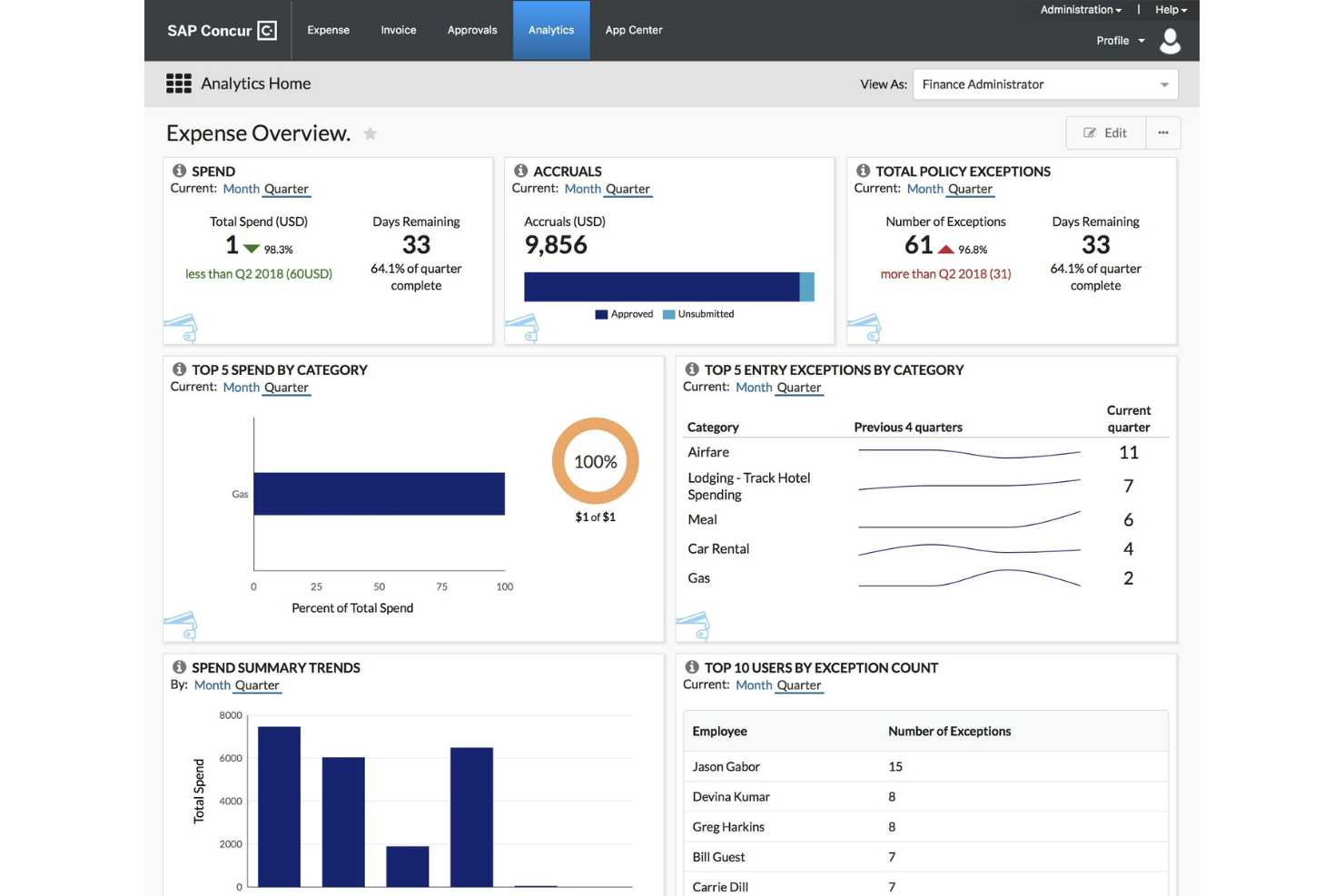
SAP Concur is a travel and expense management platform that combines travel booking, expense reporting, invoice processing, and spend audit tools, built to operate within large enterprise tech stacks.
Who Is SAP Concur Best For?
SAP Concur is a natural fit for large enterprises that need T&E management running inside complex ERP and HR system environments, like SAP S/4HANA or Workday.
Why I Picked SAP Concur
I've included SAP Concur in my top picks because its 300+ pre-built connectors are genuinely hard to match in the T&E space. I particularly like the dedicated SAP ERP and S/4HANA integration, which lets expense, invoice, and travel data flow directly into your existing SAP environment without custom development. The open API also means your dev team can build whatever custom connections your stack requires.
SAP Concur Key Features
- Automated expense reporting: Receipts captured via mobile are parsed and matched to card transactions automatically.
- Concur Invoice: Manage AP workflows with invoice capture, approval routing, and payment processing in a single module.
- Spend analytics: Run T&E reports filtered by department, cost center, or policy category across the full organization.
- Policy compliance engine: Flag out-of-policy expenses before reports are submitted for manager approval.
SAP Concur Integrations
SAP Concur offers over 330 pre-built connectors through its App Center, including SAP S/4HANA, Oracle NetSuite, Workday, Salesforce, Uber for Business, and Lyft Business, spanning ERP, HR, payroll, travel, and compliance categories. An open API is available for custom integrations.
Pros and Cons
Pros:
- Corporate card charges auto-populate expense reports
- Multi-currency and per diem support built in
- AI audits all submitted transactions
Cons:
- Hotel itemization requires day-by-day entry
- Desktop interface feels dated and cluttered
Other Travel And Expense Management Software
Here are some additional travel and expense management software options that didn’t make it onto my shortlist but are still worth checking out.
- Slash
For cross-border transactions
- Emburse
For proactive compliance with AI
- Expensya
For multi-currency support
- BizAway
For international travel management
- Fairjungle
For AI travel recommendations
- ExpenseAnywhere
For automated compliance checks
- Rippling Spend
For automated approval workflows
- Sage Expense Management (formerly Fyle)
For real-time spend tracking
- ITILITE
For enforcing travel policies
- Payhawk
For ERP-native expense automation


Related Reviews
How I Evaluate Travel and Expense Management Software
I split my evaluation into two layers: baseline requirements every T&E tool must meet—like approval workflows, receipt OCR, and ERP sync—and differentiators that separate the best from the rest.
Core Functionality (Table Stakes For This List)
When I'm selecting tools for my list, I rank each one on a scale from 0 (does not offer the functionality) to 5 (excels in this area) for each core functionality listed below. Then, I calculate the tool's total score into a percentage. Each tool needs to achieve a minimum total score of 75% to be considered for inclusion.
- Expense Report Automation: I evaluate how reports move from submission to approval—whether the tool supports multi-level routing, delegation rules, and conditional logic based on amount or department.
- Receipt Capture & OCR: A good OCR engine pulls vendor name, date, line items, and currency from a phone photo. I check whether receipts auto-match to card transactions.
- Corporate Travel Booking: I look for integrated flight, hotel, and rental car booking—either through a native engine or a tight connection with GDS and TMC partners.
- Policy Enforcement & Controls: The tool should let finance teams set granular spend rules, per-diem limits, and pre-trip approvals that flag or block out-of-policy bookings before money is spent.
- Corporate Card & Reimbursement: I evaluate whether the platform pulls real-time card feeds from major issuers and handles employee reimbursement through direct deposit or payroll sync.
- Accounting & ERP Integration: Approved expenses need to flow into your GL with correct coding. I check for pre-built connectors to systems like NetSuite, SAP, QuickBooks, and Xero.
Once I have a list of tools that meet this criteria, I consider what sets each platform apart.
Differentiating Factors (What Sets Vendors Apart)
Here's how I compare and contrast different vendors:
Standout Features
AI-powered audit tools make a real difference—I look for platforms that automatically flag duplicate receipts, out-of-policy charges, and suspicious patterns before reimbursement goes out. Virtual card issuance is another differentiator, especially for teams that want to assign single-use cards tied to specific trips or vendors. For organizations with international travelers, I also evaluate VAT and GST reclaim capabilities, since recovering reclaimable tax on cross-border expenses can represent significant savings over time.
Beyond Features
Compliance matters here—I check for SOC 2, PCI-DSS, and SOX audit trail support, since T&E platforms handle sensitive card and financial data daily. For multi-entity organizations, I evaluate whether the tool supports multi-currency reimbursement and consolidated reporting across subsidiaries. Pricing transparency is also a factor I weigh carefully, especially whether card issuance, FX conversion, and reimbursement fees are included or layered on top of the base subscription.
How To Choose Travel And Expense Management Software
It’s easy to get bogged down in long feature lists and complex pricing structures. Here's a checklist of factors to remember to help you stay focused as you work through your unique software selection process.
| Factor | What to Consider |
| Scalability | Will the software grow with your business needs? |
| Integrations | Does it connect with your existing tools and systems? |
| Customizability | Can you tailor it to fit your team’s specific requirements? |
| Ease of Use | Is the interface user-friendly for your team members? |
| Budget | Does it fit within your financial constraints? |
| Security Safeguards | Are there robust measures to protect your data? |
Trends In Travel And Expense Management Software
In my research, I sourced countless product updates, press releases, and release logs from different travel and expense management software vendors. Here are some of the emerging trends I’m keeping an eye on.
- AI Expense Predictions: AI predicts future expenses based on past spending patterns. This helps businesses budget more accurately and make informed financial decisions. Some vendors are integrating AI to offer predictive insights for better planning.
- Sustainability Tracking: More tools are incorporating features to track and report on travel's environmental impact. This is relevant for companies aiming to reduce their carbon footprint. Some software now includes options to choose eco-friendly travel alternatives.
- Voice-Activated Reporting: Voice commands are starting to simplify the reporting process. This trend caters to users who prefer hands-free operation, making it quicker to log expenses verbally. A few platforms have begun integrating voice-activated features into their apps.
- Blockchain for Expense Verification: Blockchain technology is being explored to verify expenses and provide a secure and transparent record. This innovation could enhance trust and reduce fraud in expense management. Some vendors are experimenting with blockchain to strengthen verification processes.
- Virtual Reality Meetings: As virtual reality becomes more accessible, some companies are looking into VR for meetings to reduce travel expenses. This trend allows teams to collaborate in immersive environments without needing physical travel. A few forward-thinking vendors are testing VR meeting solutions to complement their offerings.
What Is Travel And Expense Management Software?
Travel and expense management software helps businesses track and manage employee travel expenses. It’s typically used by finance teams, accountants, and managers who need to oversee business spending and ensure accurate expense reports.
Automation, report generation, and approval workflows help keep everything organized, reducing manual work and avoiding errors. These tools make managing travel costs easier and ensure proper budgeting and accountability.
Features Of Travel And Expense Management Software
When selecting travel and expense management software, look for the following key features.
- Expense tracking: Monitors and records all business travel expenses to keep budgets in check.
- Receipt scanning: Uses receipt management tools to automatically capture and process receipts for easier expense entry and verification.
- Policy compliance: Ensures all expenses align with company policies to prevent unauthorized spending.
- AI predictions: Uses AI to forecast future expenses based on historical data, aiding in better budgeting.
- Multi-currency support: Handles transactions in various currencies, ideal for international operations.
- Real-time reporting: Provides up-to-date insights into spending patterns and financial health.
- Sustainability tracking: Monitors the environmental impact of travel to support eco-friendly initiatives.
- Voice-activated reporting: Allows users to log expenses using voice commands for convenience and speed.
- Customizable workflows: Offers tailored processes to fit specific company needs and streamline operations.
Benefits Of Travel And Expense Management Software
Implementing travel and expense management software benefits your team and your business. Here are a few you can look forward to.
- Improved accuracy: Automated expense tracking and receipt scanning reduce errors in financial records.
- Cost savings: AI predictions and policy compliance help control spending and identify cost-saving opportunities.
- Time efficiency: Features like voice-activated reporting and automated approvals speed up the expense management process.
- Enhanced visibility: Real-time reporting provides instant insights into travel expenses and budget health.
- Eco-friendly practices: Sustainability tracking encourages environmentally responsible travel choices.
- Simplified operations: Customizable workflows enable businesses to tailor processes to their unique needs.
- Global reach: Multi-currency support allows for hassle-free international transactions and operations.
Costs & Pricing Of Travel And Expense Management Software
Selecting travel and expense management software requires understanding the various pricing models and plans available. Costs vary based on features, team size, add-ons, and more. The table below summarizes standard plans, average prices, and typical features of travel and expense management software solutions.
Plan Comparison Table for Travel and Expense Management Software
| Plan Type | Average Price | Common Features |
| Free Plan | $0 | Basic expense tracking, receipt scanning, and limited reporting. |
| Personal Plan | $5-$15/user/month | Expense tracking, receipt scanning, basic reporting, and support. |
| Business Plan | $20-$40/user/month | Advanced reporting, policy compliance, multi-currency support, and integrations. |
| Enterprise Plan | $50-$100/user/month | Customizable workflows, AI predictions, real-time tracking, and dedicated support. |
Travel And Expense Management Software FAQs
Here are some answers to common questions about travel and expense management software.
Can travel and expense management software integrate with my current systems?
Yes, most travel and expense management software can integrate with commonly used systems like accounting or ERP tools. Before purchasing, check if the software supports integrations with your existing tools. This can simplify data transfer and improve overall efficiency. It’s best to consult with the software provider to confirm compatibility.
How does travel and expense management software support policy compliance?
These tools help enforce your company’s travel and expense policies automatically. They flag non-compliant expenses and prevent unauthorized spending. You can customize policy settings to match your company’s guidelines. This ensures that all expenses align with your financial goals and policies.
What kind of reporting capabilities should I expect from travel and expense management software?
Expect detailed reporting capabilities that provide insights into your team’s spending patterns. Look for software that offers real-time reports, customizable dashboards, and analytics. This allows you to track expenses, identify trends, and make informed financial decisions. Accurate reporting helps you manage budgets effectively.
Is it possible to use travel and expense management software for international transactions?
Yes, many travel and expense management tools support international transactions with features like multi-currency support. This capability is crucial for businesses operating in multiple countries. It simplifies expense management in different currencies and ensures accurate exchange rate calculations. Check if the software supports the currencies you deal with regularly.
What customer support can I expect from travel and expense management software providers?
Support levels vary by provider, but you can expect options like 24/7 support, live chat, email, and phone assistance. Some providers offer dedicated account managers for personalized support. It’s important to choose a provider with responsive and knowledgeable support. This ensures quick resolution of any issues your team may face.
What’s Next?
If you're in the process of researching travel and expense management software, connect with a SoftwareSelect advisor for free recommendations.
You fill out a form and have a quick chat where they get into the specifics of your needs. Then you'll get a shortlist of software to review. They'll even support you through the entire buying process, including price negotiations.