

Outdated spend management software isn’t only costly to maintain—it also comes with several added headaches, including slow reporting, manual data entry errors, and a constant stream of back-and-forth with other departments just to get clean numbers. But with so many solutions out there promising visibility and automation, it’s tough to know which ones will actually help.
As a financial controller, I’ve worked through the full cycle, from budget planning to monthly close, and I know exactly how much time and stress inefficient tools can create. I’ve also seen what happens when a tool clicks with the team, which is what drove me to create this list.
Using this knowledge, I tested and reviewed these tools with a practical eye, looking for key features that hold up in the day-to-day of financial management. These picks for spend management software will help you find a tool that works for you, your team, and your bottom line.
Why Trust Our Software Recommendations
6,700+
Reviews
20
Industry experts
16+
Evaluation factors
14
Years
Our team has been testing and reviewing software since 2012. As finance leaders ourselves, we know how difficult—and important—it is to choose the right software.
For this guide, we evaluated tools using hands-on testing and independent research, scoring tools using our selection criteria.
Our reviews reflect our human editorial judgment, not a sales pitch.
Spend Management Software Comparison table
This comparison table summarizes pricing details for my top spend management software selections:
| Tool | Best For | Trial Info | Price | ||
|---|---|---|---|---|---|
| 1 | Best for automated expense approvals | Free demo available | Pricing upon request | Website | |
| 2 | Best for vendor management analytics | Free plan available | Pricing upon request | Website | |
| 3 | Best for customizable approval workflows | Free demo + 14-day trial available | From $499/month (billed annually) | Website | |
| 4 | Best with AI-driven procurement data cleansing | Free demo available | Pricing upon request | Website | |
| 5 | Best with automated policy enforcement | Free plan + free demo available | From $15/user/month | Website | |
| 6 | Best for team collaboration | Free demo available | Pricing upon request | Website | |
| 7 | Best for SaaS spend optimization | Free demo available | Pricing upon request | Website | |
| 8 | Best for real-time visibility | Free plan available | From $12/user/month | Website | |
| 9 | Best for financial management | Free demo available | From £1,200/month | Website | |
| 10 | Best for global enterprises | Free demo available | Pricing upon request | Website |


Best Spend Management Software Reviews
Below are my detailed summaries of the best spend management software that made it onto my shortlist. My reviews offer an in-depth look at the key features, pros & cons, integrations, and ideal use cases of each tool to help you find the best one for you.
 Best for automated expense approvals
- Free demo available
- Pricing upon request
Visit WebsiteCustomer Rating:4.8/5
Rippling Spend's payroll summary dashboard provides an overview of approved expenses and total reimbursements. Rippling Spend is a spend management software that provides businesses with detailed control over their expenditures. Its real-time visibility into spending makes it easier to manage financial operations and remain compliant.
Why I picked Rippling Spend: I like that it offers dynamic policy enforcement, allowing you to set custom spending rules that automatically apply to expenses. This feature is crucial for maintaining control over your company's spending habits and ensuring that all expenditures align with your financial policies. Additionally, the software's automated expense approval workflows reduce the need for manual intervention, further reinforcing consistency and compliance with your organization's expense policies.
Standout features & integrations:
Features include compliance controls that help prevent overspending by alerting you to any expenses that violate company policies. The software also supports international payments, which is a significant advantage for businesses operating globally.
Integrations include Slack, Checkr, Google, Zoom, Asana, Salesforce, Microsoft 365, Guideline, GitHub, Carta, PayPal, and 1Password.
Pros and Cons
Pros:
- Supports multi-currency transactions and international compliance
- Offers integrated corporate card management
- Automatically assigns spending limits and approval workflows
Cons:
- Could offer more platform customization options
- Can be difficult to import historical data
Learn more about Rippling Spend: Best for vendor management analytics
- Free plan available
- Pricing upon request
Visit WebsiteCustomer Rating:4.5/5
Payouts helps businesses keep track of payouts with detailed analytics and vendor management portals. Payouts is a FinTech software that helps businesses manage vendor payments and optimize accounts payable processes.
Why I picked Payouts: Payouts not only automates global payouts but also provides deep visibility into vendor performance, transaction histories, and compliance status. By centralizing vendor onboarding, tax-form management, invoice tracking, and real-time reporting across multiple currencies and payment methods, it enables businesses to analyze spending patterns, optimize vendor relationships, and forecast cash flow more accurately.
Standout features & integrations:
Features include global accounts that facilitate transactions in local currencies, a crypto integration that allows for seamless conversion of crypto payments to fiat, and real-time data analytics for detailed insights into payout operations.
Integrations include PayPal, Payoneer, NetSuite, Zelle, Venmo, Tune, Everflow, and CJ Affiliate.
Pros and Cons
Pros:
- Customizable workflows
- Vendor portal access and management
- Detailed financial reporting
Cons:
- Potential learning curve for new users
- Limited mobile access
Learn more about Payouts: Best for customizable approval workflows
- Free demo + 14-day trial available
- From $499/month (billed annually)
Visit WebsiteCustomer Rating:4.8/5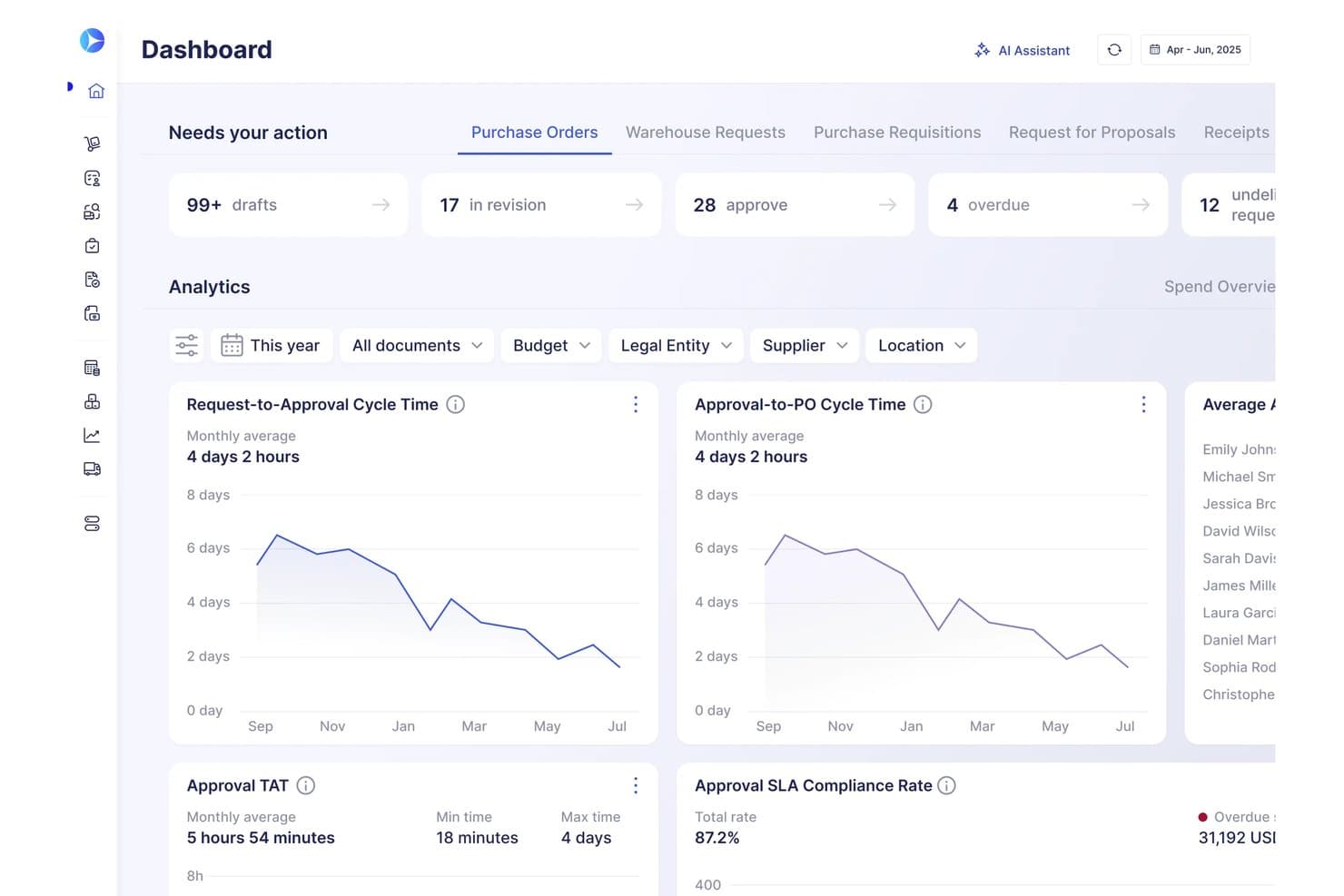
Precoro offers a dashboard with real-time analytics on approval cycle times, SLA compliance rates, and actionable purchase order statuses. Precoro is a spend management platform designed for finance teams that need advanced procurement automation, invoice processing, budgeting controls, and end-to-end approval workflow customization.
Who Is Precoro Best For?
Precoro suits mid-sized finance and procurement teams that need granular control over purchasing, approvals, and spend visibility across multiple locations or departments.
Why I Picked Precoro
I picked Precoro as one of the best because I can design granular, multi-step approval chains for purchase orders and invoices. In practice, that means my team controls spend pre-approval across any department, hierarchy, or location. I rely on this flexibility when managing complex spend policies.
Precoro Key Features
- Procurement catalog management: Users can maintain a centralized product catalog for fast and consistent order creation.
- Automated invoice matching: Invoices are automatically matched to purchase orders and receipts for validation.
- Budget tracking tools: Track expenditures against defined budgets by department, project, or location.
- ERP accounting integrations: Supports native integrations with platforms like QuickBooks and Xero for synchronized financial data.
Precoro Integrations
Precoro offers native integrations with QuickBooks Online, Xero, Slack, Sage Intacct, Power BI, and Oracle NetSuite. An API is available for custom integrations.
Pros and Cons
Pros:
- Optimized purchase order and invoice matching
- Supports multi-location and project-based budgeting
- Highly configurable approval workflow engine
Cons:
- Limited expense reimbursement automation
- No built-in corporate card functionality
Learn more about Precoro: Best with AI-driven procurement data cleansing
- Free demo available
- Pricing upon request
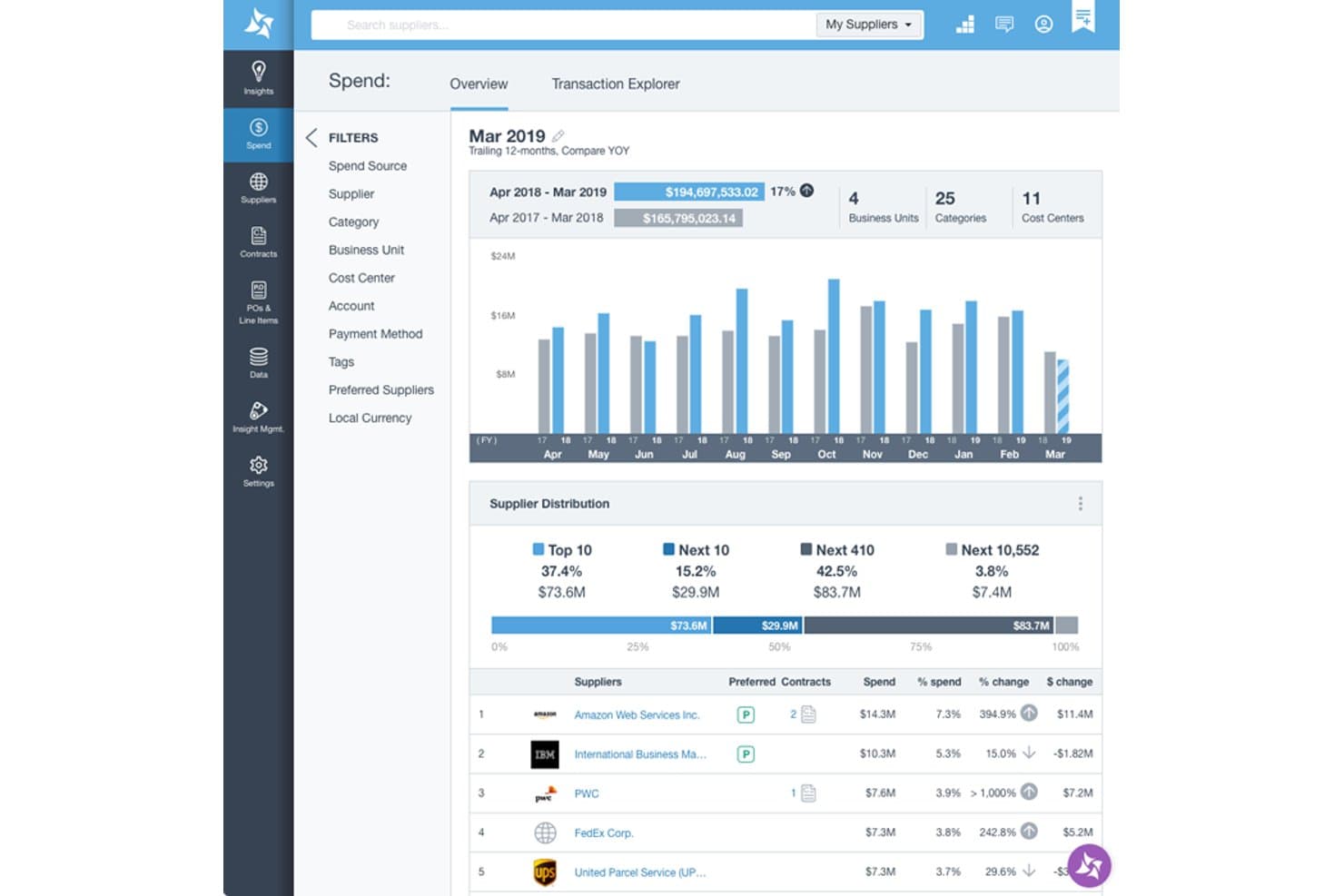
Suplari provides a spend overview dashboard with supplier distribution, YOY spend comparison, and top supplier rankings by spend percentage. Suplari is an AI-native procurement spend analytics platform that unifies and classifies spend data from ERP and source-to-pay systems to surface savings opportunities, supplier risk signals, and contract compliance insights.
Who Is Suplari Best For?
Suplari is a strong fit for enterprise procurement teams managing fragmented spend data across multiple ERP and source-to-pay systems.
Why I Picked Suplari
I've included Suplari in my top picks because its AI-driven data cleansing tackles what most spend tools assume away: messy, fragmented ERP data. It has high spend classification accuracy, compared to the sub-80% most teams achieve manually. Its Spend Anomaly Detection Worker and Tail Spend Consolidation agents then act on that clean data continuously, flagging price variances and consolidation opportunities before value is lost.
Suplari Key Features
- Contract intelligence software: Matches negotiated contract terms against actual payments to identify discrepancies.
- ESG intelligence module: Enables tracking and assessment of environmental, social, and governance exposure by spend category.
- Value orchestration workflows: Automates opportunity follow-up and outcome tracking across procurement processes.
- AI-powered executive reporting: Produces real-time dashboards and narratives rooted in procurement data for leadership teams.
Suplari Integrations
Suplari offers native integrations with SAP, Oracle, Workday, Coupa, SAP Ariba, Microsoft Dynamics, Snowflake, Databricks, and Zip. An API is available for custom integrations.
Pros and Cons
Pros:
- Strong procurement-specific analytics depth
- Continuous AI monitoring flags savings opportunities
- Accurate spend classification
Cons:
- Implementation requires significant data preparation
- Not a full spend management platform
Learn more about Suplari: 5Best with automated policy enforcement
Ramp
- Free plan + free demo available
- From $15/user/month
Visit WebsiteCustomer Rating:4.8/5
Ramp dashboard showing real-time spend tracking, virtual cards, and transaction monitoring. Ramp is a spend management platform that combines corporate cards, automated expense controls, real-time spend tracking, and integrations with accounting and HR systems.
Who Is Ramp Best For?
Ramp suits finance teams at mid-sized and enterprise companies that need centralized control over business spending and expense management.
Why I Picked Ramp
I picked Ramp as one of the best because its automated policy enforcement lets my team set granular spend rules that trigger in real time. I like that Ramp automatically flags out-of-policy transactions and requires receipts or explanations before approving expenses. In practice, that means we can enforce compliance without manual review and keep spend in check as it happens.
Ramp Key Features
- Corporate cards: Issue physical and virtual cards with custom spend limits for employees and departments.
- Real-time spend tracking: Monitor transactions as they happen with instant visibility into company-wide expenses.
- Automated receipt matching: Upload receipts via mobile or email and let Ramp automatically match them to transactions.
- Custom approval workflows: Set up multi-level approval chains for different types of spend and departments.
Ramp Integrations
Ramp offers native integrations with NetSuite, Sage Intacct, QuickBooks Online, Xero, Workday, Rippling, BambooHR, and Slack. An API is available for custom integrations.
Pros and Cons
Pros:
- Unlimited virtual and physical card issuance
- Real-time transaction notifications and alerts
- Automated policy enforcement for spend controls
Cons:
- Vendor payment options are limited outside the US
- Reimbursement features lack advanced customization
 Best for team collaboration
- Free demo available
- Pricing upon request
Visit WebsiteCustomer Rating:4.7/5
Spendesk simplifies company spending with cards, approvals, and expense tracking. Spendesk is a spend management platform designed for teams to manage expenses, budgets, and payments. It helps businesses streamline financial operations and improve team collaboration in managing company spending.
Why I picked Spendesk: Spendesk excels in team collaboration, allowing your team to manage expenses with shared visibility. You can use virtual cards for secure online payments, and set up approval workflows that fit your team's processes. Spendesk also offers real-time spend tracking, which keeps everyone on the same page. Together, these features make it an excellent choice for businesses looking to enhance their financial coordination.
Standout features & integrations:
Features include real-time spend tracking and customizable approval workflows. You can automate expense reporting and gain insights into spending patterns. Spendesk also supports multi-currency transactions for global teams.
Integrations include Xero, QuickBooks, Sage, Slack, Datev, Microsoft Excel, Microsoft Dynamics, Oracle, and MYOB.
Pros and Cons
Pros:
- Real-time spend tracking
- Customizable approval workflows
- Automated expense reporting
Cons:
- Initial setup can be complex
- Limited offline features
Learn more about Spendesk: Best for SaaS spend optimization
- Free demo available
- Pricing upon request
Visit WebsiteCustomer Rating:4.6/5
Spendflo automates procurement and helps reduce expenses. Spendflo is a spend management software designed to help businesses control SaaS expenses through AI-powered insights and full-stack procurement management. It simplifies vendor management, helping you gain visibility into contracts, renewals, and spending patterns across your entire software stack.
Why I picked Spendflo: Spendflo is ideal if you're looking to get ahead of SaaS sprawl. Its AI-powered insights help you identify duplicate tools, unused licenses, and unauthorized spend, giving you better control over your software costs. You can manage procurement intake, track renewals, and centralize contract data, making it easier to plan ahead and avoid unnecessary renewals.
Standout features & integrations:
Features include 360 degrees cost optimization, renewal tracking that syncs with Google Calendar, and access to procurement experts for vendor negotiations and contract management support.
Integrations include JumpCloud, GitHub, Adobe, Jira, HubSpot, Salesforce, Freshdesk, Figma, Zendesk, Asana, Monday.com, and Keka.
Pros and Cons
Pros:
- Consolidates contract information
- Automated workflow management
- AI-driven procurement services
Cons:
- No mobile app support
- Pricing transparency issues
Learn more about Spendflo: 8Best for real-time visibility
Brex
- Free plan available
- From $12/user/month
Visit WebsiteCustomer Rating:4.5/5
Brex combines spend controls, cards, and expense tracking for startups. Brex is a spend management solution that offers corporate cards with built-in expense management and financial tools. It helps businesses manage their finances efficiently with features designed to support growth and scalability.
Why I picked Brex: Brex offers live tracking of company expenditures across teams, departments, and individual employees through an intuitive, centralized dashboard. It automatically categorizes transactions, syncs with accounting platforms like QuickBooks and NetSuite in real time, and enables proactive control with dynamic spend limits and instant card freezing.
Standout features & integrations:
Features include automated expense categorization, receipt capture, and budget tracking. You can also access real-time spending insights and set spending limits for your team.
Integrations include QuickBooks, Xero, NetSuite, Expensify, Slack, Gusto, Carta, Plaid, Zapier, and Rippling.
Pros and Cons
Pros:
- Flexible credit limits
- Rewards on business spending
- Automated expense categorization
Cons:
- Limited customer support availability
- Requires integration setup


Sage Intacct integrates spend management with accounting and reporting. Sage Intacct is a cloud-based financial management solution designed for small to mid-sized businesses, focusing on core accounting functions and financial reporting. It helps businesses streamline their financial operations and improve decision-making with real-time spend data.
Why I picked Sage Intacct: Sage Intacct is ideal for financial management, offering deep accounting capabilities that suit various business needs. With its core finance features, businesses can customize financial reports and dashboards to gain insights into their company's performance. Sage Intacct also supports multi-entity and multi-currency operations, making it versatile for companies with complex structures.
Standout features & integrations:
Features include customizable dashboards, automated billing, and project accounting. You can manage cash flow and budget planning with ease. The platform also provides advanced audit trails for compliance and transparency.
Integrations include Salesforce, ADP, Expensify, Bill.com, MineralTree, Stripe, Avalara, Nexonia, FloQast, and Adaptive Insights.
Pros and Cons
Pros:
- Supports multi-entity operations
- Customizable financial reports
- Advanced audit trails
Cons:
- Requires initial setup time
- Needs frequent software updates
Learn more about Sage Intacct: 10Best for global enterprises
Coupa
- Free demo available
- Pricing upon request
Visit WebsiteCustomer Rating:4.2/5
Coupa offers real-time spend visibility with procurement and invoicing tools. Coupa is a spend management platform designed for large enterprises, focusing on procurement, invoicing, and expense management. It helps businesses optimize their spending and improve financial efficiency across global operations.
Why I picked Coupa: Coupa is tailored for global enterprises, providing advanced procurement and invoicing capabilities. Teams can easily manage expenses in multiple currencies, which is ideal for international businesses. Additionally, the platform's analytics offer insights into spending patterns, helping your team make informed decisions. These features, combined with Coupa's detailed reporting tools, only further support large-scale financial management.
Standout features & integrations:
Features include budget tracking, supplier management, and contract management. You can gain visibility into spending with detailed analytics. The tool also supports compliance with global financial regulations.
Integrations include SAP, Oracle, Salesforce, Workday, QuickBooks, Xero, Microsoft Dynamics, ADP, and Slack.
Pros and Cons
Pros:
- Strong procurement capabilities
- Detailed spending analytics
- Global compliance support
Cons:
- High reliance on technical support
- Limited flexibility for small teams
Learn more about Coupa:
Other Spend Management Software
Here are some additional spend management software options that didn’t make it onto my shortlist, but are still worth checking out:
- 11ExpensifyBest for automated expense tracking
- 12SAP Spend Control TowerBest for data insights
- 13RampBest for fast-growing companies
- 14Tipalti ProcurementBest for payment automation
- 15EllucianBest for educational institutions
- 16OneAdvancedBest for enterprise budget control
- 17IvaluaBest for procurement solutions
- 18SlashBest for real-time spend analytics
- 19Sage Expense Management (formerly Fyle)Best for real-time card reconciliation
- 20ProcurifyBest for purchase order management
- 21BudgytBest for budget consolidation
- 22Workday Spend ManagementBest for real-time spend visibility
- 23NetSuite Expense ManagamentBest for project-based billing
How I Evaluate Spend Management Software
I split my evaluation into two layers: the baseline a tool must clear—card issuance, AP automation, approval workflows—and the differentiators that make one platform the right fit over another.
Core Functionality (Table Stakes For This List)
When I'm selecting tools for my list, I rank each one on a scale from 0 (does not offer the functionality) to 5 (excels in this area) for each core functionality listed below. Then, I calculate the tool's total score into a percentage. Each tool needs to achieve a minimum total score of 75% to be considered for inclusion.
- Corporate Card Issuance: I check whether a platform lets you spin up virtual cards for specific vendors or projects and set merchant-level restrictions—not just blanket limits.
- Expense Management & Reimbursements: Receipt OCR, auto-categorization, and reimbursement workflows all factor in—especially how well mobile capture handles field-team submissions.
- Approval Workflows & Policy Controls: I evaluate whether you can build conditional, multi-tier approval chains, like routing spend above a threshold to a department head before finance.
- AP & Invoice Automation: Vendor invoice ingestion, GL coding, approval routing, and payment execution across rails like ACH and wire all need to be present and connected.
- Budgets & Real-Time Spend Visibility: I look for live dashboards that break spend down by department, vendor, and category—with alerts that flag budget overruns before month-end close.
- ERP/Accounting Integrations: Bi-directional syncs with platforms like QuickBooks, NetSuite, Sage Intacct, and Xero matter most—I check GL mapping depth and reconciliation quality.
Once I have a list of tools that meet this criteria, I consider what sets each platform apart.
Differentiating Factors (What Sets Vendors Apart)
Here's how I compare and contrast different vendors:
Standout Features
AI-driven anomaly detection and duplicate invoice flagging can save your AP team hours of manual review each close cycle. I also look at whether a platform tracks SaaS subscriptions—surfacing unused licenses and flagging upcoming renewals before they auto-renew. Procurement intake is another differentiator, especially for teams that want purchase requests routed through finance before a commitment is made.
Beyond Features
Compliance and security certifications matter here. SOC 2 Type II, PCI-DSS, and audit trail depth all factor into whether a platform is viable for SOX-regulated organizations. I also evaluate pricing transparency, since some vendors fund their platform through card interchange while others charge SaaS fees plus per-payment costs. Implementation speed is worth considering too; a tool that takes months to connect to your ERP delays the ROI your team signed up for.
How to Choose Spend Management Software
It’s easy to get bogged down in long feature lists and complex pricing structures. To help you stay focused as you work through your unique software selection process, here’s a checklist of factors to keep in mind:
| Factor | What to Consider |
| Scalability | Ensure the software can grow with your business. It should handle increased transactions and users as your company scales without compromising performance. |
| Integrations | Look for seamless integration with your existing tools like accounting software, CRM, and ERP systems to enhance workflow efficiency and data accuracy. |
| Customizability | Choose a solution that allows you to tailor settings and features to fit your business processes and preferences, ensuring a personalized user experience. |
| Ease of Use | Prioritize a user-friendly interface with intuitive navigation to reduce training time and enhance productivity for your team. |
| Budget | Consider your budget and the software's pricing structure. Look for transparent pricing and evaluate if the features offered justify the cost for your needs. |
| Security Safeguards | Verify that the software has robust security measures in place, such as data encryption and user access controls, to protect sensitive financial data. |
| Compliance | Make sure the software complies with industry regulations relevant to your business, such as GDPR or SOX, to avoid potential legal issues. |
| Support | Evaluate the level of customer support provided. Look for options like 24/7 support, dedicated account managers, and a comprehensive knowledge base. |
What Is Spend Management Software?
Spend management software is a tool that helps businesses track, manage, and control their spending. Finance professionals, procurement teams, and department managers typically use these tools to maintain budget compliance and enhance financial oversight.
Typically, these solutions include key features, such as expense tracking, invoice processing, and budget management, to help with efficient financial operations and decision-making. Overall, spend management software provides valuable insights into spending patterns, aiding in better financial control.
Features
When selecting spend management software, keep an eye out for the following key features:
- Expense Tracking: Automatically records and categorizes business expenses, providing visibility into spending patterns to help manage budgets effectively. This is especially helpful if your business travels frequently and expenses additional costs.
- Invoice Processing: Streamlines the creation, approval, and payment of invoices, reducing manual entry and errors for smoother financial operations.
- Budget Management: Enables setting and monitoring of budgets, ensuring that spending aligns with financial goals and constraints.
- Real-Time Analytics: Offers insights into financial data and spending trends, aiding in informed decision-making and strategic planning to avoid overspending.
- Approval Workflows: Automates the approval process for expenses, accounts payable, and purchase orders, ensuring compliance with company policies and reducing bottlenecks.
- Multi-Currency Support: Facilitates transactions in various currencies, which is essential for businesses operating in international markets.
- Supplier Management: Helps manage supplier relationships and contracts, ensuring timely payments and improving procurement efficiency.
- Customizable Dashboards: Allows users to tailor their dashboard view to focus on the most relevant financial metrics and reports.
- Mobile Access: Provides the ability to manage expenses and approvals on-the-go, enhancing flexibility for remote teams.
- Compliance Management: Ensures adherence to industry regulations and internal policies, reducing the risk of non-compliance and associated penalties.
Benefits
Implementing spend management software provides several benefits for your team and your business. Here are a few you can look forward to:
- Improved Financial Control: Offers real-time analytics and budget management features, helping you maintain oversight and control over your finances.
- Increased Efficiency: Automates invoice processing and approval workflows, reducing manual tasks and allowing your team to focus on strategic activities.
- Enhanced Compliance: Ensures adherence to industry regulations with compliance management tools, minimizing the risk of penalties.
- Better Decision-Making: Provides insights into business and employee spending patterns through detailed analytics, enabling informed financial decisions.
- Cost Savings: Identifies areas for cost reduction by tracking expenses and managing supplier relationships, contributing to overall savings.
- Flexibility For Remote Work: Supports mobile access, letting your team manage expenses and approvals from anywhere, enhancing productivity.
- Stronger Supplier Relationships: Facilitates efficient supplier relationships through timely payments and improved procurement processes.
Costs and Pricing
Selecting spend management software requires an understanding of the various pricing models and plans available. Costs vary based on features, team size, add-ons, and more. The table below summarizes common plans, their average prices, and typical features included in spend management software solutions:
Plan Comparison Table for Spend Management Software
| Plan Type | Average Price | Common Features |
| Free Plan | $0 | Basic expense tracking, limited reporting, and simple approval workflows. |
| Personal Plan | $5-$25/user/month | Expense tracking, basic invoicing, budget management, and email support. |
| Business Plan | $30-$60/user/month | Advanced reporting, multi-currency support, integrations, and mobile access. |
| Enterprise Plan | $75-$150/user/month | Customizable dashboards, compliance management, advanced analytics, and dedicated account support. |
Spend Management Software FAQs
Here are some answers to common questions about spend management software:
What is the difference between spend management and expense management?
Spend management looks at the broader picture of all business spending, including procurement and vendor-related expenses. In contrast, expense management focuses narrowly on controlling and reimbursing expenditures made by employees after they occur. Your team should use both to ensure comprehensive financial oversight and control.
How does expense management software work?
Expense management software controls, tracks, and processes employee expense reimbursements and corporate credit card transactions. It integrates with accounting software and ERP systems, offering your team a streamlined way to manage expenses. This ensures accurate bookkeeping and timely reimbursements.
What are the steps to be followed for management of spending?
To manage end-to-end spending effectively, implement strategic sourcing and define your spending process. Standardize your approval process, track and analyze spend lifecycles, and automate notifications and processes where possible. These steps help your team maintain control over expenditures and improve financial efficiency.
How do you ensure compliance with spend management software?
Ensure compliance by using software with built-in regulatory features that align with industry standards. Set up automated approval workflows and audit trails to track spending activities. This helps your team adhere to financial regulations and reduces the risk of non-compliance.
Can spend management software integrate with existing systems?
Yes, most spend management software solutions offer integrations with popular accounting, ERP, and CRM systems. This ensures data consistency and reduces manual data entry. Check compatibility with your existing tools to maximize efficiency and data accuracy for your team.
How do you measure the ROI of spend management software?
Measure ROI by evaluating cost savings from reduced manual processes and improved procurement efficiency. Look at time saved on administrative tasks and better compliance rates. These metrics help your team assess the financial and operational benefits of the software.