

10 Best Expense Reimbursement Software Reviewed in 2026

Best Expense Reimbursement Software Shortlist


Expense reimbursement software helps businesses track, manage, and approve employee expenses without messy spreadsheets or delayed payouts. If your team is still dealing with manual processes or chasing receipts over email, it’s time for a faster, more accurate way to handle reimbursements.
As a digital software expert, I know how tough it is to find a tool that actually fits your workflow. Some are too complex, others too limited, and many just don’t scale with your needs. You need something that saves time and works seamlessly with your existing systems.
I’ve reviewed and tested the top platforms to find tools that are easy to use, automate approval flows, and sync with your accounting software. These expense reimbursement software picks will help your team move faster, stay compliant, and get money back in employees’ pockets without the usual delays.
Why Trust Our Software Recommendations
Our team has been testing and reviewing software since 2012. As finance leaders ourselves, we know how difficult—and important—it is to choose the right software.
For this guide, we evaluated tools using hands-on testing and independent research, scoring tools using our selection criteria.
Our reviews reflect our human editorial judgment, not a sales pitch.
Best Expense Reimbursement Software Summary
This comparison chart summarizes pricing details for my top expense reimbursement software selections to help you find the best one for your budget and business needs.
| Tool | Best For | Trial Info | Price | ||
|---|---|---|---|---|---|
| 1 | Best for reimbursement policy automation | Free demo available | Pricing upon request | Website | |
| 2 | Best for real-time receipt submission | Free demo available | From $11.99/user/month (billed annually) | Website | |
| 3 | Best for bulk document capture for teams | 14-day free trial | Pricing upon request | Website | |
| 4 | Best for automated reimbursement sync | Free plan + free demo available | From$49/user/month | Website | |
| 5 | Best for corporate cards | Free plan + free demo available | From $15/user/month | Website | |
| 6 | Best for multi-currency support | Free demo available | Pricing upon request | Website | |
| 7 | Best for accounting integration | 30-day free trial available | From $2.50/month | Website | |
| 8 | Best for automated payments | Free demo available | From $99/month | Website | |
| 9 | Best for global compliance | Free demo available | From $8.50 to $12/active user | Website | |
| 10 | Best for small team budgets | Free demo available | From $8/user/month (billed annually) | Website |


Best Expense Reimbursement Software Review
Below are my detailed summaries of the best expense reimbursement software that made it onto my shortlist. My reviews offer an in-depth look at the key features, pros & cons, integrations, and ideal use cases of each tool to help you find the best one for you.

Best for reimbursement policy automation

Rippling Spend is a spend management solution that helps you control and monitor company expenses from one platform. It’s designed to simplify the way your team handles reimbursements, corporate card usage, and travel costs.
Why I Picked Rippling Spend: I picked Rippling Spend because it helps you control expense reimbursements with automated policies that flag or reject out-of-policy costs. It also lets you issue corporate cards with preset limits, so you’re preventing problems before they happen rather than fixing them later. These controls save your finance team time and reduce manual review. Together, they make reimbursements more predictable and compliant across your business.
Standout features & integrations:
Features include global spend controls that make it possible to manage reimbursements and expenses across multiple countries, travel tools that help you cut costs and handle bookings more efficiently, and analytics that give you detailed reports on where company money is going.
Integrations include Zoom, Asana, Salesforce, Microsoft 365, Guideline, GitHub, Carta, Jira, Datadog, Hubspot, Microsoft Teams, and Slack.
Pros and Cons
Pros:
- Automated reimbursement approval workflows
- Multi-currency support for global teams
- Strong expense policy enforcement tools
Cons:
- Limited customization of reports
- May feel complex for very small teams

Best for real-time receipt submission

Sage Expense Management (formerly Fyle) is an advanced expense reimbursement software designed to simplify how you manage your expenses. With features like real-time receipt submission and automated approvals, Sage Expense Management makes it easier for you and your team to handle expense tracking and reimbursements.
Why I Picked Sage Expense Management: I picked Sage Expense Management for its real-time receipt capture via text or app, which helps eliminate paper clutter and improves organization. Its AI-powered expense coding reduces manual data entry, while automated credit card reconciliation links transactions to corporate cards for easier tracking. Sage Expense Management also flags out-of-policy expenses to support compliance.
Standout features & integrations:
Features include budget tracking that gives you insights into your spending habits, helping you manage your finances better. Sage Expense Management also offers a user-friendly mobile app, allowing you to manage expenses on the go, whether you're a small business or a large enterprise. Another feature to note is the AI assistant, which provides quick insights into your expenses, making it easier to stay on top of your financial management.
Integrations include NetSuite, Sage Intacct, Xero, QuickBooks Online, QuickBooks Desktop, Sage 300 CRE, TravelPerk, and Bamboo HR.
Pros and Cons
Pros:
- Text-based receipt capture
- AI-powered expense categorization
- Real-time credit card reconciliation
Cons:
- Auto-filing speed may vary
- Limited customization for complex cases
New Product Updates from Sage Expense Management (formerly Fyle)

Sage Expense Management Adds Reconciliation and Expense Review Updates
Sage Expense Management introduced a new Reconciliation module, faster expense review tools, expanded admin controls, and new AI and security features. These help finance teams reconcile transactions, review expenses, manage permissions, and access corporate card data more efficiently. For more information, visit Sage Expense Management’s official site.
 .
.
Dext
Best for bulk document capture for teams
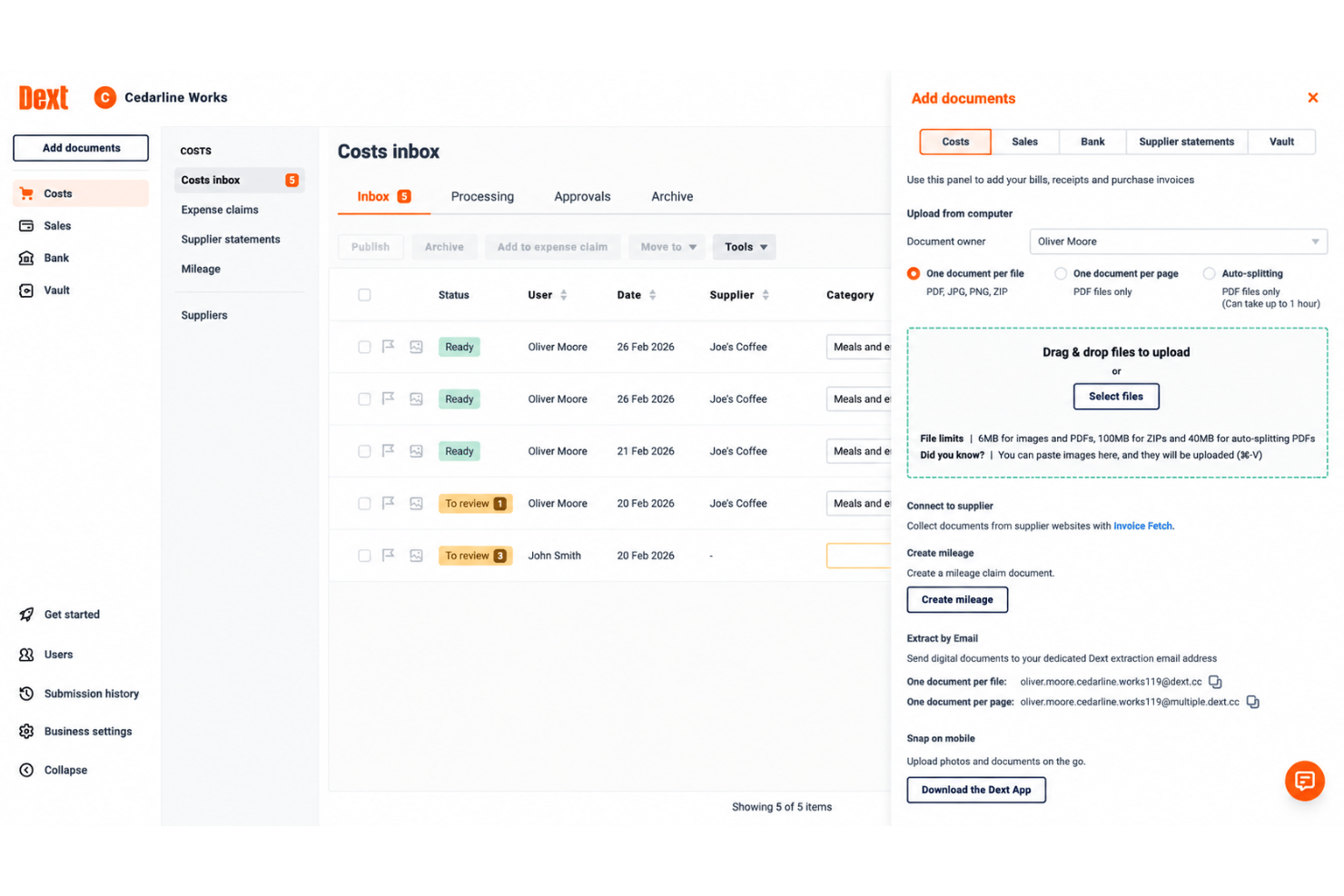
Dext is a document capture and bookkeeping automation platform that lets teams submit receipts, invoices, and expense claims via mobile, email, or direct upload, with AI-powered OCR extraction and direct sync to major accounting software.
Who Is Dext Best For?
Dext is a strong fit for small businesses and bookkeeping firms that need teams to submit and process high volumes of receipts and invoices with minimal manual handling.
Why I Picked Dext
I picked Dext as one of the best because of how it handles bulk document capture across a distributed team. Staff can submit receipts via WhatsApp, email, Dropbox, or the mobile app, all funneling into a single shared inbox. The mobile camera's multi-capture and combine modes mean someone submitting a full week of receipts can batch-photograph them in one session, not one at a time.
Dext Key Features
- AI-powered OCR and line item extraction: Instantly pulls supplier, tax, and payment details from receipts, invoices, and statements.
- Accounting software integrations: Syncs with Xero, QuickBooks, Sage, and over 30 accounting platforms.
- Multi-currency transaction support: Processes expenses in multiple currencies for international and remote teams.
- Mileage tracking functionality: Lets users record business travel distances and add them directly to expense claims.
Dext Integrations
Dext offers native integrations with Xero, QuickBooks, Sage, FreeAgent, KashFlow, and Gusto. An API is available for custom integrations.
Pros and Cons
Pros:
- Team-wide shared inbox for expense submissions
- High OCR accuracy across varied document formats
- Batch receipt capture from multiple submission channels
Cons:
- Approval workflows are basic compared to competitors
- No native reimbursement disbursement to employees

BILL
Best for automated reimbursement sync
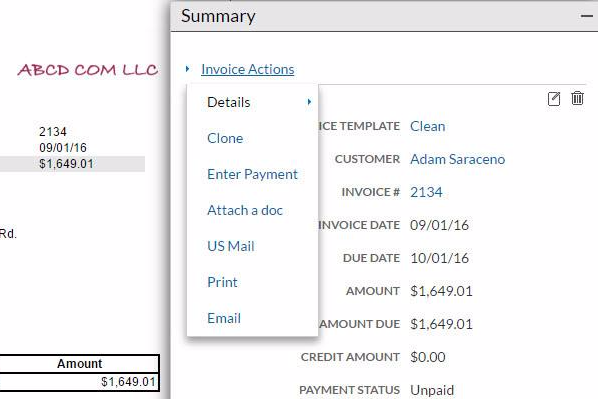
BILL is a financial operations platform that combines accounts payable, accounts receivable, and spend and expense management, including corporate cards, employee reimbursements, and budget-level spend tracking.
Who Is BILL Best For?
BILL is a good fit for small to midsize businesses that need a single platform to manage both employee expense reimbursements and broader AP and AR workflows.
Why I Picked BILL
BILL earns its spot on my shortlist because every reimbursement transaction automatically builds its own audit trail, including receipts, approval history, and notes, which are attached to each record simultaneously. I like that spending rules are enforceable at the policy level, so out-of-policy submissions get flagged before they're ever approved. BILL's AI receipt capture also means that documentation gaps are rare as the system pulls receipts from integrations or lets employees text a photo to a dedicated BILL number, coding every field automatically.
BILL Key Features
- Mileage reimbursement tracking: Log mileage-based reimbursements with automatic IRS rate updates each year, so you're always calculating at the correct rate.
- Budget-tied reimbursements: Link each reimbursement request to a specific budget line, giving you real-time visibility into spend against approved budgets.
- Local currency submissions: Employees can submit reimbursement requests in their local currency, making it practical for teams with international staff.
- ACH and payroll payouts: Pay approved reimbursements directly via ACH or route them through payroll, without switching between separate systems.
BILL Integrations
BILL offers native integrations with QuickBooks Online and Desktop, Xero, Oracle NetSuite, Sage Intacct, Microsoft Dynamics, and Acumatica. It also integrates with Slack and HR platforms, including BambooHR, Workday, Gusto, and ADP Workforce Now for employee onboarding syncs. An API is available for custom integrations.
Pros and Cons
Pros:
- Multi-level approval chains by spend amount
- Automatic audit trail for every transaction
- Free corporate cards with built-in reimbursements
Cons:
- Mobile receipt capture can sometimes be inconsistent
- Reimbursement payouts limited to ACH only
New Product Updates from BILL
BILL Adds Centralized Vendor Management for Multi-Entity Accounts
BILL adds a parent-level vendor list for multi-entity accounts with company filtering, centralized vendor profiles, and vendor credit management. This lets teams handle vendor work across linked entities without switching between company accounts. For more information, visit BILL’s official site.

Ramp
Best for corporate cards
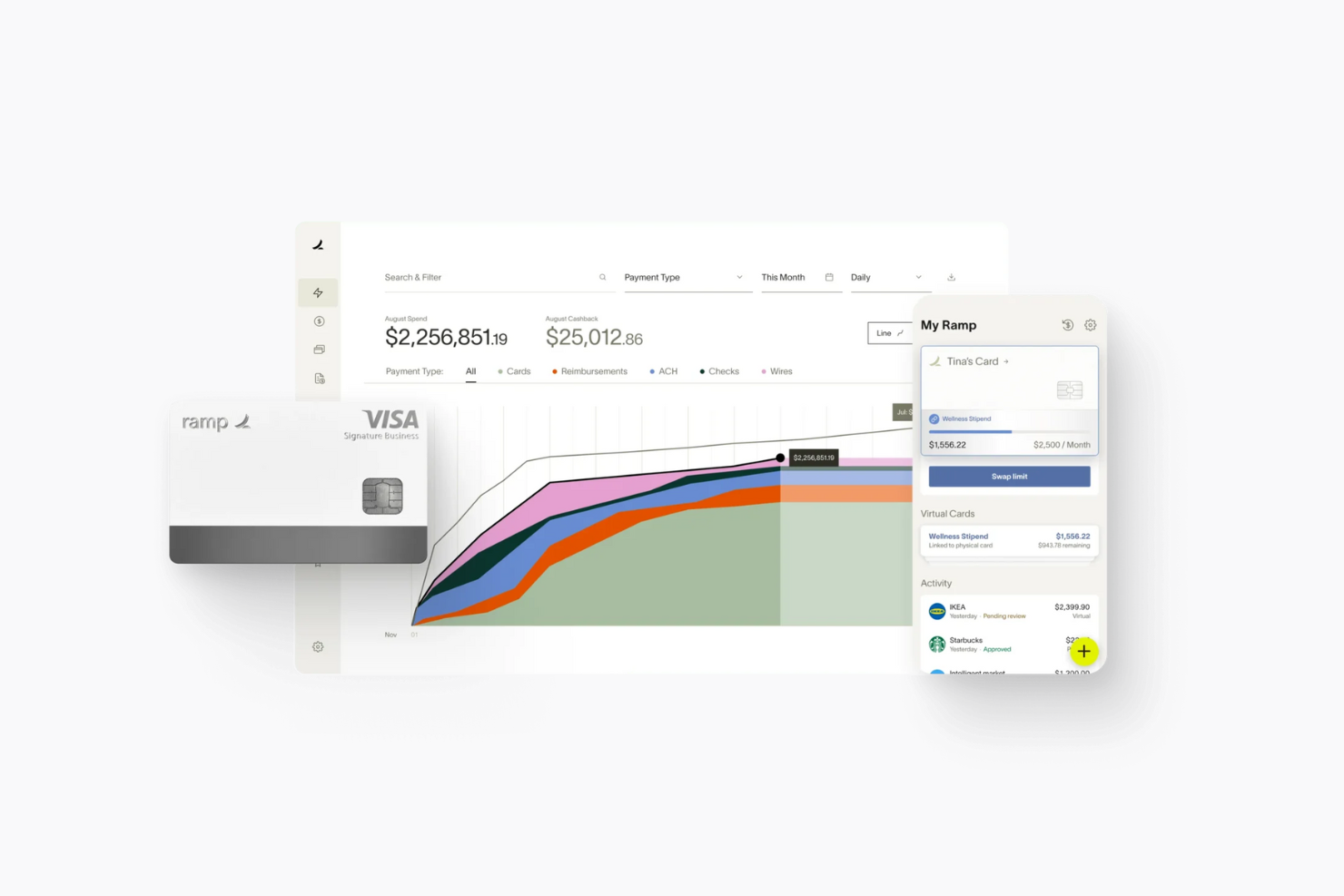
Ramp is an expense management platform designed for businesses that want to streamline their financial operations. It caters to companies of all sizes, providing tools for managing expenses, invoices, and payments.
Why I picked Ramp: Ramp excels in providing corporate cards, which are a significant asset for businesses looking to manage spending effectively. The platform offers unlimited virtual and physical cards, allowing your team to make purchases with ease. It also provides automated receipt collection, reducing manual input and errors. Additionally, Ramp's real-time spend insights help you track expenses and optimize budgets efficiently.
Standout features & integrations:
Features include automated expense categorization, which saves your team time and minimizes errors. The software offers advanced spend controls, allowing you to set limits and monitor transactions. Ramp also provides an advanced dashboard that gives you a clear view of financial data and trends.
Integrations include QuickBooks, Xero, Sage, Microsoft Dynamics, SAP, Oracle, Slack, Google Workspace, and Salesforce.
Pros and Cons
Pros:
- Real-time spend insights
- Automated receipt collection
- Unlimited virtual and physical cards
Cons:
- Limited customization options
- Limited offline capabilities
New Product Updates from Ramp

Ramp Adds VAT-Compliant Reimbursement Statements
Ramp added VAT and entity address details to reimbursement statements, helping teams in the EU, UK, and Canada reclaim VAT with less manual paperwork. For more information, visit Ramp’s official site.
 .
.
Spendesk
Best for multi-currency support

Spendesk is an expense management platform aimed at businesses seeking to manage their spending effectively. It provides tools for tracking expenses, managing budgets, and handling payments.
Why I picked Spendesk: Spendesk is ideal for companies dealing with multiple currencies, offering features that simplify international transactions. Its virtual cards allow your team to make purchases in different currencies without hassle. The software also provides real-time spending insights, helping you keep track of expenses across various regions. Additionally, automated spending controls ensure compliance with company policies.
Standout features & integrations:
Features include invoice management, which helps your team handle supplier payments efficiently. Spendesk also offers budget tracking, allowing you to monitor spending against set limits. Plus, the software’s approval workflows can be customized to fit your organization’s processes.
Integrations include QuickBooks, Xero, Sage, Microsoft Dynamics, SAP, Oracle, Slack, Google Workspace, and Office 365.
Pros and Cons
Pros:
- Budget tracking features
- Automated spending controls
- Real-time spending insights
Cons:
- Complex onboarding process
- Limited offline features

Xero
Best for accounting integration

Xero is an accounting software solution tailored for small to medium-sized businesses. It offers tools for financial management, including expense tracking and reporting.
Why I picked Xero: Xero provides seamless, automated syncing of expense data directly into the accounting system, eliminating manual entry and reducing errors. Its open API and large ecosystem of integrations allow businesses to connect popular expense tools like Expensify, Pleo, or Receipt Bank, ensuring real-time updates of receipts, reimbursements, and credit card transactions.
According to Mark Gilham, a financial leader with 20+ years in the industry, the API integration was his most helpful feature. "I was able to build an API connection to our e-commerce platform myself, enabling us to automatically raise invoices with all necessary details and attachments. I could find everything I needed on APIs and integrations without needing to call in additional expertise."
Standout features & integrations:
Features include invoicing, which helps your team send and manage invoices easily. The software also offers bank reconciliation, allowing you to match transactions with your bank statements. Plus, its inventory management feature helps you track stock levels and manage orders.
Integrations include PayPal, Stripe, Square, HubSpot, Shopify, Salesforce, Gusto, Mailchimp, Harvest, and Bill.com.
Pros and Cons
Pros:
- Bank reconciliation feature
- Advanced invoicing tools
- Real-time financial reporting
Cons:
- Limited customer support options
- Limited offline access

Tipalti
Best for automated payments

Tipalti is an expense management platform designed for businesses seeking to automate their financial operations. It serves companies of all sizes, providing tools for managing expenses, payments, and compliance.
Why I picked Tipalti: Tipalti excels in automated payments, offering features that streamline the payment process for businesses. The platform allows your team to automate payment workflows, reducing manual effort and errors. It also provides global payment capabilities, ensuring smooth transactions across different currencies. Additionally, Tipalti offers compliance checks to help your team adhere to regulatory requirements.
Standout features & integrations:
Features include supplier management, allowing you to maintain and organize supplier records efficiently. Plus, Tipalti's real-time payment tracking provides insights into transaction statuses, ensuring transparency.
Integrations include QuickBooks, Xero, Sage, SAP, Microsoft Dynamics, Oracle, Salesforce, Workday, and Intacct.
Pros and Cons
Pros:
- Compliance checks included
- Global payment capabilities
- Automated payment workflows
Cons:
- Occasional system slowdowns
- Limited customization options

Best for global compliance

Webexpenses is an expense management software designed for businesses looking to enhance their financial control. It caters to companies of varying sizes, offering tools to manage and track expenses efficiently.
Why I picked Webexpenses: Webexpenses is best suited for businesses needing global compliance, providing features that ensure adherence to international standards. The software offers multi-currency support, making it easy for your team to handle expenses from different regions. Additionally, automated policy checks help maintain compliance with local regulations.
Standout features & integrations:
Features include a mobile app that allows your team to submit expenses on the go. The platform also offers receipt scanning to reduce manual entry, saving time and minimizing errors.
Integrations include QuickBooks, Xero, Sage, SAP, Oracle, Microsoft Dynamics, Salesforce, Workday, and ADP.
Pros and Cons
Pros:
- Customizable workflows
- Automated policy checks
- Multi-currency support
Cons:
- Learning curve for new users
- Limited offline functionality

Rydoo
Best for small team budgets

Rydoo is an expense management software tailored for small to medium-sized teams. It helps users efficiently track and manage expenses, ensuring financial control and compliance.
Why I picked Rydoo: Rydoo combines simple expense tracking with automated approval workflows, helping teams avoid overspending without adding administrative overhead. Its real-time expense reporting gives managers instant visibility into spending, making it easier to enforce budget limits and spot cost-saving opportunities early. Plus, the mobile-first design allows employees to snap receipts and submit claims on the go, reducing delays and eliminating paper trails.
Standout features & integrations:
Features include automated approvals that streamline expense submissions. AI-powered receipt scanning makes entering expenses quick and easy, reducing manual entry errors. The insights feature gives you a clear picture of spending patterns, helping your team make informed financial decisions.
Integrations include QuickBooks, Xero, NetSuite, SAP, Workday, Microsoft Dynamics, Salesforce, Egencia, Sage, and Expensify.
Pros and Cons
Pros:
- Corporate credit card reconciliation
- Automated approvals
- AI receipt scanning
Cons:
- Basic reporting tools
- Limited for large enterprises
Other Expense Reimbursement Software
Here are some additional expense reimbursement software options that didn’t make it onto my shortlist, but are still worth checking out:
- Coupa
For procurement
- Expensify
For receipt scanning
- Rippling
For HR integration
- SAP Concur
For enterprise integration
- Slash
For real-time expense tracking
- Paylocity
For payroll features
- Vena
For financial planning integration
- Zoho Expense
For mobile expense tracking
- Odoo
For open-source customization
- QuickBooks
For small business accounting
- Emburse
For virtual card management


How I Evaluate Expense Reimbursement Software
I split my evaluation into two layers: baseline capabilities a tool must have—like OCR, approval workflows, and reimbursement processing—and the differentiators that set vendors apart.
Core Functionality (Table Stakes For This List)
When I'm selecting tools for my list, I rank each one on a scale from 0 (does not offer the functionality) to 5 (excels in this area) for each core functionality listed below. Then, I calculate the tool's total score into a percentage. Each tool needs to achieve a minimum total score of 75% to be considered for inclusion.
- Receipt Capture & OCR: I check whether mobile capture and OCR reliably extract merchant names, dates, and line items—or if finance teams still end up manually correcting most fields.
- Expense Report Workflows: Multi-level approval routing matters here, especially configurable chains where reports over a certain threshold escalate to a second approver automatically.
- Policy Compliance Engine: I evaluate whether the tool flags violations like duplicate submissions or out-of-policy hotel rates at the point of entry, before reports ever reach an approver's queue.
- Reimbursement Processing: The tool should support direct disbursement to employees via ACH, payroll sync, or another electronic method—not just generate a file you manually upload elsewhere.
- Accounting & ERP Integration: I look for native connections with systems like QuickBooks, NetSuite, Sage Intacct, or SAP, with GL coding and cost center mapping that syncs without manual journal entries.
- Mileage & Multi-Currency Support: Teams with field staff or international employees need mileage tracking and automatic currency conversion, so I check whether these are built in or require workarounds.
Once I have a list of tools that meet this criteria, I consider what sets each platform apart.
Differentiating Factors (What Sets Vendors Apart)
Here's how I compare and contrast different vendors:
Standout Features
Corporate card integration is a major differentiator. Tools like Brex, Ramp, and Navan bundle virtual and physical cards with real-time transaction feeds, which eliminates out-of-pocket spend entirely. I also look for AI-powered audit capabilities that automatically scan every report for duplicates and fraud signals, since manual spot-checking misses too much. Advanced spend analytics matter too. I evaluate whether dashboards surface actionable trends like vendor concentration or department-level policy compliance rates.
Beyond Features
Pricing structure matters more than most buyers expect. Some vendors like Ramp and Brex fund their model through card interchange, while others charge per user or per active user—each hits differently depending on headcount volatility. I also evaluate global and multi-entity support, especially whether a platform handles intercompany allocations and localized reimbursement rails across subsidiaries. Compliance certifications like SOC 2 Type II and GDPR round out my evaluation, since expense data includes sensitive employee financial information.
How to Choose Expense Reimbursement Software
It’s easy to get bogged down in long feature lists and complex pricing structures. To help you stay focused as you work through your unique software selection process, here’s a checklist of factors to keep in mind:
| Factor | What to Consider |
|---|---|
| Scalability | Will the software grow with your business? Consider future expansion and whether the tool can handle increased users and transactions without extra costs. |
| Integrations | Does it connect with your current systems? Ensure compatibility with your accounting, ERP, HR, and other software to avoid manual data entry. |
| Customizability | Can you tailor the software to your workflows? Look for options to modify approval processes and reporting to fit your needs. |
| Ease of Use | Is the interface intuitive for your team? A user-friendly design reduces training time and errors. Test demos to gauge usability. |
| Implementation and Onboarding | How quickly can you get started? Assess the setup time and resources needed. Look for tools with guided onboarding and training materials. |
| Cost | Does the pricing fit your budget? Compare costs across vendors, including hidden fees for additional features and user benefits. |
| Security Safeguards | Are your data and transactions secure? Ensure the software meets industry-standard security protocols, including encryption and two-factor authentication. |
| Compliance Requirements | Does it meet legal and financial regulations? Check for features that help maintain compliance with relevant laws and standards, |
What Is Expense Reimbursement Software?
Expense reimbursement software is a digital tool that automates how teams submit expenses and how companies reimburse employees. It simplifies the approval, tracking, and payout process, reducing paperwork and fraud.
Used by finance teams, HR departments, and employees across industries, this software eliminates manual expense reports and speeds up reimbursements.
Core features typically include receipt scanning, policy compliance checks, automated approvals, and integrations with payroll or accounting systems. It's especially valuable for companies aiming to improve cash flow control and ensure compliance with internal and tax-related policies.
Features of Expense Reimbursement Software
When selecting expense reimbursement software, keep an eye out for the following key features:
- Automated Expense Tracking: This feature records expenses automatically, reducing manual entry and minimizing errors in spend management.
- Receipt Capturing: Allows users to capture and store receipts digitally with built-in receipt management tools, making it easier to track and verify expenses.
- Policy Compliance Checks: Ensures that all expenses adhere to company policies, preventing unauthorized spending.
- Multi-Currency Support: Facilitates international transactions by handling multiple currencies without hassle.
- Customizable Approval Workflows: Let you tailor approval processes to match your organization's specific needs for accounts payable.
- Integration With Accounting Systems: Connects with your existing accounting software to streamline financial operations.
- Real-Time Reporting: Provides up-to-date insights into company spending patterns, helping you make informed financial decisions.
- Mobile App Access: Enables users to manage expenses on the go, increasing convenience and flexibility for employee spending.
- Tax Compliance Management: Assists with tax reporting and documentation, ensuring adherence to legal requirements.
- Virtual Card Management: Offers virtual cards for secure and controlled spending, reducing the risk of fraud.
Benefits of Expense Reimbursement Software
Implementing expense reimbursement software provides several benefits for your team and your business. Here are a few you can look forward to:
- Time Savings: Automated tracking and receipt capturing reduce the time spent on manual data entry.
- Improved Accuracy: Policy compliance checks and real-time reporting minimize errors and ensure accurate financial records and bookkeeping.
- Enhanced Control: Customizable approval workflows and virtual card management give you better control over spending.
- Convenience: Mobile app or cloud-based access allows users to manage expenses anywhere, increasing flexibility for remote work.
- Cost Efficiency: Integration with accounting systems simplifies expense management processes, reducing administrative costs.
- Better Decision-Making: Real-time reporting offers insights into spending patterns and business expenses, helping you make informed financial decisions.
- Compliance Assurance: Tax compliance management ensures adherence to legal requirements and expense policies, reducing the risk of penalties.
Costs and Pricing of Expense Reimbursement Software
Selecting expense reimbursement software requires an understanding of the various pricing models and plans available. Costs vary based on features, team size, add-ons, and more.
The table below summarizes common plans, their average prices, and typical features included in expense reimbursement software solutions:
Plan Comparison Table for Expense Reimbursement Software
| Plan Type | Average Price | Common Features |
|---|---|---|
| Free Plan | $0 | Basic expense tracking, receipt capturing, and limited integrations. |
| Personal Plan | $5-$15/user/month | Receipt capturing, automated expense tracking, and mobile app access. |
| Business Plan | $20-$40/user/month | Customizable approval workflows, multi-currency support, and integration with accounting systems. |
| Enterprise Plan | $50-$100/user/month | Advanced reporting, tax compliance management, and virtual card management. |
Expense Reimbursement Software FAQs
Here are some answers to common questions about expense reimbursement software:
How does expense reimbursement software automate approvals?
Expense reimbursement software automates approvals by setting predefined rules and workflows that align with your company’s policy. When employees submit expenses, the system automatically routes them for approval based on these rules. This reduces manual intervention, speeds up the process, and ensures compliance with company policies.
Can expense reimbursement software integrate with existing accounting systems?
Yes, most expense reimbursement software can integrate with popular accounting systems like QuickBooks and NetSuite. This integration allows for seamless data transfer, reducing manual entry and errors. It ensures that all financial data is synchronized, making it easier for your finance team to manage expenses and financial reporting.
What security measures are in place to protect data in expense reimbursement software?
Expense reimbursement software often includes security measures such as data encryption, secure access controls, and regular security audits. These measures protect sensitive financial data from unauthorized access. When evaluating options, you should ensure the software meets industry security standards to safeguard your company’s information.
How does expense reimbursement software handle multi-currency transactions?
Software that supports multi-currency transactions automatically converts expenses into your company’s base currency using current exchange rates. This feature is particularly useful for businesses with international operations, as it simplifies the reimbursement process and ensures accurate financial reporting across different currencies.
Is it possible to customize workflows in expense reimbursement software?
Yes, many expense reimbursement software solutions allow you to customize workflows to fit your company’s specific needs. You can set up unique approval processes, define spending limits, and create specific categories for expenses. This flexibility helps ensure that the software adapts to your existing business processes rather than forcing you to change them.
What kind of support is available for users of expense reimbursement software?
Most vendors offer various support options, including online documentation, tutorials, and customer service representatives. Some also provide live chat or phone support. When choosing software, consider the level of support available and whether it meets your team’s needs, especially during implementation and onboarding.
What’s Next:
If you're in the process of researching expense reimbursement software, connect with a SoftwareSelect advisor for free recommendations.
You fill out a form and have a quick chat where they get into the specifics of your needs. Then you'll get a shortlist of software to review. They'll even support you through the entire buying process, including price negotiations.