

Tracking expenses shouldn’t take hours out of your week—or eat into your sanity. Whether you're handling reimbursements, vendor invoices, or spending limits across departments, manual processes make it easy to miss things and hard to stay ahead. For financial teams and CFOs, that means slower reporting, more back-and-forth, and less control.
That’s where expense management software comes in. In my experience reviewing tools in this space, the right expense management solution reduces errors, adds visibility, and gives you back your time.
In this list, I’ll walk you through the best expense management software out there for small businesses.
Why Trust Our Software Recommendations
6,700+
Reviews
20
Industry experts
16+
Evaluation factors
14
Years
Our team has been testing and reviewing software since 2012. As finance leaders ourselves, we know how difficult—and important—it is to choose the right software.
For this guide, we evaluated tools using hands-on testing and independent research, scoring tools using our selection criteria.
Our reviews reflect our human editorial judgment, not a sales pitch.
Expense Management Software Comparison Table
This comparison table summarizes pricing details for my top expense management software selections:
| Tool | Best For | Trial Info | Price | ||
|---|---|---|---|---|---|
| 1 | Best for vendor expenses | Free plan available | Pricing upon request | Website | |
| 2 | Best for automated spending policies | Free demo available | Pricing upon request | Website | |
| 3 | Best for text-based receipt submission | Free demo available | From $11.99/user/month (billed annually) | Website | |
| 4 | Best for automated accounting tasks | Free demo available | Pricing upon request | Website | |
| 5 | Best for direct ERP-integrated invoice automation | Free demo available | Pricing upon request | Website | |
| 6 | Best for international scalability | Free plan available | Pricing upon request | Website | |
| 7 | Best for enforcing custom approval workflows | 14-day free trial | From $3/user/month (billed annually) | Website | |
| 8 | Best for unlimited receipt tracking | Not available | From $5/user/month | Website | |
| 9 | Best for integrated travel expense management | Free demo available | Pricing upon request | Website | |
| 10 | Best for auto-collecting receipts | Free plan + free demo available | From $15/user/month | Website |


Best Expense Management Software for Small Business Reviews
This in-depth analysis provides overviews of various expense management software tailored for small businesses. It covers the pros and cons of each tool, their features, and their best use cases.


Payout's dashboard offers real-time tracking and management of pending invoices and payouts. Payouts is a comprehensive platform designed to streamline financial operations for small businesses. It offers tools for automating payouts and managing vendor relationships, making it particularly beneficial for those in affiliate marketing and digital advertising.
Why I picked Payouts: Payouts stands out for its ability to automate invoice processing and approval workflows, reducing errors and speeding up payment cycles. This automation is crucial for small businesses aiming to manage expenses efficiently without dedicating extensive time to manual tasks. Additionally, Payouts supports multiple payout methods, including global accounts, virtual cards, and eWallets, facilitating seamless transactions across various channels and currencies.
Standout Features & Integrations
Features include advanced invoicing tools that ensure precise and timely billing. The platform also offers advanced data synchronization, keeping your financial systems and the Payouts platform aligned. With one-click payment execution, you can also pay anyone, anywhere, with minimal effort, enhancing operational efficiency.
Integrations include Everflow, CJ Affiliate, Awin, PayPal, Venmo, Payoneer, NetSuite, Priority, Workday, Skrill, and Tune.
Pros and Cons
Pros:
- Comprehensive automation of accounts payable processes
- Supports scaling operations
- Multiple payout methods
Cons:
- Potential challenges integrating with existing systems
- May require time to fully customize
Learn more about Payouts: Best for automated spending policies
- Free demo available
- Pricing upon request
Visit WebsiteCustomer Rating:4.8/5
Rippling Spend's expense report provides details about various spending categories across team members and departments. Rippling Spend is a comprehensive spend management solution designed to help businesses track and control company expenses. It centralizes various financial activities, including expense reporting, corporate card management, and bill payments, into a single platform.
Why I picked Rippling Spend: One thing I like about Rippling Spend is its advanced policy engine. This tool allows you to create and enforce custom spending policies based on real-time employee data, such as role, department, or transaction specifics. By automating these controls, you can ensure compliance with company guidelines and prevent unauthorized expenditures without manual oversight. Rippling Spend's global expense management also lets you reimburse employees and contractors in over 100 countries and in multiple currencies.
Standout Features & Integrations
Features include automated approval workflows that route expenses to the appropriate reviewers based on your predefined policies, real-time visibility into company spending with customizable dashboards, and the ability to sync expenses directly to your general ledger.
Integrations include Slack, Google, Salesforce, Zoom, Asana, Microsoft 365, Guideline, GitHub, Jira, Datadog, Hubspot, and Zoom.
Pros and Cons
Pros:
- Employee self-service options
- Automated workflow features
- Comprehensive features for various operations
Cons:
- Potential learning curve when maximizing the platform's features
- Initial setup can be time-consuming
Learn more about Rippling Spend: Best for text-based receipt submission
- Free demo available
- From $11.99/user/month (billed annually)
Visit WebsiteCustomer Rating:4.6/5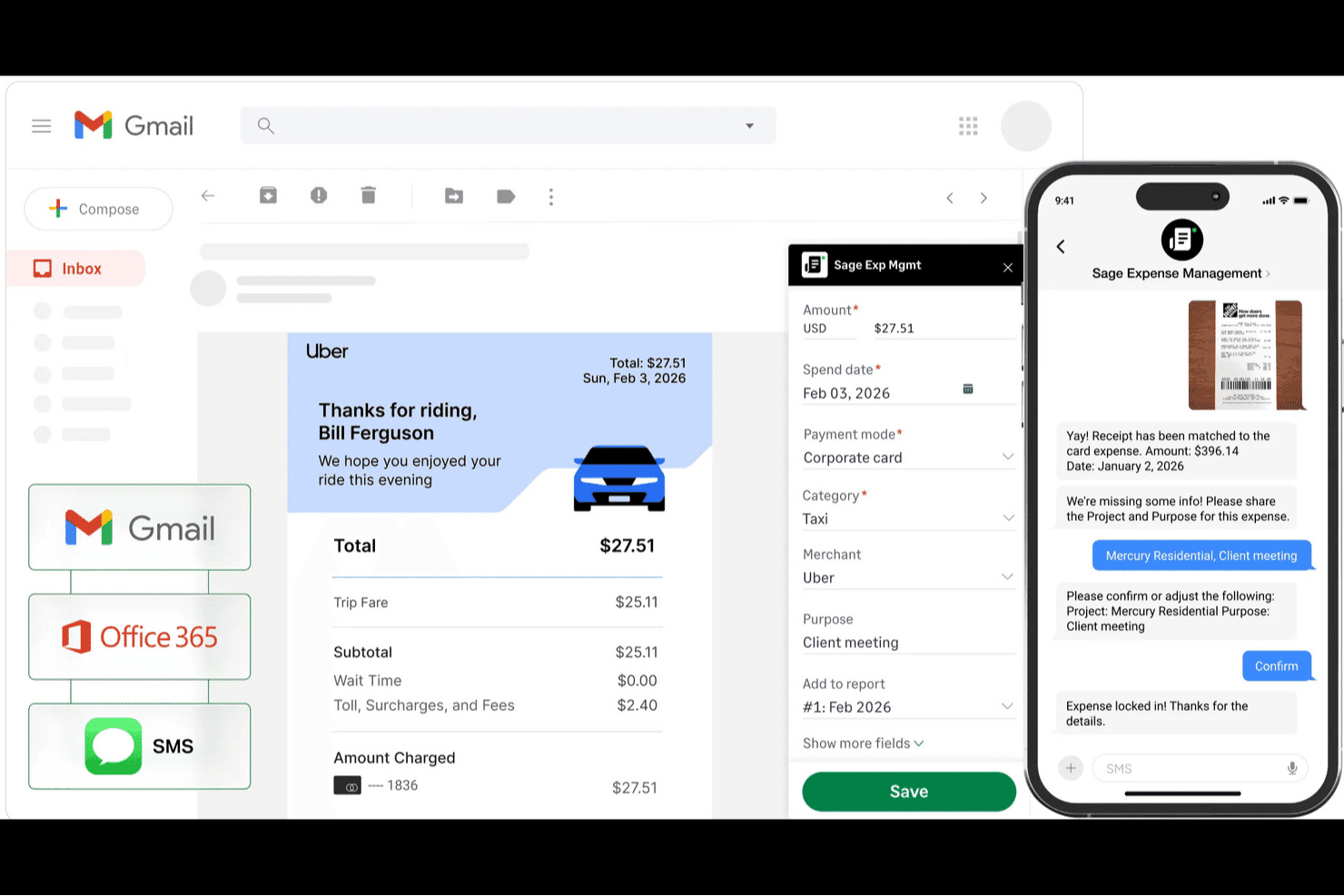
Sage Expense Management (formerly Fyle) helps small businesses capture receipts through email and SMS, automatically match transactions, and manage expense details. Sage Expense Management is an expense management solution for small businesses that covers receipt capture via text message, OCR-based categorization, approval workflows, mileage and per diem tracking, ACH reimbursements, and two-way sync with QuickBooks Online, Xero, and Sage Intacct.
Who Is Sage Expense Management Best For?
Sage Expense Management is a strong fit for small business finance managers and bookkeepers who need a no-fuss way to keep employees compliant with expense policies without changing their existing card setup.
Why I Picked Sage Expense Management
I picked Sage Expense Management because its text-based receipt submission solves the biggest compliance gap in small business expense tracking: employees who forget to log receipts. When a card charge hits, the system texts the employee automatically, who just replies with a photo. The AI reads the merchant, amount, and category, then codes it to the correct GL account.
Sage Expense Management Key Features
- Two-way accounting sync: Syncs expense data, GL codes, and receipts with QuickBooks Online, Xero, Sage Intacct, and Sage 300 CRE.
- ACH reimbursements: Processes bulk employee payments with bank verification and real-time status tracking (US only, Business plan).
- Policy-based approval workflows: Flags out-of-policy expenses and routes them to the right approver before submission.
- Mileage tracking: Uses Google Maps to calculate trip distances with vehicle-specific rates and IRS-compliant records.
Sage Expense Management Integrations
Sage Expense Management offers six documented accounting integrations, including QuickBooks Online, Xero, Sage 50, QuickBooks Desktop, Sage Intacct, and Sage 300 CRE. Its Business plan also supports API integrations for custom connectivity.
Pros and Cons
Pros:
- Reviewers praise easy receipt uploads
- Employees can submit receipts without app downloads
- Text prompts help employees submit receipts sooner
Cons:
- Some users report lag and OCR glitches after updates
- OCR errors can create duplicate expenses
Learn more about Sage Expense Management (formerly Fyle): Best for automated accounting tasks
- Free demo available
- Pricing upon request
Visit WebsiteCustomer Rating:4.3/5
Paylocity's expense management interface provides tools for effortless expense reporting and travel management. Paylocity is an all-in-one platform that combines HR, payroll, and expense management in a single system. It’s designed for small businesses that want to unify financial processes, covering everything from reimbursements and policy compliance to automated expense reporting, without juggling multiple tools.
Why I Picked Paylocity: I picked Paylocity because it helps small businesses bring HR and expense operations together in one place. Instead of switching between platforms, you can manage payroll, reimbursements, and expense approvals all within a connected system. I also like how Paylocity automates repetitive accounting tasks, such as categorizing expenses or syncing receipts, so you spend less time on data entry and more on strategic financial planning. Its fraud detection and spend analytics features give you deeper visibility into company spending and policy compliance, which can be a major benefit if you’re running lean operations.
Standout Features & Integrations
Features include AI-powered expense categorization from receipt photos, policy enforcement tools for setting spending limits, and automated mileage tracking for travel reimbursements. The system also provides a clear audit trail and mobile accessibility, so you can manage approvals on the go. Reporting tools deliver real-time insights into company spend patterns to help you stay on budget.
Integrations include QuickBooks, Sage Intacct, TravelPerk, Criteria Corp, eSkill, HighMatch, and PARiM.
Pros and Cons
Pros:
- Real-time spend analytics
- Automated expense categorization
- Unified HR and finance management
Cons:
- Customer support response delays
- Interface can feel cumbersome
Learn more about Paylocity: Best for direct ERP-integrated invoice automation
- Free demo available
- Pricing upon request
Visit WebsiteCustomer Rating:4.8/5
Stampli directs invoice processing, approvals, vendors, payments, and card spend. Stampli is an accounts payable and procure-to-pay automation platform that handles invoice processing, approval routing, vendor management, payments, and corporate card spend.
Who Is Stampli Best For?
Stampli is a strong fit for AP teams at mid-sized companies that need invoice automation to work natively within an existing ERP, without rebuilding their workflows.
Why I Picked Stampli
Stampli earns its spot on my shortlist because of how it handles ERP connectivity. Unlike tools that sync data through middleware or scheduled exports, Stampli runs directly inside your ERP, so vendors, GL codes, POs, and transactions stay in real time on both sides.
I also like its AI line-level PO matching, which connects invoices to POs and receipts automatically, flagging discrepancies before anything reaches payment. That matters when your AP team is processing high volumes without extra headcount.
Stampli Key Features
- Collaborative invoice communication: Add comments, questions, and approvals directly on top of the invoice, creating a full auditable log for every transaction.
- Duplicate invoice detection: Automatically flags potential duplicate invoices before they reach payment, reducing overpayment risk without manual review.
- Vendor portal: Gives vendors self-serve access to check invoice and payment status, cutting down on inbound inquiries to your AP team.
- Stampli Card: Issues AP and expense cards with pre-coded GL data, spending limits by cardholder or merchant category, and real-time transaction posting synced back to the ERP.
Stampli Integrations
Stampli offers 70+ native ERP integrations, including Sage Intacct, Sage 100, Oracle NetSuite, Oracle Fusion, QuickBooks Online, QuickBooks Desktop, SAP S/4HANA, SAP ECC, Microsoft Dynamics 365 Business Central, and Acumatica. Stampli uses three integration types: API (cloud-to-cloud), Bridge (cloud-to-on-premises), and file-based, but Zapier support is not clearly available.
Pros and Cons
Pros:
- Implements in weeks, not months
- On-invoice collaboration replaces email threads
- AI auto-codes invoices at the line level
Cons:
- Can feel oversized for very low-volume teams
- No GL account restrictions per user role
Learn more about Stampli: Best for international scalability
- Free plan available
- Pricing upon request
Visit WebsiteCustomer Rating:4.7/5
Navan offers travel and expense management with real-time tracking, automated approvals, and a native integration for business travel and expenses. Navan is a unified corporate card, expense management, and travel solution that offers real-time global visibility and financial accuracy. It is known for its international scalability and expense policy controls, making it a suitable choice for small businesses with international operations.
Why I picked Navan: I chose Navan for its extensive international scalability, which may be helpful to small businesses operating globally. Navan stands out due to its real-time visibility and financial accuracy, which are essential for managing expenses across different regions. Additionally, its advanced expense policy controls allow for detailed customization, making it adaptable to various business needs.
Standout Features & Integrations
Features include real-time global visibility, automated expense management, and advanced policy controls. Navan also offers bulk actions for transaction processing, custom segments for NetSuite integration, and batch records for efficient reconciliation.
Integrations include NetSuite, QuickBooks Online, SAP, Xero, Stripe, Oracle, Microsoft Dynamics 365, Salesforce, Workday, and Concur.
Pros and Cons
Pros:
- Real-time global visibility
- Advanced policy controls
- Bulk transaction processing
Cons:
- Higher starting price
- Slight learning curve
Learn more about Navan: Best for enforcing custom approval workflows
- 14-day free trial
- From $3/user/month (billed annually)
Visit WebsiteCustomer Rating:4.3/5
Zoho Expense tracks receipts, reports, mileage, card reconciliation, approvals. Zoho Expense is a travel and expense management platform that covers receipt tracking, expense reporting, mileage logging, corporate card reconciliation, and approval workflow configuration.
Who Is Zoho Expense Best For?
Zoho Expense is a strong fit for small businesses already using other Zoho products who need structured, multi-level expense approvals without a complex setup.
Why I Picked Zoho Expense
Zoho Expense earns its spot on my shortlist because of how much control it gives you over approval logic without requiring any technical setup. I picked it specifically for its criteria-based approval flows, where you can combine and/or conditions to route reports to the right approver depending on factors like policy violations or report totals.
You can also build up to 10 levels of approval for a single transaction, so nothing gets rubber-stamped before the right people have seen it. On top of that, I like that you can set auto-approval rules for low-risk, routine reports, which keeps the queue clear without removing oversight where it actually matters.
Zoho Expense Key Features
- Expense report automation: Automatically adds expenses to a report and submits it based on a schedule, removing the need for manual report creation.
- Per diem management: Calculates per diem allowances automatically using pre-defined rules based on country compliance and location.
- Expense rules: Sets spending limits by fixed amount, expense count, or mileage, with options to warn or block submissions that exceed the defined rule.
- Budget tracking: Creates budgets by expense category or type and tracks actual spend against the budget with built-in analytics.
Zoho Expense Integrations
Zoho Expense offers native integrations across accounting, travel, HR, and collaboration categories, including QuickBooks Online, QuickBooks Desktop, Xero, Sage Accounting, Slack, Amazon Business, Uber for Business, and Lyft, along with several Zoho ecosystem apps like Zoho Books, Zoho People, Zoho Projects, Zoho Payroll, Zoho CRM, and Zoho Analytics. Zoho Flow connects Zoho Expense to 500+ additional apps. Zoho Expense does not integrate directly with Zapier. An API is available for custom integrations.
Pros and Cons
Pros:
- Caps spending per category with custom rules
- Handles multi-currency expenses and conversions
- Receipt autoscan extracts data from photos
Cons:
- Free plan excludes approval flows and budgeting
- OCR misreads wrinkled or low-quality receipts
Learn more about Zoho Expense: Best for unlimited receipt tracking
- Not available
- From $5/user/month
Visit WebsiteCustomer Rating:4.5/5
Expensify is a complete expense management software that offers features such as receipt and expense tracking, budgeting, and integrations for various industries. Expensify is best known for its unlimited receipt tracking capabilities, which is useful for businesses that need to manage a high volume of receipts efficiently. The software's SmartScan technology allows users to capture receipt details automatically, reducing the potential for human error and speeding up the expense reporting process.
Why I picked Expensify: I chose Expensify for its modern receipt tracking capabilities, which stand out in the crowded field of expense management software. The ability to handle unlimited receipts with ease makes it particularly suitable for small businesses that deal with numerous transactions. Expensify's user-friendly interface and AI-powered features further enhance its appeal, making it a top choice for efficient expense management.
Standout Features & Integrations
Features include one-click receipt scanning, credit card import, customizable workflows, corporate card reconciliation, and advanced tax tracking. Expensify also offers multi-level GL coding, audit and compliance tools, and delegated access for streamlined expense management.
Integrations include QuickBooks, Xero, NetSuite, Sage Intacct, Microsoft Dynamics 365, Oracle, Salesforce, and Gusto.
Pros and Cons
Pros:
- Unlimited receipt tracking
- AI-powered SmartScan
- Customizable workflows
Cons:
- Limited offline functionality
- Slight learning curve for new users
 Best for integrated travel expense management
- Free demo available
- Pricing upon request

SAP Concur Expense automates expense reporting, integrates with travel bookings, and provides real-time insights to streamline financial management. SAP Concur Expense is a software designed to support expense management processes for businesses of all sizes. It is best known for its integrated travel and expense management capabilities, making it a top choice for businesses looking to manage both travel and expenses in one platform.
Why I picked SAP Concur Expense: I chose SAP Concur Expense for this list because it offers a detailed solution that integrates both travel and expense management, which is a unique feature compared to other tools. This integration allows businesses to manage all employee-initiated expenses and travel costs in one connected system, providing a great overall user experience. I believe SAP Concur Expense is best for integrated travel and expense management because it simplifies the travel experience, increases compliance, and controls costs effectively.
Standout Features & Integrations
Features include automated expense tracking, faster reimbursement processes, and error reduction. The tool also offers mobile-friendly, cloud-based access, industry-leading security, and the latest AI technology to enhance user experience and compliance.
Integrations include SAP, NetSuite, QuickBooks, Xero, Salesforce, Microsoft Dynamics 365, Oracle, ADP, Workday, and Google Workspace.
Pros and Cons
Pros:
- Integrated travel and expense
- Mobile-friendly access
- AI technology
Cons:
- Pricing upon request
- Slightly complex setup
Learn more about SAP Concur Expense: 10Best for auto-collecting receipts
Ramp
- Free plan + free demo available
- From $15/user/month
Visit WebsiteCustomer Rating:4.8/5
Ramp provides an automated accounting dashboard that categorizes transactions, syncs expenses, and flags missing memos for review. Ramp is a spend management platform built to help small businesses manage expenses without the usual manual lift. The platform offers corporate cards, automated expense tracking, and real-time analytics—all within a user-friendly interface. It’s especially useful for finance teams looking to consolidate travel, expenses, and accounts payable into a single system.
Why I Picked Ramp: I chose Ramp because of its zero-touch expense management system that minimizes manual data entry. What stood out was how Ramp auto-collects receipts, matches them to transactions, and enforces company policies automatically. Its AI-enhanced features help with coding and categorization, which is a time-saver during month-end close. It’s also designed for growing teams, offering flexibility in managing budgets and global payments.
Standout Features & Integrations:
Features includes Ramp Intelligence for AI-powered transaction monitoring, customizable approval workflows, corporate cards with pre-set spend controls, and real-time reporting. It supports multi-currency payments and automates bill pay processes. Ramp also eliminates the need for traditional expense reports by automatically capturing and verifying transactions.
Integrations include NetSuite, Sage, Xero, QuickBooks, Microsoft Dynamics Business Central, Acumatica, Uber, Lyft, Okta, Google, Rippling, and Gmail.
Pros and Cons
Pros:
- Automated expense reporting and receipt matching
- Ability to issue multiple virtual cards with customizable controls
- Comprehensive reporting features
Cons:
- Could offer more advanced accounting features
- Mostly focuses on accounts payable and spend management
Other Expense Management Software for Small Businesses
Below is a list of additional expense management software for small businesses that we shortlisted, but did not make it to the top list. Definitely worth checking them out.
- 11NetSuiteBest for automated project accounting
- 12BILL Spend & ExpenseBest for real-time spend and card controls
- 13SlashBest for real-time financial analytics
- 14EmburseBest for AI-driven expense compliance
- 15Doxis SpendControlBest for customizable approval workflows
- 16SutiExpenseBest for customizable workflows
- 17TipaltiBest for global reimbursement
- 18PerkBest for business travel spend
- 19SpendeskBest for operational spend control
- 20RydooBest for AI-powered expense monitoring
- 21BrexBest for AI-assisted expense reviews
How I Evaluate Expense Management Software for Small Business
I split my evaluation into two layers: baseline criteria a tool must meet—receipt capture, reimbursement, and accounting sync—and the differentiators that separate the right fit from the rest.
Core Functionality (Table Stakes For This List)
When I'm selecting tools for my list, I rank each one on a scale from 0 (does not offer the functionality) to 5 (excels in this area) for each core functionality listed below. Then, I calculate the tool's total score into a percentage. Each tool needs to achieve a minimum total score of 65% to be considered for inclusion.
- Receipt Capture & OCR: I check whether employees can snap a photo, forward an email, or drag-and-drop a file and get accurate field extraction without manual cleanup.
- Expense Reports & Reimbursement: Each tool should let staff submit grouped expenses and give admins a clear path to process payouts through ACH, payroll sync, or similar methods.
- Approval Workflows: I look for configurable routing rules—like sending anything over a set threshold to a second approver or directing department-specific spend to the right manager.
- Corporate Card Controls: Whether it's virtual cards for SaaS subscriptions or physical cards for team lunches, I evaluate the depth of spend limits and real-time transaction visibility.
- Accounting Software Integrations: Syncing GL codes, classes, and categories into QuickBooks Online or Xero without a CSV workaround is something I evaluate closely for every tool.
- Policy Enforcement & Categorization: The platform should let an admin define rules—like flagging weekend transactions or capping meal spend—and auto-categorize entries for clean books.
Once I have a list of tools that meet this criteria, I consider what sets each platform apart.
Differentiating Factors (What Sets Vendors Apart)
Here's how I compare and contrast different vendors:
Standout Features
Mileage and travel tracking matters for teams with field staff or frequent client visits—I look for GPS-based capture that feeds directly into expense reports. Bill pay integration is another feature I evaluate, since a small finance team benefits from managing vendor invoices and employee expenses in one place. I also check for real-time budget tracking by department or project, which gives owners and controllers immediate visibility into cash flow without waiting for month-end.
Beyond Features
Pricing transparency is one of the first things I evaluate—hidden fees for card issuance or ACH payouts can quietly erode value for a small team. Implementation speed also matters; I look for self-serve onboarding with pre-built templates so a bookkeeper or owner can go live without IT support. Scalability rounds out my assessment. A 10-person company today may need multi-entity reporting or international reimbursements next year, so I check whether a platform's plan tiers grow with the business instead of forcing a migration.
How to Choose Expense Management Software for a Small Business
As you work through your own unique software selection process, keep the following points in mind:
- Ease of Use: Selecting software that is user-friendly is crucial for ensuring that employees can easily adopt and use the system without extensive training. A complex interface can lead to errors and incomplete expense reports, which can frustrate employees and create additional work for the finance team. For example, a sales representative returning from a trip should be able to quickly and easily input their expenses and attach receipts without needing to navigate a complicated system.
- Integration Capabilities: The ability of the expense management software to integrate with your existing accounting and payroll systems is essential. This ensures that expense data can be transferred for reporting and tax purposes, reducing manual data entry and the potential for errors. For instance, if your business uses QuickBooks for accounting, choosing an expense management tool that integrates with QuickBooks will streamline the process of recording and reconciling expenses.
- Automation Features: Automation can significantly reduce the administrative burden on your finance team by handling repetitive tasks such as receipt capture, expense categorization, and report generation. Automated approval workflows can also ensure that expenses are reviewed and approved in a timely manner. For example, software that automatically flags duplicate receipts or out-of-policy expenses can help maintain compliance and prevent fraud.
- Scalability: As your business grows, your bookkeeping needs will evolve. Choosing software that can scale with your business ensures that you won't need to switch systems as you add more employees or freelancers, or expand into new markets. Look for an expense tracker that offers additional modules or features that can be activated as needed, such as travel management or advanced analytics. For example, a small business might start with basic expense tracking and later add features for managing international expenses as it expands globally.
- Cost and Pricing Structure: Understanding the cost and pricing structure of the expense tracking software is important for budgeting purposes. Some software may have a low upfront cost but charge additional fees for advanced features or additional users. It's important to consider both the initial cost and the long-term expenses associated with the software. For instance, a solution that charges per active user per month might be more cost-effective for a small business with a limited number of employees submitting expenses.
Trends for Expense Management Software for Small Businesses
Expense management software is evolving rapidly. Here are some key trends to watch in the coming future.
- AI-Powered Expense Tracking: AI is being used to automate expense tracking. This reduces manual entry and errors. It also provides real-time insights.
- Mobile Integration: Mobile apps are becoming essential for expense management. They allow employees to submit expenses on the go. This increases efficiency and convenience.
- Blockchain for Security: Blockchain technology is being adopted for secure transactions. It ensures data integrity and transparency. This is crucial for preventing fraud.
- Real-Time Analytics: Real-time analytics tools are gaining popularity. They help businesses make informed decisions quickly. This is vital for maintaining financial health.
- Subscription-Based Models: Subscription-based pricing is becoming more common. It offers flexibility and scalability for small businesses. This makes advanced features more accessible.
These trends are shaping the future of expense management software tools for small businesses, from increasing subscription-based models to higher adoption rates for blockchain technology.
Whether you are considering a new expense management software tool or looking to make a switch, keep these trends in mind when researching features as they will become more and more relevant to your business and operations.
What is Expense Management Software for Small Businesses?
Expense management software is a tool designed to help small businesses track, manage, and control their expenses. Small business owners, finance teams, and employees use it to submit, approve, and reimburse expenses efficiently.
The software typically includes components like expense tracking, receipt capture, approval workflows, and reporting. These features help users maintain accurate financial records, streamline expense reporting, and ensure compliance with company policies.
Features of Expense Management Software for Small Businesses
Choosing the right expense management software is crucial for small businesses to keep track of their finances efficiently. Here are the most important features to look for:
- Automated Expense Tracking: This feature helps in automatically recording expenses, reducing manual entry errors and saving time.
- Receipt Scanning: Allows users to scan and store receipts digitally, ensuring that all expense records are easily accessible and organized.
- Integration with Accounting Software: Ensures faultless data transfer between the expense management software and your accounting system, simplifying financial reporting.
- Mobile Accessibility: Provides the ability to manage expenses on the go, which is essential for business owners and employees who travel frequently.
- Customizable Expense Categories: Enables businesses to create specific categories for expenses, making it easier to track and analyze spending patterns.
- Approval Workflow: Supports the process of approving expenses, ensuring that all expenditures are reviewed and authorized before being processed.
- Policy Compliance: Ensures that all expenses adhere to the company’s policies, reducing the risk of unauthorized spending.
- Reporting and Analytics: Offers detailed reports and analytics on spending, helping businesses make informed financial decisions.
- Multi-Currency Support: Essential for businesses that operate internationally, allowing them to manage expenses in different currencies.
- User Permissions: Allows administrators to set different access levels for users, ensuring that sensitive financial information is only accessible to authorized personnel.
Selecting expense management software with these features will help small businesses manage their finances more effectively, ensuring better control over their spending and financial health.
Benefits of Expense Management Software for Small Businesses
Expense management software offers a range of advantages for small businesses, organizing financial processes and enhancing overall efficiency. By automating and simplifying expense tracking, these tools can save time, reduce errors, and provide valuable insights into spending patterns. Here are five main benefits of using expense management software for small businesses:
- Time-Savings: Automating expense tracking and reporting reduces the time spent on manual data entry, allowing employees to focus on more strategic tasks.
- Cost Control: Real-time monitoring of expenses helps businesses identify and eliminate unnecessary spending, leading to better budget management and cost savings.
- Improved Accuracy: Automated systems minimize human errors in expense reporting, ensuring that financial records are accurate and reliable.
- Enhanced Compliance: Expense management software helps businesses adhere to internal policies and external regulations by providing a clear audit trail and ensuring that all expenses are properly documented.
- Better Financial Insights: Detailed reports and analytics provide valuable insights into spending patterns, helping businesses make informed financial decisions and plan for the future.
Implementing expense management software can significantly improve the efficiency and accuracy of financial processes in small businesses. By leveraging these tools, businesses can gain better control over their expenses, ensure compliance, and make more informed financial decisions.
Costs & Pricing for Expense Management Software for Small Businesses
This section provides an estimate of average expense management software plans and costs for small businesses. The data is based on common pricing tiers and features available in the market.
Plan Comparison Table for Expense Management Software
| Plan Type | Average Price | Common Features |
| Free Plan | $0 | Basic expense tracking, receipt scanning, mobile app access, and limited reporting features |
| Personal Plan | $5 - $10/ user/month | Advanced expense tracking, integration with accounting software, multi-level approvals, and customizable policies and controls |
| Business Plan | $15 - $30/ user/month | Everything in Personal Plan, corporate card reconciliation, advanced reporting and analytics, increased data storage, and greater security features |
| Enterprise Plan | Custom pricing | Everything in Business Plan, VIP support, custom integrations and workflows, and a dedicated account management |
A breakdown of plan types, costs, and features for expense management software for small businesses.
Expense Management Software for Small Businesses FAQs
Here are some answers to frequently asked questions you may have about expense management software for small businesses and how it works:
How can I integrate expense management software with my existing accounting system?
Most expense management software offers integration capabilities with popular accounting systems like QuickBooks, Xero, and FreshBooks. To integrate, you typically need to access the settings or integrations section of your expense management software and follow the prompts to connect your accounting system. Ensure you have the necessary permissions and API keys if required. Some software may also offer step-by-step guides or customer support to assist with the integration process.
What are the security measures in place to protect my financial data?
Expense management software usually employs several security measures to protect your financial data. These can include data encryption, secure socket layer (SSL) technology, two-factor authentication (2FA), and regular security audits. Additionally, many providers comply with industry standards and regulations such as GDPR and SOC 2. It’s important to review the security policies of the software provider to ensure they meet your business’s security requirements.
Can I customize expense categories and approval workflows?
Yes, most expense management software allows you to customize expense categories and approval workflows to fit your business needs. You can create specific categories that align with your business expenses and set up multi-level approval workflows to ensure proper oversight. Customization options may vary between software providers, so it’s advisable to check the specific capabilities of the software you are considering.
How do I handle multi-currency expenses in the software?
Many expense management software solutions support multi-currency expenses, allowing you to record and report expenses in different currencies. The software typically converts foreign currency expenses to your base currency using real-time exchange rates. You can also set default currencies for different users or departments and generate reports that reflect multi-currency transactions accurately.
Is it possible to track mileage and other travel-related expenses?
Yes, most expense management software includes features to track mileage and other travel-related expenses. Users can log their mileage manually or use GPS tracking to record distances traveled. The software can then calculate reimbursement amounts based on predefined rates. Additionally, you can categorize travel-related expenses such as lodging, meals, and transportation for comprehensive tracking and reporting.
What kind of reporting and analytics capabilities are available?
Expense management software typically offers robust reporting and analytics capabilities. You can generate various reports, such as expense summaries, spending by category, and employee expense reports. Advanced analytics features may include trend analysis, budget vs. actual comparisons, and custom report generation. These tools help you gain insights into spending patterns and make informed financial decisions.
How do I manage receipts and other documentation within the software?
Most expense management software allows you to manage receipts and other documentation digitally. Users can upload receipts by taking photos with their mobile devices or scanning documents. The software often includes OCR (Optical Character Recognition) technology to extract relevant information from receipts automatically. You can also attach receipts to specific expense entries and store them securely within the software for easy retrieval and compliance purposes.
What support options are available if I encounter issues with the software?
Support options for expense management software typically include a combination of resources such as online help centers, user guides, video tutorials, and community forums. Additionally, many providers offer direct support through email, live chat, or phone. Some software may also provide dedicated account managers or premium support plans for more personalized assistance. It’s important to review the support options available to ensure they meet your business’s needs.