

Expense management software is designed to streamline how businesses track, approve, and report expenses. For finance and accounting professionals, the right tool can cut down on manual processes, ensure policy and tax compliance, and deliver better visibility into spending across departments.
As a digital software expert with a background in financial management, I’ve helped many finance teams navigate the overwhelming process of choosing the right platform. I’ve seen how the wrong tool can create more friction than it solves, from poor integrations and delayed reimbursements to inconsistent data and compliance risks. With so many options on the market, it’s not always clear which ones are worth your time.
That’s why I spent countless hours researching, testing, and comparing top-rated expense management solutions. This list is built to help you make a confident, informed decision that actually supports the way your team works.
Why Trust Our Software Recommendations
6,700+
Reviews
20
Industry experts
16+
Evaluation factors
14
Years
Our team has been testing and reviewing software since 2012. As finance leaders ourselves, we know how difficult—and important—it is to choose the right software.
For this guide, we evaluated tools using hands-on testing and independent research, scoring tools using our selection criteria.
Our reviews reflect our human editorial judgment, not a sales pitch.
Expense Management Software Comparison Table
This comparison table summarizes pricing details for my top expense management software selections:
| Tool | Best For | Trial Info | Price | ||
|---|---|---|---|---|---|
| 1 | Best for automated approval workflows | Free demo available | Pricing upon request | Website | |
| 2 | Best for managing expenses across global teams | Free demo available | From $29/user/month | Website | |
| 3 | Best for SMS receipt and card sync | Free demo available | From $11.99/user/month (billed annually) | Website | |
| 4 | Best for setting budget limits | Free demo available | From $499/month (billed annually) | Website | |
| 5 | Best for document data extraction | 14-day free trial | Pricing upon request | Website | |
| 6 | Best accounting software for small business owners or self-employed professionals | Free plan + 30-day free trial available | From $38/month | Website | |
| 7 | Best for streamlining expense management | 14-day free trial | Pricing upon request | Website | |
| 8 | Best for accounts payable automation | Free demo available | Pricing upon request | Website | |
| 9 | Best for automated expense reporting | Free plan + free demo available | From $15/user/month | Website | |
| 10 | Best for user experience | Free plan available | Pricing upon request | Website |


Best Expense Management Software Reviews
Dive into my comprehensive reviews to explore the strengths and weaknesses of leading expense management software. I’ll detail their features, benefits, and ideal scenarios to help you find the perfect fit for your business needs.
 Best for automated approval workflows
- Free demo available
- Pricing upon request
Visit WebsiteCustomer Rating:4.8/5
Rippling lets you enforce expense policies to control company spending and approve individual expenses. Rippling Spend caters to businesses needing an intuitive expense management solution that integrates with existing HR and financial tools. It appeals to HR professionals, finance teams, and business leaders across industries by offering automated workflows, customizable policies, and real-time analytics. This platform addresses challenges in financial efficiency and control by providing global spend tracking and automated policy controls.
Why I Picked Rippling Spend
I picked Rippling Spend because its automated approval workflows stand out as an efficient solution for businesses looking to streamline financial processes. The platform allows you to create advanced workflows based on specific data inputs, ensuring that approvals are routed to the right people at the right time. With features like customizable approval rules and real-time analytics, Rippling Spend helps your team maintain compliance with company policies while reducing administrative overhead. This makes it an appealing choice for organizations aiming to enhance operational efficiency and manage expenses more effectively.
Rippling Spend Key Features
In addition to its exceptional automated approval workflows, Rippling Spend offers a variety of features designed to enhance your team's expense management capabilities.
- Custom Policies: Automates and enforces specific spending rules tailored to your company's needs, optimizing approval workflows.
- Expense Tracking: Monitors all expenses, including corporate card usage and payroll, from a single interface, providing a comprehensive view of company spending.
- Card Controls: Provides customizable spending limits and controls for corporate cards, allowing you to manage spend proactively.
- Receipt Management: Automatically requests and organizes receipts for corporate card transactions, simplifying record-keeping and auditing processes.
Rippling Spend Integrations
Integrations include PayPal, 1Password, YubiKey, Carta, Zendesk, and various HR, finance, and IT applications.
Pros and Cons
Pros:
- Comprehensive features for various operations
- Automated workflow features
- Employee self-service options
Cons:
- Initial setup can be time-consuming
- Potential learning curve when maximizing the platform's features
Learn more about Rippling Spend: Best for managing expenses across global teams
- Free demo available
- From $29/user/month
Visit WebsiteCustomer Rating:4.9/5
Deel's expense management dashboard lets users generate reports and track, approve, and manage expenses. For those seeking an effective expense management solution, Deel offers a unique approach, especially for businesses that deal with global operations. By integrating expense management into its payroll and HR platform, your team can track and process employee expenses while adhering to various local regulations. This setup not only simplifies financial tasks but also delivers valuable insights through its reporting tools, helping your business manage spending and remain financially agile.
Why I Picked Deel
I picked Deel for its exceptional capability in supporting global teams with expense management, making it a standout choice for businesses operating across multiple countries. Deel's platform allows your team to submit expenses in any currency, automatically converting them for seamless reimbursement in the next payroll cycle. This feature, combined with a centralized view of all expense submissions, ensures compliance with local regulations and reduces administrative burdens. By simplifying the expense reporting process, Deel enhances financial management and transparency, making it an invaluable tool for companies wanting to maintain a clear and organized financial structure globally.
Deel Key Features
In addition to its global team capabilities, Deel offers a suite of features that enhance its appeal as an Expense Management Software.
- Automated Expense Tracking: This feature allows your team to automatically track expenses, reducing manual entry and minimizing errors.
- Customizable Approval Workflows: You can tailor approval processes to fit your organization's structure, ensuring that expenses are reviewed and approved efficiently.
- Integration with Accounting Systems: Deel seamlessly integrates with existing accounting software, allowing for a smooth transfer of financial data and reducing administrative workload.
- Real-Time Reporting and Analytics: This feature provides instant access to financial reports, enabling you to monitor spending patterns and make informed budgetary decisions.
Deel Integrations
Integrations include Expensify, QuickBooks, Google Workspace, Slack, JIRA, HubSpot, BambooHR, Workday, Xero, Salesforce, Microsoft Teams, and Zendesk.
Pros and Cons
Pros:
- Automated per diem calculations
- Country-specific expense policies
- Strong global compliance tools
Cons:
- Limited offline functionality
- Can feel complex for small teams
Learn more about Deel Payroll: Best for SMS receipt and card sync
- Free demo available
- From $11.99/user/month (billed annually)
Visit WebsiteCustomer Rating:4.6/5
Track receipts via text and automatically match them to corporate card transactions with Sage Expense Management (formerly Fyle). Sage Expense Management (formerly Fyle) is an expense management software built to help you capture receipts and track expenses as soon as they happen. It works directly with your existing credit cards and lets you submit receipts by text, email, or app, reducing manual work and improving visibility into company spending.
Why I picked Sage Expense Management: Sage Expense Management is an expense management software built to help you capture receipts and track expenses as soon as they happen. It works directly with your existing credit cards and lets you submit receipts by text, email, or app. You can track receipts via text and reconcile card spend automatically, which helps reduce manual work and gives you clearer visibility into company spending.
Standout features & integrations:
Features include AI-powered expense coding, automated policy violation alerts, and budget tracking by department or project. You can also configure approval workflows to match your internal processes, reducing back-and-forth during reviews. Sage Expense Management supports real-time reconciliation on your existing business credit cards, so you can match transactions without issuing new ones. It also offers a mobile app and centralized storage to help your team stay audit-ready.
Integrations include NetSuite, Sage Intacct, Xero, QuickBooks Online, QuickBooks Desktop, Sage 300 CRE, TravelPerk, Bamboo HR, Gmail, Outlook, and Slack.
Pros and Cons
Pros:
- Text-based receipt capture
- AI-powered expense categorization
- Real-time credit card reconciliation
Cons:
- Auto-filing speed may vary
- Limited customization for complex cases
Learn more about Sage Expense Management (formerly Fyle): Best for setting budget limits
- Free demo available
- From $499/month (billed annually)
Visit WebsiteCustomer Rating:4.8/5
Precoro gives you a real-time dashboard view of spending, transactions, and approvals across departments, suppliers, and users. Discover a solution that simplifies your purchasing processes and enhances control over your expenses with Precoro. Ideal for businesses of all sizes, this AI-driven platform integrates with popular accounting systems like NetSuite and QuickBooks, offering features such as vendor management and invoice approval. With Precoro, you can manage spending across different projects and locations, giving your team the tools they need for better efficiency and compliance.
Why I Picked Precoro
I picked Precoro because it excels in setting budget limits, a crucial feature for expense management. Its platform allows you to specify budget constraints for various departments and projects, ensuring that your spending aligns with financial objectives. With real-time visibility into expenses, you can monitor compliance and receive alerts to prevent overspending. Additionally, features like automated approval processes and three-way matching enhance financial oversight, making Precoro a reliable choice for maintaining fiscal discipline.
Precoro Key Features
In addition to setting budget limits, Precoro offers a range of features designed to enhance your expense management processes.
- Centralized Tracking: This feature allows your team to track all expenditures from a single platform, providing comprehensive visibility into spending activities.
- Automated Reimbursement: Precoro automates the reimbursement process, reducing manual data entry and minimizing errors, ensuring timely processing of expense claims.
- Advanced Reporting Capabilities: With customizable reports, you can analyze spending patterns, identify cost-saving opportunities, and make informed financial decisions.
- Mobile Access: Your team can manage expenses on-the-go, accessing the platform from any device, which supports real-time decision-making and approvals.
Precoro Integrations
Integrations include QuickBooks Online, NetSuite, Xero, Amazon, Google, Power BI, Slack, HiBob, Keycloak, and JumpCloud.
Pros and Cons
Pros:
- Subscription management tools
- Customizable approval workflows adapt to various business needs
- Real-time budget monitoring
Cons:
- Occasional challenges with data configuration
- Could offer more native integrations
Learn more about Precoro: 5Best for document data extraction
Dext
- 14-day free trial
- Pricing upon request
Visit WebsiteCustomer Rating:4.5/5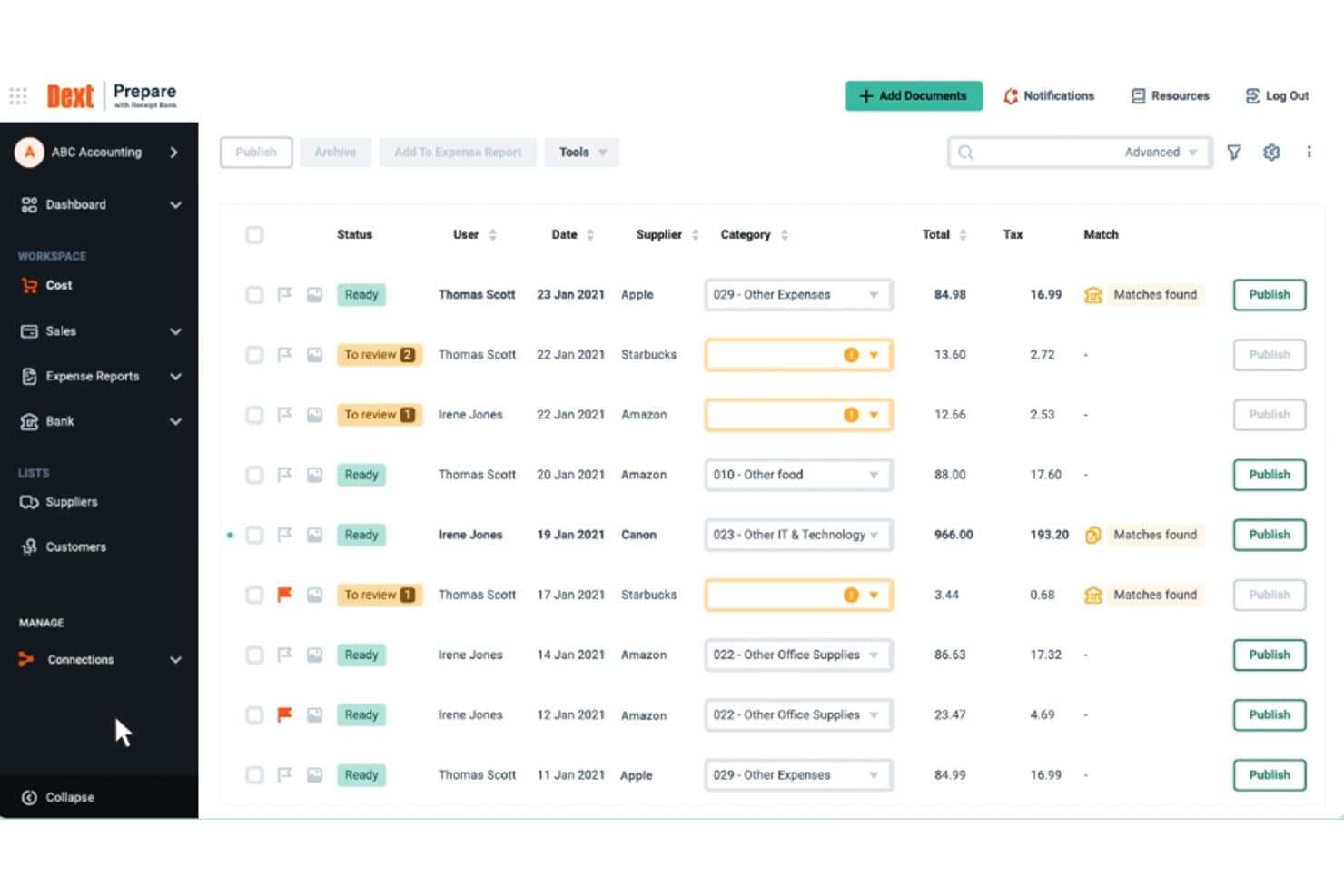
Dext offers a structured expense management dashboard where users can review, categorize, and publish cost documents with supplier, tax, and match details. Dext is a pre-accounting automation tool that captures receipts, invoices, and supplier documents via mobile, email, or drag-and-drop, then uses OCR and AI to extract and sync financial data to your accounting software.
Who Is Dext Best For?
Dext is a strong fit for small businesses and accounting or bookkeeping firms that handle high volumes of receipts and invoices across multiple clients or entities.
Why I Picked Dext
I've included Dext in my top picks because its document data extraction accuracy is genuinely difficult to match. It pulls supplier names, tax details, and individual line items from receipts submitted via WhatsApp, email, or a mobile photo snap, all without manual input. I particularly like the bank statement extraction feature, which automatically converts PDF statements into structured transaction data ready to push into QuickBooks or Xero.
Dext Key Features
- Multi-source document submission: Users can upload receipts and invoices via mobile app, email, WhatsApp, or connected cloud storage.
- Bank and credit card integration: Dext connects to over 11,500 banks for direct transaction imports and automated reconciliation.
- Supplier statement extraction: The platform extracts and matches line items from supplier statements for efficient accounts payable workflows.
- Multi-entity management: Dext supports managing multiple businesses or departments with separate document streams under one account.
Dext Integrations
Dext offers native integrations with QuickBooks, Xero, Sage, FreeAgent, KashFlow, Twinfield, Reckon, MYOB AccountRight, MYOB Essentials, and Gusto. An API is available for custom integrations.
Pros and Cons
Pros:
- Extracts line-item detail from supplier invoices
- Handles high document volumes without errors
- Highly accurate OCR for complex receipts
Cons:
- No built-in employee reimbursement processing
- Limited expense approval workflow controls
Learn more about Dext: Best accounting software for small business owners or self-employed professionals
- Free plan + 30-day free trial available
- From $38/month
Visit WebsiteCustomer Rating:4/5
With QuickBooks, you can upload expense receipts to the system with a couple of clicks. QuickBooks Online is an accounting platform designed for small business owners and self-employed professionals. It helps you manage expenses, track bills and purchases, and view cash flow all in one place. By organizing your finances, it simplifies reporting and keeps your records accurate.
Why I picked QuickBooks Online:
QuickBooks Online is best if you want an affordable and efficient way to handle expense reporting. You can automatically sort receipts, reclassify multiple transactions in bulk, and keep your categories organized. Its dashboard gives you a clear view of spending and cash flow, helping you make smarter financial decisions. Plus, it offers a self-employed plan that makes it easier for solo entrepreneurs to stay on top of their finances.
Vidhi Mehta, an accountant with 8+ years experience, discussed her admiration for QuickBooks' expense management features. She said, "When I started using the recurring transactions feature for monthly expenses, it made a big difference. Things like rent, utilities, and subscriptions are now set up to record automatically each month. I don’t have to re-enter the same information over and over, and it ensures nothing gets missed."
Standout features & integrations:
Features include receipt scanning that organizes expenses automatically, cash flow tracking with clear dashboards, and bulk transaction reclassification to save time. These features help you reduce manual work and stay accurate with your financial reporting.
Integrations include PayPal, Stripe, Square, Shopify, Gusto, Bill.com, Expensify, Amazon Business, eBay, and Etsy.
Pros and Cons
Pros:
- Expense categories update automatically
- Dashboard shows real-time cash flow
- Bulk reclassification saves you time
Cons:
- Occasional syncing delays with banks
- Can feel overwhelming for beginners
Learn more about QuickBooks Online: Best for streamlining expense management
- 14-day free trial
- Pricing upon request
Visit WebsiteCustomer Rating:5/5
Emburse's extensive analytics help your team focus on the right things. Emburse is an expense management platform that helps businesses control and track spending while reducing manual work. It’s designed for teams that want to simplify expense reporting and gain better visibility into financial data. The system provides tools for creating, submitting, and approving expenses from any device.
Why I picked Emburse:
Emburse is best if you want to cut down the time your team spends managing expenses. You can set up virtual and physical cards with built-in spending rules, making it easier to stay compliant with company policies. Mobile receipt capture and reminders keep everyone on track without paperwork piling up. Role-based permissions and approval flows give you confidence that spending is monitored, and automated categorizations make reporting much simpler.
Standout features & integrations:
Features include fraud protection to safeguard your business, Apple Wallet and Android Pay support for quick payments, and customizable approval flows that let you adapt rules to your organization’s structure. These features ensure smoother processes while giving you better control over expenses.
Integrations include NetSuite, Sage Intacct, QuickBooks, Xero, Salesforce, Chrome River, and Certify.
Pros and Cons
Pros:
- Strong fraud protection measures
- Customizable approval workflows
- Easy mobile receipt capture
Cons:
- May require training for setup
- Pricing not clearly listed upfront
Learn more about Emburse : Best for accounts payable automation
- Free demo available
- Pricing upon request
Visit WebsiteCustomer Rating:4.8/5
Airbase offers a comprehensive expense management platform that automates expense approvals, integrates payment processing, and provides detailed financial tracking and analysis for streamlined corporate spending oversight. Airbase is a comprehensive spend management platform that simplifies expense management, accounts payable (AP), and corporate card spending.
Why I picked Airbase: I chose Airbase for the list because of its robust AP automation capabilities that significantly reduce manual work and improve accuracy in financial operations. Its comprehensive suite of tools and features offers unmatched consolidation and control, making it an ideal choice for businesses looking to automate their accounts payable processes. It automates the entire procure-to-pay cycle and integrates seamlessly with accounting systems, ensuring that all financial data is synchronized and up-to-date.
Standout features & integrations:
Standout features include AI-powered automation for expense management, real-time reporting, and an automatic audit trail that ensures compliance and control. Its receipt management system and mobile app enhance the user experience by allowing for easy submission and tracking of expenses.
Integrations are available natively with a variety of systems, including NetSuite, Sage Intacct, QuickBooks, Microsoft Dynamics, HRIS, Jira, Ironclad, DocuSign, Asana, Slack, TravelPerk, SSO. It supports over 70 ERP systems through its ERP Integration API. Additionally, it offers credit card integration with American Express and Silicon Valley Bank Card.
Pros and Cons
Pros:
- Comprehensive AP automation that streamlines the entire procure-to-pay cycle
- Real-time visibility into all company spending, enhancing financial control
- Seamless integration with major accounting systems and other business tools
Cons:
- Pricing information is not readily available
- The platform's extensive features may present a learning curve for new users
 9Best for automated expense reporting
Ramp
- Free plan + free demo available
- From $15/user/month
Visit WebsiteCustomer Rating:4.8/5
Ramp provides an automated accounting dashboard that categorizes transactions, syncs expenses, and flags missing memos for review. For businesses seeking to refine financial processes, Ramp provides an AI-driven expense management solution that simplifies expense tracking and compliance. Tailored for organizations aiming to automate expense reporting and approval workflows, it reduces manual tasks and enhances operational efficiency. With real-time analytics and integration with accounting systems, Ramp ensures precise financial management, enabling your team to concentrate on strategic priorities.
Why I Picked Ramp
I picked Ramp as a standout choice for expense management software because its automated expense reporting features drastically reduce manual intervention, a key issue for many finance teams. With its ability to automatically submit expenses via SMS or mobile app, and match receipts using AI-powered OCR, Ramp saves valuable time and minimizes errors. The platform's real-time insights into spending empower your team to make informed budget adjustments, while its seamless integration with existing accounting systems ensures streamlined financial reporting. These capabilities make Ramp an ideal solution for businesses looking to enhance efficiency and maintain precise control over expenses.
Ramp Key Features
In addition to its automated expense reporting capabilities, Ramp offers several other features that enhance its utility for managing business expenses:
- Card Management: Provides unlimited physical and virtual corporate cards with granular controls and real-time tracking, ensuring you maintain oversight of all transactions.
- Approval Workflows: Customizable rules for expense approvals are integrated with HRIS, allowing your team to enforce policies effectively and streamline the approval process.
- AI Agents: These autonomous controllers enforce policies with high accuracy and offer omnichannel support for employee inquiries, reducing administrative burdens.
- Analytics & Reporting: Real-time dashboards and AI-driven recommendations provide you with audit-ready reports for compliance, enabling better financial analysis and decision-making.
Ramp Integrations
Integrations include NetSuite, QuickBooks, Xero, Amazon Business, American Airlines AAdvantage Business, DoorDash, and Egencia. Ramp also offers an API for custom integrations.
Pros and Cons
Pros:
- Comprehensive reporting features
- Ability to issue multiple virtual cards with customizable controls
- Automated expense reporting and receipt matching
Cons:
- Mostly focuses on accounts payable and spend management
- Could offer more advanced accounting features
 10Best for user experience
Navan
- Free plan available
- Pricing upon request
Visit WebsiteCustomer Rating:4.7/5
Navan supports expense management and travel planning by providing a detailed dashboard for tracking expenses, analyzing spending patterns, and managing budgets in real-time. Navan is a sophisticated expense management solution that simplifies business expense tracking, reporting, and reconciliation. It integrates travel and expense management into a unified platform, making it a versatile tool for companies that require detailed financial oversight and real-time operational control.
Why I picked Navan: I selected Navan for its user-friendly user interface and various integration capabilities, which stand out from other expense management tools. Navan is renowned for its user-centric design, which facilitates an intuitive user experience, making it the best choice for businesses prioritizing ease of use and efficient process management. This emphasis on user experience is particularly beneficial for frequent travelers and finance teams who handle extensive expense reporting.
Standout features & integrations:
Standout features include real-time expense tracking, automated policy compliance alerts, and the ability to manage expenses directly from a mobile app. These features ensure that expenses are tracked and managed efficiently, adhering to company policies without constant manual oversight. Additionally, Navan supports integration with major ERP systems like SAP and Oracle, enhancing its functionality within diverse IT ecosystems.
Integrations are available natively with significant platforms such as SAP, Oracle, Xero, Salesforce, Slack, Okta, Zoom, and Microsoft Teams.
Pros and Cons
Pros:
- Integrated travel and expense management features
- Real-time visibility into expenditures
- User-friendly mobile app for on-the-go management
Cons:
- Dependent on third-party integrations for full functionality, which might be a concern for companies with highly customized systems
- Pricing is not transparent and needs to be confirmed directly for specific features or tiers
Learn more about Navan:
Other Expense Management Software To Consider
Below is a list of additional expense management software that I shortlisted. Even though they didn’t make it into my top 10 list, they’re still worth checking out:
- 11XeroBest for small businesses
- 12Zoho ExpenseBest for auto-scanning receipts
- 13Sage IntacctBest for finance-driven expense visibility
- 14WebexpensesBest for mileage tracking
- 15RydooBest for credit card reconciliation
- 16AirwallexBest for managing multi-currency accounts
- 17ExpensifyBest for receipt scanning and logging
- 18SlashBest for multi-entity travel & global expenses
- 19SAP Concur ExpenseBest for fraud detection capabilities
- 20Doxis SpendControlBest for automated expense data extraction
- 21PaylocityBest for real-time expense tracking
- 22NetSuiteBest for project tracking
- 23HappayBest for automated data capture
- 24ExpenseOnDemandBest for global scalability
How I Evaluate Expense Management Software
I evaluate expense management software in two layers: the baseline every tool must meet—think receipt OCR, approval workflows, and ERP sync—and the differentiators that set the best options apart.
Core Functionality (Table Stakes For This List)
When I'm selecting tools for my list, I rank each one on a scale from 0 (does not offer the functionality) to 5 (excels in this area) for each core functionality listed below. Then, I calculate the tool's total score into a percentage. Each tool needs to achieve a minimum total score of 75% to be considered for inclusion.
- Expense Report Submission: I check whether employees can snap a receipt on mobile and have OCR auto-fill merchant, amount, and date fields rather than keying them in manually.
- Approval Workflows: Multi-level routing matters here. I look for configurable rules that route, say, a $500 team dinner to a direct manager and a $5,000 conference trip to a VP.
- Policy Enforcement: Real-time flags and blocks are what I evaluate—tools should catch an out-of-policy hotel rate at submission, not after the finance team reviews it.
- Corporate Card & Reimbursement: I consider how well a tool pulls in card feeds, auto-matches transactions to reports, and handles employee payouts via ACH or payroll sync.
- Accounting System Integration: Native connectors to platforms like QuickBooks, NetSuite, Sage Intacct, and Xero are key. I look at GL coding, cost center mapping, and sync reliability.
- Reporting & Analytics: Dashboards should break down spend by department, category, and policy compliance. I evaluate whether reports are exportable and customizable for month-end close.
Once I have a list of tools that meet the criteria, I consider what sets each platform apart.
Differentiating Factors (What Sets Vendors Apart)
Here's how I compare and contrast different vendors:
Standout Features
AI-driven categorization is a major differentiator. Tools that auto-code expenses to the right GL account based on historical patterns save hours during close. I also evaluate whether a platform can issue virtual or physical corporate cards with pre-set spend limits, giving finance teams control before money leaves the account. Travel booking integration is another factor I weigh, since platforms that tie trip bookings directly to expense reports cut down on manual reconciliation work.
Beyond Features
Compliance and audit readiness is a big one. I check whether a tool retains digital receipts in line with statutory requirements and maintains timestamped audit trails that hold up during reviews. Pricing transparency also matters—I look at whether per-user costs stay predictable as headcount grows or if volume-based tiers create surprises. Security certifications like SOC 2 Type II and role-based access controls round out my evaluation, especially for teams handling sensitive financial data across multiple entities.
How To Choose Expense Management Software
It’s easy to get bogged down in long feature lists and complex pricing structures. To help you stay focused as you work through your unique software selection process, here’s a checklist of factors to keep in mind:
| Factor | What to Consider |
|---|---|
| FactorScalability | What to ConsiderWill the software grow with your business? Consider future needs and whether the tool can handle increased users or expenses without a hitch. |
| FactorIntegrations | What to ConsiderDoes it sync with your existing systems? Ensure it connects smoothly with your accounting software, HR tools, and other platforms you use. |
| FactorCustomizability | What to ConsiderCan you tailor it to fit your processes? Look for options to customize workflows, reports, and permissions to align with your team’s needs. |
| FactorEase of Use | What to ConsiderIs it intuitive for your team? A straightforward interface reduces training time and user errors. Test with different team members to gauge usability. |
| FactorImplementation and Onboarding | What to ConsiderHow long will it take to get up and running? Evaluate the time and resources needed for setup. Quick onboarding can save you valuable time. |
| FactorCost | What to ConsiderDoes it fit your budget? Consider not just the initial price but also ongoing fees, potential add-ons, and whether it offers value for money. |
| FactorSecurity Safeguards | What to ConsiderAre your data protected? Verify the software's security measures, like encryption and access controls, to keep sensitive data safe. |
| FactorCompliance Requirements | What to ConsiderDoes it meet regulatory standards? Check for compliance with industry regulations, such as GDPR or other local legal requirements, to avoid potential issues. |
Trends for Expense Management Software
Expense management software is evolving rapidly. Here are the key trends shaping its future:
- Integration with AI for Predictive Analytics: Artificial intelligence is integrated into expense management software to provide predictive analytics. This trend allows for better budget forecasting and fraud detection. It's important because it helps businesses proactively manage their spending.
- Real-Time Expense Tracking: Real-time expense tracking is becoming a standard feature. This allows for immediate visibility and control over expenditures. It's interesting as it enables quicker decision-making and policy enforcement.
- Enhanced Mobile Experience: The mobile experience for expense management is significantly enhanced. Users can now manage expenses anytime, anywhere, with greater ease. This is important for the growing mobile workforce that relies on convenience and accessibility.
- Automated Compliance Checks: Expense management software is increasingly incorporating automated compliance checks. This ensures that expense claims adhere to company policies and external regulations. It's progressive because it reduces the risk of non-compliance and associated penalties.
- Personalized User Dashboards: Personalized dashboards are being offered by expense management tools. These dashboards provide tailored insights and a user-friendly interface. This unique trend improves user engagement and the overall expense management process.
What is Expense Management Software?
Expense management software is a tool that automates how businesses track, approve, and reimburse spending.
It helps streamline expense reporting, reduce manual errors, and enforce company policies. Teams use it to manage receipts, employee reimbursements, travel costs, and recurring expenses, all in one dashboard. By centralizing data and automating workflows, it saves time for finance departments and improves budget visibility.
Features
When choosing expense management software, look for tools that simplify reporting, enforce company policies, and improve visibility into spending. The right features help reduce administrative work, minimize errors, and support more informed financial decision-making. Key features include:
- Receipt capture: Digital receipt capture lets employees snap photos of receipts using their mobile devices. This reduces paperwork, speeds up submission, and minimizes the risk of lost documentation.
- Multi-currency support: For global workforces, multi-currency capabilities ensure expenses are recorded and reimbursed in the correct local currency. This improves accuracy and reduces manual adjustments for international teams.
- Mileage tracking: Automated mileage tracking calculates travel reimbursements without guesswork. It’s essential for employees who frequently travel and ensures consistent, accurate reporting.
- Policy compliance: Built-in compliance checks flag out-of-policy expenses and prevent fraudulent claims, helping companies maintain control and uphold internal spending guidelines.
- Approval workflow: Clear submission and approval processes keep expense reports moving efficiently. Automated workflows route requests to the appropriate manager, improving oversight and speeding up reimbursement.
- Integration capabilities: Integrations with accounting systems, payroll, and corporate cards create a seamless flow of financial data, reducing manual entry and improving accuracy across platforms.
- Real-time analytics: Insightful dashboards show spending trends, category breakdowns, and compliance metrics, helping finance teams make data-driven budgeting decisions.
- Mobile accessibility: Mobile-friendly platforms allow users to submit expenses, upload receipts, and review approvals from anywhere, reducing delays and improving employee convenience.
- Customizable reports: Tailored reporting tools help stakeholders access the financial insights they need—whether for audits, budgeting, or department-level reviews.
- Data security: Strong security measures protect sensitive financial and employee information, ensuring compliance with data regulations and maintaining trust in the system.
Common Expense Management Software AI Features
Many modern expense management platforms incorporate AI capabilities that streamline review processes and improve accuracy, such as:
- Automated receipt scanning: AI extracts merchant names, dates, amounts, and categories from receipts instantly, eliminating manual entry and reducing submission errors.
- AI-driven policy enforcement: Machine learning checks expenses against company policies in real time, blocking non-compliant claims and suggesting corrections before reports are submitted.
- Predictive spend insights: AI analyzes historical patterns to forecast future spending, helping finance leaders anticipate budget needs and identify areas of overspending.
- Anomaly and fraud detection: Intelligent algorithms flag suspicious activity—such as duplicate submissions or altered receipts—helping companies catch issues early.
- Smart categorization: AI learns an employee’s typical spending behavior and auto-categorizes expenses accordingly, speeding up the reporting process and improving ledger accuracy.
Benefits
Expense management software is a powerful tool that can transform how organizations handle their financial processes. By automating and streamlining processes, these systems offer a range of benefits that can lead to cost savings, compliance, and improved operational efficiency.
Here are several benefits that users and organizations can expect from implementing expense management software:
- Streamlined Expense Reporting: Simplifies the submission process. Expense management software allows employees to easily submit expenses, often through mobile apps, which can significantly reduce the time and effort required compared to manual methods.
- Real-Time Expense Tracking: Offers visibility into spending. Users can monitor expenses as they occur, providing businesses with immediate insights into their financial outgoings and helping to manage budgets more effectively.
- Enhanced Policy Compliance: Enforces company spending policies. The software can be configured to flag or reject expenses that don't comply with company policies, reducing the risk of fraudulent claims and ensuring budget adherence.
- Efficient Reimbursement Process: Accelerates employee reimbursements. By automating the approval workflow, expense management software speeds up the reimbursement process, increasing employee satisfaction and reducing administrative workload.
- Data-Driven Decision Making: Facilitates strategic planning. The analytics and reporting features of expense management software provide valuable data that can inform strategic business decisions, helping to identify cost-saving opportunities and optimize spending patterns.
Costs and Pricing
Expense management software is critical for businesses of all sizes to track and manage their spending efficiently. These software solutions come in various plans to cater to different business needs and budgets.
Understanding the plan options and their pricing is essential for software buyers new to this type of software, as it helps them make an informed decision that aligns with their financial capabilities and business requirements.
Plan Comparison Table for Expense Management Software
| Plan Type | Average Price | Common Features |
| Free | $0 | Basic expense tracking, receipt scanning, mobile app access, and limited reporting features |
| Standard | $8 - $15 per user/month | Advanced expense tracking, integration with accounting software, multi-level approvals, and customizable policies and controls |
| Professional | $15 - $30 per user/month | Everything in Standard, corporate card reconciliation, advanced reporting and analytics, and increased data storage and security features |
| Enterprise | Custom pricing | Everything in Professional, VIP support, custom integrations and workflows, and dedicated account management |
A breakdown of plan types, costs, and features for expense management software.
When considering which plan to choose, software buyers should evaluate the specific needs of their business and the level of support and customization they require. Scalability and integration capabilities are also important factors to consider as the business grows.
Depending on your needs, you may be able to start with an expense management tool on a small business plan, then hold off on scaling up until you actually need it.
FAQs
Here are some answers to frequently asked questions you may have about expense management software and how it works:
Can expense management software help with tax compliance?
Yes, many expense management platforms help with tax compliance by automating record keeping and flagging deductible expenses. Look for tools that categorize transactions, store receipts, export relevant tax reports, and sync with your accounting software. This reduces manual errors and makes tax filing or audits more straightforward for your finance team.
Is cloud-based expense management software secure?
Yes, reputable cloud-based expense management software is usually very secure. Look for vendors that use data encryption, regular security audits, role-based permissions, and multi-factor authentication. Always check compliance certifications (such as SOC 2 or ISO 27001) and request documentation before onboarding a provider.
How does expense management software handle different currencies and international travel expenses?
The best expense management software supports multiple currencies and can convert expenses using live exchange rates. You can set default currencies for different teams and automate per diem rates for international travelers. This makes managing global expense reports, reimbursements, and consolidating financial data much simpler.
What should I look for in expense management software onboarding and user training?
Look for platforms that offer clear step-by-step onboarding, live or recorded training sessions, and a searchable knowledge base. Good vendors provide dedicated account managers for implementation and ongoing support. Make sure the software training also fits your team’s tech skills and covers mobile, web, and any integrations you’ll use.
How can expense management tools help prevent employee expense fraud?
Expense management software can detect fraud by setting spending limits, requiring receipt uploads, and flagging duplicate or unusual claims. Tools with AI and audit trails quickly identify risky patterns. You can also cse the rule-setting and approval workflows to make fraud detection part of daily expense processes.
What’s the best way to roll out expense management software across multiple departments or subsidiaries?
Plan your rollout in stages by piloting with one department, adjusting workflows, and then expanding. From there, use customizable approval chains, cost centers, and permissions to reflect your org chart. Then, communicate clearly with training resources for each team, and monitor feedback to ensure company-wide adoption runs smoothly.
Can expense management software integrate with corporate credit cards and automate reconciliation?
Yes, most modern platforms sync with business credit cards and bank accounts to pull in transactions automatically. This enables fast reconciliation, reduces manual work, and ensures every expense is matched to a receipt and policy. Also check for pre-built integrations with your company’s card provider for an all-in-one credit card expense management software.
How do I know when it’s time to upgrade from spreadsheets or basic accounting tools to specialized expense management software?
If you spend too much time reviewing manual reports, chasing receipts, or dealing with policy violations, it’s probably time to upgrade. As your volume of transactions grows or your team gets more remote, dedicated expense software (or expense management software for small business) saves you time, reduces errors, and gives you better visibility into company spending.