Esistono moltissime soluzioni diverse per il monitoraggio delle spese, quindi scegliere quella migliore può essere difficile. Vuoi semplificare il processo di monitoraggio e categorizzazione delle spese, consentendo analisi e report finanziari accurati, e hai bisogno dello strumento giusto per i tuoi progetti e il tuo team.
Ho la soluzione che fa per te! In questo articolo, utilizzo la mia esperienza personale nel monitoraggio delle spese all'interno di grandi team per analizzare una lista selezionata dei migliori software per il monitoraggio delle spese.
Perché fidarsi dei nostri consigli sui software
6,700+
Reviews
20
Industry experts
16+
Evaluation factors
14
Years
Le nostre recensioni riflettono il nostro giudizio indipendente, non un discorso di vendita. Scopri come manteniamo la trasparenza.
Per questa guida, abbiamo valutato gli strumenti attraverso test pratici e ricerche indipendenti, assegnando un punteggio agli strumenti in base ai nostri criteri di selezione.
Le nostre recensioni riflettono il nostro giudizio editoriale umano, non un discorso di vendita.
Tabella comparativa dei software per il monitoraggio delle spese
Questa tabella comparativa riassume i dettagli dei prezzi delle mie migliori selezioni di software per il monitoraggio delle spese:
| Tool | Best For | Trial Info | Price | ||
|---|---|---|---|---|---|
| 1 | Ideale per team globali | Demo gratuita disponibile | Da $29/dipendente/mese | Website | |
| 2 | Ideale per le spese dei fornitori | Demo gratuita disponibile | Prezzo su richiesta | Website | |
| 3 | Beste voor AI-gestuurde onkostentracking | Gratis demo beschikbaar. | Vanaf $8.99/gebruiker/maand | Website | |
| 4 | Ideale per il monitoraggio delle spese collegato alle paghe | Demo gratuita disponibile | Prezzi su richiesta | Website | |
| 5 | Ideale per la gestione delle spese | Demo gratuita disponibile. | Prezzi su richiesta | Website | |
| 6 | Ideale per la rendicontazione automatizzata delle spese | Piano gratuito + prova gratuita di 30 giorni + demo gratuita disponibile | Da $15/utente/mese | Website | |
| 7 | Ideale per il monitoraggio delle spese di viaggio | Piano gratuito disponibile | Prezzi su richiesta | Website | |
| 8 | Miglior soluzione all-in-one per il monitoraggio delle spese | Piano gratuito disponibile | Da $99/mese | Website | |
| 9 | Miglior software gratuito per il monitoraggio delle spese | Completamente gratuito, ma è disponibile anche una demo | Da $0 | Website | |
| 10 | Ideale per le integrazioni | Piano gratuito disponibile | Da $5/utente/mese | Website |


Recensioni dei migliori software per il monitoraggio delle spese
Di seguito trovi le mie sintesi dettagliate dei migliori software per il monitoraggio delle spese inclusi nella mia lista selezionata. Le mie recensioni offrono un’analisi approfondita delle caratteristiche principali, dei pro e contro, delle integrazioni e dei casi d’uso ideali di ogni strumento, per aiutarti a trovare quello più adatto a te.
 Ideale per team globali
- Demo gratuita disponibile
- Da $29/dipendente/mese
Visit WebsiteCustomer Rating:4.9/5
La dashboard di gestione delle spese di Deel consente agli utenti di tracciare, approvare e gestire le spese. Deel è una piattaforma che aiuta le aziende a gestire assunzioni, pagamenti e conformità per team globali. Offre strumenti per gestire contratti, pagamenti e normative fiscali in diversi paesi.
Perché ho scelto Deel: Il sistema di gestione delle spese di Deel permette di creare categorie di spesa personalizzate e impostare limiti specifici per ciascuna. Questo significa che puoi adattare le politiche di spesa alle esigenze della tua azienda, garantendo che le spese rimangano entro il budget. Inoltre, puoi richiedere la presentazione delle ricevute per le spese, aggiungendo un ulteriore livello di controllo. Un'altra funzione utile è la possibilità di gestire e approvare le spese direttamente attraverso la piattaforma. I manager possono revisionare le spese in attesa, approvarle o rifiutarle e tenere traccia di tutte le registrazioni di spesa in un unico posto.
Funzionalità e integrazioni principali di Deel:
Funzionalità includono la possibilità di aggiungere spese chilometriche con un calcolatore integrato che stima i costi in base alla distanza e al tipo di veicolo. Deel offre anche calcoli di diaria, consentendo ai dipendenti di richiedere facilmente indennità giornaliere per i viaggi di lavoro.
Integrazioni includono Expensify, QuickBooks, Google Workspace, Slack, JIRA, HubSpot, BambooHR, Workday, Xero, Salesforce, Microsoft Teams, Zendesk e Jira Software Cloud.
Pros and Cons
Pros:
- Semplifica l'assunzione e i pagamenti globali
- Offre opzioni di pagamento diversificate
- Politiche di spesa personalizzabili
Cons:
- Nessuna opzione per carte di spesa aziendale
- Occasionali ritardi nell'elaborazione dei pagamenti
Learn more about Deel Payroll: Ideale per le spese dei fornitori
- Demo gratuita disponibile
- Prezzo su richiesta
Visit WebsiteCustomer Rating:4.5/5
La dashboard di Payouts offre monitoraggio e gestione in tempo reale di fatture e pagamenti in sospeso. Payouts è una piattaforma finanziaria che automatizza e ottimizza i pagamenti globali e la gestione dei fornitori. Semplifica i flussi di lavoro finanziari, rendendo più facile per le aziende gestire in modo efficiente le spese legate ai fornitori.
Perché ho scelto Payouts: Payouts offre l’elaborazione automatizzata delle fatture, riducendo l'inserimento manuale dei dati e minimizzando gli errori. La sua tecnologia intelligente di acquisizione delle fatture estrae accuratamente i dati da fatture in qualsiasi formato, velocizzando i tempi di elaborazione e garantendo la precisione. Questa funzione è particolarmente vantaggiosa per monitorare le spese dei fornitori, assicurando che tutte le fatture vengano elaborate tempestivamente e correttamente. Inoltre, Payouts offre una visibilità in tempo reale delle spese tramite dashboard complete e report personalizzati. Questo ti consente di monitorare le spese man mano che si verificano, offrendoti un maggiore controllo sul flusso di cassa e permettendoti di prendere decisioni finanziarie più consapevoli.
Caratteristiche principali e integrazioni di Payouts:
Le funzionalità includono flussi di approvazione flessibili che puoi personalizzare in base alle esigenze della tua azienda, assicurando che tutti i pagamenti ai fornitori siano debitamente autorizzati prima dell’elaborazione. Il portale collaborativo per i fornitori migliora la comunicazione, consentendo ai fornitori di inviare direttamente le fatture e verificare lo stato dei pagamenti, riducendo l’onere amministrativo per il tuo team. Payouts supporta inoltre una varietà di opzioni di pagamento, tra cui bonifici bancari tradizionali, eWallet e criptovalute, offrendo flessibilità nella gestione dei pagamenti verso i fornitori su diverse piattaforme
Le integrazioni includono Everflow, CJ Affiliate, Awin, PayPal, Venmo, Payoneer, NetSuite, Priority, Workday, Skrill e Tune.
Pros and Cons
Pros:
- Acquisizione e gestione intelligente delle fatture
- Metodi multipli di pagamento
- Flussi di approvazione per i pagamenti ai fornitori
Cons:
- Possibili difficoltà di integrazione con i sistemi esistenti
- Non tiene traccia delle spese non legate ai fornitori
Learn more about Payouts: Beste voor AI-gestuurde onkostentracking
- Gratis demo beschikbaar.
- Vanaf $8.99/gebruiker/maand
Visit WebsiteCustomer Rating:4.6/5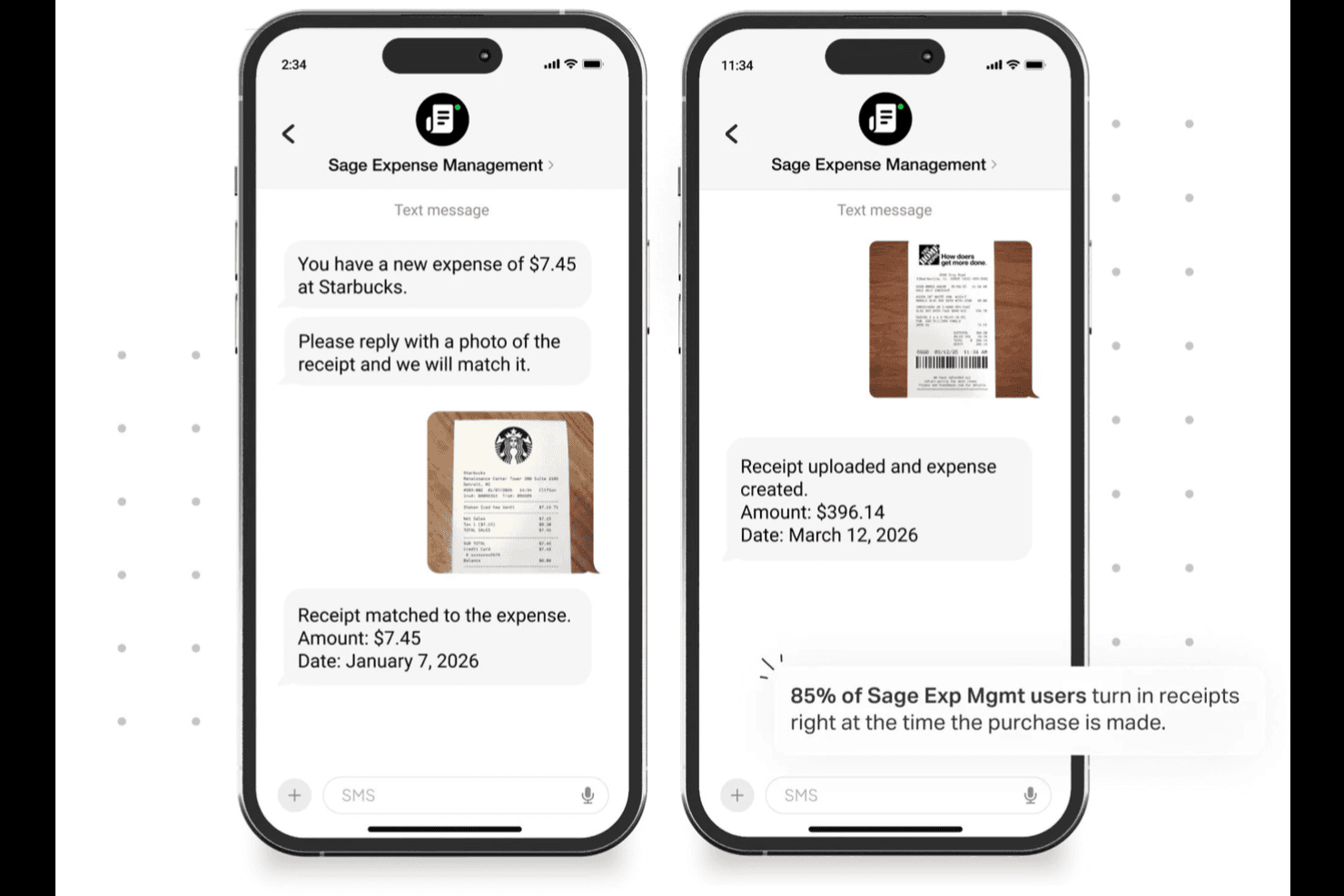
Sage Expense Management (voorheen Fyle) helpt teams uitgaven bij te houden door bonnetjes via sms vast te leggen en ze automatisch aan transacties te koppelen. Sage Expense Management (voorheen Fyle) is een AI-gestuurde tool voor het bijhouden van uitgaven waarmee teams bonnetjes kunnen vastleggen via sms, e-mail, Gmail, Outlook of mobiel, en deze automatisch aan transacties met bedrijfskaarten kan koppelen met behulp van OCR en realtime beleidscontroles.
Voor wie is Sage Expense Management het meest geschikt?
Sage Expense Management is zeer geschikt voor financiële en boekhoudteams bij kleine tot middelgrote bedrijven die orde willen scheppen in uitgaven met bedrijfskaarten zonder van kaartprogramma te wisselen.
Waarom ik voor Sage Expense Management heb gekozen
Ik heb Sage Expense Management als een van de beste gekozen omdat de door AI aangestuurde koppeling van bonnetjes echt anders is dan alles wat ik eerder heb gezien. Wanneer een kaart wordt gebruikt, ontvangt de medewerker een sms-melding en kan die antwoorden met een foto van het bonnetje, waarna het systeem dit automatisch aan de transactie koppelt. Ik ben ook enthousiast over de realtime beleidscontroles die overtredingen signaleren zodra ze plaatsvinden, zodat problemen worden ontdekt voordat een rapport ooit de wachtrij van een goedkeurder bereikt.
Belangrijkste functies van Sage Expense Management
- Bonnetjes vastleggen via meerdere kanalen: Dien bonnetjes in via sms, doorgestuurde e-mail, plug-ins voor Gmail en Outlook, de mobiele app of Dropbox en Google Drive.
- Realtime budgetbewaking: Stel budgetten in per afdeling, project, categorie of kostenplaats, met drempelwaarschuwingen zodat medewerkers hun resterende budget zien voordat ze een uitgave indienen.
- Km-registratie met GPS: Leg ritten vast via de mobiele app met Google Maps, met aangepaste tarieven, aftrek voor woon-werkverkeer en ingebouwde, voor de IRS geschikte registraties.
- Auditlogboeken en rol voor auditors: Elke wijziging op uitgave- en rapportniveau wordt geregistreerd en een speciale rol voor auditors geeft financiële teams duidelijk inzicht voor nalevingscontroles.
Integraties van Sage Expense Management
Sage Expense Management biedt rechtstreekse integraties met QuickBooks Online, Xero, Sage 50, Sage Intacct, Sage 300 CRE, QuickBooks Desktop, Gmail, Outlook, Dropbox, Google Drive, Google Maps en TravelPerk. De API ondersteunt aangepaste integraties bij de abonnementen voor bedrijven en ondernemingen.
Pros and Cons
Pros:
- Sms-meldingen koppelen bonnetjes aan kaartafschrijvingen
- Snelle mobiele uploads verminderen vertragingen bij het indienen
- Auditlogboeken zorgen voor duidelijkere controlegeschiedenissen voor financiële teams
Cons:
- OCR kan bonnetjes verkeerd lezen of dupliceren
- Fouten in de app en synchronisatiefouten verstoren controles
Learn more about Sage Expense Management (formerly Fyle): Ideale per il monitoraggio delle spese collegato alle paghe
- Demo gratuita disponibile
- Prezzi su richiesta
Visit WebsiteCustomer Rating:4.3/5
La dashboard di gestione delle spese di Paylocity collega i rimborsi alle paghe per un facile monitoraggio finanziario. Paylocity è una piattaforma completa per la gestione delle risorse umane e delle paghe che offre anche una solida soluzione per la gestione delle spese. Il suo sistema integrato di tracciamento delle spese aiuta a gestire i rimborsi, acquisire le ricevute e mantenere la conformità, tutto nello stesso ambiente utilizzato per i dati salariali e dei dipendenti. Questo lo rende ideale per le organizzazioni che desiderano una supervisione finanziaria unificata tra le funzioni HR e finanza.
Perché ho scelto Paylocity: Ho scelto Paylocity perché integra il monitoraggio delle spese direttamente nell'elaborazione delle paghe, facendo risparmiare ore ogni mese. Puoi impostare politiche di spesa personalizzate, automatizzare l'approvazione dei rimborsi e fare in modo che le spese approvate confluiscano direttamente nelle paghe per una gestione più rapida. Inoltre, mi piace che gli strumenti di intelligenza artificiale di Paylocity acquisiscano automaticamente le ricevute e categorizzino le transazioni, riducendo l'inserimento manuale e migliorando la precisione. L'app mobile aggiunge ulteriore comodità, permettendo di inviare, revisionare o approvare le spese ovunque ti trovi.
Caratteristiche distintive e integrazioni di Paylocity
Le caratteristiche distintive includono acquisizione delle ricevute tramite IA, flussi di approvazione personalizzabili e rilevamento integrato delle frodi per garantire la conformità. La piattaforma supporta anche il monitoraggio dei chilometri e l'importazione delle transazioni con carta, offrendo piena visibilità sulla spesa aziendale.
Le integrazioni includono Indeed, Ironclad, Jira Software, OneTrust, PARiM, Rain, Tilt, Timeero, VICTIG, When, 15Five e 401GO.
Pros and Cons
Pros:
- App mobile per il monitoraggio delle spese in tempo reale
- Acquisizione e categorizzazione automatica delle ricevute
- Integrazione diretta con la gestione delle paghe
Cons:
- Curva di apprendimento dovuta all'ampia gamma di funzionalità
- Prezzi disponibili solo su richiesta
Learn more about Paylocity: Ideale per la gestione delle spese
- Demo gratuita disponibile.
- Prezzi su richiesta
Visit WebsiteCustomer Rating:4.8/5
Airbase consente ai tuoi dipendenti di inviare richieste di rimborso da desktop o tramite l'app. Airbase è una piattaforma di gestione delle spese che offre una visione approfondita su quanto la tua azienda sta spendendo e in quali categorie.
Perché ho scelto Airbase: Mi piace perché dispone di funzionalità che ti permettono di gestire proattivamente le spese e i costi. Invece di scoprire spese improvvise dopo che si sono verificate, puoi impostare controlli di spesa e politiche di rimborso basate su regole per prevenirle fin dal principio.
Funzionalità e integrazioni distintive di Airbase:
Le funzionalità includono limiti di spesa e budget, che possono essere impostati per dipartimenti o team differenti. Penso che sia uno strumento eccellente per responsabilizzare le persone e offrire ai manager una comprensione più precisa del budget a disposizione. Trovo che l’app mobile di Airbase renda semplice acquisire le ricevute. Fornisce anche una traccia dettagliata di tutte le spese effettuate.
Le integrazioni includono NetSuite, QuickBooks, Xero, Jira, Ironclad e Slack.
Pros and Cons
Pros:
- Rimborso dei dipendenti semplice
- Reportistica e analisi avanzate
- Grande attenzione al controllo e alla conformità
Cons:
- Integrazioni limitate
- Nessuna connettività offline
 6Ideale per la rendicontazione automatizzata delle spese
Ramp
- Piano gratuito + prova gratuita di 30 giorni + demo gratuita disponibile
- Da $15/utente/mese
Visit WebsiteCustomer Rating:4.8/5
Ramp offre una dashboard di contabilità automatizzata che categorizza le transazioni, sincronizza le spese e segnala le note mancanti per revisione. Ramp è un software di gestione delle spese che semplifica la gestione finanziaria per le aziende. Offre una suite di strumenti, tra cui carte aziendali e gestione dei conti da pagare, per semplificare i processi di registrazione delle spese.
Perché ho scelto Ramp: Ho scelto Ramp perché automatizza la rendicontazione delle spese, evitandoti l'inserimento manuale grazie alla cattura e categorizzazione automatica delle spese. Ottieni inoltre il monitoraggio in tempo reale delle transazioni per tracciare la spesa mentre avviene e flussi di approvazione personalizzabili per adattarsi alle esigenze della tua azienda, aiutandoti a rimanere nel budget e a mantenere i processi fluidi.
Caratteristiche e integrazioni principali di Ramp:
Caratteristiche includono il supporto ai pagamenti globali, che ti consente di gestire transazioni in più valute, rendendolo ideale per imprese con operazioni internazionali. Un'altra caratteristica è il processo di implementazione rapido, che ti permette di iniziare a utilizzare la piattaforma in soli 30 giorni. Inoltre, Ramp offre strumenti gratuiti come modelli di policy di spesa per aiutarti a gestire le tue finanze in modo più efficace.
Integrazioni includono NetSuite, Sage, Xero, QuickBooks, Microsoft Dynamics Business Central, Acumatica, Uber, Lyft, Okta, Google, Rippling e Gmail.
Pros and Cons
Pros:
- Funzionalità di reportistica complete
- Possibilità di emettere più carte virtuali con controlli personalizzabili
- Rendicontazione automatizzata delle spese e abbinamento delle ricevute
Cons:
- Si concentra principalmente su conti da pagare e gestione delle spese
- Potrebbe offrire funzionalità contabili più avanzate
 Ideale per il monitoraggio delle spese di viaggio
- Piano gratuito disponibile
- Prezzi su richiesta
Visit WebsiteCustomer Rating:4.7/5
La dashboard di gestione delle spese di Navan offre una panoramica delle spese della tua organizzazione. Navan (precedentemente chiamato TripActions) è un software che aiuta le aziende a gestire le carte aziendali, le spese di viaggio e a monitorare altri costi operativi.
Perché ho scelto Navan: Penso che Navan si distingua come la migliore soluzione per il monitoraggio delle spese di viaggio. Sono rimasto colpito dalle sue funzionalità per i viaggi di gruppo e dall’interfaccia intuitiva.
Funzionalità e integrazioni distintive di Navan:
Le funzionalità comprendono una prenotazione online semplificata. Mi piace la possibilità di effettuare prenotazioni di voli e hotel per i dipendenti direttamente dal software. Le opzioni per i viaggi di gruppo ti permettono di organizzare spostamenti per un massimo di 50 dipendenti contemporaneamente.
Mi ha impressionato la gestione automatizzata delle spese di Navan. Categoriza e riconcilia automaticamente i dettagli delle transazioni ogni volta che viene utilizzata una carta aziendale, sia di persona che online.
Le integrazioni comprendono Slack, QuickBooks, NetSuite, Okta, Expensify e Sage Intacct.
Pros and Cons
Pros:
- Interfaccia intuitiva
- Facile integrazione con varie piattaforme di prenotazione viaggi
- La riconciliazione automatica semplifica il processo di rendicontazione delle spese
Cons:
- I dettagli sui prezzi non sono trasparenti
- Potrebbe essere troppo complesso per le piccole imprese
Learn more about Navan: 8Miglior soluzione all-in-one per il monitoraggio delle spese
Perk
- Piano gratuito disponibile
- Da $99/mese
Visit WebsiteCustomer Rating:4.6/5
La dashboard di reportistica dei viaggi di TravelPerk fornisce una panoramica delle spese di viaggio mensili. Nonostante il nome, TravelPerk non si occupa solo di spese di viaggio. Offre una varietà di strumenti e funzionalità per la gestione delle spese.
Perché ho scelto TravelPerk: Se desideri un software di monitoraggio delle spese ricco di funzionalità, penso che TravelPerk sia un'opzione da considerare. Mi piace che sia possibile aggiungere utenti illimitati, mentre altri software applicano costi per utente che possono davvero sommarsi.
Caratteristiche e integrazioni distintive di TravelPerk:
Le funzionalità includono un'unica interfaccia per la prenotazione dei viaggi, il monitoraggio delle spese e il rimborso. Personalmente, apprezzo avere tutto accessibile in un unico posto centralizzato. TravelPerk consente di prenotare direttamente dall'app e di acquisire e gestire le spese durante la prenotazione di voli, alloggi e trasporti.
Le integrazioni includono Slack, Divvy, Rydoo, WeWork, Ramp, Expensify, Fyle, Zoom e alcune altre.
Pros and Cons
Pros:
- Tariffa fissa
- Strumenti di prenotazione
- Interfaccia intuitiva
Cons:
- L'app mobile potrebbe essere più intuitiva
- Personalizzazioni limitate
Learn more about Perk: Miglior software gratuito per il monitoraggio delle spese
- Completamente gratuito, ma è disponibile anche una demo
- Da $0
Visit WebsiteCustomer Rating:4.6/5
Divvy offre un’app desktop e mobile, oltre a carte virtuali. Divvy è un software gratuito per il monitoraggio delle spese.
Perché ho scelto Divvy: Divvy è completamente gratuito. Non offre alcun piano a pagamento. Quindi, come guadagna Divvy? Trattiene una quota della commissione dell’esercente che normalmente andrebbe a Visa o alla banca emittente ogni volta che si utilizza la sua carta di credito.
Funzionalità distintive e integrazioni di Divvy:
Le funzionalità includono un software completamente gratuito per il monitoraggio delle spese e una carta aziendale che offre anche premi. Mi piace l’idea di poter gestire tutte le carte e le spese dell’azienda in un unico posto. Il software di Divvy consente di creare budget e controllare le spese. Ritengo che la dashboard di Divvy renda semplice visualizzare in tempo reale tutte le transazioni relative alle spese.
Le integrazioni includono QuickBooks, NetSuite, Sage Intacct e Slack.
Pros and Cons
Pros:
- Completamente gratuito
- App mobile intuitiva
- Include carte aziendali fisiche e virtuali gratuite
Cons:
- Integrazioni limitate
- Meno funzionalità rispetto alle alternative a pagamento
Learn more about Divvy: Ideale per le integrazioni
- Piano gratuito disponibile
- Da $5/utente/mese
Visit WebsiteCustomer Rating:4.3/5
La sezione viaggi all'interno dell'app Zoho Expense. Zoho Expense è un software autonomo per la gestione di viaggi e spese, creato dalla stessa azienda del popolare software di contabilità Zoho Books.
Perché ho scelto Zoho Expense: Zoho Expense ti dà accesso a una vasta libreria di integrazioni di terze parti e componenti aggiuntivi che possono essere utilizzati in parallelo con il loro software.
Caratteristiche e integrazioni distintive di Zoho Expense:
Le funzionalità includono la capacità di Zoho Expense di scansionare le ricevute e importarle in blocco. Mi piace che le ricevute vengano conservate digitalmente all'interno del software, così non devi preoccuparti di perdere le copie cartacee.
Zoho Expense offre anche alcuni dei migliori strumenti di rilevamento chilometrico che ho incontrato. I dipendenti possono inserire il loro chilometraggio tramite Android, iPhone o Apple Watch.
Per le aziende che già utilizzano Zoho Books per la contabilità, penso che Zoho Expense possa essere una scelta adatta.
Le integrazioni includono QuickBooks, Xero, GetThere, Lyft, Uber, HSBC, Slack, Dropbox, Office 365 e altri ancora.
Pros and Cons
Pros:
- Opzioni di integrazione
- Facile da apprendere e utilizzare
- App mobile per la scansione e il monitoraggio delle ricevute
Cons:
- Nessun piano per singolo utente (minimo 3 utenti)
- Funzionalità limitate nel piano gratuito
Learn more about Zoho Expense:
Altri software per il monitoraggio delle spese
Ecco alcune opzioni aggiuntive di software per il monitoraggio delle spese che non sono entrate nella mia lista selezionata, ma che vale comunque la pena valutare:
- 11BrexIdeale per startup e piccole imprese
- 12RydooIdeale per utenti mobili
- 13CoupaIdeale per le integrazioni con i fornitori
- 14PuzzleIdeale per l’accuratezza della categorizzazione assistita dall’IA
- 15ExpensifyIdeale per funzioni automatizzate di scansione delle ricevute
- 16SAP ConcurIdeale per grandi aziende
- 17SlashIdeale per gestire le spese multi-entità
- 18LicenceOneIdeale per la gestione della spesa SaaS e la sicurezza
- 19ExpensePointIdeale per team globali
- 20Rippling SpendIdeale per il controllo automatizzato delle politiche aziendali
Come valuto i software per la gestione delle spese
Divido la mia valutazione in due livelli: le funzionalità indispensabili—acquisizione delle ricevute, flussi di approvazione, controlli di conformità alle policy—e gli elementi che differenziano uno strumento dall'altro.
Funzionalità di base (Requisiti Iniziali per questa lista)
Quando seleziono gli strumenti per la mia lista, valuto ciascuno su una scala da 0 (non offre la funzionalità) a 5 (eccelle in questo ambito) per ciascuna funzionalità di base elencata sotto. Poi, calcolo il punteggio totale dello strumento in percentuale. Ogni strumento deve raggiungere un punteggio totale minimo del 75% per essere preso in considerazione.
- Acquisizione ricevute & OCR: Verifico se una foto tramite mobile o un inoltro via email recupera con precisione nome del fornitore, data e importo—oppure se il tuo team deve ancora inserire i dati delle ricevute manualmente.
- Flussi di lavoro dei report spesa: In questo caso, è importante la gestione dell'approvazione multilivello, specialmente per i team dove un pasto da $200 viene inoltrato a un responsabile ma un viaggio a una conferenza da $5.000 viene sottoposto direttamente a un direttore.
- Applicazione delle policy & segnalazioni: Cerco strumenti che segnalino automaticamente le violazioni al momento dell'invio—come limiti per pasto o fornitori non approvati—piuttosto che affidarsi agli approvatori per individuarle manualmente.
- Riconciliazione delle carte aziendali: I flussi delle carte Visa, Mastercard o Amex dovrebbero abbinarsi automaticamente alle ricevute inviate, così che il team contabile non debba controllare gli estratti conto in un foglio di calcolo ogni mese.
- Integrazione con sistemi contabili: Valuto le connessioni native a piattaforme come QuickBooks, Xero, NetSuite e Sage Intacct, controllando se i codici spesa e le dimensioni si collegano in modo fluido al tuo piano dei conti.
- Gestione dei rimborsi: Gli strumenti dovrebbero supportare il bonifico diretto o il rimborso integrato in busta paga, e controllo se gestiscono pagamenti in più valute per team distribuiti.
Una volta che ho una lista di strumenti che soddisfano questi criteri, considero cosa rende ciascuna piattaforma unica.
Elementi distintivi (Cosa differenzia i fornitori)
Ecco come confronto e metto a contrasto i diversi fornitori:
Caratteristiche Eccezionali
L'audit potenziato dall'IA rileva ricevute duplicate e importi gonfiati prima ancora che un approvatore apra il report, risparmiando così ore di revisione manuale a ogni chiusura. Dashboard di spesa in tempo reale con approfondimenti per dipartimento, progetto o fornitore offrono ai manager di FP&A visibilità per intervenire sulle spese a trimestre in corso. Valuto anche se uno strumento offre emissione nativa di carte aziendali con limite di spesa per carta e restrizioni per esercente applicate al momento della transazione.
Oltre le funzionalità
La conformità è importante—verifico la certificazione SOC 2 Type II e se la piattaforma conserva le ricevute digitali per il tempo necessario a soddisfare i requisiti di audit locali. Un'altra variabile fondamentale è la connettività ERP, soprattutto se la mappatura delle dimensioni del piano dei conti funziona senza intoppi con la tua contabilità o se richiede aggiustamenti manuali dopo la sincronizzazione. Per le organizzazioni in crescita, valuto la possibilità di consolidare multi-entità e multi-valuta così che i team finanziari possano gestire le controllate da un'unica istanza senza cambiare ambiente.
Come scegliere il software per il monitoraggio delle spese
È facile perdersi in lunghi elenchi di funzionalità e strutture tariffarie complesse. Per aiutarti a rimanere concentrato mentre affronti il tuo processo specifico di selezione del software, ecco una lista di fattori da tenere a mente:
| Fattore | Cosa considerare |
|---|---|
| FattoreScalabilità | Cosa considerareIl software può crescere insieme alla tua azienda? Verifica se supporta utenti, transazioni e dati aggiuntivi man mano che la tua azienda si espande. |
| FattoreIntegrazioni | Cosa considerareSi collega ai tuoi sistemi esistenti? Verifica la compatibilità con gli strumenti di contabilità che utilizzi attualmente e con gli altri software essenziali. |
| FattorePersonalizzazione | Cosa considerarePuoi adattare lo strumento alle tue esigenze? Cerca opzioni di personalizzazione per flussi di lavoro, report e ruoli degli utenti, in modo da adeguarli ai tuoi processi. |
| FattoreSemplicità d'uso | Cosa considerareIl software è intuitivo per il tuo team? Valuta l'interfaccia utente e la rapidità con cui i membri del team riescono a orientarsi e a utilizzare lo strumento in modo efficace. |
| FattoreImplementazione e inserimento iniziale | Cosa considerareQuanto tempo occorrerà per iniziare? Considera i tempi di configurazione, i materiali di formazione e il supporto offerto durante la fase iniziale. |
| FattoreCosto | Cosa considerareQual è il costo totale di proprietà? Confronta i modelli tariffari, inclusi i costi di abbonamento, gli addebiti aggiuntivi e qualsiasi potenziale costo nascosto. |
| FattoreMisure di sicurezza | Cosa considerareIn che modo il software protegge i tuoi dati? Assicurati che disponga di crittografia avanzata, controlli degli accessi e conformità agli standard del settore. |
Che cos'è il software per il monitoraggio delle spese?
Il software per il monitoraggio delle spese è uno strumento che aiuta le aziende a registrare, gestire e analizzare le proprie spese. Viene comunemente utilizzato da professionisti della finanza, commercialisti e manager per comprendere i modelli di spesa e prendere decisioni finanziarie consapevoli. Funzionalità come il monitoraggio delle spese in tempo reale, la scansione automatica delle ricevute e le capacità di integrazione contribuiscono a migliorare l'efficienza e l'accuratezza nella gestione delle spese. Questi strumenti offrono un valore complessivo semplificando il controllo finanziario e migliorando la gestione del budget.
Funzionalità
Ecco le funzionalità principali che ogni ottimo software per il monitoraggio delle spese dovrebbe avere:
- Monitoraggio in tempo reale: consente di monitorare le spese mentre vengono effettuate, garantendo registri finanziari aggiornati.
- Scansione automatica delle ricevute: converte le ricevute cartacee in dati digitali, facendo risparmiare tempo e riducendo gli errori di inserimento manuale.
- Capacità di integrazione: si connette ai sistemi contabili e aziendali esistenti per semplificare il flusso dei dati e migliorare la precisione.
- Report personalizzabili: offre report su misura per fornire informazioni specifiche sulle esigenze e sugli obiettivi finanziari dell'azienda.
- Supporto multivaluta: consente di monitorare e gestire le spese in diverse valute, una funzione essenziale per le attività internazionali.
- Flussi di approvazione: semplificano il processo di approvazione delle spese, garantendo conformità e controllo sui costi.
- Accesso da dispositivi mobili: fornisce accesso ai dati delle spese ovunque ci si trovi, consentendo agli utenti di gestire le finanze da qualsiasi luogo.
- Sicurezza dei dati: garantisce la protezione delle informazioni finanziarie sensibili mediante crittografia e controlli degli accessi.
- Interfaccia intuitiva: offre un design intuitivo che consente agli utenti di navigare nel software e utilizzarlo in modo efficace.
Vantaggi
L'implementazione di un software per il monitoraggio delle spese offre diversi vantaggi al team e all'azienda. Eccone alcuni:
- Maggiore precisione: la scansione automatica delle ricevute riduce gli errori manuali, garantendo registri finanziari accurati.
- Risparmio di tempo: il monitoraggio in tempo reale e l'accesso da dispositivi mobili consentono agli utenti di gestire le spese in modo rapido ed efficiente.
- Maggiore visibilità: i report personalizzabili forniscono informazioni sui modelli di spesa, contribuendo a prendere decisioni consapevoli.
- Conformità migliorata: i flussi di approvazione garantiscono che le spese vengano esaminate e approvate, mantenendo il controllo sui costi.
- Gestione dei costi: il supporto multivaluta e le capacità di integrazione aiutano a monitorare e gestire le spese su diverse piattaforme e in varie regioni.
- Sicurezza dei dati: una crittografia efficace e i controlli degli accessi proteggono le informazioni finanziarie sensibili dagli accessi non autorizzati.
Costi e prezzi
La scelta di un software per il monitoraggio delle spese richiede la comprensione dei vari modelli e piani tariffari disponibili. I costi variano in base alle funzionalità, alle dimensioni del team, ai componenti aggiuntivi e ad altri fattori. La tabella seguente riassume i piani più comuni, i relativi prezzi medi e le funzionalità generalmente incluse nelle soluzioni software per il monitoraggio delle spese:
Tabella comparativa dei piani per il software di monitoraggio delle spese
| Tipo di piano | Prezzo medio | Funzionalità comuni |
|---|---|---|
| Tipo di pianoPiano gratuito | Prezzo medio$0 | Funzionalità comuniMonitoraggio di base delle spese, caricamenti limitati delle ricevute e report essenziali. |
| Tipo di pianoPiano personale | Prezzo medio$5-$25/utente/mese | Funzionalità comuniCaricamenti illimitati delle ricevute, accesso da dispositivi mobili e integrazioni di base. |
| Tipo di pianoPiano aziendale | Prezzo medio$25-$50/utente/mese | Funzionalità comuniReport avanzati, supporto multivaluta e flussi di approvazione. |
| Tipo di pianoPiano per grandi aziende | Prezzo medio$50-$100/utente/mese | Funzionalità comuniFunzionalità personalizzabili, integrazione con i sistemi aziendali e assistenza dedicata. |
Domande frequenti
Ecco alcune risposte alle domande più comuni sui software per il monitoraggio delle spese:
Il software per il monitoraggio delle spese può sincronizzarsi con le carte di credito aziendali?
Sì, molti software per il monitoraggio delle spese supportano la sincronizzazione con le carte aziendali. In questo modo il tuo team può monitorare automaticamente le spese senza inserire ogni transazione. Assicurati che il fornitore della tua carta sia supportato dal software che utilizzi. Una volta collegata, solitamente le spese vengono visualizzate in tempo reale o entro un giorno.
Qual è la differenza tra il monitoraggio delle spese e il software per la contabilità fornitori?
Il software per il monitoraggio delle spese è specializzato nella registrazione, categorizzazione e gestione delle spese dei dipendenti. Include funzionalità per acquisire le ricevute e inviare le note spese per i rimborsi.
Il software per la contabilità fornitori ha un ambito più ampio. Consente di gestire i pagamenti a fornitori e venditori. Include l’elaborazione delle fatture, la programmazione e l’emissione dei pagamenti e la riconciliazione bancaria.
In che modo il software per il monitoraggio delle spese gestisce le ricevute duplicate?
La maggior parte dei software per il monitoraggio delle spese segnala i duplicati utilizzando i metadati delle ricevute o confrontando gli importi delle transazioni. Se carichi la stessa ricevuta due volte, il sistema potrebbe avvisarti o bloccare il duplicato. Di solito puoi esaminare le voci segnalate e decidere se mantenerle o eliminarle. Alcuni strumenti consentono anche di unire i duplicati, se necessario.
Il software per il monitoraggio delle spese consente di impostare limiti di spesa?
Sì, molti strumenti consentono di impostare limiti per categoria, progetto o dipendente. Se qualcuno supera il limite, il software può segnalare la spesa o bloccarne l’invio. Questi limiti aiutano il tuo team a rispettare il budget senza dover effettuare controlli manuali. Puoi modificare le soglie quando cambiano le policy.
È necessario formare il mio team sul nuovo software per il monitoraggio delle spese?
Sì, formare il tuo team sul nuovo software per il monitoraggio delle spese è necessario per garantirne l’adozione con successo. Anche se lo strumento è intuitivo, la formazione aiuta i membri del team a comprenderne tutte le funzionalità e a utilizzarlo in modo efficace. Cerca fornitori che offrano risorse complete per l’avvio, come tutorial, webinar e materiali di supporto. Questo investimento nella formazione aiuterà il tuo team a sfruttare al meglio il software e garantirà una transizione fluida.