

Bonsai riunisce fatturazione, contratti, monitoraggio del tempo e gestione dei progetti in un'unica piattaforma, ma non sarà la scelta giusta per ogni azienda. Potresti aver bisogno di una fatturazione più flessibile, di report finanziari più completi, di migliori integrazioni contabili o di una piattaforma in grado di supportare esigenze più complesse con la crescita della tua attività.
Quando valuto le alternative a Bonsai, presto particolare attenzione ai flussi di lavoro finanziari e amministrativi che possono diventare rapidamente macchinosi con la crescita di un'azienda. Fatturazione e pagamenti, tempo e spese fatturabili, report e integrazioni contabili sono tutti importanti, ma lo sono anche i contratti, la gestione dei clienti e gli strumenti per i flussi di lavoro che fanno funzionare senza intoppi le operazioni quotidiane.
In questa guida ho confrontato le migliori alternative a Bonsai in queste aree per aiutarti a trovare una piattaforma che offra il giusto equilibrio tra controllo finanziario, gestione dei clienti e flessibilità operativa.
Che cos'è Bonsai?
Bonsai è un software di gestione aziendale per freelance progettato per aiutare liberi professionisti e titolari di piccole aziende a gestire progetti, fatture e contratti. Viene comunemente utilizzato da professionisti creativi, consulenti e lavoratori autonomi che devono mantenere organizzate le operazioni della propria attività. Funzionalità come il monitoraggio del tempo, la fatturazione e la gestione dei contratti aiutano a semplificare le attività amministrative, permettendoti di concentrarti sul tuo lavoro. Nel complesso, Bonsai offre una piattaforma centralizzata per gestire le operazioni della tua attività da freelance.
Tabella comparativa delle alternative a Bonsai
Questa tabella comparativa mette in evidenza i prezzi e le opzioni di prova gratuita delle mie migliori alternative a Bonsai, per aiutarti a trovare una soluzione adatta al tuo budget e alle esigenze della tua attività.
| Tool | Best For | Trial Info | Price | ||
|---|---|---|---|---|---|
| 1 | Ideale per strumenti gratuiti di fatturazione | Piano gratuito disponibile | A partire da $11.67/mese (fatturato annualmente) | Website | |
| 2 | Ideale per la produttività tutto-in-uno | Piano gratuito disponibile | A partire da $7/utente/mese (fatturato annualmente) | Website | |
| 3 | Ideale per una gestione rapida dei documenti | Prova gratuita di 14 giorni | A partire da $19/utente/mese (fatturato annualmente) | Website | |
| 4 | Ideale per la gestione di aziende creative | Prova gratuita + demo gratuita disponibili | A partire da $35/mese | Website | |
| 5 | Ideale per la gestione completa dei servizi | Prova gratuita + demo gratuita disponibili | A partire da $29/mese | Website | |
| 6 | Ideale per la gestione delle attività operative delle agenzie | Prova gratuita disponibile | A partire da $39/mese (fatturato annualmente) | Website | |
| 7 | Ideale per l'automazione delle aziende di servizi | Demo gratuita disponibile | Prezzi su richiesta | Website | |
| 8 | Ideale per professionisti indipendenti | Prova gratuita disponibile | Da $29/mese (fatturato annualmente) | Website | |
| 9 | Ideale per un'efficienza del lavoro basata sull'IA | Prova gratuita di 14 giorni + piano gratuito disponibile | A partire da $9/utente/mese (con fatturazione annuale) | Website | |
| 10 | Ideale per la gestione flessibile delle banche dati | Piano gratuito + demo gratuita disponibile | A partire da $20/utente/mese (con fatturazione annuale) | Website |


Perché fidarsi dei nostri consigli sui software
6,700+
Reviews
20
Industry experts
16+
Evaluation factors
14
Years
Le nostre recensioni riflettono il nostro giudizio indipendente, non un discorso di vendita. Scopri come manteniamo la trasparenza.
Per questa guida, abbiamo valutato gli strumenti attraverso test pratici e ricerche indipendenti, assegnando un punteggio agli strumenti in base ai nostri criteri di selezione.
Le nostre recensioni riflettono il nostro giudizio editoriale umano, non un discorso di vendita.
Recensioni delle migliori alternative a Bonsai
Di seguito trovi le mie sintesi dettagliate delle migliori alternative a Bonsai che sono entrate nella mia selezione. Le mie recensioni offrono una panoramica dettagliata delle funzionalità principali, dei pro e dei contro, delle integrazioni e dei casi d’uso ideali di ogni strumento, per aiutarti a trovare quello più adatto a te.
 Ideale per strumenti gratuiti di fatturazione
- Piano gratuito disponibile
- A partire da $11.67/mese (fatturato annualmente)
Visit WebsiteCustomer Rating:4.7/5
Invoice Ninja è uno strumento di fatturazione e gestione dei pagamenti che consente ai freelance di gestire fatture, spese e pagamenti. Invoice Ninja è un software di fatturazione e gestione dei pagamenti pensato per freelance e piccole imprese. Offre strumenti per la creazione delle fatture, il monitoraggio delle spese e la gestione dei pagamenti.
Perché è una buona alternativa a Bonsai: Invoice Ninja si distingue per gli strumenti gratuiti di fatturazione, ideali per i freelance attenti ai costi. Puoi creare facilmente fatture professionali e monitorare le spese senza costi aggiuntivi. La piattaforma supporta diversi gateway di pagamento, offrendo flessibilità nella gestione dei pagamenti. L'interfaccia intuitiva di Invoice Ninja semplifica l'avvio e la gestione dei processi di fatturazione.
Funzionalità e integrazioni principali:
Funzionalità includono modelli di fattura personalizzabili per adattarsi al tuo marchio, il monitoraggio del tempo per garantire una fatturazione accurata e la gestione delle spese per mantenere le finanze organizzate.
Integrazioni includono Stripe, PayPal, Authorize.Net, WePay, Braintree, Slack, Zapier, Xero, QuickBooks e Google Wallet.
Pros and Cons
Pros:
- Funzionalità gratuite di fatturazione
- Supporta diversi gateway di pagamento
- Modelli di fattura personalizzabili e personalizzabili con il marchio
Cons:
- La contabilità è limitata agli utenti di livello aziendale
- L'assistenza clienti è limitata ai piani a pagamento
Learn more about Invoice Ninja: Ideale per la produttività tutto-in-uno
- Piano gratuito disponibile
- A partire da $7/utente/mese (fatturato annualmente)
Visit WebsiteCustomer Rating:4.7/5
ClickUp è una piattaforma per la produttività che consente di gestire attività, documenti, obiettivi e monitoraggio del tempo. ClickUp è uno strumento per la produttività e la gestione dei progetti, progettato per team di tutte le dimensioni. Aiuta gli utenti a gestire attività, documenti, obiettivi e monitoraggio del tempo.
Perché è una buona alternativa a Bonsai: ClickUp offre una piattaforma tutto-in-uno che combina la gestione delle attività con la collaborazione sui documenti e il monitoraggio del tempo. Le sue funzionalità personalizzabili soddisfano le diverse esigenze dei team, migliorando la produttività. È possibile gestire più progetti da un'unica interfaccia, riducendo la necessità di utilizzare più strumenti. Le visualizzazioni flessibili e le funzionalità di automazione di ClickUp supportano ulteriormente flussi di lavoro efficienti per i team.
Funzionalità distintive e integrazioni:
Funzionalità includono il monitoraggio degli obiettivi per mantenere il team concentrato, dashboard personalizzate per visualizzare i progetti e il monitoraggio del tempo per controllare la produttività.
Integrazioni includono Slack, Google Drive, Dropbox, Microsoft Teams, Outlook, Zoom, GitHub, Salesforce, HubSpot ed Evernote.
Pros and Cons
Pros:
- Strumenti di collaborazione in tempo reale
- Supporta il monitoraggio degli obiettivi
- Suite completa per la gestione di progetti e attività
Cons:
- L'interfaccia mobile non include schermate essenziali
- Eccesso di notifiche dovuto all'elevato volume di dati
Learn more about ClickUp: Ideale per una gestione rapida dei documenti
- Prova gratuita di 14 giorni
- A partire da $19/utente/mese (fatturato annualmente)
Visit WebsiteCustomer Rating:4.5/5
PandaDoc è un software di automazione dei documenti per creare e gestire flussi di lavoro semplificati. PandaDoc è un software di automazione dei documenti pensato per le aziende che necessitano di creare e gestire documenti in modo efficiente. È rivolto ai team di vendita, ai reparti delle risorse umane e a chiunque abbia bisogno di flussi di lavoro efficienti per i documenti.
Perché è una buona alternativa a Bonsai: PandaDoc eccelle nell'accelerare i processi di gestione dei documenti grazie alle sue funzionalità di automazione. Puoi creare, inviare e firmare elettronicamente i documenti rapidamente, riducendo il tempo dedicato alle pratiche burocratiche. Le analisi integrate forniscono informazioni sulle prestazioni dei documenti, aiutandoti a capire cosa funziona meglio. I modelli e gli strumenti di modifica del software aumentano ulteriormente l'efficienza, rendendolo una scelta eccellente per le tue esigenze documentali.
Funzionalità e integrazioni principali:
Le funzionalità includono una libreria di modelli personalizzabili per adattarsi alle esigenze della tua azienda, il monitoraggio in tempo reale per controllare lo stato dei documenti e le funzionalità di firma elettronica per finalizzare i contratti più velocemente.
Le integrazioni includono Salesforce, HubSpot, Zoho CRM, Pipedrive, Microsoft Dynamics, Slack, Google Drive, Dropbox, Stripe e QuickBooks.
Pros and Cons
Pros:
- Reportistica e analisi avanzate delle attività
- Monitoraggio dei documenti integrato
- Crittografia end-to-end e hosting sicuro
Cons:
- Mancano strumenti essenziali di modifica e formattazione
- Le funzionalità avanzate sono limitate ai piani superiori
Learn more about PandaDoc: Ideale per la gestione di aziende creative
- Prova gratuita + demo gratuita disponibili
- A partire da $35/mese

Dubsado è uno strumento di gestione aziendale per freelance che consente di gestire clienti, progetti e fatturazione. Dubsado è una soluzione di gestione aziendale pensata per imprenditori creativi e freelance. Aiuta gli utenti a gestire le relazioni con i clienti, i progetti e i processi di fatturazione.
Perché è una buona alternativa a Bonsai: Dubsado offre funzionalità di gestione aziendale creativa adatte alle esigenze specifiche dei freelance. I suoi flussi di lavoro personalizzabili consentono di adattare i processi alle proprie necessità. È possibile automatizzare le comunicazioni con i clienti e gestire i progetti in modo efficiente grazie alla sua suite di strumenti. Le funzionalità di fatturazione e gestione dei contratti di Dubsado rafforzano inoltre le operazioni aziendali, rendendolo una scelta versatile.
Funzionalità e integrazioni distintive:
Funzionalità che includono flussi di lavoro personalizzabili per adattarsi al proprio modello aziendale, comunicazioni automatizzate con i clienti per risparmiare tempo e strumenti completi di gestione dei progetti per mantenere tutto organizzato.
Integrazioni che includono QuickBooks, Xero, Stripe, Square, Zapier, Google Calendar, Gmail, Mailchimp, Zoom e Slack.
Pros and Cons
Pros:
- Modelli di contratto personalizzabili e legalmente vincolanti
- Portali cliente per i clienti abituali
- Dashboard con elenchi dinamici di attività da svolgere
Cons:
- Reportistica di base senza analisi avanzate
- Nessun supporto multivaluta nella fatturazione
Learn more about Dubsado: Ideale per la gestione completa dei servizi
- Prova gratuita + demo gratuita disponibili
- A partire da $29/mese
Visit WebsiteCustomer Rating:4.7/5
OneSuite è una piattaforma tutto-in-uno per le agenzie che consente di gestire clienti, progetti, fatturazione e documenti. OneSuite è una piattaforma tutto-in-uno pensata per le aziende basate sui servizi, in particolare le agenzie, per migliorare la gestione dei clienti e l'efficienza operativa. Offre strumenti per la gestione dei progetti, la gestione delle relazioni con i clienti, la fatturazione e la gestione dei documenti.
Perché è una buona alternativa a Bonsai: OneSuite offre una gestione completa dei servizi con funzionalità adatte alle esigenze delle agenzie. Il suo portale clienti favorisce la trasparenza e migliora le interazioni con i clienti. Il sistema di fatturazione della piattaforma supporta i pagamenti online, garantendo transazioni finanziarie più fluide. Inoltre, gli strumenti di gestione dei progetti di OneSuite aiutano a semplificare le operazioni dall'inserimento del cliente alla conclusione della collaborazione, rendendola una scelta versatile per le agenzie.
Funzionalità e integrazioni principali:
Le funzionalità includono la fatturazione personalizzabile per una gestione finanziaria semplice, un centro documenti per la gestione di contratti e proposte e un portale clienti per la collaborazione sicura.
Le integrazioni includono Stripe, PayPal, QuickBooks, Google Calendar, Zapier, Slack, Zoom, Mailchimp, Microsoft Teams e HubSpot.
Pros and Cons
Pros:
- Archiviazione e condivisione sicura dei file
- Funzionalità self-service per i clienti
- Supporto per gateway di pagamento multipli
Cons:
- L'app mobile non offre tutte le funzionalità della versione desktop
- Funzionalità limitate per l'automazione dei flussi di lavoro
Learn more about Onesuite: Ideale per la gestione delle attività operative delle agenzie
- Prova gratuita disponibile
- A partire da $39/mese (fatturato annualmente)

ManyRequests è una piattaforma con portale clienti che consente alle agenzie di gestire progetti, clienti e fatturazione. ManyRequests è una piattaforma progettata per consentire alle agenzie di gestire clienti, progetti e fatturazione. Si rivolge principalmente ad aziende di servizi come agenzie di design, marketing e sviluppo. Le funzioni principali includono un portale clienti personalizzato con il proprio marchio, la gestione dei progetti e la fatturazione.
Perché è una valida alternativa a Bonsai: ManyRequests offre un portale clienti personalizzato con il proprio marchio, il monitoraggio del tempo e funzionalità CRM che supportano la gestione delle attività operative delle agenzie. Puoi gestire in modo efficiente le richieste dei clienti e monitorare l'avanzamento dei progetti. Le funzionalità di fatturazione della piattaforma consentono di sincronizzare i pagamenti e la gestione dei progetti in un unico luogo, senza strumenti aggiuntivi. Gli strumenti di reportistica forniscono informazioni preziose sulla soddisfazione dei clienti e sui dati finanziari.
Funzionalità e integrazioni distintive:
Le funzionalità includono un portale clienti per centralizzare le interazioni con i clienti, il monitoraggio del tempo per una fatturazione accurata e strumenti di gestione dei progetti per mantenere tutto organizzato.
Le integrazioni includono Zapier, Calendly, HiBob, Xero, Stripe, Google Calendar, Slack, QuickBooks, Asana e HubSpot.
Pros and Cons
Pros:
- Portale clienti e domini personalizzati con il marchio dell'azienda
- Fatturazione integrata con la gestione dei pagamenti
- Supporto multilingue per i clienti
Cons:
- Funzionalità limitate di reportistica e raccolta dati
- Nessuna gerarchia delle attività o delega delle sottoattività
Learn more about ManyRequests: Ideale per l'automazione delle aziende di servizi
- Demo gratuita disponibile
- Prezzi su richiesta
Visit WebsiteCustomer Rating:4.4/5
Accelo è una piattaforma cloud che automatizza il lavoro con i clienti e aumenta la produttività dei team di servizi. Accelo è una piattaforma di automazione delle operazioni di servizio basata sul cloud, progettata per le aziende di servizi. Aiuta a gestire il lavoro con i clienti, centralizzare le operazioni e migliorare la produttività del team.
Perché è una buona alternativa a Bonsai: Accelo offre l'automazione per le aziende di servizi con funzionalità come la gestione dei progetti, il monitoraggio dei clienti e la fatturazione. I suoi flussi di lavoro automatizzati garantiscono una gestione efficiente delle attività e riducono il lavoro manuale. I report in tempo reale della piattaforma forniscono informazioni sulle prestazioni della tua azienda, aiutandoti a prendere decisioni consapevoli. Il portale clienti di Accelo migliora la comunicazione, rendendolo una soluzione completa per le esigenze della tua azienda di servizi.
Caratteristiche e integrazioni distintive:
Caratteristiche includono flussi di lavoro automatizzati per risparmiare tempo, report in tempo reale per migliorare il processo decisionale e un portale clienti per migliorare la comunicazione.
Integrazioni includono QuickBooks, Xero, Slack, Google Workspace, Office 365, Salesforce, HubSpot, Mailchimp, Stripe e PayPal.
Pros and Cons
Pros:
- Gestione dei progetti integrata con la fatturazione
- Report in tempo reale
- Strumenti per la gestione delle risorse
Cons:
- Funzionalità limitate dell'app mobile
- I dati dei progetti sono isolati e frammentati
 Ideale per professionisti indipendenti
- Prova gratuita disponibile
- Da $29/mese (fatturato annualmente)
Visit WebsiteCustomer Rating:5/5
HoneyBook è una piattaforma per la gestione dei clienti basata sull'intelligenza artificiale, per gestire progetti, pagamenti e crescita aziendale. HoneyBook è una piattaforma per la gestione delle relazioni con i clienti basata sull'intelligenza artificiale, progettata per i professionisti indipendenti negli Stati Uniti e in Canada. Offre strumenti per gestire clienti, progetti, pagamenti e crescita aziendale.
Perché è una valida alternativa a Bonsai: HoneyBook offre un sistema completo di gestione delle relazioni con i clienti, pensato specificamente per i professionisti indipendenti. I suoi strumenti di intelligenza artificiale aumentano la produttività automatizzando attività come proposte, programmazione e fatturazione. Le funzionalità CRM della piattaforma aiutano a gestire in modo efficiente le interazioni con i clienti. Inoltre, l'attenzione di HoneyBook alla gestione dei progetti e delle finanze favorisce la crescita e l'organizzazione aziendale.
Funzionalità e integrazioni principali:
Funzionalità includono strumenti di gestione dei progetti per mantenere il lavoro organizzato, automazioni basate sull'intelligenza artificiale per risparmiare tempo e una piattaforma centralizzata per contratti e fatture. HoneyBook Academy, che offre un'ampia raccolta di corsi avanzati, webinar e tutorial, è un ulteriore vantaggio.
Integrazioni includono QuickBooks, Google Calendar, Zapier, Mailchimp, Gmail, Square, Slack, Zoom, Outlook e Stripe.
Pros and Cons
Pros:
- Strumenti CRM basati sull'intelligenza artificiale
- Accesso agli strumenti formativi di HoneyBook Academy
- Automazione dei flussi di lavoro personalizzabile
Cons:
- Disponibile solo negli Stati Uniti e in Canada
- Il prezzo può aumentare con i componenti aggiuntivi
Learn more about HoneyBook: Ideale per un'efficienza del lavoro basata sull'IA
- Prova gratuita di 14 giorni + piano gratuito disponibile
- A partire da $9/utente/mese (con fatturazione annuale)
Visit WebsiteCustomer Rating:5/5
La Gestione del lavoro di monday.com è una piattaforma flessibile che consente ai team di pianificare, monitorare e gestire i progetti in modo efficiente. La piattaforma di gestione del lavoro monday.com è progettata per la collaborazione tra team e la gestione dei progetti. Offre servizi ad aziende di tutte le dimensioni mettendo a disposizione strumenti per pianificare, monitorare e portare a termine il lavoro in modo efficiente.
Perché è una buona alternativa a Bonsai: il software di gestione del lavoro di monday.com offre strumenti basati sull'IA che aumentano l'efficienza del lavoro e la collaborazione. Le sue dashboard personalizzabili consentono di adattare le visualizzazioni alle esigenze del team. Le funzionalità di automazione riducono le attività manuali, liberando tempo per il lavoro più importante. Le tempistiche visive e il monitoraggio dei progressi della piattaforma mantengono tutti allineati e rispettano le scadenze.
Funzionalità e integrazioni principali:
Le funzionalità includono l'automazione per ridurre le attività ripetitive, tempistiche visive per il monitoraggio dei progetti e dashboard personalizzabili in base alle esigenze specifiche.
Le integrazioni includono Slack, Microsoft Teams, Google Calendar, Dropbox, Zoom, Excel, Outlook, Jira, Salesforce e Trello.
Pros and Cons
Pros:
- Tempistiche visive dei progetti e dashboard personalizzabili
- Strumenti per la collaborazione interfunzionale
- Monitora portafogli e aggiornamenti dei progetti
Cons:
- Gli strumenti di amministrazione sono disponibili solo nei piani premium
- Le funzionalità avanzate richiedono una configurazione
Learn more about monday.com: 10Ideale per la gestione flessibile delle banche dati
Airtable
- Piano gratuito + demo gratuita disponibile
- A partire da $20/utente/mese (con fatturazione annuale)
Visit WebsiteCustomer Rating:4.6/5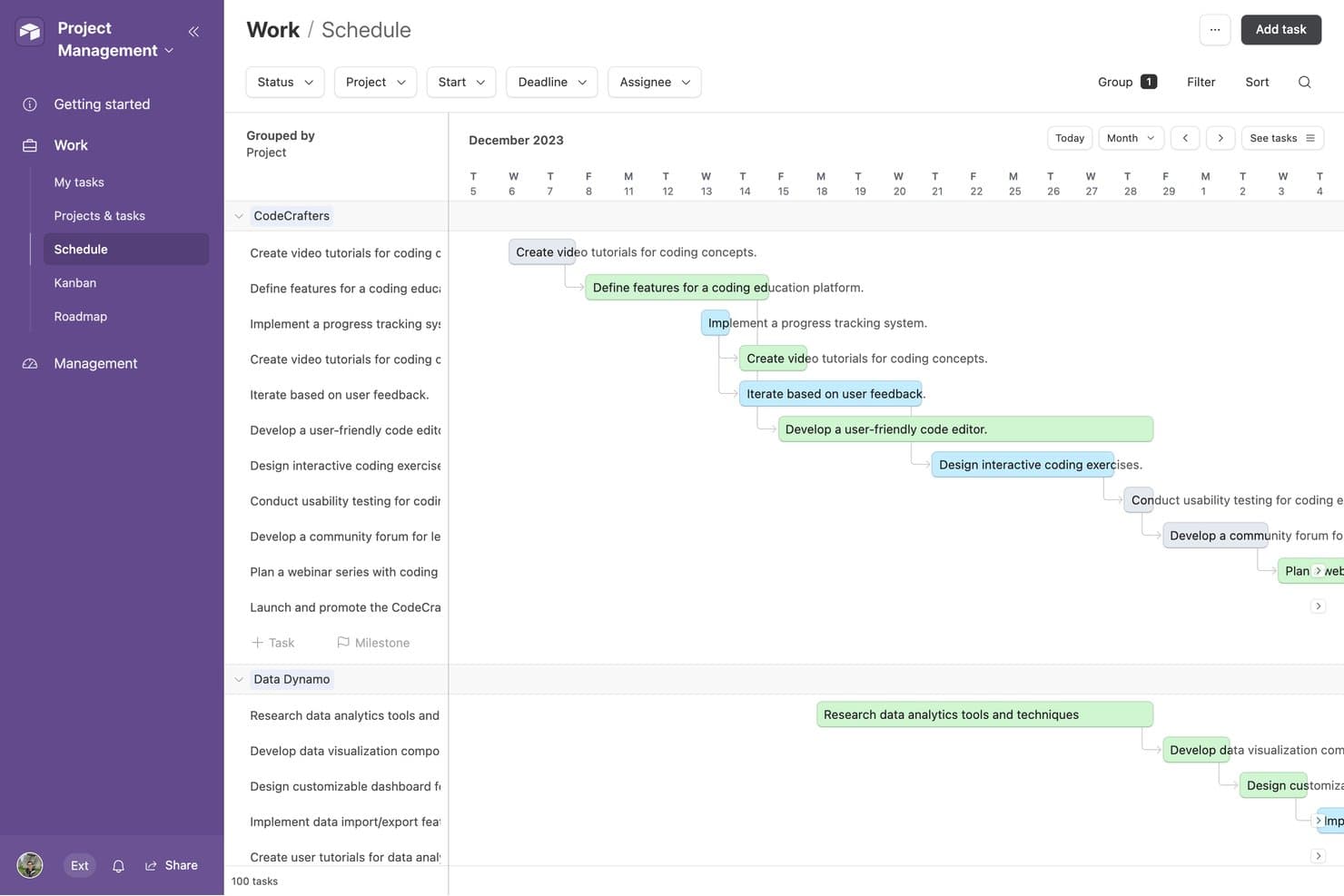
Airtable offre una vista Programmazione che mostra le attività del progetto raggruppate per progetto, con frecce delle dipendenze e sequenze temporali codificate a colori in una disposizione di calendario mensile. Airtable è una piattaforma di banca dati relazionale senza codice progettata per freelance, agenzie e squadre operative. Offre strumenti per creare flussi di lavoro personalizzati, monitorare clienti e progetti e organizzare dati collegati senza richiedere competenze di programmazione.
Perché è una buona alternativa a Bonsai: Airtable offre un approccio flessibile alla gestione di clienti, progetti e flussi di lavoro attraverso il suo modello di banca dati relazionale. Puoi collegare i record dei clienti, i progetti e i risultati finali all'interno del tuo spazio di lavoro, rendendolo più adattabile di un normale foglio di calcolo. I suoi oltre 40 tipi di campo, inclusi i campi per durata, valuta e codici a barre, aiutano le squadre a strutturare i dati in base ai propri processi specifici. Anche gli strumenti visivi, come le viste Gantt e le sequenze temporali, semplificano la pianificazione dei progetti e la gestione dei flussi di lavoro operativi.
Funzionalità e integrazioni principali:
Le funzionalità includono moduli personalizzabili per raccogliere informazioni sui clienti e sui progetti, controlli granulari delle autorizzazioni per gestire l'accesso dei collaboratori, nonché cronologia delle modifiche e registri di controllo per monitorare gli aggiornamenti e ripristinare versioni precedenti. Airtable offre inoltre diverse viste visive, tra cui le viste Gantt e le sequenze temporali, per gestire progetti e flussi di lavoro.
Integrazioni includono Google Workspace, Slack, Salesforce, Jira, GitHub, Dropbox e Zapier. Airtable offre inoltre un'API per creare integrazioni personalizzate.
Pros and Cons
Pros:
- Struttura di banca dati relazionale altamente flessibile
- Viste multiple per organizzare i dati dei clienti
- Le automazioni riducono le attività amministrative ripetitive
Cons:
- Nessuno strumento nativo per la fatturazione o la gestione dei pagamenti
- La reportistica finanziaria richiede una configurazione manuale significativa
Learn more about Airtable:
Altre alternative a Bonsai
Ecco alcune alternative aggiuntive a Bonsai che non sono entrate nella mia selezione, ma che vale comunque la pena prendere in considerazione:
- 11TogglIdeale per il semplice monitoraggio del tempo
- 12Brain LinkIdeale per prendere appunti e collaborare
Come Valuto le Alternative a Bonsai
Valuto ciascun strumento rispetto a requisiti di base—fatturazione, firme elettroniche, monitoraggio del tempo—e poi cerco elementi distintivi come automazione fiscale e portali per i clienti.
Funzionalità Principali (Requisiti Minimi per Questa Lista)
Quando seleziono gli strumenti per la mia lista, valuto ciascuno su una scala da 0 (non offre la funzionalità) a 5 (eccelle in quest'area) per ogni funzionalità centrale elencata di seguito. Successivamente, calcolo il punteggio totale dello strumento in percentuale. Ogni strumento deve raggiungere un punteggio totale minimo del 65% per essere considerato per l'inclusione.
- Fatturazione e Pagamenti: Verifico se è possibile creare fatture personalizzate, impostare cicli di fatturazione ricorrenti e raccogliere pagamenti tramite più gateway come Stripe o PayPal.
- Proposte e Contratti: Ogni strumento dovrebbe consentire la stesura di proposte, l'allegato di contratti e la raccolta di firme elettroniche affinché i clienti possano approvare e firmare senza lasciare la piattaforma.
- Monitoraggio di Tempo e Spese: Cerco un timer integrato, l'assegnazione di tariffe fatturabili per cliente o progetto e una registrazione delle spese che confluisca direttamente nelle fatture.
- Gestione di Clienti e Progetti: Una banca dati centralizzata dei clienti insieme al monitoraggio dei progetti è fondamentale qui—organizzare le consegne, le scadenze e i file per incarico.
- Rendicontazione Finanziaria e Contabilità: Valuto se lo strumento genera riepiloghi di profitti e perdite, monitora entrate e spese per categoria e produce report per la dichiarazione fiscale.
- Automazione di Attività e Flussi di Lavoro: Trigger automatici per attività come l'invio di promemoria delle fatture, l'onboarding di nuovi clienti o la creazione di attività di follow-up fanno risparmiare veramente ore amministrative.
Una volta che ho una lista di strumenti che soddisfano questi criteri, considero cosa distingue ciascuna piattaforma.
Fattori Distintivi (Cosa Distingue i Fornitori)
Ecco come confronto e metto a confronto i diversi fornitori:
Funzionalità di Spicco
L'automazione fiscale è un grande elemento distintivo—cerco strumenti che gestiscono le stime trimestrali, il monitoraggio delle detrazioni e la generazione dei 1099 senza necessità di una piattaforma separata. Anche un portale clienti conta, soprattutto per i contabili che gestiscono più incarichi nei quali i clienti devono consultare le fatture o caricare documenti in autonomia. Valuto anche quanto bene ogni strumento si integra con software di contabilità come QuickBooks o Xero, poiché la duplicazione dell'inserimento dati tra sistemi scollegati genera reali problemi di riconciliazione.
Oltre le Funzionalità
La struttura dei prezzi è rilevante per questa categoria. Valuto se uno strumento è scalabile in modo ragionevole man mano che si aggiungono clienti o membri del team, dato che molti liberi professionisti e titolari di piccoli studi iniziano da soli e crescono col tempo. Un altro elemento importante è la sicurezza—la gestione di dati finanziari sensibili mi porta a verificare standard di crittografia, accessi basati sui ruoli e certificazioni di conformità. Considero anche l'esperienza di onboarding, dato che un contabile autonomo senza supporto IT ha bisogno di una configurazione guidata e di percorsi di migrazione da strumenti come Bonsai, non di un processo d'implementazione di settimane.
Perché cercare un'alternativa a Bonsai?
Sebbene Bonsai sia una buona scelta come software di gestione aziendale per freelance, ci sono diversi motivi per cui alcuni utenti cercano soluzioni alternative. Potresti essere alla ricerca di un'alternativa a Bonsai perché…
- Hai bisogno di più opzioni di personalizzazione
- Il tuo team è più numeroso di quanto Bonsai possa supportare
- Hai bisogno di conformità specifica per il tuo settore
- Cerchi migliori funzionalità di integrazione
- Hai bisogno del supporto per più valute
- Ti trovi al di fuori dell'area geografica in cui Bonsai è disponibile
Se ti riconosci in una di queste situazioni, sei nel posto giusto. La mia lista include diverse opzioni di software per la gestione aziendale dei freelance più adatte ai team che affrontano queste difficoltà con Bonsai e cercano soluzioni alternative.
Funzionalità principali di Bonsai
Ecco alcune delle funzionalità principali di Bonsai, per aiutarti a mettere a confronto ciò che offrono le soluzioni alternative:
- Automazione: Automatizza la gestione delle attività, la fatturazione e i flussi di lavoro dei progetti per migliorare la produttività.
- Strumenti di collaborazione: Offre spazi di lavoro condivisi per la collaborazione del team e il coinvolgimento dei clienti.
- Controllo degli accessi: Fornisce la gestione delle autorizzazioni e ruoli utente personalizzati per la sicurezza dei dati.
- Interfaccia intuitiva: Dispone di una navigazione intuitiva e di un design responsivo per facilitare l'utilizzo su tutti i dispositivi.
- Gestione delle fatture: Consente di personalizzare la numerazione delle fatture e di applicare incrementi automatici per mantenere organizzati i registri finanziari.
- Integrazione dei pagamenti: Supporta diversi gateway e opzioni di pagamento per transazioni sicure.
- Fatture personalizzabili: Consentono di creare design delle fatture personalizzati e di gestire in modo flessibile le voci.
- Flussi di lavoro personalizzati: Facilita la creazione di flussi di lavoro personalizzati e l'impostazione di attivatori di automazione per garantire una fornitura coerente dei servizi.
- Portale per i pagamenti dei clienti: Offre ai clienti un portale online sicuro per gestire pagamenti e fatture.
- Cicli di fatturazione flessibili: Consente di personalizzare i programmi di fatturazione e di automatizzare i processi di fatturazione.