

Il software fiscale internazionale aiuta il tuo team a gestire la conformità fiscale transfrontaliera, automatizzare gli adempimenti e monitorare gli obblighi fiscali globali in un unico posto. Se stai cercando il miglior software fiscale internazionale, probabilmente devi affrontare requisiti di rendicontazione complessi, normative in continua evoluzione e la necessità di sostenere la crescita aziendale in più Paesi. Questa guida mette in evidenza strumenti esaminati da esperti, progettati per aiutarti a rimanere conforme, ridurre il lavoro manuale e tenere il passo con l'evoluzione delle norme fiscali internazionali, così potrai concentrarti su una rendicontazione accurata e su decisioni strategiche. Ecco cosa devi sapere per scegliere la soluzione più adatta alla tua azienda.
Perché fidarsi dei nostri consigli sui software
6,700+
Reviews
20
Industry experts
16+
Evaluation factors
14
Years
Le nostre recensioni riflettono il nostro giudizio indipendente, non un discorso di vendita. Scopri come manteniamo la trasparenza.
Per questa guida, abbiamo valutato gli strumenti attraverso test pratici e ricerche indipendenti, assegnando un punteggio agli strumenti in base ai nostri criteri di selezione.
Le nostre recensioni riflettono il nostro giudizio editoriale umano, non un discorso di vendita.
Tabella comparativa dei software fiscali internazionali
Questa tabella comparativa riassume i dettagli sui prezzi delle mie principali selezioni di software fiscali internazionali:
| Tool | Best For | Trial Info | Price | ||
|---|---|---|---|---|---|
| 1 | Ideale per IVA indiretta e fatturazione elettronica su larga scala | Demo gratuita disponibile | Prezzi su richiesta | Website | |
| 2 | Ideale per il calcolo automatico dell'IVA | Demo gratuita disponibile | Prezzi su richiesta | Website | |
| 3 | Ideale per l'automazione delle imposte sulle vendite digitali | Prova gratuita di 7 giorni disponibile | A partire da $29/mese | Website | |
| 4 | Ideale per la conformità al Secondo Pilastro su larga scala | Demo gratuita disponibile | Prezzo su richiesta | Website | |
| 5 | Il migliore per gli strumenti di ricerca fiscale globale | Demo gratuita disponibile | Prezzo su richiesta | Website | |
| 6 | Ideale per aggiornamenti normativi in tempo reale | Demo gratuita disponibile | Prezzi su richiesta | Website | |
| 7 | Il migliore per compatibilità con sistemi ERP | Demo gratuita disponibile | Prezzo su richiesta | Website | |
| 8 | Ideale per la gestione fiscale dei ricavi SaaS | Demo gratuita disponibile | Da $100/mercato/mese | Website | |
| 9 | Ideale per il supporto alla conformità transfrontaliera | Demo gratuita disponibile | Prezzo su richiesta | Website | |
| 10 | Ideale per la rendicontazione di entità multinazionali | Demo gratuita disponibile | Prezzi su richiesta | Website |


Recensioni dei migliori software fiscali internazionali
Di seguito trovi le mie sintesi dettagliate dei software fiscali internazionali entrati nel mio elenco. Le mie recensioni offrono un’analisi approfondita delle funzionalità, dei casi d’uso più adatti e delle integrazioni di ciascun software, per aiutarti a trovare quello migliore per te.
 Ideale per IVA indiretta e fatturazione elettronica su larga scala
- Demo gratuita disponibile
- Prezzi su richiesta
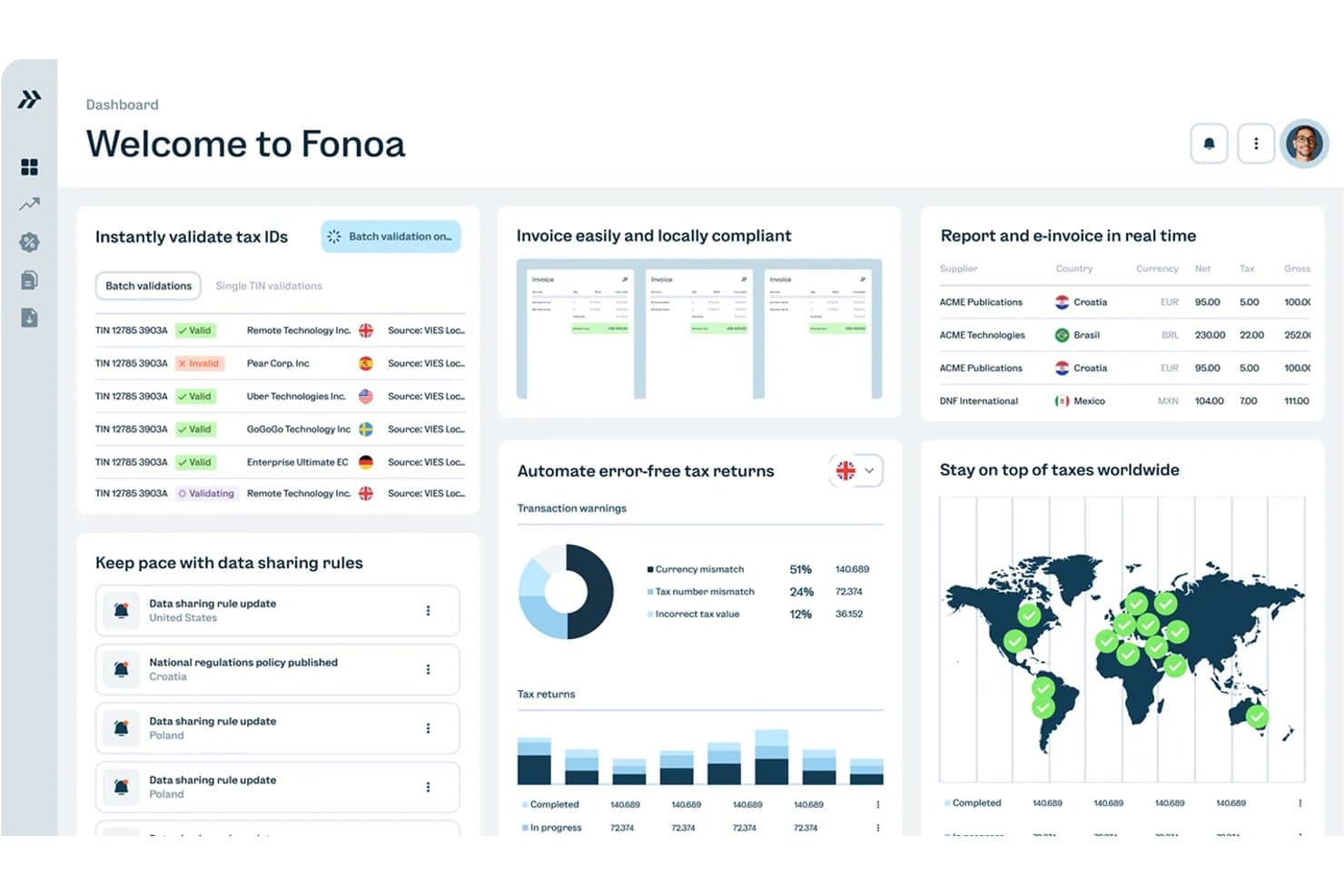
Fonoa centralizza la convalida fiscale, la fatturazione e le dichiarazioni in un'unica dashboard. Fonoa è una piattaforma di automazione della fiscalità indiretta basata su API che gestisce IVA, GST e imposte sulle vendite durante l'intero ciclo di conformità fiscale, dalla convalida degli identificativi fiscali al calcolo in tempo reale, dalla fatturazione elettronica alla presentazione delle dichiarazioni in oltre 100 giurisdizioni.
Per chi è più adatto Fonoa?
Fonoa è particolarmente adatto ai team finanziari e fiscali di aziende digitali con elevati volumi di transazioni, come società SaaS, marketplace e piattaforme, che hanno bisogno di automatizzare IVA, GST e fatturazione elettronica in decine di giurisdizioni senza dover creare da zero un'infrastruttura per la conformità fiscale.
Perché ho scelto Fonoa
Ho incluso Fonoa tra le mie scelte principali perché gestisce l'intero ciclo della fiscalità indiretta, dalla convalida al calcolo, dalla fatturazione elettronica alla presentazione delle dichiarazioni, attraverso un unico modello di dati, una caratteristica rara a questa scala. Apprezzo il fatto che il Motore fiscale elabori ogni transazione in tempo reale (in meno di 200 ms) e aggiorni automaticamente le regole in oltre 100 giurisdizioni, così il tuo team non deve gestire manualmente le tabelle delle aliquote. Il modulo di fatturazione elettronica si connette direttamente alle autorità fiscali tramite connessioni API accreditate e copre sia le fatture emesse sia quelle ricevute in oltre 50 Paesi.
Funzionalità principali di Fonoa
- Convalida degli identificativi fiscali: Verifica gli identificativi fiscali in tempo reale rispetto ai registri governativi aggiornati di oltre 120 Paesi, con corrispondenza approssimativa per correggere i dati errati ed elaborazione in batch fino a 50.000 record.
- Automazione della traccia di audit: Raccoglie ogni determinazione fiscale, modifica e approvazione per giurisdizione e periodo in evidenze versionate e a prova di manomissione, a supporto della governance SOX e SOC 2.
- Avvisi normativi: Fornisce avvisi sulla conformità personalizzati in base al profilo della tua azienda, classificati per rilevanza e collegati direttamente alla piattaforma fiscale, così le modifiche alle regole possono essere implementate immediatamente.
- Copertura fiscale di debiti e crediti commerciali: Applica la stessa logica di calcolo sia alle transazioni di vendita sia a quelle di acquisto, offrendo al tuo team un trattamento coerente della fiscalità indiretta tra crediti commerciali e debiti commerciali.
Integrazioni di Fonoa
Le integrazioni di Fonoa includono SAP, Oracle Fusion Cloud e NetSuite, sebbene il livello di profondità delle connessioni non sia descritto pubblicamente. La sua API supporta connessioni personalizzate a sistemi di checkout, fatturazione, emissione delle fatture e gestione dei debiti e crediti commerciali.
Pros and Cons
Pros:
- Copertura IVA/GST in tempo reale tra le giurisdizioni
- Le tracce di audit supportano SOX e SOC 2
- Solido supporto per transazioni ad alto volume
Cons:
- Nessuna gestione dei prezzi di trasferimento o della logica dei trattati
- Nessuna gestione degli accantonamenti fiscali o consolidamento delle entità
Learn more about Fonoa: Ideale per il calcolo automatico dell'IVA
- Demo gratuita disponibile
- Prezzi su richiesta
Visit WebsiteCustomer Rating:4/5
Avalara automatizza il calcolo delle imposte e la conformità tra diverse regioni. Avalara offre strumenti automatici per il calcolo e la conformità dell'IVA per le aziende che vendono oltre confine. La piattaforma è particolarmente utile per le aziende di ecommerce, per i team finanziari e per i professionisti fiscali che devono gestire regole IVA complesse e multilocali. Le sue funzionalità di determinazione delle imposte e invio delle dichiarazioni in tempo reale aiutano a ridurre gli errori manuali e a mantenere la conformità delle transazioni internazionali.
Perché ho scelto Avalara
Quando si tratta di gestire il calcolo automatico dell'IVA, Avalara offre una precisione e una copertura difficili da eguagliare. La piattaforma applica automaticamente le aliquote e le regole IVA corrette per ogni transazione, anche quando le normative cambiano nei vari paesi. Apprezzo il fatto che Avalara supporti anche la registrazione IVA e la dichiarazione digitale, aiutando le aziende a rimanere conformi senza interventi manuali. Queste funzionalità la rendono una scelta solida per le aziende che gestiscono elevati volumi di vendite transfrontaliere e complesse obbligazioni IVA.
Caratteristiche principali di Avalara
Altre caratteristiche che distinguono Avalara includono:
- Determinazione fiscale transfrontaliera: Calcola le imposte per le transazioni internazionali in base ai dati in tempo reale su localizzazione e prodotto.
- Preparazione e invio delle dichiarazioni: Genera e inoltra le dichiarazioni IVA alle autorità fiscali in diversi paesi.
- Gestione dei documenti: Archivia e recupera documenti fiscali, certificati e registri di conformità in un portale centralizzato.
- Gestione dei certificati di esenzione fiscale: Raccoglie, valida e gestisce i certificati di esenzione per i clienti idonei.
Integrazioni Avalara
Le integrazioni includono Shopify, NetSuite, QuickBooks, Magento, Salesforce, Epicor, Sage e Microsoft Dynamics.
Pros and Cons
Pros:
- Ampia libreria di integrazioni
- Calcolo delle tariffe in tempo reale
- Mappatura HS code integrata
Cons:
- Si concentra solo sulle imposte indirette
- La configurazione può essere complicata
Learn more about Avalara: Ideale per l'automazione delle imposte sulle vendite digitali
- Prova gratuita di 7 giorni disponibile
- A partire da $29/mese
Visit WebsiteCustomer Rating:4.8/5
Quaderno automatizza la conformità fiscale su vendite, IVA e GST per i venditori. Quaderno è pensato per aziende digitali e società SaaS che devono automatizzare la conformità fiscale sulle vendite in mercati internazionali. La piattaforma monitora le soglie fiscali, applica le aliquote corrette e genera fatture conformi alle normative fiscali per ogni vendita. Questo lo rende particolarmente utile per i venditori online che gestiscono IVA, GST e imposta sulle vendite negli Stati Uniti in diversi paesi.
Perché ho scelto Quaderno
Per le aziende digitali, Quaderno si distingue per la capacità di automatizzare la conformità fiscale sulle vendite internazionali. La piattaforma rileva automaticamente quando superi le soglie fiscali nei diversi paesi e applica le aliquote corrette di IVA, GST o imposta sulle vendite negli Stati Uniti a ciascuna transazione. Apprezzo come Quaderno generi fatture conformi e mantenga registri dettagliati per ogni vendita, elemento essenziale per società SaaS ed ecommerce che vendono a livello internazionale. Questa attenzione all'automazione delle imposte sulle vendite digitali lo rende una soluzione solida per i team che vogliono mantenere la conformità senza interventi manuali.
Caratteristiche principali di Quaderno
Altre funzionalità di Quaderno che i venditori internazionali possono trovare utili includono:
- Supporto multivaluta: Emissione di fatture e gestione dei pagamenti in più valute per i clienti globali.
- Generazione automatica delle note di credito: Creazione e invio automatico delle note di credito in caso di rimborsi o rettifiche.
- Modelli di fatture personalizzabili: Progetta e personalizza le fatture per adattarsi alle normative locali e alle esigenze aziendali.
- Report fiscali in tempo reale: Accesso a riepiloghi fiscali aggiornati e esportazione dei dati per le dichiarazioni fiscali in qualsiasi momento.
Integrazioni di Quaderno
Le integrazioni includono Stripe, PayPal, Shopify, WooCommerce, Amazon, Zapier, Xero e QuickBooks Online.
Pros and Cons
Pros:
- Interfaccia utente accattivante
- Integrazione facile con Stripe
- Invia ricevute conformi
Cons:
- Manca una sincronizzazione approfondita con ERP
- Nessuno strumento per il transfer pricing
Learn more about Quaderno: Ideale per la conformità al Secondo Pilastro su larga scala
- Demo gratuita disponibile
- Prezzo su richiesta
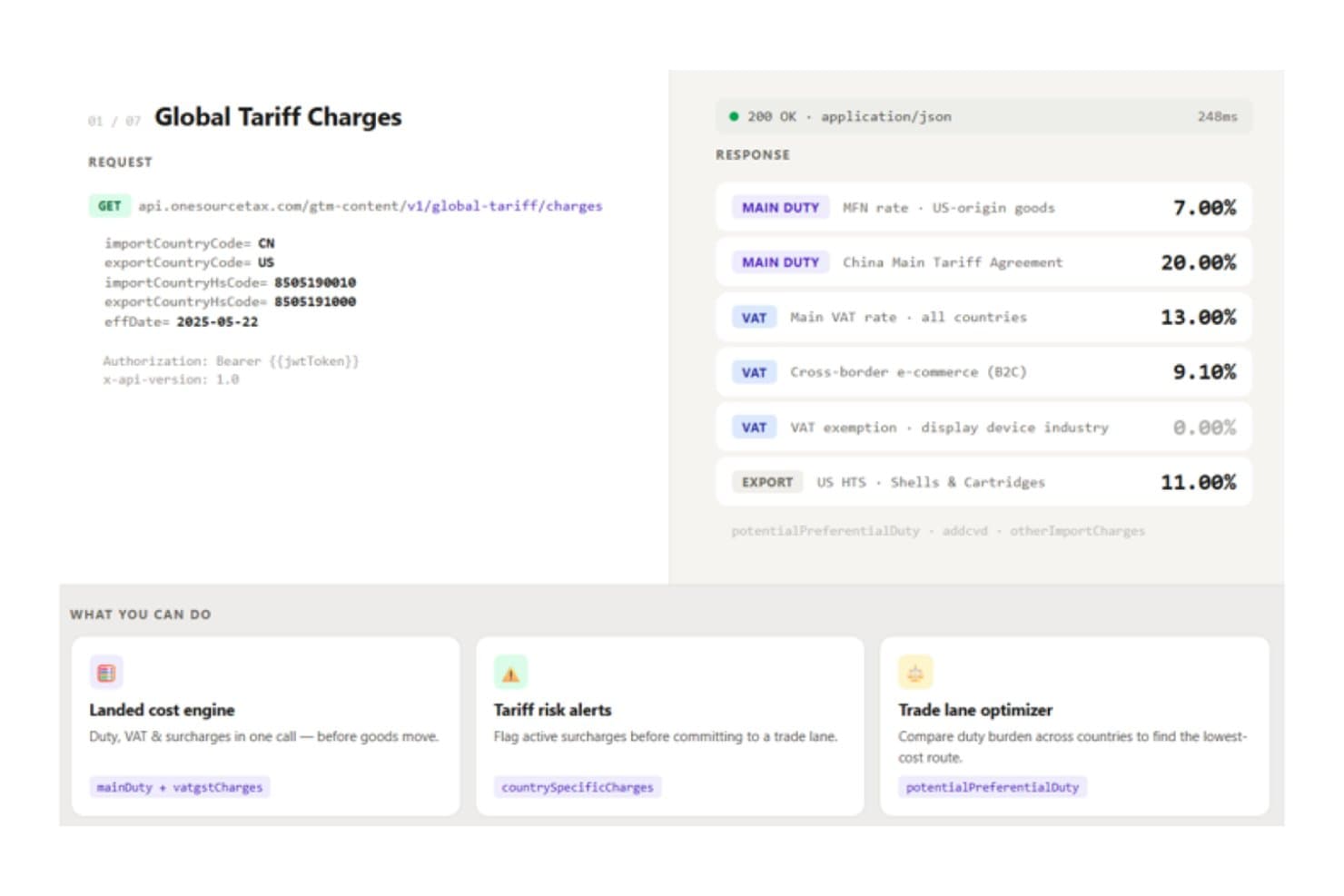
ONESOURCE fornisce tramite API aliquote tariffarie globali in tempo reale per la conformità commerciale. ONESOURCE è una suite fiscale aziendale modulare di Thomson Reuters che comprende la conformità fiscale diretta, l'accantonamento fiscale, il calcolo e la rendicontazione delle imposte indirette, la fatturazione elettronica, la rendicontazione prevista dalla legge e la conformità al Secondo Pilastro (GloBE) per le entità multinazionali.
Per chi è più adatto ONESOURCE?
ONESOURCE è particolarmente adatto ai team fiscali multinazionali che devono gestire la conformità al Secondo Pilastro, l'automazione delle imposte indirette e l'accantonamento per più entità tramite un unico fornitore aziendale.
Perché ho scelto ONESOURCE
Ho incluso ONESOURCE tra le mie scelte principali perché la sua capacità di gestire la conformità al Secondo Pilastro è senza pari tra le soluzioni per aziende di grandi dimensioni che ho visto. L'integrazione con Orbitax Global Minimum Tax automatizza i calcoli GloBE e l'analisi dei porti sicuri in oltre 190 paesi e si collega direttamente a Tax Provision, così le mappature dei dati esistenti vengono mantenute. Apprezzo anche il fatto che lo strumento abbia registrato oltre 1.700 dichiarazioni informative GloBE in 34 giurisdizioni in meno di un anno, il che dimostra che questa copertura non è solo teorica.
Caratteristiche principali di ONESOURCE
- Determinazione delle imposte indirette: Calcola in tempo reale le imposte sulle vendite, l'IVA, la GST e le accise in oltre 205 paesi e 60.000 giurisdizioni, elaborando fino a 10 milioni di transazioni all'ora.
- Rendicontazione prevista dalla legge: Genera bilanci conformi agli obblighi di legge in oltre 45 giurisdizioni utilizzando modelli nella lingua locale, con registri di controllo e traduzione automatica con un clic.
- Automazione delle dichiarazioni IVA: Prepara e riconcilia le dichiarazioni IVA/GST, i report digitali SAF-T/SII e i confronti con le dichiarazioni precompilate in oltre 38 paesi tramite Indirect Compliance.
- Conformità alla fatturazione elettronica: Supporta i requisiti di fatturazione elettronica in oltre 80–85 paesi tramite la rete Pagero integrata, con abbinamento a livello di riga delle fatture elettroniche alle dichiarazioni.
Integrazioni di ONESOURCE
ONESOURCE offre 12 integrazioni SAP, tra cui SAP ERP, S/4HANA e Ariba, oltre a connettori certificati per Oracle ERP Cloud, Oracle Cloud Infrastructure e Microsoft Dynamics 365 F&O. Determination offre oltre 60 integrazioni predefinite, mentre REST APIs, OData e SFTP supportano connessioni dati personalizzate.
Pros and Cons
Pros:
- Automazione del Secondo Pilastro in oltre 190 paesi
- Aggiornamenti frequenti dei contenuti fiscali nelle diverse giurisdizioni
- L'accantonamento per più entità supporta la rendicontazione globale
Cons:
- La documentazione sui prezzi di trasferimento richiede un altro fornitore
- La dichiarazione delle imposte sul reddito al di fuori degli Stati Uniti rimane poco chiara
Learn more about ONESOURCE: Il migliore per gli strumenti di ricerca fiscale globale
- Demo gratuita disponibile
- Prezzo su richiesta

Bloomberg Tax aiuta le imprese a gestire la conformità e la pianificazione fiscale globale. Con Bloomberg Tax, i professionisti fiscali e i team finanziari multinazionali hanno accesso a una vasta libreria di strumenti di ricerca fiscale globale. La piattaforma è progettata per chi ha bisogno di orientarsi tra complesse normative fiscali internazionali e rimanere aggiornato sugli standard di conformità in evoluzione. Il suo punto di forza è la capacità di offrire analisi esperte, guide paese per paese e monitoraggio legislativo aggiornato per le operazioni transfrontaliere.
Perché ho scelto Bloomberg Tax
Ciò che distingue Bloomberg Tax per me è la sua impareggiabile suite di strumenti di ricerca fiscale globale, essenziale per chi si occupa di questioni fiscali internazionali. La piattaforma offre dettagliate guide fiscali paese per paese e commenti di esperti, aiutando l'utente a interpretare normative complesse in varie giurisdizioni. Apprezzo il monitoraggio e l’analisi legislativa in tempo reale, che tiene il tuo team informato sui cambiamenti che potrebbero impattare la conformità transfrontaliera. Queste funzionalità orientate alla ricerca rendono Bloomberg Tax una scelta solida per le organizzazioni che necessitano di un'intelligenza fiscale autorevole e aggiornata su scala globale.
Caratteristiche principali di Bloomberg Tax
Altre funzionalità che mi hanno colpito includono:
- Strumento di confronto di trattati fiscali: Confronta le disposizioni di diversi trattati fiscali internazionali in un’unica visualizzazione.
- Grafici fiscali interattivi: Visualizza le principali aliquote e regole fiscali dei vari paesi.
- Sistema di gestione documentale: Organizza, archivia e recupera in sicurezza i documenti di ricerca e conformità.
- Avvisi personalizzati sulle novità: Ricevi aggiornamenti sulle novità fiscali in base alle tue giurisdizioni e tematiche selezionate.
Integrazioni di Bloomberg Tax
Le integrazioni includono Advantax, Vertex, Avalara e diversi sistemi ERP tramite Advantage Fixed Assets.
Pros and Cons
Pros:
- Monitora le reti di trattati
- Fonte dati altamente affidabile
- Solidi strumenti di pianificazione
Cons:
- Concentrato soprattutto sulla ricerca
- Eccessivo per realtà di piccole dimensioni
Learn more about Bloomberg Tax: Ideale per aggiornamenti normativi in tempo reale
- Demo gratuita disponibile
- Prezzi su richiesta

Sovos automatizza la conformità IVA per le aziende di diverse regioni. Sovos è progettato per i team finanziari e i professionisti fiscali che devono stare al passo con le normative fiscali globali in continua evoluzione. La piattaforma è specializzata nell'offrire aggiornamenti normativi in tempo reale e nell'automatizzare la conformità in diverse giurisdizioni. Questo la rende particolarmente utile per le aziende multinazionali che affrontano frequenti cambiamenti nelle regole fiscali e nei requisiti di reportistica.
Perché ho scelto Sovos
Ciò che distingue Sovos è l'attenzione agli aggiornamenti normativi in tempo reale, fondamentale per le aziende che operano in più paesi. La piattaforma monitora i cambiamenti delle leggi fiscali mondiali e aggiorna automaticamente i processi di conformità, così il tuo team può rispondere rapidamente ai nuovi requisiti. Mi piace che Sovos offra anche funzionalità di reportistica automatizzata e fatturazione elettronica che aiutano a rimanere al passo con gli obblighi fiscali internazionali in evoluzione. Questo lo rende una soluzione ideale per le organizzazioni che devono ridurre al minimo i rischi di non conformità in un ambiente normativo in rapida evoluzione.
Caratteristiche principali di Sovos
Altre funzionalità di Sovos che potrebbero risultare utili ai team fiscali internazionali includono:
- Determinazione fiscale multi-giurisdizionale: Calcola le imposte per le transazioni in diversi paesi e regioni in tempo reale.
- Preparazione automatica della dichiarazione IVA: Genera dichiarazioni IVA per più giurisdizioni all'interno della piattaforma.
- Tracciabilità e documentazione di conformità: Mantieni registri dettagliati dei calcoli e delle dichiarazioni fiscali per supporto in caso di audit.
- Cruscotto di analisi dei dati fiscali: Visualizza e analizza le tendenze dei dati fiscali nelle tue attività globali.
Integrazioni di Sovos
Le integrazioni includono SAP, NetSuite, Microsoft Dynamics, Magento, QuickBooks, Shopify e Oracle.
Pros and Cons
Pros:
- Sincronizzazione normativa in tempo reale
- Ideale per dimensioni enterprise
- Elaborazione di grandi volumi
Cons:
- Mancano funzionalità per imposte dirette
- Servizio clienti lento
Learn more about Sovos: Il migliore per compatibilità con sistemi ERP
- Demo gratuita disponibile
- Prezzo su richiesta

Vertex automatizza il calcolo fiscale e la conformità per le grandi imprese. Vertex è pensato per le organizzazioni che devono gestire requisiti fiscali complessi in diversi paesi e sistemi aziendali. La piattaforma si distingue per la sua profonda compatibilità con i principali sistemi ERP, rendendola particolarmente adatta alle imprese con finanza e operazioni integrate. Questo aiuta i team fiscali ad automatizzare i calcoli, mantenere la conformità e adattarsi rapidamente ai cambiamenti delle normative fiscali internazionali.
Perché ho scelto Vertex
Per le aziende che si affidano ai sistemi ERP per gestire le operazioni globali, Vertex offre un livello di compatibilità difficile da eguagliare nel panorama dei software fiscali internazionali. Ho scelto Vertex perché si integra direttamente con le principali piattaforme ERP, permettendo che i calcoli fiscali e i processi di conformità vengano eseguiti all'interno dei flussi di lavoro finanziari esistenti. La piattaforma supporta la determinazione fiscale in tempo reale e aggiornamenti automatici per le regole fiscali in continua evoluzione in molteplici giurisdizioni. Questo la rende particolarmente preziosa per le organizzazioni che devono mantenere i processi fiscali strettamente allineati con la propria infrastruttura finanziaria e operativa.
Caratteristiche principali di Vertex
Altre funzionalità che rendono Vertex una scelta solida per la gestione fiscale internazionale includono:
- Database globale dei contenuti: Fornisce aliquote e regole fiscali aggiornate per oltre 19.000 giurisdizioni in tutto il mondo.
- Dashboard di analisi dei dati fiscali: Offre strumenti di visualizzazione e reportistica per monitorare l'esposizione e la conformità fiscale.
- Gestione automatizzata dei certificati di esenzione: Traccia, archivia e valida i certificati di esenzione per le imposte sulle vendite e sull'uso.
- Capacità di elaborazione in batch: Gestisce grandi volumi di transazioni per calcoli e dichiarazioni fiscali in massa.
Integrazioni di Vertex
Le integrazioni includono SAP, Oracle, NetSuite, Microsoft Dynamics, Salesforce e Workday.
Pros and Cons
Pros:
- Regole IVA/GST accurate
- Gestisce enormi volumi di dati
- Regole altamente personalizzabili
Cons:
- Richiede supporto IT
- Manutenzione costosa
Learn more about Vertex: Ideale per la gestione fiscale dei ricavi SaaS
- Demo gratuita disponibile
- Da $100/mercato/mese

Anrok automatizza la conformità fiscale sulle vendite per le aziende SaaS. Anrok è progettato appositamente per le aziende SaaS che devono gestire la conformità fiscale sui ricavi ricorrenti del software nei mercati globali. È particolarmente rilevante per i team finanziari e operativi che devono districarsi tra complesse normative fiscali digitali, come IVA, GST e tasse di vendita negli Stati Uniti. La piattaforma automatizza il calcolo delle imposte, la registrazione e la dichiarazione fiscale per i ricavi SaaS, aiutandoti a rispettare i requisiti internazionali in evoluzione.
Perché ho scelto Anrok
Per le aziende SaaS che gestiscono ricavi ricorrenti, Anrok affronta le sfide fiscali specifiche legate alla vendita di prodotti digitali oltre confine. Ho scelto Anrok perché è specializzato nell’automazione del calcolo e della presentazione delle tasse per software in abbonamento, spesso soggetto a normative internazionali complesse e in continua evoluzione. La piattaforma monitora le soglie fiscali, gestisce la registrazione in più giurisdizioni e genera fatture conformi in base ai modelli di fatturazione SaaS. Queste caratteristiche rendono Anrok particolarmente adatto ai team finanziari che devono rimanere conformi man mano che espandono il business del software a livello globale.
Funzionalità principali di Anrok
Altre funzionalità che rendono Anrok utile per la gestione fiscale SaaS includono:
- Dashboard in tempo reale delle responsabilità fiscali: Offre una panoramica in tempo reale degli obblighi fiscali in tutte le giurisdizioni.
- Gestione automatizzata dei certificati di esenzione: Raccoglie, convalida e archivia i certificati di esenzione dei clienti.
- Strumenti di reportistica pronti per l’audit: Prepara report dettagliati a supporto di audit e revisioni normative.
- Supporto multivaluta: Gestisce il calcolo delle imposte e la fatturazione in diverse valute per clienti globali.
Integrazioni Anrok
Le integrazioni includono Stripe, Chargebee, Recurly, Zuora, NetSuite e QuickBooks Online.
Pros and Cons
Pros:
- Sincronizzazione con i sistemi di fatturazione
- Avvisi globali sulle soglie facili da usare
- Interfaccia pulita e moderna
Cons:
- Nessuna funzionalità per la tassazione dei dipendenti
- Caso d'uso globale ristretto
Learn more about Anrok: Ideale per il supporto alla conformità transfrontaliera
- Demo gratuita disponibile
- Prezzo su richiesta

Forte International Tax supporta le esigenze di conformità fiscale e payroll a livello globale. Forte International Tax offre soluzioni personalizzate per le aziende che affrontano la complessa conformità fiscale transfrontaliera. È particolarmente rilevante per le multinazionali, i team finanziari e i professionisti fiscali che gestiscono la rendicontazione e i requisiti normativi in più giurisdizioni. La piattaforma si distingue per il suo focus sulla gestione proattiva della conformità e il supporto alle leggi fiscali internazionali in continua evoluzione.
Perché ho scelto Forte International Tax
Ciò che mi ha colpito di Forte International Tax è la sua particolare attenzione al supporto per la conformità transfrontaliera, una delle principali preoccupazioni per le organizzazioni che operano in più paesi. La piattaforma fornisce una guida approfondita sulle normative fiscali internazionali e aiuta gli utenti a gestire la conformità alle regole e alle scadenze specifiche dei vari paesi. Apprezzo il fatto che Forte International Tax offra un monitoraggio continuo dei cambiamenti normativi, permettendo al tuo team di restare sempre aggiornato sui nuovi requisiti. Queste caratteristiche lo rendono una scelta valida per le aziende che vogliono ridurre il rischio e mantenere la conformità nelle diverse giurisdizioni.
Caratteristiche principali di Forte International Tax
Oltre al monitoraggio della conformità e alla guida normativa, ho trovato anche queste funzionalità degne di nota:
- Modelli di report personalizzabili: Genera report fiscali specifici per paese su misura per le esigenze della tua organizzazione.
- Gestione sicura dei documenti: Archivia, organizza e recupera documenti fiscali sensibili in un ambiente protetto.
- Gestione multi-entità: Supervisiona la conformità fiscale di diverse filiali o unità aziendali da una sola dashboard.
- Accesso diretto ai consulenti fiscali: Collega direttamente gli esperti di fiscalità internazionale per domande e supporto specifici per il caso.
Integrazioni di Forte International Tax
Le integrazioni includono Oracle, SAP, Microsoft Dynamics 365 e Corptax.
Pros and Cons
Pros:
- Gestione del transfer pricing
- Adatto alle aziende di medie dimensioni
- Tiene traccia dei crediti d'imposta esteri
Cons:
- L'interfaccia può risultare datata
- L'implementazione richiede tempo
Learn more about Forte International Tax: 10Ideale per la rendicontazione di entità multinazionali
Orbitax
- Demo gratuita disponibile
- Prezzi su richiesta

Orbitax supporta la pianificazione e la conformità fiscale globale per le aziende. Orbitax è progettato per team finanziari e professionisti fiscali che gestiscono la rendicontazione e la conformità di entità multinazionali. La piattaforma è specializzata nell'automatizzare calcoli fiscali globali, documentazione e raccolta dati tra differenti giurisdizioni. Il suo approccio unico aiuta le organizzazioni a centralizzare requisiti di rendicontazione complessi e a ridurre lo sforzo manuale nella gestione fiscale transfrontaliera.
Perché ho scelto Orbitax
Per le organizzazioni che devono gestire la rendicontazione di entità multinazionali, Orbitax si distingue per le sue capacità di automazione specializzata e gestione dei dati. La piattaforma centralizza i dati fiscali globali, rendendo più facile preparare e inviare report in diverse giurisdizioni. Mi piace che Orbitax offra la rendicontazione paese per paese automatizzata e una gestione documentale efficiente, aiutando a ridurre errori manuali e semplificare la conformità. Queste funzioni lo rendono particolarmente adatto per i team finanziari che necessitano di coordinare complessi adempimenti di rendicontazione per entità attive in vari paesi.
Funzionalità principali di Orbitax
Altre funzionalità che hanno attirato la mia attenzione includono:
- Database dei tassi fiscali globali: Accesso ai tassi fiscali aggiornati di molteplici paesi in un'unica soluzione.
- Generatore di documentazione per il transfer pricing: Crea report di transfer pricing conformi su misura per le normative locali.
- Gestione del calendario fiscale: Tieni traccia delle principali scadenze per le dichiarazioni fiscali e degli appuntamenti di conformità in diverse giurisdizioni.
- Funzionalità di audit trail: Mantieni un registro dettagliato delle modifiche e delle attività degli utenti a fini di controllo e revisione.
Integrazioni di Orbitax
Le integrazioni includono SAP, Oracle, Microsoft Dynamics 365, Workday, NetSuite, Thomson Reuters ONESOURCE, Wolters Kluwer CCH, Vertex, Avalara e Xero.
Pros and Cons
Pros:
- Ottimi strumenti di monitoraggio visivo
- Creato per team fiscali globali
- Ottime capacità API
Cons:
- Non adatto alle piccole imprese
- Può risultare complesso da utilizzare
Learn more about Orbitax:
Altri software fiscali internazionali
Ecco alcune opzioni aggiuntive di software fiscali internazionali che non sono entrate nel mio elenco, ma che vale comunque la pena prendere in considerazione:
- 11PwC SightlineIdeale per integrazioni su scala enterprise
- 12CCH IntegratorIdeale per l'accantonamento fiscale di gruppo e la presentazione relativa al Secondo pilastro
- 13SAP Tax ComplianceBest for eksperimentarbeidsflyter basert på analyse
- 14Longview TaxIdeale per la rendicontazione CbCR e del Pilastro 2 basata sugli accantonamenti
- 15CCH TagetikIdeale per la gestione degli accantonamenti fiscali di gruppo e delle chiusure su un'unica piattaforma
- 16CSC CorptaxIdeale per dati fiscali globali consolidati
- 17TaxuallyIdeale per il white label per aziende specializzate in IVA e fatturazione elettronica
Come valuto i software fiscali internazionali
Divido la mia valutazione in tre parti, dando il maggior peso alle funzionalità principali: calcolare e dichiarare le imposte transfrontaliere tra entità, valute e giurisdizioni. Successivamente, cerco integrazioni con gli ERP e la modellazione di scenari, ad esempio per testare l'applicazione di un trattato. Infine, considero l'onboarding, l'assistenza, la sicurezza e il valore in rapporto al prezzo.
Funzionalità principali (requisiti fondamentali per questo elenco)
Quando seleziono gli strumenti da includere nel mio elenco, assegno a ciascuno un punteggio su una scala da 0 (non offre la funzionalità) a 5 (eccelle in quest'area) per ogni funzionalità principale indicata di seguito. Converto quindi il totale in una percentuale per aiutare a valutare l'idoneità complessiva di ciascuno strumento, attribuendo un peso aggiuntivo a tutte le funzionalità che ho ritenuto essenziali.
- Conformità fiscale globale (essenziale): cerco calcoli a livello nazionale, dichiarazioni, adempimenti, moduli e supporto per le entità che operano in più giurisdizioni.
- Motore fiscale transfrontaliero (essenziale): valuto l'applicazione dei trattati, le regole sulle ritenute, le transazioni infragruppo e i calcoli fiscali tra valute e giurisdizioni.
- Aggiornamenti normativi: verifico con quale rapidità gli strumenti aggiornano aliquote, regole, requisiti per gli adempimenti e indicazioni quando cambiano le normative fiscali.
- Gestione delle imposte indirette: valuto i calcoli, la convalida, la reportistica e i risultati pronti per la dichiarazione relativi a IVA e GST per le transazioni digitali e fisiche.
- Supporto per i prezzi di trasferimento: cerco documentazione infragruppo, metodi di determinazione dei prezzi, supporto per l'analisi comparativa e registri pronti per le verifiche tra entità correlate.
- Consolidamento delle entità e delle valute: valuto la reportistica fiscale consolidata tra entità giuridiche, valute, flussi di ricavi e strutture organizzative.
Una volta individuato un elenco di strumenti che soddisfano i criteri, considero ciò che distingue ciascuna piattaforma.
Fattori distintivi (ciò che differenzia i fornitori)
Ecco come confronto i diversi fornitori:
Funzionalità distintive
Cerco funzionalità di modellazione degli scenari che consentano ai team fiscali di simulare ristrutturazioni o applicazioni di trattati prima di impegnarsi, poiché individuare un'esposizione al Secondo pilastro in una previsione è preferibile a scoprirla al momento della dichiarazione. L'automazione della traccia di audit è altrettanto importante: verifico se le carte di lavoro vengono generate automaticamente con dettagli difendibili, perché rispondere a una richiesta dell'autorità fiscale non dovrebbe significare ricostruire un foglio di calcolo da zero. Valuto inoltre l'estensibilità basata sulle API, soprattutto per le organizzazioni che devono trasferire i dati fiscali nei propri archivi di dati interni o negli strumenti di BI esterni all'ecosistema del fornitore.
Oltre le funzionalità
Valuto come ciascuna piattaforma gestisce le ristrutturazioni delle entità e l'ingresso in nuovi mercati, poiché l'aggiunta di una società controllata dopo un'acquisizione non dovrebbe costringere a una nuova implementazione. Anche i modelli di licenza sono importanti: verifico se i costi aumentano in modo prevedibile con la crescita del numero di giurisdizioni ed entità. Considero inoltre la profondità normativa del fornitore: se dispone di gruppi interni di ricerca fiscale o collabora con organizzazioni come IBFD per garantire l'accuratezza dei contenuti, poiché una copertura obsoleta o superficiale delle giurisdizioni meno comuni comporta una reale esposizione al rischio di non conformità.
Come scegliere un software fiscale internazionale
È facile perdersi in lunghi elenchi di funzionalità e strutture tariffarie complesse. Per aiutarti a rimanere concentrato mentre affronti il tuo specifico processo di selezione del software, ecco un elenco di fattori da tenere a mente:
| Fattore | Cosa considerare |
|---|---|
| FattoreScalabilità | Cosa considerareIl software sarà in grado di gestire i volumi di transazioni attuali e previsti, la crescita delle entità e i nuovi mercati senza importanti aggiornamenti? |
| FattoreIntegrazioni | Cosa considerareLo strumento si collega nativamente al tuo sistema ERP e ai sistemi di fatturazione e contabilità, oppure sarà necessario sviluppare soluzioni personalizzate o utilizzare un middleware? |
| FattorePersonalizzazione | Cosa considerarePuoi adattare le regole fiscali, i formati dei report e i flussi di lavoro al tuo modello aziendale e alle tue esigenze di conformità, oppure sei limitato a impostazioni predefinite? |
| FattoreFacilità d'uso | Cosa considerareIl tuo team finanziario e gli utenti non tecnici saranno in grado di navigare nel sistema, aggiornarlo e risolverne i problemi senza un supporto IT continuo? |
| FattoreImplementazione e avviamento | Cosa considerareQuanto tempo servirà per rendere operativo il sistema e quali risorse, interne o fornite dal fornitore, saranno necessarie per la migrazione dei dati e la formazione? |
| FattoreCosto | Cosa considerareTutti i moduli necessari sono inclusi nel prezzo indicato oppure sono previsti costi aggiuntivi per ulteriori Paesi, utenti o adempimenti? |
| FattoreMisure di sicurezza | Cosa considerareIl fornitore soddisfa gli standard della tua organizzazione in materia di privacy dei dati, crittografia e controllo degli accessi, soprattutto per i dati fiscali sensibili? |
| FattoreRequisiti di conformità | Cosa considerareIl software supporta le giurisdizioni, i tipi di imposta e gli standard di rendicontazione specifici a cui la tua azienda deve conformarsi ora e in futuro? |
Che cos'è un software fiscale internazionale?
Il software fiscale internazionale è una soluzione digitale che aiuta le aziende a gestire, calcolare e dichiarare le imposte in più Paesi e giurisdizioni. Automatizza attività complesse come i calcoli di IVA, GST e imposta sulle vendite, monitora i requisiti di conformità e genera report pronti per le revisioni contabili. I team finanziari utilizzano questi strumenti per ridurre gli errori manuali, rimanere aggiornati sulle normative in evoluzione e garantire dichiarazioni accurate per le transazioni transfrontaliere.
Funzionalità
Ecco le funzionalità principali che qualsiasi ottimo software fiscale internazionale dovrebbe offrire:
- Calcolo automatizzato delle imposte: Calcola IVA, GST e imposta sulle vendite per ogni transazione in base alle normative più recenti di ciascuna giurisdizione pertinente, riducendo il lavoro manuale e gli errori.
- Supporto per più giurisdizioni: Gestisce la conformità fiscale in più Paesi, Stati o province, consentendo di gestire le operazioni globali da un'unica piattaforma.
- Monitoraggio delle soglie: Monitora le vendite e i volumi delle transazioni per avvisarti quando ti avvicini o superi le soglie di registrazione fiscale nelle diverse regioni.
- Automazione delle dichiarazioni fiscali: Prepara e invia elettronicamente le dichiarazioni fiscali alle autorità competenti, aiutandoti a rispettare le scadenze e a ridurre i rischi di non conformità.
- Report pronti per le revisioni contabili: Genera report dettagliati ed esportabili che supportano revisioni contabili e revisioni interne, con registrazioni chiare dei calcoli e delle dichiarazioni.
- Gestione dei certificati di esenzione: Raccoglie, convalida e archivia i certificati di esenzione dei clienti, garantendo l'applicazione delle aliquote fiscali corrette e il mantenimento della conformità.
- Dashboard in tempo reale: Fornisce una visibilità aggiornata sulle passività fiscali, sulle dichiarazioni e sullo stato di conformità in tutte le giurisdizioni.
- Supporto per più valute: Gestisce transazioni, fatturazione e reportistica in diverse valute, una funzione essenziale per le aziende con clienti internazionali.
- Funzionalità di integrazione: Si collega direttamente ai sistemi ERP, contabili e di fatturazione per sincronizzare i dati delle transazioni e semplificare i flussi di lavoro.
- Aggiornamenti normativi: Integra automaticamente le modifiche alle leggi e alle aliquote fiscali, mantenendo accurati i calcoli e le dichiarazioni con l'evolversi delle normative.
Vantaggi
L'implementazione di un software fiscale internazionale offre diversi vantaggi al tuo team e alla tua azienda. Eccone alcuni:
- Riduzione del rischio di non conformità: I calcoli automatizzati e gli aggiornamenti normativi consentono di evitare errori e sanzioni onerose in più giurisdizioni.
- Risparmio di tempo: Le dichiarazioni fiscali, la reportistica e il monitoraggio delle soglie automatizzati liberano il tuo team dalle attività manuali e ripetitive.
- Maggiore precisione: Le dashboard in tempo reale e i report pronti per le revisioni contabili garantiscono che i dati fiscali siano precisi e facili da verificare.
- Operazioni globali scalabili: Il supporto per più giurisdizioni e valute facilita l'espansione in nuovi mercati senza dover rivedere completamente i processi fiscali.
- Gestione fiscale centralizzata: L'integrazione con i sistemi ERP, contabili e di fatturazione consente di gestire tutti gli obblighi fiscali da un'unica piattaforma.
- Migliore preparazione alle revisioni contabili: La conservazione dettagliata dei documenti e la gestione dei certificati di esenzione semplificano la risposta alle revisioni contabili e alle revisioni normative.
- Maggiore visibilità: Gli aggiornamenti in tempo reale sulle passività fiscali e sullo stato di conformità aiutano a prendere decisioni informate e a pianificare in modo proattivo.
Costi e prezzi
La scelta di un software fiscale internazionale richiede la comprensione dei diversi modelli di prezzo e dei piani disponibili. I costi variano in base alle funzionalità, alle dimensioni del team, agli strumenti aggiuntivi e ad altri fattori. La tabella seguente riassume i piani più comuni, i relativi prezzi medi e le funzionalità tipicamente incluse nelle soluzioni software fiscali internazionali:
Tabella comparativa dei piani per il software fiscale internazionale
| Tipo di piano | Prezzo medio | Funzionalità comuni |
|---|---|---|
| Tipo di pianoPiano gratuito | Prezzo medio$0 | Funzionalità comuniCalcolo fiscale di base, supporto limitato per le giurisdizioni, inserimento manuale dei dati e reportistica di base. |
| Tipo di pianoPiano personale | Prezzo medio$30-$100/utente/mese | Funzionalità comuniCalcolo automatizzato delle imposte, accesso per un singolo utente, strumenti di conformità di base e assistenza standard. |
| Tipo di pianoPiano aziendale | Prezzo medio$150-$1500/mese | Funzionalità comuniAccesso per più utenti, supporto per più giurisdizioni, dichiarazioni automatizzate, opzioni di integrazione e report per le revisioni contabili. |
| Tipo di pianoPiano aziendale avanzato | Prezzo medio$2,000+/mese | Funzionalità comuniGestione avanzata della conformità, integrazioni personalizzate, assistenza dedicata, analisi avanzate e supporto all'avvio. |
FAQ
Ecco alcune risposte alle domande comuni sul software fiscale internazionale:
In che modo il software fiscale internazionale gestisce il cambiamento delle normative fiscali?
Il software fiscale internazionale aggiorna automaticamente le aliquote e le regole fiscali quando cambiano le normative. Questo aiuta il tuo team a mantenere la conformità senza ricerche o aggiornamenti manuali, riducendo il rischio di errori e scadenze mancate.
Il software fiscale internazionale può integrarsi con i miei sistemi contabili o ERP esistenti?
Sì, la maggior parte dei software fiscali internazionali offre integrazioni con le piattaforme contabili, ERP e di fatturazione più diffuse. Questo consente di sincronizzare i dati delle transazioni, automatizzare i flussi di lavoro ed evitare l’inserimento duplicato dei dati.
Cosa devo considerare quando valuto un software fiscale internazionale per un'azienda in crescita?
Cerca scalabilità, supporto per più giurisdizioni e prezzi flessibili. Assicurati che il software sia in grado di gestire l’aumento dei volumi delle transazioni, l’ingresso in nuovi mercati e l’aggiunta di utenti man mano che la tua azienda si espande.
L'avvio e la formazione sono generalmente inclusi nel software fiscale internazionale?
La maggior parte dei fornitori mette a disposizione risorse per l’avvio, come guide alla configurazione, video formativi e supporto dal vivo. Alcuni offrono tour interattivi del prodotto o webinar per aiutare il tuo team a iniziare rapidamente e con sicurezza.
In che modo il software fiscale internazionale supporta la preparazione agli audit?
Il software fiscale internazionale genera report dettagliati ed esportabili e conserva registri chiari di calcoli, dichiarazioni e certificati di esenzione. Questa documentazione facilita la risposta agli audit e alle verifiche normative.