


Priority Software vs. Microsoft Dynamics 365: Confronto Esperto e Recensioni per il 2026
Confronta Priority Software e Microsoft Dynamics 365 ERP su funzionalità, prezzi ed esperienza utente per trovare la soluzione più adatta alle esigenze della tua azienda.

Recensiamo gli strumenti in modo indipendente e le commissioni aiutano a finanziare i nostri test. Consulta la nostra politica sulla trasparenza, la nostra metodologia, oppure suggerisci uno strumento.
Gestire un’azienda senza un sistema ERP dedicato può dare origine a una serie di problemi. Pensa a reportistica in ritardo, informazioni sparse e continui scambi tra i team solo per ottenere risposte basilari. È un mal di testa che nessuno vuole.
Eppure, scegliere la giusta soluzione ERP può sembrare opprimente quando si cerca di bilanciare crescita, conformità normativa e operazioni quotidiane. Vuoi un software ERP che si adatti ai tuoi flussi di lavoro, cresca con l’azienda e non crei più problemi di quanti ne risolva. Priority Software e Microsoft Dynamics 365 promettono entrambi di ottimizzare i processi, ma quale dei due offre davvero ciò di cui hai bisogno?
In questo articolo, ti propongo un confronto chiaro e diretto tra i due strumenti — inclusi vantaggi e svantaggi, casi d’uso, prezzi, sicurezza e facilità d’uso. Spero che questo articolo ti aiuti a superare la confusione e a prendere una decisione informata e sicura.
Priority Software
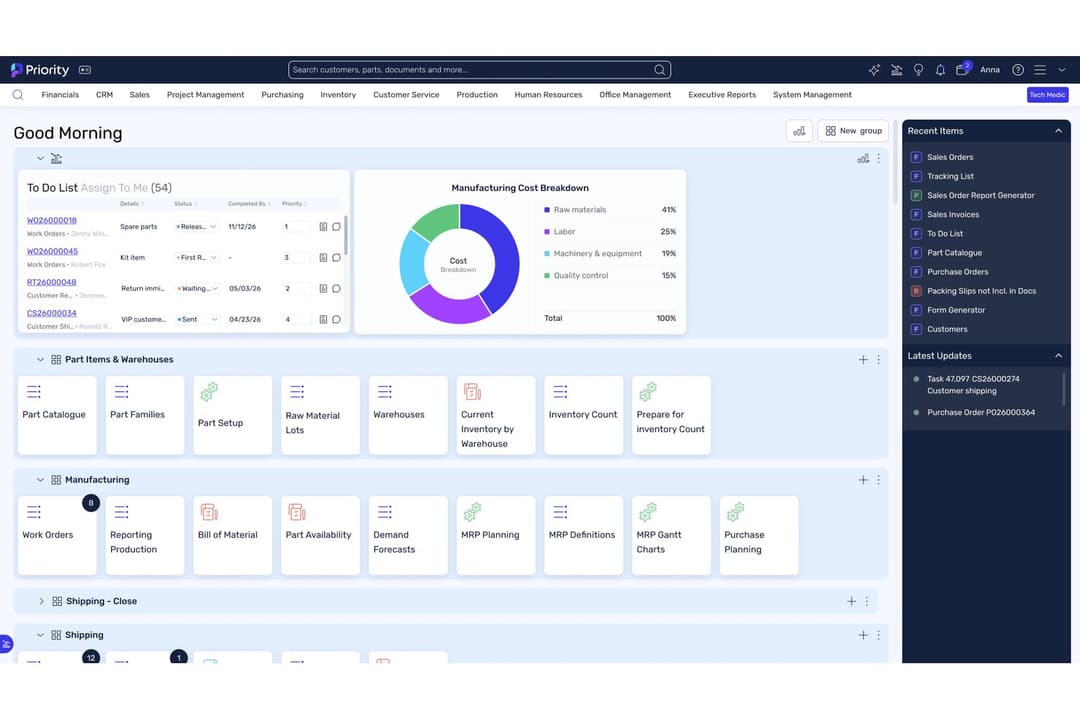
4.4/5
- Free demo available
- Pricing available upon request
Microsoft Dynamics 365 Business Central

4/5
- 30-day free trial
- From $80/user/month (billed annually)
Perché fidarsi dei nostri consigli sui software
6,700+
Reviews
20
Industry experts
16+
Evaluation factors
14
Years
Le nostre recensioni riflettono il nostro giudizio indipendente, non un discorso di vendita. Scopri come manteniamo la trasparenza.
Per questa guida, abbiamo valutato gli strumenti attraverso test pratici e ricerche indipendenti, assegnando un punteggio agli strumenti in base ai nostri criteri di selezione.
Le nostre recensioni riflettono il nostro giudizio editoriale umano, non un discorso di vendita.
| Priority Software | Microsoft Dynamics 365 Business Central | |
|---|---|---|
| Free Trial | Free demo available | 30-day free trial |
| Pricing | Pricing available upon request | From $80/user/month (billed annually) |
Priority Software vs. Microsoft Dynamics 365: Prezzi e Costi Nascosti
Priority Software adotta un modello di prezzi modulare, permettendoti di pagare solo per le funzionalità e gli utenti di cui hai bisogno. I costi possono aumentare se aggiungi nuovi moduli, utenti o se hai bisogno di integrazioni avanzate. Microsoft Dynamics 365 segue invece un approccio classico basato su abbonamento, con tariffe separate per diverse app e tipologie di utenti. Con entrambe le piattaforme potresti anche dover sostenere costi extra per implementazione, personalizzazioni e supporto continuo.
Per scegliere il fornitore giusto, non fermarti all’abbonamento base ma considera il costo totale di possesso. Calcola installazione, formazione, assistenza e tutti gli upgrade o integrazioni future di cui potresti aver bisogno. Chiedi a ciascun fornitore un dettaglio preciso di tutte le spese potenziali e parla con clienti di riferimento per conoscere i costi reali dopo il go-live. Così eviterai sorprese e avrai una soluzione in linea con i tuoi piani a lungo termine.
Sia Priority Software che Microsoft Dynamics 365 coprono tutte le funzionalità fondamentali che ti aspetti da un ERP moderno: gestione finanziaria, controllo degli inventari, approvvigionamenti, vendite e reportistica. Ogni piattaforma supporta inoltre l’automazione dei flussi di lavoro e offre opzioni d’integrazione con altri strumenti aziendali. Queste funzionalità condivise ti permettono di gestire le operazioni quotidiane e collegare i dati tra i reparti.
Priority Software si distingue per il design flessibile e modulare, che permette di adattare il sistema alle tue esigenze senza pesanti personalizzazioni. Microsoft Dynamics 365 invece brilla grazie a un’integrazione profonda con l’ecosistema Microsoft, offrendo analisi avanzate e insight basati su intelligenza artificiale attraverso Power BI e Azure. Questi punti di forza possono fare la differenza a seconda delle priorità aziendali e della tecnologia già in uso.
| Priority Software | Microsoft Dynamics 365 Business Central | |
|---|---|---|
| Accounts Payable | Yes | Yes |
| Accounts Receivable | Yes | Yes |
| API | Yes | Yes |
| Budgeting | Yes | Yes |
| Calendar Management | Yes | No |
| Compliance Tracking | Yes | Yes |
| Customer Management | Yes | Yes |
| Dashboard | Yes | Yes |
| Data Export | Yes | Yes |
| Data Import | Yes | Yes |
| Data Visualization | Yes | Yes |
| Expense Tracking | Yes | Yes |
| External Integrations | Yes | Yes |
| Financial Analysis | Yes | Yes |
| Forecasting | Yes | Yes |
| Inventory Tracking | Yes | Yes |
| Multi-Currency | Yes | Yes |
| Multi-User | Yes | Yes |
| Notifications | Yes | Yes |
| Order Management | Yes | Yes |
| Payroll | Yes | No |
| Project Management | Yes | Yes |
| Purchase Orders | Yes | Yes |
| Resource Management | Yes | Yes |
| Scheduling | Yes | Yes |
| Supplier Management | Yes | Yes |
| Task Scheduling/Tracking | Yes | Yes |
| Third-Party Plugins/Add-Ons | Yes | Yes |
| Warehouse Management | Yes | Yes |
| Workflow Management | Yes | Yes |
| Integrazione | Priority Software | Microsoft Dynamics 365 |
| Salesforce | ✅ | ✅ |
| Shopify | ✅ | ✅ |
| Amazon Web Services | ✅ | ✅ |
| Azure Active Directory | ✅ | ✅ |
| HubSpot | ❌ | ✅ |
| Magento | ✅ | ❌ |
| WooCommerce | ✅ | ❌ |
| Power BI | ❌ | ✅ |
| ❌ | ✅ | |
| DocuSign | ✅ | ✅ |
| API | ✅ | ✅ |
| Zapier | ✅ | ✅ |
Entrambe le piattaforme offrono una gamma completa di integrazioni popolari, ma Microsoft Dynamics 365 si distingue per i suoi collegamenti profondi con l’ecosistema Microsoft, mentre Priority Software offre più integrazioni per ecommerce e marketplace. Con il supporto API e Zapier su entrambi i fronti, hai la flessibilità di collegarti alla maggior parte degli strumenti aziendali, quindi entrambe le soluzioni possono soddisfare le tue esigenze di integrazione in base alle tue priorità.
| Fattore | Priority Software | Microsoft Dynamics 365 |
| Crittografia dei dati | Utilizza la crittografia end-to-end per i dati a riposo e in transito. | Fornisce standard di crittografia avanzata e si integra con i controlli di sicurezza di Azure. |
| Conformità normativa | Offre standard di sicurezza e conformità esaustivi per governo e settori specifici con registri di audit. | Offre numerose certificazioni di conformità, tra cui GDPR, HIPAA e standard ISO. |
| Controlli di accesso | Permessi basati sui ruoli e autenticazione a più fattori disponibili. | Permessi utente granulari, single sign-on e autenticazione a più fattori supportati. |
| Uptime e affidabilità | Garantisce SLA di uptime del 99,9% con ridondanza in cloud e on-premise. | Offre SLA di uptime del 99,9% e robusto disaster recovery tramite Microsoft Azure. |
Microsoft Dynamics 365 eccelle in copertura globale della conformità e affidabilità, mentre Priority Software offre una forte crittografia e controlli di accesso flessibili per settori regolamentati. Trovo l’ecosistema di sicurezza di Dynamics 365 particolarmente robusto per le grandi aziende, ma i controlli semplici e le funzionalità di conformità di Priority Software sono una soluzione ideale per le medie imprese.
| Fattore | Priority Software | Microsoft Dynamics 365 |
| Interfaccia utente | Interfaccia pulita e intuitiva con dashboard personalizzabili e menu di rapido accesso. | Layout moderno e familiare per gli utenti Microsoft, ma può risultare complesso per i nuovi utenti. |
| Onboarding | Configurazione guidata e risorse del centro assistenza facilitano l’avvio rapido dei team. | Documentazione estesa e risorse di formazione, ma l’onboarding può essere impegnativo. |
| Personalizzazione | Selezione modulare flessibile e flussi di lavoro facili da configurare senza codice. | Altamente personalizzabile con opzioni avanzate, ma la configurazione può richiedere il supporto IT. |
| Supporto | Assistenza clienti reattiva tramite telefono, email e centro assistenza. | Supporto globale 24/7 e ampia rete di partner per troubleshooting e formazione. |
Priority Software è più facile da apprendere e utilizzare subito, mentre Microsoft Dynamics 365 offre maggiore profondità ma comporta una curva di apprendimento più ripida. Trovo la configurazione guidata di Priority Software ideale per i team che desiderano un’adozione rapida, mentre Dynamics 365 è più adatto alle organizzazioni disposte a investire in formazione per capacità avanzate.
Priority Software
- Fast implementation compared to most ERP systems
- Strong AI-driven automation and reporting tools
- Highly customizable workflows for different industries
- Extensive customization can become complex.
- Some users report inconsistent customer support experiences.
- Priority might not meet certain regulatory requirements in some regions.
Microsoft Dynamics 365 Business Central
- It offers extensive customization options to fit your business needs.
- The financial management tools provide comprehensive insights for better decision-making.
- It seamlessly integrates with other Microsoft products, enhancing your team's productivity.
- Some users find the initial setup complex and time-consuming.
- The user interface can feel outdated compared to other modern ERP solutions.
- There may be a learning curve for teams not already familiar with Microsoft products.
Priority Software
- Growing Mid-Sized CompaniesScalable modules and fast onboarding suit expanding teams and operations.
- Financial ServicesAutomated reporting and audit trails simplify compliance and month-end close.
- Retail ChainsMulti-location management and POS integration are included out of the box.
- Field ServicesPriority ERP allows for seamless communication between site teams and headquarters.
- Wholesale DistributorsIts real-time inventory tracking and order management are highly effective.
- Manufacturing FirmsPriority ERP supports complex production planning and inventory management.
Microsoft Dynamics 365 Business Central
- Retail BusinessesYou can streamline inventory management and gain valuable insights into sales trends with its comprehensive reporting tools.
- Manufacturing CompaniesYour production processes can become more efficient with its detailed planning and scheduling functionalities.
- Service ProvidersYou can manage projects more effectively with its integrated project management features.
- Finance DepartmentsYour team will benefit from advanced financial reporting and analysis capabilities, providing deeper insights into financial health.
- Operations ManagersYou can tailor the system to your specific operational needs with its extensive customization options.
- Microsoft Product UsersYour work becomes more seamless with its native integration with other Microsoft applications, boosting overall productivity.
Chi dovrebbe scegliere Priority Software e chi dovrebbe scegliere Microsoft Dynamics 365?
Priority Software è una scelta intelligente per medie imprese e aziende in crescita che desiderano un ERP flessibile e facile da usare senza pesanti oneri informatici. È particolarmente adatto a team in ambito manifatturiero, distributivo e retail che necessitano di funzionalità modulari e un'implementazione rapida. Microsoft Dynamics 365 è ideale per grandi aziende o organizzazioni con operazioni complesse e globali che richiedono integrazioni profonde, analisi avanzate e ampia copertura di conformità.
| Priority Software | Microsoft Dynamics 365 Business Central | |
|---|---|---|
| Analytics & Insights | Priority Software Standard reporting and dashboards included. | Microsoft Dynamics 365 Business Central Advanced analytics and AI-driven insights via Power BI and Azure. |
| Customization | Priority Software Easy-to-configure modules and workflows for fast setup. | Microsoft Dynamics 365 Business Central Highly customizable but often requires IT or partner support. |
| Microsoft Integration | Priority Software Limited Microsoft ecosystem integration. | Microsoft Dynamics 365 Business Central Deep integration with Microsoft 365, Power BI, and Azure. |
| Pricing Model | Priority Software Modular pricing lets you pay for only what you use. | Microsoft Dynamics 365 Business Central Subscription-based with separate fees for apps and user types. |
| User Experience | Priority Software Simple, intuitive interface for quick adoption. | Microsoft Dynamics 365 Business Central Feature-rich but can be complex for new users. |
| Cloud Deployment | Both are available as cloud-based solutions, offering remote access, automatic updates, and scalable infrastructure for growing businesses. |
|---|---|
| Core ERP Modules | Both offer financial management, inventory, procurement, sales, and reporting modules to cover essential business operations. |
| Integration Options | Both provide a wide range of integrations with popular business tools and marketplaces, plus API and Zapier support for custom connections. |
| Role-Based Security | Each solution includes robust role-based access controls and multi-factor authentication to protect sensitive business data. |
| Workflow Automation | Each platform supports workflow automation to streamline repetitive tasks and approvals, helping teams boost efficiency and reduce manual errors. |