

Recensione di Intuit Enterprise Suite: Caratteristiche principali, vantaggi, svantaggi e dettagli sui prezzi
Un foglio di calcolo è aperto in una scheda, un report finanziario in un'altra, e i numeri di diverse entità devono ancora essere combinati prima della fine della giornata. Con la crescita della tua azienda, gestire le finanze tra filiali, prevedere le performance e mantenere organizzati i flussi di lavoro può diventare rapidamente difficile senza il giusto software ERP. È qui che entrano in gioco piattaforme come Intuit Enterprise Suite […]

Recensiamo gli strumenti in modo indipendente e le commissioni aiutano a finanziare i nostri test. Consulta la nostra politica sulla trasparenza, la nostra metodologia, oppure suggerisci uno strumento.
Un foglio di calcolo è aperto in una scheda, un rapporto finanziario in un'altra, e i numeri di diverse entità devono ancora essere combinati prima della fine della giornata.
Man mano che la tua azienda cresce, gestire le finanze tra le controllate, prevedere le prestazioni e mantenere i flussi di lavoro organizzati può diventare rapidamente difficile senza il giusto software ERP.
Ed è qui che entrano in gioco piattaforme come Intuit Enterprise Suite.
In questa guida analizzo le sue funzionalità, i prezzi, i punti di forza e i casi d'uso migliori così potrai capire come funziona e decidere se è adatto alle esigenze di gestione finanziaria della tua organizzazione.
Intuit Enterprise Suite Evaluation Summary

4.6/5
- Pricing upon request
- Free demo available
Perché fidarsi dei nostri consigli sui software
6,700+
Reviews
20
Industry experts
16+
Evaluation factors
14
Years
Le nostre recensioni riflettono il nostro giudizio indipendente, non un discorso di vendita. Scopri come manteniamo la trasparenza.
Per questa guida, abbiamo valutato gli strumenti attraverso test pratici e ricerche indipendenti, assegnando un punteggio agli strumenti in base ai nostri criteri di selezione.
Le nostre recensioni riflettono il nostro giudizio editoriale umano, non un discorso di vendita.
Intuit Enterprise Suite Overview
Pros
- Multi-entity management supports complex organizational structures.
- AI-powered forecasting and insights help businesses analyze financial data.
- Built-in migration tools support transitions from QuickBooks Desktop and Advanced.
Cons
- The platform lacks sufficient training for new releases.
- Features can feel overwhelming.
- Reports take longer than expected to load.
Is Intuit Enterprise Suite Right For Your Needs?
Who Would be a Good Fit for Intuit Enterprise Suite?
Intuit Enterprise Suite is best suited for growing or mid-sized organizations that need advanced financial management capabilities. Businesses managing multiple entities, relying on forecasting, or handling structured financial workflows can benefit from its automation, reporting, and consolidated visibility tools.
It’s particularly valuable for data-driven teams, product-based companies managing inventory, and organizations that need detailed financial tracking across departments, locations, or projects.
- Multi-Entity BusinessesCompanies managing multiple subsidiaries, brands, or locations that need consolidated financial visibility while maintaining separate books.
- Finance Teams Focused on ForecastingOrganizations that rely on financial planning and projections to guide budgeting, expansion, and strategic decisions.
- Businesses With Structured Financial WorkflowsCompanies with complex approval processes that want to automate financial workflows and improve internal controls.
- Growing Service BusinessesService businesses needing project profitability tracking, workforce management, and consolidated financial planning across departments benefit significantly.
- Product-Based BusinessesCompanies that manage inventory and sales orders and need accounting, inventory, and order workflows connected in one system.
- Construction FirmsConstruction companies tracking job costing, project budgets, and multi-entity structures gain stronger operational visibility.
Who Would be a Bad Fit for Intuit Enterprise Suite?
Intuit Enterprise Suite may not be the best choice for businesses with simple financial needs or limited operational complexity. Freelancers, very small businesses, or organizations without a dedicated accounting staff may find the platform more advanced than necessary.
Companies looking for lightweight bookkeeping tools or those that rarely rely on forecasting, reporting, or multi-entity management may be better served by simpler accounting solutions.
- Freelancers and Independent ContractorsIndividuals managing basic income and expenses typically don’t need the platform’s multi-entity management, forecasting tools, or workflow automation.
- Very Small BusinessesBusinesses that only need basic accounting features, such as invoicing and expense tracking, may find the platform unnecessarily complex.
- Businesses Without Dedicated Accounting StaffOrganizations without internal finance teams may struggle to manage a platform designed for structured financial processes and reporting.
- Inventory-Heavy ManufacturersManufacturers needing advanced inventory controls like serial numbers, bins, builds, or barcode workflows may struggle.
- Businesses Looking for Lightweight Accounting ToolsCompanies seeking a simple bookkeeping solution may be better served by smaller accounting platforms rather than a full financial management suite.
- Early-Stage StartupsStartups without operational complexity or financial teams gain minimal benefit from enterprise-level accounting features.
Come testiamo e valutiamo gli strumenti
Abbiamo impiegato anni a costruire, perfezionare e migliorare il nostro sistema di test e valutazione dei software. Il nostro schema è progettato per cogliere le sfumature della scelta del software e ciò che rende uno strumento efficace, concentrandosi sugli aspetti critici del processo decisionale. Di seguito puoi vedere esattamente come funzionano i nostri test e le nostre valutazioni in base a sette criteri. Questo ci permette di offrire una valutazione imparziale del software basata su funzionalità di base, caratteristiche distintive, facilità d’uso, onboarding, assistenza clienti, integrazioni, recensioni dei clienti e rapporto qualità-prezzo.
Funzionalità principali (25% del punteggio finale)
Il punto di partenza della nostra valutazione è sempre la funzionalità principale dello strumento. Dispone delle funzionalità base che un utente si aspetterebbe di trovare? Alcune di queste funzionalità sono riservate ai piani a pagamento più elevati? In sostanza, ci aspettiamo che uno strumento sia all’altezza delle capacità minime dei concorrenti.
Caratteristiche distintive (25% del punteggio finale)
Successivamente, valutiamo le caratteristiche distintive che vanno oltre la funzionalità principale normalmente presente negli strumenti di questo tipo. Un punteggio elevato riflette funzionalità specializzate o uniche che rendono il prodotto più rapido, efficiente o offrono valore aggiunto all’utente. Valutiamo inoltre quanto sia semplice integrare il software con altri strumenti tipicamente presenti nello stack tecnologico, per estenderne la funzionalità e l’utilità. Gli strumenti che offrono numerose integrazioni native, connessioni di terze parti e accesso API per creare integrazioni personalizzate ottengono il punteggio migliore.
Facilità d’uso (10% del punteggio finale)
Consideriamo quanto sia rapido e semplice eseguire le attività fondamentali previste dallo strumento. Un software con punteggio elevato è ben progettato, intuitivo da usare, offre app mobile, modelli predefiniti e semplifica operazioni complesse.
Onboarding (10% del punteggio finale)
Sappiamo quanto sia importante l’adozione rapida da parte del team quando si introduce una nuova piattaforma: per questo valutiamo quanto sia facile imparare e utilizzare lo strumento con una formazione minima. Valutiamo la rapidità con cui un membro del team può impostare e iniziare a utilizzare lo strumento senza esperienza pregressa. Le soluzioni con punteggio alto richiedono poco o nessun supporto.
Assistenza clienti (10% del punteggio finale)
Analizziamo quanto sia semplice e veloce ottenere aiuto tramite telefono, live chat o knowledge base. Gli strumenti e le aziende che offrono supporto in tempo reale ottengono i punteggi migliori, mentre i chatbot ricevono i punteggi più bassi.
Recensioni dei clienti (10% del punteggio finale)
Oltre ai nostri test e valutazioni, consideriamo il net promoter score dei clienti attuali e passati. Verifichiamo la probabilità che i clienti scelgano nuovamente lo strumento per le funzionalità di base. Un software con punteggio elevato riflette un net promoter score alto da parte dei clienti vecchi e attuali.
Rapporto qualità-prezzo (10% del punteggio finale)
Infine, considerando tutti gli altri criteri, valutiamo il prezzo medio dei piani base rispetto alle funzionalità principali e agli altri criteri di valutazione. I software che offrono di più, a un costo inferiore, ottengono punteggi migliori.
Core Features
Multi-Entity Financial Management
Manage multiple subsidiaries or business units in one platform with consolidated financial reporting and cross-entity visibility.
Workflow Automation
Automate financial approvals and operational workflows to reduce manual tasks and improve internal controls across your organization.
Business Intelligence and Reporting
Generate customizable financial reports, dashboards, and KPIs to monitor company performance and analyze financial data in real time.
Inventory and Order Management
Track inventory, manage sales orders, and connect operational workflows with accounting data to streamline order-to-cash processes.
Dimension Enhancements
Assign dimensions to transactions to track financial performance across departments, projects, or locations, with options for faster and bulk assignment.
Industry-Specific Business Modules
Intuit Enterprise Suite includes capabilities designed for industries like construction and professional services, helping businesses manage project budgets, proposals, and operational workflows.

Standout Features
AI-Powered Financial Forecasting
Intuit Enterprise Suite uses AI-powered forecasting to analyze historical data and generate financial projections up to three years ahead.
Real-Time Consolidated Financial Reporting
Intuit Enterprise Suite allows finance teams to generate consolidated financial reports across multiple entities, giving organizations a unified view of financial performance without manually combining data from separate systems.

Ease of Use
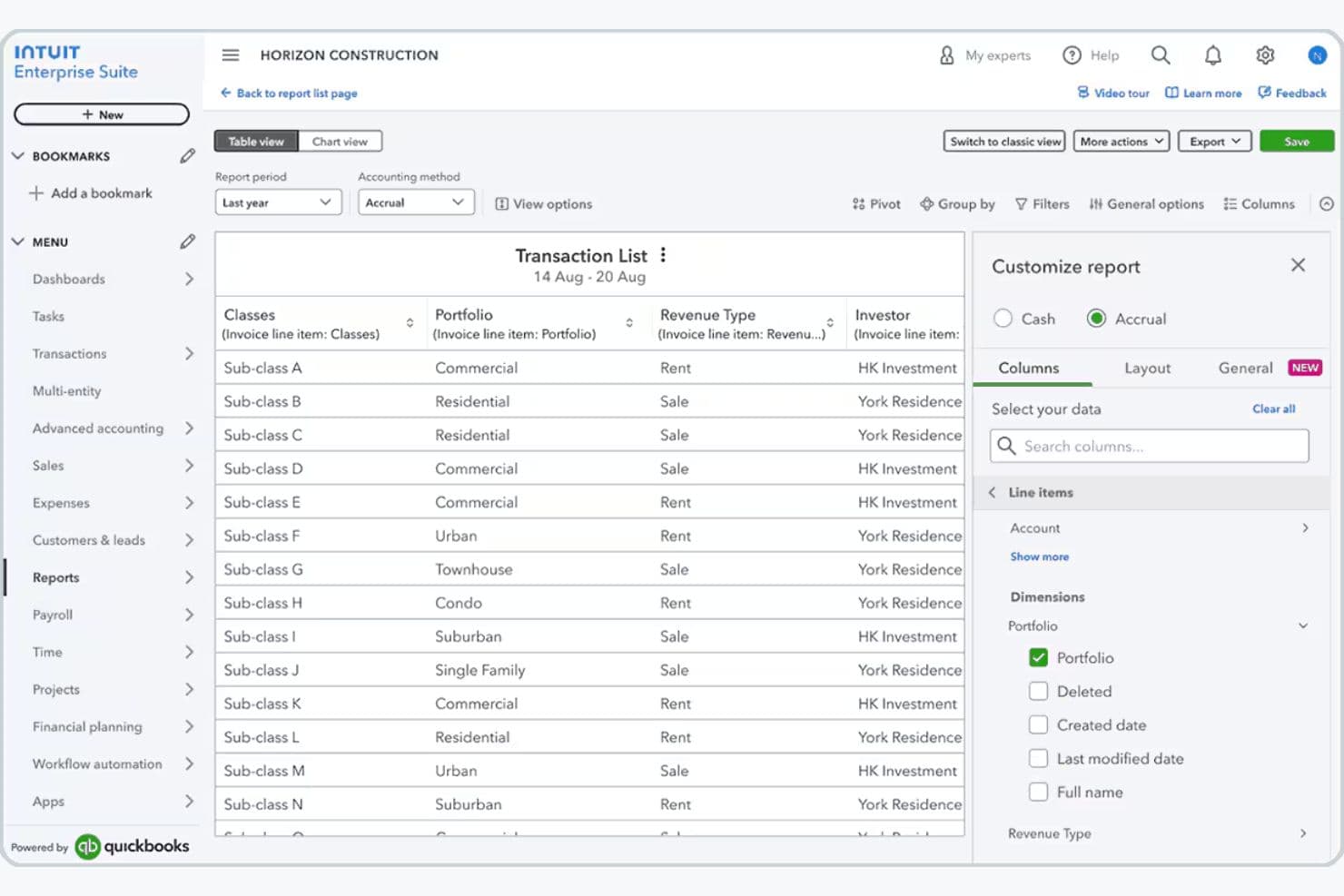
Intuit Enterprise Suite is generally easy to use, especially if you already use QuickBooks, since the interface follows familiar design patterns that shorten your learning curve.
You can manage accounting, payroll, reporting, and multiple entities in one cloud platform, making it easier to collaborate, access data anywhere, and reduce manual work. Most users find the interface intuitive and time-saving, though the advanced features—like multi-entity management and dimensional reporting—can feel overwhelming if you’re new to ERP accounting systems.
Onboarding
Intuit Enterprise Suite offers guided onboarding through a dedicated Customer Success Manager who helps businesses configure the platform, migrate data, and train their teams.
Companies transitioning from QuickBooks or other systems receive migration support from Intuit’s implementation team, while professional services and training resources help organizations adopt the platform more quickly.
This structured onboarding approach allows you to move to the platform with minimal disruption while ensuring your workflows, financial structures, and integrations are properly configured.
Customer Support
Intuit Enterprise Suite provides several customer support options to help businesses adopt and maintain the platform. Customers typically work with a dedicated Customer Success Manager who serves as a primary contact for onboarding, platform configuration, and ongoing guidance.
Additional support is available through phone assistance with Intuit product experts, a searchable knowledge base of help articles, and community forums where users can share solutions and best practices.
Together, these support channels provide both direct assistance and self-service resources for troubleshooting and platform optimization.

Integrations
With Intuit Enterprise Suite, you can connect the platform to hundreds of third-party apps through the broader QuickBooks ecosystem. For example, you can connect Mailchimp for marketing, QuickBooks Payroll and QuickBooks Time for workforce management, and various CRM, project management, and ecommerce apps available through the QuickBooks App Store, helping you keep financial and operational data synced across systems.
If you need deeper customization, you can also use the QuickBooks Online API, which works with Intuit Enterprise Suite out of the box and lets developers build custom integrations or connect internal tools—though if you manage multiple entities, you currently need to connect integrations to each entity individually.

Value for Money
Because pricing is tailored to each business, you’ll need to schedule a consultation with Intuit to receive a quote and determine the appropriate configuration for their needs. This approach allows companies to scale the platform as they grow while paying only for the capabilities and operational scope relevant to their organization.
The final cost depends on factors such as the number of entities, users, modules required, and the complexity of the organization’s financial structure.

Intuit Enterprise Suite Specs
- Accounts Payable: Yes
- Accounts Receivable: Yes
- API: Yes
- Batch Permissions & Access: No
- Budgeting: Yes
- Calendar Management: No
- Customer Management: No
- Dashboard: Yes
- Data Export: Yes
- Data Import: Yes
- Data Visualization: Yes
- Expense Tracking: Yes
- External Integrations: Yes
- Forecasting: Yes
- General Account Ledger: Yes
- Inventory Tracking: Yes
- Lead Management: No
- Lead Scoring: No
- Marketing Automation: No
- Multi-User: Yes
- Notifications: Yes
- Password & Access Management: No
- Payroll: Yes
- Project Management: Yes
- Scheduling: No
- Supplier Management: Yes
- Tax Management: Yes
- Third-Party Plugins/Add-Ons: Yes
- Travel Management: No
Intuit Enterprise Suite FAQs
Intuit Enterprise Suite Company Overview & History
Intuit Enterprise Suite is part of Intuit, a global financial technology company headquartered in Mountain View, California. Intuit is known for building widely used financial software, including QuickBooks, TurboTax, Mailchimp, and Credit Karma.
The platform combines financial management, payroll, payments, automation, and business intelligence tools in a single system to help companies streamline operations and scale efficiently.
Intuit Enterprise Suite Major Milestones
- 1983: Intuit Inc. was founded in Palo Alto, California.
- 2024: Intuit launches Intuit Enterprise Suite, an AI-powered financial management platform designed for growing mid-market businesses.
- 2025: Intuit continues expanding the platform with updates focused on automation, reporting, and operational efficiency.