

Recensione Maxio: Pro, Contro, Funzionalità e Prezzi Spiegati per il 2026
Maxio si distingue per la sua robusta automazione della fatturazione e le funzionalità focalizzate sulle aziende SaaS, ma potrebbe essere più indicato per le aziende in crescita che necessitano di una gestione avanzata dei ricavi piuttosto che della semplice fatturazione.

Recensiamo gli strumenti in modo indipendente e le commissioni aiutano a finanziare i nostri test. Consulta la nostra politica sulla trasparenza, la nostra metodologia, oppure suggerisci uno strumento.
Maxio is a billing software built specifically for B2B SaaS companies that need subscription billing, revenue recognition, and SaaS metrics reporting in one place. I'd consider it over Chargebee if your finance team needs stronger native support for deferred revenue, ARR/MRR tracking, and GAAP-compliant revenue recognition—rather than patching those capabilities together through third-party integrations.
Maxio Evaluation Summary
4.3/5
- From $599/month
- Free demo available
Perché fidarsi dei nostri consigli sui software
6,700+
Reviews
20
Industry experts
16+
Evaluation factors
14
Years
Le nostre recensioni riflettono il nostro giudizio indipendente, non un discorso di vendita. Scopri come manteniamo la trasparenza.
Per questa guida, abbiamo valutato gli strumenti attraverso test pratici e ricerche indipendenti, assegnando un punteggio agli strumenti in base ai nostri criteri di selezione.
Le nostre recensioni riflettono il nostro giudizio editoriale umano, non un discorso di vendita.
Maxio Overview
Maxio offers advanced billing automation, granular revenue recognition, and strong SaaS integrations, making it a top choice for finance teams managing complex subscription models. Its interface is intuitive, and onboarding is straightforward for users familiar with SaaS finance. Pricing is competitive for mid-market and growth-stage companies, though smaller businesses may find it more than they need. Support is responsive, and API options enable custom workflows.
Compared to others, Maxio excels in handling multi-entity billing and compliance, but may feel overwhelming for simple invoicing needs. It’s best for organizations prioritizing scalability and detailed financial controls.
Pros
- Handles complex subscription and usage-based billing scenarios.
- Automates revenue recognition for GAAP and IFRS compliance.
- Offers multi-entity support for global or multi-brand businesses.
Cons
- Reporting customization is limited compared to some competitors.
- API documentation can be difficult for developers to navigate.
- Pricing may be high for small or early-stage companies.
Is Maxio Right For Your Needs?
Who Would be a Good Fit for Maxio?
Maxio is best suited for B2B SaaS companies and subscription-based businesses with recurring revenue and moderate-to-complex billing needs. It works well for organizations that need automated billing, revenue recognition, and SaaS metrics without the heavier implementation burden of more finance-centric systems. Its combination of billing automation, financial reporting, and integrations makes it especially valuable for growing companies that want to scale operations while maintaining visibility into performance.
- SaaS StartupsMaxio automates subscription billing and revenue recognition for SaaS models.
- Growing Mid-Market BusinessesCompanies scaling revenue operations benefit from automation without requiring a highly complex implementation.
- Finance DepartmentsFinance teams benefit from audit-ready revenue recognition and compliance tools.
- Multi-Entity Businesses (with higher tiers)Supports multi-entity billing and reporting, though typically in more advanced plans.
- Global SaaS OperationsSupports multi-currency billing and international payment workflows.
- Companies Focused on SaaS MetricsStrong reporting for metrics like MRR, ARR, cohorts, and revenue trends.
Who Would be a Bad Fit for Maxio?
Maxio is less suitable for businesses with simple billing needs or non-subscription models, as well as organizations that require deep ERP functionality or highly customized financial controls. It’s also not ideal for companies expecting a lightweight, plug-and-play invoicing tool or a full all-in-one system.
- Simple Billing NeedsOverkill for basic invoicing or low transaction volumes.
- FreelancersThe platform’s complexity is unnecessary for solo billing needs.
- Early-Stage StartupsPricing and features may exceed the needs of new ventures.
- Highly Regulated Enterprises with Complex Compliance NeedsMay require more finance-centric systems (e.g., deeper audit controls or customization).
- Highly Customized Enterprise Billing LogicMay hit limits compared to more configurable enterprise platforms.
- Manufacturing FirmsManufacturers with inventory and supply chain needs require different solutions.
Come testiamo e valutiamo gli strumenti
Abbiamo impiegato anni a costruire, perfezionare e migliorare il nostro sistema di test e valutazione dei software. Il nostro schema è progettato per cogliere le sfumature della scelta del software e ciò che rende uno strumento efficace, concentrandosi sugli aspetti critici del processo decisionale. Di seguito puoi vedere esattamente come funzionano i nostri test e le nostre valutazioni in base a sette criteri. Questo ci permette di offrire una valutazione imparziale del software basata su funzionalità di base, caratteristiche distintive, facilità d’uso, onboarding, assistenza clienti, integrazioni, recensioni dei clienti e rapporto qualità-prezzo.
Funzionalità principali (25% del punteggio finale)
Il punto di partenza della nostra valutazione è sempre la funzionalità principale dello strumento. Dispone delle funzionalità base che un utente si aspetterebbe di trovare? Alcune di queste funzionalità sono riservate ai piani a pagamento più elevati? In sostanza, ci aspettiamo che uno strumento sia all’altezza delle capacità minime dei concorrenti.
Caratteristiche distintive (25% del punteggio finale)
Successivamente, valutiamo le caratteristiche distintive che vanno oltre la funzionalità principale normalmente presente negli strumenti di questo tipo. Un punteggio elevato riflette funzionalità specializzate o uniche che rendono il prodotto più rapido, efficiente o offrono valore aggiunto all’utente. Valutiamo inoltre quanto sia semplice integrare il software con altri strumenti tipicamente presenti nello stack tecnologico, per estenderne la funzionalità e l’utilità. Gli strumenti che offrono numerose integrazioni native, connessioni di terze parti e accesso API per creare integrazioni personalizzate ottengono il punteggio migliore.
Facilità d’uso (10% del punteggio finale)
Consideriamo quanto sia rapido e semplice eseguire le attività fondamentali previste dallo strumento. Un software con punteggio elevato è ben progettato, intuitivo da usare, offre app mobile, modelli predefiniti e semplifica operazioni complesse.
Onboarding (10% del punteggio finale)
Sappiamo quanto sia importante l’adozione rapida da parte del team quando si introduce una nuova piattaforma: per questo valutiamo quanto sia facile imparare e utilizzare lo strumento con una formazione minima. Valutiamo la rapidità con cui un membro del team può impostare e iniziare a utilizzare lo strumento senza esperienza pregressa. Le soluzioni con punteggio alto richiedono poco o nessun supporto.
Assistenza clienti (10% del punteggio finale)
Analizziamo quanto sia semplice e veloce ottenere aiuto tramite telefono, live chat o knowledge base. Gli strumenti e le aziende che offrono supporto in tempo reale ottengono i punteggi migliori, mentre i chatbot ricevono i punteggi più bassi.
Recensioni dei clienti (10% del punteggio finale)
Oltre ai nostri test e valutazioni, consideriamo il net promoter score dei clienti attuali e passati. Verifichiamo la probabilità che i clienti scelgano nuovamente lo strumento per le funzionalità di base. Un software con punteggio elevato riflette un net promoter score alto da parte dei clienti vecchi e attuali.
Rapporto qualità-prezzo (10% del punteggio finale)
Infine, considerando tutti gli altri criteri, valutiamo il prezzo medio dei piani base rispetto alle funzionalità principali e agli altri criteri di valutazione. I software che offrono di più, a un costo inferiore, ottengono punteggi migliori.
Core Features
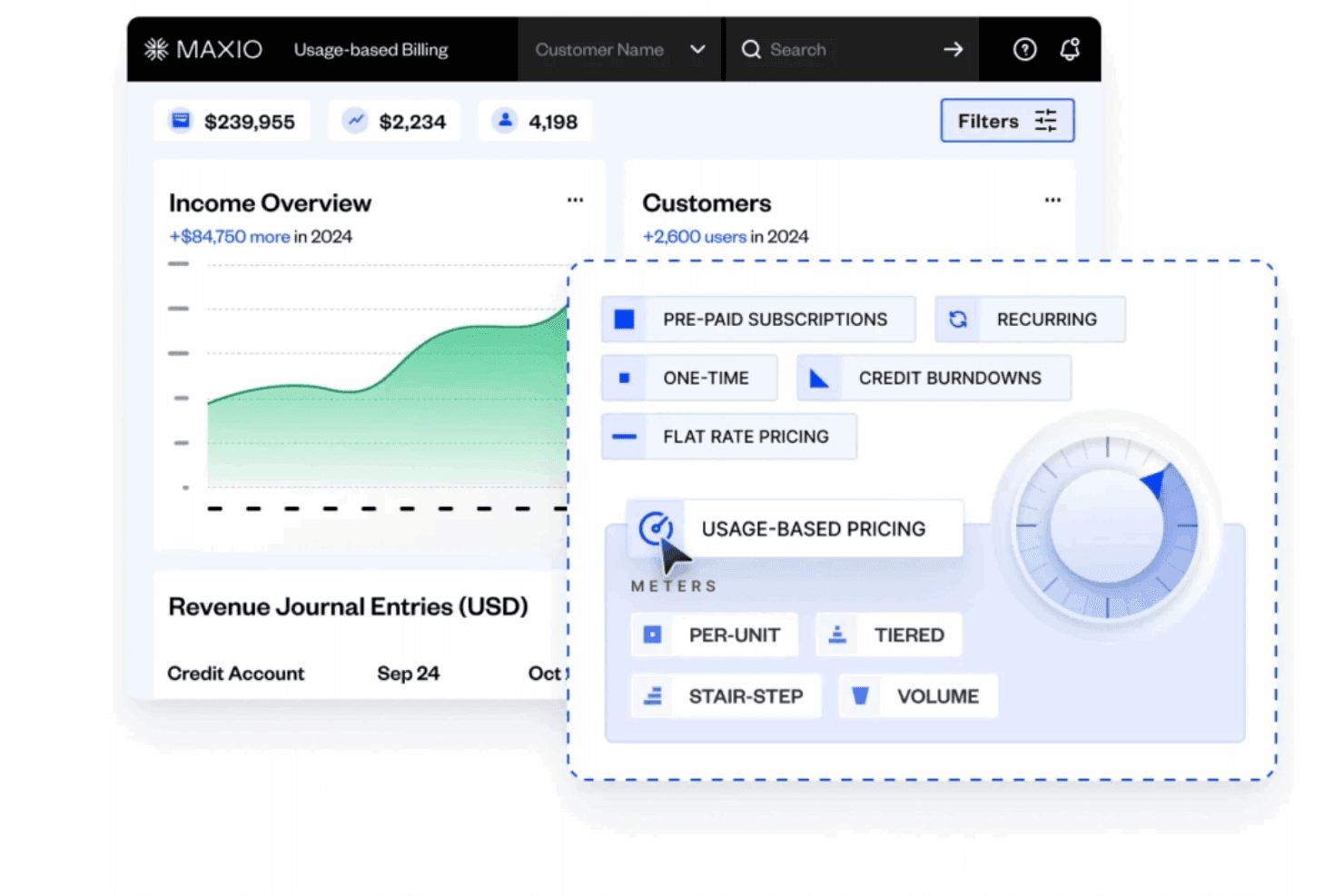
Usage-Based Billing
Supports metering, rating, and multiple pricing models for accurate, automated invoicing. Handles per unit, volume, tiered, and stairstep pricing without manual reconciliation.
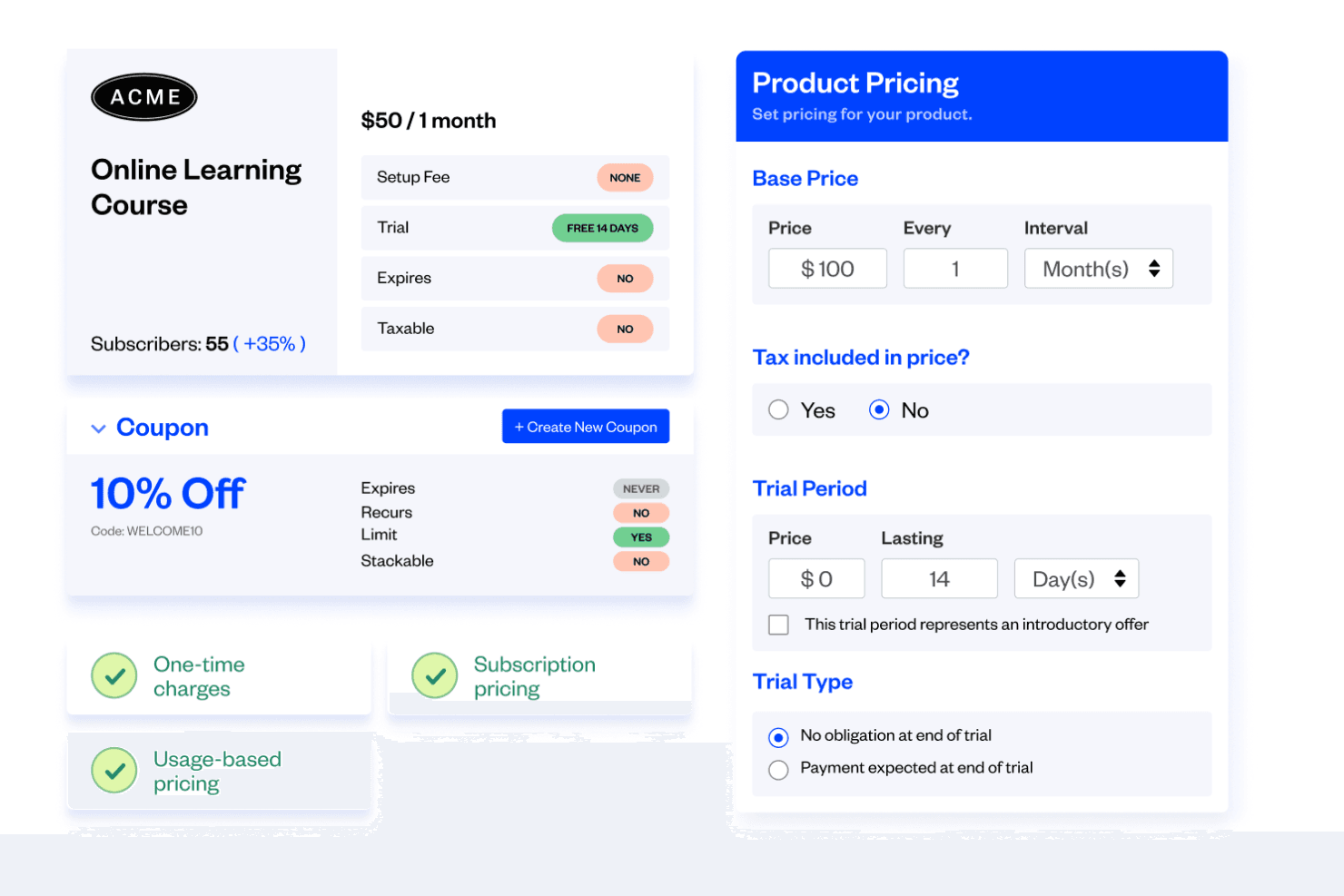
Subscription Management
Lets you create, modify, and manage subscription plans and contracts in minutes. Enables setup fees, coupons, add-ons, and upsells for flexible billing.
Revenue Recognition
Automates revenue recognition schedules and calculations for GAAP and IFRS compliance. Offers custom rules and premade methods to fit your policies.
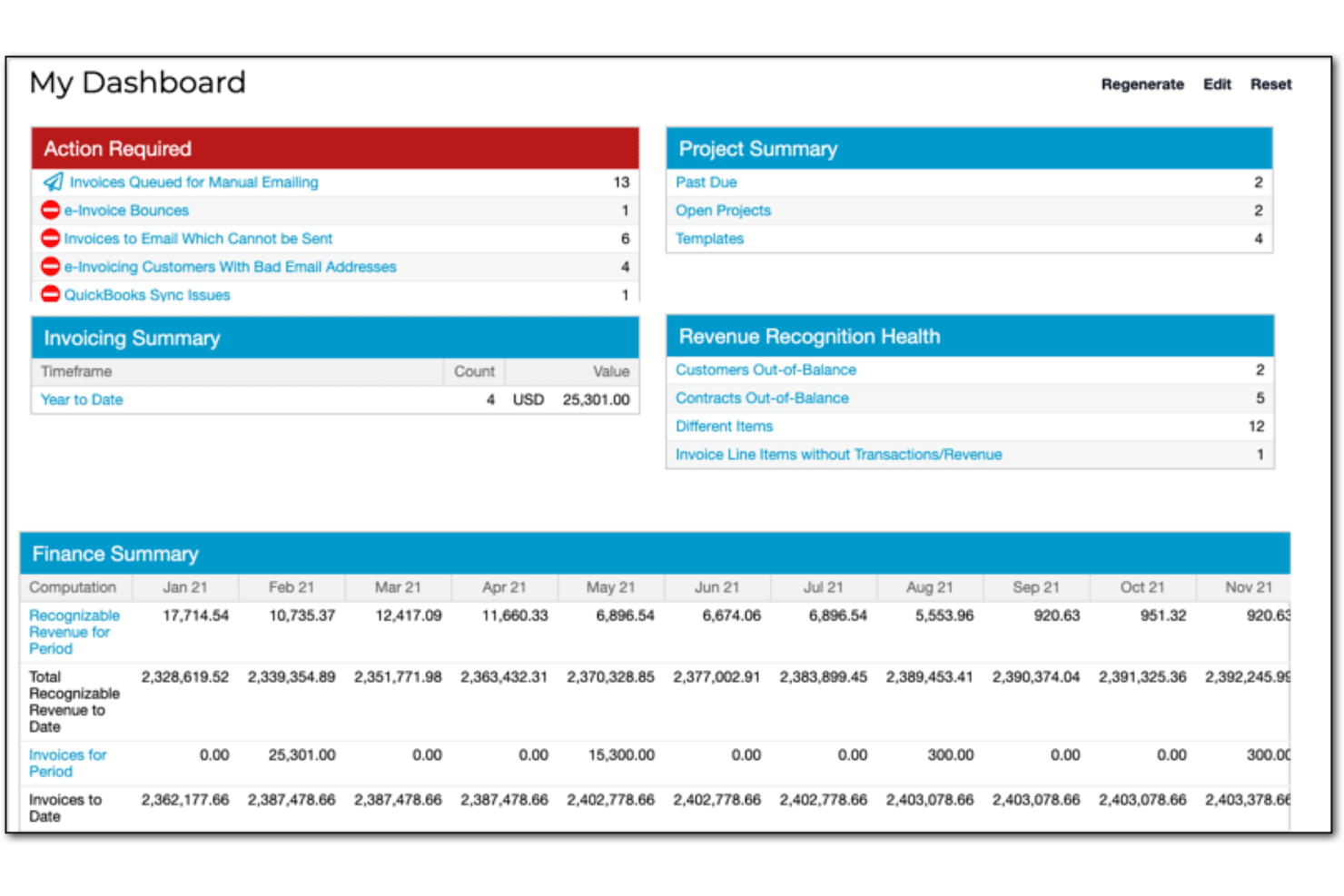
Financial Reporting
Provides custom dashboards and drill-down reports for real-time financial insights. Includes 30+ prebuilt reports like ARR summary and DSO.
Multi-Entity Support
Allows management of multiple business entities with unique catalogs and settings. Consolidates billing and reporting across global or multi-brand operations.
Self-Service Portals
Enables customers to manage subscriptions, pay invoices, and update billing details online. Reduces manual intervention and improves customer experience.
Ease of Use
Maxio’s interface is user-friendly, clean, and logically organized, making it approachable for finance professionals familiar with SaaS billing concepts. Users report that onboarding is straightforward, especially for teams with experience in subscription management. However, some find the depth of features and reporting options can be overwhelming at first. The platform’s guided setup, in-app help, and responsive support team help users navigate and optimize complex billing scenarios with confidence.
Integrations
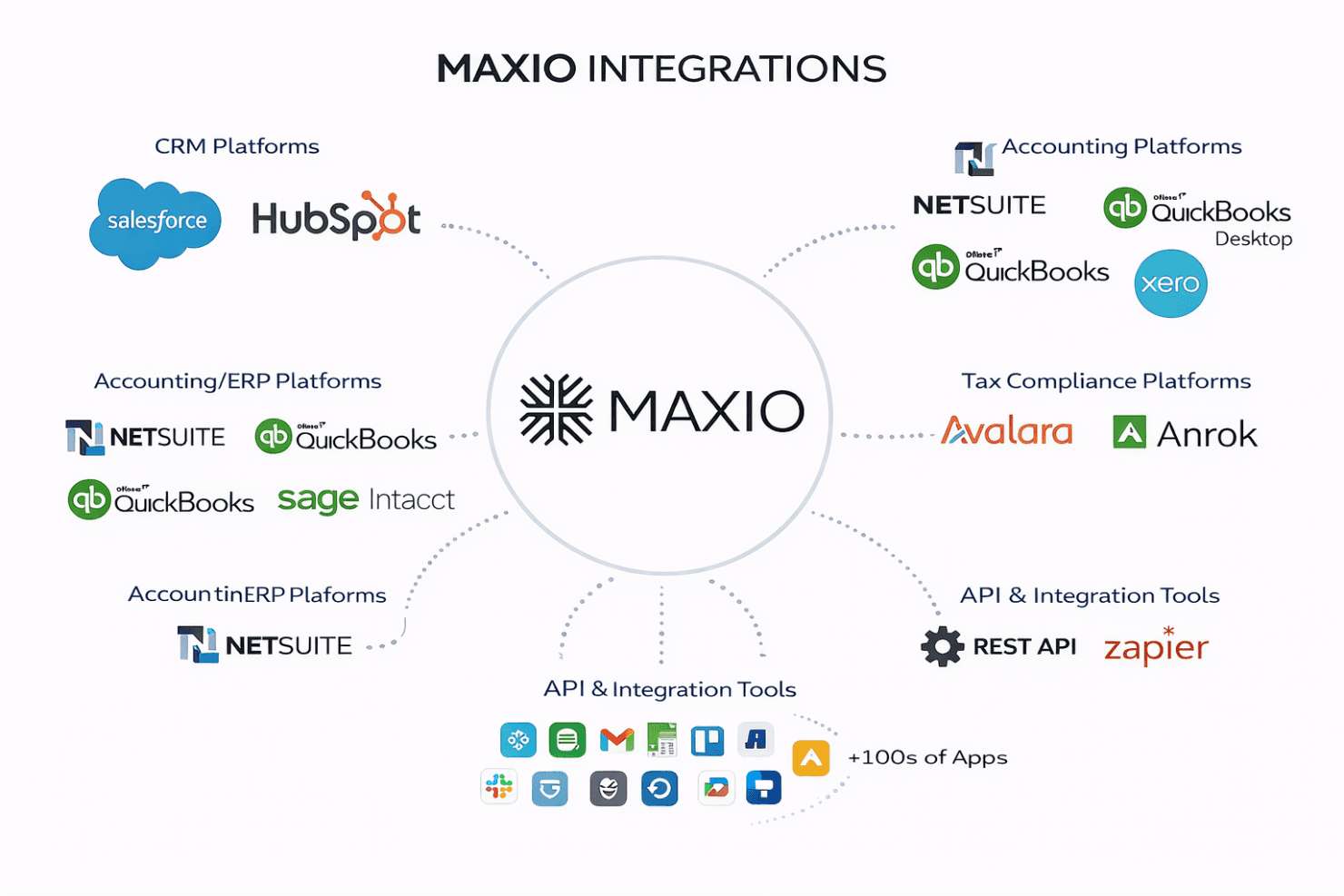
Maxio integrates with Salesforce, HubSpot, NetSuite, QuickBooks Online, QuickBooks Desktop, Xero, Sage Intacct, Avalara, Anrok, and Pipedrive, among others.
Maxio also offers a robust API and connects with third-party integration tools to extend its functionality.
Maxio Specs
- 2-Factor Authentication: Yes
- A/B Testing: Yes
- API: Yes
- Batch Permissions & Access: No
- BitCoin: No
- Budgeting: No
- Calendar Management: No
- Conversion Tracking: No
- Customer Management: Yes
- Dashboard: Yes
- Data Export: Yes
- Data Import: Yes
- Data Visualization: Yes
- External Integrations: Yes
- Forecasting: No
- Lead Management: No
- Lead Scoring: No
- Marketing Automation: No
- Multi-Currency: Yes
- Multi-User: Yes
- Notifications: Yes
- Password & Access Management: Yes
- PayPal: Yes
- Scheduling: No
- Stripe: Yes
- Third-Party Plugins/Add-Ons: Yes


