

Recensione OpenEMR: Pro, Contro, Caratteristiche e Prezzi Spiegati
OpenEMR si distingue come una soluzione di fatturazione medica open-source e flessibile, offrendo funzionalità robuste e personalizzazione senza costi di licenza.

Recensiamo gli strumenti in modo indipendente e le commissioni aiutano a finanziare i nostri test. Consulta la nostra politica sulla trasparenza, la nostra metodologia, oppure suggerisci uno strumento.
OpenEMR is an open-source medical invoicing software built for healthcare practices that need to handle billing, claims processing, and patient records in one place—without paying per-seat licensing fees. I'd consider it if your practice has the IT resources to manage a self-hosted setup and wants full control over its billing configuration. Compared to a paid platform like Kareo, OpenEMR gives you more flexibility to customize workflows and removes recurring subscription costs, making it a practical option for cost-conscious practices willing to invest in the setup.
OpenEMR Evaluation Summary
3.9/5
- Pricing upon request
- Free demo available
Perché fidarsi dei nostri consigli sui software
6,700+
Reviews
20
Industry experts
16+
Evaluation factors
14
Years
Le nostre recensioni riflettono il nostro giudizio indipendente, non un discorso di vendita. Scopri come manteniamo la trasparenza.
Per questa guida, abbiamo valutato gli strumenti attraverso test pratici e ricerche indipendenti, assegnando un punteggio agli strumenti in base ai nostri criteri di selezione.
Le nostre recensioni riflettono il nostro giudizio editoriale umano, non un discorso di vendita.
OpenEMR Overview
If you’re judging medical invoicing software by flexibility and cost, OpenEMR is hard to beat. Its open-source model means no licensing fees, and you can tailor workflows or reports to your needs. While the interface feels dated and onboarding takes effort, the feature set—claims, scheduling, patient records, and billing—rivals pricier options. Support relies on community forums, so I think it’s best for tech-savvy teams or clinics with IT resources. If you’re comparing options and want control over customization and budget, OpenEMR deserves a close look.
Pros
- No licensing fees for software or updates
- Supports electronic and paper claims billing
- Customizable billing workflows and reporting
Cons
- Billing features are basic for complex needs
- Requires strong IT support for setup and maintenance
- Limited official customer support beyond community forums
Is OpenEMR Right For Your Needs?
Who Would be a Good Fit for OpenEMR?
OpenEMR is a strong choice for organizations that want control over their billing processes, need customizable workflows, and have the technical resources to manage open-source software. It’s especially well-suited for smaller clinics, specialty practices, and nonprofits that want to avoid licensing fees and tailor their invoicing to unique requirements. If your team values flexibility and can handle some IT overhead, OpenEMR’s feature set and cost structure make it a compelling option.
- Small PracticesOpenEMR’s no-cost licensing and customizable billing suit small budgets.
- Community Health CentersThe open-source model supports grant-funded clinics with limited resources.
- Behavioral Health ProvidersCustomizable templates and billing workflows fit specialized documentation needs.
- Rural ClinicsOffline access and local hosting options help clinics with unreliable internet.
- Medical Billing DepartmentsDetailed reporting and claims management support in-house billing teams.
- Nonprofit Healthcare OrganizationsCost savings and open-source flexibility align with nonprofit priorities.
Who Would be a Bad Fit for OpenEMR?
OpenEMR isn’t ideal for organizations that need advanced billing automation, premium support, or seamless integration with a wide range of third-party systems. Large enterprises, hospital networks, and teams without dedicated IT support may find the platform’s setup and maintenance requirements too demanding. If you need out-of-the-box automation or extensive vendor support, OpenEMR may not meet your needs.
- Large Hospital NetworksComplex billing and compliance needs exceed OpenEMR’s core capabilities.
- Multi-Specialty GroupsLacks advanced automation for high-volume, multi-specialty billing.
- Enterprise Healthcare SystemsLimited integration options hinder large-scale interoperability.
- Solo Practitioners Without ITSetup and maintenance require technical skills solo providers may lack.
- Dental PracticesOpenEMR’s billing features are not tailored for dental coding.
- Urgent Care ChainsFast-paced, multi-location operations need more automation and support.
Come testiamo e valutiamo gli strumenti
Abbiamo impiegato anni a costruire, perfezionare e migliorare il nostro sistema di test e valutazione dei software. Il nostro schema è progettato per cogliere le sfumature della scelta del software e ciò che rende uno strumento efficace, concentrandosi sugli aspetti critici del processo decisionale. Di seguito puoi vedere esattamente come funzionano i nostri test e le nostre valutazioni in base a sette criteri. Questo ci permette di offrire una valutazione imparziale del software basata su funzionalità di base, caratteristiche distintive, facilità d’uso, onboarding, assistenza clienti, integrazioni, recensioni dei clienti e rapporto qualità-prezzo.
Funzionalità principali (25% del punteggio finale)
Il punto di partenza della nostra valutazione è sempre la funzionalità principale dello strumento. Dispone delle funzionalità base che un utente si aspetterebbe di trovare? Alcune di queste funzionalità sono riservate ai piani a pagamento più elevati? In sostanza, ci aspettiamo che uno strumento sia all’altezza delle capacità minime dei concorrenti.
Caratteristiche distintive (25% del punteggio finale)
Successivamente, valutiamo le caratteristiche distintive che vanno oltre la funzionalità principale normalmente presente negli strumenti di questo tipo. Un punteggio elevato riflette funzionalità specializzate o uniche che rendono il prodotto più rapido, efficiente o offrono valore aggiunto all’utente. Valutiamo inoltre quanto sia semplice integrare il software con altri strumenti tipicamente presenti nello stack tecnologico, per estenderne la funzionalità e l’utilità. Gli strumenti che offrono numerose integrazioni native, connessioni di terze parti e accesso API per creare integrazioni personalizzate ottengono il punteggio migliore.
Facilità d’uso (10% del punteggio finale)
Consideriamo quanto sia rapido e semplice eseguire le attività fondamentali previste dallo strumento. Un software con punteggio elevato è ben progettato, intuitivo da usare, offre app mobile, modelli predefiniti e semplifica operazioni complesse.
Onboarding (10% del punteggio finale)
Sappiamo quanto sia importante l’adozione rapida da parte del team quando si introduce una nuova piattaforma: per questo valutiamo quanto sia facile imparare e utilizzare lo strumento con una formazione minima. Valutiamo la rapidità con cui un membro del team può impostare e iniziare a utilizzare lo strumento senza esperienza pregressa. Le soluzioni con punteggio alto richiedono poco o nessun supporto.
Assistenza clienti (10% del punteggio finale)
Analizziamo quanto sia semplice e veloce ottenere aiuto tramite telefono, live chat o knowledge base. Gli strumenti e le aziende che offrono supporto in tempo reale ottengono i punteggi migliori, mentre i chatbot ricevono i punteggi più bassi.
Recensioni dei clienti (10% del punteggio finale)
Oltre ai nostri test e valutazioni, consideriamo il net promoter score dei clienti attuali e passati. Verifichiamo la probabilità che i clienti scelgano nuovamente lo strumento per le funzionalità di base. Un software con punteggio elevato riflette un net promoter score alto da parte dei clienti vecchi e attuali.
Rapporto qualità-prezzo (10% del punteggio finale)
Infine, considerando tutti gli altri criteri, valutiamo il prezzo medio dei piani base rispetto alle funzionalità principali e agli altri criteri di valutazione. I software che offrono di più, a un costo inferiore, ottengono punteggi migliori.
Core Features
Integrated Medical Billing
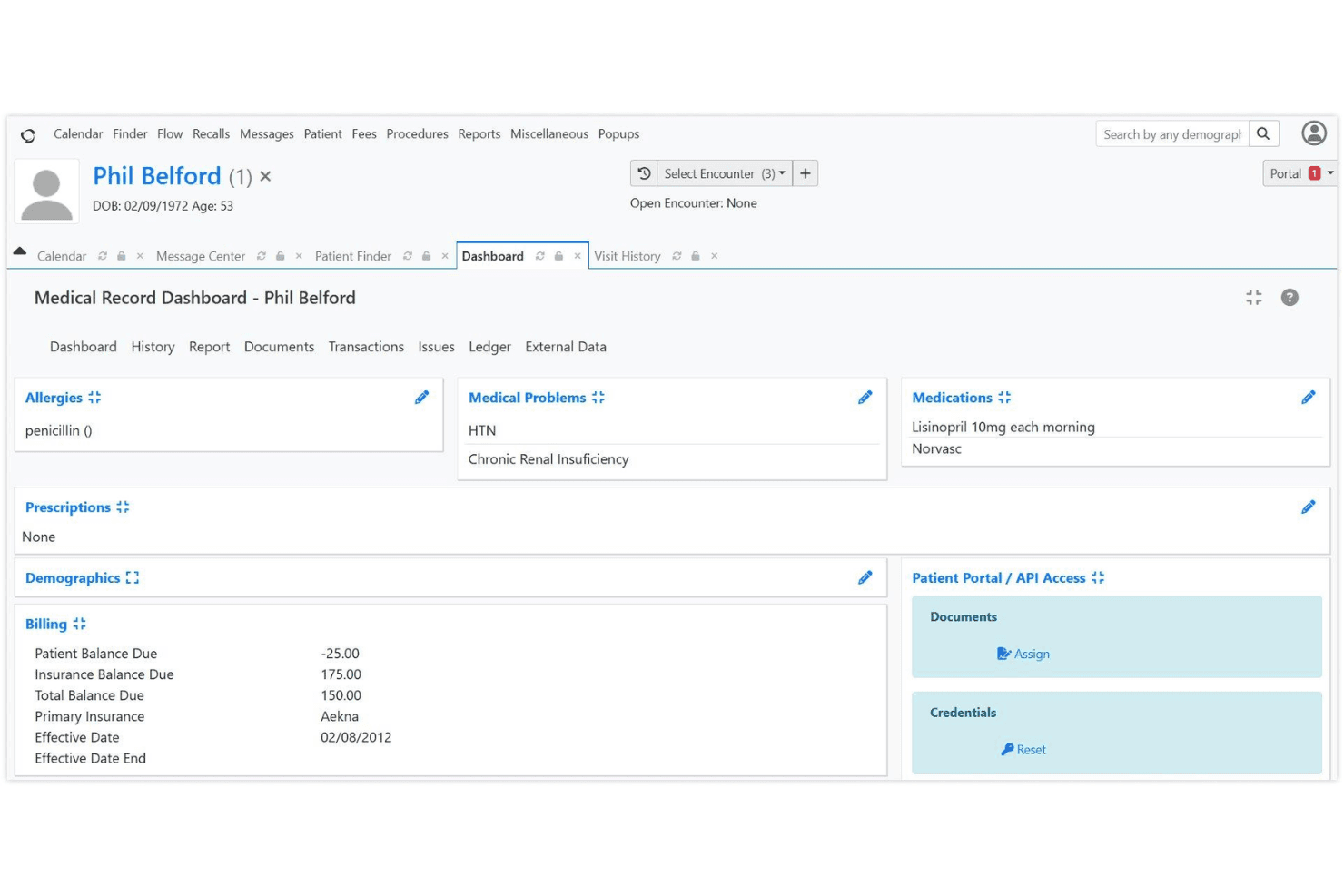
OpenEMR supports HIPAA-compliant electronic and paper claims billing. Users can manage claims, payments, and remittances from a single dashboard.
Advanced Scheduling
Create repeating appointments, automate check-in workflows, and send patient reminders. This helps reduce no-shows and keeps billing aligned with visit schedules.
CMS Reporting
Generate compliance and financial reports with a few clicks. These reports help track billing performance and meet regulatory requirements.
Customizable Billing Workflows
Tailor billing processes to fit your clinic’s needs, including custom codes and templates. This flexibility supports unique payer or specialty requirements.
Patient Statements and Invoices
Produce detailed patient statements and invoices directly from the platform. This feature streamlines communication and payment collection.
Security and Access Controls
HIPAA-friendly access controls and password hashing protect sensitive billing data. You can assign permissions by user role to limit access to financial information.
Ease of Use
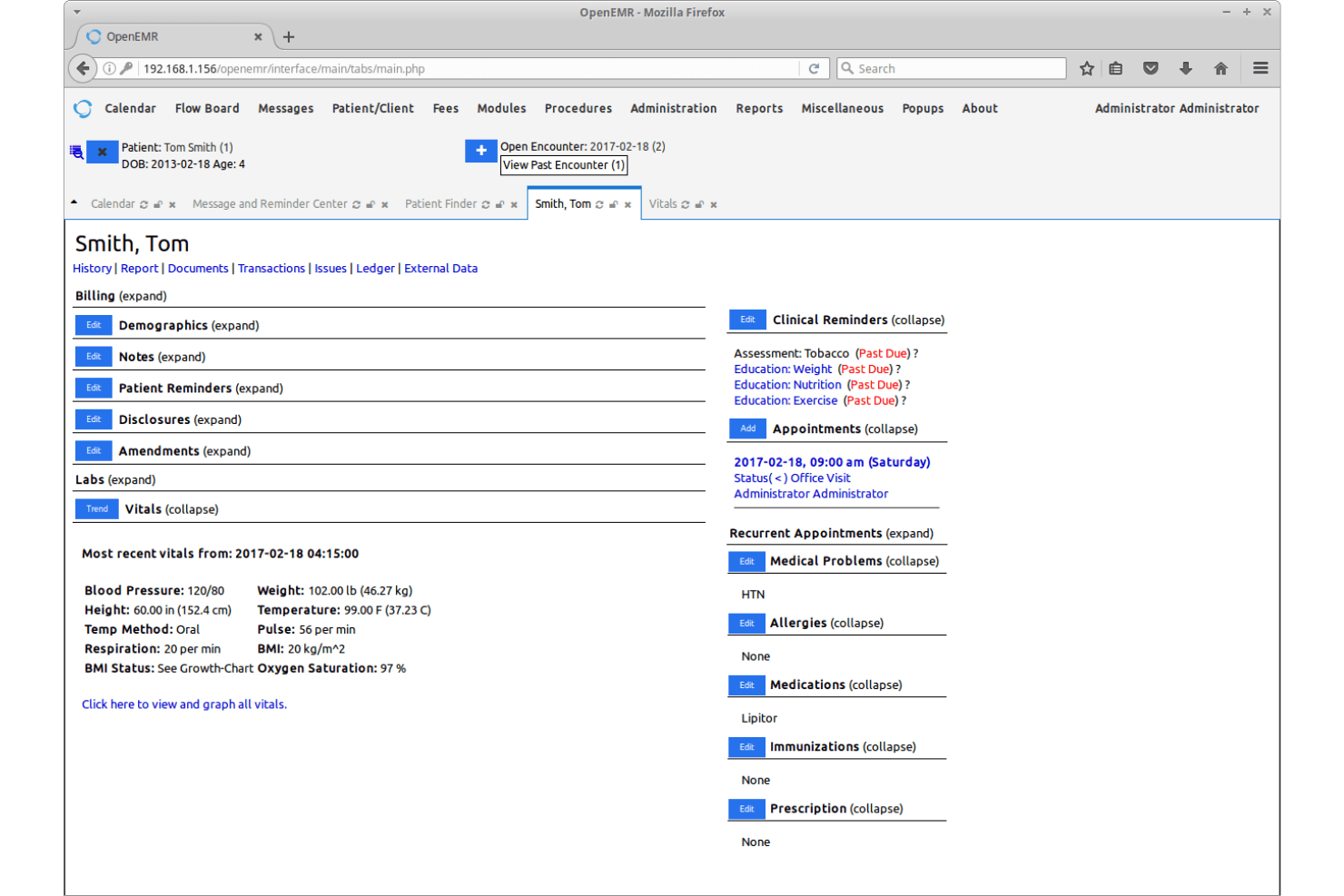
OpenEMR’s user interface feels dated and can be overwhelming for new users, especially compared to more modern medical invoicing software. Many users mention that setup and navigation require a bit of a learning curve, and documentation can be dense. However, once configured, the workflows are logical and customizable, letting experienced teams manage billing efficiently. If your team is comfortable with open-source EMR platforms and values flexibility over user-friendly aesthetics, you’ll find OpenEMR’s usability acceptable for daily invoicing tasks.
Integrations
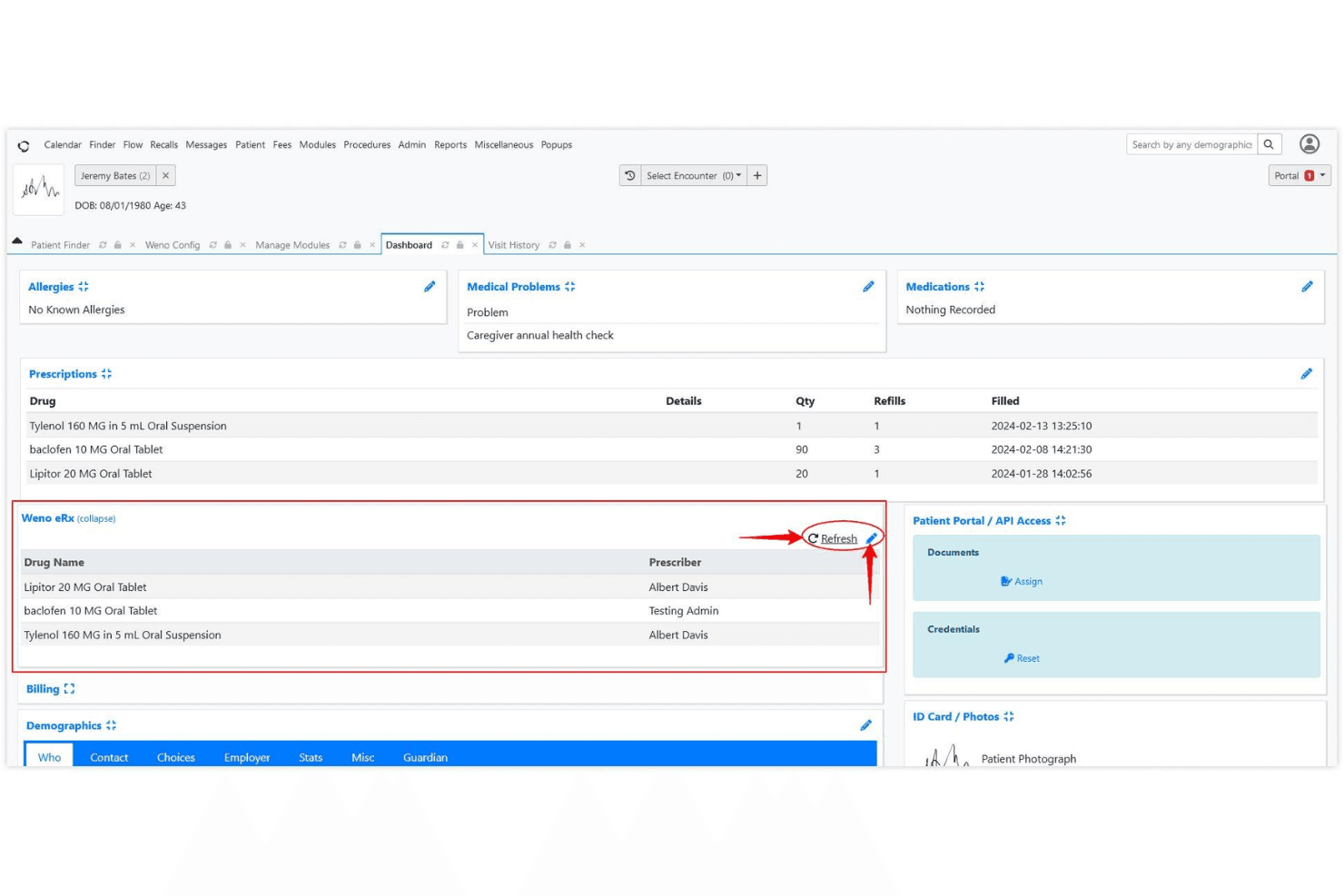
OpenEMR integrates with e-prescribing tools like NewCrop, Weno Exchange, and Allscripts, and can connect to labs such as Quest Diagnostics and LabCorp through third-party interfaces. These integrations often require additional setup and are not always available out of the box.
OpenEMR also offers REST and FHIR APIs, allowing custom integrations and extended functionality.
OpenEMR Specs
- API: Yes
- Appointment Scheduling: Yes
- Athlete Management: No
- Audit Management: Yes
- Calendar Management: No
- Compliance Tracking: Yes
- Customer Management: Yes
- Dashboard: No
- Data Export: Yes
- Data Import: Yes
- Data Visualization: No
- Electronic Prescribing: Yes
- External Integrations: Yes
- File Sharing: No
- File Transfer: No
- Health Management: No
- HIPAA Compliance: Yes
- Inventory Tracking: No
- Multi-User: Yes
- Notifications: Yes
- Organization Management: No
- Patient Management: Yes
- Project Management: No
- Regulatory Alerts: Yes
- Risk Assessment: Yes
- Scheduling: No
- Supplier Management: No


